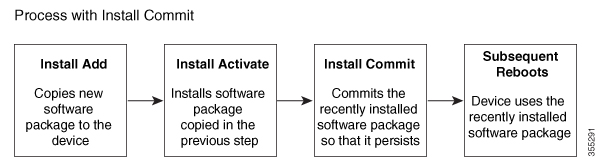
Explains the workflow and steps to perform the Cisco Catalyst 8000V upgrade process by using the installation methods described in this document.
The Cisco Catalyst 8000V virtual router runs on the Cisco IOS XE platform, the same platform that has powered Cisco CSR1000V or Cisco ISRV.
To use the Cisco Catalyst 8000V router, first obtain the software image from the Cisco Software Download page. Obtain the installation files, and begin the installation or upgrade. For additional information about the installation files, see Installation files.
If you are an existing Cisco CSR1000V or a Cisco ISRV user, download the latest installation file from the Cisco Software Download page. Begin the upgrade process by by using the installation methods described in this chapter.
Software packaging for Cisco Catalyst 8000V
The software image for Cisco Catalyst 8000V is available as a consolidated package and as optional subpackages. Each consolidated package contains a collection of software subpackages, and each software subpackage is an individual software file that controls a different element or elements of the virtual router. Using a consolidated package, you can upgrade all the individual subpackages with a single software image download.
You can upgrade an individual software subpackage, or upgrade all the software subpackages for a specific consolidated package during a complete upgrade. To run the router using individual subpackages from a consolidated package, download the image from Cisco.com and extract the subpackages.
Upgrading using subpackage consumes less memory than upgrading through a consolidated package. For this reason, upgrading through subpackages is the recommended method, especially for deployments with small footprints.