Service Layer-API

Get to Know Service Layer API

A service layer API is a model-driven network communication protocol that

  • uses Google-defined remote procedure call (gRPC) to enable programmatic control of network devices,
  • provides direct access to network infrastructure layers for high performance, and
  • supports multiple programming languages for integration with various clients, controllers, and protocols.

Benefits

Service layer APIs provide direct access to the Network Infrastructure Layer (Service-Adaptation Layer), resulting in:

  • High Performance: Access bypasses intermediary network-state databases, enabling faster operations than typical management APIs. For example, batch updates go directly to the Label Switching Data Base (LSDB) and Routing Information Base (RIB) over gRPC.
  • Flexibility: Developers can bring custom protocols or controllers in a variety of languages (C++, Python, Go, etc.) using gRPC.
  • Offloading of Low-Level Tasks: IOS XR infrastructure handles conflict resolution, transactional notifications, and data plane abstraction, allowing you to focus on higher-layer protocols and logic.

Components of Service Layer API

  • Functionality Verticals/Domains: These categorize API capabilities. Supported verticals include:
    • Initialization (event notifications, heartbeats)
    • Route (RIB) manipulation (IPv4, IPv6)
    • MPLS (label allocation and mapping)
    • Interface (state event subscription)
    • BFD (session management and notifications)
    • Policy-Based Routing (PBR)
  • Protobuf schema/model: APIs are defined using gRPC and Google Protocol Buffers (GPB) for model-driven communication.
  • gRPC: Handles serialization and encoding/decoding requests/responses between clients and routers, with bindings generated for various languages.
  • Service layer gRPC clients: Can run on-box (agents in containers) or off-box (controllers or open-source tools).
  • gRPC authentication modes: Secure communication between clients and servers using different methods.
  • The following table lists the authentication type and configuration requirements:

    Table 1. Types of Authentication with Configuration
    Type

    Authentication Method

    Authorization Method

    Configuration Requirement

    Requirement From Client

    Metadata with TLS

    username, password

    username

    grpc

    username, password, and CA

    Metadata without TLS

    username, password

    username

    grpc no-tls

    username, password

    Metadata with Mutual TLS

    username, password

    username

    grpc tls-mutual

    username, password, client certificate, client key, and CA

    Certificate based Authentication

    client certificate's common name field

    username from client certificate's common name field

    grpc tls-mutual

    and

    grpc certificate authentication

    client certificate, client key, and CA
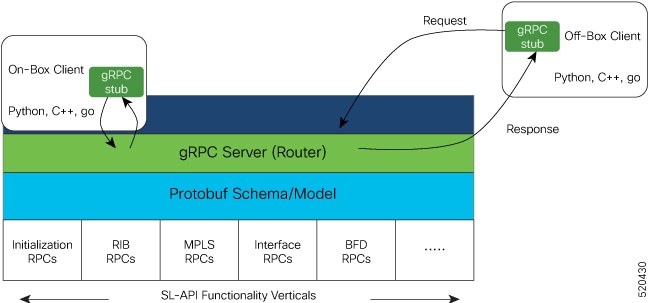
Figure 1. Components of Service Layer API
Service Layer API components

Bring your controller

To bring your controller on IOS XR, first, enable the service layer on the router and then write your Service Layer Client API.
  1. Enable the service layer

  2. Write Your Service Layer Client API.

Enable the service layer

Enable the service layer for gRPC, allowing for efficient service communication and enhanced network operations.

Enabling the service layer activates network functions related to gRPC and gNMI/gRIBI protocols. It is required for programmatic configuration, monitoring, and service integration.

  • You can use this task when enabling service integration and programmatic control on your router.

Perform these steps to enable the service layer on your router.

Before you begin

  • Ensure you have access to the router CLI.

  • Confirm that you have administrative privileges.

  • Identify the preferred gRPC port for your deployment.

Procedure


Step 1

Enable the service layer.

Example:


                                                Router# configure
                                                Router(config)# grpc
                                                Router(config-grpc)# port 57777
                                                Router(config-grpc)# service-layer
                                                Router(config-grpc)# no-tls
                                                Router(config-grpc)# commit
                                        

The default gNMI service port is 9339. Valid gNMI service port values range from 57344 to 57999. The default gRIBI service port is 9340. Valid gRIBI service port values range from 57344 to 57999.

The service layer is enabled.

Step 2

Verify that the service layer is operational.

Example:


                                                Router# show running-config grpc
                                                Mon Nov  4 04:19:14.044 UTC
                                                grpc
                                                port 57777
                                                no-tls
                                                service-layer
                                                !
                                        

The running configuration displays the service layer settings.

Step 3

Verify the gRPC state.

Example:


                                                Router# show service-layer state
                                                Mon Feb 24 04:18:40.055 UTC
                                                ------------service layer state----------
                                                config on:                   YES
                                                standby connected :          NO
                                                idt done:                    NO
                                                blocked on ndt:              NO
                                                connected to RIB for IPv4:   YES
                                                connected to RIB for IPv6:   YES
                                                Initialization state:        estab sync
                                                pending requests:            0
                                                BFD Connection:              UP
                                                MPLS Connection:             UP
                                                Interface Connection:        UP
                                                Objects accepted:            NO
                                                interface registered:        NO
                                                bfd registered for IPv4:     NO
                                                bfd registered for IPv6:     NO
                                        

Service layer and related protocol connections are displayed.


The service layer is enabled and operational, allowing the router to communicate using gRPC and related services.

What to do next

  • If needed, verify integration with network management systems or initiate application communications using the configured service layer.

Write Your Service Layer Client API

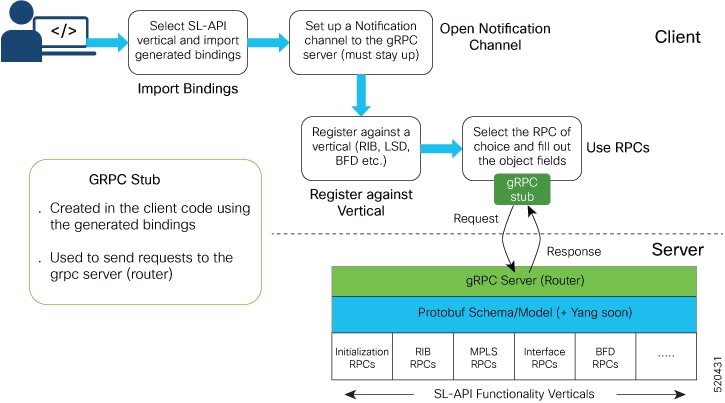
he Service Layer API enables you to design and implement clients tailored to specific business requirements. Developing a Service Layer API client involves understanding how to import the generated client bindings, establish communication channels, register with the gRPC server, and utilize remote procedure calls (RPCs) for various functionality verticals.

Key aspects of developing a Service Layer API client include:

  • Importing Bindings: After generating the necessary bindings from provided specifications, you must import these into your codebase to enable interaction with the API.
  • Opening Notification Channels: Initialization requires creating a notification channel, which allows your client to register with the gRPC server running on the router.
  • Registering with Functionality Verticals: The registration RPC must be used to declare the specific vertical (set of functionality) your client will work with. Any attempts to make calls without prior registration will be rejected by the system.
  • Using RPCs: After registration, you can select and use available RPCs by populating the relevant object fields in the gRPC stub.

The diagram below illustrates the typical workflow when developing a Service Layer API client:

Figure 2. Service Layer API Workflow

Note


Removing VRF or interface configurations referenced by SL-API objects is not supported and may impact network traffic. Before making such changes, ensure that Service Layer API clients have rerouted traffic and updated routing information.


Intra-AFI RIB route prioritization

Intra-AFI RIB route prioritization is an architectural enhancement that

  • maps SL-API route priorities to the internal RIB Bulk Content Downloader (BCDL) priority queues for ordered processing,

  • ensures critical controller-programmed route updates received via SL-API are processed and programmed into the forwarding plane ahead of lower-priority updates,

  • improves convergence time during link failures and control-plane contention, and

  • allows SL-API clients to assign explicit route priorities.

Table 2. Feature History Table

Feature Name

Release Information

Feature Description

Intra-AFI RIB route prioritization

Release 26.1.1

Introduced in this release on: Fixed Systems (8200 [ASIC: Q200, P100], 8700 [ASIC: P100]); Centralized Systems (8600 [ASIC:Q200]); Modular Systems (8800 [LC ASIC: Q200, P100])

Intra-AFI RIB route prioritization improves routing visibility and convergence for controller-programmed route updates received through SL-API. The feature allows controllers to assign priorities to routes so that the router processes and programs critical updates into the forwarding plane before lower-priority routing updates.

Intra-AFI route processing enhancements

The feature prioritizes controller-programmed route updates received via SL-API during the RIB to FIB download process, ensuring that time-sensitive controller operations program the forwarding plane before lower-priority routing updates. The solution extends the existing Label Switching Database (LSD) prioritization model to the RIB.

The following enhancement is introduced:

  • Route priority mapping in RIB

    The router allows the controller-programmed route updates via SL-API, to assign explicit priorities to route updates. The RIB maps these priorities to internal BCDL queues and programs the FIB based on priority.

Benefits of intra-AFI route prioritization

The benefits of intra-AFI route prioritization include:

  • The router prioritizes critical controller-programmed route updates via SL-API, reducing convergence delays during link failures and topology changes.

  • The router processes controller-programmed route updates via SL-API based on priority, preventing important updates from being delayed during control-plane contention.

  • Controllers can assign priorities to routes and program time-sensitive route updates via SL-API into the FIB ahead of lower-priority updates.

SL-API priority routing model

The SL-API priority model is a routing update category that allows SL-API clients to assign priority levels to route updates so that the router programs critical routes before lower-priority updates.

During route programming, the controller assigns priorities and passes them to the RIB through SL-API. The RIB honors these priorities when processing route update operations.

The feature defines four distinct priority levels to ensure ordered and predictable route programming.

Table 3. SL-API priority mapping

SL-API priority

RIB queue

Critical

BCDL0

High

BCDL1

Medium

BCDL2

Low

BCDL3

Verify intra-AFI route prioritization

Follow the steps to verify the intra-AFI route prioritization.

Procedure


Run the show service-layer route <ipv4|ipv6> detail command to verify the SL-API RIB priority.

Example:

The highlighted lines in the show output confirm that the priority assigned by the controller via SL-API is correctly recognized and applied in the RIB.

Router# show service-layer route ipv4 100.2.1.2/32 detail
Output received:
Sun Jan 25 08:41:51.177 UTC

VRF: default, Client 0

100.2.1.2/32, tag: 0, distance: 2, metric: 3824949353, priority: critical
    path: 1, 102.1.4.4 via Bundle-Ether1402
        remote labels: 24001, 17000, 
        load metric: 11, path flags: 0
        id: 0, protected bitmap: 0x0
        ref count: 1
    path: 2, 103.1.4.4 via Bundle-Ether1403
        remote labels: 24001, 17000, 
        load metric: 11, path flags: 0
        id: 0, protected bitmap: 0x0
        ref count: 1
    path: 3, 104.1.4.4 via Bundle-Ether1404
        remote labels: 24001, 17000, 
        load metric: 10, path flags: 0
        id: 0, protected bitmap: 0x0
        ref count: 1
  Update TimeStamp: Jan 25 08:41:27.072483
  Client:0, Session:31, Operation ID:2065, Operation Result: 0x0
  RIB:Programmed, FIB:Unavailable, Ack Type:Rib, FIB Version:0
  Ack Cadence:Continuous, Ack PermitGate/Status: ALL/Open
Network 100.2.1.2/32: RIB priority = 'rib_priority_slapi_critical (5) svd type rib_svd_type_local', SL priority = 'critical'
Network 100.2.1.2/32: Priority match confirmed - SL priority 'critical' found in RIB priority

Example:

Router# show service-layer route ipv6 2002::6402:101/128 detail 
Sun Jan 25 08:41:52.675 UTC

VRF: default, Client 0

2002::6402:101/128, tag: 0, distance: 2, metric: 4189176100, priority: critical
    path: 1, ::ffff:102.1.4.4 via Bundle-Ether1402
        remote labels: 24500, 16062, 
        load metric: 11, path flags: 0
        id: 0, protected bitmap: 0x0
        ref count: 1
    path: 2, ::ffff:103.1.4.4 via Bundle-Ether1403
        remote labels: 24500, 16062, 
        load metric: 11, path flags: 0
        id: 0, protected bitmap: 0x0
        ref count: 1
    path: 3, ::ffff:104.1.4.4 via Bundle-Ether1404
        remote labels: 24500, 16062, 
        load metric: 10, path flags: 0
        id: 0, protected bitmap: 0x0
        ref count: 1
  Update TimeStamp: Jan 25 08:41:27.207009
  Client:0, Session:32, Operation ID:2667, Operation Result: 0x0
  RIB:Programmed, FIB:Unavailable, Ack Type:Rib, FIB Version:0
  Ack Cadence:Continuous, Ack PermitGate/Status: ALL/Open
Network 2002::6402:101/128: RIB priority = 'rib_priority_slapi_critical (5) svd type rib_svd_type_local', SL priority = 'critical'
Network 2002::6402:101/128: Priority match confirmed - SL priority 'critical' found in RIB priority