Modular QoS Configuration Guide for Cisco 8000 Series Routers, Cisco IOS XR Release

PDF

Modular QoS Configuration Guide for Cisco 8000 Series Routers, Cisco IOS XR Release

Configurable ECN threshold and marking probability values

Want to summarize with AI?

Log in

Defines configurable ECN threshold and marking probability values as a PFC congestion-optimization mechanism that activates before pause thresholds to provide early probabilistic congestion feedback and prevent pause propagation.


Configurable ECN threshold and marking probability values are Priority Flow Control (PFC) congestion optimization mechanisms that

  • activate Explicit Congestion Notification (ECN) thresholds before PFC pause thresholds

  • provide fine-grained control over when ECN marking begins and how marking probability increases, and

  • help prevent aggressive throttling of source traffic by signaling congestion early and gradually.

Priority Flow Control modes and support

  • This functionality is supported only when PFC is configured in buffer-internal mode.

  • In buffer-extended mode, ECN thresholds are derived from QoS policy maps and are documented under the Congestion Avoidance feature.


How Explicit Congestion Notification works within Priority Flow Control buffer-internal mode

In buffer-internal mode, Explicit Congestion Notification (ECN) acts as an early congestion notifier within the PFC control loop. It gradually signals congestion to senders through ECN markings before resorting to link-level pause or packet drops.

Summary

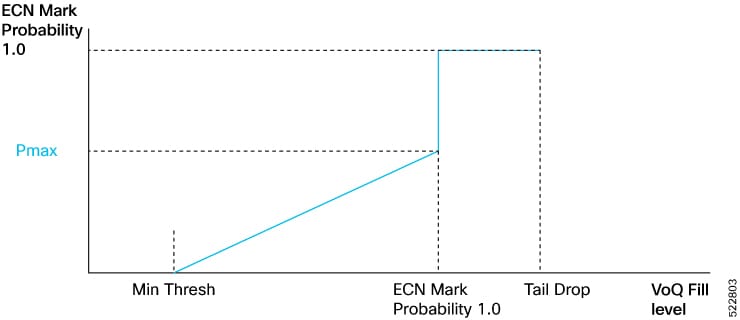
The figure, ECN Mark Probability vs. Queue Length (VOQ Fill Levels) illustrates the progressive relationship between queue depth and router response:

  • ECN Min threshold: Start of the probabilistic marking region

  • ECN Max threshold : End of the linear region; ECN marking probability reaches Pmax

  • Pause threshold: Queue depth where PFC pause frames are triggered

  • Tail drop threshold: Final limit beyond which packets are dropped deterministically.

Workflow

Figure 1. ECN Mark Probability vs. Queue Length (VOQ Fill Levels)

The stages show how ECN, PFC, and tail drop operate sequentially as queue depth increases.

  1. Queue occupancy increases: The router monitors each traffic class queue within the Shared Memory System (SMS). ECN marking does not occur while depth is below the ECN Min Threshold.
  2. ECN marking begins (early warning): When queue depth exceeds the ECN Min Threshold, the router marks packets with ECN bits at a low probability. This action provides early congestion feedback to upstream devices.
  3. Marking probability rises linearly: As the queue grows from the ECN Min to Max threshold, marking probability increases linearly—from 0 percent to the configured Pmax value, for example, 5 percent.
  4. Full ECN marking region reached: After the ECN Max Threshold is crossed, marking probability becomes 1 (100%). Every packet is ECN-marked, but all traffic continues to be forwarded with no packet drops.
  5. Pause threshold reached (PFC activation): If congestion continues and queue depth reaches the configured pause threshold, the router sends PFC PAUSE frames to upstream devices for the affected traffic class. ECN marking stays active at 100%, while PFC halts incoming traffic temporarily to allow queues to drain.
  6. Tail drop protection: If the queue continues to grow and crosses the tail drop threshold, the router starts dropping packets deterministically. This action protects against buffer exhaustion when ECN and PFC feedback have not restored stability.
  7. Congestion clears: When queue depth falls below the ECN Min Threshold, ECN marking ceases, pause frames stop, and traffic resumes normal operation.
    When... Then... And...

    Queue depth < ECN min threshold

    Router does not mark packets

    Marking probability = 0%

    Queue depth ≥ ECN min threshold

    Router begins ECN marking

    Probability increases linearly

    Queue depth between ECN min and max

    ECN marking probability rises from 0% to Pmax

    Provides early congestion feedback

    Queue depth ≥ ECN max threshold but < pause threshold

    All packets are ECN-marked

    No packet drops yet

    Queue depth ≥ pause threshold

    Router sends PFC pause frames

    ECN marking continues at 100%

    Queue depth ≥ Tail-Drop Threshold

    Router drops packets deterministically

    Protects against buffer overflow

    Queue depth < ECN Min Threshold (after drain)

    ECN marking and pause actions cease

    Normal operations resume


PFC buffer internal mode configuration options and behaviors

You configure the max-threshold and probability-percentage options for this feature within the hw-module profile priority-flow-control command.

This feature gives you the flexibility to choose one of the following configuration options:

  • Default max-threshold and probability-percentage values

  • User-defined (configurable) max-threshold and probability-percentage values

  • Priority Flow Control (PFC) in buffer-internal mode without these new options, as supported in releases prior to Release 7.5.4.

Table 1. Useful Tips

If you...

...you must...

Want to switch from the default configuration mode to the custom configuration mode

OR

Want to switch from the custom configuration mode to the default configuration

  1. Use the no form of the hw-module profile priority-flow-control command to remove the existing configuration.

  2. Configure the new mode and settings using the hw-module profile priority-flow-control command.

  3. Reload the line card

Configured PFC in buffer-internal mode without configuring the max-threshold and probability-percentage parameters, but now want to configure them

  1. Configure the max-threshold and probability-percentage parameters using the hw-module profile priority-flow-control command.

  2. Reload the line card.

Want to change the buffer-internal parameters in the custom mode

Configure the buffer-internal parameters using the hw-module profile priority-flow-control command. You do not need to reload the line card.

Want to continue configuring PFC in buffer-internal mode the way you did in releases prior to Release 7.5.4

Configure the buffer-internal parameters using the hw-module profile priority-flow-control command, but ensure that you only configure values for pause-threshold , headroom , and ecn . If you don't configure values for max-threshold , the router takes the ecn value as the ECN maximum threshold value.

For more details, refer to Option 3 in the section titled Configure ECN threshold and maximum marking probability values.

Best practices for configuring ECN threshold and marking probability

Follow these principles to ensure that configuration is consistent and operation is predictable for Explicit Congestion Notification (ECN) thresholds and marking probabilities within Priority Flow Control (PFC).

  • Mode dependency: This functionality is supported only when PFC is configured in buffer-internal mode.

  • ECN value derivation: If you configure PFC values in the buffer-internal mode, the ECN value for the line card is derived from the buffer-internal configuration, unlike in the buffer-extended mode where the ECN value is derived from the policy map.

  • Hardware Support:

    Supported line cards include:

    • 88-LC0-36FH

    • 88-LC0-36FH-M

  • Supported interface types include:

    • Physical interfaces

    • Bundle interfaces

    • Subinterfaces

    • Bundle subinterfaces

  • Interface speeds: This functionality is supported across all interface speeds.

  • Policy map applicability:

    If your policy map enables maximum ECN marking probability for one or more classes, you can:

    • apply the map to any of the supported interface types

    • remove the map from any of the supported interface types

    • modify the map while you’re attaching it to multiple interfaces.

  • Class configuration dependency: The probability percentage option is valid only when random-detect ecn is configured in the same class. Otherwise, the policy is rejected when applied.

  • Device level consistency: Ensure that the configured probability percentage value is identical for all traffic classes, because this setting is enforced at the device level.


Configure ECN threshold and maximum marking probability values

Use this task to configure the Explicit Congestion Notification (ECN) thresholds and marking probability values for Priority Flow Control (PFC) operating in buffer-internal mode.

Depending on your network requirements, you can choose the default options, custom options, or use the existing configuration without the new options

In buffer-internal mode, you can configure PFC with adjustable ECN thresholds to optimize congestion control. You can manage queue behavior by defining the minimum and maximum thresholds and the marking probability.

The task supports three configuration paths:

  • Option 1: Default configuration mode (uses predefined ECN and marking values)

  • Option 2: Custom configuration mode (you define every parameter, including max-threshold and probability-percentage )

  • Option 3: Configuration without the new options, as used before Release 7.5.4.

Before you begin

  • Ensure that PFC is enabled on the router.

  • Confirm that the buffer-internal mode is enabled.

Follow these steps to configure ECN threshold and maximum marking probability values.

Procedure

1.

Enable PFC on the interface.

Example:

Router(config)#interface FourHundredGigE0/6/0/1
Router(config-if)#priority-flow-control mode on
2.

Choose one configuration option that meets your requirements.

  • Option 1: Default configuration mode
    Configure PFC in buffer-internal mode using predefined buffer values and default ECN thresholds.
    Router(config)#hw-module profile priority-flow-control location 0/6/0/1
    Router(config-pfc-loc)#buffer-internal traffic-class 3
    Router(config-pfc-loc)#buffer-internal traffic-class 4
    Router(config-pfc-loc)#commit
    

    This mode applies the system’s default max-threshold and probability-percentage values for ECN.

  • Option 2: Custom configuration modeConfigure PFC in buffer-internal mode with custom thresholds for all parameters, including max-threshold and probability-percentage.
    Router(config)#hw-module profile priority-flow-control location 0/6/0/1
    Router(config-pfc-loc)#buffer-internal traffic-class 3 pause-threshold 1574400 bytes headroom 1651200 bytes ecn 629760 bytes max-threshold 1416960 bytes probability-percentage 50
    Router(config-pfc-loc)#buffer-internal traffic-class 4 pause-threshold 1574400 bytes headroom 1651200 bytes ecn 629760 bytes max-threshold 1416960 bytes probability-percentage 50
    Router(config-pfc-loc)#commit
    

    You define all thresholds and probabilities. This option provides the highest control over ECN marking behavior.

  • Option 3: Configuration mode without ECN enhancements

    Configure PFC in buffer-internal mode without max-threshold and probability-percentage parameters.

    Router(config)#hw-module profile priority-flow-control location 0/6/0/1
    Router(config-pfc-loc)#buffer-internal traffic-class 3 pause-threshold 1574400 bytes headroom 1651200 bytes ecn 629760 bytes
    Router(config-pfc-loc)#buffer-internal traffic-class 4 pause-threshold 1574400 bytes headroom 1651200 bytes ecn 629760 bytes
    Router(config-pfc-loc)#commit
    

    This option uses configurations prior to Release 7.5.4.

    If you do not configuring max-threshold , the router uses the ECN threshold value as the ECN maximum threshold.

3.

Verify the configuration.

Example:

Router#show controllers npu priority-flow-control location all
  • Option 1: Default configuration
    Location: 0/6/CPU0
    PFC: Enabled
    PFC Mode: buffer-internal
    TC  Pause-threshold  Headroom  ECN      ECN-MAX  Prob-per
    ----------------------------------------------------------
    3   1574400 bytes    1651200   629760   1416960  5
    4   1574400 bytes    1651200   629760   1416960  5
    

    Both traffic classes (3 and 4) use the system defaults for ECN maximum threshold and marking probability (5 percent).

  • Option 2: Custom configuration modeConfigure PFC in buffer-internal mode with custom thresholds for all parameters, including max-threshold and probability-percentage.
    Location: 0/6/CPU0
    PFC: Enabled
    PFC Mode: buffer-internal
    TC  Pause-threshold  Headroom  ECN      ECN-MAX  Prob-per
    ----------------------------------------------------------
    3   1574400 bytes    1651200   629760   1416960  50
    4   1574400 bytes    1651200   629760   1416960  50


    The ECN max threshold (1416960 bytes) and marking probability (50 percent) reflect custom values.

  • Option 3: Configuration mode without

    max-threshold and probability-percentage parameters.

    Location: 0/6/CPU0
    PFC: Enabled
    PFC Mode: buffer-internal
    TC  Pause-threshold  Headroom  ECN      ECN-MAX        Prob-per
    ---------------------------------------------------------------
    3   1574400 bytes    1651200   629760   not-configured not-configured
    4   1574400 bytes    1651200   629760   not-configured not-configured


    Since max-threshold and probability-percentage are not configured, these fields display not-configured , and the ECN threshold functions as the effective maximum threshold.

You have successfully configured ECN thresholds and marking probabilities for buffer-internal mode. The router applies ECN marking and congestion feedback based on your chosen configuration option.