Modular QoS Configuration Guide for Cisco 8000 Series Routers, Cisco IOS XR Release

PDF

Modular QoS Configuration Guide for Cisco 8000 Series Routers, Cisco IOS XR Release

Short-pipe mode

Want to summarize with AI?

Log in

Details the short-pipe tunneling mode, which uses the inner IP DSCP value to determine packet treatment at the egress router after MPLS decapsulation. It outlines best practices and configuration steps to preserve end-to-end service differentiation for VPN and tunneled traffic.


Short-pipe mode is a QoS classification mechanism that

  • uses the Differentiated Services Code Point (DSCP) value from the inner IP header to determine packet treatment at the egress router

  • applies per-hop behavior (PHB) based on the original IP packet markings after MPLS decapsulation, and

  • preserves end-to-end service differentiation for user and application traffic as it exits the MPLS core.

Short-pipe mode is especially relevant for networks that use VPNs or tunnels, where traffic needs to be classified and prioritized based on original application or user markings instead of MPLS label markings imposed in the provider core.
Table 1. Feature History Table

Feature Name

Release Information

Feature Description

Short-pipe mode

Release 26.2.1

Introduced in this release on: Fixed Systems (8200 [ASIC: P100], 8700 [ASIC: P100, K100], 8010 [ASIC: A100]); Centralized Systems (8400 [ASIC: K100]); Modular Systems (8800 [LC ASIC: P100])

You can now prioritize MPLS-to-IP L3VPN traffic by explicitly applying short-pipe classification to packets undergoing MPLS disposition. This capability enables the router to classify MPLS-to-IP decapsulated packets using the DSCP value in the inner IP header and assign the appropriate traffic class or QoS group for queuing. Use the match mpls disposition class-map CLI command to associate a class map with MPLS disposition-based classification.

The feature introduces this change:

CLI:

match mpls disposition class-map

Short-pipe mode

Release 25.4.1

Introduced on Fixed Systems (8200 [ASIC:Q200], Centralized Systems (8600 [ASIC:Q200]), Modular Systems (8800 [LC ASIC: Q200])

Short-pipe mode ensures that your device applies QoS policies only to customer traffic, excluding network overhead such as tunnel headers or the MPLS encapsulation header. This helps you achieve fairer bandwidth allocation and better prioritization of user data, especially in service provider or large-scale enterprise networks.


How Short-Pipe mode for QoS classification works

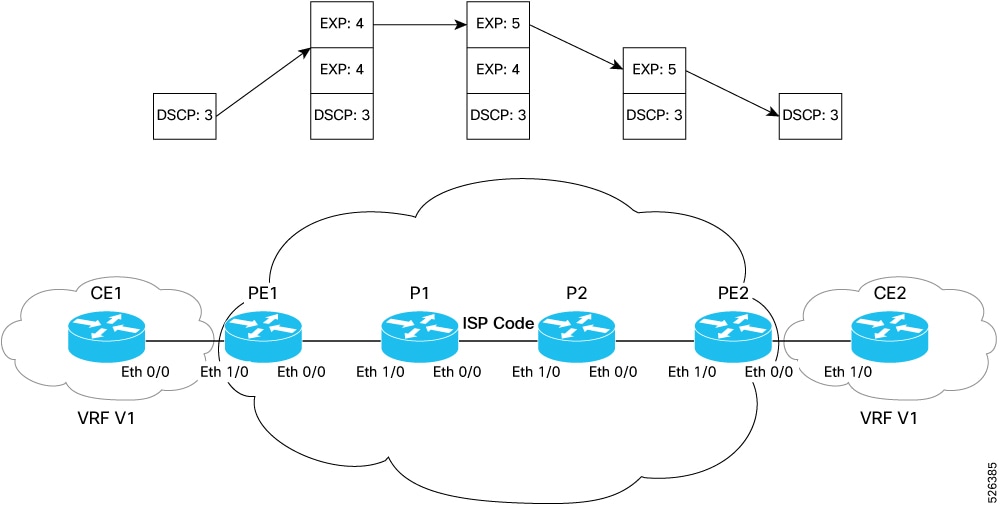
In short-pipe mode, QoS classification and policy decisions on the egress Provider Edge (PE) router are based on the original IP packet's DSCP value, rather than the MPLS EXP bits. This approach allows end-to-end QoS to be preserved for user traffic as it traverses the MPLS core. The workflow diagram illustrates a typical MPLS VPN setup using short-pipe mode, with traffic flowing from CE1 (Customer Edge) through PE and P routers across an Internet Service Provider (ISP) core to CE2.

Summary

Key components involved in short-pipe mode QoS classification are:

  • Customer Edge (CE) Routers (CE1 and CE2 in the figure): Devices connecting customer networks to the MPLS VPN.

  • Provider Edge (PE) Routers (PE1 and PE2): Routers at the boundary of the MPLS provider core, responsible for label imposition (ingress) and disposition (egress).

  • Provider (P) Routers: Core routers that forward labeled packets across the MPLS network.

  • Packets: Each packet may have an original DSCP value in its IP header and MPLS labels added by PE routers.

Workflow

Figure 1. Traffic flow in short-pipe mode showing inner DSCP preservation across the MPLS core

These stages describe how short-pipe mode for QoS classification works. Refer to the diagram for visual reference.

  1. The CE1 router sends a packet into the network: The packet is marked with a DSCP value (such as DSCP:3) corresponding to its QoS requirements.
  2. The ingress PE1 router receives the packet: PE1 imposes an MPLS label stack onto the packet. The top label carries the EXP value (such as EXP:4) mapped from the DSCP value.
  3. The packet traverses the MPLS core (P1 and P2): P routers may remark the EXP value as needed (such as EXP:5) to reflect new QoS policies. The EXP value is used to schedule and prioritize the packet at each hop.
  4. At the penultimate router (P2), the top MPLS label (with EXP:5) is removed (penultimate hop popping or PHP): This action exposes the next label in the stack (with EXP:4). The packet is then forwarded to the egress PE2 router.
  5. At the edge (PE2), the remaining MPLS label is removed (label disposition): The original DSCP value (or QoS marking) is restored or mapped as needed.
  6. The CE2 router receives the packet with the intended QoS treatment intact.

Best practices for configuring short-pipe mode

Account for system-wide behavior when enabling short-pipe mode

Be aware of these points while enabling short-pipe mode:

  • Ensure that enabling short-pipe mode applies the configuration system-wide. All interfaces will adopt short-pipe behavior for MPLS-to-IP L3VPN traffic flows.

  • Pipe mode is the default tunneling behavior for Layer 3 VPN. The router uses pipe mode unless short-pipe mode is explicitly enabled.

  • Disabling short-pipe mode reverts the router to pipe mode.

  • No system reload is required after enabling or disabling short-pipe mode.

Apply only DSCP-based classification for decapsulated packets

Take note of these important points for classification and matching actions in short-pipe mode.

  • Use only DSCP-based classification for MPLS decapsulation packets. Matching on the MPLS EXP (outer header) value is not supported when short-pipe mode is enabled.

    Matching on MPLS EXP for non-decapsulation MPLS-to-MPLS flows is supported.

  • Do not use complex QoS matching criteria, such as ACL-based matching, with short-pipe mode enabled.

Avoid ingress remarking when using short-pipe mode

Short-pipe mode does not rewrite DSCP or EXP values. DSCP and other QoS values cannot be remarked or modified on ingress.

Apply short-pipe mode only to MPLS-to-IP flows

Use short-pipe mode only for MPLS-to-IP flows. The feature does not apply to MPLS flows with underlay headers other than IP.

Ensure an ingress QoS policy is applied on all core-facing interfaces

Short-pipe mode requires an ingress QoS policy for correct classification behavior.

Use short-pipe mode only for L3VPN deaggregation flows

Short-pipe classification activates when the PE router removes the VPN label. The decapsulated IP packet is mapped to the appropriate Virtual Routing and Forwarding (VRF) instance for routing and DSCP-based short-pipe classification. This deaggregation step is required for the router to use the inner DSCP value for per-hop behavior (PHB).

Configure per-VRF label allocation to support short-pipe operation

Short-pipe mode works on a per-VRF basis and requires MPLS label allocation in per-VRF mode. Ensure that the MPLS configuration includes label mode per-vrf so that each VRF receives its own VPN label for correct short-pipe classification at egress.

Use only supported match criteria

MPLS disposition class maps support only DSCP, precedence, and MPLS EXP matching criteria.

Use match-any mode

Do not use match-all mode for MPLS disposition class maps or classes that reference MPLS disposition class maps.

Use only supported actions

Only set traffic-class and set qos-group actions are supported.

Apply only on Layer 3 interfaces

Short-pipe mode is supported only on Layer 3 interfaces.

Avoid ACL matching in the same policy

Do not combine MPLS disposition classification with ACL-based or other complex classification criteria in the same policy.

Short-pipe mode supports only DSCP, precedence, and MPLS EXP matching criteria.


Enable short-pipe mode for MPLS to IP traffic

Enable short-pipe mode so that QoS classification for MPLS-to-IP flows is based on the DSCP value in the IP header at the egress router.

Use this feature when the egress interface of your device should classify and queue IP packets according to their DSCP value, rather than the MPLS EXP value, after the MPLS label is removed. This approach enables precise service differentiation for tunneled or VPN traffic.

Before you begin

  • Short-pipe mode addresses QoS classification at the decapsulation edge. Complete all standard tunnel and VPN setup steps before you enable short-pipe mode. For comprehensive instructions on configuring MPLS tunnels, L3VPNs, or other foundational network elements, refer to the Cisco IOS XR MPLS and L3VPN Configuration Guides for your router. These guides provide details on:

    • setting up MPLS tunnels

    • configuring VRFs and PE-CE connections, and

    • applying interface and routing policies.

  • If your QoS set up requires rewriting DSCP or EXP values, see Packet marking.

Follow these steps to enable short-pipe mode for MPLS-to-IP traffic:

Procedure

1.

Enter configuration mode on your router.

Example:

Router#config
2.

Enable short-pipe mode system-wide.

Example:

Router#hw-module profile qos mode l3vpn-short-pipe
Router#commit

The router does not require a reload after enabling this mode.

3.

Confirm the l3vpn-short-pipe mode is enabled.

Example:

Router#show hw-module profile qos mode

Knob                       Status      Applied  Action
------------------------------------------------------
QOS L3VPN Short Pipe Mode  Configured  Yes      None

The Status: Configured and Applied: Yes fields indicate that the l3vpn-short-pipe modeis enabled and active on the hardware. Enablement of this mode is required for proper operation of QoS classification.

4.

Examine the QoS policy map configuration.

Example:

Router#show policy-map pmap-name policymap_1_0_0 detail
class-map match-any classmap_1_1_0_0
 match precedence 1
 end-class-map
!
class-map match-any classmap_1_2_0_0
 match dscp 16
 end-class-map
!
class-map match-all classmap_1_3_0_0
 match dscp 24
 end-class-map
!
class-map match-any classmap_1_4_0_0
 match precedence 4
 end-class-map
!
class-map match-all classmap_1_5_0_0
 match precedence 5
 end-class-map
!
class-map match-all classmap_1_6_0_0
 match dscp 48
 end-class-map
!
class-map match-any classmap_1_7_0_0
 match dscp 56
 end-class-map
!
class-map match-any class-default
 end-class-map
!
policy-map policymap_1_0_0
 class classmap_1_1_0_0
  set traffic-class 1
  set qos-group 1
 !
 class classmap_1_2_0_0
  set traffic-class 2
  set qos-group 2
 !
 class classmap_1_3_0_0
  set traffic-class 3
  set qos-group 3
 !
 class classmap_1_4_0_0
  set traffic-class 4
  set qos-group 4
 !
 class classmap_1_5_0_0
  set traffic-class 5
  set qos-group 5
 !
 class classmap_1_6_0_0
  set traffic-class 6
  set qos-group 6
 !
 class classmap_1_7_0_0
  set traffic-class 7
  set qos-group 7
 !
 class class-default
  set traffic-class 0
  set qos-group 0
 !
 end-policy-map
!

This example confirms that the policy map policymap_1_0_0 contains class maps that match packets based on DSCP or IP precedence values. For each matching class, the policy sets the appropriate traffic-class and qos-group, which determine how the router applies internal QoS handling, queuing, and marking decisions. The class-default entry ensures that all unmatched traffic is assigned a default internal forwarding class.

5.

Verify active traffic classification on the ingress interface.

Example:

router#show policy-map type qos interface HundredGigE0/0/0/0 input pmap-name policymap_1_0_0

HundredGigE0/0/0/0 input: policymap_1_0_0

Class classmap_1_1_0_0
  Classification statistics          (packets/bytes)     (rate - kbps)
    Matched             :           459380561/178674499066         9921297
    Transmitted         :           459380561/178674499066         9921297
    Total Dropped       :                   0/0                    0
Class classmap_1_2_0_0
  Classification statistics          (packets/bytes)     (rate - kbps)
    Matched             :           459380732/178674790252         9921296
    Transmitted         :           459380732/178674790252         9921296
    Total Dropped       :                   0/0                    0
Class classmap_1_3_0_0
  Classification statistics          (packets/bytes)     (rate - kbps)
    Matched             :           459380862/178674965756         9921295
    Transmitted         :           459380862/178674965756         9921295
    Total Dropped       :                   0/0                    0
Class classmap_1_4_0_0
  Classification statistics          (packets/bytes)     (rate - kbps)
    Matched             :           459380988/178674990652         9921314
    Transmitted         :           459380988/178674990652         9921314
    Total Dropped       :                   0/0                    0
Class classmap_1_5_0_0
  Classification statistics          (packets/bytes)     (rate - kbps)
    Matched             :           459381140/178675150032         9921295
    Transmitted         :           459381140/178675150032         9921295
    Total Dropped       :                   0/0                    0
Class classmap_1_6_0_0
  Classification statistics          (packets/bytes)     (rate - kbps)
    Matched             :           459381249/178675130694         9921287
    Transmitted         :           459381249/178675130694         9921287
    Total Dropped       :                   0/0                    0
Class classmap_1_7_0_0
  Classification statistics          (packets/bytes)     (rate - kbps)
    Matched             :           459381373/178675175370         9921284
    Transmitted         :           459381373/178675175370         9921284
    Total Dropped       :                   0/0                    0
Class class-default
  Classification statistics          (packets/bytes)     (rate - kbps)
    Matched             :           459381499/178675117678         9921007
    Transmitted         :           459381499/178675117678         9921007
    Total Dropped       :                   0/0                    0
Policy Bag Stats time: 1761564022245  [Local Time: 10/27/25 11:20:22.245]

This example confirms that the ingress PE classifies L3VPN traffic using the DSCP or precedence values of inner IP packets. Non-zero Matched counters for class maps with match dscp or match precedence show that classification is occurring after the MPLS VPN label is removed and the packet is delivered into the VRF instance. Because the router is not using the MPLS EXP field for classification, this behavior indicates that l3vpn-short-pipe mode is enabled and that the PE router is applying QoS decisions based on the restored or mapped DSCP value following decapsulation.


Configure MPLS disposition classification for short-pipe mode

Configure MPLS disposition classification so that the router classifies MPLS-to-IP L3VPN traffic by using the DSCP value in the inner IP header after MPLS disposition.

Starting with Cisco IOS XR Release 26.2.1, use the match mpls disposition class-map command on supported platforms to identify a QoS policy as a short-pipe classification policy. This command does not enable short-pipe mode. Enable short-pipe mode system-wide before you configure the disposition classification policy.

Before you begin

Enable short-pipe mode by completing Enable short-pipe mode for MPLS to IP traffic.

Follow these steps to configure MPLS disposition classification for short-pipe mode:

Procedure

1.

Enter configuration mode.

Example:

Router#config
2.

Create a class map to classify the MPLS disposition traffic.

Example:

Router#class-map match-any MPLS-DISP-VOICE
Router#match mpls experimental topmost 5
Router#match dscp ef
Router#end-class-map

The match-any class map matches traffic when either the MPLS EXP value is 5 or the inner IP DSCP value is EF.

3.

Create a class map that associates the classification criteria with MPLS disposition.

Example:

Router#class-map match-any POST-MPLS-VOICE
Router#match mpls disposition class-map MPLS-DISP-VOICE
Router#end-class-map

Starting from Cisco IOS-XR Release 26.2.1, use the match mpls disposition class-map command on supported platforms to indicate that the policy is used for short-pipe classification. This command is not required on Q200 ASIC-based routers. However, you can configure it to distinguish a short-pipe policy from a non-short-pipe mode.

4.

Create a policy map and assign the matching traffic to a QoS group.

Example:

Router#policy-map pm
Router#class POST-MPLS-VOICE
Router#set qos-group 1
Router#end-policy-map
5.

Apply the policy map to the ingress interface.

Example:

Router#interface HundredGigE0/0/0/0
Router#service-policy input pm
Router#commit
6.

Examine the MPLS disposition policy map configuration.

Example:

Router#show policy-map pmap-name pm detail
class-map match-any MPLS-DISP-VOICE
 match mpls experimental topmost 5
 match dscp ef
 end-class-map
!
class-map match-any POST-MPLS-VOICE
 match mpls disposition class-map MPLS-DISP-VOICE
 end-class-map
!
policy-map pm
 class POST-MPLS-VOICE
  set qos-group 1
 !
 end-policy-map
!

This example confirms that the pm policy map uses the POST-MPLS-VOICE class map for MPLS disposition classification. The POST-MPLS-VOICE class map references the MPLS-DISP-VOICE class map, which matches packets based on the MPLS EXP value or the DSCP value. For matching traffic, the policy sets the QoS group to 1 for subsequent internal QoS processing and queuing.

7.

Verify active classification on the ingress interface.

Example:

Router#show policy-map type qos interface HundredGigE0/0/0/0 input pmap-name pm

Confirm that the matched-packet counters increase for the POST-MPLS-VOICE class when MPLS-to-IP L3VPN disposition traffic is received.

The router applies the disposition-aware classification policy to MPLS-to-IP L3VPN traffic and assigns matching packets to the configured QoS treatment.