Introduces the enhanced running configuration display feature, which improves the readability of QoS configurations by showing class maps and policy maps on separate lines. It explains how using specific CLI commands aids in the verification and troubleshooting of complex policy structures.
Enhanced running configuration displays are CLI output improvements that
-
display each class map or policy map configuration instance on a separate line
-
improve readability of QoS configurations, and
-
aid in easier verification and troubleshooting.
| Feature Name |
Release Information |
Feature Description |
|---|---|---|
| Enhanced Running Configuration Display for Policy Maps and Class Maps |
Release 26.1.1 | Introduced in this release on: Centralized Systems (8400 [ASIC: K100]) (select variants only*) *This feature is now supported on Cisco 8404-SYS-D routers. |
| Enhanced Running Configuration Display for Policy Maps and Class Maps |
Release 25.4.1 | Introduced in this release on: Fixed Systems (8010 [ASIC: A100])(select variants only*) *This feature is supported on:
|
| Enhanced Running Configuration Display for Policy Maps and Class Maps |
Release 25.1.1 | Introduced in this release on: Fixed Systems (8010 [ASIC: A100])(select variants only*) *This feature is now supported on Cisco 8011-4G24Y4H-I routers. |
| Enhanced Running Configuration Display for Policy Maps and Class Maps |
Release 24.4.1 | Introduced in this release on: Fixed Systems (8200 [ASIC: P100], 8700 [ASIC: P100, K100])(select variants only*); Modular Systems (8800 [LC ASIC: P100])(select variants only*) *This feature is supported on:
|
| Enhanced Running Configuration Display for Policy Maps and Class Maps |
Release 24.2.11 | You can view each class map or policy map running configuration instance on a separate line. The feature modifies the output display of this command: CLI: show run formal |
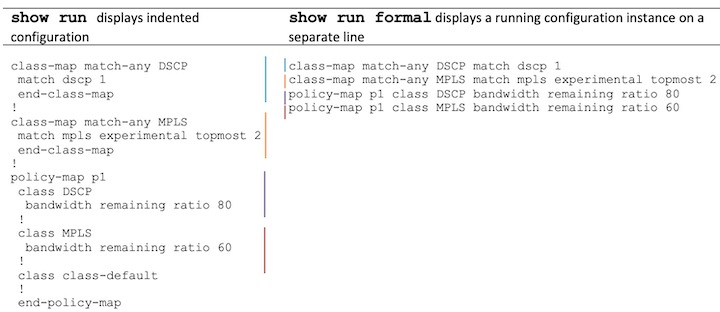
Before this enhancement, the running configuration outputs for policy maps and class maps were compressed and difficult to read. With this enhancement, the show run formal command outputs each QoS component—such as class maps and their matches, or policy maps and their associated classes—on dedicated lines.
Running Configuration Example
The configuration example associates policy map p1 with the class maps DSCP and MPLS .
After the configuration, its show run formal running configuration is displayed.
/* class map DSCP */

Router# config
Router(config)# class-map match-any DSCP
Router(config-cmap)# match dscp 1
Router(config-cmap)# end-class-map

/* class map MPLS */

Router(config)# class-map match-any MPLS
Router(config-cmap)# match mpls experimental topmost 2
Router(config-cmap)# end-class-map

/* DSCP-to-p1 association */

Router(config)#  policy-map p1
Router(config-pmap)# class DSCP
Router(config-pmap-c)# bandwidth remaining ratio 80
Router(config-pmap-c)# root

/* MPLS-to-p1 association */

Router(config)#  policy-map p1
Router(config-pmap)# class MPLS
Router(config-pmap-c)# bandwidth remaining ratio 60
Router(config-pmap-c)# exit
Router(config-pmap)# end-policy-map
Router(config)# commit
Verification
The show run formal running configuration displays each class map and policy map running configuration instance on a separate line.
Router# show run formal
..
class-map match-any DSCP match dscp 1
class-map match-any MPLS match mpls experimental topmost 2
policy-map p1 class DSCP bandwidth remaining ratio 80
policy-map p1 class MPLS bandwidth remaining ratio 60
..
show run and show run formal running configuration comparison:
| Display aspect |
Before enhancement (show run command ) |
After enhancement (show run formal ) |
|---|---|---|
| Class map output |
Compressed or inline |
Shown on a separate line |
| Policy map class association |
Merged into single policy block |
Shown per class, each on a separate line |
| Troubleshooting readability |
Moderate-to-low |
High |
Use the show run formal command instead of the show run command to view the enhanced QoS configuration display with clearly separated class map and policy map lines.