Modular QoS Configuration Guide for Cisco 8000 Series Routers, Cisco IOS XR Release

PDF

Modular QoS Configuration Guide for Cisco 8000 Series Routers, Cisco IOS XR Release

Traffic policing

Want to summarize with AI?

Log in

Details traffic policing mechanisms that enforce configured traffic rates, including 1R2C and 2R3C policers, hierarchical ingress policing, burst values, guidelines, and configuration procedures.


Traffic policing is a QoS congestion management feature that

  • limits the maximum rate of traffic entering or leaving an interface by enforcing compliance with a configured bandwidth profile

  • uses a token bucket algorithm to determine whether each packet conforms to or exceeds a configured rate profile and applies the corresponding transmit or drop action, and

  • applies immediate actions—such as transmitting, marking, or dropping packets—without buffering excess traffic.

Key concepts of traffic policing

  • Token bucket: is a rate-control mechanism that accumulates tokens at a configured rate and uses them to determine whether packets conform to or exceed a traffic policer’s allowed bandwidth profile.

  • Conform, exceed, and violate actions: are policing outcomes that classify each packet based on whether it fits within the allowed rate: conforming packets are transmitted, exceeding packets may be marked or dropped, and violating packets are typically dropped according to the configured policing mode.

  • Committed Information Rate (CIR): is the sustained bandwidth level that a policer guarantees for a traffic flow, defining the average rate at which tokens are added to the token bucket.

  • Peak Information Rate (PIR): is the upper bandwidth limit configured for two-rate policers, defining the maximum rate at which traffic is allowed to be sent when both the committed and peak token buckets contain sufficient tokens.

  • Committed Burst (Bc): or Committed Burst Size (CBS) is the maximum amount of data that can be sent at once while still conforming to the CIR, representing the number of bytes or time interval that the committed token bucket can hold at full capacity.

    This value represents the capacity of the primary token bucket. The larger the value, the more tolerant the policer is of momentary traffic bursts above the average rate.

  • Excess Burst (Be): or Excess Burst Size (EBS) is the additional amount of data that may be permitted beyond the committed burst when excess tokens are available, allowing short-term transmission above the CIR before packets are treated as exceeding or violating the rate.

    Excess Burst (Be) is an optional parameter used in traffic policing, specifically within a two-bucket, three-color policing mode, to allow for a secondary, higher level of burst tolerance beyond the Committed Burst (Bc)

Types of traffic policing modes

This section outlines the traffic-policing modes supported on your router.

  • Single-Rate policer

    • Single-rate two-color (1R2C) policer: is a rate-control mode that uses a single token bucket and classifies each packet as either conform or exceed based on the CIR, applying corresponding actions such as transmit or drop.

  • Two-rate policer

    • Two-rate three-color (2R3C) policer: is a metering mode that uses two token buckets—one for the CIR and one for the peak information rate (PIR)—to classify packets into conform, exceed, or violate actions, enforcing both a sustained rate limit and a peak rate limit.


Single-rate two-color policers

The single-rate two-color (1R2C) policer is a traffic-policing feature that

  • uses a single token bucket to meter packets against a configured committed information rate (CIR)

  • classifies each packet as either conforming or exceeding the allowed rate based solely on the available committed burst tokens, and

  • applies fixed policing actions—transmit for conforming packets and drop for exceeding packets—without buffering excess traffic.


Guidelines for configuring single-rate two-color policers

Default policer actions

  • The policer always transmits packets that conform to the CIR.

  • The policer always drops packets that exceed the CIR.

  • The default actions cannot be modified, regardless of class configuration or policy-map settings.


How the single-rate two-color policer works

Summary

The key components involved in the single-rate two-color policer are:

  • Traffic policer: A metering function on the interface that evaluates each packet against a configured committed information rate (CIR) and burst parameters, then applies a conform or exceed action based on that evaluation.

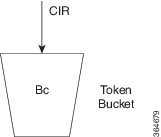
  • Token bucket (Tc): A logical bucket that accumulates tokens at the CIR up to a configured committed burst value (Bc). The number of tokens represents how much traffic can be sent at any given moment.

  • Committed information rate (CIR): The configured average rate (in bits per second) at which the policer replenishes tokens and against which packet sizes are evaluated.

The single-rate two-color policer meters traffic by updating a single token bucket at the committed information rate and comparing the size of each packet against the available tokens. Based on this comparison, the policer classifies each packet as conforming or exceeding the CIR and applies the corresponding default action. This process limits the maximum traffic rate on the interface without buffering excess packets.

Workflow

Figure 1. Workflow for single-rate two-color policers

These stages describe how the single-rate two-color policer works.

  1. The router receives packets on an interface with a single-rate two-color policer configured. The traffic policer on the interface inspects each incoming packet and prepares to meter it against the configured committed information rate (CIR) and burst parameters.
  2. The policer updates the token bucket based on the committed information rate. At every refresh interval, the policer adds tokens to the token bucket (Tc) at a rate equal to the CIR, up to the committed burst value (Bc). Tokens represent the amount of traffic that can be sent at the committed rate.
  3. The policer compares the packet size to the available tokens. For each packet of size B, the policer checks whether the current token count in the bucket is sufficient to accommodate the packet. If the bucket holds enough tokens, the packet can conform to the CIR; otherwise, the packet exceeds the CIR.
  4. The policer classifies conforming packets and applies the conform action. If the packet size B is less than or equal to the number of tokens in the bucket, the packet conforms. The policer decrements the token bucket by B and applies the conform action, which transmits the packet.
  5. The policer classifies exceeding packets and applies the exceed action. If the packet size B is greater than the number of available tokens in the bucket, the packet exceeds the CIR. The policer applies the exceed action, which drops the packet for the single-rate two-color policer. Excess packets are not buffered for later transmission.
  6. The policer continues metering traffic to enforce the configured rate.

Result

As traffic continues to arrive, the policer repeats the cycle of replenishing tokens, classifying packets as conform or exceed, and applying the corresponding actions. This ongoing process enforces the configured committed information rate on the interface without buffering excess packets.


Configure single-rate two-color policers

Before you begin

Prepare or identify a class map that matches the traffic you want to police.

Follow these steps to configure traffic policing (1R2C) on an ingress interface.

Procedure

1.

Create or modify a policy-map to apply the single-rate two-color policer to a traffic class.

This step creates a policy-map that applies a 1R2C policer to a class of traffic. The policer limits the rate for that class on the ingress interface.

Example:

Router# configure
Router(config)# policy-map test-police-1R2C
Router(config-pmap)# class dscp1
Router(config-pmap-c)# police rate 10 gbps
Router(config-pmap-c-police)# exit
Router(config-pmap-c)# exit
Router(config-pmap)# exit
          

The policy-map now includes a single-rate two-color policer that enforces a 10-Gbps committed rate for the dscp1 class.

2.

Attach the policing policy-map to the ingress interface.

Attaching the policy-map enables traffic policing on the selected interface in the ingress direction.

Example:

Router(config)# interface HundredGigE 0/0/0/18
Router(config-if)# service-policy input test-police-1R2C
Router(config-if)# commit
          

The single-rate two-color policer is now active on the specified input interface.

Running Configuration:

class-map match-any dscp1
 match dscp ipv4 1
 end-class-map
!
!
policy-map test-police-1R2C
 class dscp1
  police rate 10 gbps
  !
 !
 class class-default
  !
 !
 end-policy-map
!
!
interface HundredGigE0/0/0/8
service-policy input test-police-1R2C
!
3.

Verify the traffic policing configuration and policer statistics.

Example:

Router# show qos interface HundredGigE 0/0/0/8 input
NOTE:- Configured values are displayed within parentheses
Interface HundredGigE0/0/0/8 ifh 0xf0001e8  -- input policy
NPU Id:                        0
Total number of classes:       2
Interface Bandwidth:           100000000 kbps
Policy Name:                   test-police-1R2C
Accounting Type:               Layer1 (Include Layer 1 encapsulation and above)
------------------------------------------------------------------------------
Level1 Class                             =   dscp1
Policer committed rate                   =   10000000 kbps (10 gbits/sec)
Policer conform burst                    =   1024000 bytes (default)
Policer conform action                   =   Just TX
Policer exceed action                    =   DROP PKT

Level1 Class                             =   class-default
Policer not configured for this class
          

The output confirms that the input interface is using the test-police-1R2C policy and that the dscp1 class is policed at the configured rate with the expected conform and exceed actions.


Two-rate three-color policers

The two-rate three-color (2R3C) policer is a traffic-policing feature that

  • uses two token buckets, a committed bucket and a peak bucket, to meter traffic at both the committed information rate (CIR) and the peak information rate (PIR)

  • classifies each packet into one of three conformance levels—conform, exceed, or violate—based on the configured rates and burst parameters, and

  • applies predefined per-color actions in which conform and exceed traffic are transmitted and violate traffic is dropped.


Guidelines for configuring two-rate three-color policers

Default policer actions

  • The policer always transmits packets that conform to the committed or peak information rates.

  • The policer always drops packets that violate the configured rate thresholds.

  • You cannot modify these default actions, regardless of class configuration or policy-map settings.


How the two-rate three-color policer works

Summary

The key components involved in two-rate three-color policing are:

  • Committed information rate (CIR): The configured average rate (in bits per second) at which the policer replenishes tokens and against which packet sizes are evaluated.

  • Peak information rate (PIR): The higher metering rate that allows short-term bursts above the CIR, up to a configured peak limit.

  • Committed token bucket (Tc): A token bucket associated with the CIR that determines whether packets conform to the committed rate.

  • Peak token bucket (Tp): A token bucket associated with the PIR that determines whether packets exceed the committed rate but still remain within the peak rate.

The two-rate three-color policer uses the committed and peak token buckets together to meter packets against CIR and PIR and to assign a color-based action that enforces the configured traffic policy at the ingress interface.

Workflow

Figure 2. Workflow for two-rate three-color policers

These stages describe how the two-rate three-color policer works.

  1. The policer initializes the committed and peak token buckets. The committed bucket is sized by the committed burst (Bc), and the peak bucket is sized by the peak burst (Be). Both buckets start accumulating tokens as soon as the policer is active. Based on the configured committed information rate (CIR), peak information rate (PIR), and burst parameters, the router initializes the committed and peak token buckets used to meter incoming traffic.
  2. The policer refreshes tokens based on the CIR and PIR. When a packet arrives at the interface, then
    • the committed bucket is refilled at the CIR rate, up to Bc, and
    • the peak bucket is refilled at the PIR rate, up to Be.
    This dual-rate update occurs each time traffic arrives, ensuring both long-term and peak-rate metering.
  3. The policer evaluates the packet size against both token buckets. The policer compares the packet’s size (B) with the committed and then the peak bucket.
    Table 1. Packet evaluation against token buckets
    When… Then…
    the packet size B is less than or equal to the committed token bucket (Tc) the policer determines that the committed bucket has enough tokens and classifies the packet as conform.
    the packet size B is greater than Tc but less than or equal to the peak token bucket (Tp) the policer determines that the committed bucket overflows, but the peak bucket can accommodate the packet, and classifies it as exceed.
    the packet size B is greater than Tp the policer determines that neither bucket has enough tokens and classifies the packet as violate.
  4. The policer assigns a color to the packet based on CIR and PIR.
    Table 2. Packet color assignment
    When… Then…
    the packet size B is less than or equal to the committed token bucket (Tc) the policer assigns the packet the conform (green) color.
    the packet size B is greater than Tc but less than or equal to the peak token bucket (Tp) the policer assigns the packet the exceed (yellow) color because it does not fit in the committed bucket but still fits within the peak bucket.
    the packet size B is greater than Tp the policer assigns the packet the violate (red) color because it does not fit in either token bucket and exceeds the PIR.
  5. The policer applies the default transmit or drop actions for each color.
    Table 3. Color-based policer actions
    When… Then…
    a packet is classified as conform (green) the packet is transmitted, and the policer decrements both the committed and peak token buckets by the packet size B.
    a packet is classified as exceed (yellow) the packet is transmitted, the committed bucket is decremented by B, and the peak bucket is decremented by the overflow amount.
    a packet is classified as violate (red) the packet is dropped, and the peak token bucket is not decremented.

Result

As traffic continues to arrive, the policer repeatedly refreshes tokens in both the committed and peak buckets, evaluates packet sizes against the available tokens, assigns each packet a conform, exceed, or violate color, and applies the corresponding predefined actions. This continuous metering process enforces both the committed and peak information rates on the interface and ensures that exceeding and violating traffic is handled according to the policer’s color-based rules.


Configure two-rate three-color policers

Before you begin

Prepare or identify a class map that matches the traffic you want to police.

Follow these steps to configure two-rate three-color traffic policing (2R3C) on an ingress interface.

Procedure

1.

Create or modify a policy-map to apply the two-rate three-color policer to a traffic class.

This step creates a policy-map that applies a 2R3C policer to a class of traffic. The policer meters traffic using a committed information rate (CIR) and a peak information rate (PIR).

Example:

Router# configure
Router(config)# policy-map test-police-2R3C
Router(config-pmap)# class dscp1
Router(config-pmap-c)# police rate 10 gbps peak-rate 20 gbps
Router(config-pmap-c-police)# exit
Router(config-pmap-c)# exit
Router(config-pmap)# exit

The policy-map now includes a two-rate three-color policer with a 10 Gbps committed rate and a 20 Gbps peak rate for the dscp1 class.

2.

Attach the policing policy-map to the ingress interface.

Attaching the policy-map enables two-rate three-color traffic policing on the selected interface in the ingress direction.

Example:

Router(config)# interface HundredGigE 0/0/0/8
Router(config-if)# service-policy input test-police-2R3C
Router(config-if)# commit

The two-rate three-color policer is now active on the specified input interface.

Running Configuration:

class-map match-any dscp1
match dscp ipv4 1
end-class-map
!
!
policy-map test-police-2R3C
class dscp1
police rate 10 gbps peak-rate 20 gbps
!
!
class class-default
!
!
end-policy-map
!
!
interface HundredGigE0/0/0/8
service-policy input test-police-2R3C
!
3.

Verify the two-rate three-color traffic policing configuration and policer statistics.

  1. Verify the policer configuration applied on the ingress interface.

    Example:

    Router# show qos interface HundredGigE 0/0/0/8 input
    NOTE:- Configured values are displayed within parentheses
    |Interface HundredGigE0/0/0/8 ifh 0xf0001e8  -- input policy
    |NPU Id:||0
    |Total number of classes:       2
    |Interface Bandwidth:           100000000 kbps
    |Policy Name:|       test-police-2R3C
    |Accounting Type:|   Layer1 (Include Layer 1 encapsulation and above)
    |------------------------------------------------------------------------------
    |Level1 Class||     =   dscp1
    |Policer committed rate|       =   10000000 kbps (10 gbits/sec)
    |Policer peak rate||=   20000000 kbps (20 gbits/sec)
    |Policer conform burst|        =   1024000 bytes (default)
    |Policer exceed burst|         =   2048000 bytes (default)
    |Policer conform action|       =   Just TX
    |Policer exceed action|        =   DROP PKT
    |Policer violate action|       =   DROP PKT
    |
    |Level1 Class||     =   class-default
    |Policer not configured for this class
  2. Review detailed policer statistics on the ingress interface.

    Example:

    Router# policy-map interface HundredGigE 0/0/0/8 input
    |HundredGigE0/0/0/8 input: test-police-2R3C
    |
    |Class dscp1
    |Classification statistics          (packets/bytes)     (rate - kbps)
    |Matched| :           289228439/289228439000         27734775
    |Transmitted         :|56422213/56422213000          5410359
    |Total Dropped       :           232806226/232806226000         22324416
    |Policing statistics|    (packets/bytes)     (rate - kbps)
    |Policed(conform)    :|56422213/56422213000          5410359
    |Policed(exceed)     :|56422215/56422215000          5410358
    |Policed(violate)    :           176384011/176384011000         16914058
    |Policed and dropped :           232806226/232806226000
    |Class class-default
    |Classification statistics          (packets/bytes)     (rate - kbps)
    |Matched| :|61136620/61136620000          0
    |Transmitted         :|61136620/61136620000          0
    |Total Dropped       :|       0/0|        0
    |Policy Bag Stats time: 1570155764000  [Local Time: 10/04/19 02:22:44.000]

The output confirms that the input interface is using the test-police-2R3C policy and that the dscp1 class is metered at the configured committed and peak rates with the expected conform, exceed, and violate actions.


Configurable burst values for ingress QoS policers

Configurable burst values for ingress QoS policers is a QoS policing capability that

  • enables configurable conform and exceed burst values for ingress policers

  • applies to supported 1R2C, 2R3C, and parent 1R3C policers, and

  • uses default burst values when the burst values are not explicitly configured.

Table 4. Feature History Table

Feature Name

Release Information

Feature Description

Configurable burst values for ingress QoS policers

Release 26.2.1

Introduced in this release on: Fixed Systems (8200 [ASIC: P100, A100], 8700 [ASIC: P100, K100]); Centralized Systems (8400 [ASIC: K100]); Modular Systems (8800 [LC ASIC: P100])

You can now configure conform and exceed burst values for ingress QoS policers instead of relying only on platform-calculated default burst values. This capability enables ingress policers to have granular control over short-term traffic bursts for efficient traffic congestion management.

If you do not configure burst values, the router uses the default burst values.

The feature introduces these changes:

CLI:

  • The burst and peak-burst keywords are introduced in the police rate command.

YANG Data Model:
  • Cisco-IOS-XR-8000-qos-oper.yang

  • Cisco-IOS-XR-qos-ma-oper.yang

(see GitHub, YANG Data Models Navigator)

Guidelines for configuring burst values for ingress QoS policers

Supported interfaces

User-configurable burst values for ingress QoS policers are supported on physical, VLAN, bundle, PWHE, and BVI interfaces.

Burst value configuration defaults

If you do not explicitly configure a burst value, the policer uses the platform-calculated default burst value.


Configure burst values for ingress QoS policers

Before you begin

Before you begin, ensure that the QoS policy is applied in the ingress direction on a supported interface and platform.

Procedure

1.

Configure a class map for traffic classification using the ingress policer.

Example:

Router(config)# class-map match-any INGRESS_POLICER_CLASS
Router(config-cmap)# match traffic-class 5
Router(config-cmap)# end-class-map
2.

Configure an ingress policy map with explicit burst values.

Use the burst keyword to configure the conform burst value. For a 2R3C policer, use the peak-burst keyword to configure the exceed burst value.

  • Configure a 1R2C policer with an explicit conform burst value.

    Router(config)# policy-map INGRESS_POLICER_BURST
    Router(config-pmap)# class INGRESS_POLICER_CLASS
    Router(config-pmap-c)# police rate 5 gbps burst 400 kbytes
    Router(config-pmap-c-police)# conform-action transmit
    Router(config-pmap-c-police)# exceed-action drop
    Router(config-pmap-c-police)# exit
    Router(config-pmap-c)# exit
    Router(config-pmap)# end-policy-map
  • Configure a 2R3C policer with explicit conform and exceed burst values.

    Router(config)# policy-map INGRESS_POLICER_BURST
    Router(config-pmap)# class INGRESS_POLICER_CLASS
    Router(config-pmap-c)# police rate 1 gbps burst 4 mbytes peak-rate 2 gbps peak-burst 8 mbytes
    Router(config-pmap-c-police)# conform-action transmit
    Router(config-pmap-c-police)# exceed-action transmit
    Router(config-pmap-c-police)# violate-action drop
    Router(config-pmap-c-police)# exit
    Router(config-pmap-c)# exit
    Router(config-pmap)# end-policy-map
3.

Apply the policy map to the ingress interface.

Example:

Router(config)# interface HundredGigE0/0/0/1
Router(config-if)# service-policy input INGRESS_POLICER_BURST
Router(config-if)# commit
4.

Verify the ingress policer configuration.

Use either command depending on whether you want to verify the programmed QoS values or view policing statistics.

  • Verify the programmed burst values on the interface.

    Router# show qos interface HundredGigE0/0/0/1 input
    
    Interface HundredGigE0/0/0/1 -- input policy
    Policy Name: INGRESS_POLICER_BURST
    ------------------------------------------------------------------------------
    Level1 Class                             =   INGRESS_POLICER_CLASS
    Policer committed rate                   =   5000000 kbps (5 gbits/sec)
    Policer conform burst                    =   400000 bytes
  • Verify policing statistics for the policy applied to the interface.

    Router# show policy-map interface HundredGigE0/0/0/1 input
    
    HundredGigE0/0/0/1 input: INGRESS_POLICER_BURST
    
    Class INGRESS_POLICER_CLASS
      Classification statistics          (packets/bytes)     (rate - kbps)
        Matched             :                   0/0                    0
        Transmitted         :                   0/0                    0
        Total Dropped       :                   0/0                    0
      Policing statistics                (packets/bytes)     (rate - kbps)
        Policed(conform)    :                   0/0                    0
        Policed(exceed)     :                   0/0                    0
        Policed(violate)    :                   0/0                    0
        Policed and dropped :                   0/0                    0

The command output displays the configured burst values or the policing statistics for the ingress policer.