Modular QoS Configuration Guide for Cisco 8000 Series Routers, Cisco IOS XR Release

PDF

Modular QoS Configuration Guide for Cisco 8000 Series Routers, Cisco IOS XR Release

QoS Policy Propagation via BGP

Want to summarize with AI?

Log in

Enables classification and marking of traffic based on BGP route attributes, allowing QoS policies to be applied according to routing information.


A QoS Policy Propagation via BGP (QPPB) mechanism is a Quality of Service (QoS) classification technique that

  • enables QoS classification by leveraging BGP attributes distributed through the BGP control plane

  • facilitates destination-based (or source-based) traffic classification by associating BGP routes with QoS groups, and

  • simplifies packet marking and prioritization without relying solely on access control lists (ACLs).

A QoS group is a numeric value associated with a route in the forwarding information base (FIB). The router uses this value to determine the traffic class or priority for packets that match that route.

Table 1. Feature History Table

Feature Name

Release Information

Feature Description

QoS Policy Propagation via BGP

Release 26.1.1

Introduced in this release on: Centralized Systems (8400 [ASIC: K100]) (select variants only*)

*This feature is now supported on the Cisco 8404-SYS-D routers.

QoS Policy Propagation via BGP

Release 25.4.1

Introduced in this release on: Fixed Systems (8010 [ASIC: A100])(select variants only*)

*This feature is supported on:

  • 8011-32Y8L2H2FH

  • 8011-12G12X4Y-A/D

QoS Policy Propagation via BGP

Release 25.1.1

Introduced in this release on: Fixed Systems (8010 [ASIC: A100])(select variants only*)

*This feature is now supported on the Cisco 8011-4G24Y4H-I routers.

QoS Policy Propagation via BGP

Release 24.4.1

Introduced in this release on: Fixed Systems (8200 [ASIC: P100], 8700 [ASIC: P100, K100])(select variants only*); Modular Systems (8800 [LC ASIC: P100])(select variants only*)

*This feature is now supported on:

  • 8212-48FH-M

  • 8711-32FH-M

  • 8712-MOD-M

  • 88-LC1-36EH

  • 88-LC1-52Y8H-EM

  • 88-LC1-12TH24FH-E

QoS Policy Propagation via BGP

Release 7.5.2

You now have the ability to install a BGP route in the routing table with a QoS Group so that IP packets that match the route receive the QoS policies associated with the QoS group.

This functionality enables convenient classification and marking when BGP is deployed, overcoming the administrative challenges of classifying based on ACLs.

QPPB integration of BGP and QoS groups

QPPB integrates the BGP control plane with the IP data forwarding plane. It uses routing policies and table maps to match specific prefixes learned through BGP neighbors and assigns a QoS group value. The FIB retains this value so the data plane can apply QoS actions such as remarking, shaping, or policing.

QPPB for Prioritizing Business-Critical Traffic

In an enterprise network, an administrator may want to prioritize mission-critical traffic, such as web-based business applications, over general data traffic. Using QPPB, the administrator can tag destination prefixes representing these business applications within the BGP route policy. When packets arrive at the ingress interface, the router automatically classifies and marks them according to their associated QoS group, ensuring consistent prioritization across the network.

Benefits of QoS Policy Propagation via BGP

QPPB provides these benefits:

  • IP prefix–based classification: enables IP prefix-based QoS classification and marking to differentiate traffic based on destination networks.

  • Traffic prioritization: prioritizes traffic to specific destination prefixes over other traffic classes for predictable service delivery.

  • Control plane integration: leverages the BGP control plane to tag prefixes using standard route-map techniques, ensuring consistent policy propagation.

  • Flexible remarking and prioritization: uses Modular QoS CLI (MQC) mechanisms for flexible remarking, queuing, and prioritization actions.

  • Control and forwarding plane alignment: establishes a direct connection between the BGP control plane routing decisions and the IP data forwarding plane for QoS enforcement.


How QoS Policy Propagation via BGP works

When a router receives routes from BGP peers, it can classify traffic based on route attributes rather than source information. QoS Policy Propagation via BGP (QPPB) works within the BGP process to assign QoS group values to specific destination prefixes. These values are then propagated to the forwarding plane, where packet-level actions are applied based on your policy.

Summary

The key components that are involved in the QPPB process are:

  • BGP control plane: learns routes and applies the table map or route policy to assign QoS group values.

  • Routing policy: defines which prefixes receive which QoS group values.

  • Forwarding plane (FIB): stores the assigned QoS group for each route and uses it to classify incoming packets.

  • QoS policy: uses the assigned QoS group values for marking, queuing, and shaping actions.

Workflow

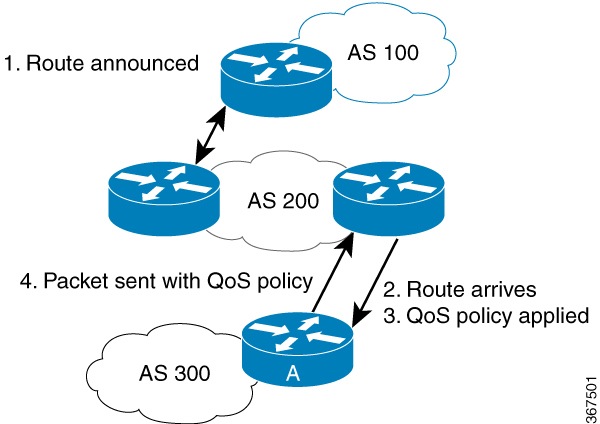
Figure 1. QPPB process example

These stages describe how QPPB works:

  1. Router A in the figure receives routes from BGP peers (for example, AS 100 and AS 200) and evaluates each route using the configured routing policy.
  2. The routing policy (table map) matches the destination prefix against defined criteria such as community lists, prefix sets, or autonomous system (AS) paths and assigns a QoS group value.
  3. The router installs the route, along with its assigned QoS group, into the routing information base (RIB) and then into the forwarding information base (FIB).
  4. When an incoming packet’s destination matches one of these prefixes, the router retrieves the corresponding QoS group from the FIB and classifies the packet accordingly.
  5. The ingress QoS policy uses this QoS group to apply marking, queuing, or other actions.

Result

The QPPB process results in a scalable, BGP-driven QoS model that reduces administrative complexity and ensures consistent policy enforcement for traffic toward specific destinations.


Best practices for configuring QoS Policy Propagation via BGP

Configuration best practices

Configure QPPB with supported QoS group values and destination-prefix policies to ensure valid, consistent, destination-based classification.
  • Define route policies using the set qos-group command to assign QoS group values between 0 and 7.

  • Use QoS group-based classification. IP precedence–based QPPB is not supported.

  • Use IP destination prefix mode on input policies. This is the supported mode for QPPB.

Interface and hardware recommendations

Apply QPPB to supported interfaces and platforms. This approach prevents configuration failures and ensures correct QoS group propagation.
  • Apply QPPB on physical interfaces, bundle interfaces, or their subinterfaces based on your topology.

  • Do not configure QPPB on Q100-based routers or line cards, which do not support this feature.

Interactions with other features

Coordinate QPPB with ACL, FlowSpec, Peering QoS, and policing behavior to maintain predictable precedence.
  • Plan your QoS and ACL configurations considering ascending order feature precedence.

    • For QoS group-based policy, the order is: Security ACL (0), BGP FlowSpec (1), QPPB (2), Peering QoS (3)

    • For ACL-based policy, the order is: Security ACL (0), ACL-based QoS (1), BGP FlowSpec (2), QPPB (3)

  • Do not configure QPPB on Q100-based routers or line cards, which do not support this feature.

  • QPPB overwrites QoS group values set by security ACLs.

  • Peering QoS overwrites QoS group values set by QPPB.

  • Peering QoS and QPPB overwrite BGP FlowSpec actions, except for drop and policer.

  • QPPB does not support egress policing.

Compatibility with SPAN and remarking features

Verify Switched Port Analyzer (SPAN) and remarking compatibility before enabling QPPB to prevent interface conflicts and preserve expected QoS behavior.
  • You cannot enable ACL-based SPAN on interfaces where QPPB is configured. Disable ACL-based SPAN before applying QPPB on interfaces.

  • QPPB supports the same remarking and policing behavior as the current QoS features.


Configure QoS Policy Propagation via BGP

Use this task to configure QoS Policy Propagation via BGP (QPPB) so that traffic classification and marking occur automatically based on BGP-learned destination prefixes.

QPPB integrates BGP routing information with QoS classification. You define route policies that assign QoS group values to specific prefixes and apply them to BGP through a table-policy. Ingress and egress QoS policies then use those values to apply differentiated treatment to packets.

Before you begin

  • Ensure BGP is configured and routes are being exchanged with peers.

  • Verify that the target interfaces support QoS configuration.

  • Confirm that no ACL-based SPAN sessions are active on the same interfaces.

Follow these steps to configure QPPB.

Procedure

1.

Define a routing policy. Use the Routing Policy Language (RPL) to set up destination prefixes and assign QoS groups.

Example:

Router#configure
Router(config)#prefix-set prefix-list-v4
Router(config-prefix-set)#70.1.1.1
Router(config-prefix-set)#70.2.1.0/24
Router(config-prefix-set)#70.2.2.0/24 ge 28
Router(config-prefix-set)#70.2.3.0/24 le 28
Router(config-prefix-set)#end-set
Router(config)#prefix-set prefix-list-v6
Router(config-prefix-set)#2001:300::2
Router(config-prefix-set)#2003:200::3
Router(config-prefix-set)#end-set
Router(config)#route-policy qppb1
Router(config-route-policy)#if destination in (60.60.0.2/24) then
Router(config-route-policy)#set qos-group 5
Router(config-route-policy)#elseif destination in prefix-list-v4 then
Router(config-route-policy)#set qos-group 4
Router(config-route-policy)#else
Router(config-route-policy)#set qos-group 1
Router(config-route-policy)#pass
Router(config-route-policy)#endif
Router(config-route-policy)#end-policy
Router(config)#commit

This step uses prefix sets and route policies to classify BGP learned routes and tag them with QoS groups. For example:

  • prefix set prefix-list-v4 includes 70.1.1.1 , 70.2.1.0/24 , and ranges like 70.2.2.0/24 ge 28 .

  • Route policy assigns qos-group 5 to destination 60.60.0.2/24 , qos-group 4 to prefixes in prefix-list-v4 , and qos-group 1 otherwise.

This step enables granular classification of traffic based on destination prefixes, essential for scalable QoS enforcement.

2.

Attach the routing policy at the table-policy point under BGP to apply QoS group values.

Example:

Router#configure
Router(config)#router bgp 900
Router(config-bgp)#bgp router-id 22.22.22.22
Router(config-bgp)#address-family ipv4 unicast
Router(config-bgp-af)#table-policy qppb1
Router(config-bgp-af)#exit
Router(config-bgp)#address-family ipv6 unicast
Router(config-bgp-af)#table-policy qppb2
Router(config-bgp-af)#exit
Router(config-bgp)#neighbor 30.2.2.1
Router(config-bgp-nbr)#remote-as 500
Router(config-bgp-nbr)#address-family ipv4 unicast
Router(config-bgp-nbr-af)#route-policy pass in
Router(config-bgp-nbr-af)#route-policy pass out
Router(config-bgp-nbr-af)#exit
Router(config-bgp-nbr)#address-family ipv6 unicast
Router(config-bgp-nbr-af)#route-policy pass in
Router(config-bgp-nbr-af)#route-policy pass out
Router(config-bgp-nbr-af)#exit
Router(config-bgp-nbr)#exit
Router(config-bgp)#exit
Router(config)#commit

This step attaches the route policy to BGP address families so routes carry QoS group values when installed in the RIB and FIB. For example, for router bgp 900 , it applies table-policy qppb1 for IPv4 unicast and table-policy qppb2 for IPv6 unicast address families.

This step ensures QoS group values propagate with routing information, aligning control and forwarding planes for QoS.

3.

Configure ingress QoS and enable IPv4 or IPv6 BGP propagation.

Example:

Router#configure
Router(config)#class-map match-any qos-group5
Router(config-cmap)#match qos-group 5
Router(config-cmap)#exit
Router(config)#class-map match-any qos-group4
Router(config-cmap)#match qos-group 4
Router(config-cmap)#exit
Router(config)#policy-map ingress-marker-po1
Router(config-pmap)#class qos-group5
Router(config-pmap-c)#set precedence 0
Router(config-pmap-c)#set discard-class 0
Router(config-pmap-c)#set traffic-class 1
Router(config-pmap-c)#exit
Router(config-pmap)#class qos-group4
Router(config-pmap-c)#set precedence 1
Router(config-pmap-c)#set discard-class 1
Router(config-pmap-c)#set traffic-class 2
Router(config-pmap-c)#exit
Router(config-pmap)#class class-default
Router(config-pmap)#exit
Router(config)#interface HundredGigE0/0/0/0
Router(config-if)#ipv4 address 25.1.1.1/24
Router(config-if)#ipv6 address 2001:db8:a0b:12f0::1/64
Router(config-if)#ipv4 bgp policy propagation input qos-group destination
Router(config-if)#ipv6 bgp policy propagation input qos-group destination
Router(config-if)#service-policy input ingress-marker-po1
Router(config-if)#exit
Router(config)#commit

This step defines class-maps matching QoS groups, creates a policy-map to set packet markings, and applies this policy on ingress interfaces. It also enables BGP policy propagation for IPv4 and IPv6. Specifically:

  • class-map qos-group5 matches qos-group 5 , class-map qos-group4 matches qos-group 4 .

  • policy-map ingress-marker-po1 sets precedence 0 for qos-group5 and precedence 1 for qos-group4 .

This step automates packet marking based on destination prefixes, eliminating manual ACLs and simplifying QoS enforcement.

4.

Configure the egress interface policy.

Example:

Router#configure
Router(config)#class-map match-any level1
Router(config-cmap)#match traffic-class 1
Router(config-cmap)#exit
Router(config)#class-map match-any level2
Router(config-cmap)#match traffic-class 2
Router(config-cmap)#exit
Router(config)#policy-map output-po1
Router(config-pmap)#class level1
Router(config-pmap-c)#bandwidth percent 50
Router(config-pmap-c)#exit
Router(config-pmap)#class level2
Router(config-pmap-c)#bandwidth percent 20
Router(config-pmap-c)#queue-limit 50 ms
Router(config-pmap-c)#exit
Router(config-pmap)#exit
Router(config)#interface HundredGigE0/5/0/0
Router(config-if)#ipv4 address 30.1.1.1/24
Router(config-if)#ipv6 address 2001:da8:b0a:12f0::1/64
Router(config-if)#service-policy output output-po1
Router(config-if)#exit
Router(config)#commit

The egress interface policy uses the traffic class assigned at ingress as an internal match criterion. The router applies QoS treatments such as bandwidth allocation and queue limits based on this class. Because traffic class is internal and not part of the packet header, the router enforces QoS consistently within the device without modifying packets. This approach leads to scalable and effective traffic management on egress interfaces.

This step enforces QoS treatment such as bandwidth guarantees and queue management, ensuring consistent traffic handling downstream.

Your router automatically classifies and marks packets based on BGP-learned destination prefixes. This enables scalable, policy-driven QoS control without manual ACL-based classification.