Manage Crosswork Data Gateway Base VM

A Crosswork Data Gateway instance is deployed as a standalone entity. It can be located in a different geographic region than the controller application, such as Crosswork Cloud or Crosswork Network Controller.

This instance connects to the controller application and enables seamless data collection from the network.

This chapter covers these topics.

Crosswork Data Gateway interactive console

When you log in to the Crosswork Data Gateway, an interactive console is launched. It provides a command-line interface for managing and troubleshooting the system.

The console presents a main menu upon successful login.

Main menu overview and role-based access

The main menu displays various options based on the user's role and privileges. Options differ for the Administrator (dg-admin) and the Operator (dg-oper) roles. Here is an example of the main menu as seen by the dg-admin user:
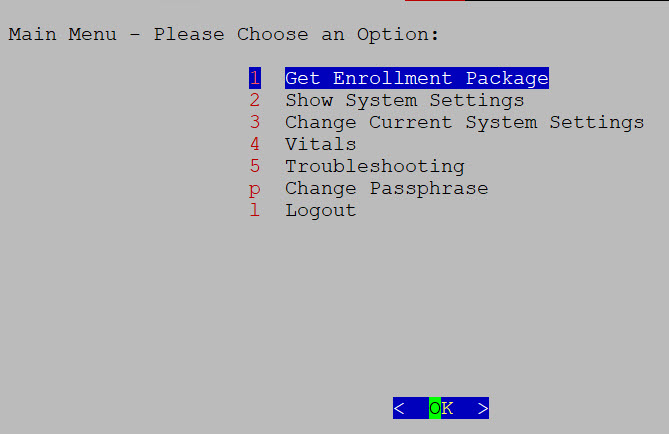
Figure 1. Interactive console

The main menu presents these options:

  • Get Enrollment Package

  • Show System Settings

  • Change Current System Settings

  • Vitals

  • Troubleshooting

  • Change Passphrase

  • Log out

User roles and configuration guidelines

  • The main menu for the dg-oper user differs, as the operator has more limited access compared to the administrator. Refer to the Role-based permissions table for a detailed breakdown of user roles and their associated privileges.

  • When using an IPv6 address for any configuration, enclose it in square brackets, as in ([1::1]).
Manage Crosswork Data Gateway users

This section contains these topics:

Supported user roles

Crosswork Data Gateway supports two default user roles. Each role has specific permissions and responsibilities.

  • Administrator role:

    • Username: dg-admin

    • Description: This user is created by default when Crosswork Data Gateway is set up for the first time. The dg-admin user has full administrative privileges, which include both read and write access.

      Permissions:
      • Starting and shutting down the Crosswork Data Gateway VM.

      • Registering applications within the system.

      • Applying authentication certificates.

      • Configuring server settings.

      • Performing kernel upgrades.

        For other permissions, see Role-based permissions.

      Note that the dg-admin user cannot be deleted.

  • Operator role: The dg-oper user is also created by default during the initial VM startup. This user can review the health of the Crosswork Data Gateway, retrieve error logs, receive error notifications, and run connectivity tests between the Crosswork Data Gateway instance and the output destination.

    • Username: dg-oper

    • Description: This user is also created by default during the initial deployment of the Crosswork Data Gateway VM. The dg-oper user has a more limited set of permissions, focusing on system monitoring and troubleshooting.

    • Permissions:

      • Reviewing the health status of Crosswork Data Gateway.

      • Retrieving error logs.

      • Receiving error notifications.

      • Running connectivity tests between the Crosswork Data Gateway instance and its output destination.

        For other permissions, see Role-based permissions.

Role-based permissions for administrators and operators

Table 1. Role-based permissions

Permissions

Administrator

Operator

Get Enrollment Package

Show system settings

vNIC Addresses

NTP

DNS

Proxy

UUID

Syslog

Certificates

First Boot Provisioning Log

Timezone

Change Current System Settings

Configure NTP

Configure DNS

Configure Control Proxy

Configure Static Routes

Configure Syslog

Create new SSH keys

Import Certificate

Configure vNIC MTU

Configure Timezone

Configure Password Requirements

Configure Simultaneous Login Limits

Configure Idle Timeout

Configure Login Check Frequency

Configure Interface Address

Vitals

Docker Containers

Docker Images

Controller Reachability

NTP Reachability

Route Table

ARP Table

Network Connections

Disk Space Usage

Linux services

NTP Status

System Uptime

Troubleshooting

Run Diagnostic Commands

Run show-tech

Remove All Non-Infra Containers and Reboot VM

Reboot VM

Export audited logs

Re-enroll Data Gateway

Enable TAC Shell Access

Change Passphrase

User authentication

  • Both the dg-admin and dg-oper accounts are configured with credentials during the installation of Crosswork Data Gateway.

  • User authentication is local to the system. Authentication occurs within the system rather than through an external identity provider.

Change the user passphrase

Both Administrator and Operator users can change their own passphrases, but they cannot change each other's passphrases.

To change your passphrase, use these steps:

Procedure


Step 1

From the Main Menu, select Change Passphrase and click OK.

Step 2

Enter your current password, then press Enter.

Step 3

Enter your new password and press Enter. To confirm, re-type your new password and press Enter.


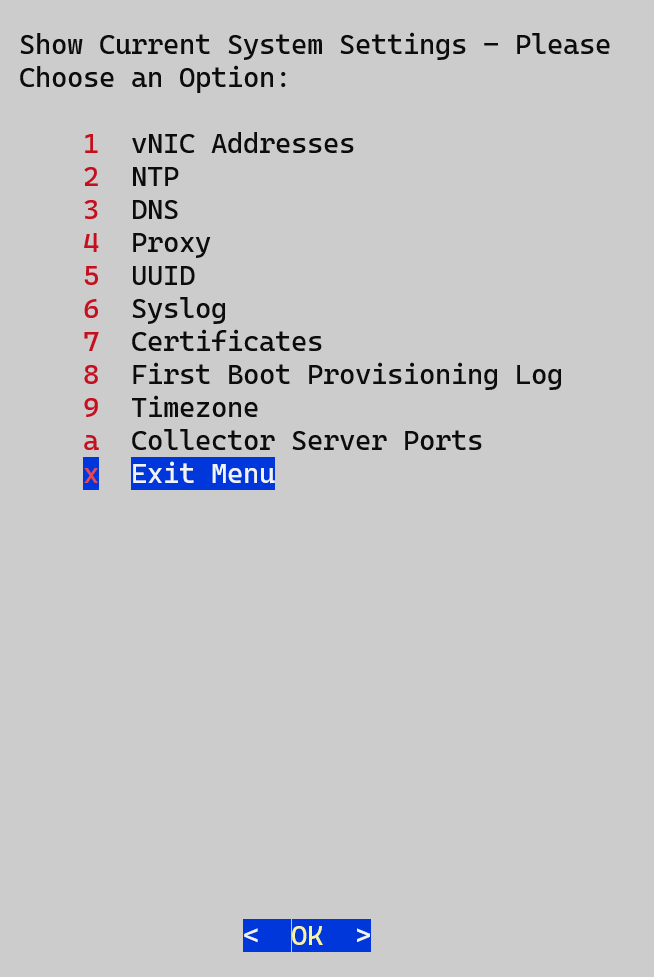
View the system settings

You can view various system settings through Crosswork Data Gateway.

Figure 2. Show current system settings menu
Show Current System Settings Menu

Complete these steps to view the current system configuration.

Procedure


Step 1

From the Main Menu, select Show System Settings.

Step 2

In the prompt, click OK to open the Show Current System Settings menu.

Step 3

Select the setting that you want to view.

Setting option

Description

vNIC Addresses

Displays the vNIC configuration, including address information.

NTP

Displays the details of the currently configured Network Time Protocol (NTP) server.

DNS

Displays the details of the Domain Name System (DNS) server configuration.

Proxy

Displays the proxy server details (if any proxy is configured).

UUID

Displays the system UUID.

Syslog

Displays the syslog forwarding configuration. If the forwarding configuration is not set, only the message "# Forwarding configuration follows" is displayed.

Certificates

You can view certificate files such as:

  • Crosswork Data Gateway signing certificate file

  • controller signing certificate file

  • controller SSL/TLS certificate file

  • syslog certificate, and

  • collector certificate.

First Boot Provisioning Log

Displays the content of the first boot log file.

Timezone

Displays the current timezone setting.

Enrollment Token

Attention


This menu option is for users of Crosswork Data Gateway for Cloud applications.

Displays the token that is used by Crosswork Data Gateway to enroll with Crosswork Cloud.


Change the system settings

Crosswork Data Gateway allows you to configure various system settings. The Change Current System Settings menu provides access to these options.

Follow these steps to modify the current system settings:

Before you begin

Ensure you are aware of these considerations and requirements:

  • Enrollment token: The Enrollment Token menu option is intended for users of Crosswork Data Gateway for Cloud applications.

  • Administrator access: Only the administrator can modify system settings.

  • IPv6 address format: When you use an IPv6 address, enclose it in square brackets (for example, [1::1] ).

  • SCP port configuration: If you need to use a custom SCP port (not the default port 22), specify the port in the SCP command with the syntax:
    -P55
                                user@host:path/to/file
    In this example, 55 is the custom port number.

Procedure


Step 1

From the Main Menu, select 3 Change Current System Settings.

Step 2

Select the setting that you want to modify.


Configure the NTP time

It is essential for the NTP time to be synchronized between the controller application and its Crosswork Data Gateway instances.

If the time is not synchronized, session handshakes fail, and functional images will not be downloaded. In such cases, the following error message will be logged in the controller-gateway.log: Clock time not matched and sync failed.

How to access the log files

Use the Run show-tech command. For more information, see Run the Showtech Command. You can check the NTP reachability for both the controller application and Crosswork Data Gateway by using the Controller Reachability and NTP Reachability options from the Main Menu > Vitals. For more information, see View the Crosswork Data Gateway vitals.

If NTP is incorrectly configured, the error Session not established will appear.

Key considerations for NTP configuration

  • When configuring Crosswork Data Gateway to use authentication via a keys file, the chrony.keys file must follow the specific format that is documented at chrony.conf documentation.

  • For sites using ntpd and a ntp.keys file, you can convert the ntp.keys to a chrony.keys file using the conversion tool available at ntp2chrony tool.

    This tool converts the ntpd configuration into a chrony compatible format, but only the keys file is needed for importing into Crosswork Data Gateway.

Follow the steps to configure NTP settings:

Procedure


Step 1

From the Change Current System Settings menu, select Configure NTP.

Step 2

Enter the details for the new NTP server:

  • Server list with each server separated by a space

  • Use NTP authentication?

  • Key list, with each key separated by a space, and the number of keys must match the number of servers in the list

  • Key file passphrase to use Secure Copy Protocol (SCP) to the VM

  • Key file passphrase to SCP to the VM

Step 3

Click OK to save the settings.


Configure the DNS

By configuring DNS in Crosswork Network Controller, users can enable the system to resolve hostnames to IP addresses, ensuring reliable communication with external servers and services. This setup is essential for seamless integration, software updates, and connectivity to various network resources.

To configure DNS settings for Crosswork Data Gateway, use these steps:

Procedure


Step 1

From the Change Current System Settings menu, select Configure DNS and click OK.

Step 2

Enter the new DNS server addresses and domain.

Step 3

Click OK to save the settings.


Configure the control proxy

If a proxy server was not configured during the installation, you can set up the proxy server using this option.

Procedure


Step 1

From the Change Current System Settings menu, select Configure Control Proxy and click OK.

Step 2

In the confirmation dialog, click Yes to proceed. Click Cancel if you do not wish to proceed.

Step 3

Enter the following Proxy server details:

  • server URL,

  • bypass addresses,

  • proxy username, and

  • proxy passphrase.

Step 4

Click OK to save the settings.


Configure static routes

Static routes are typically configured when Crosswork Data Gateway receives addition or deletion requests from the collectors. The Configure Static Routes option from the main menu can also be used for troubleshooting purposes.


Caution


Static routes configured using this option are lost when the Crosswork Data Gateway reboots.


Add the static routes

Before you begin

To add a static route, complete the steps.

Procedure

Step 1

From the Change Current System Settings menu, select 4 Configure Static Routes.

Step 2

To add a static route, select Add.

Step 3

Select the interface for which you want to add a static route.

Step 4

Select the IP version.

Step 5

Enter the IPv4 or IPv6 subnet in CIDR format when prompted.

Step 6

Click OK to save the settings.


Delete the static routes

Before you begin

To delete a static route, complete the steps.

Procedure

Step 1

From the Change Current System Settings menu, select 4 Configure Static Routes.

Step 2

To delete a static route, select Delete.

Step 3

Select the interface for which you want to delete a static route.

Step 4

Select the IP version.

Step 5

Enter the IPv4 or IPv6 subnet in CIDR format.

Step 6

Click OK to save the settings.


Configure the syslog system

The syslog server can be configured during Day0 installation through the configuration file. If you wish to modify the syslog server list, port number, protocol, or certificate file later (Day1 or beyond), you can use the Interactive Console.


Note


For syslog server configuration with IPv4 or IPv6 support on different Linux distributions, refer to your system administrator and configuration guides.


Syslog configuration modes:

  • Simultaneous: Crosswork Data Gateway sends messages to all the configured syslog server addresses. If one of the servers is unresponsive, the message is queued to the disk until the servers respond.

  • Failover: Crosswork Data Gateway sends messages to the first syslog server address. If the server is unavailable, the message is sent to the subsequent configured address. If all servers are unresponsive, the message is queued to the disk until a server responds.

To configure syslog, complete these steps.

Procedure


Step 1

From the Change Current System Settings menu, select 5 Configure Syslog.

Step 2

In the Use Syslog window, select True to continue configuring the syslog server.

Step 3

In the Select Syslog Multiserver Mode window, select either Simultaneous or Failover.

Step 4

Enter the values for the following syslog attributes:

  • Server address or hostname: Enter a space-delimited list of IPv4 or IPv6 addresses for one or more syslog servers that are accessible from the management interface.

  • Port: Enter the port number of the syslog server.

  • Protocol: Choose UDP, TCP, or RELP for sending system logs.

  • Use Syslog over TLS?: To encrypt syslog traffic using TLS, select Yes.

  • TLS Peer Name: Enter the syslog server’s hostname as it appears in the server certificate SubjectAltName or Subject Common Name.

  • Syslog Root Certificate File URI: Enter the URI for the PEM-formatted root certificate of the syslog server, which is retrieved using SCP.

  • Syslog Certificate File Passphrase: Enter the password for the SCP user to retrieve the syslog certificate chain.

Step 5

Click OK to save the settings.


Create the new SSH keys

Creating new SSH keys overwrites the current keys.

To create new SSH keys, follow these steps.

Procedure


Step 1

From the Change Current System Settings menu, select 6 Create new SSH keys.

Step 2

Click OK.

Crosswork Data Gateway launches an auto-configuration process that generates new SSH keys.


Import a certificate

If you update any certificate except the Controller Signing Certificate, the collector restarts.

Crosswork Data Gateway allows you to import these certificates:

  • Controller signing certificate file

  • Controller SSL or TLS certificate file

  • Syslog certificate file

  • Proxy certificate file

Procedure


Step 1

From the Change Current System Settings menu, select Import Certificate.

Step 2

Select the certificate you want to import.

Step 3

Enter the SCP URI for the selected certificate file.

Step 4

Enter the passphrase for the SCP URI and click OK.


Configure the vNIC2 MTU

You can modify the vNIC2 MTU only if you are using 3 NICs and:

  • If your interface supports jumbo frames, the valid MTU range is 60 to 9000.

  • If the interface does not support jumbo frames, the valid MTU range is 60 to 1500.

Setting an invalid MTU causes Crosswork Data Gateway to revert to the currently configured value. Ensure that the MTU value is within the supported range as specified in your hardware documentation. Errors related to MTU changes are logged in kern.log and can be viewed after running showtech.

Procedure


Step 1

From the Change Current System Settings menu, select Configure vNIC2 MTU.

Step 2

Enter the desired vNIC2 MTU value.

Step 3

Click OK to save the settings.


Configure the timezone of the Crosswork Data Gateway VM

By default, the Crosswork Data Gateway VM launches with the UTC timezone.

Update the timezone so that all Data Gateway processes, including Showtech logs, reflect the correct timestamp for your location.

Procedure


Step 1

Log in to the Crosswork Data Gateway VM.

Step 2

Select 3 Change Current System Settings in the Crosswork Data Gateway VM interactive menu.

Step 3

Select 9 Timezone from the menu.

Step 4

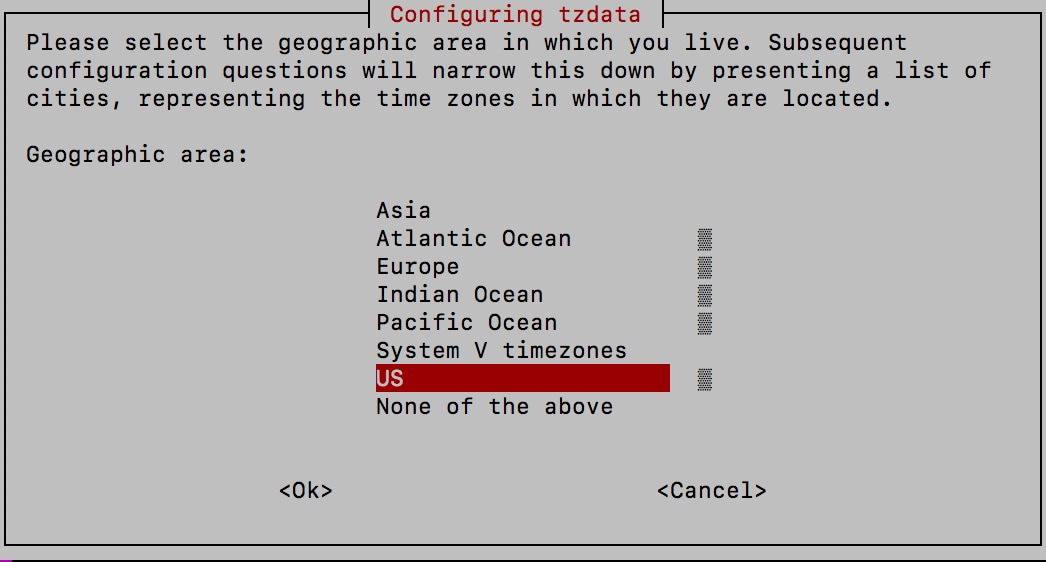
Select the geographical area in which you are located.

Figure 3. Geographic area selection
Timezone Settings - Geographic Area Selection

Step 5

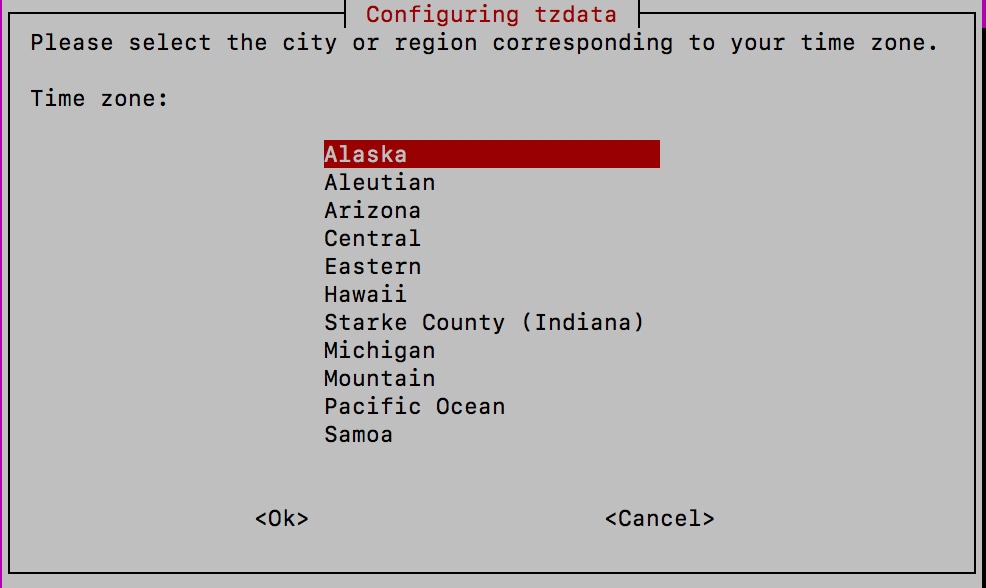
Select the city or region that corresponds to your timezone.

Figure 4. Region selection
Timezone Settings - Region Selection

Step 6

Select OK to save the settings.

Step 7

Reboot the Crosswork Data Gateway VM to apply the new timezone to all processes.

Step 8

Log out of the Crosswork Data Gateway VM.


Configure the password requirements

You can configure various password requirements, including:

  • Password strength

  • Password history

  • Password expiration

    and
  • Login failures

Procedure


Step 1

From the Change Current System Settings menu, select Configure Password Requirements.

Step 2

Select the password requirement you want to change.

Set the options for the selected requirement:

  • Password strength

  • Password history

  • Password expiration

  • Login Failures

Step 3

Click OK to save the settings.


Configure the simultaneous login limits

By default, Crosswork Data Gateway supports ten simultaneous sessions for the dg-admin and dg-oper users on each VM. To change this limit, use these steps:

Procedure


Step 1

From the Change Current System Settings menu, select Configure Simultaneous Login Limits.

Step 2

In the window that appears, enter the desired number of simultaneous sessions for the dg-admin and dg-oper users.

Step 3

Click OK to save your changes.


Configure an idle timeout

After a specified idle timeout, the system will automatically log out any inactive user session.

Procedure


Step 1

From the Change Current System Settings menu, select b Configure Idle Timeout.

Step 2

Enter the desired idle timeout value in the window that appears.

Step 3

Enter OK to save your changes.


Configure a remote auditd server

To export logs to a remote auditd server, perform the steps in this procedure.

Procedure


Step 1

From the Change Current System Settings menu, select c Configure Auditd.

Step 2

Enter the following details.

  • Remote auditd server address.

  • Remote auditd server port.

Step 3

Select OK to save your changes.


Configure the login check frequency

You can configure the number of permissible login attempts allowed after a failed login. If you want to disable the feature, set the frequency to zero.

Procedure


Step 1

From the Change Current System Settings menu, select Configure Login Check Frequency and click OK.

Step 2

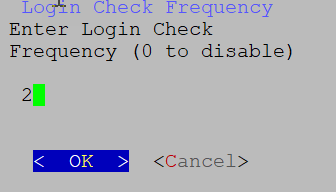
In the Login Check Frequency window, enter the number of login attempts you want to allow after a failure. To disable the feature, enter 0.

Figure 5. Login check frequency
Login Check Frequency Window

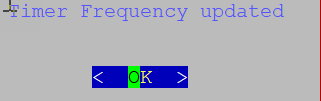
After the timer is updated, a confirmation window appears.

Figure 6. Timer frequency
Timer Frequency Updated Window

Configure an interface address

After deploying a Crosswork Data Gateway instance, you can reconfigure the network interfaces that are associated with it. The reconfiguration allows you to modify an interface’s name, IP address, or security group association.

Before you begin

Before reconfiguring the interface address, make sure to:

  • Ensure that all devices are detached from the Crosswork Data Gateway instance.

  • Verify that the Crosswork Data Gateway instance is in maintenance mode.

Procedure


Step 1

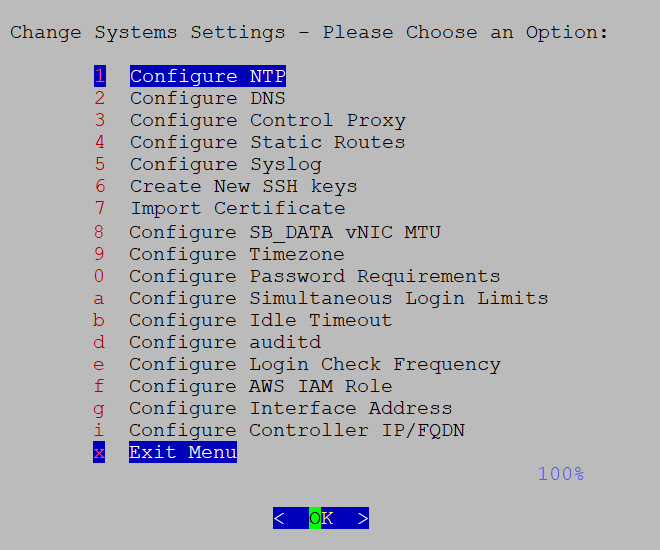
From the Change System Settings menu, select Configure Interface Address.

Figure 7. System settings
Change System Settings Menu

Step 2

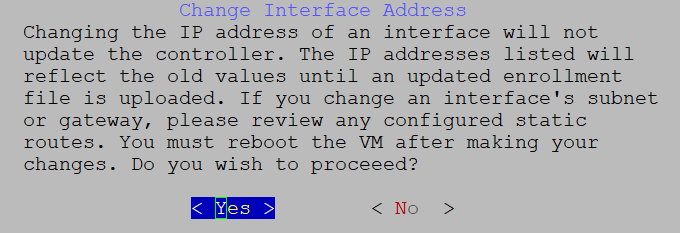
In the Change Interface Address confirmation box, click Yes.

Figure 8. Change interface address confirmation message
Change Interface Address Confirmation Message

Step 3

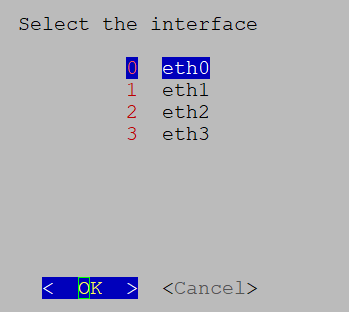
Select the interface that you want to reconfigure with options are eth0 , eth1, eth2, or eth3. Click OK.

Figure 9. Interface selection
Interface Selection Menu

Step 4

Choose the IPv4 addressing method for the interface. You can select from:

  • DHCP

  • Static Address

  • No address

Note


Cisco recommends that you select the option you configured during the Day0 installation.

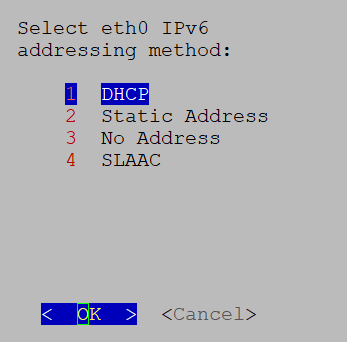
Figure 10. IPv6 address selection
IPv6 Address Selection

Step 5

Enter the IPv4:

  • address and click OK.

  • netmask address and click OK.

Step 6

In the Skip Interface IPv4 Gateway Configuration confirmation box, select True or False and click OK.

Step 7

If you selected True in the previous step, specify the IPv4 gateway address.

Step 8

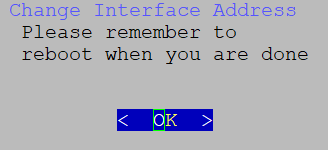
In the Change Interface Address confirmation box, click OK.

Figure 11. Confirmation message
Confirmation Message

Step 9

After reconfiguring the interface, reboot the VM to apply the changes.


Configure the controller IP for Crosswork Data Gateway

This topic explains the procedure for configuring the Controller IP or fully qualified domain name (FQDN) for the Crosswork Data Gateway after enabling the Geo Redundancy feature.

When a Data Gateway is deployed with an invalid Controller IP, it may get stuck in the enrollment process. To address this, reconfigure the Controller IP. Also, if a Data Gateway is enrolled to a Crosswork and there is a change in Controller virtual IP address (VIP IP) or the IP is changed to FQDN due to the enabled Geo Redundancy feature, it needs to be reconfigured.

To configure the controller IP for a new enrollment or change the controller IP of an existing Crosswork that the Data Gateway is enrolled with:

Navigate to the Data Gateway on the active cluster before the geo redundancy feature is enabled.

Procedure


Step 1

From the Change Current System Settings menu, select Configure Controller IP/FQDN

Step 2

Enter the SCP URI for the controller signing certificate file.

Step 3

Enter the SCP passphrase or the SCP user password for the controller-signing certificate file.

Step 4

Enter the IP address for the controller.

A message appears to confirm that Crosswork has updated the IP address or FQDN of the controller, and the VM is rebooted.


View the Crosswork Data Gateway vitals

To view Crosswork Data Gateway vitals, use these steps.

Procedure


Step 1

From the Main Menu, select Vitals.

Step 2

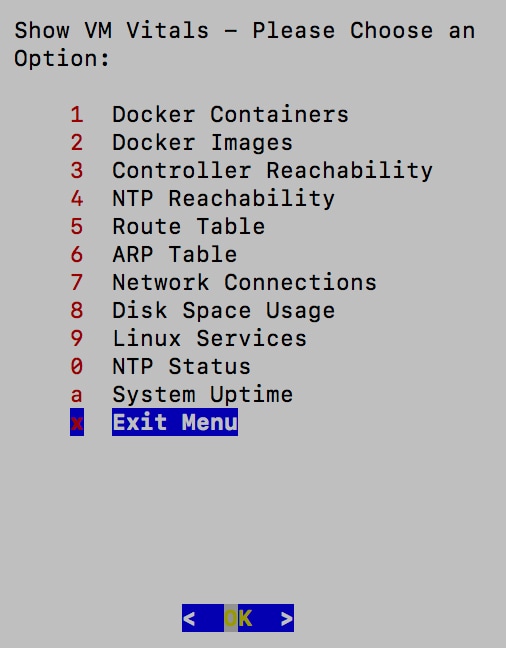
From the Show VM Vitals menu, select the vital you want to view.

Figure 12. Show the VM vitals
Show VM Vitals Menu

Vital

Description

Docker Containers

The system displays the following vitals for the Docker containers currently instantiated in the system.

• Container ID

• Image

• Name

• Command

• Created Time

• Status

• Port

Docker Images

The system displays the following details for the Docker images currently saved in the system.

• Repository

• Image ID

• Created Time

• Size

• Tag

Controller Reachability

The system displays the results of the controller reachability test run.

• Default IPv4 gateway

• Default IPv6 gateway

• DNS server

• Controller

• Controller session status

NTP Reachability

The system displays the results of NTP reachability tests.

• NTP server resolution

• Ping

• NTP Status

• Current system time

Route Table

The system displays the IPv4 and IPv6 routing tables.

ARP Table

The system displays the ARP tables.

Network Connections

The system displays the current network connections and listening ports.

Disk Space Usage

The system displays the current disk space usage for all partitions.

Linux Services

The system displays the status of these Linux services.

  • NTP

  • SSH

  • Syslog

  • Docker

  • Crosswork Data Gateway Infrastructure containers.

Check NTP Status

The system displays the NTP server status.

Check System Uptime

The system displays the system uptime.


Crosswork Data Gateway VMs troubleshooting

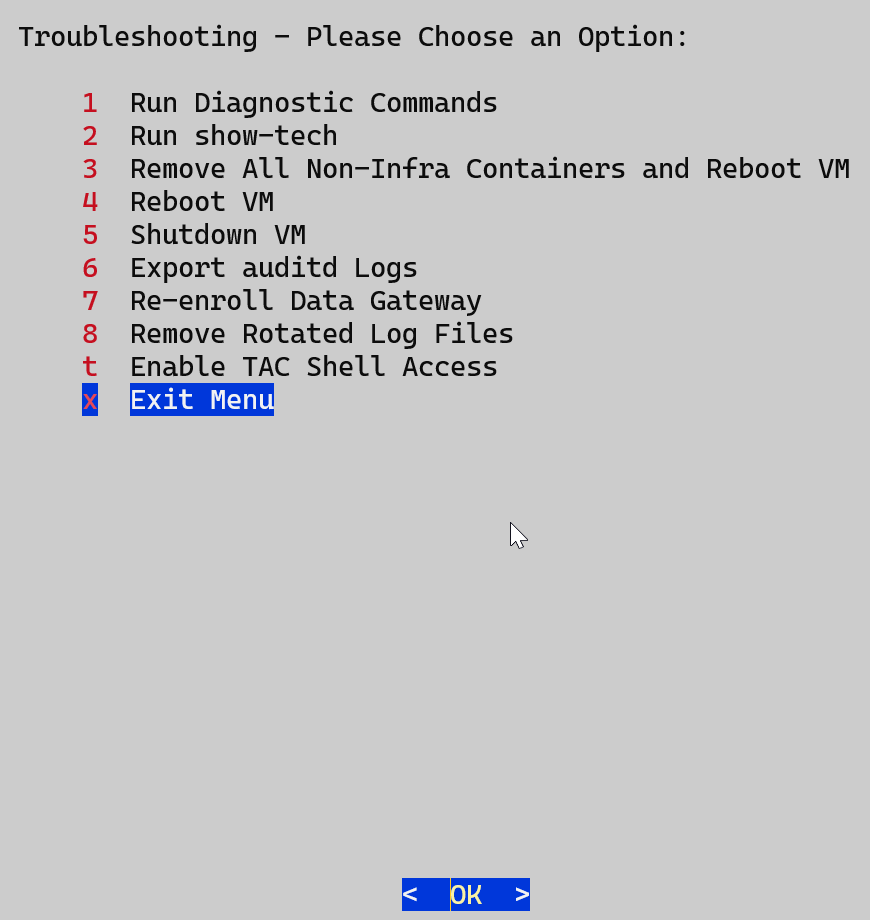
To access the Troubleshooting menu, select 5 Troubleshooting from the Main Menu.

Troubleshooting menu overview

The Troubleshooting menu provides several options to diagnose and resolve issues with the Crosswork Data Gateway VM.


Note


  1. Some options may be restricted for the dg-oper user. See Table 1.

  2. Crosswork Cloud does not support the Remove All Non-Infra Containers and Reboot option under the Troubleshooting menu.


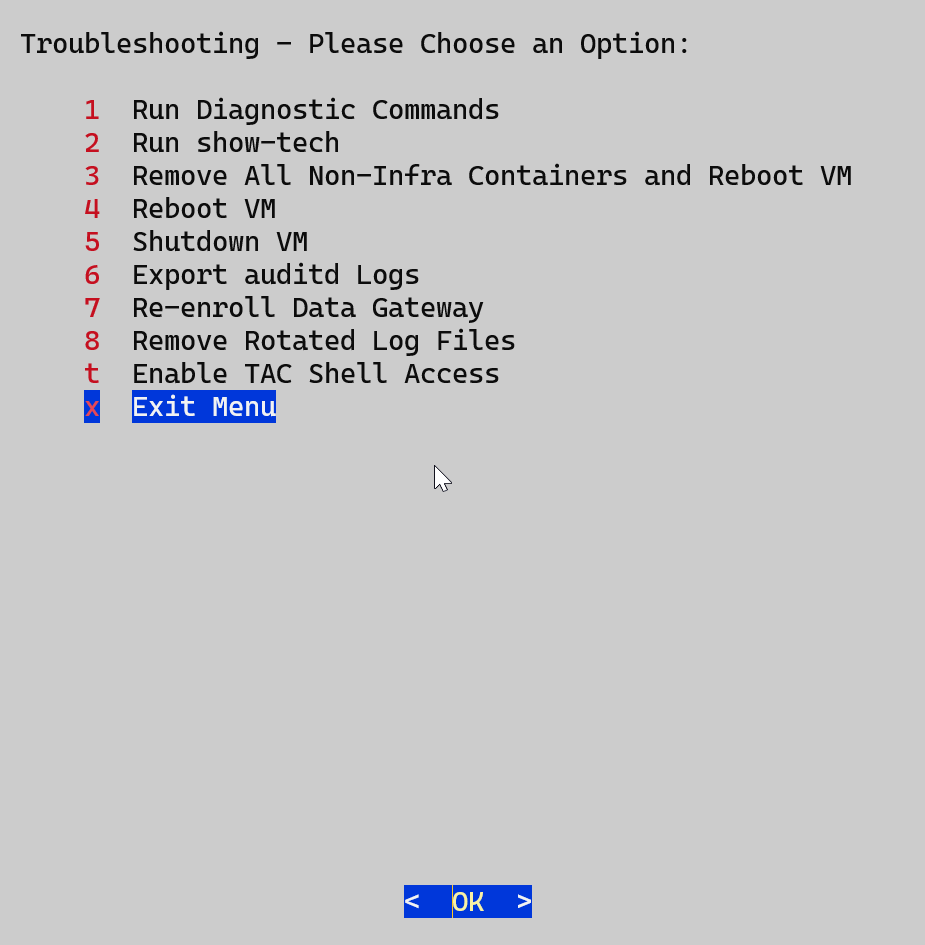
The Troubleshooting menu provides the options listed here:

Diagnostic commands

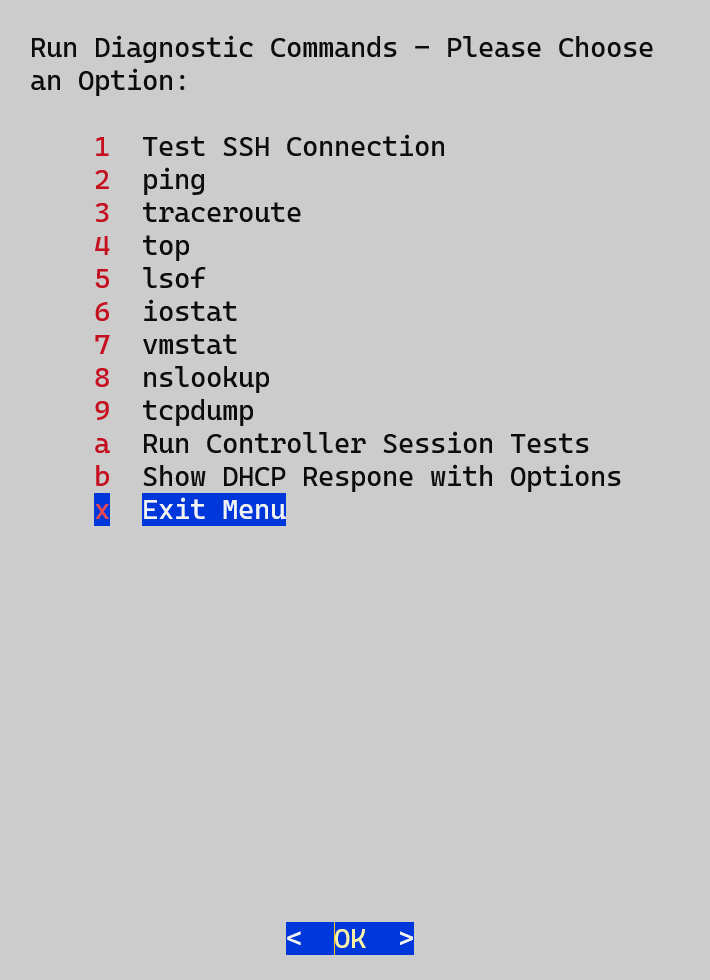
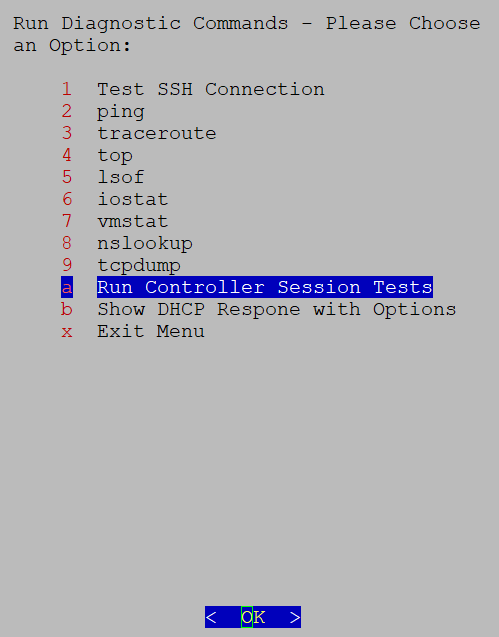
The Run Diagnostics menu provides you these options in the console:

Figure 13. Run diagnostics

Ping a host

The Crosswork Data Gateway provides a ping utility to check the reachability of any IP address.

Procedure

Step 1

From the Main Menu, select Troubleshooting > Run Diagnostics > Ping.

Step 2

Enter the required information:

  • Number of pings: Specify how many pings to send.

  • Destination hostname or IP: Enter the target hostname or IP address.

  • Source port: Choose the type (UDP, TCP, or TCP Connect).

  • Destination port: Select the appropriate type (UDP, TCP, or TCP Connect).

Step 3

Click OK.


Traceroute to a Host

The Crosswork Data Gateway offers the Traceroute option to help troubleshoot latency issues. This tool provides an estimate of the time it takes for the gateway to reach the destination.

Procedure

Step 1

From the Main Menu, select Troubleshooting > Run Diagnostics > Traceroute.

Step 2

Specify the destination for the traceroute.

Step 3

Click OK.


Troubleshoot the commands in Crosswork Data Gateway

The Crosswork Data Gateway provides a set of diagnostic commands to assist with troubleshooting.

Procedure

Step 1

From the Main Menu, navigate to Troubleshooting > Run Diagnostics.

Step 2

Choose one of the following commands based on your troubleshooting needs:

  • 4 top

  • 5 lsof

  • 6 iostat

  • 7 vmstat

  • 8 nsolookup

Apply any relevant filters or options for the selected command.

Step 3

Click OK.

Crosswork Data Gateway clears the screen and executes the selected command with the specified options.


Download the tcpdump

The tcpdump utility allows you to capture and analyze network traffic on Crosswork Data Gateway.


Note


Only the dg-admin user can run the tcpdump utility.


Procedure

Step 1

From the Main Menu, navigate to Troubleshooting > Run Diagnostics > tcpdump.

Step 2

Choose an interface to run tcpdump on. To capture traffic from all interfaces, select the All option.

Step 3

Select whether to display packet information on screen or save it to a file.

Step 4

Set the following parameters:

  • Packet count limit

  • Collection time limit

  • File size limit

  • Filter expression

Step 5

Click OK.


  • When tcpdump reaches the specified limits, Crosswork Data Gateway will:

    • Compress the capture file.

    • Prompt for SCP credentials to transfer the file to a remote host.

  • Once the file transfer is complete (or canceled), the compressed file is deleted.

Run a controller session test

To verify if Crosswork Data Gateway can establish a connection to Crosswork Cloud, use the Controller Session Test. This test also checks whether the VM’s resource allocation matches the deployment profile.

Procedure

From the Main Menu, navigate to Troubleshooting > Run Diagnostics > Run Controller Session Test.

If the connection is successful, a message confirming the connection appears. If the connection fails, the console displays these details to help you troubleshoot:

  • DNS server IP address

  • DNS domain

  • NTP server address

  • NTP status

  • Proxy URL

  • Proxy reachability status

  • Controller URL

  • Controller reachability status

  • Last test date

Figure 14. Run Controller Session Tests menu
Figure 15. Result of the Run Controller Session Tests menu

What to do next

If the session test fails, review the displayed information to determine the probable cause. Follow the corrective actions suggested by the console.

Run the Showtech command

The Showtech command allows you to export logs and vital information from the Crosswork Data Gateway to a user-defined SCP destination.

Typically, the command enables you to collect:

  • Logs from all Crosswork Data Gateway components running on Docker containers

  • VM vitals

When you run the command, it creates a tarball in the directory where it is executed. The tarball is named DG-<CDG version>-<CDG host name>-year-month-day--hour-minute-second.tar.xz.enc.

Procedure


Step 1

From the Troubleshooting menu, select Show-tech and click OK.

Step 2

Specify where to save the tarball containing logs and VM vitals.

Step 3

Enter your SCP passphrase and click OK.

The show-tech file is downloaded in an encrypted format.

Note


The download may take several minutes depending on the system usage.

Step 4

After the download is complete, run the following command to decrypt it:

openssl enc -d -aes-256-ctr -pbkdf2 -md sha512 -iter 100000 -in <showtech file> -out <decrypted filename> -pass pass:<password>

For example:

openssl enc -d -aes-256-ctr -pbkdf2 -md sha3-512 -iter 100000 -in show-tech-file.tar.xz.enc -out show-tech-file.tar.xz -pass pass: myPassword

Note

 
  • Use OpenSSL version 1.1.1i to decrypt the file. To check the OpenSSL version on your system, use the command openssl version.

  • The <showtech file> must have a .tar.xz extension.

  • Do not enclose the filenames <showtech file> and <decrypted filename> in quotation marks.

  • To decrypt on a MAC, you need OpenSSL 1.1.1+, as LibreSSL does not support all the necessary switches.


Crosswork Data Gateway VMs reboots

ou can reboot the VM in two ways using Crosswork Data Gateway.

  • Remove all Collectors and Reboot VM: Select this option if you want to

    • stop containers that are downloaded after installation (collectors and offload containers).

    • remove Docker images associated with these containers.

    • remove collector data and configurations.

    • reboot the VM.

    This action restores the VM to its state immediately after the initial configuration, with only infrastructure containers running.

  • Reboot VM: Select this option to perform a normal reboot of the Crosswork Data Gateway VM.


Note


This task is only available to dg-admin users.


Crosswork Data Gateway VMs shutdown

From the Troubleshooting menu, select 5 Shutdown VM to power off the Crosswork Data Gateway VM.

Export the auditd logs

Follow the steps to export auditd logs.

Procedure


Step 1

From Troubleshooting, select Export Audit Logs.

Step 2

Enter a passphrase to encrypt the auditd log tarball.

Step 3

Click OK.


Re-enroll Crosswork Data Gateway

To re-enroll Crosswork Data Gateway, complete each step in this task.

Before you begin

Before you re-enroll Crosswork Data Gateway, delete the existing enrollment from the controller.

Procedure


Step 1

From the Troubleshooting menu, select Re-enroll Data Gateway.

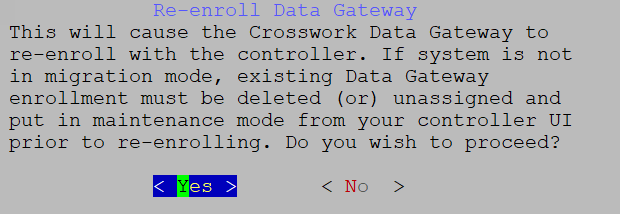
Step 2

Review the information in the confirmation window and click Yes to proceed.

Figure 16. Re-enroll Data Gateway Confirmation Window

Remove the rotated log files

To remove all rotated log files such as those with the .gz or .xz extension from the /var/log and /opt/dg/log folders, perform these steps:

Procedure


Step 1

From the Troubleshooting menu, select Remove Rotated Log Files.

Step 2

In the dialog that appears, select Yes to confirm and proceed with the log removal.


Enable the TAC shell access

The TAC Shell Access function allows a Cisco engineer to log in directly to the Ubuntu shell using multifactor authentication through the dg-tac user.

By default, the dg-tac account is locked and the password is expired to prevent unauthorized access. Once enabled, the dg-tac user is active for less than 24 hours (until midnight UTC [00:00 UTC] the next day).

Before you begin

Confirm that the Cisco engineer you are working with has access to the Secure Web Identity Management Service (SWIMS) Aberto tool. Active communication with the Cisco engineer is required to enable dg-tac access.

  • Enabling this access requires you to communicate actively with the Cisco engineer.

Procedure


Step 1

Log in to the Crosswork Data Gateway VM as the dg-admin user.

Step 2

From the Main Menu, select Troubleshooting.

Step 3

From the Troubleshooting menu, select Enable TAC Shell Access.

A dialog appears, warning you that the dg-tac user login requires a password you set, along with a challenge token from TAC. Choose Yes to continue or No to cancel.

Step 4

If you proceed, the system prompts you to set a password for the dg-tac user.

Step 5

Enter a password, and the system displays the expiration date when the account will be disabled.

Step 6

Log out of Crosswork Data Gateway.

Step 7

If the Cisco engineer has direct access to the Crosswork Data Gateway VM, share the password you set in Step 3.

  1. Share the password that you had set in Step 5 for the dg-tac user with the Cisco engineer who is working with you.

  2. The engineer logs in via SSH as the dg-tac user with the password you provided.

    The system will then prompt for a challenge token. The engineer signs it using SWIMS Aberto, pastes the signed response into the VM, and logs in successfully.

  3. The Cisco engineer logs in successfully as the dg-tac user and completes the troubleshooting.

    There is a fifteen-minute idle timeout period for the dg-tac user. If the Cisco engineer logs out, they must sign a new challenge to log in again.

  4. After troubleshooting is complete, the Cisco engineer logs out of the TAC shell.

Step 8

If the Cisco engineer does not have direct access:

  1. Start a meeting with desktop sharing enabled.

  2. Log in as dg-tac using SSH:

    ssh dg-tac@<DG hostname or IP>
  3. Enter the password that you set and obtain the challenge token.

  4. Share the token with the Cisco engineer, who will sign it using SWIMS Aberto and provide the signed response.

  5. Paste the signed response back into the VM to get the shell prompt.

  6. Share your desktop, or follow the engineer’s instructions to troubleshoot.

    There is a fifteen-minute idle timeout period for the dg-tac user. If logged out, the Cisco engineer must sign a new challenge to log in again.

  7. Once troubleshooting is complete, the engineer logs out of the TAC shell.