Multipath Operation

Multipath operation

Multipath Operation (MPO) is a patented technology that

  • enhances reliability by sending duplicate copies of packets across multiple wireless paths

  • duplicates high priority traffic up to 4x to reduce hardware failures and increase availability, and

  • establishes multiple label switched paths (LSPs) between a mobile system and the backend infrastructure to reduce packet loss.

MPO benefits and functionality

Fast-moving mobile systems expect high-speed connectivity onboard, which implies reliable wireless ground-to-vehicle communication without any interruptions. However, the dynamic nature of the network, the environmental radio frequency conditions and roaming under the various Wi-Fi standards lead to packet losses.

MPO addresses these challenges by providing:

  • Reduced latency for high priority traffic

  • Lower effects of interference through redundant path transmission

  • Increased system availability through hardware failure mitigation

The multiple LSPs enable high priority packets to be sent through redundant paths to reduce packet loss in mobile wireless network environments.

MPO working functionality

By default, MPLS establishes a single tunnel using one wireless link between the vehicle and the infrastructure for data transmission. Using two radio interfaces on two vehicle radios allows you to set up four MPLS tunnels for transmitting MPO-protected traffic. When you configure MPO to use multiple links for protected traffic, the system creates an MPLS tunnel over each available wireless link. Every wireless link replicates MPO-protected traffic. If one wireless link fails, the others continue replicating the traffic. Fast Failover is supported with MPO since UIW Release 17.14.1.

MPO packet duplication and deduplication

MPO packet duplication and deduplication is a reliability mechanism that

  • sends duplicate packets through several wireless channels to various access points to ensure reliability

  • uses spatial diversity of receiving access points to increase the chances of at least one packet copy being received correctly, and

  • removes duplicate packets received along different wireless paths using sequence numbers and deduplication algorithms.

MPO duplication and deduplication process

The delivered packets have sequence numbers assigned to them, allowing the deduplication algorithm to eliminate copies of packets that it has already received.

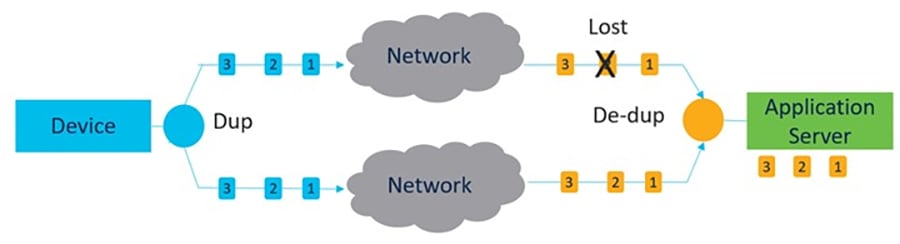
The process of duplication and deduplication is shown:

The diagram illustrates the process of packet duplication and deduplication in a wireless network, highlighting how sequence numbers are used to identify and eliminate duplicate packets received from multiple access points.

The duplication and deduplication algorithm performs these functions:

  • Address packet loss and asymmetric high/variable delay paths.

  • Remove additional packet delays created by buffering.

  • Remove duplicate and out of sequence packets.

  • Improve CPU, resource, and memory efficiency.

MPO limitations

Disable the following handoff features when MPO is enabled, as they are not available for use:

  • Pole Ban and Pole Proximity

  • Coloring

  • Load balancing

Configure MPO features using CLI

This task configures Multi-Path Operation (MPO) features to provide traffic redundancy and enable quality of service settings for improved network performance.

MPO features let you configure class-of-service traffic protection. You can also set up redundant paths for mobile devices, RSSI thresholds for wireless links, and telemetry settings. These configurations help ensure reliable network connectivity. They also enable performance monitoring.

Before you begin

Before you configure MPO, you must enable 802.1p-based QoS.

Procedure


Step 1

Use the configure fluidity mpo{cos cos-value| path max max-value| rssi min min-value | telemetry {enabled | disabled}} command to configure MPO features.

Example:


Device# configure fluidity mpo cos 5
Device# configure fluidity mpo path max 2
Device# configure fluidity mpo rssi min 10
Device# configure fluidity mpo telemetry enabled

This example shows the UDP Telemetry stream with MPO counters.

Example:


Device# configure telemetry server 192.168.0.200
Device# configure telemetry export enable
Device# configure fluidity mpo telemetry enabled
  • cos - Configure the class-of-service of traffic to protect with MPO redundancy. Only one CoS can be specified at a time. The valid cos range is zero to seven, and the default value is six.

  • path - Configure the maximum number of simultaneous redundant paths established by only mobile devices. The valid range for maximum path links is one to four. The default value is one.

  • rssi - Configure min RSSI threshold for a wireless link to be eligible as a redundant path(dB) (mobile devices only). The valid range for minimum RSSI value is 0 to 96. The default value is 20.

  • telemetry – Configure enable/disable specific MPO telemetry. The telemetry value can be enabled (M=1) or disabled (M=0). The default is disabled.

Step 2

Use the configure fluidity mpo status{disabled | rx-only | enabled } command to configure MPO status.

Example:

Device# configure fluidity mpo status enabled
  • disabled: Disable MPO duplication/deduplication.

  • rx-only: Set MPO status as rx-only. Deduplicate incoming MPLS traffic and do not duplicate outgoing traffic.

  • enabled: Enable MPO. Duplicate outgoing traffic and de-duplicate incoming MPLS traffic.

Step 3

Use the show fluidity mpo config command to verify the MPO configuration parameters.

Example:


Device# show fluidity mpo config
Status: enabled
Path max links: 2
RSSI min: 20
CoS: 6

Verify MPO features using CLI (MPO monitoring)

This section provides CLI commands and their sample outputs to verify and monitor Multi-Path Operation (MPO) features. Use these commands to check MPO configuration, view packet statistics, examine network topology, and analyze engineering data for troubleshooting and monitoring MPO performance.

MPLS configuration output

The output of the show mpls config command:


Device# show mpls config
5.42.42.43:
path_id : 0
ilm : 136000
nhlfe : 16:
lbr : 5.42.42.42
age : 6.980000028 { 5.42.42.42 5.42.42.43 }

path_id : 1
ilm : 136001
nhlfe : 18:
lbr : 5.42.42.42
age : 6.970000026 { 5.42.42.42 5.42.42.43 }

MPO statistics output

The output of the show fluidity MPO statistics command:


Device# show fluidity mpo statistics (on Mesh End)
table-size 2:
MAC address : 40:36:5A:15:C8:50        8C:89:A5:83:EB:71 
Tx-1        : 0                        208
Tx-2        : 0                        208
Rx-Accept-1 : 178                      0
Rx-Accept-2 : 30                       0
Rx-Drop-1   : 30                       0
Rx-Drop-2   : 178                      0
Lost-1-only : 0                        0
Lost        : 0                        0

Device# show fluidity mpo statistics (on Mobile Primary unit)
table-size 2:

MAC address : 40:36:5A:15:C8:50        8C:89:A5:83:EB:71 
Tx-1        : 208                      0
Tx-2        : 208                      0
Rx-Accept-1 : 0                        182
Rx-Accept-2 : 0                        26
Rx-Drop-1   : 0                        26
Rx-Drop-2   : 0                        182
Lost-1-only : 0                        0
Lost        : 0                        0
 

This list describes the fields in the command output.

  • MAC address: Source L2 address of the external network device which is sending packets.

  • Tx-1 and Tx-2: This field displays the total count of packets eligible for duplication.

  • Rx-Accept-1 and Rx-Accept-2: These counters represent, respectively, the number of packets received and dropped in the de-duplication process either on the primary path or secondary paths.

  • Lost-1-only: This field shows the number of packets received and accepted in the de-duplication process on the secondary paths but not on the primary path.

  • Lost: The cumulative number of packets lost on both primary path and secondary paths.

Fluidity network output

The output of the show fluidity network command:


Device# show fluidity network (on Mesh End and Mobile Primary)

unit 5.21.201.60  infrastructure meshend primary
vehicles 4  total_mobiles 5
infrastructure 1  backbone 0  meshend 5.21.201.60

Vehicle ID : + 85313616
Path : 0
Infrastr.ID : 5.21.201.60
Via : R1
Mobile ID : 5.21.200.80
Via : R2
H/O seq : 5710
H/O age : 36.597
#M: 2
Primary ID : 5.21.200.80
Secondary IDs : 5.21.201.204

Vehicle ID : + 85313616
Path : 1
Infrastr.ID : 5.21.201.60
Via : R2
Mobile ID : 5.21.201.204
Via : R2
H/O seq : 5711
H/O age : 5.909
#M: 2
Primary ID : 5.21.200.80
Secondary IDs : 5.21.201.204
```


Note


Intermediate nodes (MP and mobile secondaries) have only a subset of paths.

MPO path ID 0: primary path, others: redundant paths.


Engineering statistics output

The output of the show eng-stats command:

Device# show eng-stats (on mobile primary unit)
....
Fluidity role : primary 
vehicle id : 0
static  : 3.21.201.60 [FC:58:9A:15:C7:D2]
mobile  : 4.21.200.80 [FC:58:9A:15:B9:13]
snr : 42
rssi : -54
dop : 40
chan : 132/40
handoff: 21.518258794
time : 2
Current:
ho_seq: 7  pending: false  age: 21.518303221  primary: 5.21.200.80
[0] - <3.21.201.60 - 4.21.200.80> status SUCCESS seq 6 id 0 age 59.469266332 rssi 42
[1] - <4.21.201.60 - 4.21.201.204> status SUCCESS seq 7 id 1 age 21.518317752 rssi 41
last primary: <3.21.201.60 - 4.21.200.80>
free ids: 7 6 5 4 3 2
current missing path mask: 1111110

HO Table
static  : 3.21.201.60 [FC:58:9A:15:C7:D2]
mobile  : 4.21.200.80 [FC:58:9A:15:B9:13]
rssi : 42
dop : 40
chan : 132/40
updated : 74
skip : 0

static  : 4.21.201.60 [FC:58:9A:15:C7:D3]
mobile  :  4.21.201.204 [FC:58:9A:15:E4:D3]
rssi : 41
dop : 40
chan : 100/40
updated : 18
skip : 0
rssi_delta : 6 3
threshold : 35