High Efficiency (802.11 ax)

Configure and validate high efficiency

This task enables or disables 802.11ax High Efficiency (HE) mode on URWB devices and validates the configuration.

When High Efficiency (HE) is enabled, it is backward compatible with 802.11ac. To enable or disable 802.11ax HE, the following list is supported:

  • URWB HE supports 20,40, and 80 MHz bandwidth for slot 1

  • URWB HE supports 20,40,80, and 160 MHz bandwidth for slot 2

  • URWB HE default setting is disabled

  • HE negotiation is only supported between the devices with HE enabled

Procedure


Step 1

Use the configure dot11Radio {1 | 2} high-efficiency {enable | disable} command to enable or disable HE mode.

Example:

Device# configure dot11Radio 1 high-efficiency enable

Step 2

Use the configure dot11Radio {1 | 2} mcs maxmcs mcs-index command to configure maxmcs.

Example:

Device# configure dot11Radio 1 mcs maxmcs 11

Note


The default maxmcs is 9.

Step 3

Use the show dot11Radio {1 | 2} config command to validate HE mode.

Example:

Device# show dot11Radio 1 config
Maximum tx mcs : 9
High-Efficiency : Enabled
Maximum tx nss : 2
RTS Protection : disabled
guard-interval : 800ns

Step 4

Use the show eng-stats command to view engineering statistics:

Example:

Device# show eng-stats

WLAN1 Rx:

FC:58:9A:16F8:52 rate 1201 MCS 11/2 HE80/G1(800ns) ssn 48 rssi-48 received

WLAN1 Tx:

FC:58:9A:16F8:52 rate 1201 MCS 11/2 HE80/G1(800ns) sent 195612 failed 0

WLAN2 Rx:

FC:58:9A:16F8:13 rate 1201 MCS 11/2 HE80/G1(800ns) ssn 50 rssi-46 received

WLAN2 Tx:

FC:58:9A:16F8:13 rate 864 MCS 11/2 HE80/G1(800ns) sent 390797 failed 1


Configure global gateway using GUI

Configure global gateway MODE to automatically enforce MPLS Layer 3 functionality on your device.

Global gateway MODE automatically enforces the MPLS Layer 3. In this MODE, Radio-off and Radio status cannot be changed.

Procedure


Step 1

In the GENERAL SETTINGS, click GENERAL MODE.

The GENERAL MODE window appears.

Step 2

Click gateway from MODE.

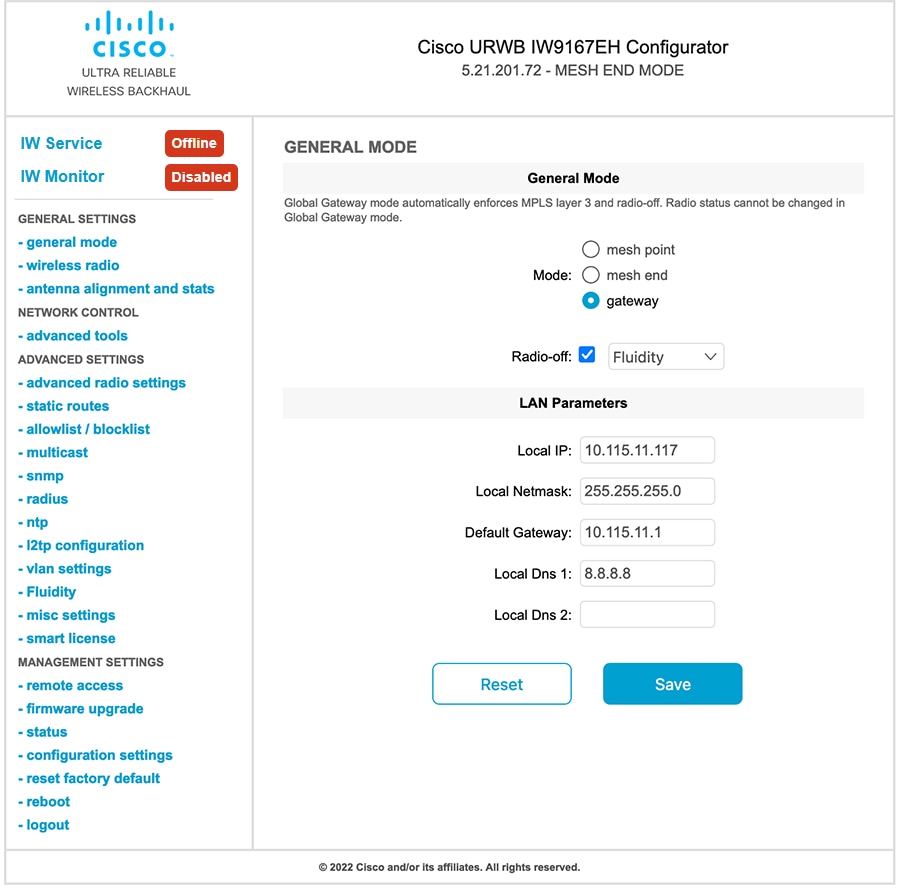
Following images shows the GUI configuration of global gateway mode:

Figure 1. Global gateway mode
The GENERAL MODE window displays the GUI configuration for global gateway mode, indicating that the device is set to global gateway mode with MPLS Layer 3 automatically enforced. The GENERAL MODE window displays the GUI configuration for setting the device to global gateway mode, indicating that MPLS Layer 3 is automatically enforced. The GUI configuration screen displays the global gateway mode settings, indicating that the device is set to global gateway mode with MPLS Layer 3 automatically enforced.

Configuring Guard Interval for HE

Configures the guard interval for HE to improve link reliability in long-range outdoor deployments.

Procedure


Step 1

Use the configure dot11Radio interface guard-interval [gi] command to configure the guard interval.

Example:

Device# configure dot11Radio 1 guard-interval 1600

Guard interval values include:

  • 3200: Configures 3200 ns guard interval (supported only in HE mode).

  • 1600: Configures 1600 ns guard interval (supported only in HE mode).

  • 800: Configures 800 ns guard interval (default guard interval mode and disable mode in HT, VHT, and HE).

  • 400: Configures 400 ns guard interval (supported in HT and VHT modes).

Step 2

Use the show dot11Radio interface show command to verify the configuration.

Example:

Device# show dot11Radio 1 show

Maximum tx mcs: 9
High-efficiency : enabled
Maximum tx nss : 2
RTS protection : disabled
guard-interval : 1600 ns