Fluidmax topology configuration and validation
Fluidmax topology configuration is a wireless network setup method that
-
enables any wireless interface to operate in Fluidmax mode for point-to-multipoint connections
-
uses independent sets of Fluidmax parameters for each interface, and
-
allows great flexibility in network topologies for fixed infrastructure.
Cascaded point-to-multipoint clusters
Two cascaded point-to-multipoint clusters demonstrate topology flexibility where the ME (Mesh End) node uses both radios in Fluidmax Primary mode to serve several secondary clients (MP1 (Mesh Point), MP2, and MP3) on two different frequencies. For MP2, the first radio operates in Fluidmax secondary mode to connect to the ME, while the second interface is configured as Fluidmax Primary to serve more downstream clients (MP4 and MP5).
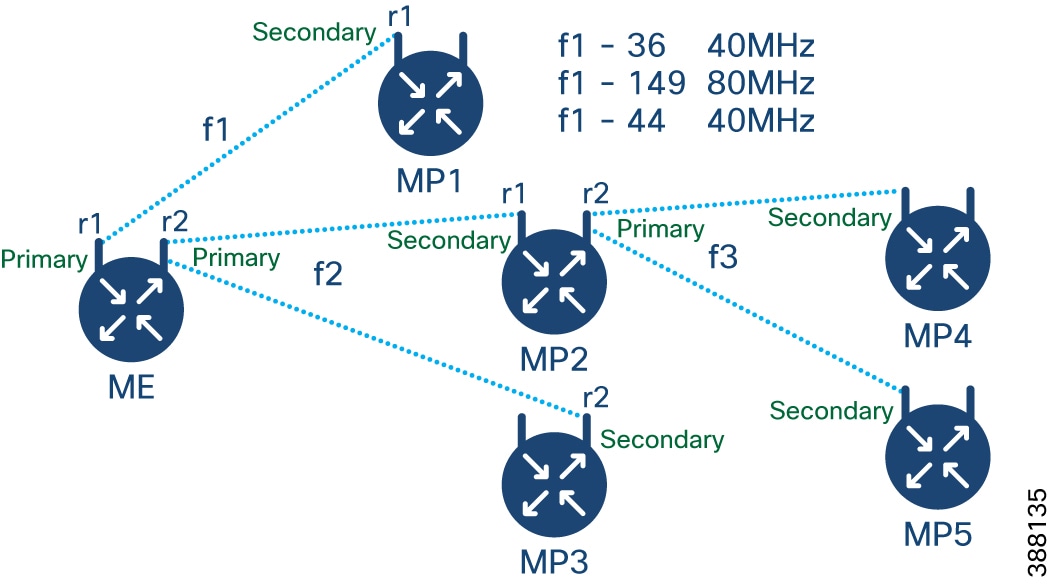
Configure point to multipoint topology from CLI
Configure a Fluidmax (point-to-multipoint) topology to establish wireless mesh networks with designated primary and secondary device roles.
The Fluidmax topology enables the creation of mesh networks in which devices function as either primary or secondary nodes. This configuration involves setting up dot11Radio interfaces, selecting operating modes, configuring channels, and specifying bandwidth parameters.
Procedure
|
Step 1 |
Use the configure dot11Radio interface command to configure the dot11Radio interface. Example:interface - Valid dot11Radio interface numbers range from 0-3. |
|
Step 2 |
Use the configure dot11Radio interface {enable | disable} command to enable or disable the wireless interface. Example: |
|
Step 3 |
Use the configure dot11Radio interface mode{fluidity | fixed| fluidmax}{primary | secondary} command to set the operating mode and role for the interface. Example: |
|
Step 4 |
Use the configure dot11Radio interface channel channel-id command to set the operating channel. Example:channel-id - Valid channel IDs range from 1 – 256. |
|
Step 5 |
Use the configure dot11Radio interface band-width channel-bandwidth command to configure the channel bandwidth. Example:channel-bandwidth - Supported values are 20, 40, 80, and 160. |
|
Step 6 |
Use the write command to save the configuration. Example: |
|
Step 7 |
Configure Fluidmax cluster ID and tower ID as needed. |
Configuration examples: Point to multipoint topology
ME (Mesh End) Configuration
Device#configure dot11Radio 1 enable
Device#configure dot11Radio 1 mode fluidmax primary
Device#configure dot11Radio 1 channel 36
Device#configure dot11Radio 1 band-width 40
Device#configure dot11Radio 2 enable
Device#configure dot11Radio 2 mode fluidmax primary
Device#configure dot11Radio 2 channel 149
Device#configure dot11Radio 2 band-width 80
MP1 (Mesh point) Configuration
Device#configure dot11Radio 1 enable
Device#configure dot11Radio 1 mode fluidmax secondary
Device#configure dot11Radio 1 channel 36
Device#configure dot11Radio 1 band-width 40
MP2 Configuration
Device#configure dot11Radio 1 enable
Device#configure dot11Radio 1 mode fluidmax secondary
Device#configure dot11Radio 1 channel 149
Device#configure dot11Radio 1 band-width 80
Device#configure dot11Radio 2 enable
Device#configure dot11Radio 2 mode fluidmax primary
Device#configure dot11Radio 2 channel 44
Device#configure dot11Radio 2 band-width 40
MP3 Configuration
Device#configure dot11Radio 1 enable
Device#configure dot11Radio 1 mode fluidmax secondary
Device#configure dot11Radio 1 channel 149
Device#configure dot11Radio 1 band-width 80
MP4 Configuration
Device#configure dot11Radio 1 enable
Device#configure dot11Radio 1 mode fluidmax secondary
Device#configure dot11Radio 1 channel 44
Device#configure dot11Radio 1 band-width 40
MP5 Configuration
Device#configure dot11Radio 1 enable
Device#configure dot11Radio 1 mode fluidmax secondary
Device#configure dot11Radio 1 channel 44
Device#configure dot11Radio 1 band-width 40
Validate point to multipoint topology using CLI
Use the show dot11Radio interface config command to validate the point-to-multipoint (Fluidmax) topology configuration.
Example:
ME (Mesh End) radio2
Device# show dot11Radio 2 config
Interface : enabled
Mode : fluidmax primary
Frequency : 5745 MHz
Channel : 149
…….
Fluidmax Configuration
Tower ID : disabled
Cluster ID : fluidmesh
Automatic scan : enabled
Automatic scan threshold : disabled
MP2 (Mesh Point)
Device# show dot11Radio 1 config
Interface : enabled
Mode : fluidmax secondary
Frequency : 5745 MHz
Channel : 149
…….
Fluidmax Configuration
Tower ID : disabled
Cluster ID : fluidmesh
Automatic scan : enabled
Automatic scan threshold : disabled
Device# show dot11Radio 2 config
Interface : enabled
Mode : fluidmax primary
Frequency : 5220 MHz
Channel : 44
Channel width : 40
…….
Fluidmax Configuration
Tower ID : 100
Cluster ID : fluidmesh
Automatic scan : enabled
Automatic scan threshold : disabled
MP4 radio1
Device# show dot11Radio 1 config
Interface : enabled
Mode : fluidmax secondary
Frequency : 5220 MHz
Channel : 44
Fluidmax Configuration
Tower ID : disabled
Cluster ID : fluidmesh
Automatic scan : enabled
Automatic scan threshold : disabled Feedback