Overview of Cisco Spaces: IoT Service (Wireless)
Cisco Spaces: IoT Service (Wireless) is a platform service within Cisco Spaces that enables you to claim, manage, and monitor IoT devices using Cisco's wireless infrastructure. IoT Service is designed to enable management of IoT devices across vendors, form factors, and technology protocols. Bluetooth Low Energy (BLE) is the first technology available for management using IoT services.
IoT service (wireless) encompasses hardware, software, and partner components to enable the management of devices that support critical business outcomes. IoT service (wireless) uses Cisco Catalyst 9800 Series Wireless Controllers, Cisco Spaces: Connector, Cisco Wi-Fi6 access points, and Cisco Spaces. IoT service (wireless) adopts a next-generation approach to manage complexity in an enterprise environment.

Click the Get Started button to learn more about getting started. This action redirects to the Cisco Spaces: IoT Service Configuration Guide (Wireless).
Click the Compatible Devices button to view the list of supported devices. This action redirects to the Cisco Spaces IoT Device Marketplace website.
Click the View Documentation button to see how to set up the product. This action redirects to the Cisco Spaces Setup Guide.
Using the IoT service (wireless), you can perform these IoT management activities:
-
Deploy BLE gateways on supported APs in your network.
-
Claim the BLE beacons that you acquired from Cisco Spaces: IoT Device Marketplace.
-
Configure APs and manage floor beacons.
-
Monitor device attributes such as location, telemetry, battery status, and movement status.
The section Outcome Apps describes these two sections:
-
Smart Workspaces: Smart Workspaces helps you prepare your workspace for hybrid work. Click on the Know More button to visit the Cisco Spaces: Smart Workspaces page.
-
Detect and Locate: Detect and Locate simplifies IoT with eBLE technology powered by Cisco Spaces. Click on the Know More button to visit the Cisco Spaces: Detect and Locate page.
Components of Cisco Spaces: IoT Service
The section describes the various components that work to complete the Cisco Spaces: IoT Service solution.
The Cisco Catalyst 9100 Series Family of Access Points acts as a gateway of communication between Cisco Spaces and the IoT devices. Cisco Spaces: IoT Service can then use a range of common APIs to communicate with edge devices and apps. The Cisco Spaces: IoT Service collects data from devices and apps, and passes it to Cisco-partnered websites that manage these devices far more extensively (referred to in this document as Device Manager websites). These Device Manager websites can use edge-device signals to enable outcomes specialized and targeted for each industry.
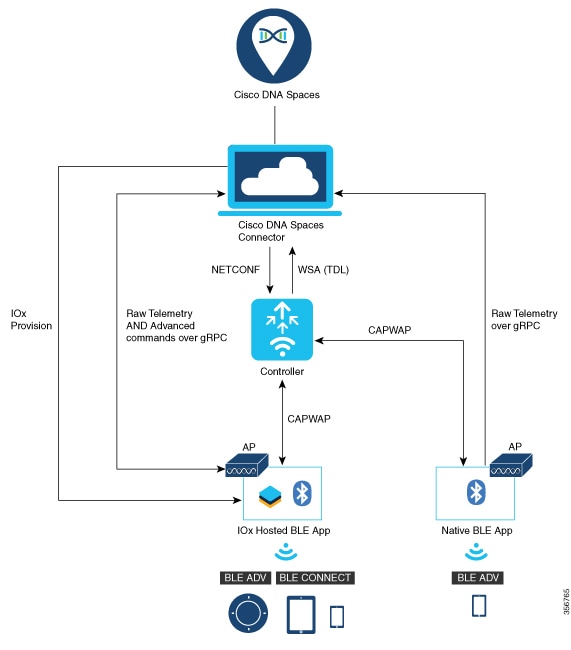
Access Points
You can configure access points as gateways in Cisco Spaces. You can find the list of supported APs in the Compatibility Matrix section.
Depending on your Cisco AP model, configure the AP as one of these types of BLE gateways:
-
Base BLE Gateway: This is an AP that does not run Cisco IOx App. You can configure this AP in Scan, Transmit, or Dual mode.
-
Advanced BLE Gateway: This is an AP installed with the Cisco IOx App. The Cisco IOx App brings the ability to connect, configure, and manage third-party BLE floor beacons using the Cisco Spaces dashboard. Moreover, the Cisco IOx App can be used to perform additional BLE filtering on the AP. You can configure this AP in Scan, Transmit, or Dual mode.
Cisco Catalyst 9800 Series Wireless Controllers
The Cisco Catalyst 9800 Series Wireless Controller (Catalyst 9800 controller) combines RF excellence with Cisco IOS-XE benefits, and comes in physical or virtual form factor. This wireless controller is reliable and highly secure. You can manage this Catalyst 9800 controller using CLI, GUI, NETCONF, Yang, or the Catalyst Center.
The Catalyst 9800 controller is the single point for configuring and managing a wireless network and access points. The Catalyst 9800 controller configures and manages APs using the CAPWAP protocol.
The Catalyst 9800 controller receives BLE configuration from Cisco Spaces over NETCONF and passes the configuration to AP over CAPWAP. The feedback path from the AP to the wireless controller is through CAPWAP, and from the Catalyst 9800 controller to Cisco Spaces through Telemetry data logger (TDL) telemetry streaming. The gRPC configuration from Cisco Spaces also goes through the Catalyst 9800 controller, and from there to the corresponding AP. The configuration sets up the gRPC channel between the AP and Cisco Spaces. The AP sends the gRPC channel statistics to the Catalyst 9800 controller, and you can view these statistics on the Catalyst 9800 controller.
 Note |
IoT service (wireless) and Intelligent Capture (iCAP) can co-exist from Cisco IOS XE Cupertino 17.7.x or higher. |
Cisco Spaces: IoT Device Marketplace
Cisco Spaces: IoT Device Marketplace is a platform where you can discover, research, and purchase IoT devices. IoT Device Marketplace is a part of the Cisco Spaces full-stack partner ecosystem. Each device is preconfigured to give the customer an out-of-the-box experience with sensors, tags, wearables, and more. All the devices are compatible with the applications in the App Center. Current devices in the IoT Device Marketplace leverage BLE to transmit telemetry, with plans to add other technology in the future, such as Ultra Wide Band (UWB) and Zigbee.
Cisco Spaces: Connector
Cisco Spaces: Connector allows Cisco Spaces to communicate with more than one
-
Cisco AireOS Wireless Controllers, and
-
Cisco Catalyst 9800 Series Wireless Controllers.
APs connect to connector using the gRPC framework.
The APs establish a connection to connector using the gRPC protocol. The gRPC protocol configures floor beacons and receives telemetry data from the floor beacons. gRPC is a bidirectional streaming service, and requires a certificate to validate the host connection and a token for authentication. Each AP creates a gRPC connection. Connector can thus support many simultaneous connections.
Compatibility Matrix for IoT Service (Wireless)
|
Application Name |
Support for Cisco Spaces: IoT Service |
||
|---|---|---|---|
|
Supported wireless controllers |
|
||
|
Cisco Spaces: Connector Docker |
2.0.455 and later |
||
|
Cisco Spaces: Connector OVA |
3.x and later |
||
|
Cisco Prime Infrastructure |
Cisco Prime Infrastructure Release 3.8 MR1 and later |
||
|
Catalyst Center (for map import) |
Catalyst Center Release 2.1.1 and later |
||
|
Access Points for advanced BLE gateway (Wi-Fi 6) |
|
||
|
Access points for basic BLE gateway |
|
||
|
Cisco IOx App Version |
1.0.46 and later
|
Note |
IoT Service (Wireless) is not supported with a directly connected controller, CMX Tethering, and AireOS connector. The only supported configuration is the Cisco Catalyst 9800 Wireless Controller and the connector. |
This table lists the compatibility of the Advanced BLE Gateway for BLE and the Base BLE Gateway App with various AP modes. This table is not applicable to Cisco Embedded Wireless Controller on Cisco Catalyst Access Points (Cisco EWC-AP).
|
AP Mode |
Advanced BLE Gateway App |
Base BLE Gateway App |
|---|---|---|
|
PI: Local |
|
|
|
P1: Flex |
|
|
|
P2: Fabric |
|
|
|
P3: Mesh |
|
|
IoT services old Vs new UI
Feature Parity But Moved
|
Old UI section |
Old UI location |
New UI location |
| IoT Management | Home/summary | Consolidated into Device Management, starting with building selection |
| IoT Management | AP Gateways | Device Management → Wireless APs → AP Gateways |
| IoT Management | AP inventory included within AP Gateways | Inventory → Wireless APs |
| IoT Management | Wired Gateways | Device Management → Wired → Wired Gateways |
| IoT Management | Wired switch inventory/deployment list | Inventory → Wired |
| IoT Management | AP Gateway request history | Device Management → Wireless APs → Bulk/Operation Request History |
| IoT Management | Wired Gateway request history | Device Management → Wired → Bulk Request History |
| Device Management | Home/summary | Consolidated into Device Management, divided into Wireless APs, BLE Devices, and Wired |
| Device Management | Devices → AP Beacons | Device Management → Wireless APs → AP Beacons |
| Device Management | AP Beacon sensor capability view | Device Management → Wireless APs → AP Sensors for non-Meraki networks |
| Device Management | AP Beacon scanning controls | Device Management → Wireless APs → Activate/Stop Scanning on Network |
| Device Management | Devices → Floor Beacons | Device Management → BLE Devices |
| Device Management | Floor Beacon profile views | Device Management → BLE Devices, using profile/KPI views |
| Device Management | Floor Beacons → Claimed Devices | Inventory → Claimed Devices |
| Device Management | Onboard/Claim Devices | Inventory → Claimed Devices → Claim Devices |
| Device Management | Claimed Device → Firmware Management | Device Management → BLE Devices → Claimed Device details |
| Device Management | Devices → Wired Devices | Device Management → Wired → Wired Sensors |
| Device Management | Devices → Smart PDUs | Device Management → Wired → Smart PDUs |
| Device Management | Groups | Settings → Groups |
| Device Management | Settings → Filtering | Settings → Device Filtering |
| Device Management |
Different Buckets like All Profiles/AP Sensor/ Tranmist(iBeacon/eddyUid/eddyUrl)/Scan/ Dual/NeedsConfigChange/Disabl |
APbeacons/ NeedsConfigChange/Disabled |
| Device Management | Actions-Manage Sensor | Only Available in AP Sensor tab |
Deprecated / Not Provided
|
Old UI section |
Old UI feature/location |
New UI disposition |
| About | Standalone Network Health dashboard | Deprecated/removed. The network_health route is commented out. Per-device Network Troubleshoot remains available.
|
| About | One-click activation when no IoT license is present | Not provided. Activation and configuration are license-gated; unavailable locations/actions are locked or hidden. |
| IoT Management / Device Management | Root/ORG/Campus-level management operations | Deprecated. Management is building-oriented; ROOT, ORG, and CAMPUS nodes cannot be selected for these operations. |
| IoT Management | Actions-Manage Sensor | Only provided in AP Sensor tab |
| IoT Management | Add New gateway link | Not Provided in AP Gateway tab but user can add AP gateways from about |
| Device Management | Policies and policy alerts | Not provided. Policy code exists, but the Policies tab is commented out and unreachable. |
| Device Management | Settings → Sensor History | Deprecated/removed |
| Device Management | Settings → Access Key | Not provided in the current Settings page. |
| Device Management | Devices → Hella Cameras | Not provided in active Device Management or Inventory navigation. |
| Device Management | Onboard through Camera | Not provided in the active Claim Devices choices. |
| Device Management | Devices → Zigbee Devices | Not provided as a dedicated page. Zigbee capability information may still appear for AP Gateways. |
| Device Management | Standalone Maps page and general list/map switching | Deprecated. There is no active Maps route, and the general Map View control was removed. Some device-specific embedded maps remain. |
 Feedback