You must complete all the prerequisites before upgrading to Secure Access.
The prerequisite steps listed below need to be completed before you can begin the next step to Start Upgrade.
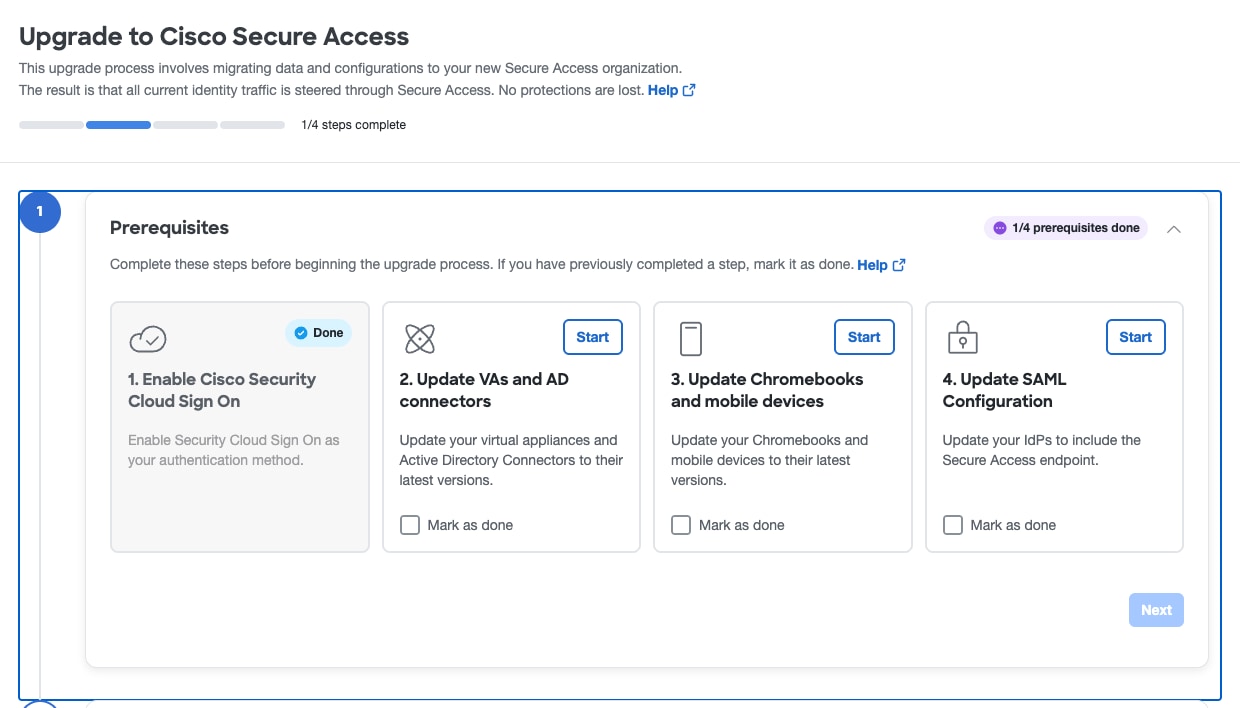
Add any additional registered network devices using the legacy API before upgrading. For guidance on setting up network devices with legacy APIs, see the Hardware integration section at https://securitydocs.cisco.com/docs/umbrella-sig/olh/152032.dita.
Enable Cisco Security Cloud Sign On
Prerequisite: Enable Cisco Security Cloud Sign On
Overview of Virtual Appliance Updates
Check that your virtual appliances are updated.
Overview of Active Directory Connector Updates
Ensure that your Active Directory Connectors are updated.
Update Chromebooks
Check that all Chromebooks and Cisco Chromebook clients are updated.
Update Mobile Device
Check that all mobile devices and clients are up to date before attempting the upgrade.
Overview to Update SAML Metadata XML
This is the last step in the prerequisites – to update the end-user SAML configuration in your IdP.