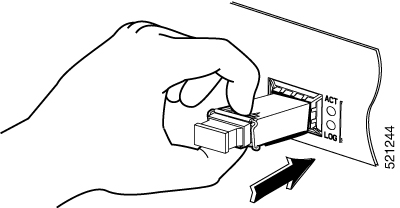
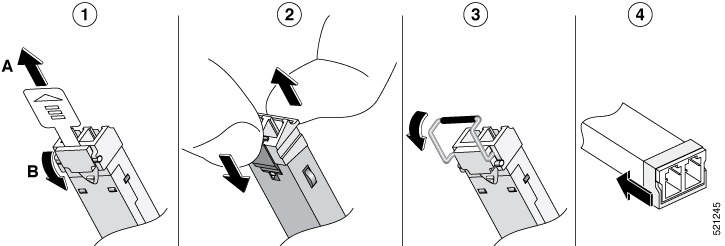
Outlines the steps for installing and removing SFP and SFP+ modules, including adherence to laser safety guidelines and proper removal techniques for small form pluggable modules.
Before you begin
See the Cisco Optics-to-Device Compatibility Matrix for a list of supported SFP and SFP+ modules. Use only supported SFP/SFP+ modules on the platform.
Class 1 laser product. Statement 1008
We recommend that you wait 30 seconds between removal and insertion of an SFP on an interface module. This time is recommended to allow the transceiver software to initialize and synchronise with the standby RSP. Changing an SFP more quickly could result in transceiver initialization issues that disable the SFP
-
Do not remove the dust plugs from the SFP and SFP+ modules or the rubber caps from the fiber-optic cable until you are ready to connect the cable. The plugs and caps protect the module ports and cables from contamination and ambient light.
-
Removing and installing an SFP and SFP+ module can shorten its useful life. Do not remove and insert any SFP/SFP+ module more often than is necessary.
-
To prevent ESD damage, follow your normal board and component handling procedures when connecting cables to the switch and other devices.
-
When you insert several SFP and SFP+ modules in multiple ports, wait for 5 seconds between inserting each SFP/SFP+. This will prevent the ports from going into error disabled mode. Similarly, when you remove an SFP and SFP+ from a port, wait for 5 seconds before reinserting it.