Cisco 8600 Series Secure Routers Hardware Installation Guide

PDF

Cisco 8600 Series Secure Routers Hardware Installation Guide

Install and connect

Want to summarize with AI?

Log in

Introduces safety considerations and best practices for installing 8600 Series Secure Routers, detailing standalone and rack installation guidelines, including verification of rack dimensions to ensure proper equipment fit and secure deployment.


This chapter provides procedures for installing the Cisco 8600 Series Secure router on an equipment shelf, tabletop, or in an equipment rack. It describes how to install and connect Cisco 8600 Series Secure Routers to LAN and WAN networks.

Safety instructions for installation

Note

IMPORTANT SAFETY INSTRUCTIONS

Before you work on any equipment, be aware of the hazards involved with electrical circuitry and be familiar with standard practices for preventing accidents. Read the installation instructions before using, installing, or connecting the system to the power source. Use the statement number at the beginning of each warning statement to locate its translation in the translated safety warnings for this device.

SAVE THESE INSTRUCTIONS

Note

IMPORTANT SAFETY INSTRUCTIONS

Invisible laser radiation may be emitted from the fiber cable or connector. Do not view with optical instruments. Viewing the laser output with certain optical instruments (for example, eye loupes, magnifiers, and microscopes) within a distance of 100 mm may pose an eye hazard.

Note

IMPORTANT SAFETY INSTRUCTIONS

Pluggable optical modules comply with IEC 60825-1 Ed. 3 and 21 CFR 1040.10 and 1040.11 with or without exception for conformance with IEC 60825-1 Ed. 3 as described in Laser Notice No. 56, dated May 8, 2019.

Note

Read the installation instructions before using, installing, or connecting the system to the power source.

Note

Proceed with the installation if you have already unpacked your chassis and read all the site requirements for your new equipment.


Guidelines for installation

The chassis should already be in the area where you want to install it. If you have not determined where to install your chassis,

  • Keep at least 3 feet of clear space in front of and behind the rack. This space ensures that you can remove the Cisco 8600 Series Secure Router components and perform routine maintenance and upgrades easily.

    Avoid installing the Cisco 8600 Series Secure Router in a congested rack and consider how the routing of cables from other pieces of equipment in the same rack might affect access to the routers cards.

    The front and top of the chassis must remain unobstructed to ensure adequate airflow and prevent overheating inside the chassis.

    Allow these clearances for normal system maintenance:

    • At the top of the chassis—At least 3 in. (7.6 cm)

    • In front of the chassis—3 to 4 ft (91.44 cm to 121.92 cm)

    • Rear of the chassis—atleast 12 in.

  • The chassis should be installed off the floor. Dust that accumulates on the floor is drawn into the interior of the router by the cooling fans. Excessive dust inside the router can cause overtemperature conditions and component failures.

  • Maintain a minimum clearance of 5.25 inches (13.335 or 13.34 cm) on the front and back sides of the chassis for the cooling air inlet and exhaust ports, respectively. Avoid placing the chassis in an overly congested rack or directly next to another equipment rack; the heated exhaust air from other equipment can enter the inlet air vents and cause an overtemperature condition inside the router.

  • The chassis needs adequate ventilation. Do not install it in an enclosed cabinet where ventilation is inadequate.

  • Keep the cable-management bracket ready if you plan to install it on the front of the chassis.

  • Ensure that an adequate chassis ground (earth) connection exists for your router chassis (see the "Attaching a Chassis Ground Connection" section).


Guidelines for rack installation

The Cisco 8600 Series Secure Routers can be installed in Four-post, 19-inch equipment rack. Inner clearance (the width between the inner sides of the two posts or rails) must be at least 19 inches (48.26 cm). Airflow through the chassis is from front to back.

The Cisco 8600 Series Secure Routers must be installed with both front and rear rack-mount brackets.

When planning your rack installation, consider these guidelines:

  • The Cisco 8600 Series Secure Routers requires a minimum of 1.75 inches or 4.45 cm rack units of vertical rack space. The Cisco 8600 Series Secure Routers requires a minimum of 3.5 inches or 8.9 cm rack units of vertical rack space. Measure the proposed rack location before mounting the chassis in the rack.

  • Before using a particular rack, check for obstructions (such as a power strip) that could impair rack-mount installation. If a power strip does impair a rack-mount installation, remove the power strip before installing the chassis, and then replace it after the chassis is installed.

  • Allow sufficient clearance around the rack for maintenance. If the rack is mobile, you can push it back near a wall or cabinet for normal operation and pull it out for maintenance (installing or moving cards, connecting cables, or replacing or upgrading components). Otherwise, allow 19 inches (48.3 cm) of clearance to remove field-replaceable units.

  • Maintain a minimum clearance of 3 inches on the front and back sides of the chassis for the cooling air inlet and exhaust ports, respectively. Avoid placing the chassis in an overly congested rack or directly next to another equipment rack; the heated exhaust air from other equipment can enter the inlet air vents and cause an overtemperature condition inside the router.

    Caution

    To prevent chassis overheating, never install a Cisco 8600 Series Secure Routers in an enclosed space that is not properly ventilated or air conditioned.

    Caution

    The recommended torque for rack mount bracket screws is 8 in-lbs.

  • Always install heavier equipment in the lower half of a rack to maintain a low center of gravity to prevent the rack from falling over.

  • Install and use the cable-management brackets included with the Cisco 8600 Series Secure Routers to keep cables organized and out of the way of the cards and processors. Ensure that cables from other equipment already installed in the rack do not impair access to the cards or require you to disconnect cables unnecessarily to perform equipment maintenance or upgrades.

  • Provide an adequate chassis ground (earth) connection for your router chassis.


Verify rack dimensions

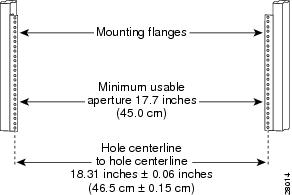
Before you install the chassis, measure the space between the vertical mounting flanges (rails) on your equipment rack to verify that the rack conforms to the measurements shown in this figure.

Figure 1. Verify Equipment Rack Dimensions

Procedure

  1. Mark and measure the distance between two holes on the left and right mounting rails.

    The distance should measure 18.31 inches ± 0.06 inches (46.5 cm ± 0.15 cm).

    Note

    Measure for pairs of holes near the bottom, middle, and top of the equipment rack to ensure that the rack posts are parallel.

  2. Measure the space between the inner edges of the left front and right front mounting flanges on the equipment rack.

    The space must be at least 17.7 inches (45 cm) to accommodate the chassis that is 17.25 inches (43.8 cm) wide and fits between the mounting posts on the rack.