Cisco 8600 Series Secure Routers Hardware Installation Guide

PDF

Cisco 8600 Series Secure Routers Hardware Installation Guide

Hardware features

Want to summarize with AI?

Log in

Details the hardware features of Cisco 8600 Series Secure Routers, describing AC and DC power supply options and integrated power supply fans to support reliable hardware operation.


Table 1. Hardware Features for Cisco 8600 Series Secure Routers

Feature

C8650-G2

Ethernet Ports

20 x 1/10GE SFP+ ports

6 x 40/100GE QSFP28 ports

Rack Units

Three

System Memory (DRAM)

64GB DRAM (default)

Storage

480 GB SSD (default)

eUSB bootflash 32GB

Management Interface

1x RJ-45 Out-Of-Band (OOB) management

1x RJ-45/1x Micro-USB Console

Console Port

1xRJ45, 1x USB Micro-USB

USB Ports

USB Type C

Rack Installation

Four post

Table 2. Supported Transceivers for Cisco 8600 Series Secure Routers

Feature

C8650-G2

Supported Transceivers

1G and 10G SFP+ modules

40G and 100G QSFP modules

QSFP power classes up to Class 8

Table 3. Power Supply for Cisco 8600 Series Secure Routers

Power Supplies

C8650-G2

AC

PWR-CH1-1100WAC

DC

PWR-CH1-950WDC


AC power supply

This section describes the AC power supply for the Cisco 8600 Series Secure Routers.

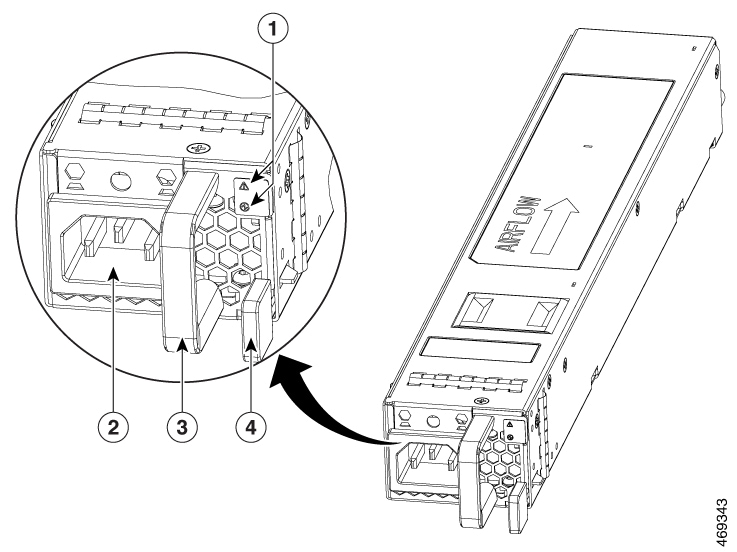
Figure 1. AC Power Supply Used in the Cisco C8650-G2 Router

1

Fail and OK LEDs

3

Handle

2

AC power connector

4

Retaining latch


DC power supply

The DC input connector is a two-wire connector with connection polarity from left to right (when facing the unit) of positive (+) and negative (–).

The power supply has a handle to be used for insertion and extraction. The module must be supported with one hand because of its length.

Note

The airflow direction is front to back with ambient air drawn in from the venting located on the chassis front sides.

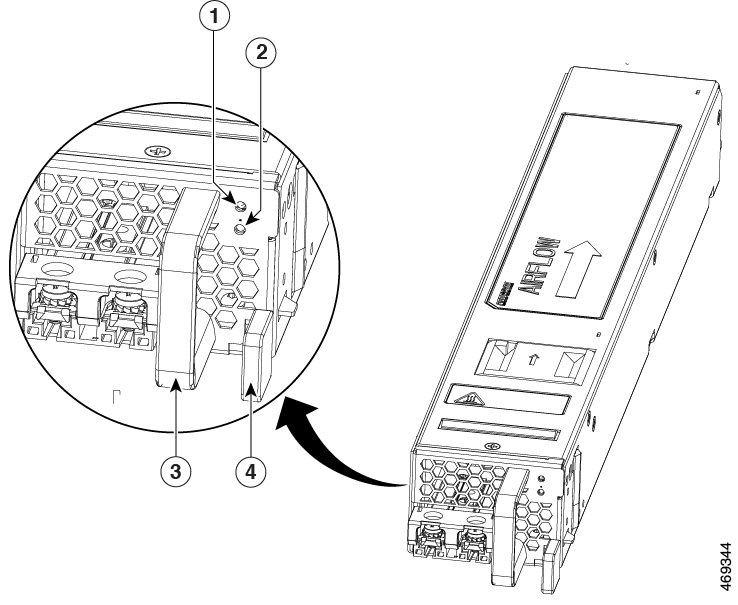
Figure 2. DC Power Supply for C8650-G2

1 and 2

Fail and OK LEDs

3

Handle

4

Retaining latch

—

Power supply fans

The fans in the power supply module are used for cooling the power supply module itself while system-level cooling is provided by fans within the chassis. The power supplies do not depend on the system-level fans for cooling. Fan failure is determined by fan-rotation sensors.

Caution

The chassis has a front-to-rear airflow. All of the power supplies and fan modules in the same chassis must use the same airflow direction or an error will occur with possible overheating and shut down of the router. If you power up the router with more than one airflow direction, you must power down the router and replace the modules with the wrong airflow direction before powering up the router.

Note

The fans in the power supply modules will run as soon as the power supply is plugged in, even if the power switch is in the Standby position.