Cisco MSX Platform Features and Enhancements
The Cisco MSX 4.0 platform features and enhancements are given in the table below.
Platform Microservices
| Feature | Description | Category | ||
|---|---|---|---|---|
|
Migration of Service Configuration |
The Cisco MSX platform enables the migration of the service configuration with the new template service. This migration improves the overall performance by reducing the memory footprint. |
Enhancement: API |
||
|
Migration of Workflow Service |
The Cisco MSX platform enables the migration of the workflow service to reduce the memory footprint. |
Enhancement: API |
||
|
Migration of Administration Service |
The Cisco MSX platform enables the administration service to migrate from the Cassandra database to the Cockroach database for improving the performance. |
Enhancement: API |
||
|
Device Password Retrieval Using Serial Number |
The Cisco MSX platform allow users with administrator privileges to retrieve the deleted or existing device password using the serial number. For more information, see the Retrieving Deleted Password. |
Enhancement: API and GUI |
||
|
Addition of Tag on Service Offers |
The Cisco MSX platform provides a set of labels or tags such as Preview on the service offer that is available on the Tenant Workspace > Offer Catalog window. For more information, see Assigning Offers to Tenants. |
Enhancement: API and GUI |
||
|
Smart Account License Validation |
The tenants can log into MSX using the Cisco.com SSO credentials and select a service offer for subscription. The Cisco MSX platform provides capabilities to validate the list of smart accounts, virtual accounts, and licenses associated with the Cisco.com user's account. Only based on the authentication the users are allowed to proceed with the offer subscription process. For more information, see Validating Smart Account License Using API. |
New Feature: API |
||
|
Billable Events Management |
The Cisco MSX platform provides event-based billing capabilities for the tenants. The events that are registered from the service pack are determined as billable and monetary values are assigned by operators for different service pack-based events in the Cisco MSX. The event generation and billing calculation are scheduled as per the pre-configured interval. For more information, see Managing Billing. |
Enhancement: API and GUI |
||
|
Incident Tracking System Integration with the Tenants |
The Cisco MSX platform provides an extended capability to integrate an incident tracking system with all the MSX tenants. You can create, update, resolve, or close an incident ticket. For more information, see Integrating Incident Tracking System with Cisco MSX. |
Enhancement: API |
||
|
Device Compliance Vulnerability Monitoring and E-mail Notification |
The Cisco MSX platform now detects and reports the software vulnerability for both the Cisco devices and third-party devices. MSX sends an email notification to all the tenants regarding the captured vulnerability information of the registered devices. For more information, see Managing Device Compliance Vulnerability Using API. |
New Feature: API |
||
|
Enhanced SSO Integration Using Okta |
The Cisco MSX platform integrates with Okta to enhance existing MSX identity capabilities and onboard enterprise users into MSX. The Cisco IDP will validate one of the initial users using cisco.com details and create them as a tenant. Any subsequent users will be authenticated based on their enterprise IDP. For more information, see Configuring SAML-Based IDPs on MSX . |
Enhancement: API |
||
|
Identity Management Enhancements |
The Cisco MSX platform enables the users to be placed into groups and allows the administrator to apply for roles and permissions at the group level rather than to individual users. For more information, see Configuring SAML-Based IDPs on MSX . |
Enhancement: API |
||
|
Dynamic Tenant Creation from Cisco.com Account |
The Cisco MSX platform now generates a tenant for a user logging into MSX for the first time using cisco.com credentials. MSX extracts the company name attribute from the user's cisco.com profile for creating a tenant (federated user).
For more information, see Generating Tenant Dynamically from Cisco.com Account. |
Enhancement: API |
||
|
Tenant Groups Enhancement |
The Cisco MSX platform now displays all the available Tenant Groups in a list format and allows you to manage Tenant Groups effectively. For more information, see Managing Tenant Groups. |
Enhancement: GUI |
||
|
MSX Portal Access for Users Without Any Subscription |
Users accessing the MSX portal with no subscriptions will see the Offer Catalog window with the servicesthat they can subscribe to. For more information, see Subscribing Application from Tenant Workspace. |
Enhancement: GUI |
Cisco MSX SD-WAN Service Pack Features and Enhancements
The Cisco MSX 4.0 SD-WAN service pack features and enhancement are given in the table below.
| Feature | Description |
Category |
||
|---|---|---|---|---|
|
Support of Control Planes for Different Environments |
The Cisco MSX SD-WAN now allows you to create different control planes for production and proof-of-concept (POC) environments. For more information, see Configuring Cisco SD-WAN Orchestrator Settings. |
Enhancement: GUI |
||
|
MSX Portal Updates |
The following options have now been moved under Tenant Workspace > Service Controls.
|
Enhancement: GUI |
||
|
Updated Device Page in the Tenant Workspace |
The Device Details option from Tenant Workspace > Devices > Device window displays device details, such as device name, serial number, device model, and the last updated time. The data presented on this window is refreshed every (n) minutes depending on the time set by your administrator. For more information, see Monitoring Cisco SD-WAN Device Status. |
Enhancement: GUI |
||
|
Support of Newer Version of Cisco SD-WAN |
The Cisco MSX now supports 20.5.1 version of Viptela SD-WAN software. For more information, see Cisco SD-WAN and MSX Compatibility Matrix. |
Enhancement: General |
||
|
Cisco MSX Meraki SD-WAN Enhancements |
The Cisco MSX now supports Meraki MS (Switch) in the Meraki Add Site Flow. For more information, see Meraki device types in Adding a New Site or Device for Meraki. |
Enhancement: General |
||
|
Cisco SD-WAN Control Plane Access using MSX managed proxy |
You can now access the control plane from within the MSX portal using MSX-managed proxy, eliminating the need to whitelist your IPs to access the control plane. For more information, see Prerequisites for Setting Up Control Plane. |
Enhancement - Process Change |
||
|
SD-Branch Hidden GUI |
The Cisco MSX SD-WAN service pack depends on the Cisco MSX SD-Branch service pack to deploy vEdge VNFs on ENCS devices. From this release onwards, the SD-Branch GUI is hidden by default. Operators can enable the SD-Branch GUI from the Offer Management GUI.
|
New Feature: GUI |
Cisco MSX SD-Branch Features and Enhancements
The Cisco MSX 4.0 SD-Branch features and enhancements are given in the table below.
| Feature | Description | Category |
|---|---|---|
|
Milestone-2 |
||
|
Hidden SD-Branch GUI |
From this release onwards, the SD-Branch GUI is hidden by default. Operators can enable the SD-Branch GUI from the Offer Management GUI. |
Enhancement: GUI |
Cisco MSX Managed Device Service Pack Features and Enhancements
The Cisco MSX 4.0 Managed Device service pack features and enhancement are given in the table below.
| Feature | Description | Category |
|---|---|---|
|
Cisco MSX New GUI for Managed Device Service Pack |
An MSX user can now perform all the MD tasks from the new tenant-centric GUI. For more information, see Cisco MSX Managed Device Documentation. |
New Feature: GUI |
|
Device Configuration to Device Template |
The Cisco MSX platform allows a user to:
For more information, see Converting Device Configuration to Device Template. |
New Feature: GUI |
|
Device Configuration and Compliance |
The Cisco MSX ensures that the devices under management do not have their configuration drift from the standard applied. A device configured to a set of standards remains in that state until it is changed. This feature supports both Cisco and non-Cisco devices. Using this feature, you can:
For more information, see Device Compliance. |
New Feature: GUI |
|
Detection of Changes in Device Configuration and Compliance |
The Cisco MSX detects the changes in device configuration and compliance. This feature helps in the approval and rollback of the changes. For more information, see Device Compliance. |
New Feature: GUI |
|
Adding Device to Compliance during Onboarding |
During a device onboarding, Cisco MSX allows you to bring a device under compliance and apply the standard configuration. This feature supports both direct and PnP onboarding. For more information, see Adding Device. |
New Feature: GUI |
|
Compliance for Imported Devices |
When you import devices into Managed Device, this feature ensures that the devices in the CSV file are under compliance. For more information, see Importing Multiple Devices. |
New Feature: GUI |
|
Remediation of Device Compliance |
The Cisco MSX allows you to remediate the changes in device compliance. You can review the out of compliance values and rollback into standard configuration. You can also configure automatic remediation of values. The out of compliance devices are automatically restored to the standard configuration. For more information, see Remediating Non-compliant Values in a Device. |
New Feature: GUI |
|
Management of Standard Configuration |
The Cisco MSX allows you to change the values of standard configuration. You can add new values, update, and remove existing values. For more information, see Editing Standard Configuration. |
New Feature: GUI |
|
Out of Compliance Notification to Service Now |
The Cisco MSX notifies you when a device is no longer in compliance with the standard values. You get an email or ticket in service now as notification. For more information, see Viewing an Event Log. |
New Feature: GUI |
Cisco MSX Enterprise Access Service Pack Features and Enhancements
The Cisco MSX 4.0 Enterprise Access (EA) service pack features and enhancements are given in the table below.
| Feature | Description | Category |
|---|---|---|
|
Support for Cisco DNA Center Version 2.2.2 |
The Cisco MSX EA service pack now supports Cisco DNA Center version 2.2.2. For more information, see Cisco MSX Enterprise Access 4.0 Documentation. |
New Feature: GUI |
|
Enterprise WLAN Provisioning for Non-Fabric |
The Cisco MSX EA service pack allows a user to deploy a new wireless LAN service on an existing switched access network (Non-Fabric). A user can:
For more information, see WLAN Provisioning. |
New Feature: GUI |
Cisco MSX Portal Enhancement
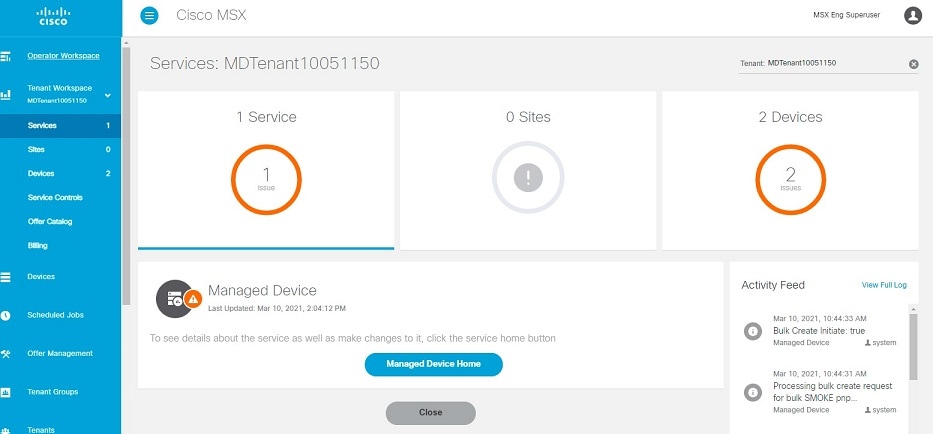
From Cisco MSX 4.0 release onwards, MSX portal displays new GUI.
The Cisco MSX GUI has:
-
The Operator Workspace is only visible to operator users. It lists all tenants that the operator is managing and the services they have subscribed to.
Click on a tenant's tile to see details specific to a tenant in the Tenant Workspace GUI.
-
A Tenant Workspace, which allows tenants to access the information related to their subscribed services.
The menus that are available in the Tenant Workspace are:
-
Services: Display all services subscribed by a tenant, service status, and other service metrics.
-
Sites: Display an overview of the tenant’s sites, site status, and allows access to site details.
-
Devices: Display an overview of the tenant’s devices, device status, and allows access to device details.
-
Service Controls: Display the custom service controls that are used to manage the services.
-
Offer Catalog: Display existing subscriptions and allows subscribing to new services.
-
Billing: Display billing information about the tenant’s subscriptions.
-
Activity Feed: The Cisco MSX portal allows a tenant to view several events pertaining to the subscriptions, sites, devices, template, and services. The events that are logged in the Events Log window are also used in the Activity Feed. To view the Activity Feed, choose Tenant Workspace > Services. These contextual event feeds are also displayed on the Sites Overview window and Devices Overview window.
For more information on monitoring service status, see the Cisco Managed Services Accelerator (MSX) 4.0 Administration Documentation link in the Related Documentation table.
-
The figure below shows the Tenant Workspace:
Cisco MSX Documentation Enhancement
A new documentation interface has been introduced for Cisco MSX for ease of search and better accessibility on Cisco.com. You can access this new interface at:
The following are the categories available on this new interface:
-
What's New: Includes new features, enhancements, deprecated APIs for this release.
-
MSX Solution Overview: Provides a comprehensive explanation of the design of Cisco MSX, a software solution that enables service providers and enterprises to develop and manage flexible and extensible network services.
-
MSX Guides: Includes the following:
-
Details of post-install configuration information and administrative tasks required to set up the Cisco MSX.
-
Details of deploying SD-WAN, Managed Devices, and Enterprise Access services.
-
-
MSX Licensing: Contains licenses and notices for Open Source software used in Cisco MSX product.
-
DevNet: Contains details of various development tools like Service Design Studio (SDS), Template Development Environment (TDE), SDK, and so on.
 Feedback