802.1ah Support for Ethernet Infrastructure
Available Languages
Table Of Contents
802.1ah Support for Ethernet Infrastructure
Information About 802.1ah Support for Ethernet Infrastructure
How to Configure 802.1ah Support for Ethernet Infrastructure
Configuration Examples for 802.1ah Support for Ethernet Infrastructure
Feature Information for 802.1ah Support for Ethernet Infrastructure
802.1ah Support for Ethernet Infrastructure
First Published: November 20, 2009Last Updated: November 20, 2009The Excalibur MAC Tunneling Protocol (MTP) feature is based on IEEE 802.1ah standard and provides Virtual Bridged Local Area Network (VLAN) and MAC scalability. This feature extends the Cisco QinQ (IEEE 802.1ad) capability to support highly scalable Provider Backbone Bridge Architecture (PBB). MTP allows a service provider to interconnect multiple Provider Bridged Networks (PBNs) with maximum 10,48,576 (2 to the 20th power) Service VLANS support and extend the MAC address scalability.
Finding Feature Information
Your software release may not support all the features documented in this module. For the latest feature information and caveats, see the release notes for your platform and software release. To find information about the features documented in this module, and to see a list of the releases in which each feature is supported, see the "Feature Information for 802.1ah Support for Ethernet Infrastructure" section.
Use Cisco Feature Navigator to find information about platform support and Cisco IOS and Catalyst OS software image support. To access Cisco Feature Navigator, go to http://www.cisco.com/go/cfn. An account on Cisco.com is not required.
Contents
•
Information About 802.1ah Support for Ethernet Infrastructure
•
•
•
Information About 802.1ah Support for Ethernet Infrastructure
With this feature, you can scale a Provider Bridged P802.1ad network using the existing Bridged and VLAN deployment. Although the current Cisco QinQ capability provides for VLAN scaling, this feature extends the scaling and inter-operability between multiple vendors.
To make forwarding decisions, Bridges in a Provider Backbone Bridged Network (PBBN) need to learn MAC address of each host. MTP resolves the issue of MAC address learning by encapsulating the data packet and MAC addresses (source and destination) into a new Ethernet frame. The header of the new Ethernet frame contains:
•
•
•
•
MAC scalability is implemented using the B-MACs. Since the new Ethernet frames are encapsulated with MAC address while traversing the PBBN, a bridge needs to learn only the B-MACs. The MAC addresses of hosts are hidden from the Provider Backbone Bridges (PBB), resulting in the PB Bridges to learn only the provider MAC address, independent of the number of hosts or the number of host MAC addresses supported. Since the data packets are sent to specific MAC addresses, the 802.1ah cloud is not flooded with unnecessary traffic. A MAC address may be a static entry in the MAC address table on the Backbone Core Bridge.
The VLAN scalability is implemented using the I-SID. The MTP achieves VLAN scalability by using a backbone VLAN TAG with 12 bit B-VID and the Service Instance TAG with 24 bit Service Instance ID to provide the VLAN scalability necessary to map large number of customers.
MTP Software Architecture
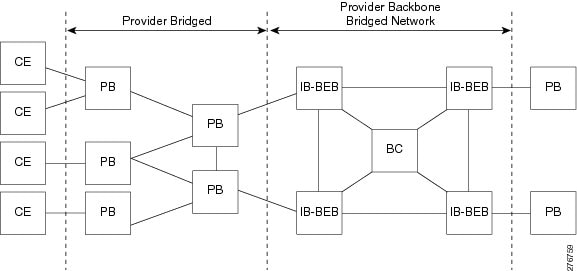
The encapsulation and de-capsulation of MAC addresses is performed on a Backbone Edge Bridge (BEB) at the edge of the PBBN. A BEB can be an I-Bridge (I-BEB), a B-bridge (B-BEB), or an IB-bridge (IB-BEB). MTP with IB-BEB functionality is also supported. Figure 1 shows the MTP software architecture:
Figure 1 MTP Software Architecture
IB Backbone Edge Bridge
The IB-BEB consists of one B-Component and one or more I-Components. An IB-BEB provides the functionality to select the B-MAC and insert I-SIDs based on the supported tags. It also validates the I-SIDs and transmits or receives the frames on the B-VLAN.
The 802.1ah draft describes two types of customer facing interfaces supported by IB-BEB:
•
–
–
•
MTP supports these interfaces.
Data Plane Processing
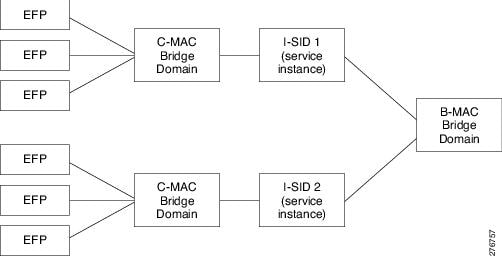
The packets on the ingress EFP are tunneled to the appropriate MAC tunnel using the C-MAC bridge domain. For multiple EFPs using the same I-SID, the switching among EFPs is done using the C-MAC bridge domain. The local switching is performed across all the ports in the bridge domain even if they span multiple tunnel engines.
MTP Configuration
Table 1 lists the relationship between the various entities in a Cisco 7600 Series router for MTP implementation:
Figure 2 show N to N relationship within a Cisco 7600 Series Router:
Figure 2 N to N relationship within a Cisco 7600 Series Router
Scalability Information
Table 2 lists the scalability information for MTP:
Table 2 Scalability Information for MTP
How to Configure 802.1ah Support for Ethernet Infrastructure
The configuration of 802.1ah support for ethernet infrastructure of Excalibur MTP for Cisco 7600 Router is described in detail below.
Restrictions
Follow these restrictions and usage guidelines when configuring the MAC Tunneling Protocol on an ES40 line card:
•
•
•
•
•
•
•
•
•
SUMMARY STEPS
1.
2.
3.
4.
5.
6.
7.
8.
9.
10.
11.
12.
13.
14.
15.
16.
17.
DETAILED STEPS
Configuration Examples for 802.1ah Support for Ethernet Infrastructure
This example shows how to configure Excalibur MTP for Cisco 7600 Routers:
Router>enableRouter#configure terminalRouter(config)#interface GigabitEthernet 3/1Router(config-if)#service instance 20 ethernetRouter(config-if-srv)#encapsulation dot1q 40 second-dot1q 42Router(config-if-srv)#rewrite ingress tag pop 1 symmetricRouter(config-if-srv)#bridge-domain 21 c-macRouter(config-if-srv)#exitRouter(config-if)#exitRouter(config)#ethernet mac-tunnel virtual 22Router(config-tunnel-minm)#bridge-domain 200Router(config-tunnel-minm)#service in 23 ethernetRouter(config-tunnel-srv)#encapsulation dot1ah isid 24Router(config-tunnel-srv)#bridge-domain 21 c-macRouter(config-tunnel-srv)#exitRouter(config-tunnel-minm)#exitRouter(config)#exitUse the following commands to verify the MTP configuration:
•
Router#sh platform mtp slot 3SLOT TUNNELENGINE VLAN_LIST3 MacTunnelEngine3/0 2003 MacTunnelEngine3/13 MacTunnelEngine3/23 MacTunnelEngine3/3•
Router#sh platform mtp c_bd 21C_BD B_BD SLOT PPE C_BD_COUNT21 200 3 0 1Router#•
Router#sh platform mtp b_bd 200B_BD SLOT PPE B_BD_COUNT200 3 0 1Router#•
Router#sh platform mtp befp 23BEFP C_BD B_BD SLOT PPE C_BD_COUNT23 21 200 3 0 1Router#•
•
Router#show ethernet service mac-tunnel 1 detailTunnel Id: 1EFP Microblocks:****************Microblock type: Bridge-domainBridge-domain: 20No. of Service Instances: 1Service Instance ID: 16000Associated Tunnel Id: 1Encapsulation: dot1ah 1 vlan-type 0x88E7Rewrite: egress tag push dot1ah 1 vlan-type 0x88E7 symmetricState: Upmac-tunnel address map: 0001.0001.0001 0002.0002.0002EFP Statistics:Pkts In Bytes In Pkts Out Bytes Out0 0 0 0EFP Microblocks:****************Microblock type: Bridge-domainBridge-domain: 1 c-macMicroblock type: CFMCFM encapsulation:Additional References
The following sections provide references related to the IEEE 802.1ah Support for Ethernet Infrastructure feature.
Related Documents
Standards
MIBs
•
To locate and download MIBs for selected platforms, Cisco IOS releases, and feature sets, use Cisco MIB Locator found at the following URL:
RFCs
Technical Assistance
Feature Information for 802.1ah Support for Ethernet Infrastructure
Table 3 lists the release history for this feature.
Not all commands may be available in your Cisco IOS software release. For release information about a specific command, see the command reference documentation.
Use Cisco Feature Navigator to find information about platform support and software image support. Cisco Feature Navigator enables you to determine which Cisco IOS and Catalyst OS software images support a specific software release, feature set, or platform. To access Cisco Feature Navigator, go to http://www.cisco.com/go/cfn. An account on Cisco.com is not required.

Note
.
CCDE, CCENT, CCSI, Cisco Eos, Cisco HealthPresence, Cisco IronPort, the Cisco logo, Cisco Nurse Connect, Cisco Pulse, Cisco SensorBase, Cisco StackPower, Cisco StadiumVision, Cisco TelePresence, Cisco Unified Computing System, Cisco WebEx, DCE, Flip Channels, Flip for Good, Flip Mino, Flipshare (Design), Flip Ultra, Flip Video, Flip Video (Design), Instant Broadband, and Welcome to the Human Network are trademarks; Changing the Way We Work, Live, Play, and Learn, Cisco Capital, Cisco Capital (Design), Cisco:Financed (Stylized), Cisco Store, Flip Gift Card, and One Million Acts of Green are service marks; and Access Registrar, Aironet, AllTouch, AsyncOS, Bringing the Meeting To You, Catalyst, CCDA, CCDP, CCIE, CCIP, CCNA, CCNP, CCSP, CCVP, Cisco, the Cisco Certified Internetwork Expert logo, Cisco IOS, Cisco Lumin, Cisco Nexus, Cisco Press, Cisco Systems, Cisco Systems Capital, the Cisco Systems logo, Cisco Unity, Collaboration Without Limitation, Continuum, EtherFast, EtherSwitch, Event Center, Explorer, Follow Me Browsing, GainMaker, iLYNX, IOS, iPhone, IronPort, the IronPort logo, Laser Link, LightStream, Linksys, MeetingPlace, MeetingPlace Chime Sound, MGX, Networkers, Networking Academy, PCNow, PIX, PowerKEY, PowerPanels, PowerTV, PowerTV (Design), PowerVu, Prisma, ProConnect, ROSA, SenderBase, SMARTnet, Spectrum Expert, StackWise, WebEx, and the WebEx logo are registered trademarks of Cisco Systems, Inc. and/or its affiliates in the United States and certain other countries.
All other trademarks mentioned in this document or website are the property of their respective owners. The use of the word partner does not imply a partnership relationship between Cisco and any other company. (0910R)
Any Internet Protocol (IP) addresses and phone numbers used in this document are not intended to be actual addresses and phone numbers. Any examples, command display output, network topology diagrams, and other figures included in the document are shown for illustrative purposes only. Any use of actual IP addresses or phone numbers in illustrative content is unintentional and coincidental.
© 2009 Cisco Systems, Inc. All rights reserved.
 Feedback
Contact Cisco
- Open a Support Case

- (Requires a Cisco Service Contract)
This Document Applies to These Products
- Collaboration Endpoints - Retired Products
- Conferencing - Retired Products
- Contact Center - Retired Products
- Optical Networking - Retired Products
- Routers - Retired Products
- Security - Retired Products
- Servers - Unified Computing (UCS) Retired Products
- Storage Networking Retired Products
- Switches - Retired Products
- Video - Retired Products
- Wireless - Retired Products