Overview
Description of LAN automation attributes.
To set up LAN automation, select the primary seed device, peer seed device, site for seed device, a LAN IP pool, and an interface. Optionally, configure other attributes such as, the device prefix, hostname CSV file, a configurable IS-IS password, discovery depth, device matching mode, and session timeout details.
-
Interface selection
The interfaces on the primary seed device are used for new device discovery and Layer 3 configuration. The interfaces on seed devices provide a filter to directly connect PnP agents that can be onboarded through the LAN automation session. For example, consider four directly connected PnP agents: device 1 is connected through Gig1/0/10, device 2 through Gig 1/0/11, device 3 through Gig 1/0/12, and device 4 through Gig 1/0/13. If you choose Gig 1/0/11 and Gig 1/0/12 as discovery interfaces, LAN automation discovers only device 1 and device 2. If device 3 and device 4 try to initiate the PnP flow, LAN automation filters them because they connect through unselected interface. You can use this mechanism to restrict the discovery process.
You can also choose interfaces between the primary seed and the peer seed to configure with Layer 3 links. If there are multiple interfaces between the primary and peer seeds, you can choose to configure any set of these interfaces with Layer 3 links. If no interfaces are chosen, they aren't configured with Layer 3 links.
The option to choose a peer seed interface is not available. Interfaces between peer seed and PnP agents are automatically identified based on the topology information gathered from the device. The topology information is derived from the CDP data available on the device.
-
Site selection: You can select sites for both seed devices and PnP agents. Currently, one site is designated for seed devices and one site for PnP agents.
-
LAN pool selection
The LAN pool is selected based on PnP agent site information. To start LAN automation, select a LAN pool from the list of pools available for a particular site. You can reuse the same LAN pool for multiple LAN automation sessions. For example, you can run a discovery session to find the initial set of devices. After the session completes, you can provide the same IP pool for subsequent LAN automation sessions. Similarly, you can choose a different LAN pool for other discovery sessions. Make sure the LAN pool you select has enough capacity.
-
IS-IS password
-
If you enter a password, make sure it matches the password configured on the seed. If the entered value does not match the password on the primary and peer seeds, an error is returned.
-
If the password on the primary and peer seeds does not match, an error is returned.
If you enter a value in the IS-IS Password field:
-
If the primary seed has an IS-IS password configured, LAN automation configures the primary seed's IS-IS password on the PnP devices (and on the peer seed, if it doesn't already have the password).
-
If the primary seed doesn't have an IS-IS password but the peer does, LAN automation configures the peer seed's IS-IS password on the PnP devices and on the primary seed.
-
If the primary and peer seeds don't have an IS-IS password configured and you enter a value in the password field, LAN automation configures the user-entered password on the PnP devices and on the primary and peer seeds.
If you leave the IS-IS Password field blank:
-
If the primary seed has an IS-IS password configured, LAN automation configures the primary seed's IS-IS password on the PnP devices (and on the peer seed, if it doesn't already have the password).
-
If the primary seed doesn't have an IS-IS password but the peer does, LAN automation configures the peer seed's IS-IS password on the PnP devices and on the primary seed.
-
If the primary and peer seeds don't have an IS-IS password configured, LAN automation uses the default value "cisco" for the PnP devices and for both seeds.
-
-
OSPF (Catalyst Center Release 3.1.x and later)
-
Process Id: The OSPF routing process identifier.
-
Area Id: OSPF area identifier for the network.
-
Authentication key: Password or key used for OSPF message authentication.
OSPF feature support is in beta and is not supported for IPv6 deployments.
-
-
Hostname mapping
-
Default: If no value is entered, LAN automation sets the hostname as Switch, followed by the loopback address. Example: Switch-192-168-199-100.
-
Device Name Prefix: The device prefix is used to generate hostnames for discovered devices. LAN automation maintains the site counter and generates the name using the prefix and the current site counter. For example, if the device prefix is Building-23-First-Floor, LAN automation generates device names such as Building-23-First-Floor-1, and Building-23-First-Floor-2.
-
Hostname Map File Format: Catalyst Center expects a CSV file with the hostname and serial number along with site and IP address details. For stack LAN automation, the CSV file lets you enter one hostname and multiple serial numbers per row. Use commas to separate serial numbers.
If both a device name prefix and a hostname map file are used, the hostname map file takes precedence, and the device name prefix is not used.
Figure 1. Example of hostname file format 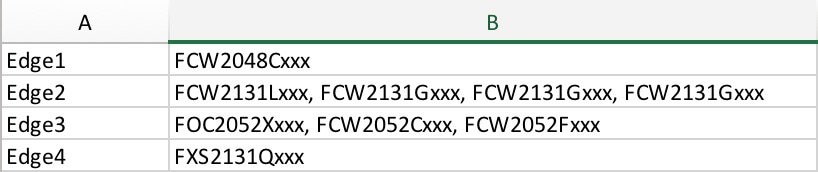
-
-
Attributes supported in Catalyst Center Release 2.3.7.5 and later.
-
Discovery depth: Devices are LAN automated up to the specified level under the primary seed device. The default value for Discovery Depth is 2, and the maximum value is 5.
-
Device matching: Specifies the method for device discovery.
-
Relaxed: Hostname and loopback IP is assigned to the discovered device if the device's serial number matches the uploaded device list.
-
Strict: Device discovery is restricted to the list of devices provided. You can discover a maximum of 50 devices.
You can also download a sample CSV file for reference.
-
-
Session Timeout: Specifies a timeout value for the LAN automation session. LAN automation stops automatically when the specified time limit is reached. The value is specified in minutes, and the valid range is 20 to 10080 minutes.
-