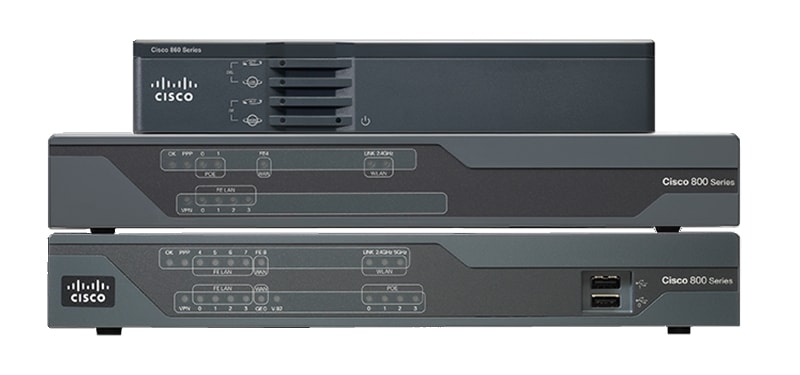
Cisco 800 Series Routers
| Product Type | Branch Routers |
|---|---|
| Status | Available |
| Series Release Date | Pre-1999 |
| Diagram | Visio Stencil (757 KB .zip file) |
|
This product is no longer sold, but is still supported by Cisco.
|
|
- US/Canada 800-553-2447
- Worldwide Support Phone Numbers
- All Tools
 Feedback
 Feedback
-
Top Search Results
Key Information
Customers Also Viewed
Saved Content
-
You can now save documents for easier access and future use. Saved documents for this product will be listed here, or visit the My Saved Content page to view and manage all saved content from across Cisco.com.
Log in to see your Saved Content.
Document Categories
-
Data Sheets and Product Information
- Cisco 890 Series Integrated Services Routers Data Sheet
- Cisco 809 Industrial Integrated Services Routers Data Sheet
- Cisco 819 Integrated Services Routers with 3G and Wi-Fi Data Sheet
- Cisco 880 Series Integrated Services Routers - Data Sheet
- Cisco 860VAE Series Integrated Services Routers - Data Sheet
- Cisco 890G Series 4G LTE 2.5 Integrated Services Routers for Asia, Australia, and selected Latin America Regions
- Cisco 819 Non-Hardened 4G LTE 2.0 Machine-to-Machine Integrated Services Routers with Wi-Fi - Data Sheet
- Cisco 880G and 890G Series 4G LTE 2.0 Integrated Services Routers - Data Sheet
- Cisco 800M Series Integrated Services Router Data Sheet
- Cisco 4G LTE (Category 4) Wireless WAN Interface Module for Cisco 800M Integrated Services Router Data Sheet
- Cisco 819 Non-Hardened 4G LTE 2.5 Machine-to-Machine Integrated Services Routers with Wi-Fi for Asia, Australia, and Selected Latin America Regions
- Cisco 880G Series 3G Wireless Integrated Services Router Data Sheet
- Cisco 880G Series Integrated Services Router with Embedded 3.7G (21.1-Mbps Mobile Broadband Wireless WAN) Data Sheet
- Cisco 819 4G LTE 2.0 Machine-to-Machine Integrated Services Routers Data Sheet
- Cisco 880VA Series Integrated Services Routers Data Sheet
Data Sheets
- End-of-Sale and End-of-Life Announcement for the Cisco 890G Series 4G LTE 2.0 Integrated Services Routers
- End-of-Sale and End-of-Life Announcement for the Cisco Select Cisco 800BB Products
- End-of-Sale and End-of-Life Announcement for the Cisco Select Cisco 800 Series and Cisco 1000 Series Software PIDs and Power Cables
- End-of-Sale and End-of-Life Announcement for the Cisco Select 819, 886, 887, 897, 898 and 899 models
- End-of-Sale and End-of-Life Announcement for the Cisco Select ISR800 related System Softwares, Configuration Softwares and Cables
- End-of-Sale and End-of-Life Announcement for the Cisco 819 Hardened Integrated Services Router
- End-of-Sale and End-of-Life Announcement for the Cisco Select ISR 890
- End-of-Sale and End-of-Life Announcement for the Cisco Select Cisco 866 and 867 models
- End-of-Sale and End-of-Life Announcement for the Cisco Select 881, 898 and 887
- End-of-Sale and End-of-Life Announcement for the Cisco 886 and 898 4G LTE Routers
- End-of-Sale and End-of-Life Announcement for the Cisco Selected voice products for ISR 880 series
- End-of-Sale and End-of-Life Announcement for the Cisco Selected C867 and C881W NAL Certification labels
- End-of-Sale and End-of-Life Announcement for the Cisco Selected ISR 880 and ISR 860
- End-of-Sale and End-of-Life Announcement for the Cisco Select Cisco 800 series software PIDs
- End-of-Sale and End-of-Life Announcement for the Cisco Announcement of 896 and 897 VDSL2/ADSL2+ Routers
End-of-Life and End-of-Sale Notices
-
Security Notices
-
Applicable to Multiple Models
- Field Notice: FN - 63502 - Cisco has been informed that the power cable (CAB-AC2J) previously shipped with the 800 & 1900 series products are not METI compliant - Replace on Failure
- Field Notice: FN - 72105 - SUDI Certificate Expires When Registered to a PKI and Used to Configure Certain Functionalities on Cisco IOS and IOS XE Platforms - Workaround Provided
- Field Notice: FN - 70573 - Cisco Secure Unique Device Identifier Certificate Expiration Impact On Internet of Things Products Managed by Cisco Field Network Director - Workaround Provided
- Field Notice: FN - 70447 - Products with Modems 7700 and 7710 That Use the Cellular GPS Feature Will Have the Week Number Counter Reset on 2019-11-03 - Workaround Provided
- Field Notice: FN - 70448 - Products with Modem 7750 That Use the Cellular GPS Feature Will Have the Week Number Counter Reset on 2019-11-03 - Workaround Provided
- Field Notice: FN - 64063 - LED Missing from C896VAG-LTE-K9, C897VAG-LTE-K9, C898EAG-LTE-K9, and C897VAMG-LTE-GA-K9 - Replace on Failure
- Field Notice: FN - 63761 - CISCO8XX, IAD8XX, and CISCO1941W-XXX Might Fail to Boot Up After a Power Cycle - Replace on Failure
- Field Notice: FN - 63343 - PCEX-3G-HSPA-R6 Modem not Recognized in Cisco IOS 15.1(1)T of Cisco 880G Series Router - Software Upgrade Recommended
-
Cisco 819 Hardened 3G - Dual Radio 802.11n WiFi ISR
-
Cisco 819 Non-Hardened Secure Multi-mode 4G LTE M2M ISR Router
Field Notices
- Cisco IR800 Integrated Services Router ROM Monitor Input Validation Vulnerability
- Cisco IOS Software Multiprotocol Label Switching Packet Vulnerability
- Cisco IOS Software TCP Initial Sequence Number Randomization Improvements
- Cisco IOS Software IPS and Zone Based Firewall Vulnerabilities
- Cisco IOS Software IP Version 6 over Multiprotocol Label Switching Vulnerabilities
- Cisco Router Web Setup Ships with Insecure Default IOS Configuration
- Cisco Telnet Denial of Service Vulnerability
- IOS HTTP Authorization Vulnerability
- IOS Reload after Scanning Vulnerability
- Cisco IOS Software Multiple SNMP Community String Vulnerabilities
- Cisco IOS HTTP Server Query Vulnerability
- Cisco IOS HTTP Server Vulnerability
- Cisco IOS Syslog Crash
- Cisco IOS Command History Release at Login Prompt
- Cisco IOS Remote Router Crash
- Cisco IOS Software TCP Denial of Service Vulnerability
- IOS Stack Group Bidding Protocol Crafted Packet DoS
Security Advisories, Responses and Notices
-
-
Release and Compatibility
- Cisco 800 Series Router Compatibility Matrix (Excel Sheet) (XLSX - 170 KB)
Compatibility Information
- Cross Platform Release Notes for Cisco IOS Release 15.9(3)M
- Cross Platform Release Notes for Cisco IOS Release 15.8(3)M
- Release Note for Firmware Release A2pv6F039f1
- Release Note for Firmware Release A2pv6F039d
- Release Notes for NIM Firmware Releases A2pv6F039t and A2pvbF039t
- Release Notes for Cisco 860VAE-W Series Multimode VDSL2/ADSL2/2+ DSL Routers using Firmware Release A2pv6F039t
- Release Notes for VDSL CPE PHY Release A2pv6C039t
- Release Notes for VDSL CPE PHY Release B2pvC038u
- Release Notes for VDSL CPE PHY Release B2pvC038h3_J
- Release Notes for VDSL CPE PHY Release A2pv6C039k
- Release Notes for VDSL CPE PHY Release A2pv6C039m
- Release Notes for Firmware Release A2pv6C038q and B2pvC038r1
- Release Notes for Firmware Release A2pv6F039d and B2pvC038h3
- Release Notes for Cisco 819 4G LTE Integrated Services Routers
- Release Notes for Firmware Release A2pv6C038k1
Release Notes
-
Design
- DSL Modem/Router Interface Pinouts and Status LED Descriptions
- 5-in-1 V.35 Assembly and Pinouts
- Specifications for Ethernet 100BaseTX and 10BaseT Cables
- CAB-232 MT/FC EIA/TIA-232 Serial Cable Specifications
- Ethernet AUI Port, Pinouts, and Cable Specifications
- CAB-530 MT Serial Cable Specifications
Design TechNotes
-
Install and Upgrade
- Software Activation on Cisco Integrated Services Routers
- Cisco 4G LTE Software Configuration Guide
- Cisco Dual LTE Multi-element Multi-band Indoor Antenna Installation Guide
- Cisco 800 Series Integrated Services Router Hardware Installation Guide
- Regulatory Compliance and Safety Information for Cisco 800 and 800M Series Routers
- Video: Installing 3G WAN Module on Cisco 800M Series Integrated Services Router
- Cisco 800M Series ISR Hardware Installation Guide
- Overview of Cisco 800 Series ISR Deployment (PDF)
- Cisco Dual LTE-Single GPS Multi-band Antenna Installation Guide
- Cisco 815 Integrated Services Router Cabling and Installation Quick Start Guide
- Chinese Version of Cisco 800 Series Router Cabling and Setup Quick Start Guide
- Installing and Configuring Cisco 802 IDSL and Cisco 804 IDSL Routers
- Cisco Virtual Office - End User Instructions for Cisco 871 and Cisco 881 Router Set Up at Home or Small Office
- Russian - Readme First for the Cisco 800 Series Integrated Services Routers (PDF - 1 MB)
- Cisco Virtual Office – End User Instructions for Cisco 891 Router Set Up at Home or Small Office (DOC)
Install and Upgrade Guides
-
Configuration
- Configure a LAN-to-LAN IPsec Tunnel Between Two Routers
- Configuring IPSec Between a Cisco IOS Router and a Cisco VPN Client 4.x for Windows Using RADIUS
- Configure Field Network Director to use Plug and Play on IR800
- Configure WAN Mode Feature on Cisco 867VAE Platform
- Configuring an IPsec Router Dynamic LAN-to-LAN Peer and VPN Clients
- ISR Wireless Configuration Example
- Basic Router Configuration using SDM
- Configure Clientless SSL VPN (WebVPN) on Cisco IOS with SDM
- IPSec/GRE with NAT on IOS Router Configuration Example
- Install Trusted Authority Certificates on Cisco IOS Routers for Trend URL Filtering Support (TXT - 1 KB)
- Configuring Network Address Translation and Static Port Address Translation to Support an Internal Web Server
- EIGRP Message Authentication Configuration Example
- Configuring Router-to-Router IPsec (Pre-shared Keys) on GRE Tunnel with IOS Firewall and NAT
- Cisco IOS Certificate Enrollment Using Enhanced Enrollment Commands Configuration Example
- Dynamic LAN-to-LAN VPN between Cisco IOS Routers Using IOS CA on the Hub Configuration Example
Configuration Examples and TechNotes
-
Cisco 880 3G Integrated Services Router
-
Cisco 800M Integrated Services Router
-
Cisco 810 Series, Cisco 860 Series, Cisco 880 Series, and Cisco 890 Series Routers
-
Wireless Technology
-
Licensing Information
- Video: Configuring 3G WAN Module on Cisco 800M Series Integrated Services Router Using CCP Express.
Configuration Guides
-
Troubleshooting
- Recover the Password for the 881 Series Routers
Password Recovery
-
Pre-RMA Troubleshooting Guides
- Bourns Primary Protection (PDF - 530 KB)
Troubleshooting Guides
- Reset Router to Factory Defaults
- WAN Mode Feature on Cisco 867VAE Platform
- Troubleshooting Watchdog Timeouts
- Troubleshooting Bus Error Crashes
- Understand Software-forced Crashes
- Less Common Types of System Crashes
- MallocLite Memory Leaks Troubleshooting
- ISR with Embedded AP802 Image Recovery
- Maximum Number of Interfaces and Subinterfaces for Cisco IOS Routers: IDB Limits
- Configure VLAN Routing and Bridging on a Router with IRB
- High CPU Utilization in Exec and Virtual Exec Processes
- Troubleshooting High CPU Utilization due to Processes
- Capturing Text Output from Hyperterminal
- Why Does My Router Lose Its Configuration During Reboot?
- What Causes %SYS-3-CPUHOG Messages?
Troubleshooting TechNotes
-
Literature
- Cisco ScanSafe and AVC Support Cloud Intelligent Network (PDF - 355 KB)
Case Studies
-
Log in to see available downloads.
-
-
Supported:
Below are the supported models within the Cisco 800 Series Routers. Unless specified, documentation for the Cisco 800 Series Routers is applicable to all models. For model disambiguation and specifications, please consult the Cisco 800 Series Routers Compatibility Matrix - .xlsx file
- Cisco 800M Integrated Services Router
- Cisco 819 Hardened Dual Radio 802.11n WiFi Integrated Services Router
- Cisco 819 Integrated Services Router
- Cisco 819 Non-Hardened 4G LTE M2M with Dual Radio 802.11n WiFi Router
- Cisco 819 Non-Hardened Integrated Services Router
- Cisco C888 Integrated Services Router
- Cisco C891F Integrated Services Routers
- Cisco C891FJ Integrated Services Router
- Cisco C891FW Integrated Services Router
- Cisco C892FSP Integrated Services Router
No Longer Supported:
The following 800 Series Router product lines are no longer supported by Cisco, as the product's End-of-Support date has passed. For more information, you can view our 800 Series Routers End-of-Life and End-of-Sale Announcements and the Cisco End-of-Life Policy.
Product Lines:
Includes:
○ 800 ○ ISDN, IDSL, Serial & Broadband Routers (801, 802, 803, 804, 805, 806) ○ 810 ○ ISDN Routers and Integrated Services Routers (811, 812, 813, 815) ○ 820 ○ ADSL and G.SHDSL Routers (820, 826, 827, 828) ○ 830 ○ Broadband Routers (831, 836, 837) ○ 850 ○ Integrated Services Routers (851, 857) ○ 860 ○ Integrated Services Routers (860, 861, 866, 867) ○ 870 ○ Integrated Services Routers (871, 876, 877, 878) ○ 880 ○ Integrated Services Routers (880, 881, 886, 887, 888)
