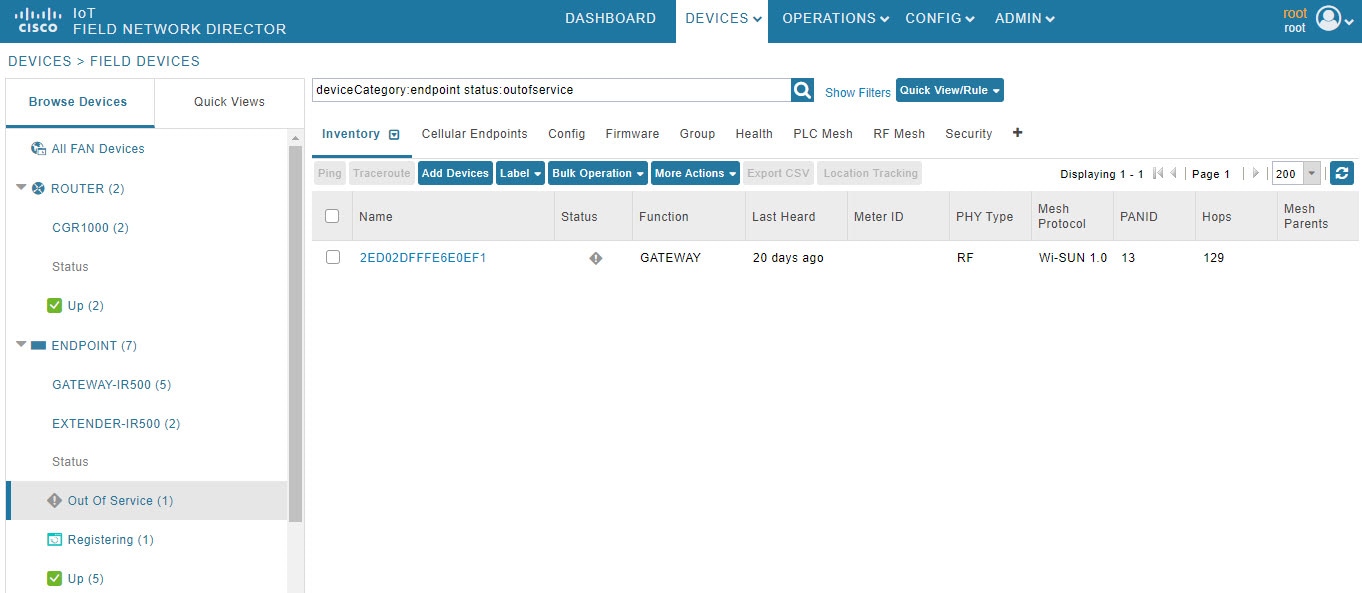
|
Label
|
:
|
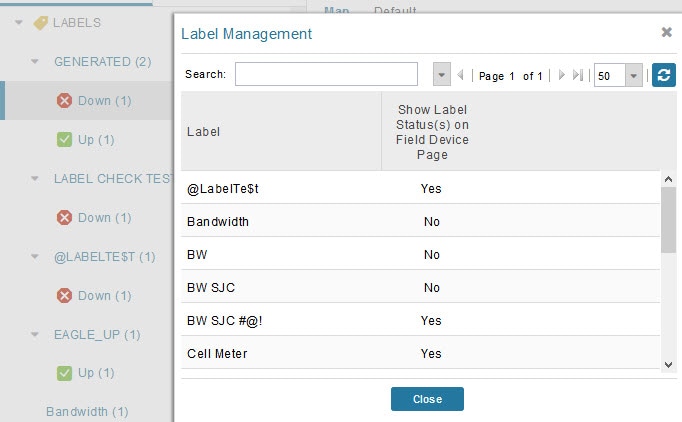
Filters devices by their assigned labels. Use this filter to quickly find devices that have been tagged with specific labels
for organization or categorization purposes.
|
|
Asset
|
:
|
Filters devices by their asset name. Use this filter to search for devices associated with specific asset identifiers or asset
management records.
|
|
Config Group
|
:
|
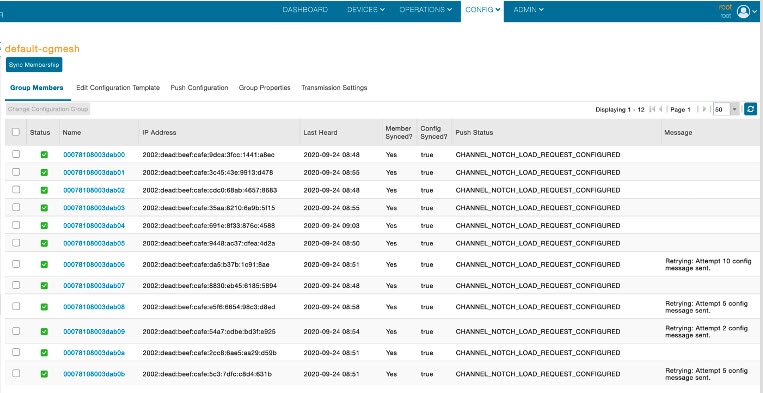
Filters devices by their configuration group membership. Use this filter to find all devices that belong to a specific configuration
group for managing or viewing devices with similar configuration settings.
|
|
Firmware Group
|
:
|
Filters devices by their firmware group assignment. Use this filter to locate devices in a specific firmware group for tracking
firmware versions or planning firmware updates.
|
|
Groups
|
:
|
Filters devices by general group membership using text search. Use this filter to find devices belonging to any group by entering
group name keywords.
|
|
Tunnel Group
|
:
|
Filters devices by their tunnel group assignment. Use this filter to find devices that are part of specific tunnel configurations
for network connectivity management.
|
|
Category
|
:
|
Filters devices by their device category classification. Use this filter to narrow down devices to specific categories (e.g.,
routers, endpoints, gateways) within the fan device family.
|
|
Domain
|
:
|
Filters devices by their network domain. Use this filter to search for devices within a specific network domain or administrative
boundary.
|
|
EID
|
:
|
Filters devices by their unique Element Identifier. Use this filter to quickly locate a specific device using its unique EID
for troubleshooting or configuration.
|
|
Firmware
|
:
|
Filters devices by their currently running firmware version. Use this filter to find all devices running a specific firmware
version for identifying devices needing updates or to verify deployment success.
|
|
Function
|
:
|
Filters devices by their functional role or purpose. Use this filter to locate devices based on their designated function
in the network (e.g., gateway, repeater, collector).
|
|
Hardware ID
|
:
|
Filters devices by their hardware identifier. Use this filter to search for devices with specific hardware IDs for inventory
management or hardware-specific troubleshooting.
|
|
IP
|
:
|
Filters devices by their IP address. Use this filter to find devices using IP address search (exact match or partial) for
network troubleshooting or connectivity verification.
|
|
Last GPS Heard
|
between
|
Filters devices by the date/time when GPS location was last received. Use this filter to identify devices with recent or outdated
GPS data for monitoring mobile devices or detecting connectivity issues.
|
|
Last Heard
|
between
|
Filters devices by the date/time they last communicated with the system. Use this filter to find devices that haven't reported
recently (potential offline devices) or verify recent device activity.
|
|
Latitude
|
between
|
Filters devices by their geographic latitude coordinate. Use this filter to search for devices within specific latitude ranges
for geographic-based device management or mapping.
|
|
Longitude
|
between
|
Filters devices by their geographic longitude coordinate. Use this filter to search for devices within specific longitude
ranges to locate devices in particular geographic areas.
|
|
Model Number
|
:
|
Filters devices by their product ID or model number. Use this filter to find all devices of a specific model for model-specific
configuration, updates, or inventory reporting.
|
|
Name
|
:
|
Filters devices by their assigned device name. Use this filter to search for devices using their friendly names for quick
identification and access.
|
|
Serial Number
|
:
|
Filters devices by their unique serial number. Use this filter to locate a specific device using its serial number for warranty
tracking, RMA, or precise device identification.
|
|
Status
|
:
|
Filters devices by their operational status. Use this filter to find devices in specific states (e.g., up, down, unheard,
unmanaged) for monitoring network health or troubleshooting issues.
|
|
Type
|
:
|
Filters devices by their specific device type. Use this filter to narrow down to specific device types within the fan family
for type-specific management or reporting.
|
|
Up Time
|
between
|
Filters devices by their uptime duration (in numeric range). Use this filter to find devices with specific uptime ranges for
identifying recently rebooted devices or those with stability issues.
|
|
Base Pluggable Module PID1
|
:
|
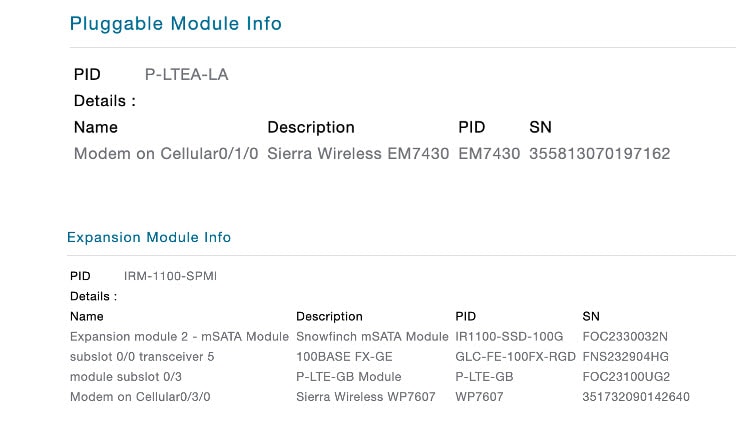
Filters routers by their base pluggable module product ID (slot 1). Use this filter to identify routers with specific cellular
module hardware for inventory or compatibility verification.
|
|
Base Pluggable Module PID2
|
:
|
Filters routers by their base pluggable module product ID (slot 2). Use this filter to identify routers with specific secondary
cellular module hardware for dual-modem configurations.
|
|
Cell ID1
|
:
|
Filters routers by their cellular tower/cell identifier (modem 1). Use this filter to locate routers connected to specific
cell towers for coverage analysis or troubleshooting.
|
|
Cell ID3
|
:
|
Filters routers by their cellular tower/cell identifier (modem 3). Use this filter to locate routers connected to specific
cell towers on tertiary modem for multi-carrier deployments.
|
|
Cell RSRP1 (dBm)
|
between
|
Filters routers by Reference Signal Received Power in dBm (modem 1). Use this filter to find routers with weak or strong LTE
signal strength for identifying connectivity issues or optimal coverage areas.
|
|
Cell RSRP3 (dBm)
|
between
|
Filters routers by Reference Signal Received Power in dBm (modem 3). Use this filter to assess signal quality on tertiary
modem for multi-carrier or failover configurations.
|
|
Cell RSRP1 (dB)
|
between
|
Filters routers by Reference Signal Received Quality in dB (modem 1). Use this filter to identify routers with poor signal
quality indicating interference or network congestion.
|
|
Cell RSRQ3 (dB)
|
between
|
Filters routers by Reference Signal Received Quality in dB (modem 3). Use this filter to monitor signal quality on tertiary
modem for performance optimization.
|
|
Cell RSSI1 (dBm)
|
between
|
Filters routers by Received Signal Strength Indicator in dBm (modem 1). Use this filter to find routers with weak cellular
reception for antenna repositioning or signal boosting.
|
|
Cell RSSI3 (dBm)
|
between
|
Filters routers by Received Signal Strength Indicator in dBm (modem 3). Use this filter to monitor reception strength on tertiary
modem for coverage verification.
|
|
Cell Rx1 (kBps)
|
between
|
Filters routers by cellular receive speed in kilobytes per second (modem 1). Use this filter to identify routers with low
download speeds for performance troubleshooting or bandwidth monitoring.
|
|
Cell Rx2 (kBps)
|
between
|
Filters routers by cellular receive speed in kilobytes per second (modem 2). Use this filter to monitor download performance
on secondary modem for load balancing analysis.
|
|
Cell Rx3 (kBps)
|
between
|
Filters routers by cellular receive speed in kilobytes per second (modem 3). Use this filter to track download throughput
on tertiary modem for multi-carrier performance comparison.
|
|
Cell Rx4 (kBps)
|
between
|
Filters routers by cellular receive speed in kilobytes per second (modem 4). Use this filter to monitor download performance
on quaternary modem in advanced multi-modem configurations.
|
|
Cell Rx5 (kBps)
|
between
|
Filters routers by cellular receive speed in kilobytes per second (modem 5). Use this filter to track download throughput
on fifth modem for high-availability deployments.
|
|
Cell SNR1 (dB)
|
between
|
Filters routers by Signal-to-Noise Ratio in dB (modem 1). Use this filter to identify routers with poor signal quality due
to noise or interference affecting data transmission.
|
|
Cell SNR3 (dB)
|
between
|
Filters routers by Signal-to-Noise Ratio in dB (modem 3). Use this filter to assess signal clarity on tertiary modem for connection
quality analysis.
|
|
Cell Tx1 (kBps)
|
between
|
Filters routers by cellular transmit speed in kilobytes per second (modem 1). Use this filter to identify routers with low
upload speeds for performance troubleshooting or bandwidth monitoring.
|
|
Cell Tx2 (kBps)
|
between
|
Filters routers by cellular transmit speed in kilobytes per second (modem 2). Use this filter to monitor upload performance
on secondary modem for load balancing analysis.
|
|
Cell Tx3 (kBps)
|
between
|
Filters routers by cellular transmit speed in kilobytes per second (modem 3). Use this filter to track upload throughput on
tertiary modem for multi-carrier performance comparison.
|
|
Cell Tx4 (kBps)
|
between
|
Filters routers by cellular transmit speed in kilobytes per second (modem 4). Use this filter to monitor upload performance
on quaternary modem in advanced multi-modem configurations.
|
|
Cell Tx5 (kBps)
|
between
|
Filters routers by cellular transmit speed in kilobytes per second (modem 5). Use this filter to track upload throughput on
fifth modem for high-availability deployments.
|
|
Cell Consumption Per Cycle1 (bytes)
|
between
|
Filters routers by cellular data consumption per billing cycle in bytes (modem 1). Use this filter to monitor data usage for
managing cellular costs and identifying routers exceeding data plan limits.
|
|
Cell Consumption Per Cycle2 (bytes)
|
between
|
Filters routers by cellular data consumption per billing cycle in bytes (modem 2). Use this filter to track data usage on
secondary modem for cost management and billing analysis.
|
|
Cell Consumption Per Cycle3 (bytes)
|
between
|
Filters routers by cellular data consumption per billing cycle in bytes (modem 3). Use this filter to monitor data consumption
on tertiary modem for multi-carrier cost optimization.
|
|
Cell Consumption Per Cycle4 (bytes)
|
between
|
Filters routers by cellular data consumption per billing cycle in bytes (modem 4). Use this filter to track data usage on
quaternary modem for comprehensive billing management.
|
|
Cellular APN1
|
:
|
Filters routers by Access Point Name configuration (modem 1). Use this filter to find routers using specific APNs for carrier-specific
configurations or troubleshooting connectivity.
|
|
Cellular APN2
|
:
|
Filters routers by Access Point Name configuration (modem 2). Use this filter to identify routers with specific APN settings
on secondary modem for multi-carrier setups.
|
|
Cellular APN3
|
:
|
Filters routers by Access Point Name configuration (modem 3). Use this filter to locate routers using particular APNs on tertiary
modem for carrier verification.
|
|
Cellular APN4
|
:
|
Filters routers by Access Point Name configuration (modem 4). Use this filter to find routers with specific APN configurations
on quaternary modem.
|
|
Cellular APN5
|
:
|
Filters routers by Access Point Name configuration (modem 5). Use this filter to identify APN settings on fifth modem for
advanced multi-carrier deployments.
|
|
Cellular Network1
|
:
|
Filters routers by cellular network operator name (modem 1). Use this filter to identify routers connected to specific carriers
for network performance analysis or carrier verification.
|
|
Cellular Network3
|
:
|
Filters routers by cellular network operator name (modem 3). Use this filter to find routers on specific carriers using tertiary
modem for multi-carrier deployment tracking.
|
|
Expansion Pluggable Module PID1
|
:
|
Filters routers by expansion module product ID (slot 1). Use this filter to identify routers with specific expansion hardware
modules for inventory or feature verification.
|
|
Expansion Pluggable Module PID2
|
:
|
Filters routers by expansion module product ID (slot 2). Use this filter to locate routers with specific secondary expansion
modules for hardware compatibility checks.
|
|
IMEI1
|
:
|
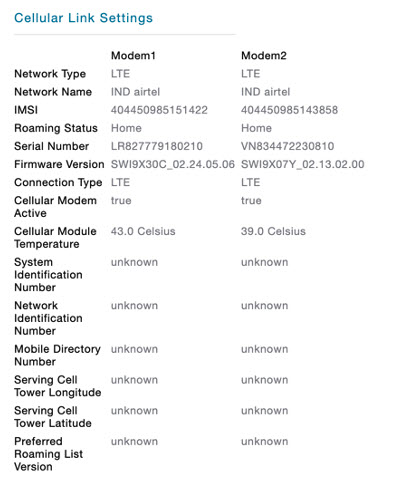
Filters routers by International Mobile Equipment Identity (modem 1). Use this filter to locate specific cellular modem hardware
for warranty tracking, RMA, or carrier registration.
|
|
IMEI3
|
:
|
Filters routers by International Mobile Equipment Identity (modem 3). Use this filter to identify specific tertiary modem
hardware for device tracking or carrier whitelisting.
|
|
IMSI1
|
:
|
Filters routers by International Mobile Subscriber Identity (modem 1). Use this filter to find routers with specific SIM cards
for subscriber management or carrier plan verification.
|
|
IMSI3
|
:
|
Filters routers by International Mobile Subscriber Identity (modem 3). Use this filter to identify SIM cards in tertiary modem
for subscriber tracking or plan management.
|
|
LAC1
|
:
|
Filters routers by Location Area Code (modem 1). Use this filter to locate routers in specific cellular network areas for
geographic coverage analysis.
|
|
LAC3
|
:
|
Filters routers by Location Area Code (modem 3). Use this filter to find routers in specific network areas using tertiary
modem for coverage mapping.
|
|
Link Status1
|
:
|
Filters routers by cellular link operational status (modem 1). Use this filter to find routers with active, inactive, or failed
cellular connections for connectivity troubleshooting.
|
|
Link Status2
|
:
|
Filters routers by cellular link operational status (modem 2). Use this filter to monitor connection status on secondary modem
for failover verification.
|
|
Link Status3
|
:
|
Filters routers by cellular link operational status (modem 3). Use this filter to check connection status on tertiary modem
for multi-carrier availability.
|
|
Link Status4
|
:
|
Filters routers by cellular link operational status (modem 4). Use this filter to monitor connection status on quaternary
modem for redundancy verification.
|
|
Link Status5
|
:
|
Filters routers by cellular link operational status (modem 5). Use this filter to check connection status on fifth modem for
high-availability configurations.
|
|
NID1
|
:
|
Filters routers by Network Identification number (modem 1). Use this filter to identify routers on specific CDMA networks
for carrier-specific management.
|
|
NID3
|
:
|
Filters routers by Network Identification number (modem 3). Use this filter to find routers on specific CDMA networks using
tertiary modem.
|
|
RAC1
|
:
|
Filters routers by Routing Area Code (modem 1). Use this filter to locate routers in specific routing areas for network topology
analysis.
|
|
RAC3
|
:
|
Filters routers by Routing Area Code (modem 3). Use this filter to find routers in specific routing areas using tertiary modem
for coverage verification.
|
|
SID1
|
:
|
Filters routers by System Identification number (modem 1). Use this filter to identify routers on specific CDMA systems for
carrier network management.
|
|
SID3
|
:
|
Filters routers by System Identification number (modem 3). Use this filter to find routers on specific CDMA systems using
tertiary modem.
|
|
Config Error Message
|
:
|
Filters routers by configuration error messages. Use this filter to identify routers with configuration failures for troubleshooting
deployment or update issues.
|
|
Config Last Status Date
|
:
|
Filters routers by the date/time of last configuration status update. Use this filter to find routers with recent or outdated
configuration attempts for deployment tracking.
|
|
Config Push Status
|
:
|
Filters routers by configuration push status. Use this filter to identify routers with pending, successful, or failed configuration
updates for deployment management.
|
|
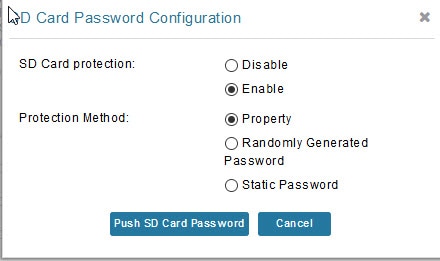
SD Card Password Lock
|
:
|
Filters routers by SD card password protection status. Use this filter to find routers with locked or unlocked SD cards for
security compliance verification.
|
|
DHCPv4 Loopback Link
|
:
|
Filters routers by DHCPv4 loopback interface link status. Use this filter to verify DHCP server functionality on loopback
interfaces for network service troubleshooting.
|
|
DHCPv4 Tunnel Link
|
:
|
Filters routers by DHCPv4 tunnel interface link status. Use this filter to monitor DHCP service availability over tunnel connections
for VPN or mesh networks.
|
|
DHCPv6 Loopback Link
|
:
|
Filters routers by DHCPv6 loopback interface link status. Use this filter to verify IPv6 DHCP server functionality on loopback
interfaces for IPv6 deployments.
|
|
DHCPv6 Tunnel Link
|
:
|
Filters routers by DHCPv6 tunnel interface link status. Use this filter to monitor IPv6 DHCP service availability over tunnel
connections.
|
|
Packet Drops (packets/sec)
|
between
|
Filters routers by Ethernet packet drop rate. Use this filter to identify routers experiencing packet loss for network performance
troubleshooting or congestion analysis.
|
|
Receive Speed (bps)
|
between
|
Filters routers by Ethernet receive speed in bits per second. Use this filter to monitor inbound network traffic for bandwidth
utilization and capacity planning.
|
|
Transmit Speed (bps)
|
between
|
Filters routers by Ethernet transmit speed in bits per second. Use this filter to monitor outbound network traffic for bandwidth
utilization and performance analysis.
|
|
FW Error Message
|
:
|
Filters routers by firmware update error messages. Use this filter to identify routers with firmware upgrade failures for
troubleshooting and remediation.
|
|
FW Last Update Date
|
:
|
Filters routers by the date/time of last firmware update attempt. Use this filter to track firmware deployment progress and
identify routers needing updates.
|
|
Mode of Installation
|
:
|
Filters routers by firmware installation mode (e.g., automatic, manual, scheduled). Use this filter to identify routers using
specific installation methods for deployment strategy verification.
|
|
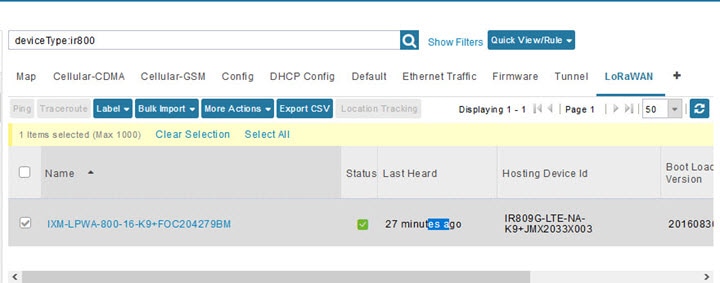
Agent Version
|
:
|
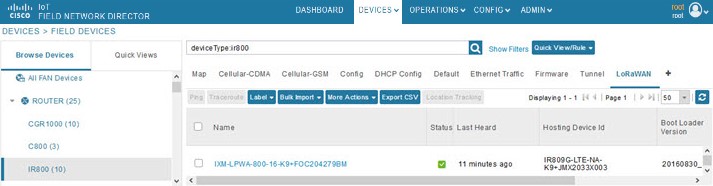
Filters routers by LoRaWAN agent software version. Use this filter to identify routers running specific LoRaWAN agent versions
for compatibility verification or updates.
|
|
Boot Loader Version
|
:
|
Filters routers by bootloader version. Use this filter to find routers with specific bootloader versions for firmware compatibility
or upgrade planning.
|
|
Hosting Device ID
|
:
|
Filters routers by the ID of the device hosting the LoRaWAN modem. Use this filter to identify which router is hosting specific
LoRaWAN modems for topology mapping.
|
|
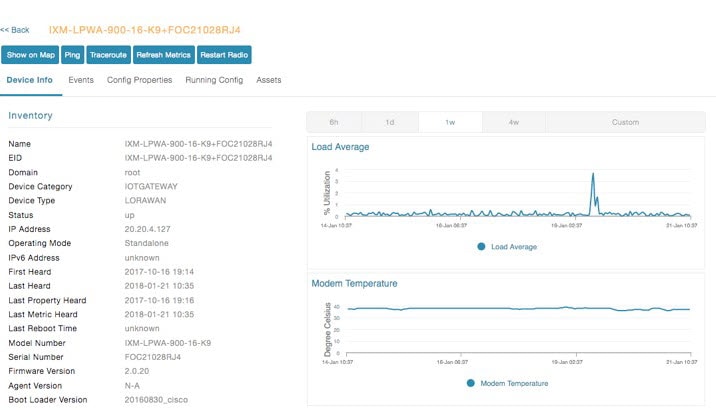
Modem Load Average
|
between
|
Filters routers by LoRaWAN modem CPU load average. Use this filter to identify modems with high CPU utilization for performance
troubleshooting or capacity planning.
|
|
Modem Temperature
|
between
|
Filters routers by LoRaWAN modem temperature. Use this filter to find modems with high temperatures indicating potential hardware
issues or environmental problems.
|
|
Mesh Count
|
between
|
Filters routers by the number of mesh endpoints connected (interface 1). Use this filter to identify routers with high or
low endpoint counts for network capacity planning or load balancing.
|
|
Mesh Count 2
|
between
|
Filters routers by the number of mesh endpoints connected (interface 2). Use this filter to monitor endpoint distribution
on secondary mesh interface for multi-radio deployments.
|
|
Mesh Count 3
|
between
|
Filters routers by the number of mesh endpoints connected (interface 3). Use this filter to track endpoint counts on tertiary
mesh interface for advanced mesh configurations.
|
|
Mesh Firmware
|
:
|
Filters routers by mesh radio firmware version (interface 1). Use this filter to find routers running specific mesh firmware
versions for compatibility or update planning.
|
|
Mesh Firmware 2
|
:
|
Filters routers by mesh radio firmware version (interface 2). Use this filter to verify firmware versions on secondary mesh
interface for multi-radio consistency.
|
|
Mesh Firmware 3
|
:
|
Filters routers by mesh radio firmware version (interface 3). Use this filter to check firmware versions on tertiary mesh
interface for version management.
|
|
Mesh Rx (bps)
|
between
|
Filters routers by mesh receive speed in bits per second (interface 1). Use this filter to monitor inbound mesh traffic for
bandwidth utilization and network performance analysis.
|
|
Mesh Rx2 (bps)
|
between
|
Filters routers by mesh receive speed in bits per second (interface 2). Use this filter to track inbound traffic on secondary
mesh interface for load balancing verification.
|
|
Mesh Rx3 (bps)
|
between
|
Filters routers by mesh receive speed in bits per second (interface 3). Use this filter to monitor inbound traffic on tertiary
mesh interface for multi-radio performance.
|
|
Mesh Status
|
:
|
Filters routers by mesh interface operational status (interface 1). Use this filter to find routers with active or inactive
mesh interfaces for connectivity troubleshooting.
|
|
Mesh Status 2
|
:
|
Filters routers by mesh interface operational status (interface 2). Use this filter to verify operational status of secondary
mesh interface for redundancy verification.
|
|
Mesh Status 3
|
:
|
Filters routers by mesh interface operational status (interface 3). Use this filter to check operational status of tertiary
mesh interface for multi-radio availability.
|
|
Mesh Tx (bps)
|
between
|
Filters routers by mesh transmit speed in bits per second (interface 1). Use this filter to monitor outbound mesh traffic
for bandwidth utilization and network performance analysis.
|
|
Mesh Tx2 (bps)
|
between
|
Filters routers by mesh transmit speed in bits per second (interface 2). Use this filter to track outbound traffic on secondary
mesh interface for load distribution analysis.
|
|
Mesh Tx3 (bps)
|
between
|
Filters routers by mesh transmit speed in bits per second (interface 3). Use this filter to monitor outbound traffic on tertiary
mesh interface for multi-radio performance.
|
|
PANID
|
:
|
Filters routers by mesh Personal Area Network ID (interface 1). Use this filter to identify routers in specific mesh networks
for network segmentation or troubleshooting.
|
|
PANID 2
|
:
|
Filters routers by mesh Personal Area Network ID (interface 2). Use this filter to find routers in specific mesh networks
on secondary interface for multi-network deployments.
|
|
PANID 3
|
:
|
Filters routers by mesh Personal Area Network ID (interface 3). Use this filter to locate routers in specific mesh networks
on tertiary interface for advanced configurations.
|
|
SSID
|
:
|
Filters routers by mesh network SSID (interface 1). Use this filter to find routers in specific mesh networks by network name
for network management.
|
|
SSID 2
|
:
|
Filters routers by mesh network SSID (interface 2). Use this filter to identify routers in specific mesh networks on secondary
interface for multi-SSID setups.
|
|
SSID 3
|
:
|
Filters routers by mesh network SSID (interface 3). Use this filter to locate routers in specific mesh networks on tertiary
interface for network verification.
|
|
Transmit RF Power
|
:
|
Filters routers by mesh radio transmit power level (interface 1). Use this filter to identify routers with specific power
settings for coverage optimization or interference management.
|
|
Transmit RF Power 2
|
:
|
Filters routers by mesh radio transmit power level (interface 2). Use this filter to verify power settings on secondary mesh
interface for multi-radio coordination.
|
|
Transmit RF Power 3
|
:
|
Filters routers by mesh radio transmit power level (interface 3). Use this filter to check power settings on tertiary mesh
interface for coverage planning.
|
|
Dio Double
|
:
|
Filters routers by RPL DIO doubling interval configuration (interface 1). Use this filter to verify mesh routing protocol
timing parameters for network optimization.
|
|
Dio Double 2
|
:
|
Filters routers by RPL DIO doubling interval configuration (interface 2). Use this filter to check routing protocol timing
on secondary mesh interface for consistency.
|
|
Dio Double 3
|
:
|
Filters routers by RPL DIO doubling interval configuration (interface 3). Use this filter to verify routing protocol timing
on tertiary mesh interface for multi-radio coordination.
|
|
Dio Min
|
:
|
Filters routers by RPL DIO minimum interval configuration (interface 1). Use this filter to identify routers with specific
routing protocol timing for network performance tuning.
|
|
Dio Min 2
|
:
|
Filters routers by RPL DIO minimum interval configuration (interface 2). Use this filter to verify routing protocol minimum
interval on secondary mesh interface.
|
|
Dio Min 3
|
:
|
Filters routers by RPL DIO minimum interval configuration (interface 3). Use this filter to check routing protocol minimum
interval on tertiary mesh interface.
|
|
Dodag Lifetime
|
:
|
Filters routers by RPL DODAG lifetime configuration (interface 1). Use this filter to verify mesh routing topology lifetime
settings for network stability analysis.
|
|
Dodag Lifetime 2
|
:
|
Filters routers by RPL DODAG lifetime configuration (interface 2). Use this filter to check routing topology lifetime on secondary
mesh interface for consistency.
|
|
Dodag Lifetime 3
|
:
|
Filters routers by RPL DODAG lifetime configuration (interface 3). Use this filter to verify routing topology lifetime on
tertiary mesh interface for multi-radio coordination.
|
|
Mesh Address Config
|
:
|
Filters routers by mesh IPv6 address configuration (interface 1). Use this filter to identify routers with specific mesh addressing
schemes for network planning or troubleshooting.
|
|
Mesh Address Config 2
|
:
|
Filters routers by mesh IPv6 address configuration (interface 2). Use this filter to verify addressing configuration on secondary
mesh interface for multi-radio setups.
|
|
Mesh PANID config
|
:
|
Filters routers by configured mesh PAN ID (interface 1). Use this filter to find routers with specific PAN ID configurations
for network segmentation verification.
|
|
Mesh PANID config 2
|
:
|
Filters routers by configured mesh PAN ID (interface 2). Use this filter to verify PAN ID configuration on secondary mesh
interface for multi-network deployments.
|
|
Mesh Prefix Config
|
:
|
Filters routers by mesh IPv6 prefix configuration (interface 1). Use this filter to identify routers with specific IPv6 prefix
settings for addressing scheme verification.
|
|
Mesh Prefix Config 2
|
:
|
Filters routers by mesh IPv6 prefix configuration (interface 2). Use this filter to verify IPv6 prefix on secondary mesh interface
for addressing consistency.
|
|
Mesh Prefix Length Config
|
:
|
Filters routers by mesh IPv6 prefix length configuration (interface 1). Use this filter to find routers with specific subnet
sizes for network capacity planning.
|
|
Mesh Prefix Length Config 2
|
:
|
Filters routers by mesh IPv6 prefix length configuration (interface 2). Use this filter to verify subnet size on secondary
mesh interface for addressing scheme consistency.
|
|
Security Mode
|
:
|
Filters routers by mesh security mode configuration (interface 1). Use this filter to identify routers with specific security
settings for compliance verification or security audits.
|
|
Security Mode 2
|
:
|
Filters routers by mesh security mode configuration (interface 2). Use this filter to verify security settings on secondary
mesh interface for security policy compliance.
|
|
Security Mode 3
|
:
|
Filters routers by mesh security mode configuration (interface 3). Use this filter to check security settings on tertiary
mesh interface for multi-radio security consistency.
|
|
Version Increment
|
:
|
Filters routers by RPL version increment time configuration (interface 1). Use this filter to verify routing protocol version
management settings for network stability.
|
|
Version Increment 2
|
:
|
Filters routers by RPL version increment time configuration (interface 2). Use this filter to check routing protocol version
settings on secondary mesh interface.
|
|
Version Increment 3
|
:
|
Filters routers by RPL version increment time configuration (interface 3). Use this filter to verify routing protocol version
settings on tertiary mesh interface.
|
|
# of Batteries
|
:
|
Filters routers by the number of backup batteries installed. Use this filter to identify routers with battery backup for power
redundancy verification or maintenance planning.
|
|
BBU Ready
|
:
|
Filters routers by Battery Backup Unit ready status. Use this filter to find routers with operational or failed battery backup
systems for power reliability monitoring.
|
|
Batt 0 Charge
|
:
|
Filters routers by battery 0 charging status. Use this filter to identify routers with batteries currently charging, discharging,
or fully charged for power management.
|
|
Batt 0 Level (%)
|
between
|
Filters routers by battery 0 charge level percentage. Use this filter to find routers with low battery levels for proactive
battery replacement or maintenance.
|
|
Batt 0 Remaining Time (min)
|
between
|
Filters routers by battery 0 estimated runtime in minutes. Use this filter to identify routers with limited backup power duration
for emergency power planning.
|
|
Batt 0 State
|
:
|
Filters routers by battery 0 operational state. Use this filter to find routers with healthy, degraded, or failed batteries
for maintenance scheduling.
|
|
Batt 1 Charge
|
:
|
Filters routers by battery 1 charging status. Use this filter to monitor charging status of secondary battery for redundant
power system verification.
|
|
Batt 1 Level (%)
|
:
|
Filters routers by battery 1 charge level percentage. Use this filter to track charge levels on secondary battery for backup
power monitoring.
|
|
Batt 1 Remaining Time (min)
|
:
|
Filters routers by battery 1 estimated runtime in minutes. Use this filter to assess backup power duration on secondary battery
for redundancy planning.
|
|
Batt 1 State
|
:
|
Filters routers by battery 1 operational state. Use this filter to monitor health of secondary battery for maintenance and
replacement planning.
|
|
Batt 2 Charge
|
:
|
Filters routers by battery 2 charging status. Use this filter to monitor charging status of tertiary battery for extended
backup power systems.
|
|
FW Backup Version
|
:
|
Filters endpoints by their backup firmware version. Use this filter to identify endpoints with specific backup firmware for
rollback planning or version verification.
|
|
FW Last Status Date
|
:
|
Filters endpoints by the date/time of last firmware status update. Use this filter to track firmware deployment progress and
identify endpoints with recent or stale firmware activity.
|
|
FW Sched Reload Time
|
:
|
Filters endpoints by scheduled firmware reload/activation time. Use this filter to find endpoints with pending firmware activations
for deployment scheduling and coordination.
|
|
FW Update Progress %
|
:
|
Filters endpoints by firmware update completion percentage. Use this filter to monitor firmware deployment progress and identify
endpoints with stalled or incomplete updates.
|
|
FW Update Status
|
:
|
Filters endpoints by firmware update status. Use this filter to identify endpoints with pending, in-progress, successful,
or failed firmware updates for deployment management.
|
|
FW Uploaded Version
|
:
|
Filters endpoints by uploaded/downloaded firmware version. Use this filter to find endpoints with specific firmware versions
staged for installation but not yet activated.
|
|
Third Party Version
|
:
|
Filters endpoints by third-party application or module version. Use this filter to identify endpoints running specific third-party
software versions for compatibility or update management.
|
|
Hops
|
:
|
Filters endpoints by the number of mesh network hops to reach the gateway. Use this filter to identify endpoints with high
hop counts indicating poor mesh connectivity or network depth issues.
|
|
Inter Pan Migrations/day
|
:
|
Filters endpoints by the number of migrations between different PANs per day. Use this filter to identify endpoints frequently
switching between mesh networks indicating instability or interference.
|
|
Intra Pan Migrations/day
|
:
|
Filters endpoints by the number of parent changes within the same PAN per day. Use this filter to find endpoints with frequent
parent switching indicating mesh routing instability or signal issues.
|
|
Mesh Descendants
|
:
|
Filters endpoints by their mesh descendant node identifiers. Use this filter to identify endpoints serving as parent nodes
and view their child devices for mesh topology analysis.
|
|
Mesh Parents
|
:
|
Filters endpoints by their mesh parent node identifiers. Use this filter to find endpoints connected to specific parent nodes
for mesh routing verification and troubleshooting.
|
|
Missed Periodic Reads/day
|
:
|
Filters endpoints by the number of missed periodic data reads per day. Use this filter to identify endpoints with communication
reliability issues affecting data collection and meter reading.
|
|
Path Cost
|
:
|
Filters endpoints by mesh routing path cost metric. Use this filter to find endpoints with high path costs indicating poor
mesh routes for network optimization.
|
|
RSSI (dBm)
|
:
|
Filters endpoints by Received Signal Strength Indicator in dBm. Use this filter to identify endpoints with weak signal strength
for mesh connectivity troubleshooting or antenna optimization.
|
|
Link Cost
|
:
|
Filters endpoints by mesh link cost to their parent node. Use this filter to identify endpoints with high link costs indicating
poor mesh connectivity for network optimization.
|
|
Manufacturer
|
:
|
Filters endpoints by manufacturer name. Use this filter to find endpoints from specific manufacturers for vendor-specific
management or compatibility verification.
|
|
Mesh Children
|
:
|
Filters endpoints by their mesh child node identifiers. Use this filter to identify endpoints serving as parent nodes and
view their child devices for mesh topology analysis.
|
|
Mesh PLC Rx (bps)
|
:
|
Filters endpoints by Power Line Communication receive speed in bits per second. Use this filter to monitor inbound PLC traffic
for bandwidth utilization and PLC performance analysis.
|
|
Mesh PLC Tx (bps)
|
:
|
Filters endpoints by Power Line Communication transmit speed in bits per second. Use this filter to monitor outbound PLC traffic
for bandwidth utilization and PLC performance analysis.
|
|
Mesh RF Rx (bps)
|
:
|
Filters endpoints by Radio Frequency receive speed in bits per second. Use this filter to monitor inbound RF traffic for bandwidth
utilization and wireless mesh performance analysis.
|
|
Mesh RF Tx (bps)
|
:
|
Filters endpoints by Radio Frequency transmit speed in bits per second. Use this filter to monitor outbound RF traffic for
bandwidth utilization and wireless mesh performance analysis.
|
|
Meter ID
|
:
|
Filters endpoints by their meter identifier. Use this filter to locate specific meters using their meter ID for utility billing,
data collection, or meter management.
|
|
PHY Type
|
:
|
Filters endpoints by physical layer type (e.g., RF, PLC, hybrid). Use this filter to find endpoints using specific communication
technologies for technology-specific management or analysis.
|
|
Reverse RSSI (dBm)
|
:
|
Filters endpoints by reverse path Received Signal Strength Indicator in dBm. Use this filter to assess bidirectional link
quality by monitoring signal strength from endpoint to parent node.
|
|
Forward Modulation
|
:
|
Filters endpoints by Power Line Communication forward modulation scheme. Use this filter to identify endpoints using specific
PLC modulation types for performance analysis or compatibility verification.
|
|
Forward Tone Quality (etx)
|
:
|
Filters endpoints by PLC forward tone quality metric (expected transmissions). Use this filter to find endpoints with poor
PLC tone quality indicating line noise or interference affecting communication.
|
|
Forward Tx Gain (etx)
|
:
|
Filters endpoints by PLC forward transmit gain metric. Use this filter to identify endpoints with low transmit gain indicating
power line attenuation or signal degradation.
|
|
Reverse Modulation
|
:
|
Filters endpoints by Power Line Communication reverse modulation scheme. Use this filter to assess reverse path PLC modulation
for bidirectional communication quality analysis.
|
|
Reverse Tone Quality (etx)
|
:
|
Filters endpoints by PLC reverse tone quality metric (expected transmissions). Use this filter to find endpoints with poor
reverse path tone quality for bidirectional PLC troubleshooting.
|
|
Reverse Tx Gain (etx)
|
:
|
Filters endpoints by PLC reverse transmit gain metric. Use this filter to identify endpoints with low reverse path transmit
gain for power line quality assessment.
|
|
Meter Certificate
|
:
|
Filters endpoints by meter security certificate status or identifier. Use this filter to verify endpoints with valid security
certificates for compliance verification or security audits.
|
|
FPGA Version
|
:
|
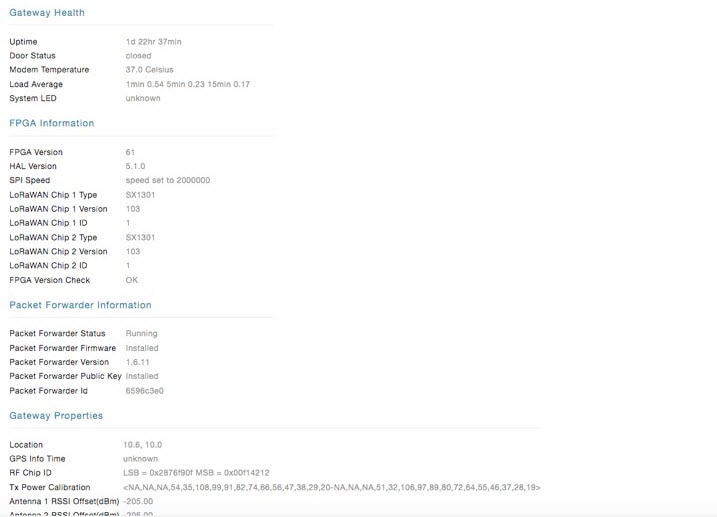
Filters gateways by FPGA (Field Programmable Gate Array) firmware version. Use this filter to find gateways running specific
FPGA versions for hardware compatibility checks.
|
|
HAL Version
|
:
|
Filters gateways by Hardware Abstraction Layer (HAL) version. Use this filter to identify gateways with specific HAL versions
for driver compatibility verification.
|
|
LoRaWAN Chip 1 Type
|
:
|
Filters gateways by LoRaWAN radio chip 1 type/model. Use this filter to find gateways with specific radio chip models for
hardware inventory.
|
|
LoRaWAN Chip 1 Version
|
:
|
Filters gateways by LoRaWAN radio chip 1 firmware version. Use this filter to identify gateways needing radio chip firmware
updates.
|
|
LoRaWAN Chip 2 Type
|
:
|
Filters gateways by LoRaWAN radio chip 2 type/model for dual-radio gateways. Use this filter to identify specific hardware
in dual-radio gateway deployments.
|
|
LoRaWAN Chip 2 Version
|
:
|
Filters gateways by LoRaWAN radio chip 2 firmware version. Use this filter to verify firmware versions on secondary radio
chips.
|
|
LRC Server 1 Hostname
|
:
|
Filters gateways by primary LoRaWAN Regional Controller (LRC) server hostname. Use this filter to find gateways configured
to connect to a specific LRC server.
|
|
LRC Server 1 IP
|
:
|
Filters gateways by primary LRC server IP address. Use this filter to identify gateways using specific LRC server IP configurations.
|
|
LRC Server 2 Hostname
|
:
|
Filters gateways by secondary LRC server hostname for redundancy. Use this filter to find gateways with backup LRC server
configurations.
|
|
LRC Server 2 IP
|
:
|
Filters gateways by secondary LRC server IP address. Use this filter to verify backup LRC server IP configurations across
gateways.
|
|
Antenna 1 RSSI Offset
|
:
|
Filters gateways by RSSI (Received Signal Strength Indicator) offset for antenna 1. Use this filter to find gateways with
specific antenna calibration settings.
|
|
Antenna 2 RSSI Offset
|
:
|
Filters gateways by RSSI offset for antenna 2 (dual-antenna gateways). Use this filter to verify antenna calibration on dual-antenna
gateway deployments.
|
|
Operating Mode
|
:
|
Filters gateways by LoRaWAN operating mode (e.g., Class A, Class C). Use this filter to find gateways configured for specific
LoRaWAN operational modes.
|
|
Radio Status
|
:
|
Filters gateways by radio operational status (enabled, disabled, error). Use this filter to find gateways with radio issues
or verify radio enablement status.
|
|
System LED
|
:
|
Filters gateways by system LED status indicator. Use this filter to identify gateways with specific LED states for visual
status verification.
|
|
Packet Forwarder Firmware Status
|
:
|
Filters gateways by packet forwarder firmware status (current, outdated, error). Use this filter to find gateways needing
packet forwarder firmware updates.
|
|
Packet Forwarder ID
|
:
|
Filters gateways by packet forwarder unique identifier (LRR ID). Use this filter to locate gateways by their packet forwarder
registration ID.
|
|
Packet Forwarder Public Key Status
|
:
|
Filters gateways by packet forwarder public key status for secure communication. Use this filter to identify gateways with
missing or invalid public keys for security troubleshooting.
|
|
Packet Forwarder Status
|
:
|
Filters gateways by packet forwarder operational status (running, stopped, error). Use this filter to find gateways with packet
forwarder service issues.
|
|
Packet Forwarder Version
|
:
|
Filters gateways by packet forwarder software version. Use this filter to identify gateways running specific packet forwarder
versions for compatibility.
|
|
Door Status
|
:
|
Filters gateways by physical door/enclosure status (open, closed). Use this filter to find gateways with open enclosures for
security or maintenance alerts.
|
|
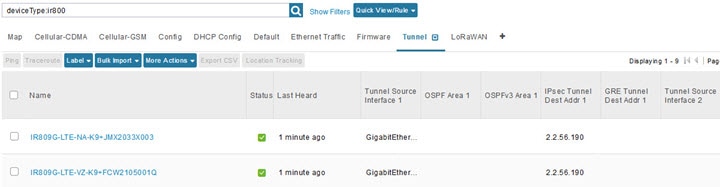
IPsec Tunnel Dest Addr 1
|
:
|
Filters gateways by IPsec tunnel 1 destination address. Use this filter to find gateways configured to connect to specific
VPN endpoints.
|
|
IPsec Tunnel Dest Addr 2
|
:
|
Filters gateways by IPsec tunnel 2 destination address for redundancy. Use this filter to verify backup tunnel configurations
across gateways.
|
|
IPsec Tunnel Dest Sub Addr 1
|
:
|
Filters gateways by IPsec tunnel 1 destination subnet address. Use this filter to find gateways routing to specific remote
subnets via tunnel 1.
|
|
IPsec Tunnel Dest Sub Addr 2
|
:
|
Filters gateways by IPsec tunnel 2 destination subnet address. Use this filter to verify remote subnet routing via backup
tunnel.
|
|
IPsec Tunnel Dest Sub Addr Pre Len 1
|
:
|
Filters gateways by IPsec tunnel 1 destination subnet prefix length. Use this filter to verify subnet mask configurations
for tunnel 1 routing.
|
|
IPsec Tunnel Dest Sub Addr Pre Len 2
|
:
|
Filters gateways by IPsec tunnel 2 destination subnet prefix length. Use this filter to verify subnet mask configurations
for tunnel 2 routing.
|
|
Tunnel HER EID 1
|
:
|
Filters gateways by Headend Router (HER) Element ID for tunnel 1. Use this filter to find gateways connected to a specific
headend router via tunnel 1.
|
|
Tunnel HER EID 2
|
:
|
Filters gateways by Headend Router (HER) Element ID for tunnel 2. Use this filter to find gateways with backup tunnel connections
to specific headend routers.
|