Troubleshooting for Specific IoT FND Components

This chapter explains some of the component-specific IoT FND issues and possible resolutions.

Troubleshoot PNP

Procedure
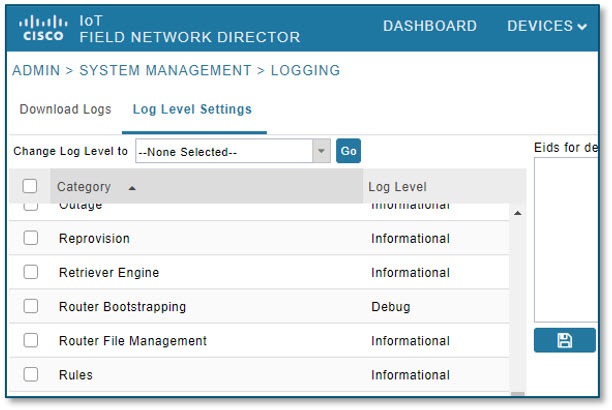

Figure 1. ADMIN > SYSTEM MANAGEMENT > LOGGING > Log Level Settings

Step 1

Check the FND-server logs by doing the following:

  1. Increase the log level: Choose ADMIN > SYSTEM MANAGEMENT > LOGGING.

  2. Select the Log Level Settings tab.

  3. Select the box next to the Router Bootstrapping option; and, select the Debug option from the Change Log Level to drop-down menu.

  4. Click Go.

    You can find the generated logs in the following location:

    opt/cgms/server/cgms/logs/server.log (RPM) and opt/fnd/logs/server.log (OVA)

Step 2

Debug on FAR by entering the following commands:

debug pnp
debug ip http client

Step 3

Check certificates and the ‘fnd’ trustpoint.

Step 4

Check provisioning link in settings.

Step 5

Check archive configuration and directory.


Debug IGMA websocket sessions for L+G border routers

An L+G border router cannot complete registration, metrics refresh, tunnel-related messaging, firmware-related transfer, or another operation that uses IGMA or a WebSocket-backed communication path.

IGMA profiles identify the Cisco IoT FND registration, metrics, and tunnel endpoints that a device uses for Cisco IoT FND communication. When WebSocket is used, the device and Cisco IoT FND establish an HTTP or HTTPS session and then use the same TCP connection for bidirectional communication. If a firewall, proxy, load balancer, certificate, URL, or idle-timeout setting interrupts that session, Cisco IoT FND might show stale metrics, incomplete registration, failed file transfer, or no visible response to a device operation.

Use this procedure when an L+G border router loses connectivity to Cisco IoT FND, stops reporting metrics, or experiences intermittent disconnects.

Procedure


Step 1

Identify the failing symptom:

Example:

  • The device loses connectivity to Cisco IoT FND.

  • The device stops reporting telemetry.

  • The device repeatedly disconnects and reconnects.

  • Registration, metrics refresh, tunnel messaging, configuration push, or firmware transfer fails.

Step 2

Confirm network connectivity between the L+G border router and Cisco IoT FND:

Example:

  • Verify that the configured Cisco IoT FND IP address or host name is reachable from the device network.

  • Verify that the configured Cisco IoT FND port is reachable.

  • Check firewall rules, proxy rules, NAT rules, and ACLs that may block communication.

  • If a load balancer is in the path, confirm that it allows long-lived WebSocket sessions.

Step 3

Check device-side IGMA service status and system resources:

Example:

  • Confirm that the IGMA process is running.

  • Confirm that all required dependent services are operational.

  • If the IGMA service is unresponsive, restart it according to the device operating procedure.

  • Check available memory, CPU, and disk space.

  • Verify that temporary directories and log directories are accessible and not full.

  • Investigate resource exhaustion events reported by the operating system.

Step 4

Validate the device configuration, IGMA URLs, and certificate requirements:

Example:

  • Confirm that the device configuration matches the intended deployment.

  • Verify controller, Cisco IoT FND, and telemetry settings.

  • Check for configuration changes that occurred before the issue started.

  • Verify that the IGMA registration, metrics, and tunnel URLs match the Cisco IoT FND provisioning settings and deployment mode.

  • Confirm that the device trusts the certificate chain presented by Cisco IoT FND.

  • Confirm that Cisco IoT FND trusts the device certificate when client certificate authentication is used.

  • Confirm that the device clock and Cisco IoT FND server clock are synchronized.


https://<fnd-hostname>:9121/igma/register
https://<fnd-hostname>:9121/igma/metric
http://<fnd-hostname>:9124/igma/metric

Use the URL generated by the deployment template or provisioning settings for the actual device. Do not assume that /igma/metric and /igma/metrics are interchangeable.

Step 5

Enable Cisco IoT FND log levels for L+G border router debugging:

  1. Choose ADMIN > Logging. In releases where logging is grouped under system management, choose ADMIN > System Management > Logging.

  2. Click the Log Level Settings tab.

  3. Set Lwm2m to the required debug log level.

  4. Set Websocket to the required debug log level.

  5. Save the log level settings.

  6. If available, enable EID-specific debug logging for the L+G border router.

Step 6

Reproduce the problem and collect timestamped logs:

Example:

  • Record the time when the issue is observed or reproduced.

  • Download server.log from all Cisco IoT FND cluster nodes for the same timestamp range.

  • Collect IGMA logs and system logs from the L+G border router.

  • In a cluster, remember that the WebSocket session or metric request may be handled by a different node than the node you are using in the browser.

Step 7

Examine and correlate logs:

Example:

  • Review IGMA logs on the device for errors, warnings, reconnect events, or repeated failures.

  • Review FND server.log for the L+G border router EID and IGMA/WebSocket messages.

  • Correlate IGMA logs, Cisco IoT FND logs, system logs, and network events by timestamp.

  • Identify patterns such as recurring disconnects, communication failures, resource-related errors, or repeated reconnect cycles.

grep -i "<L+G-router-EID>" /opt/cgms/server/cgms/logs/server.log
grep -Ei "igma|websocket|lwm2m|upgrade|handshake|register|metric|telemetry|tunnel|close|timeout|reset|certificate|401|403|404|500" /opt/cgms/server/cgms/logs/server.log

Step 8

Interpret the result and take corrective action:

Example:

  • No IGMA or WebSocket log entry for the EID: the router is not reaching Cisco IoT FND, or it is using the wrong URL, port, DNS name, or certificate.

  • Registration succeeds but metrics are stale: check the metrics profile URL, periodic metrics URL, metrics port, telemetry settings, and Cisco IoT FND server.log.

  • The WebSocket session opens and then closes: check proxy/firewall idle timeout, TLS inspection, load balancer behavior, and device-side timeout settings.

  • Firmware upload fails over IGMA: verify the transfer path and, if the upload exceeds the default timeout, review the igma-idle-timeout setting in cgms.properties.


Temporary communication interruptions may result in automatic reconnection attempts. Persistent failures, repeated reconnect cycles, or prolonged loss of telemetry should be investigated using the connectivity, service status, system resource, configuration, and log review steps above.

Troubleshooting Steps to Upload ODM File

At times, during the periodic metrics refresh, the IoT FND UI fails to provide the device metrics updates due to the absence of the ODM file (cg-nms.odm). To resolve this issue, you can download the cg-nms.odm file from the FND server and upload the file to the /managed/odm folder of the device from the Device File Management page of the FND UI.


Note


This workaround is applicable to all Cisco IOS and IOS-XE device types that FND supports.


Retrieve Inventory Error

Here are the instructions for you to update the cg-nms.odm file to prevent the retrieve inventory error:

Before you begin

When you upgrade from Cisco IoT FND Release 4.10 to Cisco IoT FND Release 4.11.x or 4.12.x with Cisco IR8100 or Cisco IR1800 routers, you'll view the following error message:
java.io
.IOException: Failed to retrieve inventory from device.Reason [Invalid cli command] sent [show platform hardware battery short] | formatflash:/managed/odm/cgms.odm platform hardware gnss details |
format flash:/managed/odm/cgms.odm,
show platform resources |
formatflash:/managed/odm/cgms.odm
There is a significant change in the cg-nms.odm file starting from Cisco IoT FND Release 4.10.x that triggers the error message.

Procedure


Step 1

Log in to the Cisco IoT FND server using the SSH terminal.

Step 2

Navigate to the folder location /opt/cgms/standalone/deployments

Step 3

Copy the cgms.ear file to a different directory

Here's an example:
[root@fnd410-107 deployments]# mkdir /opt/cgms-ear
[root@fnd410-107 opt]# cd /opt/cgms/standalone/deployments
[root@fnd410-107 deployments]#
cp cgms.ear /opt/cgms-ear/

Step 4

Unzip the cgms.ear file.

 [root@fnd410-107 cgms-ear]# cd /opt/cgms-odms/
[root@fnd410-107 cgms-ear]# ls
cgms.ear
[root@fnd410-107 cgms-ear]#
unzip cgms.ear
Archive:
cgms.ear
creating: META-INF/
inflating: META-INF/MANIFEST.MF
inflating: META-INF/application.xml
inflating: META-INF/jboss-deployment-structure.xml
inflating: cgms-aggr.jar
inflating: cgms-base.jar
inflating: cgms-c800.jar
inflating: cgms-ap800.jar
inflating: cgms-cgdm.jar
inflating: cgms-cgnms.jar
inflating: cgms-service.jar
inflating: cgms-cgrserver.jar
inflating: cgms-ciscoasr.jar
inflating: cgms-ciscoc8000.jar
inflating: cgms-ciscocgr.jar
inflating: cgms-mesh.jar
inflating: cgms-ciscocgos.jar
inflating: cgms-ciscocm.jar
inflating: cgms-ciscosbr.jar
inflating: cgms-ciscoesr5900.jar
inflating: cgms-ciscoir500.jar
inflating: cgms-iox.jar
inflating: cgms-ciscoios.jar
inflating: cgms-ciscoisr.jar
inflating: cgms-ciscoir800.jar
inflating: cgms-ciscolora.jar
inflating: cgms-common.jar
inflating: cgms-csmp.jar
inflating: cgms-dashboard.jar
inflating: cgms-db.jar
inflating: cgms-dhcp.jar
inflating: cgms-event.jar
inflating: cgms-her.jar
inflating: cgms-jobengine.jar
inflating: cgms-initialized.jar
inflating: cgms-labels.jar
inflating: cgms-logger.jar
inflating: cgms-markdown.jar
inflating: cgms-metrics.jar
inflating: cgms-odms.jar
inflating: cgms-nbapi.jar
inflating: cgms-netconf.jar
inflating: cgms-outage.jar
inflating: cgms-reprovision.jar
inflating: cgms-rules.jar
inflating: cgms-scheduler.jar
inflating: cgms-seam.jar
inflating: cgms-security.jar
inflating: cgms-snmp.jar
inflating: cgms-templates.jar
inflating: cgms-webapp.war
inflating: cgms-wsma.jar
inflating: cgms-osssh.jar
inflating: cgms-itroncam.jar
inflating: cgms-itronact.jar
inflating: cgms-itronbact.jar
inflating: cgms-lwm2m.jar
inflating: cgms-coap18.jar
inflating: cgms-cellnode.jar
inflating: cgms-iotgateway.jar
inflating: cgms-consul.jar
inflating: cgms-profile.jar
inflating: cgms-oracle.jar
inflating: cgms-tsdbadapter.jar
inflating: cgms-httpcoapproxy.jar
inflating: cgms-pnp.jar
inflating: cgms-ioxclient.jar
inflating: cgms-messageproducer.jar
inflating: cgms-ciscoir1100.jar
inflating: cgms-ciscoir1800.jar
inflating: cgms-ciscoir8100.jar
inflating: cgms-bsdiff.jar
inflating: cgms-websocket.jar
inflating: cgms-app.jar
inflating: cgms-ciscogenericdevice.jar
inflating: cgms-ciscogenericendpoint.jar
inflating: cgms-slservice.jar
inflating: cgms-lgnn.jar
inflating: cgms-lgelectric.jar
inflating: cgms-lgradio.jar
inflating: cgms-lglfn.jar
inflating: cgms-ciscoieswitch.jar
creating: lib/
inflating: lib/HikariCP-java7-2.4.13.jar
inflating: lib/antlr-runtime-3.2.jar
inflating: lib/c3p0-0.9.5.4.jar
inflating: lib/cglib-nodep-2.2.jar
inflating: lib/cgms-mibs.jar
inflating: lib/checker-qual-3.8.0.jar
inflating: lib/commons-beanutils-1.9.4.jar
inflating: lib/commons-codec-1.15.jar
inflating: lib/commons-collections-3.2.2.jar
inflating: lib/commons-configuration-1.10.jar
inflating: lib/commons-digester-1.8.1.jar
inflating: lib/commons-exec-1.1.jar
inflating: lib/commons-fileupload-1.5.jar
inflating: lib/commons-io-2.11.0.jar
inflating: lib/commons-lang-2.6.jar
inflating: lib/commons-lang3-3.11.jar
inflating: lib/commons-logging-1.2.jar
inflating: lib/commons-net-3.0.1.jar
inflating: lib/commons-validator-1.6.jar
inflating: lib/deltaspike-bean-validation-module-api-1.9.5.jar
inflating: lib/deltaspike-bean-validation-module-impl-1.9.5.jar
inflating: lib/deltaspike-cdictrl-api-1.9.5.jar
inflating: lib/deltaspike-cdictrl-weld-1.9.5.jar
inflating: lib/deltaspike-core-api-1.9.5.jar
inflating: lib/deltaspike-core-impl-1.9.5.jar
inflating: lib/deltaspike-data-module-api-1.9.5.jar
inflating: lib/deltaspike-data-module-impl-1.9.5.jar
inflating: lib/deltaspike-jpa-module-api-1.9.5.jar
inflating: lib/deltaspike-jpa-module-impl-1.9.5.jar
inflating: lib/deltaspike-jsf-module-api-1.9.5.jar
inflating: lib/deltaspike-jsf-module-impl-1.9.5.jar
inflating: lib/deltaspike-partial-bean-module-api-1.9.5.jar
inflating: lib/deltaspike-partial-bean-module-impl-1.9.5.jar
inflating: lib/deltaspike-proxy-module-api-1.9.5.jar
inflating: lib/deltaspike-proxy-module-impl-asm-1.9.5.jar
inflating: lib/deltaspike-security-module-api-1.9.5.jar
inflating: lib/deltaspike-security-module-impl-1.9.5.jar
inflating: lib/deltaspike-servlet-module-api-1.9.5.jar
inflating: lib/deltaspike-servlet-module-impl-1.9.5.jar
inflating: lib/encoder-1.2.2.jar
inflating: lib/error_prone_annotations-2.5.1.jar
inflating: lib/esper-4.10.0.jar
inflating: lib/failureaccess-1.0.1.jar
inflating: lib/freemarker-2.3.16.jar
inflating: lib/ftplet-api-1.1.1.jar
inflating: lib/ftpserver-core-1.1.1.jar
inflating: lib/guava-30.1.1-jre.jar
inflating: lib/j2objc-annotations-1.3.jar
inflating: lib/jackson-core-asl-1.9.9.redhat-4.jar
inflating: lib/jackson-mapper-asl-1.9.9.redhat-4.jar
inflating: lib/java-saml-2.6.0.jar
inflating: lib/java-saml-core-2.6.0.jar
inflating: lib/jboss-3.2.3.jar
inflating: lib/jboss-cache-1.4.1.GA.jar
inflating: lib/jboss-el-1.0_02.CR4.jar
inflating: lib/joda-time-2.10.6.jar
inflating: lib/jsch-0.1.59.jar
inflating: lib/json-20160810.jar
inflating: lib/jsr305-3.0.2.jar
inflating: lib/listenablefuture-9999.0-empty-to-avoid-conflict-with-guava.jar
inflating: lib/mchange-commons-java-0.2.15.jar
inflating: lib/mibble-mibs-2.9.3.jar
inflating: lib/mibble-parser-2.9.3.jar
inflating: lib/mina-core-2.2.1.jar
inflating: lib/netty-3.2.1.Final.jar
inflating: lib/opencsv-2.1.jar
inflating: lib/openwebbeans-spi-2.0.23.jar
inflating: lib/org.apache.servicemix.bundles.snmp4j-2.2.5_1.jar
inflating: lib/org.everit.json.schema-1.5.1.jar
inflating: lib/picketlink-api-2.7.1.Final.jar
inflating: lib/picketlink-common-2.7.1.Final.jar
inflating: lib/picketlink-idm-api-2.7.1.Final.jar
inflating: lib/picketlink-idm-impl-2.7.1.Final.jar
inflating: lib/picketlink-impl-2.7.1.Final.jar
inflating: lib/prettytime-3.2.4.Final.jar
inflating: lib/protobuf-java-3.22.2.jar
inflating: lib/protobuf-java-format-1.2.jar
inflating: lib/quartz-2.3.2.jar
inflating: lib/snakeyaml-2.0.jar
inflating: lib/snmp4j-2.2.5.jar
inflating: lib/spring-core-5.2.23.RELEASE.jar
inflating: lib/spring-jcl-5.2.23.RELEASE.jar
inflating: lib/stax2-api-4.2.jar
inflating: lib/stringtemplate-3.2.jar
inflating: lib/syslog4j-0.9.30.jar
inflating: lib/woodstox-core-5.2.1.jar
inflating: lib/xmlsec-2.2.0.jar
inflating: lib/xmp_log4j_manager-8.0.27.jar

Step 5

Unzip the cgms-odms.jar file. Here's an example:

[root@fnd410-107 cgms-ear]# mkdir /opt/cgms-odms
[root@fnd410-107 cgms-ear]#
[root@fnd410-107 cgms-ear]# cp cgms-odms.jar /opt/cgms-odms/
[root@fnd410-107 cgms-ear]#
[root@fnd410-107 cgms-ear]# cd /opt/cgms-odms/
[root@fnd410-107 cgms-odms]#
[root@fnd410-107 cgms-odms]#
unzip cgms-odms.jar
Archive:
cgms-odms.jar
creating: META-INF/
inflating: META-INF/MANIFEST.MF
creating: com/
creating: com/cisco/
creating: com/cisco/cgms/
creating: com/cisco/cgms/ios/
creating: com/cisco/cgms/ios/odm/
creating: com/cisco/cgms/protocols/
creating: com/cisco/cgms/protocols/igma/
creating: com/cisco/cgms/protocols/igma/tlv/
inflating: com/cisco/cgms/ios/odm/DirectoriesDef$Directory$Files$Entry.class
inflating: com/cisco/cgms/ios/odm/DirectoriesDef$Directory$Files.class
inflating: com/cisco/cgms/ios/odm/DirectoriesDef$Directory.class
inflating: com/cisco/cgms/ios/odm/DirectoriesDef.class
inflating: com/cisco/cgms/ios/odm/ObjectFactory.class
inflating: com/cisco/cgms/ios/odm/SOAPEnvelope$SOAPBody$Response$ResultEntry$Success.class
inflating: com/cisco/cgms/ios/odm/SOAPEnvelope$SOAPBody$Response$ResultEntry.class
inflating: com/cisco/cgms/ios/odm/SOAPEnvelope$SOAPBody$Response.class
inflating: com/cisco/cgms/ios/odm/SOAPEnvelope$SOAPBody.class
inflating: com/cisco/cgms/ios/odm/SOAPEnvelope.class
inflating: com/cisco/cgms/ios/odm/ShowBootDef.class
inflating: com/cisco/cgms/ios/odm/ShowCellularAllDef$CdmaAccountInfo.class
inflating: com/cisco/cgms/ios/odm/ShowCellularAllDef$CdmaDataProfileInfo$CdmaDataProfile.class
inflating: com/cisco/cgms/ios/odm/ShowCellularAllDef$CdmaDataProfileInfo.class
inflating: com/cisco/cgms/ios/odm/ShowCellularAllDef$DataConnectionInfo$DataConnectionProfile.class
inflating: com/cisco/cgms/ios/odm/ShowCellularAllDef$DataConnectionInfo.class
inflating: com/cisco/cgms/ios/odm/ShowCellularAllDef$GpsInfo.class
inflating: com/cisco/cgms/ios/odm/ShowCellularAllDef$HardwareInfo.class
inflating: com/cisco/cgms/ios/odm/ShowCellularAllDef$ModemInfo.class
inflating: com/cisco/cgms/ios/odm/ShowCellularAllDef$NetworkInfo.class
inflating: com/cisco/cgms/ios/odm/ShowCellularAllDef$ProfileInfo$ActiveProfile.class
inflating: com/cisco/cgms/ios/odm/ShowCellularAllDef$ProfileInfo.class
inflating: com/cisco/cgms/ios/odm/ShowCellularAllDef$RadioInformation$CdmaRadioInfo.class
inflating: com/cisco/cgms/ios/odm/ShowCellularAllDef$RadioInformation.class
inflating: com/cisco/cgms/ios/odm/ShowCellularAllDef.class
inflating: com/cisco/cgms/ios/odm/ShowControllersCellularDef.class
inflating: com/cisco/cgms/ios/odm/ShowDot11AssociationsDef$Interface$SsidAssoc$Clients$Entry.class
inflating: com/cisco/cgms/ios/odm/ShowDot11AssociationsDef$Interface$SsidAssoc$Clients.class
inflating: com/cisco/cgms/ios/odm/ShowDot11AssociationsDef$Interface$SsidAssoc.class
inflating: com/cisco/cgms/ios/odm/ShowDot11AssociationsDef$Interface.class
inflating: com/cisco/cgms/ios/odm/ShowDot11AssociationsDef.class
inflating: com/cisco/cgms/ios/odm/ShowDot16RadioControllersDef$AutodetectEntryCriteria.class
inflating: com/cisco/cgms/ios/odm/ShowDot16RadioControllersDef$AutodetectExitCriteria.class
inflating: com/cisco/cgms/ios/odm/ShowDot16RadioControllersDef$FrequencySupport.class
inflating: com/cisco/cgms/ios/odm/ShowDot16RadioControllersDef$PeriodicScanningStatus.class
inflating: com/cisco/cgms/ios/odm/ShowDot16RadioControllersDef$ScanningParameters.class
inflating: com/cisco/cgms/ios/odm/ShowDot16RadioControllersDef.class
inflating: com/cisco/cgms/ios/odm/ShowDot16RadioInterfacesAssociationDef.class
inflating: com/cisco/cgms/ios/odm/ShowEnvironmentTemperatureDef$TemperatureTable$Entry.class
inflating: com/cisco/cgms/ios/odm/ShowEnvironmentTemperatureDef$TemperatureTable.class
inflating: com/cisco/cgms/ios/odm/ShowEnvironmentTemperatureDef.class
inflating: com/cisco/cgms/ios/odm/ShowEventManagerPolicyAvailableDef$AvailablePolicies$Entry.class
inflating: com/cisco/cgms/ios/odm/ShowEventManagerPolicyAvailableDef$AvailablePolicies.class
inflating: com/cisco/cgms/ios/odm/ShowEventManagerPolicyAvailableDef.class
inflating: com/cisco/cgms/ios/odm/ShowEventManagerPolicyRegisteredDef$RegisteredPolicyEntry.class
inflating: com/cisco/cgms/ios/odm/ShowEventManagerPolicyRegisteredDef.class
inflating: com/cisco/cgms/ios/odm/ShowHostsDef.class
inflating: com/cisco/cgms/ios/odm/ShowInterfaceDot16RadioLedsDef.class
inflating: com/cisco/cgms/ios/odm/ShowInterfacesDef$Interface.class
inflating: com/cisco/cgms/ios/odm/ShowInterfacesDef.class
inflating: com/cisco/cgms/ios/odm/ShowInventoryDef$InventoryEntry.class
inflating: com/cisco/cgms/ios/odm/ShowInventoryDef.class
inflating: com/cisco/cgms/ios/odm/ShowIoxAllAppsDetailsDef$AppList.class
inflating: com/cisco/cgms/ios/odm/ShowIoxAllAppsDetailsDef.class
inflating: com/cisco/cgms/ios/odm/ShowIoxAppStatusDef.class
inflating: com/cisco/cgms/ios/odm/ShowIoxAppsListDef$PerGosInfo$PerGosAppList$Entry.class
inflating: com/cisco/cgms/ios/odm/ShowIoxAppsListDef$PerGosInfo$PerGosAppList.class
inflating: com/cisco/cgms/ios/odm/ShowIoxAppsListDef$PerGosInfo.class
inflating: com/cisco/cgms/ios/odm/ShowIoxAppsListDef.class
inflating: com/cisco/cgms/ios/odm/ShowIoxHostDetailDef$IoxHost.class
inflating: com/cisco/cgms/ios/odm/ShowIoxHostDetailDef.class
inflating: com/cisco/cgms/ios/odm/ShowIoxPerAppDetailsDef.class
inflating: com/cisco/cgms/ios/odm/ShowIoxServiceDef.class
inflating: com/cisco/cgms/ios/odm/ShowIpInterfaceBriefDef$IPInterfaces$Entry.class
inflating: com/cisco/cgms/ios/odm/ShowIpInterfaceBriefDef$IPInterfaces.class
inflating: com/cisco/cgms/ios/odm/ShowIpInterfaceBriefDef.class
inflating: com/cisco/cgms/ios/odm/ShowIpv6DhcpDef.class
inflating: com/cisco/cgms/ios/odm/ShowIpv6InterfaceDef$Interface$GlobalUnicastAddress.class
inflating: com/cisco/cgms/ios/odm/ShowIpv6InterfaceDef$Interface.class
inflating: com/cisco/cgms/ios/odm/ShowIpv6InterfaceDef.class
inflating: com/cisco/cgms/ios/odm/ShowLte450AllDef$AntennaSignalQuality.class
inflating: com/cisco/cgms/ios/odm/ShowLte450AllDef$GnssLocationData.class
inflating: com/cisco/cgms/ios/odm/ShowLte450AllDef$MobileConnectionInformation.class
inflating: com/cisco/cgms/ios/odm/ShowLte450AllDef$MobileNetworkStatus.class
inflating: com/cisco/cgms/ios/odm/ShowLte450AllDef$ModemInformation.class
inflating: com/cisco/cgms/ios/odm/ShowLte450AllDef$PimInformation.class
inflating: com/cisco/cgms/ios/odm/ShowLte450AllDef$SignalQuality.class
inflating: com/cisco/cgms/ios/odm/ShowLte450AllDef$SystemStatus.class
inflating: com/cisco/cgms/ios/odm/ShowLte450AllDef$WatchdogStatistics.class
inflating: com/cisco/cgms/ios/odm/ShowLte450AllDef.class
inflating: com/cisco/cgms/ios/odm/ShowMemoryStatisticsDef$MemoryStatistics$Entry.class
inflating: com/cisco/cgms/ios/odm/ShowMemoryStatisticsDef$MemoryStatistics.class
inflating: com/cisco/cgms/ios/odm/ShowMemoryStatisticsDef.class
inflating: com/cisco/cgms/ios/odm/ShowMeshSecurityKeysDef$MeshInterfaces$MeshSecurityKey.class
inflating: com/cisco/cgms/ios/odm/ShowMeshSecurityKeysDef$MeshInterfaces.class
inflating: com/cisco/cgms/ios/odm/ShowMeshSecurityKeysDef.class
inflating: com/cisco/cgms/ios/odm/ShowMeshSecurityKeysLfnDef$MeshInterfaces$MeshSecurityKey.class
inflating: com/cisco/cgms/ios/odm/ShowMeshSecurityKeysLfnDef$MeshInterfaces.class
inflating: com/cisco/cgms/ios/odm/ShowMeshSecurityKeysLfnDef.class
inflating: com/cisco/cgms/ios/odm/ShowModuleDef$ModSerialNumMap$SerialNumMap$Entry.class
inflating: com/cisco/cgms/ios/odm/ShowModuleDef$ModSerialNumMap$SerialNumMap.class
inflating: com/cisco/cgms/ios/odm/ShowModuleDef$ModSerialNumMap.class
inflating: com/cisco/cgms/ios/odm/ShowModuleDef$ModuleInfo$ModuleType$Entry.class
inflating: com/cisco/cgms/ios/odm/ShowModuleDef$ModuleInfo$ModuleType.class
inflating: com/cisco/cgms/ios/odm/ShowModuleDef$ModuleInfo.class
inflating: com/cisco/cgms/ios/odm/ShowModuleDef.class
inflating: com/cisco/cgms/ios/odm/ShowPlatformBatteryDef.class
inflating: com/cisco/cgms/ios/odm/ShowPlatformBatteryDetailsDef$BatteryUnit$Entry.class
inflating: com/cisco/cgms/ios/odm/ShowPlatformBatteryDetailsDef$BatteryUnit.class
inflating: com/cisco/cgms/ios/odm/ShowPlatformBatteryDetailsDef.class
inflating: com/cisco/cgms/ios/odm/ShowPlatformBatteryShortDef$BatteryUnitInfo$BatteryUnit$Entry.class
inflating: com/cisco/cgms/ios/odm/ShowPlatformBatteryShortDef$BatteryUnitInfo$BatteryUnit.class
inflating: com/cisco/cgms/ios/odm/ShowPlatformBatteryShortDef$BatteryUnitInfo.class
inflating: com/cisco/cgms/ios/odm/ShowPlatformBatteryShortDef.class
inflating: com/cisco/cgms/ios/odm/ShowPlatformDoorDef.class
inflating: com/cisco/cgms/ios/odm/ShowPlatformGpsDef.class
inflating: com/cisco/cgms/ios/odm/ShowPlatformGuestOsDef.class
inflating: com/cisco/cgms/ios/odm/ShowPlatformHardwareGnssDetailsDef.class
inflating: com/cisco/cgms/ios/odm/ShowPlatformHypervisorDef.class
inflating: com/cisco/cgms/ios/odm/ShowPlatformLedDef$LedSummary$Entry.class
inflating: com/cisco/cgms/ios/odm/ShowPlatformLedDef$LedSummary.class
inflating: com/cisco/cgms/ios/odm/ShowPlatformLedDef.class
inflating: com/cisco/cgms/ios/odm/ShowPlatformLedSummaryDef$CellularLedSummary$Entry.class
inflating: com/cisco/cgms/ios/odm/ShowPlatformLedSummaryDef$CellularLedSummary.class
inflating: com/cisco/cgms/ios/odm/ShowPlatformLedSummaryDef$LedSummary$Entry.class
inflating: com/cisco/cgms/ios/odm/ShowPlatformLedSummaryDef$LedSummary.class
inflating: com/cisco/cgms/ios/odm/ShowPlatformLedSummaryDef$WimaxLedSummary$Entry.class
inflating: com/cisco/cgms/ios/odm/ShowPlatformLedSummaryDef$WimaxLedSummary.class
inflating: com/cisco/cgms/ios/odm/ShowPlatformLedSummaryDef$WpanLedSummary$Entry.class
inflating: com/cisco/cgms/ios/odm/ShowPlatformLedSummaryDef$WpanLedSummary.class
inflating: com/cisco/cgms/ios/odm/ShowPlatformLedSummaryDef.class
inflating: com/cisco/cgms/ios/odm/ShowPlatformResourcesDef.class
inflating: com/cisco/cgms/ios/odm/ShowPlatformSoftwareLicenseDef$SoftwareLicense.class
inflating: com/cisco/cgms/ios/odm/ShowPlatformSoftwareLicenseDef.class
inflating: com/cisco/cgms/ios/odm/ShowPrivilegeDef.class
inflating: com/cisco/cgms/ios/odm/ShowProcessesCpuDef.class
inflating: com/cisco/cgms/ios/odm/ShowProcessesCpuSortedDef.class
inflating: com/cisco/cgms/ios/odm/ShowProcessesMemorySortedDef.class
inflating: com/cisco/cgms/ios/odm/ShowRadioDetailsDef$RadioInformation.class
inflating: com/cisco/cgms/ios/odm/ShowRadioDetailsDef.class
inflating: com/cisco/cgms/ios/odm/ShowRawTcpSessionsDef$SessionsTable$Entry.class
inflating: com/cisco/cgms/ios/odm/ShowRawTcpSessionsDef$SessionsTable.class
inflating: com/cisco/cgms/ios/odm/ShowRawTcpSessionsDef.class
inflating: com/cisco/cgms/ios/odm/ShowRawTcpStatisticDef$StatisticsTable$Entry.class
inflating: com/cisco/cgms/ios/odm/ShowRawTcpStatisticDef$StatisticsTable.class
inflating: com/cisco/cgms/ios/odm/ShowRawTcpStatisticDef.class
inflating: com/cisco/cgms/ios/odm/ShowRawTcpStatisticsDef$StatisticsTable$Entry.class
inflating: com/cisco/cgms/ios/odm/ShowRawTcpStatisticsDef$StatisticsTable.class
inflating: com/cisco/cgms/ios/odm/ShowRawTcpStatisticsDef.class
inflating: com/cisco/cgms/ios/odm/ShowRunningConfigDef$ScadaProtocol$Channel$TcpConnection.class
inflating: com/cisco/cgms/ios/odm/ShowRunningConfigDef$ScadaProtocol$Channel.class
inflating: com/cisco/cgms/ios/odm/ShowRunningConfigDef$ScadaProtocol$Sector.class
inflating: com/cisco/cgms/ios/odm/ShowRunningConfigDef$ScadaProtocol$Session.class
inflating: com/cisco/cgms/ios/odm/ShowRunningConfigDef$ScadaProtocol.class
inflating: com/cisco/cgms/ios/odm/ShowRunningConfigDef.class
inflating: com/cisco/cgms/ios/odm/ShowScadaStatisticsDef$Channel.class
inflating: com/cisco/cgms/ios/odm/ShowScadaStatisticsDef.class
inflating: com/cisco/cgms/ios/odm/ShowScadaTcpDef$Channel$Connection.class
inflating: com/cisco/cgms/ios/odm/ShowScadaTcpDef$Channel$TotalConnections.class
inflating: com/cisco/cgms/ios/odm/ShowScadaTcpDef$Channel.class
inflating: com/cisco/cgms/ios/odm/ShowScadaTcpDef.class
inflating: com/cisco/cgms/ios/odm/ShowSdCardStatusDef.class
inflating: com/cisco/cgms/ios/odm/ShowSnmpMibIfmibIfindexDef$IfIndex.class
inflating: com/cisco/cgms/ios/odm/ShowSnmpMibIfmibIfindexDef.class
inflating: com/cisco/cgms/ios/odm/ShowVersionDef$LicenseUdiTable$Entry.class
inflating: com/cisco/cgms/ios/odm/ShowVersionDef$LicenseUdiTable.class
inflating: com/cisco/cgms/ios/odm/ShowVersionDef.class
inflating: com/cisco/cgms/ios/odm/ShowVirtualLpwaModemGpsStatusDef.class
inflating: com/cisco/cgms/ios/odm/ShowVirtualLpwaModemInfoDef.class
inflating: com/cisco/cgms/ios/odm/ShowVirtualLpwaModemStatisticsDef.class
inflating: com/cisco/cgms/ios/odm/ShowVirtualLpwaModemStatusDef.class
inflating: com/cisco/cgms/ios/odm/ShowVirtualLpwaPktForwarderInfoDef.class
inflating: com/cisco/cgms/ios/odm/ShowVirtualLpwaPktForwarderStatusDef.class
inflating: com/cisco/cgms/ios/odm/ShowWpanConfigDef.class
inflating: com/cisco/cgms/ios/odm/ShowWpanHADetailDef.class
inflating: com/cisco/cgms/ios/odm/ShowWpanHardwareVersionDef.class
inflating: com/cisco/cgms/ios/odm/ShowWpanPacketCountDef.class
inflating: com/cisco/cgms/ios/odm/ShowWpanRplBriefDef.class
inflating: com/cisco/cgms/ios/odm/ShowWpanRplItableDef$RPLRouteTable$Entry.class
inflating: com/cisco/cgms/ios/odm/ShowWpanRplItableDef$RPLRouteTable.class
inflating: com/cisco/cgms/ios/odm/ShowWpanRplItableDef.class
inflating: com/cisco/cgms/ios/odm/ShowWpanRplStreeDef$Node.class
inflating: com/cisco/cgms/ios/odm/ShowWpanRplStreeDef.class
inflating: com/cisco/cgms/ios/odm/SnmpEngineDef.class
inflating: com/cisco/cgms/protocols/igma/tlv/IotGateway$1.class
inflating: com/cisco/cgms/protocols/igma/tlv/IotGateway$ConfigCliReply$1.class
inflating: com/cisco/cgms/protocols/igma/tlv/IotGateway$ConfigCliReply$Builder.class
inflating: com/cisco/cgms/protocols/igma/tlv/IotGateway$ConfigCliReply.class
inflating: com/cisco/cgms/protocols/igma/tlv/IotGateway$ConfigCliReplyOrBuilder.class
inflating: com/cisco/cgms/protocols/igma/tlv/IotGateway$ConfigTerminalReply$1.class
inflating: com/cisco/cgms/protocols/igma/tlv/IotGateway$ConfigTerminalReply$Builder.class
inflating: com/cisco/cgms/protocols/igma/tlv/IotGateway$ConfigTerminalReply.class
inflating: com/cisco/cgms/protocols/igma/tlv/IotGateway$ConfigTerminalReplyOrBuilder.class
inflating: com/cisco/cgms/protocols/igma/tlv/IotGateway$Dir$1.class
inflating: com/cisco/cgms/protocols/igma/tlv/IotGateway$Dir$Builder.class
inflating: com/cisco/cgms/protocols/igma/tlv/IotGateway$Dir.class
inflating: com/cisco/cgms/protocols/igma/tlv/IotGateway$DirOrBuilder.class
inflating: com/cisco/cgms/protocols/igma/tlv/IotGateway$GetFile$1.class
inflating: com/cisco/cgms/protocols/igma/tlv/IotGateway$GetFile$Builder.class
inflating: com/cisco/cgms/protocols/igma/tlv/IotGateway$GetFile.class
inflating: com/cisco/cgms/protocols/igma/tlv/IotGateway$GetFileOrBuilder.class
inflating: com/cisco/cgms/protocols/igma/tlv/IotGateway$GetFileReply$1.class
inflating: com/cisco/cgms/protocols/igma/tlv/IotGateway$GetFileReply$Builder.class
inflating: com/cisco/cgms/protocols/igma/tlv/IotGateway$GetFileReply.class
inflating: com/cisco/cgms/protocols/igma/tlv/IotGateway$GetFileReplyOrBuilder.class
inflating: com/cisco/cgms/protocols/igma/tlv/IotGateway$PostCli$1.class
inflating: com/cisco/cgms/protocols/igma/tlv/IotGateway$PostCli$Builder.class
inflating: com/cisco/cgms/protocols/igma/tlv/IotGateway$PostCli.class
inflating: com/cisco/cgms/protocols/igma/tlv/IotGateway$PostCliOrBuilder.class
inflating: com/cisco/cgms/protocols/igma/tlv/IotGateway$PostConfig$1.class
inflating: com/cisco/cgms/protocols/igma/tlv/IotGateway$PostConfig$Builder.class
inflating: com/cisco/cgms/protocols/igma/tlv/IotGateway$PostConfig.class
inflating: com/cisco/cgms/protocols/igma/tlv/IotGateway$PostConfigOrBuilder.class
inflating: com/cisco/cgms/protocols/igma/tlv/IotGateway$PostFile$1.class
inflating: com/cisco/cgms/protocols/igma/tlv/IotGateway$PostFile$Builder.class
inflating: com/cisco/cgms/protocols/igma/tlv/IotGateway$PostFile.class
inflating: com/cisco/cgms/protocols/igma/tlv/IotGateway$PostFileOrBuilder.class
inflating: com/cisco/cgms/protocols/igma/tlv/IotGateway$ShowAesKey$1.class
inflating: com/cisco/cgms/protocols/igma/tlv/IotGateway$ShowAesKey$Builder.class
inflating: com/cisco/cgms/protocols/igma/tlv/IotGateway$ShowAesKey.class
inflating: com/cisco/cgms/protocols/igma/tlv/IotGateway$ShowAesKeyOrBuilder.class
inflating: com/cisco/cgms/protocols/igma/tlv/IotGateway$ShowCommonPktFwdInfo$1.class
inflating: com/cisco/cgms/protocols/igma/tlv/IotGateway$ShowCommonPktFwdInfo$Builder.class
inflating: com/cisco/cgms/protocols/igma/tlv/IotGateway$ShowCommonPktFwdInfo.class
inflating: com/cisco/cgms/protocols/igma/tlv/IotGateway$ShowCommonPktFwdInfoOrBuilder.class
inflating: com/cisco/cgms/protocols/igma/tlv/IotGateway$ShowCommonPktFwdStatus$1.class
inflating: com/cisco/cgms/protocols/igma/tlv/IotGateway$ShowCommonPktFwdStatus$Builder.class
inflating: com/cisco/cgms/protocols/igma/tlv/IotGateway$ShowCommonPktFwdStatus.class
inflating: com/cisco/cgms/protocols/igma/tlv/IotGateway$ShowCommonPktFwdStatusOrBuilder.class
inflating: com/cisco/cgms/protocols/igma/tlv/IotGateway$ShowFpga$1.class
inflating: com/cisco/cgms/protocols/igma/tlv/IotGateway$ShowFpga$Builder.class
inflating: com/cisco/cgms/protocols/igma/tlv/IotGateway$ShowFpga.class
inflating: com/cisco/cgms/protocols/igma/tlv/IotGateway$ShowFpgaOrBuilder.class
inflating: com/cisco/cgms/protocols/igma/tlv/IotGateway$ShowInterfaces$1.class
inflating: com/cisco/cgms/protocols/igma/tlv/IotGateway$ShowInterfaces$Builder.class
inflating: com/cisco/cgms/protocols/igma/tlv/IotGateway$ShowInterfaces.class
inflating: com/cisco/cgms/protocols/igma/tlv/IotGateway$ShowInterfacesOrBuilder.class
inflating: com/cisco/cgms/protocols/igma/tlv/IotGateway$ShowInventory$1.class
inflating: com/cisco/cgms/protocols/igma/tlv/IotGateway$ShowInventory$Builder.class
inflating: com/cisco/cgms/protocols/igma/tlv/IotGateway$ShowInventory.class
inflating: com/cisco/cgms/protocols/igma/tlv/IotGateway$ShowInventoryOrBuilder.class
inflating: com/cisco/cgms/protocols/igma/tlv/IotGateway$ShowIpsecStatusInfo$1.class
inflating: com/cisco/cgms/protocols/igma/tlv/IotGateway$ShowIpsecStatusInfo$Builder.class
inflating: com/cisco/cgms/protocols/igma/tlv/IotGateway$ShowIpsecStatusInfo.class
inflating: com/cisco/cgms/protocols/igma/tlv/IotGateway$ShowIpsecStatusInfoOrBuilder.class
inflating: com/cisco/cgms/protocols/igma/tlv/IotGateway$ShowLedStatus$1.class
inflating: com/cisco/cgms/protocols/igma/tlv/IotGateway$ShowLedStatus$Builder.class
inflating: com/cisco/cgms/protocols/igma/tlv/IotGateway$ShowLedStatus.class
inflating: com/cisco/cgms/protocols/igma/tlv/IotGateway$ShowLedStatusOrBuilder.class
inflating: com/cisco/cgms/protocols/igma/tlv/IotGateway$ShowPktForwarderInfo$1.class
inflating: com/cisco/cgms/protocols/igma/tlv/IotGateway$ShowPktForwarderInfo$Builder.class
inflating: com/cisco/cgms/protocols/igma/tlv/IotGateway$ShowPktForwarderInfo.class
inflating: com/cisco/cgms/protocols/igma/tlv/IotGateway$ShowPktForwarderInfoOrBuilder.class
inflating: com/cisco/cgms/protocols/igma/tlv/IotGateway$ShowPktForwarderStatus$1.class
inflating: com/cisco/cgms/protocols/igma/tlv/IotGateway$ShowPktForwarderStatus$Builder.class
inflating: com/cisco/cgms/protocols/igma/tlv/IotGateway$ShowPktForwarderStatus.class
inflating: com/cisco/cgms/protocols/igma/tlv/IotGateway$ShowPktForwarderStatusOrBuilder.class
inflating: com/cisco/cgms/protocols/igma/tlv/IotGateway$ShowPlatformStatus$1.class
inflating: com/cisco/cgms/protocols/igma/tlv/IotGateway$ShowPlatformStatus$Builder.class
inflating: com/cisco/cgms/protocols/igma/tlv/IotGateway$ShowPlatformStatus.class
inflating: com/cisco/cgms/protocols/igma/tlv/IotGateway$ShowPlatformStatusOrBuilder.class
inflating: com/cisco/cgms/protocols/igma/tlv/IotGateway$ShowRadio$1.class
inflating: com/cisco/cgms/protocols/igma/tlv/IotGateway$ShowRadio$Builder.class
inflating: com/cisco/cgms/protocols/igma/tlv/IotGateway$ShowRadio.class
inflating: com/cisco/cgms/protocols/igma/tlv/IotGateway$ShowRadioOrBuilder.class
inflating: com/cisco/cgms/protocols/igma/tlv/IotGateway$ShowReplyNoFormat$1.class
inflating: com/cisco/cgms/protocols/igma/tlv/IotGateway$ShowReplyNoFormat$Builder.class
inflating: com/cisco/cgms/protocols/igma/tlv/IotGateway$ShowReplyNoFormat.class
inflating: com/cisco/cgms/protocols/igma/tlv/IotGateway$ShowReplyNoFormatOrBuilder.class
inflating: com/cisco/cgms/protocols/igma/tlv/IotGateway$ShowVersion$1.class
inflating: com/cisco/cgms/protocols/igma/tlv/IotGateway$ShowVersion$Builder.class
inflating: com/cisco/cgms/protocols/igma/tlv/IotGateway$ShowVersion.class
inflating: com/cisco/cgms/protocols/igma/tlv/IotGateway$ShowVersionOrBuilder.class
inflating: com/cisco/cgms/protocols/igma/tlv/IotGateway.class
creating: META-INF/odm/
inflating: META-INF/odm/cg-nms-ap800.odm
inflating: META-INF/odm/cg-nms-ap800r.odm
inflating: META-INF/odm/cg-nms-c800.odm
inflating: META-INF/odm/cg-nms-esr5900.odm
inflating: META-INF/odm/cg-nms-ie4000.odm
inflating: META-INF/odm/cg-nms-ie4010.odm
inflating: META-INF/odm/cg-nms-ir1100.odm
inflating: META-INF/odm/cg-nms-ir1800.odm
inflating: META-INF/odm/cg-nms-ir800.odm
inflating: META-INF/odm/cg-nms-ir8100.odm
inflating: META-INF/odm/cg-nms-sbr.odm
inflating: META-INF/odm/cg-nms.odm

Step 6

The latest ODM files are available at /opt/cgms-odms/META-INF/odm/. Here's an example:

[root@fnd410-107 cgms-odms]# ls -l /opt/cgms-odms/META-INF/odm/
total 504
-rw-r--r-- 1 root root
8658 May 8 2024 cg-nms-ap800.odm
-rw-r--r-- 1 root root
8916 May 8 2024 cg-nms-ap800r.odm
-rw-r--r-- 1 root root 28192 May 8 2024 cg-nms-c800.odm
-rw-r--r-- 1 root root 26950 May 8 2024 cg-nms-esr5900.odm
-rw-r--r-- 1 root root 16884 May 8 2024 cg-nms-ie4000.odm
-rw-r--r-- 1 root root 16884 May 8 2024 cg-nms-ie4010.odm
-rw-r--r-- 1 root root 68545 May 8 2024 cg-nms-ir1100.odm
-rw-r--r-- 1 root root 69096 May 8 2024 cg-nms-ir1800.odm
-rw-r--r-- 1 root root 73980 May 8 2024 cg-nms-ir800.odm
-rw-r--r-- 1 root root 78343 May 8 2024 cg-nms-ir8100.odm
-rw-r--r-- 1 root root 19867 May 8 2024 cg-nms-sbr.odm
-rw-r--r-- 1 root root 70156 May 8 2024 cg-nms.odm

Step 7

Download the following on your local and rename them. Here's an example:

cg-nms-ir1800.odm or cg-nms-ir8100 and RENAME to cg-nms.odm

Step 8

Login to Cisco IoT FND, navigate to CONFIG > Device Management.

Step 9

Select configuration groups of the routers reporting the error message and click Upload.

Step 10

Click the Select File from the List Window and click Add File.

Note


You see the file upload successful message.

Step 11

Choose the cg-nms.odm file downloaded for upgrading to Cisco IoT FND Release 4.11.x or 4.12.x. Click Add File and then upload the file.

Step 12

In the Select File From List pane, click Upload File.

Step 13

In the Upload File to Routers page, select and override the list of routers on which the new Cisco IoT FND 4.11.x or 4.12.x cg-nms.odm files need to be upgraded. Click Upload.

Step 14

The cg-nms.odm file is uploaded to the router directory bootflash:/managed/odm/ dirctory.

Step 15

When you see the Upload Complete message, the refresh metrics are updates for the respective routers.


What to do next

Upload the ODM File from FND UI

Upload the ODM File from FND UI

To upload the ODM file from FND UI:

Note


Ensure that the ODM file renamed as cg-nms.odm is available in your PC.


Before you begin

Retrieve Inventory Error.

Procedure


Step 1

Log in to IoT FND UI using a browser.

Step 2

Navigate to CONFIG > Device File Management page.

Step 3

In the Device File Management page, select the Actions tab and click Upload.

Step 4

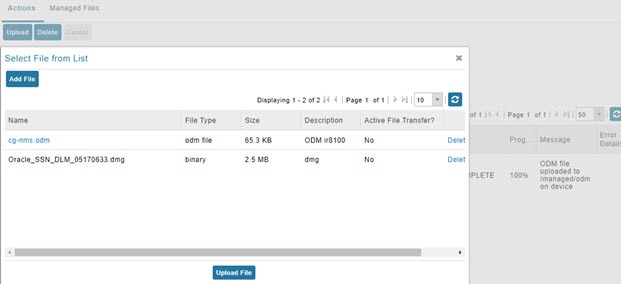
In the Select File from List window, click Add File.

Step 5

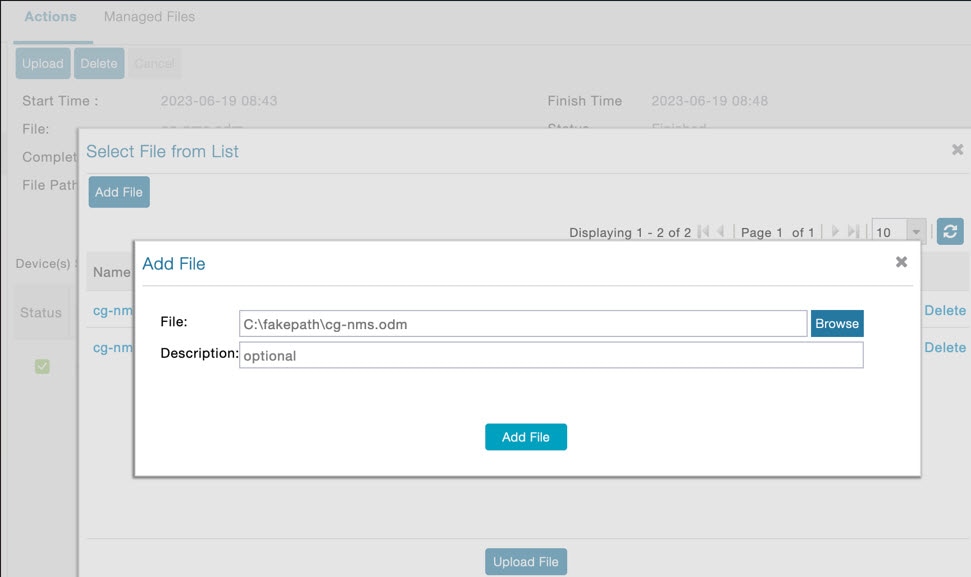
Browse to the ODM file path (cg-nms.odm) and click Add File and then Upload File.

Step 6

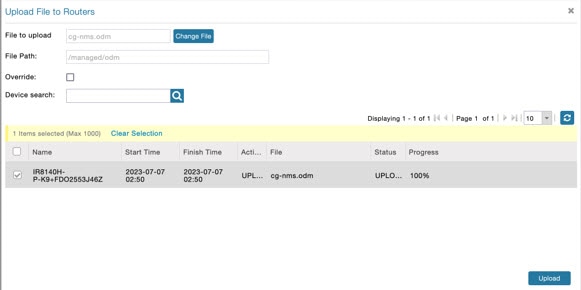
Select the check box of the device(s) in the Upload File to Routers window and click Upload.

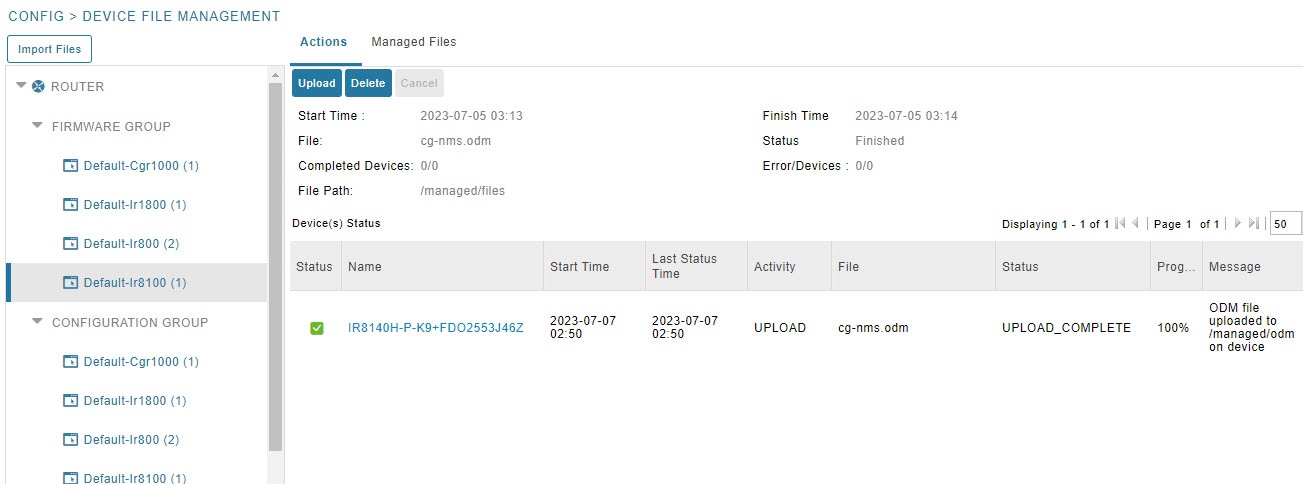
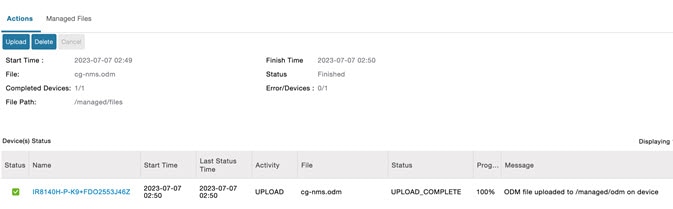
On successful completion of the upload, the Device Status table displays the upload completion message as shown below.

Note


Only the cg-nms.odm file gets uploaded to the /managed/odm folder, while the other files get uploaded to the /managed/files folder.


Troubleshoot TCL Scripts

Procedure

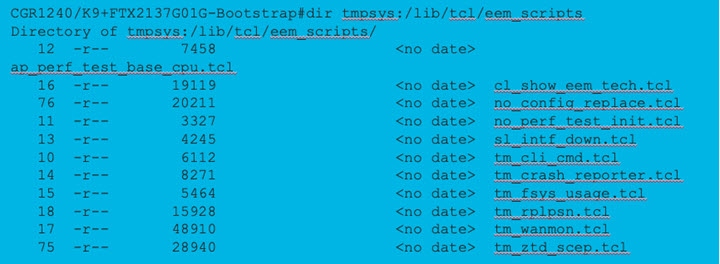
You can find the TCL scripts on a FAR at: tmpsys:/lib/tcl/eem_scripts.


You can find the TCL scripts on a FAR at: tmpsys:/lib/tcl/eem_scripts.

Step 1

Debug using the debug event manager tcl commands.

Step 2

List planned scripts: sh event manager statistics policy.

Step 3

Manual execution: event manager run tm_ztd_scep.tcl.

Figure 2. Supported Troubleshooting TCL Scripts

Troubleshoot Certificate Enrollment

Procedure


Debug EEM and TCL on a FAR by entering the following command:

event manager environment ZTD_SCEP_Debug TRUE
  • Manually perform trustpoint authentication and enrollment.

  • Check Time and NTP

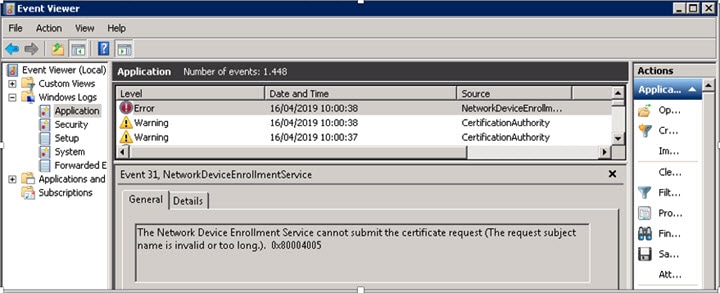
  • Check NDES logs

Figure 3. Event Viewer

Certificate Enrollment — Test Manual

Procedure


Step 1

Save the current crypto config:

FGL204220HB# sh run | s crypto pki profile enrollment LDevID
FGL204220HB# sh run | s crypto pki trustpoint LDevID

Step 2

Remove crypto trustpoint in order to reset state and remove certificates:

no crypto pki trustpoint LDevID

Step 3

Re-add the saved configuration:

configure terminal
FGL204220HB# sh run | s crypto pki profile enrollment LDevID
FGL204220HB# sh run | s crypto pki trustpoint LDevID

Step 4

Authenticate with SCEP:

crypto pki authenticate LDevID

Step 5

Request Certificate:

crypto pki enroll LDevID

Certificate Enrollment — Example Output

CGR1120/K9+FOC21255M(config)#crypto pki authenticate LDevID
Certificate has the following attributes:
Fingerprint MD5: 438C8EB4 145564EF 4BACAFDB E5A338BB
Fingerprint SHA1: 0CF137AC F108235C F7125434 A0383728 852508D5
Trustpoint Fingerprint: 0CF137AC F108235C F7125434 A0383728 852508D5
Certificate validated - fingerprints matched.
Trustpoint CA certificate accepted.
CGR1120/K9+FOC21255M(config)#crypto pki enroll LDevID
%
% Start certificate enrollment...
% The subject name in the certificate will include: serialNumber=PID:CGR1120 SN:xxxxxxxxxx,CN=yyyyyyyyy
% The fully-qualified domain name will not be included in the certificate
% Certificate request sent to Certificate Authority
% The 'show crypto pki certificate verbose LDevID' command will show the fingerprint.
CGR1120/K9+FOC21255M(config)#
Mar 21 08:13:38.475 UTC: CRYPTO_PKI: Certificate Request Fingerprint MD5: 34AE797C E6A9DB7E 8EAA43E8
DC50CC45
Mar 21 08:13:38.475 UTC: CRYPTO_PKI: Certificate Request Fingerprint SHA1: F79DD9C7 015B8B7D E37130B7
543F2721 330E235C
Mar 21 08:13:43.201 UTC:%PKI-6-CERTRET: Certificate received from Certificate Authority

Troubleshoot WSMA

Before you begin

You must have cgms-tools installed before you can troubleshoot WSMA.

Procedure


Step 1

To execute:

/opt/cgms-tools/bin/wsma-request https://10.48.43.249:443/wsma/exec fndadmin cisco123
/opt/cgms/server/cgms/conf "show version | format flash:/managed/odm/cg-nms.odm"

Step 2

For an OVA install:

docker exec -it fnd-container /opt/cgms-tools/bin/wsma-request https://<FAR IP>:443/wsma/exec
<username> <password> /opt/cgms/server/cgms/conf "show version | format flash:/managed/odm/cg-nms.odm"
Example Output:
[root@iot-fnd ~]# docker exec -it fnd-container /opt/cgms-tools/bin/wsma-request
https://10.48.43.249/wsma/exec fndadmin cisco123 /opt/cgms/server/cgms/conf "show version | format
flash:/managed/odm/cg-nms.odm"
sending command: show version | format flash:/managed/odm/cg-nms.odm
<?xml version="1.0" encoding="UTF-8"?>
<ShowVersion xmlns="ODM://bootflash:/managed/odm/cg-nms.odm//show_version">
<Version>17.01.01</Version>
<VersionNonXe>17.1.1</VersionNonXe>
<HostName>IR1101</HostName>
<Uptime>1 week, 6 days, 3 hours, 3 minutes</Uptime>
<SystemImageFile>&quot;bootflash:ir1101-universalk9.17.01.01.SPA.bin&quot;</SystemImageFile>
<ReloadReason>Reload Command</ReloadReason>
<HardwareRevision>1.2 GHz</HardwareRevision>
<ProcessorBoardId>FCW223700AV</ProcessorBoardId>
<FastEthernetIntfCnt>4</FastEthernetIntfCnt>
<GigabitEthernetIntfCnt>2</GigabitEthernetIntfCnt>
<LicenseUdiTable>
</LicenseUdiTable></ShowVersion>

Troubleshoot Tunnel Provisioning

Procedure


Step 1

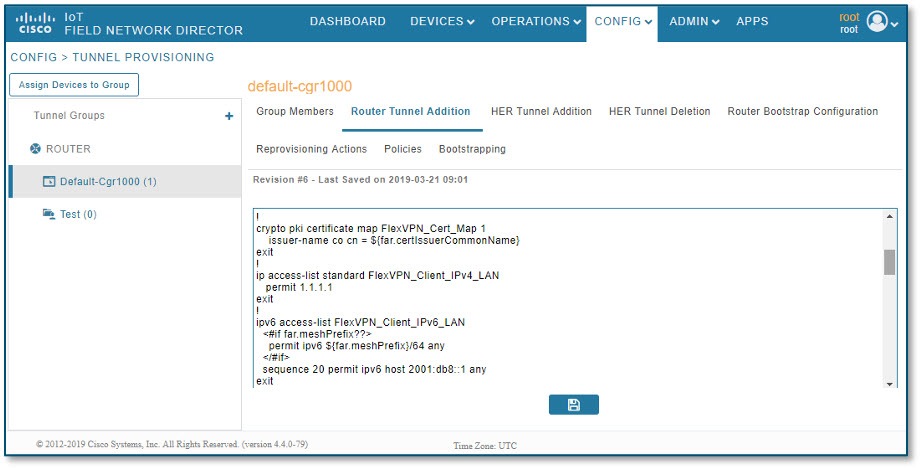
Substitute variables in the Router Tunnel Addition template (Figure 9) and check if the configuration is valid.

Step 2

Check server.log and optionally increase the log level.

Step 3

Check the head-end router (HER) Flex VPN.

Step 4

Debug on FAR using the following commands:

debug crypto sess
debug crypto ikev2
debug crypto ipsec
Figure 4. CONFIG > Tunnel Provisioning

Troubleshoot Netconf: FND—HER Communications

Procedure


Step 1

Start netconf session:

[root@iot-fnd ~]# ssh -l admin 10.48.43.228 -s netconf
Password:

Step 2

Device sends hello:

<?xml version="1.0" encoding="UTF-8"?><hello xmlns="urn:ietf:params:xml:ns:netconf:base:1.0"><capabilities>
<capability>urn:ietf:params:netconf:base:1.0</capability>
<capability>urn:ietf:params:netconf:capability:writeable-running:1.0</capability>
<capability>urn:ietf:params:netconf:capability:startup:1.0</capability>
<capability>urn:ietf:params:netconf:capability:url:1.0</capability>
<capability>urn:cisco:params:netconf:capability:pi-data-model:1.0</capability>
<capability>urn:cisco:params:netconf:capability:notification:1.0</capability></capabilities><session-id>2036979584</session-id></hello>]]>]]>

Step 3

Send a hello yourself:

<?xml version=”1.0″ encoding=”UTF-8″?>

<hello>

<capabilities>

<capability>urn:ietf:params:netconf:base:1.0</capability>

</capabilities>

</hello>]]>]]>

Step 4

Request running config (for example):

<?xml version="1.0" encoding="UTF-8" standalone="yes"?>

<ns2:rpc xmlns:ns2="urn:ietf:params:xml:ns:netconf:base:1.0" message-id="1">

<ns2:get-config>

<source>

<ns2:running/>

</source>

</ns2:get-config>

</ns2:rpc>]]>]]>

Step 5

Device Response:

<?xml version=”1.0" encoding="UTF-8"?><rpc-reply message-id="1" xmlns="urn:ietf:params:xml:ns:netconf:base:1.0"><data><cli-config-data-block>!

! Last configuration change at 16:10:25 UTC Thu Apr 4 2019 by admin

! NVRAM config last updated at 16:20:47 UTC Thu Apr 4 2019 by admin

!

version 16.3

service timestamps debug datetime msec

service timestamps log datetime msec

no platform punt-keepalive disable-kernel-core

platform console auto

!

hostname fnd4her

Troubleshoot Configuration Deployment

Procedure


Step 1

Substitute configuration and try manually line by line:

Step 2

Check device events: Devices > Inventory > Select Device.

Step 3

Debug CGNA/WSMA:

show cgna profile-state all
debug cgna logging ?
debug wsma agent

Troubleshoot HSM Connectivity

Procedure


To troubleshoot HSM connectivity:

[root@FNDPRDAPP01 bin]# /opt/cgms-tools/bin/signature-tool print

Certificate:

Data:

Version: 1

Serial Number: xxxxxxxxxx

Signature Algorithm: SHA256withECDSA

Issuer: CN=CGNMS, OU=CENBU, O=Cisco, L=San Jose, ST=CA, C=US

Validity

Not Before: Tue Feb 19 19:10:29 ICT 2019

Not After: Fri Feb 19 19:10:29 ICT 2049

Subject: CN=CGNMS, OU=CENBU, O=Cisco, L=San Jose, ST=CA, C=US

Fingerprints:

MD5: 4D:BB:C7:7A:02:2D:74:E5:99:62:AC:92:4A:8D:01:66

SHA1: 9B:C5:8F:BF:0B:7D:BF:4E:5F:E1:DB:8D:86:FC:8C:D0:C9:A1:F3:BA

Subject Public Key Info:

Public Key Algorithm: EC

…

Signature Algorithm: SHA256withECDSA

Issues Faced During HSM Client Upgrade

IoT FND accesses the HSM Server using the HSM Client.

In order for IoT FND to access the HSM Server, the HSM Client corresponding to the HSM Server version must be installed on the Linux server where the IoT FND application server is installed.

IoT FND is integrated with the HSM Client by using the HSM client API. The HSM client assigns a slot number to the HSM Server and also to the HA Group. On HSM Client 5.4 or earlier, the slot numbering started from one (1). However, in HSM Client 6.x and later, the slot numbering starts from zero (0).


Note


IoT FND gets the slot value dynamically from the HSM Client API. Sometimes during an upgrade from 5.4 to 7.3, the slot ID change is not dynamically populated. (CSCvz38606).


Note


HSM Client 5.4 uses slot ID 1 (one). However, HSM Client 6.x and onward, slot ID 0 (zero) is used by the HSM client. The IoT FND application gets the value of the slot ID dynamically from the HSM client. The slot ID change will be communicated to the FND server by the HSM Client API upon restart of the IoT FND application. However, in some cases, the HSM client fails to send the correct value of the slot to the FND application server.


In such cases, where the FND Application Server has a value of 1 for the slot ID, but the HSM Client is using slot 0, and the HSM Client API is not giving the correct value dynamically, we can set the slot ID manually to one (1) in the HSM Client configuration file -/etc/Chrystoki.conf with the below:

Presentation = {OneBaseSlotID=1;}