Overview of the Cisco Wireless Gateway for LoRaWAN

This chapter provides an overview of the Cisco Wireless Gateway for LoRaWAN and contains the following sections:

About Cisco Wireless Gateway for LoRaWANs

Long Range WAN (LoRaWAN) is a Low-Power WAN (LPWAN) specification. It is intended for the wireless battery operated things in regional, national, or global network.

LoRaWAN network architecture is typically laid out in a star-of-stars topology. In this topology, gateways are transparent bridges relaying messages between end-devices and a central network server in the back end. Gateways are connected to the network server by standard IP connections while end-devices use single-hop wireless communication to one or many gateways.

A typical LoRa integrated infrastructure comprises the following four layers:

  • LoRa Endpoint—The sensor to equip a Semtech LoRa RF module inside and run the LoRaWAN protocol to communicate to the backend platform.

  • LoRa Gateway—The concentrator tunneling the LoRaWAN MAC frames between an endpoint and a Network Server platform.

  • LoRa Network Server—The central component that handles the LoRaWAN MAC traffic, performing endpoint and gateway management, and LoRaWAN MAC layer security and other functions.

  • Application Server—Data security and application enablement.

The Cisco Wireless Gateway for LoRaWAN is connected to the Cisco 800 Series Industrial Integrated Services Router. It is connected through an Ethernet cable with PoE+ to perform as a carrier-grade LoRa gateway.

Hardware Models

The following table shows the model numbers (or part numbers) and descriptions of the Cisco Wireless Gateway for LoRaWAN.

Model

Description

IXM-LPWA-800-16-K9

Cisco Wireless Gateway for LoRaWAN, IoT extension module series, radio spectrum 863–870 MHz, 16 LoRa channels, IP67

IXM-LPWA-900-16-K9

Cisco Wireless Gateway for LoRaWAN, IoT extension module series, radio spectrum 902–928 MHz, 16 LoRa channels, IP67

Hardware Features

This section describes the hardware features of the Cisco Wireless Gateway for LoRaWAN.

Platform Features

The following lists the hardware platform features for the Cisco Wireless Gateway for LoRaWAN:

  • CPU 1.33 GHz, single core

  • 1-GB DDR4 RAM

  • 4-GB flash memory

  • One RJ45 console port, for manufacturing use only.

  • One 10/100 Fast Ethernet RJ45 port, PoE+PD supported

  • One USB 2.0 Type A external port

  • External Reset button

  • External DC-In power port, 0.7A, 48V

  • Two extendable RF antenna N-type connectors

  • One extendable GPS antenna TNC connector

  • Class A EMC compliance

  • Wall or pole mount

Connectors

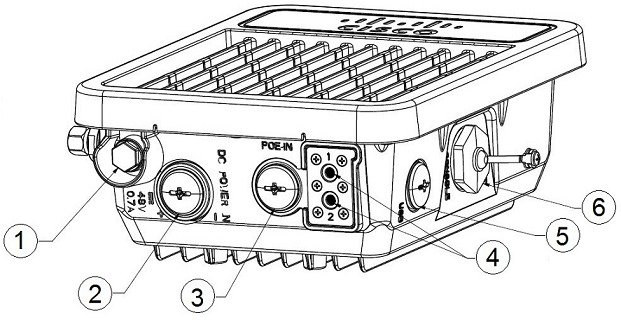
The following figure shows the Cisco Wireless Gateway for LoRaWAN connectors on the bottom and right panels.


Note

The illustrations in this document show all available connections for the Cisco Wireless Gateway for LoRaWAN. Unused connections are capped with a connector plug to ensure the watertight integrity of the Cisco Wireless Gateway for LoRaWAN.
Figure 1. Cisco Wireless Gateway for LoRaWAN Bottom and Right Panels

1

Pressure vent

4

LED indicators

2

DC power port

5

USB port

3

PoE-IN port

6

Console port and Reset button

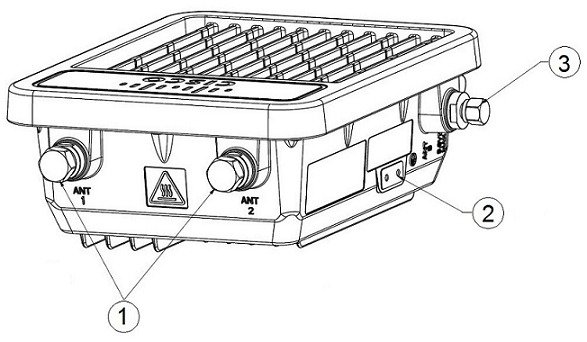
The following figure shows the Cisco Wireless Gateway for LoRaWAN connectors on the top and left panels.

Figure 2. Cisco Wireless Gateway for LoRaWAN Top and Left Panels

1

LoRa antenna ports

2

Ground lug location

3

GPS antenna port

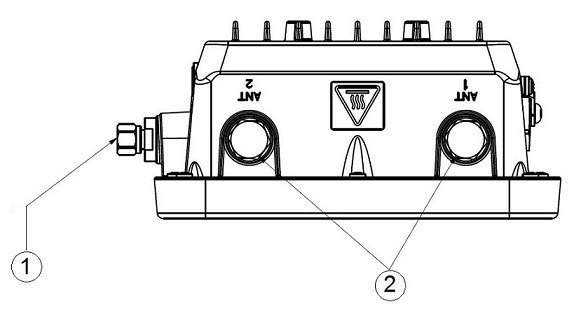
Antenna Port Locations

This figure shows the antenna port locations for the Cisco Wireless Gateway for LoRaWAN. The ports that are used depend on the optional antennas ordered.

Figure 3. Antenna Connectors

1

TNC connector for GPS antenna

2

N-Type connectors for LoRa antennas

Radio Operation


DANGER

In order to comply with radio frequency (RF) exposure limits, the antennas should be placed no less than 23 cm (9”) from your body or nearby persons. Statement 339


DANGER

Do not locate the antenna near overhead power lines or other electric light or power circuits, or where it can come into contact with such circuits. When installing the antenna, take extreme care not to come into contact with such circuits, because they may cause serious injury or death. For proper installation and grounding of the antenna, please refer to national and local codes (for example, U.S.: NFPA 70, National Electric Code, Article 180, Canada: Canadian Electrical Code, Section 54). Statement 1052


DANGER

Only trained and qualified personnel should be allowed to install, replace, or service this equipment. Statement 1030


The Cisco Wireless Gateway for LoRaWAN is equipped with two N-type radio frequency (RF) connectors (antenna ports 1 and 2) on the top of the unit for LoRa antennas, and one TNC connector on the left of the unit for the GPS antenna, as shown in Figure 1. If the antennas are remotely located, an appropriate low-loss RF coax cable must be used. The LoRa antennas must be installed closely to the Cisco Wireless Gateway for LoRaWAN to reduce the signal strength loss on the feed cable as much as possible.


Note

The antenna port caps must be removed before using, but the unused ports should remain capped to provide an IP67 seal.

Multiple Power Sources

The Cisco Wireless Gateway for LoRaWAN supports these power sources:

  • Power-over-Ethernet (PoE+, 30W)

  • DC power—48 VDC


DANGER

Installation of the equipment must comply with local and national electrical codes. Statement 1074


DANGER

This equipment must be externally grounded using a customer-supplied ground wire before power is applied. Contact the appropriate electrical inspection authority or an electrician if you are uncertain that suitable grounding is available. Statement 366


DANGER

Do not work on the system or connect or disconnect cables during periods of lightning activity. Statement 1001


DANGER

Connect the unit only to DC power source that complies with the safety extra-low voltage (SELV) requirements in IEC 60950 based safety standards. Statement 1033


DANGER

To reduce the risk of fire, use only No. 26 AWG or larger telecommunication line cord. Statement 1023


Caution

Do not place the power injector in an unprotected outdoor environment. Because water could get into the power injector and cause a short circuit and possible fire.


Ethernet Ports

The Cisco Wireless Gateway for LoRaWAN supports an Ethernet uplink port (PoE-In). The RJ-45 connector (with weatherproofing) links the device to the 10BASE-T or 100BASE-T network. The Ethernet cable is used to send and receive Ethernet data and to optionally supply inline 54-VDC power from the power injector.

The Ethernet cable must be a shielded outdoor rated Category 5 (CAT5) or better cable. The Cisco Wireless Gateway for LoRaWAN senses the Ethernet and power signals and automatically switches internal circuitry to match the cable connections.

Console Port and Reset Button

The Console port and the Reset button are under a hex-shaped sealed plug and located on the right panel of the Cisco Wireless Gateway for LoRaWAN. (See Figure 1.)

The console port is an RJ45 port. The data rate of the console port is 115.2 kbs, which is different from most Cisco devices. Use the console cable (Cisco P/N: CAB-CONSOLE-RJ45= or equivalent) to connect to the console port.

A LoRaWAN gateway that has already been configured can be reset to the manufacturing configuration by pressing the Reset button.

If you press the Reset button and release it in less than 5 seconds, the system reboots immediately with the last saved configuration.

If you press the Reset button and release it after more than 5 seconds, the system reboots immediately and restore to the factory default.

LEDs

This section describes the LEDs for the Cisco Wireless Gateway for LoRaWAN.

Table 1. LED Definitions

LED

LED Color

Definition

LED 1

Off

Power off or under the bootloader mode

Blinking Green

Under the starting kernel (bring up phase).

Solid Green

Normal operation state

Blinking Red

  • Failed to get IP address.

  • Register to IR800 failed

Solid Red

  • ACT2 check failed

  • Lost connection to IR800

  • CPU usage high

  • Temperature high

  • Flash usage high

  • Cover open

LED 2

Off (when LED 1 is solid green).

The gateway is running in standalone mode.

Solid green (when LED 1 is solid green).

The gateway is running in virtual interface mode with the IR800 series.

Optional Hardware

Depending on what you ordered, the following optional Cisco Wireless Gateway for LoRaWAN hardware may be part of your shipment:

  • Wall/pole mount kit (AIR-ACC1530-PMK1=)

  • DC-IN power adapter jack plug (PLG-PWRJCK=)

  • Grounding lug

  • LoRa Antenna

    • Omnidirectional antenna (ANT-LPWA-DB-O-N=)

    • Antennas lightning arrestor (ACC-LA-H-NM-NF=)

    • 10-ft low-loss cable assembly with N type connector (AIR-CAB010LL-N=)

  • GPS Antenna

    • Outdoor GPS antenna with an integrated 15-ft cable (ANT-GPS-OUT-TNC=)

    • Outdoor GPS antenna lightning arrestor (ACC-LA-G-TM-TF=)


Note

For more detailed information about the accessories, see the data sheet of Cisco Wireless Gateway for LoRaWAN.