- Cisco ASR 901 Router Overview
- Licensing
- First-Time Configuration
- Managing and Monitoring Network Management Features
- Using the Command-Line Interface
- Software Upgrade
- Configuring Gigabit Ethernet Interfaces
- Configuring EtherChannels
- Configuring Ethernet OAM
- ITU-T Y.1731 Performance Monitoring
- Configuring Resilient Ethernet Protocol
- Configuring MST on EVC Bridge Domain
- Multiprotocol Label Switching
- Configuring EoMPLS
- Configuring MPLS VPNs
- Configuring MPLS OAM
- Configuring Routing Protocols
- Configuring Bidirectional Forwarding Detection
- Configuring T1/E1 Controllers
- Configuring Pseudowire
- Configuring Clocking
- G.8275.1 Telecom Profile
- Cisco IOS IP SLA
- Configuring QoS
- Configuring MLPPP
- Onboard Failure Logging
- Hot Standby Router Protocol and Virtual Router Redundancy Protocol
- Configuring Link Layer Discovery Protocol
- Configuring Multihop Bidirectional Forwarding Detection
- Bit Error Rate Testing
- Microwave ACM Signaling and EEM Integration
- IPv6 Support on the Cisco ASR 901 Router
- Labeled BGP Support
- BGP Support for Next-Hop Address Tracking
- MPLS Traffic Engineering - Fast Reroute Link Protection
- Layer 2 Control Protocol Peering, Forwarding, and Tunneling
- Configuring Inverse Muliplexing over ATM
- IPv6 over MPLS: 6PE and 6VPE
- Storm Control
- Remote Loop-Free Alternate - Fast Reroute
- Digital Optical Monitoring
- IPv4 Multicast
- IPv6 Multicast
- Configuring Switched Port Analyzer
- IP Security
- BCP Support on MLPPP
- ITU-T G.8032 Ethernet Ring Protection Switching
- Configuring NAT for IP Address Conservation
- Auto-IP
- IPv6 Routing: OSPFv3 Authentication Support with IPsec
- Policy-Based Routing
- Generic Routing Encapsulation
- Call Home
- PTP Debugging over GRE Tunnel
- Overview
- MAC Layer 2 Access Control Lists
- Index
Cisco ASR 901 Series Aggregation Services Router Software Configuration Guide
Bias-Free Language
The documentation set for this product strives to use bias-free language. For the purposes of this documentation set, bias-free is defined as language that does not imply discrimination based on age, disability, gender, racial identity, ethnic identity, sexual orientation, socioeconomic status, and intersectionality. Exceptions may be present in the documentation due to language that is hardcoded in the user interfaces of the product software, language used based on RFP documentation, or language that is used by a referenced third-party product. Learn more about how Cisco is using Inclusive Language.
- Updated:
- March 16, 2015
Chapter: Configuring NAT for IP Address Conservation
- Finding Feature Information
- Prerequisites for Configuring NAT for IP Address Conservation
- Restrictions for Configuring NAT for IP Address Conservation
- Information About Configuring NAT for IP Address Conservation
- How to Configure NAT for IP Address Conservation
- Configuration Examples for NAT for IP Address Conservation
- Additional References
- Feature Information for Configuring NAT for IP Address Conservation
Configuring NAT for
IP Address Conservation
This module describes how to configure Network Address Translation (NAT) for IP address conservation and how to configure the inside and outside source addresses. This module also provides information about the benefits of configuring NAT for IP address conservation.
NAT enables private IP internetworks that use nonregistered IP addresses to connect to the Internet. NAT operates on a device, usually connecting two networks, and translates the private (not globally unique) addresses in the internal network into legal addresses before packets are forwarded to the corresponding network.
NAT can be configured to advertise to the outside world only one address for the entire network. This provides additional security by effectively hiding the entire internal network behind that one address.
NAT is also used at the enterprise edge to allow internal users access to the Internet and to allow Internet access to internal devices such as mail servers.
- Finding Feature Information
- Prerequisites for Configuring NAT for IP Address Conservation
- Restrictions for Configuring NAT for IP Address Conservation
- Information About Configuring NAT for IP Address Conservation
- How to Configure NAT for IP Address Conservation
- Configuration Examples for NAT for IP Address Conservation
- Additional References
- Feature Information for Configuring NAT for IP Address Conservation
Finding Feature Information
Your software release may not support all the features documented in this module. For the latest feature information and caveats, see the release notes for your platform and software release. To find information about the features documented in this module, and to see a list of the releases in which each feature is supported, see the “Feature Information for NAT” section.
Use Cisco Feature Navigator to find information about platform support and Cisco software image support. To access Cisco Feature Navigator, go to http://www.cisco.com/go/cfn. An account on Cisco.com is not required.
Prerequisites for Configuring NAT for IP Address Conservation
Restrictions for Configuring NAT for IP Address Conservation
The following limitations and configuration guidelines apply when configuring NAT on the Cisco ASR 901 Router:
-
NAT-T is not supported.
-
Dynamic NAT with pools in the same network as on the NAT interfaces.
-
Port channel for NAT and Port Address Translation (PAT) are not supported.
-
Simple Network Management Protocol (SNMP) MIB is not supported for NAT.
-
Dynamic NAT with Extended ACL is not supported.
-
This feature is available only on the new software image named asr901sec-universalk9.mz. (This feature is not available on the standalone software image named asr901-universalk9.mz. If you use asr901sec-universalk9.mz in an unsupported Cisco ASR 901 PID, the router issues a warning message and loads the software with basic features.)
-
Maximum bidirectional throughput supported for ESP-NAT traffic is 250 Mbps.
 Note | Throughput is low with fragmentation (around 300 Kbps). |
Information About Configuring NAT for IP Address Conservation
The following features are supported on the Cisco ASR 901 Routers from Cisco IOS Release 15.4(2)S onwards.
- Overview
- How NAT Works
- Types of NAT
- NAT Inside and Outside Addresses
- Static IP Address Support
- Supported Components
Overview
You can translate IP addresses into globally unique IP addresses when communicating outside your network.
- Static translation establishes a one-to-one mapping between an inside local address and an inside global address. Static translation is useful when a host on the inside has to be accessed by a fixed address from the outside.
- Dynamic translation establishes mapping between an inside local address and a pool of global addresses.
The following figure shows the translation of a source address inside a network to a source address outside the network.
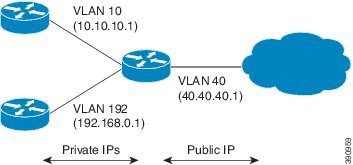
You can conserve addresses in the inside global address pool by allowing a device to use one global address for many local addresses. This type of Network Address Translation (NAT) configuration is called overloading. When overloading is configured, the device maintains enough information from higher-level protocols (for example, TCP or UDP port numbers) to translate the global address back to the correct local address. When multiple local addresses map to one global address, the TCP or UDP port numbers of each inside host distinguish between local addresses.
How NAT Works
A device that is configured with NAT will have at least one interface to the inside network and one to the outside network. In a typical environment, NAT is configured at the exit device between a stub domain and the backbone. When a packet leaves the domain, NAT translates the locally significant source address into a globally unique address. When a packet enters the domain, NAT translates the globally unique destination address into a local address. If more than one exit point exists, each NAT must have the same translation table.
If NAT cannot allocate an address because it has run out of addresses, it drops the packet and sends an Internet Control Message Protocol (ICMP) host unreachable packet to the destination.
Types of NAT
NAT operates on a router—generally connecting only two networks—and translates the private (inside local) addresses within the internal network into public (inside global) addresses before packets are forwarded to another network. This functionality gives you the option to configure NAT such that it will advertise only a single address for your entire network to the outside world. Doing this effectively hides the internal network from the world, giving you additional security.
The types of NAT include:
-
Static address translation (static NAT)—Allows one-to-one mapping between local and global addresses.
-
Dynamic address translation (dynamic NAT)—Maps unregistered IP addresses to registered IP addresses from a pool of registered IP addresses.
-
Overloading—Maps multiple unregistered IP addresses to a single registered IP address (many to one) using different ports. This method is also known as PAT. By using overloading, thousands of users can be connected to the Internet by using only one real global IP address.
NAT Inside and Outside Addresses
The term inside in NAT context refers to networks owned by an organization, and which must be translated. When NAT is configured, hosts within this network will have addresses in one space (known as the local address space) that will appear to those outside the network as being in another space (known as the global address space).
Similarly, the term outside refers to those networks to which the stub network connects, and which are generally not under the control of an organization. Hosts in outside networks can also be subject to translation, and can thus have local and global addresses.
NAT uses the following definitions:
-
Inside local address—An IP address that is assigned to a host on the inside network. The address is probably not a valid IP address assigned by the Network Information Center (NIC) or service provider.
-
Inside global address—A valid IP address (assigned by the NIC or service provider) that represents one or more inside local IP addresses to the outside world.
-
Outside local address—The IP address of an outside host as it appears to the inside network. Not necessarily a valid address, it is allocated from the address space that is routable on the inside.
-
Outside global address—The IP address assigned to a host on the outside network by the owner of the host. The address is allocated from a globally routable address or network space.
Static IP Address Support
A public wireless LAN provides users of mobile computing devices with wireless connections to a public network, such as the Internet.
The NAT Static IP Address Support feature extends the capabilities of public wireless LAN providers to support users configured with a static IP address. By configuring a device to support users with a static IP address, public wireless LAN providers extend their services to a greater number of users.
Users with static IP addresses can use services of the public wireless LAN provider without changing their IP address. NAT entries are created for static IP clients, and a routable address is provided.
Supported Components
The following components are supported as part of the NAT feature:
How to Configure NAT for IP Address Conservation
The tasks described in this section configure NAT for IP address conservation. You must configure at least one of the tasks described in this section. Based on your configuration, you may have to configure more than one task.
- Configuring an Inside Source Address
- Configuring Dynamic Translation of Inside Source Addresses Without Overload
- Configuring Dynamic Translation of Inside Source Addresses with Overload
- Configuring Static PAT
- Verifying Configuration of NAT for IP Address Conservation
Configuring an Inside Source Address
Inside source addresses can be configured for static or dynamic translations. Based on your requirements, you can configure either static or dynamic translations.
Note | You must configure different IP addresses for an interface on which NAT is configured and for inside addresses that are configured, by using the ip nat inside source static command. |
Configuring Dynamic Translation of Inside Source Addresses Without Overload
Dynamic translation establishes a mapping between an inside local addresses and a pool of global addresses. Dynamic translation is useful when multiple users on a private network have to access the Internet. The dynamically configured pool IP address can be used as required, and is released for use by other users when access to the Internet is no longer required.
Note | Cisco ASR 901 Router does not differentiate between the dynamic translation with overload and dynamic translation without overload. By default, overloading is considered if translation exceeds the given pool. |
Note | When inside global or outside local addresses belong to a directly connected subnet on a NAT device, the device adds IP aliases for them so that it can answer Address Resolution Protocol (ARP) requests. However, a situation where the device answers packets that are not destined for it, possibly causing a security issue, may arise. This may happen when an incoming Internet Control Message Protocol (ICMP) packet or a UDP packet that is destined for one of the alias addresses does not have a corresponding NAT translation in the NAT table, and the device itself runs a corresponding service, for example, Network Time Protocol (NTP). Such a situation might cause minor security risks. |
| Command or Action | Purpose | |
|---|---|---|
| Step 1 |
enable
Example: Router> enable |
Enables privileged EXEC mode. Enter password if prompted. |
| Step 2 | configure
terminal
Example: Router# configure terminal |
Enters global configuration mode. |
| Step 3 | interface
type number
Example: Router(config)# interface vlan 10 |
Specifies an interface type and number, and enters interface configuration mode. |
| Step 4 | ip address
ip-address mask
Example: Router(config-if)# ip address 10.10.10.1 255.255.255.0 |
Sets a primary IP address for the interface. |
| Step 5 | ip nat inside
Example: Router(config-if)# ip nat inside |
Connects the interface to the inside network, that is subject to NAT. |
| Step 6 | exit
Example: Router(config-if)# exit |
Exits interface configuration mode and returns to the global configuration mode. |
| Step 7 | interface
type number
Example: Router(config)# interface vlan 40 |
Specifies an interface type and number, and enters interface configuration mode. |
| Step 8 | ip address
ip-address mask
Example: Router(config-if)# ip address 40.40.40.1 255.255.255.0 |
Sets a primary IP address for the interface. |
| Step 9 | ip nat outside
Example: Router(config-if)# ip nat outside |
Connects the interface to the outside network. |
| Step 10 | exit
Example: Router(config-if)# exit |
Exits interface configuration mode and returns to global configuration mode. |
| Step 11 | ip nat pool name start-ip end-ip {netmask netmask |
prefix-length prefix-length}
Example: Router(config)# ip nat pool net-208 50.50.50.1 50.50.50.10 netmask 255.255.255.0 |
Defines a pool of global addresses to be allocated as required. |
| Step 12 | access-list access-list-number permit source
[source-wildcard]
Example: Router(config)# access-list 1 permit 10.10.10.2 0.0.0.0 |
Defines a standard access list permitting those addresses that are to be translated. |
| Step 13 | ip nat inside source list access-list-number pool
name
Example: Router(config)# ip nat inside source list 1 pool net-208 |
Establishes dynamic source translation, specifying the access list defined in Step 12. |
| Step 14 | end
Example: Router(config)# end |
Exits interface configuration mode and returns to privileged EXEC mode. |
Configuring Dynamic Translation of Inside Source Addresses with Overload
You can conserve addresses in the inside global address pool by allowing a device to use one global address for many local addresses. This type of NAT configuration is called overloading. When overloading is configured, the device maintains enough information from higher-level protocols (for example, TCP or UDP port numbers) to translate the global address back to the correct local address. When multiple local addresses map to one global address, the TCP or UDP port numbers of each inside host distinguish between local addresses.
| Command or Action | Purpose | |
|---|---|---|
| Step 1 |
enable
Example: Router> enable |
Enables privileged EXEC mode. Enter password if prompted. |
| Step 2 | configure
terminal
Example: Router# configure terminal |
Enters global configuration mode. |
| Step 3 | interface
type number
Example: Router(config)# interface vlan 10 |
Specifies an interface type and number, and enters the interface configuration mode. |
| Step 4 | ip address
ip-address mask
Example: Router(config-if)# ip address 10.10.10.1 255.255.255.0 |
Sets a primary IP address for the interface. |
| Step 5 | ip nat inside
Example: Router(config-if)# ip nat inside |
Connects the interface to the inside network, that is subject to NAT. |
| Step 6 | exit
Example: Router(config-if)# exit |
Exits interface configuration mode and returns to global configuration mode. |
| Step 7 | interface
type number
Example: Router(config)# interface vlan 40 |
Specifies an interface type and number, and enters interface configuration mode. |
| Step 8 | ip address
ip-address mask
Example: Router(config-if)# ip address 40.40.40.1 255.255.255.0 |
Sets a primary IP address for the interface. |
| Step 9 | ip nat outside
Example: Router(config-if)# ip nat outside |
Connects the interface to the outside network. |
| Step 10 | exit
Example: Router(config-if)# exit |
Exits interface configuration mode and returns to global configuration mode. |
| Step 11 | ip nat pool name start-ip end-ip {netmask netmask |
prefix-length prefix-length}
Example: Router(config)# ip nat pool net-208 50.50.50.1 50.50.50.10 netmask 255.255.255.0 |
Defines a pool of global addresses to be allocated as required. |
| Step 12 | access-list access-list-number permit source
[source-wildcard]
Example: Router(config)# access-list 1 permit 10.10.10.2 0.0.0.0 |
Defines a standard access list permitting those addresses that are to be translated. |
| Step 13 | ip nat inside source list access-list-number pool
name
overload
Example: Router(config)# ip nat inside source list 1 pool net-208 overload |
Establishes dynamic source translation, specifying the access list defined in Step 12. |
| Step 14 | end
Example: Router(config)# end |
Exits interface configuration mode and returns to privileged EXEC mode. |
Configuring Static PAT
To configure a static PAT, complete the following steps:
Verifying Configuration of NAT for IP Address Conservation
To verify the NAT configuration, use the show ip nat translation command:
Router# show ip nat translation
SNAT: Proto udp Inside local ip is 10.10.10.2 Inside global ip 40.40.40.10 input 1146 output 0
DNAT: Proto tcp Outside local ip is 40.40.40.10 Outside global ip 10.10.10.2 input 8 output 5
Configuration Examples for NAT for IP Address Conservation
Example: Configuring Inside Source Address
The following is a sample configuration of static NAT:
interface vlan10
ip address 10.10.10.1 255.255.255.0
ip nat inside
int vlan40
ip address 40.40.40.1 255.255.255.0
ip nat outside
ip nat inside source static 10.10.10.2 40.40.40.1
ip nat inside source static 192.168.1.2 40.40.40.2
Example: Configuring Dynamic Translation of Inside Source Addresses Without Overload
The following is a sample configuration of dynamic NAT without overload:
interface vlan10
ip address 10.10.10.1 255.255.255.0
ip nat inside
interface vlan192
ip address 192.168.0.1 255.255.255.0
ip nat inside
interface vlan40
ip address 40.40.40.1 255.255.255.0
ip nat outside
ip nat pool no-overload 50.50.50.10 50.50.50.10 netmask 255.255.255.0
access-list 7 permit 10.10.10.0 0.0.0.255
ip nat inside source list 7 pool no-overload
Example: Configuring Dynamic Translation of Inside Source Addresses with Overload
The following is a sample configuration of dynamic NAT with overload:
interface vlan10
ip address 10.10.10.1 255.255.255.0
ip nat inside
interface vlan192
ip address 192.168.0.1 255.255.255.0
ip nat inside
interface vlan40
ip address 40.40.40.1 255.255.255.0
ip nat outside
ip nat pool overld 50.50.50.10 50.50.50.10 netmask 255.255.255.0
access-list 7 permit 10.10.10.0 0.0.0.255
ip nat inside source list 7 pool overld overload
Example: Configuring Static PAT
The following is a sample configuration of static PAT:
interface vlan10
ip address 10.10.10.1 255.255.255.0
ip nat inside
interface vlan192
ip address 192.168.0.1 255.255.255.0
ip nat inside
interface vlan40
ip address 40.40.40.1 255.255.255.0
ip nat outside
ip nat inside source static tcp 10.10.10.2 23 40.40.40.1 2323
Additional References
The following sections provide references related to Configuring NAT for IP Address Conservation feature.
Related Documents
|
Related Topic |
Document Title |
|---|---|
|
Cisco IOS Commands |
|
|
Cisco ASR 901 Command Reference |
Cisco ASR 901 Series Aggregation Services Router Command Reference |
|
Cisco IOS Interface and Hardware Component Commands |
Cisco IOS Interface and Hardware Component Command Reference |
Standards
|
Standard |
Title |
|---|---|
|
None |
— |
RFCs
|
RFC |
Title |
|---|---|
|
None |
— |
Technical Assistance
|
Description |
Link |
|---|---|
|
The Cisco Technical Support website contains thousands of pages of searchable technical content, including links to products, technologies, solutions, technical tips, and tools. Registered Cisco.com users can log in from this page to access even more content. |
Feature Information for Configuring NAT for IP Address Conservation
The following table lists the features in this module and provides links to specific configuration information.
Use Cisco Feature Navigator to find information about platform support and software image support. Cisco Feature Navigator enables you to determine which software images support a specific software release, feature set, or platform. To access Cisco Feature Navigator, go to http://www.cisco.com/go/cfn . An account on Cisco.com is not required.
Note | The following table lists only the software release that introduced support for a given feature in a given software release train. Unless noted otherwise, subsequent releases of that software release train also support that feature. |
|
Feature Name |
Releases |
Feature Information |
|---|---|---|
|
Configuring NAT for IP Address Conservation |
15.4(2)S |
This feature was introduced on the Cisco ASR 901 Routers. |
 Feedback