Introduction (Release 4.6)
Available Languages
Table Of Contents
ICM Software and the CTI Server
Multiple Instances of Siebel CTI
Introduction
This chapter provides an introduction to integration of Cisco ICM software with Siebel eBusiness applications. It presents:
•
An overview
•
•
•
Overview
The Cisco CTI Driver for Siebel interfaces the Siebel eBusiness Applications application with Cisco's CTI products. It is designed to operate at the desktop and uses Cisco's Desktop Control Server (DCS) driver for telephony control. The DCS driver uses Cisco's CTI Server.
The Siebel application expects to receive notification of telephony events and provides a mechanism to permit it to control or interact with the phone system. Siebel provides an easy-to-use user interface to customize actions (commands). It also permits users to enhance functionality using Siebel's Visual Basic-like programming language.
The Cisco CTI Driver for Siebel:
•
•
•
•
•
•
•
•
•
•
•
•
•
Cisco Data Store
The Cisco Data Store is a distributed, scalable, fault-tolerant object store. It is used to store the Siebel application call context data (see the "Call Context" section).
ICM Software and the CTI Server
Cisco's Intelligent Contact Management (ICM) software is central to Cisco's overall call center routing solution. The Cisco CTI Server is the heart of Cisco's CTI. This section give an overview of how they fit together.
The CTI Server provides an interface between ICM software and client CTI applications so that these applications can make use of the enterprise-wide routing data managed by ICM software. The CTI Server runs at the call center site on either an ICM Peripheral Gateway (PG) with ACD interface software or on a dedicated CTI Gateway (CG) platform. CTI Servers may be running at one or several call centers in the enterprise.
ICM software, via the CTI Server, forwards pre-route indications to CTI application servers. Pre-route indications identify the caller and provide associated call attributes to applications while the call is still in the public or private network (that is, before the call is connected to an agent or internal IVR).
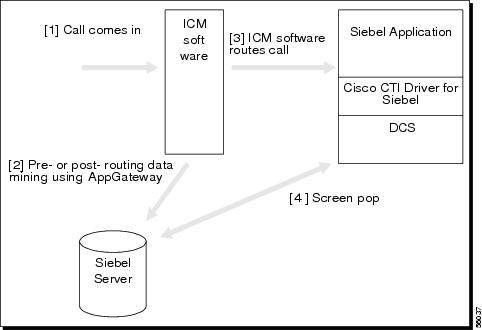
A screen pop is most useful if it happens on or before the first ring. A screen pop that occurs several seconds after the agent is already speaking with the customer may be of little value. ICM software gets the network call data (ANI, DNIS, CED, ...) and call profile data (from a database lookup) to the application by means of the pre-route indications. When ICM software returns the routing label to the network, it simultaneously passes this destination down to the CTI client. This permits the client time to do a pre-fetch of the appropriate database record, allowing for an extremely quick screen pop when the agent ultimately receives the call. ICM software can do this because ICM software knows where the call is going to land, even before the carrier network knows. (ICM software knows this because it has determined the best answering resource—agent or IVR—within the entire enterprise, based on call data, profile data, availability, and the scripting algorithm.)
In the case of a desktop client, call event information is automatically delivered to the targeted desktop when the call is delivered. CTI Server reports call events and agent work state changes to the application as they occur through each stage of the call flow—from the moment a call arrives at an answering resource (ACD, PBX, IVR, Web server), until the caller hangs up.
Integration of Cisco ICM software with Siebel eBusiness applications provides the capabilities of the CTI Server through the Cisco CTI Driver for Siebel. Figure 1-1 illustrates how the Cisco and Siebel components work together.
Figure 1-1 Integration
Software Requirements
Cisco CTI Driver for Siebel requires the following:
•
•

Note
Note
Hardware Requirements
Integration of Cisco ICM software with Siebel eBusiness applications requires an IBM PC or 100% compatible computer with a Pentium 90 Mhz or faster processor. The client computer must have at least 32 megabytes of RAM. Trace file logging requires at least 10 megabytes of available disk space.
Installation
For the current version, the Cisco CTI Driver for Siebel is not integrated with the Siebel setup.
The Cisco CTI Driver for Siebel:
•
•
Launcher allows a Siebel site to perform a single server installation. Launcher can be used in workstations to automatically detect and update newer versions of any installed Cisco CTI Driver for Siebel or CTI Desktop component. (Launcher performs automatic version checks at startup.)
Note
Siebel routing is not supported.
Siebel's Adaptive CTI layer supports inbound call routing. The Siebel server supports execution of a stored procedure that returns the extension of the agent to whom the call is to be routed. Siebel routing is not supported in this version. All pre- and post-routing are performed by ICM software.
Architecture
The Cisco CTI Driver for Siebel runs in the Siebel application space. It is responsible for sending telephony events received from the Cisco Desktop Control Server and responding to commands sent by the Siebel application, as indicated in Figure 1-2.
Figure 1-2 Cisco CTI Driver for Siebel Interfaces: Siebel Applications and DCS
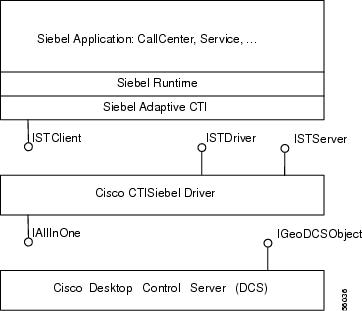
The Siebel application uses the definition and configuration files that map buttons on the Siebel application to Cisco defined events and commands. The Cisco CTI Driver for Siebel implements these driver-level commands. The commands used are:
AnswerCall
ChangeBusyState
ChangeReadyState
ChangeNotReadyState
ChangeWorkReadyState
ConferenceComplete
ConferenceInit
HoldCall
LogIn
LogOut
MakeCall
ReleaseCall
RetrieveCall
SimulateCall
TransferComplete
TranferInit
TransferMute
UnHoldCall
UpdateCurCallData
Note
Command names are defined by the Cisco CTI Driver for Siebel. When the Cisco CTI Driver for Siebel is installed, a definition file is used to import the new commands into Siebel. Siebel defines two layers of command definitions, one specific to the Siebel application and another which maps the Siebel business logic to driver commands.
Note
Screen Pop and Call Variables
When a call is passed to the Siebel product, all of the call variables available with a call are passed to the Siebel application in the form of a set of key/value pairs. If Expanded Call Context (ECC) variables are used, the list is extended to include the name and values of each ECC variable. These variables are used by the Siebel application to execute the proper screen pop.
The key/value pairs will appear to the Siebel application as:
ANI=value
DNIS=value
CallVariable1=value
...
For specifics on enabling, creating, and naming the ECC variables, see the Cisco ICM Software Script Editor Guide.
Call Context
When an agent using the Siebel application receives multiple calls or when calls are transferred, the Cisco CTI Driver for Siebel saves and restores, or transfers, the current call context. Also, the DEF file can be configured so the Cisco CTI Driver for Siebel can transfer the context with an internal call (not a transfer). The call context is stored in the Cisco Data Store.
The Cisco CTI Driver for Siebel handles call context transfer such that:
•
•
•
Hoteling
Hoteling allows you to have the same agents work from different workstations. It is possible to have agents to login to Siebel applications and ACD queues from any telesets and computers configured for this purpose. For more information regarding this functionality, see the appropriate Siebel documentation.
Multiple Instances of Siebel CTI
Multiple instances of Siebel CTI can be run simultaneously on the same desktop as long as each instance is connected to a different database. This can be useful for multi-lingual call centers, for example, where each language can have its own database. For more information on how to implement this functionary, see the appropriate Siebel documentation.
 Feedback
Contact Cisco
- Open a Support Case

- (Requires a Cisco Service Contract)
This Document Applies to These Products
- Collaboration Endpoints - Retired Products
- Conferencing - Retired Products
- Contact Center - Retired Products
- Optical Networking - Retired Products
- Routers - Retired Products
- Security - Retired Products
- Servers - Unified Computing (UCS) Retired Products
- Storage Networking Retired Products
- Switches - Retired Products
- Video - Retired Products
- Wireless - Retired Products