Product Offering Descriptions (Release 4.6)
Available Languages
Table Of Contents
Cisco CTI Object Server (CTI OS)
Softphone Controls and CTI Desktop Softphone
Flexibility of Softphone Controls
Product Offering Descriptions
This chapter provides brief descriptions of the various Cisco CTI product offerings, including comments on when and why one of these offerings might be preferred to another. This chapter discusses the following:
•
Sample code and utilities
•
•
•
•
•
For detailed discussions of each of the above components, see the documentation referred to in the various sections.
All of the product offerings provide third-party call control support. Depending on the specific switch, the client application can perform all or most of the following telephony functions:
•
•
•
•
•
•
•
•
•
•
Sample Code and Utilities
An overarching goal of the Cisco CTI offerings is to allow customers to get up and running very quickly. While Cisco provides a number of manuals that describe in detail the various CTI product offerings, developers do not usually want to read through lengthy documents. Rather, they like to have working example code that demonstrates in code how to make things happen. Through the sample code, Cisco provides working examples in a variety of languages; e.g., Visual Basic, Visual C++, Delphi, PowerBuilder, and VB Script inside a Web browser. This code is provided without copyright so that you are free to copy and use the code within your own projects. All this is provided as a means to get your CTI project working at the earliest possible date. The code samples are provided in appropriately named directories on the Cisco CTI Desktop CD.
Utilities are also provided to aid in development. These utilities—such as CTISim and CTITest—are documented in the Cisco ICM Software CTI Programmer's Guide.
Cisco CTI Server
Cisco CTI Server, the basic server component of Cisco CTI, enables ICM software to deliver agent, call, and customer data in real-time to a server and/or workstation application as events occur throughout the life of a call. The CTI Server is a software process that runs either on a Peripheral Gateway (PG) or on a CTI Gateway (CG) machine. It is the CTI gateway into ICM software's data and services.
•
•

Note
The system's full third-party call control features allow agents and integrated desktop or server applications to perform such tasks as transfer, conference and set call data, all within an enterprise framework. Data collected by an agent at the desktop can be transferred among agents across multi-vendor switches, allowing customer and transaction data to accompany a call from the IVR or Web server to the agent, and from site-to-site, as required. This capability increases the efficiency of a virtual call center workforce by eliminating time spent verbally soliciting information that should already be available.
You may write to the CTI Server directly. However, first consider one of the Cisco provided application-directed offerings (CTI OS Toolkit, JavaClient).
For more on the CTI Server, see the Cisco ICM Software CTI Server Message Reference Guide.
Cisco CTI Object Server (CTI OS)
CTI Object Server (CTI OS) is a high performance, scalable, fault-tolerant server-based solution for deploying CTI applications. It is Cisco's latest version of CTI implementation. CTI OS serves as a single point of integration for third-party applications, including Customer Relationship Management (CRM) systems, data mining, and workflow solutions. Configuration and behavior information is managed at the server, simplifying customization, updates, and maintenance. Servers can be accessed and managed remotely. Thin-client and browser-based applications that do not require Cisco software on the desktop can be developed and deployed with CTI OS.
CTI OS incorporates the following major components:
•
•
•
•
CTI OS, a client of CTI Server, has a single all-events connection to Cisco CTI Server. In turn, CTI OS accepts client connections using session, agent, and call interfaces. These interfaces are implemented in COM, Java, C++, and C, allowing for a wide range of application development uses. The interfaces are used for call control, to access data values, and to receive event notifications. The client interface supports the following:
•
•
•
•
•
•
•
The advantages of using CTI OS for integrations are:
•
•
•
•
•
CTI Desktop
CTI Desktop is an earlier version CTI package that consists of the following major components.
•
•
•
•
CTI Desktop supports client applications that meet the following requirements:
•
•
Note
CTIClient
CTIClient acts as middleware between the CTI Server interface and a host application at the desktop. Its purpose is to make it easy for business application developers to integrate with ICM software.
CTIClient is a packaging of the CTI Server interface, with additional built-in support for high availability with automatic recovery mechanisms for CTI Server failover. You do not need to understand the details of the CTI Server messages or invent new software to perform the low-level tasks of network communication and variable length packet handling. Figure 4-1 depicts where CTIClient sits in relation to the CTI Server and in relation to the client OLE application. (Also see Figure 4-2, for CTIClient as a part of DCS.)
Figure 4-1 CTIClient Architecture
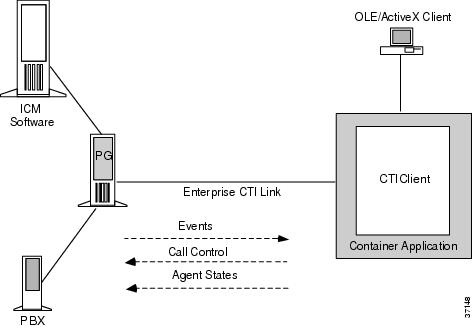
CTIClient is termed middleware because it sits between the client application and the CTI Server interface. To the CTI Server, CTIClient acts as a client; to the client application, CTIClient acts as an in-process (that is, a DLL) ActiveX server. CTIClient handles both inbound and outbound traffic and supports multiple call appearances on a single teleset.
Some advantages to using CTIClient directly rather than using DCS are:
•
•
For more information on CTIClient, see the Cisco ICM Software CTIClient Reference Guide.
Desktop Control Server
The Desktop Control Server (DCS) is a local COM server that runs entirely in its own process address space, on the same system as the applications that are using it. DCS communicates with the host container applications via IPC (InterProcess Communication); the protocol of the IPC is the OLE2 protocol. DCS has CTIClient embedded as an in-process (that is, a DLL) server, which in turn talks over a TCP/IP socket to the Cisco CTI Server.
By embedding CTIClient, DCS automatically provides insulation from the details of TCP/IP communications and the fault tolerance model employed by the CTI Server. DCS provides a layer of abstraction above CTIClient that adds state management and hides the complexity of the Computer-Supported Telecommunications Applications (CSTA) implementation. In addition, since the DCS is a local server, it can service many applications on a single desktop simultaneously. You may have multiple applications running on a single desktop that all need to react to an incoming call. DCS works across process boundaries to provide call information to all interested applications.
It is most likely that you will use DCS in conjunction with Softphone Controls—writing directly to DCS if your application requires functionality not included in the Softphone Controls. However, you can, if you prefer, use only DCS, ignoring the Softphone Controls.
Using DCS has several advantages over using CTIClient directly:
•
•
•
•
For more information on DCS, see the Cisco ICM Software Desktop Control Server Reference Guide.
Softphone Controls and CTI Desktop Softphone
The Softphone Controls are in-process (DLL) ActiveX objects that run in the host container application's process address space. The Softphone Controls communicate with the Desktop Control Server and the host container applications via IPC (InterProcess Communication); the protocol of the IPC is the OLE2 protocol. The Desktop Control Server has CTIClient embedded as an in-process server, which in turn talks over a TCP/IP socket to the CTI Server.
You can embed the Softphone Controls in any or all desktop host container applications in which you want CTI capabilities. The controls work through the Desktop Control Server (DCS) but operate independently of each other, so you may choose to use one or many of them. You can embed multiple instances of a given control in more than one application or in more than one place within an application. This permits you to put the functionality you need where you need it. The one-to-many configuration between DCS and all desktop applications is efficient because there is only one connection back to CTI Server. Additionally, all connected applications gain the desktop fault tolerance provided by COMMonitor.
Figure 4-2 CTI Desktop
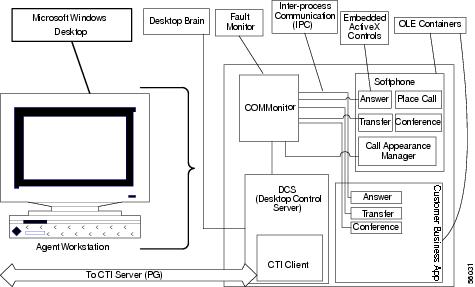
Each Softphone Control contains both of the following public interfaces that your program can work with:
•
•
CTI Desktop Softphone
CTI Desktop Softphone is basically a packaging of the Softphone Controls within a Visual Basic container application. However, CTI Desktop Softphone does contain additional code and graphics that provide some added value beyond the standard Softphone Controls on their own.
Since flexibility is the a cornerstone of the Cisco CTI model, the code for the CTI Desktop Softphone is provided free as part of CTI Desktop. You may use CTI Desktop Softphone as is, or to modify it to suit your particular needs. There is no copyright on the application, so you have complete flexibility to modify it as you choose.
AgentStatistics
AgentStatistics displays a real-time feed of agent statistics at the desktop, providing agents with information useful for self-evaluation and motivation. Because it is an ActiveX control, this functionality can run within the context of any ActiveX host, such as Visual Basic, Excel or a Web browser. Based on customer requirements, it can reside in the same host application as the soft phone or can execute and reside outside the soft phone. By default, the AgentStatistics control is contained within CTI Desktop Softphone.
SkillGroupStatistics
SkillGroupStatistics displays a real-time feed of skill group statistics at the desktop. In use and applicability it parallels AgentStatistics.
Flexibility of Softphone Controls
Most applications on the market are monolithic; that is, each is a single executable program that runs within its own process address space. This model is limiting because it inextricably combines the function of a program with its look and feel. What the Softphone Controls do is separate function (for example, put this call on hold) from presentation (that is, the look and feel of a soft phone) and where a particular function resides (that is, from which program an end-user is permitted to perform a given function). Further, Softphone Controls are largely indifferent as to the containing application, as long as it is ActiveX-compliant. So, for example, Softphone Controls are equally as at home within Microsoft Word or Excel as they are within a Visual Basic application.
Two examples will help illustrate this point.
1.
–
–
–
2.
A monolithic application makes this operating model impossible. Agents would be forced to toggle back and forth between banking application and soft phone. However, because the Softphone Controls are indifferent to the containing application, they can readily be embedded into the existing banking application (only provided that it can act as an ActiveX container). Therefore, from the agent's perspective, there is no difference between performing banking or telephony operations. Better still, the banking application itself is allowed to remain ignorant of the details of how the Softphone Controls perform their telephony functions. To the banking application, they are a black box. Not only is the call center manager able to get the environment desired, but the integration to the banking application is made significantly easier.
For more information on Softphone Controls, CTI Desktop Softphone, AgentStatistics, and SkillGroupStatistics, see the Cisco ICM Software Softphone Controls Reference Guide.
COMMonitor
CTI Desktop provides fault tolerance at the agent desktop level through a process called the COMMonitor. The COMMonitor runs automatically in its own process address space; it continuously monitors the availability of DCS components. In the event of a fault, COMMonitor automatically acts to restore the CTI connections. Client applications that use Softphone Controls do not need to do anything to respond to the failure; COMMonitor handles recovery automatically and without loss of application data.
JavaClient
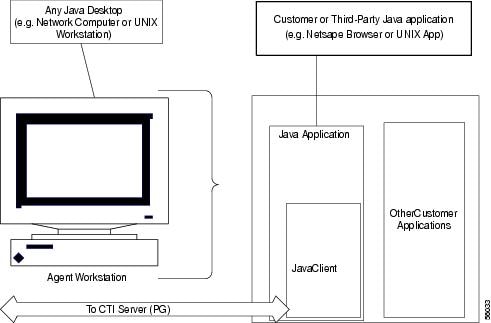
JavaClient can be embedded into any Java host application or applet. JavaClient provides desktop applications with access to CTI Server functionality while abstracting the underlying details of the telephony system. As a result, CTI operations can be easily generated and integrated with business applications.
Figure 4-3 JavaClient
Note
Currently, CTI Desktop is more feature rich than JavaClient. However, you might prefer JavaClient over CTI Desktop because:
•
•
•
For more information on JavaClient, see the Cisco ICM Software JavaClient Reference Guide.
Cisco Turnkey CTI
Cisco Turnkey CTI is a client-server application providing out-of-the-box CTI functionality for Cisco ICM/CTI. This application includes Cisco Turnkey CTI Server, an all events client of Cisco CTI Server. Cisco Turnkey CTI Server processes may be installed on a Peripheral Gateway co-resident with Cisco CTI Server, or may reside on a dedicated hardware platform. Also included is Cisco Turnkey CTI Agent, a desktop-installed, thick client to Turnkey CTI Server. Turnkey CTI Agent provides out-of-the box functionality at the desktop, including:
•
•
•
•
•
The key advantage of Turnkey CTI is its ability to be deployed rapidly, realizing the benefits of CTI more quickly and with smaller requirements for professional services or customization. The trade-off for rapid deployment is less flexibility in the CTI application.
The Cisco Turnkey CTI solution is ideal for customers who:
•
•
•
•
•
Refer to the Cisco Turnkey CTI documentation for more information.
 Feedback
Contact Cisco
- Open a Support Case

- (Requires a Cisco Service Contract)
This Document Applies to These Products
- Collaboration Endpoints - Retired Products
- Conferencing - Retired Products
- Contact Center - Retired Products
- Optical Networking - Retired Products
- Routers - Retired Products
- Security - Retired Products
- Servers - Unified Computing (UCS) Retired Products
- Storage Networking Retired Products
- Switches - Retired Products
- Video - Retired Products
- Wireless - Retired Products