Collaboration Transitions
Available Languages
Contents
Collaboration Transitions Overview
Collaboration Transitions Overview
Collaboration Transitions is focused on moving collaboration workloads from existing on-premises products and solutions to the latest Cisco cloud-delivered collaboration services. A transition could be directly from on-premises to cloud or a step approach from on-premises to coexistence (mix of on-premises and cloud) and then to cloud (see Figure 1).
Figure 1. Collaboration Applications & Services Delivery: On-Premises, Coexistence, and Cloud Transitions
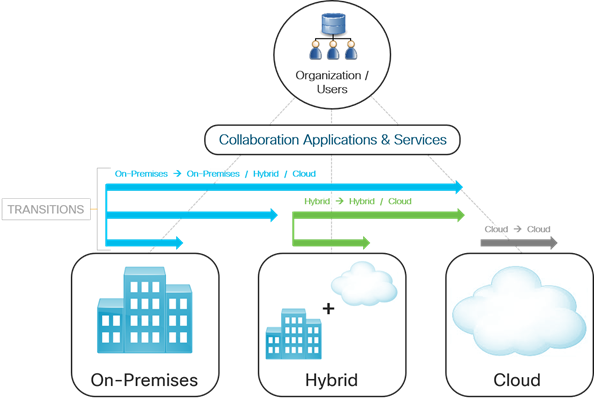
To guide customers during these transitions, Cisco has defined a methodology for transitioning their primary collaboration services to the latest Cisco cloud-delivered collaboration applications and services. This process defines a prescriptive deployment and transition model building upon the existing Collaboration Preferred Architectures (PA) available at https://www.cisco.com/go/pa. This model addresses the transitions to the latest cloud collaboration experiences delivered by Cisco Webex.
As shown in Figure 2, to transition the on-premises collaboration workloads to the latest Cisco cloud applications and services, customers need to answer the question: "How do I get from where I am today to where I want to be?"
Figure 2. Collaboration Transitions: Mapping the Move to the Latest Collaboration Applications and Services
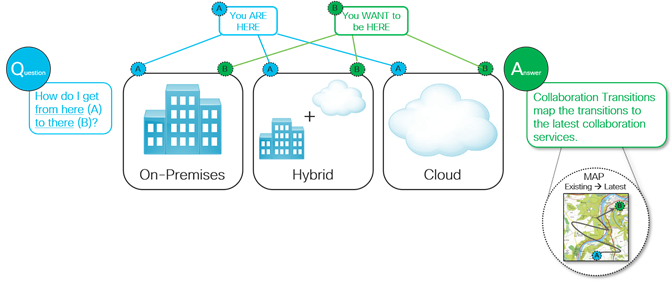
The answer rests within the Collaboration Transitions Journeys, which maps the transition to the latest and most sophisticated cloud collaboration services by guiding customers on how to implement the transition and highlighting the changes and benefits along the way.
Transition Approach
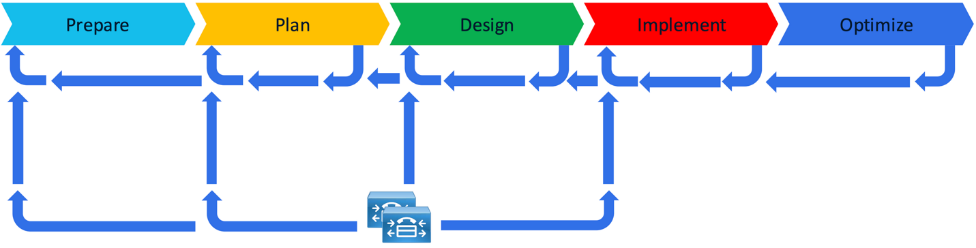
As you embark upon your journey to cloud collaboration services it is recommended to approach this by following Cisco’s structured methodology called Prepare, Plan, Design, Implement and Optimize (PPDIO):
· Prepare: Assess the current environment, gather requirements, and align stakeholders to establish a solid foundation.
· Plan: Develop detailed project plans including timelines, resources, and risk mitigation strategies.
· Design: Architect the target solution tailored to business and technical needs.
· Implement: Execute the deployment or migration according to the design, validating functionality and performance.
· Optimize: Continuously improve the solution post-implementation by monitoring performance, refining configurations, and leveraging automation and integration tools.
The goal of using this methodology is to leverage its defined structured process while leveraging data and information from your current on-premises solution to assist in the transition. Figure 3 below highlights this iterative approach where findings discovered in later phases can be used to revisit and improve decisions made in previous phases, ultimately validating and refining the solution for a more robust and effective deployment. It also shows how data from the on-premises solution (Unified CM in this example) is used to gain insights and incorporated into the process along the way to accelerate the overall project and deployment.
Figure 3. On-premises assisted PPDIO process
Transition Journey
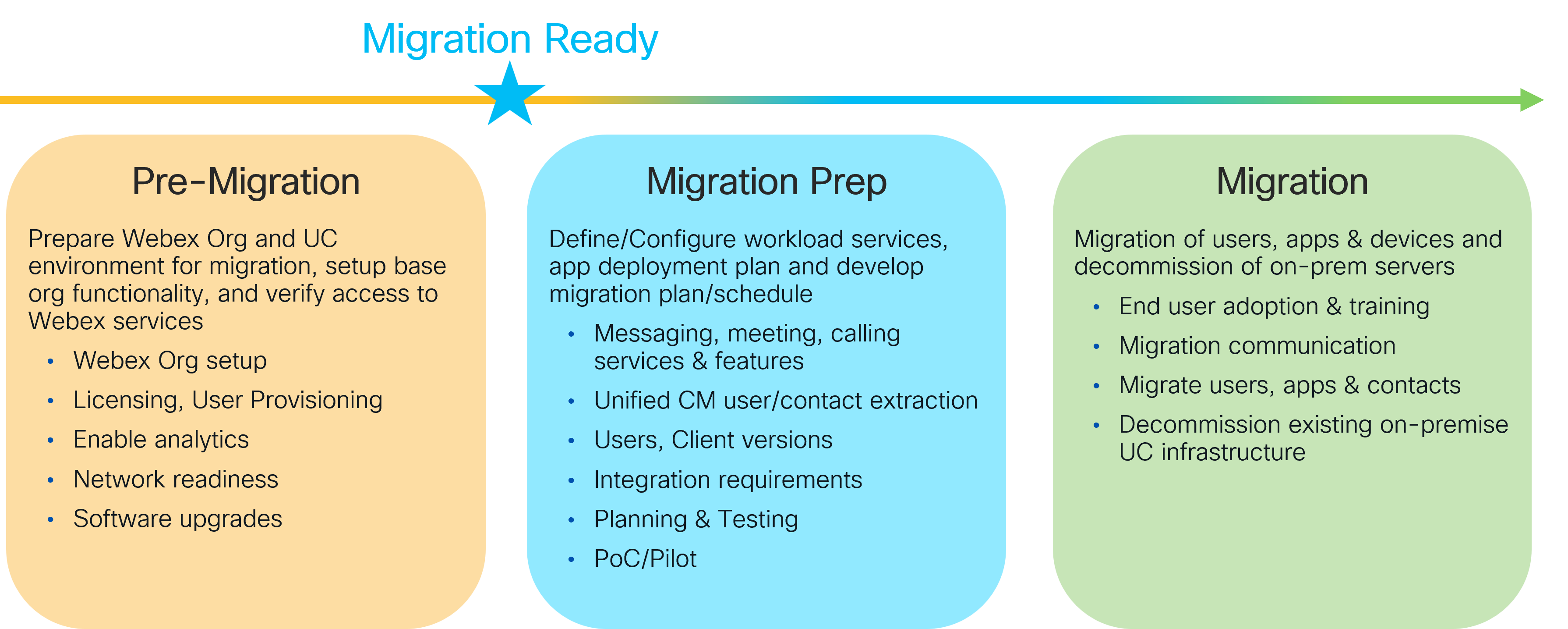
For any transition, whether it is on-premises to cloud or on-premises to coexistence and then to cloud, a 3-phase approach is recommended.
1. Pre-Migration: prepare the foundation of your on-premises and/or cloud collaboration environments by completing required, recommended and optional activities. At this point you are "Migration Ready" to start your transition to the new solution.
2. Migration Prep: complete your preparation, planning, (re-)define requirements, pre-configuration, and pre-testing.
3. Migration: complete transition of users, devices, services and clients/apps from the on-premises solution to the coexistence and/or cloud solution. Decommission any existing infrastructure that is no longer required.
Figure 4 highlights this 3-phase approach and the key activities within each phase.
Figure 4. Collaboration Transition 3-Phase Approach
Migration Readiness
Before starting any Webex transition, it is important to evaluate the current collaboration deployment and the current state of the Webex Org (if one exists). Understanding migration readiness and leveraging tools like the readiness assessments can help determine whether the existing environments are ready for the transition and is critical for a successful transition.
■ Webex Migrations - Customer Journeys & Readiness
As you prepare for your transition to Webex there are some required, recommended and optional pre-migration activities that should be completed before starting your project. Completing these first allows you to streamline your transition project along with providing the best experience for your administrators and end users.
This document covers the migration journeys from Cisco on-premises collaboration to Webex collaboration for Messaging, Meetings and Calling and identifies the readiness activities for each workload. Use this document to understand the pre-migration activities and which ones you need to complete. This information will help you complete the Webex Migrations - Customer Readiness Assessment.
■ Webex Migrations - Customer Readiness Assessment
As you prepare to transition to Webex for Messaging, Meetings and Calling this assessment identifies how ready you are for the transition. By answering questions about your current Webex and on-premises UC environment, deployment, and configurations, it will quickly assess the required, recommended, and optional activities for transitioning to Webex and identify ones you should take action on before embarking upon your transition.
Transition Scenarios
This section covers the different transition scenarios to Webex and includes the following documentation to assist, illustrate and explain the transitions:
■ Transition Maps – Illustrates the recommended phases and steps for transitioning from an existing on-premises collaboration deployment to the latest cloud solution, while accounting for the changes required before, during and after the transition.
■ Transition Deployment Guides – Provides technical background, deployment steps, and the key differences and considerations for transitioning the collaboration workloads to the latest cloud deployments.
The transition scenarios focus on moving from an on-premises to a Webex deployment and are divided into the following categories:
■ Clients & Devices – Covers on-premises client (Unified CM Calling, Meetings and Messaging) and video device transitions.
■ Calling – Covers on-premises calling platform, clients and IP phone transitions.
■ Contact Center – Covers on-premises contact center transitions.
■ Meetings – Covers on-premises meeting platform transitions.
* Note: Previously available transition scenarios for legacy on-premises solutions/products have moved to the Archived Transition Scenarios page.
Clients & Devices
It is recommended to transition from Jabber to the Webex App with Unified CM Calling whether you are planning to stay with on-premises Unified CM Calling or planning to transition to cloud calling (Webex Calling Multi-tenant and/or Webex Calling Dedicated Instance). If you are transitioning to Webex Calling, then the client transition is the first step in getting your end users' ready for the calling platform transition.
If you use Webex Meetings, then your end users are most likely already using the Webex App today. In this case the client transition will consist of moving the Unified CM Calling and/or Unified CM Messaging (IM&P) workloads to the Webex App, so end users have a single client for all their Cisco collaboration workloads. Figure 5 below highlights the different client transition options. Follow the one that meets your collaboration requirements.
Figure 5. On-premises Jabber to Webex App Client Transition Options
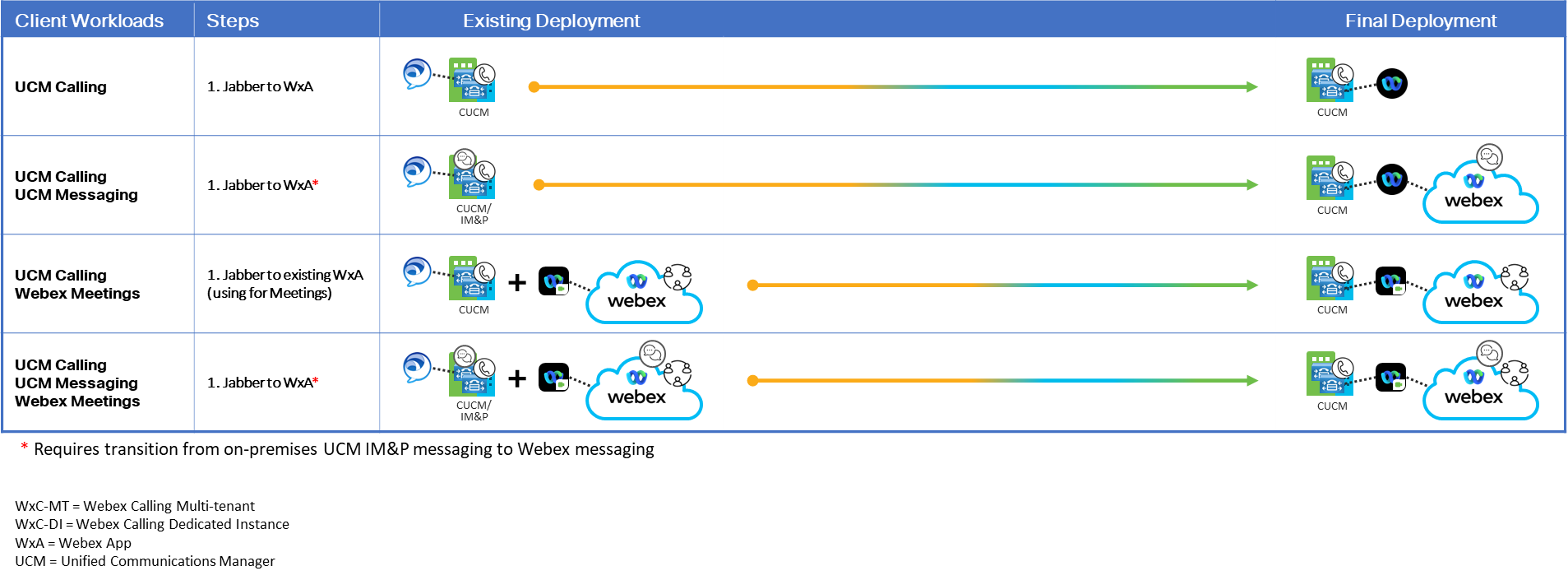
Based on the collaboration workloads and devices required, use the appropriate transition documents below to transition users from their existing soft client to the Webex App or to transition their video endpoints to Webex.
■ Jabber to Webex App - Transition from Jabber to Webex App to support Unified CM Calling and Webex Messaging.
Transition Map | Deployment Guide
■ WDA to Webex App - Transition from the Webex Meetings Desktop App (WDA) to the Webex App for Webex Meetings.
Transition Map | Deployment Guide
* Note: As of September 1, 2023 most customers have already been updated to the Webex App for Meetings
■ Video Endpoints - Unified CM / Expressway to Webex - Transition from on-premises video device registration and management (Unified CM / Expressway) to cloud registration and management (Webex).
Transition Map | Deployment Guide
Calling
For a true cloud calling platform it is recommended to transition to Webex Calling Multi-tenant. However, if specific business or technical requirements prohibit this today, you can transition to Webex Calling Dedicated Instance first and then to Webex Calling Multi-tenant as a second transition in the future. Or you can transition to a combination of Webex Calling Multi-tenant and Dedicated Instance and then move fully to the Webex Calling Multi-tenant platform in the future.
This allows for multiple paths to successfully transition the calling environment to the Webex Calling Multi-tenant solution. Figure 6 below highlights these path and options. Follow the one that meets your business needs and goals. Each path has two options and if you follow the recommended option to transition to the Webex App with Unified CM Calling first, then refer to the Clients & Devices transition scenario for details about that transition.
Figure 6. On-Premises Unified CM to Webex Calling Transition Options
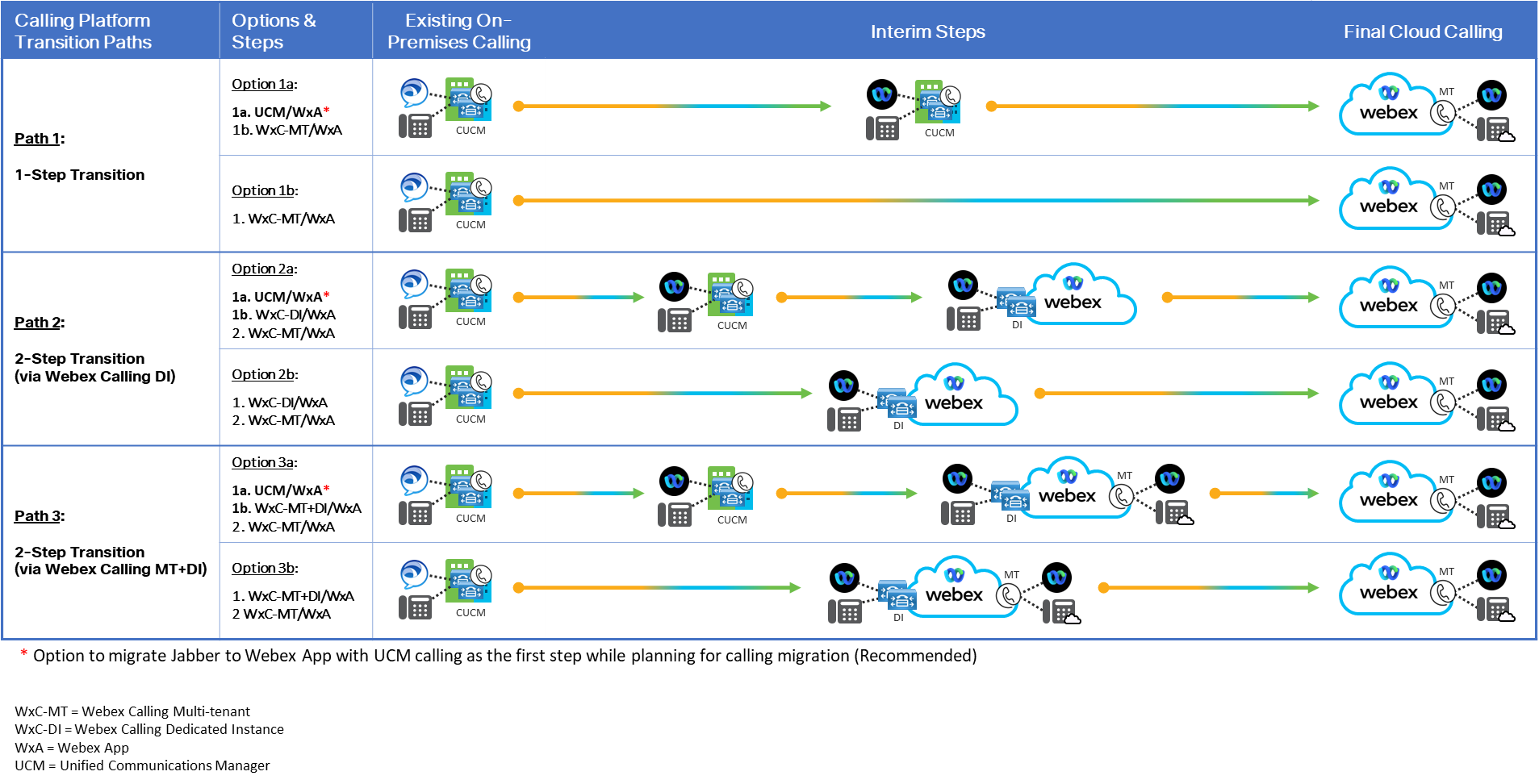
Based on the transition path that you select use the appropriate transition documents below.
■ Webex Calling Multi-tenant - Transition from on-premises calling (Jabber and Unified CM) to full cloud calling (Webex App and Webex Calling Multi-tenant).
Transition Map | Deployment Guide
■ Webex Calling Dedicated Instance - Transition from on-premises calling (Jabber and Unified CM) to hybrid cloud calling (Webex App and Webex Dedicated Instance calling).
Transition Map | Deployment Guide
Contact Center
■ Unified Contact Center Enterprise (CCE) to Webex Contact Center (CC) - Transition from on-premises contact center (Unified CCE, agents, supervisors, devices, and clients) to cloud contact center (Webex Contact Center).
■ Unified Contact Center Express (CCX) to Webex Contact Center (CC) - Transition from on-premises contact center (Unified CCX, agents, supervisors, devices, and clients) to cloud contact center (Webex Contact Center).
Transition Map | CCX to WxCC Deployment Guide
Meetings
■ Cisco Meeting Server to Webex Meetings – Transition from on-premises video meetings (Cisco Meeting Server) to cloud video meetings (Webex Meetings).
* Note: Previously available transition scenarios for legacy on-premises solutions/products have moved to the Archived Transition Scenarios page.
Related Information
The Collaboration Transition architecture is based on the Enterprise (on-premises) Preferred Architecture (PA) and is included under the Collaboration PA documentation framework. For more details on deploying both on-premises and hybrid collaboration solutions, refer to the Preferred Architecture documentation available at https://www.cisco.com/go/pa.
 Feedback
Contact Cisco
- Open a Support Case

- (Requires a Cisco Service Contract)
This Document Applies to These Products
- Collaboration Endpoints - Retired Products
- Conferencing - Retired Products
- Contact Center - Retired Products
- Optical Networking - Retired Products
- Routers - Retired Products
- Security - Retired Products
- Servers - Unified Computing (UCS) Retired Products
- Storage Networking Retired Products
- Switches - Retired Products
- Video - Retired Products
- Wireless - Retired Products