AI policy suggestions in Secure Workload

Cisco Secure Workload uses an AI engine to constantly scan and analyze traffic flows for workspaces. The AI engine optimizes the workspaces by suggesting simple and easy-to-use policies without needing to run AI Policy Discovery.

Based on the available policy filters and Role-Based Access Control (RBAC), the AI engine suggests draft policies and priority levels for enforcement on the workspaces.

AI policy suggestions for workspaces

AI policy suggestion is a workspace management strategy that:

  • optimizes workspace configurations to minimize errors,

  • ensures consistent security compliance, and

  • updates policies that are not recently enforced.

The Secure Workload AI engine continuously classifies workloads to maintain workspaces. It can replace existing policies that have not been enforced for a considerable time, ensuring security compliance and reducing configuration errors. The AI may also display a message if a policy for the selected flow is already present.

Prerequisites for AI policy suggestions

Components:

  • Ensure that you designate your workspace as the primary workspace for AI policy suggestions.

  • Configure policy enforcement to Catch All-Deny to facilitate recommendations.

Limitations for AI policy suggestions

A policy suggestion serves as a guidance mechanism that

  • considers the Advanced Policy discovery configurations that were created earlier when suggesting policies for workspaces.

  • can be customized per workspace, and

  • allows disabling AI Policy Suggestions per Virtual Routing and Forwarding (VRF) as needed.

View and use AI suggested policies

Use AI-suggested policies to automate and enhance policy application in selected workspaces.

Procedure


Step 1

Verify the workspace for scanning is designated as primary and select either Grouped or Ungrouped policies.

Note


Add Ungrouped policies individually once suggested.

Step 2

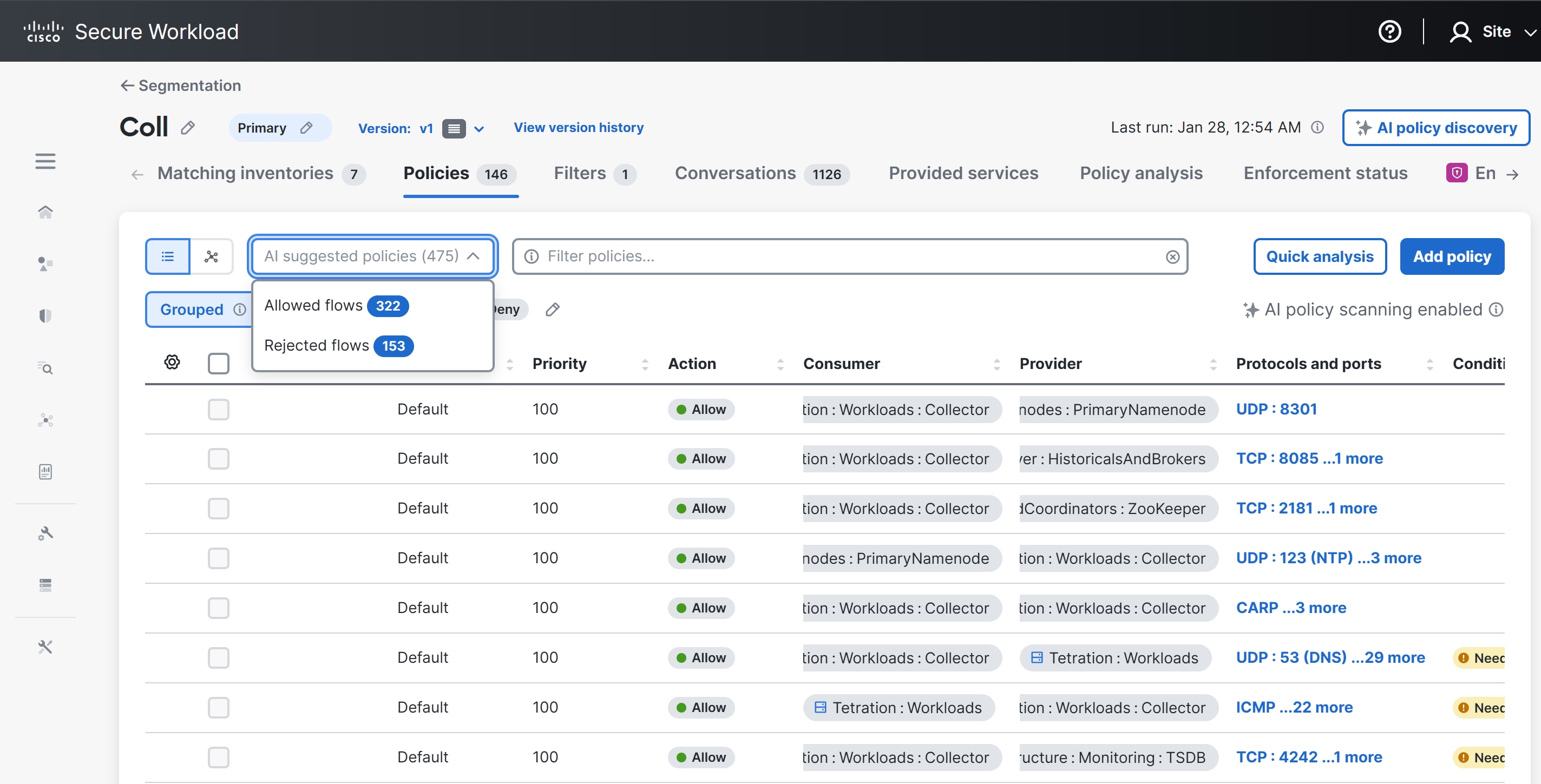
Click the AI suggested policies drop-down list. The drop-down has two options:

  1. Allowed flows: The number of policies available.

  2. Rejected flows: The number of policies that are generated based on the rejected traffic flows.

Note


Rejected policy flows appear only if enforcement is enabled and the catch-all deny is enforced.

Figure 1. AI suggested policies

Step 3

Select the AI suggested policies you want to add to the 'draft workspace' and click Add Selected Policies. The AI engine adds new policies to newly created workspaces, replaces existing policies with the suggested policies, and replaces existing policies that have been idle for a certain period of time.

Figure 2. AI Suggested Policies

Step 4

The AI engine will replace unselected suggestions with new ones if the AI engine suggests better policies.


Troubleshooting

This section lists some potential issues that you could possibly face while using the AI engine:

  • Ques: Why should I check if workspace is primary? •

  • Ans: In-order for the AI engine to suggest policies, the workspace must be primary.

  • Ques: Why should I check the advanced policy configuration?

  • Ans: AI Policy Suggestions feature will use the previous Advanced Policy discovery configuration when suggesting policies, so check the advanced policy configuration if any change in behavior is required.

  • Ques: Can I turn off the AI Policy suggestions?

  • Ans: Yes, the AI Policy suggestions can be turned off per VRF if required.

  • Ques: Why am I unable to see the policies for the workspace?

    Ans: Check if the policies are published. For the AI engine to scan the policies, the policies must to be published.

  • Ques: How often are policy statistics updated?

    Ans: Policy statistics are updated every six hours. Note that this is not configurable by users.

  • Ques: Can I enforce the policy suggestions immediately after I get the suggestions?

    Ans: Policy conditions are suggestions and you must verify the suggestions before taking any action on them.

  • Ques: How will policy suggestions work with the available policy conditions of Broad, Overshadowed or No Traffic?

    Ans: With the AI Policy Suggestions functionality, the finest policy is suggested with the available filters. For example, if all the filters are broad in nature, the resultant policy will also be broad in nature.

  • Ques: What should I do if the results are not as expected?

    Ans: Check AI Policy Settings if any of the results are not as expected, revert to the defaults for optimal usage.

  • Ques: Will there be any customer facing documentation about the models being used here? Are there any details available where the AI related services are being used?

    Ans: We are not using any Large Language Models (LLMs). All the results are from the decision tree and data processing. AI-related services are server processes running inside a Secure Workload cluster on a VM, which is not a yarn job.