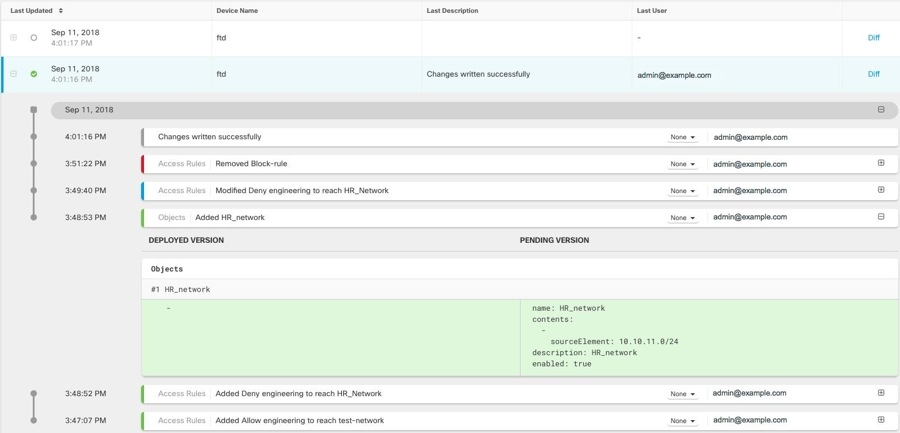
Describes how to review change log entries after deploying changes to an FDM-Managed devices, including summarized updates, detailed diffs, and color-coded additions, modifications, deletions, and messages.
A change log entry after deploying to FDM-Managed device is a deployment record that
-
summarizes changes for FDM-managed devices in simple terms
-
provides detailed information about exact changes when clicked, and
-
moves to Completed state after writing changes from Security Cloud Control to your FDM-managed device.
Change log entry features
After deployment, Security Cloud Control creates a new entry for future changes. Clicking the Diff link in a change log entry row displays a side-by-side comparison of the changes in the context of the running configuration file.
Each row within a log contains a colored band or outline at the start of the row which indicate the state of the changes:
-
Red indicates deletions
-
Blue indicates modifications
-
Green indicates additions to the device configuration
-
Grey indicates messages
HR_network object addition
The log details show addition of a network object called HR_network. In the expanded section for Added HR_network, the Deployed Version contains information about the configuration present in the device. The Pending Version column contains the configuration that are yet to be updated. The Deployed Version column is empty because there was no HR_network object on the device before the change. The Pending Version column shows that HR_network object was created with the value 10.10.11.0/24.