Secure Firewall Threat Defense high availability
Secure Firewall Threat Defense high availability is a failover configuration that
-
requires two identical Firewall Threat Defense devices connected through a dedicated failover link and optionally a state link
-
supports Active/Standby failover where one unit passes traffic while the standby unit does not actively pass traffic synchronizes configuration and state information, and
-
monitors the health of the active unit (hardware, interfaces, software, and environmental status) to determine if failover conditions are met.
Failover process details
When a failover occurs, the active unit fails over to the standby unit, which then becomes active. The health of the active unit (hardware, interfaces, software, and environmental status) is monitored to determine if specific failover conditions are met. If those conditions are met, failover occurs.
 Note |
High availability is not supported on Firewall Threat Defense Virtual running in the public cloud. See the Secure Firewall Threat Defense Virtual getting started guides for more information about configuring the Firewall Threat Defense Virtual device for high availability. |
High availability support on Firewall Threat Defense devices in a remote branch office deployment
High availability support on Firewall Threat Defense devices in a remote branch office deployment is a feature that
-
enables Security Cloud Control to manage devices through data interfaces instead of management interfaces
-
supports centralized management through outside Security Cloud Control access for single internet connection environments, and
-
requires software version 7.2 or later on managed devices.
Remote branch office deployment characteristics
In a remote branch office deployment, the data interface of the Firewall Threat Defense device is used for Security Cloud Control management instead of the management interface on the device. Most remote branch offices only have a single internet connection. Outside Security Cloud Control access makes centralized management possible.
You can use any data interface for Security Cloud Control access, for example, the inside interface if you have an inside Security Cloud Control. However, this guide primarily covers outside interface access, because it is the most likely scenario for remote branch offices.
Security Cloud Control provides high availability support on the Firewall Threat Defense devices that it manages through the data interface. This feature is supported on devices running on software version 7.2 or later.
For more information, see Firepower Threat Defense Deployment with a Remote FMC in the Cisco Firepower Getting Started Guide.
High availability system requirements
High availability system requirements are specifications that define the hardware, software, and license prerequisites for Firewall Threat Defense devices to function in a High availability configuration.
Hardware requirements
Hardware requirements are specifications that ensure two units in a High availability configuration can
-
maintain identical hardware configurations including model, interfaces, modules, and RAM
-
support proper synchronization and failover functionality, and
-
ensure reliable high availability operation.
Hardware requirement specifications
The two units in a High availability configuration must meet these requirements:
-
Be the same model. In addition, for container instances, they must use the same resource profile attributes.
For the Firepower 9300, High Availability is only supported between same-type modules. However, the two chassis can include mixed modules. For example, each chassis has an SM-56, SM-48, and SM-40. You can create High Availability pairs between the SM-56 modules, between the SM-48 modules, and between the SM-40 modules.
If you change the resource profile after you add the High Availability pair to the Security Cloud Control, update the inventory for each unit on the dialog box.
If you assign a different profile to instances in an established high-availability pair, which requires the profile to be the same on both units, you must:
-
Break high availability.
-
Assign the new profile to both units.
-
Re-establish high availability.
-
-
Have the same number and types of interfaces.
For the Firepower 4100/9300 chassis, all interfaces must be preconfigured in FXOS identically before you enable High availability. If you change the interfaces after you enable High availability, make the interface changes in FXOS on the Standby unit, and then make the same changes on the Active unit.
-
Have these settings in a remote branch deployment:
-
Have the same data management interface to handle management traffic in a remote deployment.
For example, if you have used eth0 in device 1, use the same interface (eth0) in device 2 as well.
-
Use data management interface for management traffic.
You cannot have one unit managed using a data interface and the other using a management interface.
-
If you are using units with different flash memory sizes in your High availability configuration, make sure the unit with the smaller flash memory has enough space to accommodate the software image files and the configuration files. If it does not, configuration synchronization from the unit with the larger flash memory to the unit with the smaller flash memory will fail.
Software requirements
Software requirements are configuration specifications that High availability units must meet to function properly in a failover configuration.
Required software specifications
The two units in a High availability configuration must meet these requirements:
-
Be in the same firewall mode (routed or transparent).
-
Have the same software version.
-
Be in the same group on the Cloud-Delivered Firewall Management Center.
-
Have the same NTP configuration. See Synchronize time on FTD devices.
-
Configuration changes must be fully deployed to the devices.
-
Not have DHCP or PPPoE configured in any of their interfaces.
-
(Firepower 4100/9300) Have the same flow offload mode, either both enabled or both disabled.
License requirements for Firewall Threat Defense devices in a high availability pair
Both Firewall Threat Defense units in a high availability configuration must have the same licenses.
High availability configurations require two license entitlements: one for each device in the pair.
Before high availability is established, it does not matter which licenses are assigned to the secondary/standby device. During high availability configuration, the Cloud-Delivered Firewall Management Center releases any unnecessary licenses assigned to the standby unit and replaces them with identical licenses assigned to the primary/active unit.
For example, if the active unit has a Essentials license and a IPS license, and the standby unit has only a Essentials license, the Cloud-Delivered Firewall Management Center communicates with the Smart Software Manager to obtain an available IPS license from your account for the standby unit. If your license account does not include enough purchased entitlements, your account becomes Out-of-Compliance until you purchase the correct number of licenses.
Failover and stateful failover links
A failover link and stateful failover link are dedicated connections that
-
establish communication between the two units in a failover configuration
-
require the same interface to be used between corresponding devices for consistency, and
-
transmit critical failover and state information between the paired units.
Configuration recommendations
Cisco recommends to use the same interface between two devices in a failover link or a stateful failover link. For example, in a failover link, if you have used eth0 in device 1, use the same interface (eth0) in device 2 as well.
Failover link
A failover link is a communication mechanism that enables two units in a failover pair to constantly communicate to determine the operating status of each unit.
Failover link data
This below information is communicated over the failover link:
-
The unit state (active or standby)
-
Hello messages (keep-alives)
-
Network link status
-
MAC address exchange
-
Configuration replication and synchronization
Interface for the failover link
A failover link interface is a dedicated communication channel that
-
exists solely for failover communication between high availability units
-
uses an unused data interface (physical, or EtherChannel)
-
cannot be shared with normal networking interfaces or user data traffic, and
-
requires specific interface sizing based on the device model.
Interface restrictions and requirements
You can use an unused data interface (physical, or EtherChannel) as the failover link; however, you cannot specify an interface that is currently configured with a name. You cannot use a data management interface if the interface is configured for communication with Security Cloud Control. You also cannot use a subinterface with the exception of a subinterface defined on the chassis for multi-instance mode. The failover link interface is not configured as a normal networking interface; it exists for failover communication only. This interface can only be used for the failover link (and also for the state link).
The Firewall Threat Defense does not support sharing interfaces between user data and the failover link. You also cannot use separate subinterfaces on the same parent for the failover link and for data (multi-instance chassis subinterfaces only). If you use a chassis subinterface for the failover link, then all subinterfaces on that parent, and the parent itself, are restricted for use as failover links.
Note |
When using an EtherChannel as the failover or state link, you must confirm that the same EtherChannel with the same member interfaces exists on both devices before establishing high availability. |
See these guidelines for the failover link:
-
Firepower 4100/9300—You cannot use the management-type interface for the failover link.
-
See these guidelines for sizing the link.
Table 1. Failover link size Model
Interface Size for Combined Failover and State Link
Firewall 200
1 Gbps
Firepower 1010
1 Gbps
Firepower 1100
1 Gbps
Secure Firewall 1200
1 Gbps
Secure Firewall 3100
Secure Firewall 3105—1 Gbps
Secure Firewall 3110—1 Gbps
Secure Firewall 3120—1 Gbps
Secure Firewall 3130—10 Gbps
Secure Firewall 3140—10 Gbps
Firepower 4100
10 Gbps
Secure Firewall 4200
10 Gbps
Firewall 6100
10 Gbps
Firepower 9300
10 Gbps
The alternation frequency is equal to the unit hold time.
Note |
If you have a large configuration and a low unit hold time, alternating between the member interfaces can prevent the secondary unit from joining/re-joining. In this case, disable one of the member interfaces until after the secondary unit joins. |
For an EtherChannel used as the failover link, to prevent out-of-order packets, only one interface in the EtherChannel is used. If that interface fails, then the next interface in the EtherChannel is used. You cannot alter the EtherChannel configuration while it is in use as a failover link.
Connect the failover link
The failover link enables communication and coordination between units in a failover configuration.
You need to establish a physical connection between the failover units to enable proper failover functionality.
Procedure
|
Connect the failover link using one of the following methods:
If you do not use a switch between the units and the interface fails, the link is brought down on both peers. This condition may hamper troubleshooting efforts because you cannot easily determine which unit has the failed interface and caused the link to come down. |
The failover link is physically connected and ready for failover configuration.
Stateful failover links
A stateful failover link is a network connection that
-
passes connection state information between failover units, and
-
must be configured to enable stateful failover functionality.
State link configuration requirements
To use Stateful Failover, you must configure a Stateful Failover link (also known as the state link) to pass connection state information.
Shared failover links
A shared failover link is an interface conservation method that enables multiple network functions to use the same failover connection, though dedicated interfaces for state and failover links should be considered for large configurations and high traffic networks.
Dedicated interface for the stateful failover link
A dedicated interface for the stateful failover link is a data interface configuration that uses a dedicated physical or EtherChannel interface specifically for the state link in failover deployments.
Performance considerations
You can use a dedicated data interface—such as a physical or EtherChannel interface—for the state link. For requirements about a dedicated state link, refer to Interface for the failover link. See the section on connecting the state link for additional information Connect the failover link.
For optimum performance with long-distance failover, the state link latency should be less than 10 milliseconds but no more than 250 milliseconds. If latency exceeds 10 milliseconds, performance might degrade due to retransmission of failover messages.
Failover and data link interruption avoidance
Failover and data link interruption avoidance is a network design practice that
-
ensures failover links and data interfaces travel through different paths to decrease the chance that all interfaces fail at the same time
-
prevents failover operation suspension when the failover link is down, and
-
maintains network resilience by using proper connection scenarios.
Connection scenarios
We recommend that failover links and data interfaces travel through different paths to decrease the chance that all interfaces fail at the same time. If the failover link is down, the failover operation is suspended until the health of the failover link is restored.
These connection scenarios help design a resilient failover network.
Scenario 1—Not recommended
If a single switch or a set of switches are used to connect both failover and data interfaces between two Firewall Threat Defense devices, then when a switch or inter-switch-link is down, both Firewall Threat Defense devices become active. Therefore, the two connection methods shown in these figures are not recommended.


Scenario 2—Recommended
We recommend that failover links not use the same switch as the data interfaces. Instead, use a different switch or use a direct cable to connect the failover link, as shown in these figures.
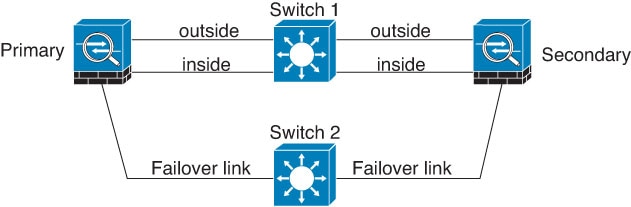
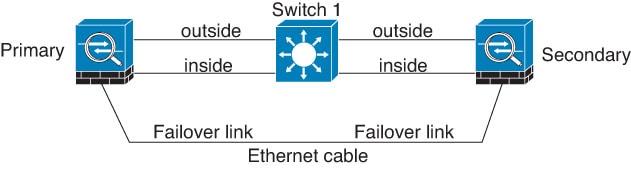
Scenario 3—Recommended
If the Firewall Threat Defense data interfaces are connected to more than one set of switches, then a failover link can be connected to one of the switches, preferably the switch on the secure (inside) side of network, as shown in this figure.
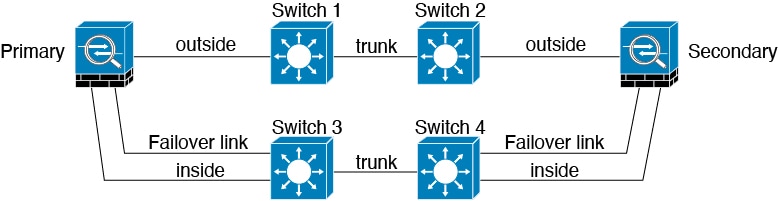
MAC addresses and IP addresses in High availability
MAC addresses and IP addresses in High availability are network addressing mechanisms that
-
provide unique identification for network interfaces during failover scenarios
-
maintain network connectivity when primary devices become unavailable, and
-
ensure seamless traffic flow between active and standby configurations.
Address configuration types
When you configure your interfaces, you can specify an active IP address and a standby IP address on the same network. Generally, when a failover occurs, the new active unit takes over the active IP addresses and MAC addresses. Because network devices see no change in the MAC to IP address pairing, no ARP entries change or time out anywhere on the network.
Note |
Although recommended, the standby address is not required. Without a standby IP address, the active unit cannot perform network tests to check the standby interface health; it can only track the link state. You also cannot connect to the standby unit on that interface for management purposes. |
The IP address and MAC address for the state link do not change at failover.
Active/standby configurations use specific address handling methods:
For Active/Standby High availability, see the following for IP address and MAC address usage during a failover event:
-
The active unit always uses the primary unit's IP addresses and MAC addresses.
-
When the active unit fails over, the standby unit assumes the IP addresses and MAC addresses of the failed unit and begins passing traffic.
-
When the failed unit comes back online, it is now in a standby state and takes over the standby IP addresses and MAC addresses.
However, if the secondary unit boots without detecting the primary unit, then the secondary unit becomes the active unit and uses its own MAC addresses, because it does not know the primary unit MAC addresses. When the primary unit becomes available, the secondary (active) unit changes the MAC addresses to those of the primary unit, which can cause an interruption in your network traffic. Similarly, if you swap out the primary unit with new hardware, a new MAC address is used.
If you disable high availability and set the failover configurations to a disabled state, you will need to manually resume high availability, or reboot the device. It is recommended to use the command configure high-availability resume and resume the high availability instead of rebooting the device. If you reload the standby unit with the failover configuration disabled, the standby unit boots up as the active unit and uses the primary unit's IP addresses and MAC addresses. This leads to duplicate IP addresses and causes network traffic disruptions. Use the command configure high-availability resume to enable failover and restore the traffic flow.
Note |
If you enable failover on a standalone device, the data interfaces go down at negotiation state of failover, interrupting traffic. |
Virtual MAC addresses guard against this disruption, because the active MAC addresses are known to the secondary unit at startup, and remain the same in the case of new primary unit hardware. We recommend that you configure the virtual MAC address on both the primary and secondary units to ensure that the secondary unit uses the correct MAC addresses when it is the active unit, even if it comes online before the primary unit. If you do not configure virtual MAC addresses, you might need to clear the ARP tables on connected routers to restore traffic flow. The Firewall Threat Defense does not send gratuitous ARPs for static NAT addresses when the MAC address changes, so connected routers do not learn of the MAC address change for these addresses.
For Active/Active failover, see the following for IP address and MAC address usage during a failover event:
-
The primary unit autogenerates active and standby MAC addresses for all interfaces in failover group 1 and 2 contexts. You can also manually configure the MAC addresses if necessary, for example, if there are MAC address conflicts.
-
Each unit uses the active IP addresses and MAC addresses for its active failover group, and the standby addresses for its standby failover group. For example, the primary unit is active for failover group 1, so it uses the active addresses for contexts in failover group 1. It is standby for the contexts in failover group 2, where it uses the standby addresses.
-
When a unit fails over, the other unit assumes the active IP addresses and MAC addresses of the failed failover group and begins passing traffic.
-
When the failed unit comes back online, and you enabled the preempt option, it resumes the failover group.
Virtual MAC addresses provide specialized functionality:
The Firewall Threat Defense has multiple methods to configure virtual MAC addresses. We recommend using only one method. If you set the MAC address using multiple methods, the MAC address used depends on many variables, and might not be predictable.
For multi-instance capability, the FXOS chassis autogenerates only primary MAC addresses for all interfaces. You can overwrite the generated MAC address with a virtual MAC address with both the primary and secondary MAC addresses, but predefining the secondary MAC address is not essential; setting the secondary MAC address does ensure that to-the-box management traffic is not interrupted in the case of new secondary unit hardware.
MAC address table updates occur during failover events:
During failover, the device that is designated as the new active device generates multicast packets for each MAC address entry in the MAC table and sends them to all the bridge group interfaces. This action prompts the upstream switches in the bridge group to update their routing tables with the new active device's interface to ensure accurate traffic forwarding.
The time taken to generate multicast packets and update the routing tables of the upstream switches depends on the number of entries in the MAC address table and the number of bridge group interfaces. Use the show failover statistics state-switch-delay command to display statistics related to the delays encountered during failover events.
Stateful failover
A stateful failover is a high availability mechanism that
-
continuously passes per-connection state information from the active unit to the standby unit
-
maintains connection information after a failover occurs, and
-
allows supported end-user applications to continue communication sessions without reconnecting.
Stateful failover operation
During Stateful Failover, the active unit continually passes per-connection state information to the standby unit. After a failover occurs, the same connection information is available at the new active unit. Supported end-user applications are not required to reconnect to keep the same communication session.
Supported features
Supported features are high availability capabilities that
-
enable state information to be passed to the standby Firewall Threat Defense device during Stateful Failover
-
maintain connection states and critical information for seamless traffic flow, and
-
ensure minimal disruption during failover events.
State information types
For Stateful Failover, these state information types are passed to the standby device:
-
NAT translation table.
-
TCP and UDP connections and states, including HTTP connection states. Other types of IP protocols, and ICMP, are not parsed by the active unit, because they get established on the new active unit when a new packet arrives.
-
Snort connection states, inspection results, and pin hole information, including strict TCP enforcement.
-
The ARP table
-
The Layer 2 bridge table (for bridge groups)
-
The ISAKMP and IPsec SA table
-
GTP PDP connection database
-
SIP signaling sessions and pin holes.
-
Static and dynamic routing tables—Stateful Failover participates in dynamic routing protocols, like OSPF and EIGRP, so routes that are learned through dynamic routing protocols on the active unit are maintained in a Routing Information Base (RIB) table on the standby unit. Upon a failover event, packets travel normally with minimal disruption to traffic because the active secondary unit initially has rules that mirror the primary unit. Immediately after failover, the re-convergence timer starts on the newly active unit. Then the epoch number for the RIB table increments. During re-convergence, OSPF and EIGRP routes become updated with a new epoch number. Once the timer is expired, stale route entries (determined by the epoch number) are removed from the table. The RIB then contains the newest routing protocol forwarding information on the newly active unit.
Note
Routes are synchronized only for link-up or link-down events on an active unit. If the link goes up or down on the standby unit, dynamic routes sent from the active unit may be lost. This is normal, expected behavior.
-
DHCP Server—DHCP address leases are not replicated. However, a DHCP server configured on an interface will send a ping to make sure an address is not being used before granting the address to a DHCP client, so there is no impact to the service. State information is not relevant for DHCP relay or DDNS.
-
Access control policy decisions—Decisions related to traffic matching (including URL, URL category, geolocation, and so forth), intrusion detection, malware, and file type are preserved during failover. However, for connections being evaluated at the moment of failover, there are the following caveats:
-
AVC—App-ID verdicts are replicated, but not detection states. Proper synchronization occurs as long as the App-ID verdicts are complete and synchronized before failover occurs.
-
Intrusion detection state—Upon failover, once mid-flow pickup occurs, new inspections are completed, but old states are lost.
-
File malware blocking—The file disposition must become available before failover.
-
File type detection and blocking—The file type must be identified before failover. If failover occurs while the original active device is identifying the file, the file type is not synchronized. Even if your file policy blocks that file type, the new active device downloads the file.
-
-
User identity decisions from the identity policy, including the user-to-IP address mappings gathered passively through ISE Session Directory, and active authentication through captive portal. Users who are actively authenticating at the moment of failover might be prompted to authenticate again.
-
Network AMP—Cloud lookups are independent from each device, so failover does not affect this feature in general. Specifically:
-
Signature Lookup—If failover occurs in the middle of a file transmission, no file event is generated and no detection occurs.
-
File Storage—If failover occurs when the file is being stored, it is stored on the original active device. If the original active device went down while the file was being stored, the file does not get stored.
-
File Pre-classification (Local Analysis)—If failover occurs in the middle of pre-classification, detection fails.
-
File Dynamic Analysis (Connectivity to the cloud)—If failover occurs, the system might submit the file to the cloud.
-
Archive File Support—If failover occurs in the middle of an analysis, the system loses visibility into the file/archive.
-
Custom Blocking—If failover occurs, no events are generated.
-
-
Security Intelligence decisions. However, DNS-based decisions that are in process at the moment of failover are not completed.
-
RA VPN—Remote access VPN end users do not have to reauthenticate or reconnect the VPN session after a failover. However, applications operating over the VPN connection could lose packets during the failover process and not recover from the packet loss.
-
From all the connections, only established ones will be replicated on the Standby device.
Unsupported features
Unsupported features are device capabilities that
-
are not passed to the standby Firewall Threat Defense in Stateful Failover
-
do not maintain state information during failover events, and
-
may require re-establishment after a failover occurs.
State information limitations
For Stateful Failover, the following state information is not passed to the standby Firewall Threat Defense:
-
Sessions in plaintext tunnels other than GREv0 and IPv4-in-IP. Sessions inside tunnels are not replicated and the new active node will not be able to reuse existing inspection verdicts to match the correct policy rules.
-
Decrypted TLS/SSL connections—The decryption states are not synchronized, and if the active unit fails, then decrypted connections will be reset. New connections will need to be established to the new active unit. Connections that are not decrypted (in other words, those that match a TLS/SSL Do Not Decrypt rule action) are not affected and are replicated correctly.
-
Multicast routing.
Bridge group requirements for high availability
Bridge group requirements for high availability are special considerations that
-
address traffic loss on bridge group member interfaces during failover
-
prevent switch ports from entering blocking state for 30 to 50 seconds, and
-
provide workarounds to maintain connectivity during topology changes.
High availability workarounds
There are special considerations for high availability when using bridge groups.
When the active unit fails over to the standby unit, the switch port running Spanning Tree Protocol (STP) can go into a blocking state for 30 to 50 seconds when it senses the topology change. To avoid traffic loss on the bridge group member interfaces while the port is in a blocking state, you can configure one of the following workarounds:
-
Switch port is in Access mode—Enable the STP PortFast feature on the switch:
interface interface_id
  spanning-tree portfast
The PortFast feature immediately transitions the port into STP forwarding mode upon linkup. The port still participates in STP. So if the port is to be a part of the loop, it eventually transitions into STP blocking mode.
-
If the switch port is in Trunk mode, or you cannot enable STP PortFast, then you can use one of the following less desirable workarounds that impacts failover functionality or STP stability:
-
Disable interface monitoring on the bridge group and member interfaces.
-
Increase the interface hold time in the failover criteria to a high value that will allow STP to converge before the unit fails over.
-
Decrease the STP timers on the switch to allow STP to converge faster than the interface hold time.
-
Failover health monitoring
Failover health monitoring is a system capability that monitors each unit for overall health and interface health.
Health monitoring tests
The Firewall Threat Defense device performs tests to determine the state of each unit. This section includes information about how the Firewall Threat Defense device performs tests to determine the state of each unit.
Unit health monitoring
Unit health monitoring is a failover mechanism that
-
determines the health of peer units by monitoring the failover link with hello messages
-
sends LANTEST messages on each data interface when three consecutive hello messages are missed, and
-
initiates appropriate failover actions based on peer unit responsiveness.
Unit health monitoring behavior
The Firewall Threat Defense device determines the health of the other unit by monitoring the failover link with hello messages. If a unit does not receive three consecutive hello messages on the failover link, the sends LANTEST messages on each data interface, including the failover link, to validate whether the peer is responsive. The action that the Firewall Threat Defense device takes depends on the response from the other unit. These are the possible actions:
-
If the Firewall Threat Defense device receives a response on the failover link, then it does not fail over.
-
If the Firewall Threat Defense device does not receive a response on the failover link, but it does receive a response on a data interface, then the unit does not failover. The failover link is marked as failed. You should restore the failover link as soon as possible because the unit cannot fail over to the standby while the failover link is down.
-
If the Firewall Threat Defense device does not receive a response on any interface, then the standby unit switches to active mode and classifies the other unit as failed.
Note |
During a high-availability failover event, the Firewall Threat Defense device device may briefly appear as Offline in the device's health monitoring dashboard. This happens because health alerts are cleared during the process and are only updated after the process is complete. Wait for the failover operation to finish. |
Heartbeat module redundancy
Heartbeat module redundancy is a high availability feature that
-
sends heartbeat messages using the data plane transport infrastructure to supplement control plane heartbeat packets
-
increments a counter when the peer receives heartbeat packets in the data plane
-
prevents false failover or split-brain scenarios when the control plane is congested with traffic.
Heartbeat module redundancy behavior
Each unit in the HA periodically sends a broadcast keepalive heartbeat packet over the failover link. If the control plane is too busy handling traffic, sometimes the heartbeat packets do not reach the peers, or the peers do not process the heartbeat packets due to CPU overloading. When peers cannot communicate the keepalive status within the configurable timeout period, a false failover or split-brain scenario occurs.
The heartbeat module in the data plane helps to avoid the occurrence of false failover or split-brain due to traffic congestion in the control plane.
-
The additional heartbeat module works similarly to the control plane module but sends and receives heartbeat messages using the data plane transport infrastructure.
-
When the peer receives heartbeat packets in the data plane, a counter gets incremented.
-
If the heartbeat transfer in the control plane fails, the node checks the heartbeat counter in the data plane. If the counter is incrementing, then the peer is alive, and the cluster does not perform a failover in this situation.
Note |
|
Interface monitoring
Interface monitoring is a failover capability that
-
tracks the health of up to 1025 interfaces to detect interface failures
-
performs interface tests when hello messages are not received within 15 seconds, and
-
triggers failover when the number of failed interfaces meets the defined threshold.
Interface monitoring operation
When a unit does not receive hello messages on a monitored interface for 15 seconds, it runs interface tests. If one of the interface tests fails for an interface, but this same interface on the other unit continues to successfully pass traffic, then the interface is considered to be failed, and the device stops running tests.
If the threshold you define for the number of failed interfaces is met (see , and then ), and the active unit has more failed interfaces than the standby unit, then a failover occurs. If an interface fails on both units, then both interfaces go into the "Unknown" state and do not count towards the failover limit defined by failover interface policy.
An interface becomes operational again if it receives any traffic. A failed device returns to standby mode if the interface failure threshold is no longer met.
If an interface has IPv4 and IPv6 addresses configured on it, the device uses the IPv4 addresses to perform the health monitoring. If an interface has only IPv6 addresses configured on it, then the device uses IPv6 neighbor discovery instead of ARP to perform the health monitoring tests. For the broadcast ping test, the device uses the IPv6 all nodes address (FE02::1).
Interface tests
Interface tests are monitoring mechanisms that:
-
evaluate interface operational status during failover scenarios
-
run sequentially with approximately 1.5 second duration per test, and
-
determine interface failure status on Firewall Threat Defense device units.
Interface test sequence
The Firewall Threat Defense device uses these interface tests in sequence:
-
Link Up/Down test—A test of the interface status. If the Link Up/Down test indicates that the interface is down, then the device considers it failed, and testing stops. If the status is Up, then the device performs the Network Activity test.
-
Network Activity test—A received network activity test. At the start of the test, each unit clears its received packet count for its interfaces. As soon as a unit receives any eligible packets during the test, then the interface is considered operational. If both units receive traffic, then testing stops. If one unit receives traffic and the other unit does not, then the interface on the unit that does not receive traffic is considered failed, and testing stops. If neither unit receives traffic, then the device starts the ARP test.
-
ARP test—A test for successful ARP replies. Each unit sends a single ARP request for the IP address in the most recent entry in its ARP table. If the unit receives an ARP reply or other network traffic during the test, then the interface is considered operational. If the unit does not receive an ARP reply, then the device sends a single ARP request for the IP address in the next entry in the ARP table. If the unit receives an ARP reply or other network traffic during the test, then the interface is considered operational. If both units receive traffic, then testing stops. If one unit receives traffic, and the other unit does not, then the interface on the unit that does not receive traffic is considered failed, and testing stops. If neither unit receives traffic, then the device starts the Broadcast Ping test.
-
Broadcast Ping test—A test for successful ping replies. Each unit sends a broadcast ping, and then counts all received packets. If the unit receives any packets during the test, then the interface is considered operational. If both units receive traffic, then testing stops. If one unit receives traffic, and the other unit does not, then the interface on the unit that does not receive traffic is considered failed, and testing stops. If neither unit receives traffic, then testing starts over again with the ARP test. If both units continue to receive no traffic from the ARP and Broadcast Ping tests, then these tests will continue running in perpetuity.
Interface status
Interface status is a monitoring indicator that
-
shows the current operational state of monitored interfaces in a failover configuration
-
tracks traffic reception and hello packet communication between peer units, and
-
determines whether an interface is actively monitored by the failover process.
Interface status types
Monitored interfaces can have these status types:
-
Unknown: Initial status. This status can also mean the status cannot be determined.
-
Normal: The interface is receiving traffic.
-
Normal (Waiting): The interface is up, but has not yet received a hello packet from the corresponding interface on the peer unit.
-
Normal (Not-Monitored): The interface is up, but is not monitored by the failover process.
-
Testing: Hello messages are not heard on the interface for five poll times.
-
Link Down: The interface or VLAN is administratively down.
-
Link Down (Waiting): The interface or VLAN is administratively down and has not yet received a hello packet from the corresponding interface on the peer unit.
-
Link Down (Not-Monitored): The interface or VLAN is administratively down, but is not monitored by the failover process.
-
No Link: The physical link for the interface is down.
-
No Link (Waiting): The physical link for the interface is down and has not yet received a hello packet from the corresponding interface on the peer unit.
-
No Link (Not-Monitored): The physical link for the interface is down, but is not monitored by the failover process.
-
Failed: No traffic is received on the interface, yet traffic is heard on the peer interface.
Failover triggers and detection timing
Failover triggers and detection timing are high availability mechanisms that:
-
initiate automatic switchover when specific failure conditions occur on the active unit,
-
monitor system health through configurable detection thresholds and timing parameters, and
-
ensure service continuity by transferring control to the standby unit when failures exceed defined limits.
Failover triggering events and timing parameters
These events trigger failover in a Firepower high availability pair:
-
More than 50% of the Snort instances on the active unit are down.
-
Disk space on the active unit is more than 90% full.
-
The no failover active command is run on the active unit or the failover active command is run on the standby unit.
-
The active unit has more failed interfaces than the standby unit.
-
Interface failure on the active device exceeds the threshold configured.
By default, failure of a single interface causes failover. You can change the default value by configuring a threshold for the number of interfaces or a percentage of monitored interfaces that must fail for the failover to occur. If the threshold is exceeded on the active device, failover occurs. If the threshold is exceeded on the standby device, the unit moves to Fail state.
To change the default failover criteria, enter this command in global configuration mode:
Table 2. Interface policy command Command
Purpose
failover interface-policy num [%]
hostname (config)# failover interface-policy 20%Changes the default failover criteria.
When specifying a specific number of interfaces, the num argument can be from 1 to 250.
When specifying a percentage of interfaces, the num argument can be from 1 to 100.
This table shows the failover triggering events and associated failure detection timing. If failover occurs, you can view the reason for the failover in the Message Center, along with various operations pertaining to the high availability pair. You can configure these thresholds to a value within the specified minimum-maximum range.
|
Failover triggering event |
Minimum |
Default |
Maximum |
|---|---|---|---|
|
Active unit loses power, hardware goes down, or the software reloads or crashes. When any of these occur, the monitored interfaces or failover link do not receives any hello message. |
800 milliseconds |
15 seconds |
45 seconds |
|
Active unit interface physical link down. |
500 milliseconds |
5 seconds |
15 seconds |
|
Active unit interface up, but connection problem causes interface testing. |
5 seconds |
25 seconds |
75 seconds |
Active/standby failover
Active/standby failover is a high availability configuration that
-
lets you use a standby Firewall Threat Defense device to take over the functionality of a failed unit,
-
enables the standby unit to become the active unit when the active unit fails, and
-
allows the failed unit to come back online as the standby unit if the problem is temporary.
The failed unit must be replaced if the problem is not temporary. Set the standby unit to primary before replacing the failed unit to retain the configuration of the secondary unit.
For multiple context mode, the ASA can fail over the entire unit (including all contexts) but cannot fail over individual contexts separately.
Primary/secondary roles and active/standby status
Primary/secondary roles and active/standby status are failover configuration concepts that
-
define unit hierarchy, with primary units taking precedence during simultaneous startup
-
determine IP address and MAC address usage patterns during failover operations, and
-
establish traffic flow responsibilities between paired units in Active/Standby failover configurations.
Primary and secondary unit differences
When setting up Active/Standby failover, you configure one unit to be primary and the other to be secondary. During configuration, the primary unit's policies are synchronized to the secondary unit. At this point, the two units act as a single device for device and policy configuration. However, for events, dashboards, reports and health monitoring, they continue to display as separate devices.
The main differences between the two units in a failover pair are related to which unit is active and which unit is standby, namely which IP addresses to use and which unit actively passes traffic.
However, a few differences exist between the units depending on which unit is primary (as specified in the configuration) and which unit is secondary:
-
The primary unit always becomes the active unit if both units start up at the same time (and are of equal operational health).
-
The primary unit MAC addresses are always coupled with the active IP addresses. The exception to this rule occurs when the secondary unit becomes active and cannot obtain the primary unit MAC addresses over the failover link. In this case, the secondary unit MAC addresses are used.
Active unit determination at startup
Active unit determination at startup is a high availability process that
-
sets a unit to standby if it boots and detects a peer already running as active,
-
sets a unit to active if it boots and does not detect a peer, and
-
sets the primary unit as active and secondary unit as standby if both units boot simultaneously.
Failover events
A failover event is a system condition that
-
triggers an active unit to transfer control to a standby unit in Active/Standby failover configurations
-
occurs on a unit basis, and
-
follows specific failover policies that determine whether failover occurs and what actions each unit takes.
Failover event policies and actions
This table shows the failover action for each failure event. For each failure event, the table shows the failover policy (failover or no failover), the action taken by the active unit, the action taken by the standby unit, and any special notes about the failover condition and actions.
|
Failure Event |
Policy |
Active Unit Action |
Standby Unit Action |
Notes |
|---|---|---|---|---|
|
Active unit failed (power or hardware) |
Failover |
n/a |
Become active Mark active as failed |
No hello messages are received on any monitored interface or the failover link. |
|
Formerly active unit recovers |
No failover |
Become standby |
No action |
None. |
|
Standby unit failed (power or hardware) |
No failover |
Mark standby as failed |
n/a |
When the standby unit is marked as failed, then the active unit does not attempt to fail over, even if the interface failure threshold is surpassed. |
|
Failover link failed during operation |
No failover |
Mark failover link as failed |
Mark failover link as failed |
You should restore the failover link as soon as possible because the unit cannot fail over to the standby unit while the failover link is down. |
|
Failover link failed at startup |
No failover |
Become active Mark failover link as failed |
Become active Mark failover link as failed |
If the failover link is down at startup, both units become active. |
|
State link failed |
No failover |
No action |
No action |
State information becomes out of date, and sessions are terminated if a failover occurs. |
|
Interface failure on active unit above threshold |
Failover |
Mark active as failed |
Become active |
None. |
|
Interface failure on standby unit above threshold |
No failover |
No action |
Mark standby as failed |
When the standby unit is marked as failed, then the active unit does not attempt to fail over even if the interface failure threshold is surpassed. |


 Feedback