PDF(825.5 KB) View with Adobe Reader on a variety of devices
ePub(881.7 KB) View in various apps on iPhone, iPad, Android, Sony Reader, or Windows Phone
Mobi (Kindle)(781.6 KB) View on Kindle device or Kindle app on multiple devices
Updated:June 5, 2026
Document ID:212699
Bias-Free Language
The documentation set for this product strives to use bias-free language. For the purposes of this documentation set, bias-free is defined as language that does not imply discrimination based on age, disability, gender, racial identity, ethnic identity, sexual orientation, socioeconomic status, and intersectionality. Exceptions may be present in the documentation due to language that is hardcoded in the user interfaces of the product software, language used based on RFP documentation, or language that is used by a referenced third-party product. Learn more about how Cisco is using Inclusive Language.
This document describes how to configure and verify Firepower Threat Defense (FTD) High Availability (HA) on Firepower devices.
Prerequisites
Requirements
There are no specific requirements for this document.
Components Used
The information in this document is based on these software and hardware versions:
2xCisco Firepower 9300
2xCisco Firepower 4100 (7.2.8)
Firepower Management Center (FMC) (7.2.8)
The information in this document was created from the devices in a specific lab environment. All of the devices used in this document started with a cleared (default) configuration. If your network is live, ensure that you understand the potential impact of any command.
Note: On an FPR9300 appliance with FTD, you can configure only inter-chassis HA. The two units in a HA configuration must meet the conditions mentioned herein.
Task 1. Verify Conditions
Task requirement:
Verify both FTD appliances meet the note requirements and can be configured as HA units.
Solution:
Step 1. Connect to the FPR9300 Management IP and verify the module hardware.
Verify the FPR9300-1 hardware:
KSEC-FPR9K-1-A# show server inventory
Server Equipped PID Equipped VID Equipped Serial (SN) Slot Status      Ackd Memory (MB) Ackd Cores
------- ------------ ------------ -------------------- ---------------- ---------------- ----------
1/1     FPR9K-SM-36  V01          FLM19216KK6          Equipped                   262144         36
1/2     FPR9K-SM-36  V01          FLM19206H71          Equipped                   262144         36
1/3     FPR9K-SM-36  V01          FLM19206H7T          Equipped                   262144         36
KSEC-FPR9K-1-A#
Verify the FPR9300-2 hardware:
KSEC-FPR9K-2-A# show server inventory
Server  Equipped PID Equipped VID Equipped Serial (SN) Slot Status      Ackd Memory (MB) Ackd Cores
------- ------------ ------------ -------------------- ---------------- ---------------- ----------
1/1     FPR9K-SM-36  V01          FLM19206H9T          Equipped                   262144         36
1/2     FPR9K-SM-36  V01          FLM19216KAX          Equipped                   262144         36
1/3     FPR9K-SM-36  V01          FLM19267A63          Equipped                   262144         36
KSEC-FPR9K-2-A#
Step 2. Log into FPR9300-1 Chassis Manager and navigate to Logical Devices.
Step 3. Verify the software version, number, and type of interface.
Task 2. Configure FTD HA
Task requirement:
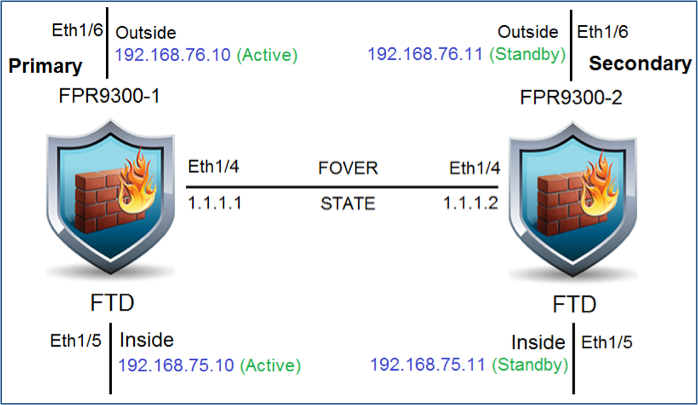
Step 1. Configure the Active/Standby failover (HA) per the diagram. In this case, a 41xx pair is used.
Solution
Both FTD devices are registered on the FMC.
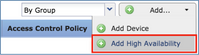
Step 1. To configure the FTD failover, navigate to Devices > Device Management and choose Add High Availability.
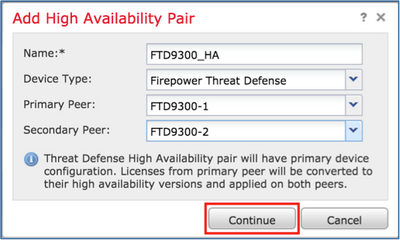
Step 2. Enter the Primary Peer and the Secondary Peer and choose Continue.
Warning: Ensure you select the correct unit as the primary unit. All configurations on the selected primary unit are replicated to the selected secondary FTD unit. As a result of replication, the current configuration on the secondary unit can be replaced.
Conditions
To create an HA between 2 FTD devices, these conditions must be met:
Same model
Same version, this applies to FXOS and to FTD - major (first number), minor (second number), and maintenance (third number) must be equal.
Same number of interfaces
Same type of interfaces
Both devices as part of the same group/domain in FMC
Have identical Network Time Protocol (NTP) configurations
Must be fully deployed on the FMC without uncommitted changes
Must be in the same firewall mode: routed or transparent
Note: This must be checked on both FTD devices and FMC GUI since there have been cases where the FTDs had the same mode, but FMC does not reflect this.
Does not have DHCP/Point-to-Point Protocol over Ethernet (PPPoE) configured on any of the interfaces.
Different hostname [Fully Qualified Domain Name (FQDN)] for both chassis. To check the chassis hostname, navigate to FTD CLI and run this command:
firepower# show chassis-management-url

https://KSEC-FPR9K-1.cisco.com:443//
Note: In post 6.3 FTD, use the command show chassis detail.
Firepower-module1# show chassis detail
Chassis URL : https://FP4100-5:443//
Chassis IP : 10.62.148.187
Chassis IPv6 : ::
Chassis Serial Number : JAD19500BAB
Security Module : 1
If both chassis have the same name, change the name in one with this command:
KSEC-FPR9K-1-A# scope system
KSEC-FPR9K-1-A /system # set name FPR9K-1new
Warning: System name modification changes FC zone name and redeploys them non-disruptively
KSEC-FPR9K-1-A /system* # commit-buffer
FPR9K-1-A /system # exitFPR9K-1new-A#
After you change the chassis name, unregister the FTD from FMC and register it again. Then, proceed with the HA pair creation.
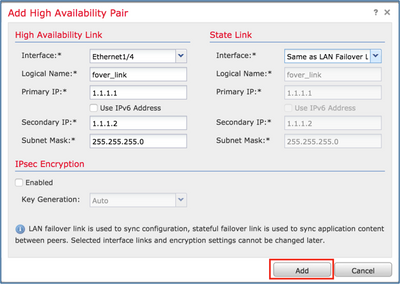
Step 3. Configure the HA and state the links settings.
In this case, the state link has the same settings as the High Availability Link.
Step 4. Choose Add and wait a few minutes for the HA pair to deploy.
Step 5. Configure the Data interfaces (primary and standby IP addresses).
Step 6. From the FMC GUI, choose the HA Edit..
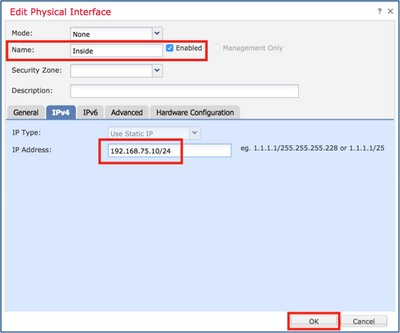
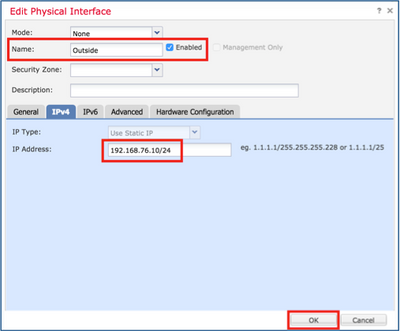
Step 7. Configure the interface settings:
In the case of a subinterface, you must enable the parent interface:
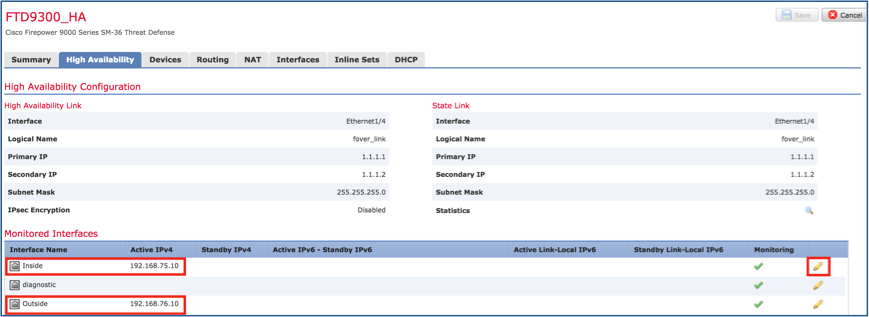
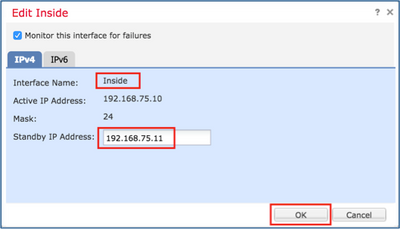
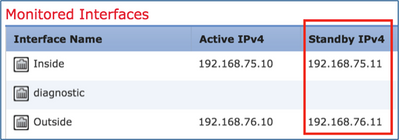
Step 8. Navigate to High Availability and choose the Interface Name, click Edit to add the standby IP addresses.
Step 9. Complete the same steps for the Outside Interface.
Step 10. Verify the results.
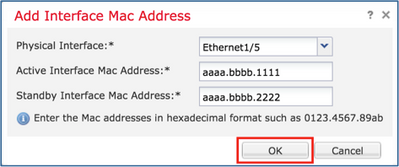
Step 11. Stay on the High Availability tab, and configure Virtual MAC addresses.
Step 12. Inside Interface image.
Step 13. Complete the same steps for the Outside Interface.
Step 14. Verify the results.
Step 15. After you configure the changes, choose Save and Deploy.
Task 3. Verify FTD HA and License
Task requirement:
Verify the FTD HA settings and enable the Licenses from the FMC GUI and FTD CLI.
Solution:
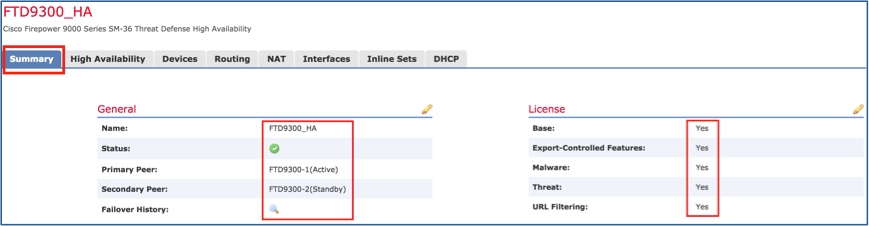
Step 1. Navigate to Summary and check the HA settings and enable the Licenses.
Step 2. From the FTD CLISH CLI, run the show high-availability config or show failover command:
> show high-availability config Failover On Failover unit Primary Failover LAN Interface: FOVER Port-channel3 (up) Reconnect timeout 0:00:00 Unit Poll frequency 1 seconds, holdtime 15 seconds Interface Poll frequency 5 seconds, holdtime 25 seconds Interface Policy 1 Monitored Interfaces 2 of 1291 maximum MAC Address Move Notification Interval not set failover replication http Version: Ours 9.18(4)210, Mate 9.18(4)210 Serial Number: Ours FLM1949C5RR, Mate FLM2108V9YG Last Failover at: 08:46:30 UTC Jul 18 2024 This host: Primary - Active Active time: 1999 (sec) slot 0: UCSB-B200-M3-U hw/sw rev (0.0/9.18(4)210) status (Up Sys) Interface diagnostic (0.0.0.0): Normal (Waiting) Interface Inside (192.168.75.10): Link Down (Shutdown) Interface Outside (192.168.76.10): Normal (Not-Monitored) slot 1: snort rev (1.0) status (up) slot 2: diskstatus rev (1.0) status (up) Other host: Secondary - Standby Ready Active time: 1466 (sec) slot 0: UCSB-B200-M3-U hw/sw rev (0.0/9.18(4)210) status (Up Sys) Interface diagnostic (0.0.0.0): Normal (Waiting) Interface Inside (192.168.75.11): Link Down (Shutdown) Interface Outside (192.168.76.11): Normal (Not-Monitored) slot 1: snort rev (1.0) status (up) slot 2: diskstatus rev (1.0) status (up)
Step 3. Complete the same steps on the secondary device.
Step 4. Run the show failover state command from the LINA CLI:
firepower# show failover state

               State          Last Failure Reason      Date/Time
This host  -   Primary
               Active         None
Other host -   Secondary
               Standby Ready  Comm Failure             18:32:56 EEST Jul 21 2016

====Configuration State===
	Sync Done
====Communication State===
	Mac set

firepower#
Step 5. Verify the configuration settings from the Primary Unit (LINA CLI):
> show running-config failover
failover
failover lan unit primary
failover lan interface FOVER Port-channel3
failover replication http
failover mac address Ethernet1/4 aaaa.bbbb.1111 aaaa.bbbb.2222
failover mac address Port-channel2.202 aaaa.bbbb.3333 aaaa.bbbb.4444
failover link FOVER Port-channel3
failover interface ip FOVER 172.16.51.1 255.255.255.0 standby 172.16.51.2

> show running-config interface
!
interface Port-channel2
no nameif
no security-level
no ip address
!
interface Port-channel2.202
vlan 202
nameif Outside
cts manual
propagate sgt preserve-untag
policy static sgt disabled trusted
security-level 0
ip address 192.168.76.10 255.255.255.0 standby 192.168.76.11
!
interface Port-channel3
description LAN/STATE Failover Interface
!
interface Ethernet1/1
management-only
nameif diagnostic
security-level 0
no ip address
!
interface Ethernet1/4
shutdown
nameif Inside
security-level 0
ip address 192.168.75.10 255.255.255.0 standby 192.168.75.11
>
Task 4. Switch the Failover Roles
Task requirement:
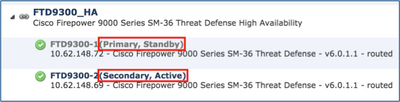
From the FMC, switch the failover roles from Primary/Active, Secondary/Standby to Primary/Standby, Secondary/Active.
Solution:
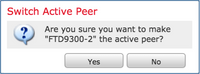
Step 1. Select the icon.
Step 2. Confirm the action.
You can use the show failover history command output:
On the new Active
On the new Standby
> show failover history ========================================================================== From State To State Reason ==========================================================================
09:27:11 UTC Jul 18 2024 Standby Ready Just Active Other unit wants me Active (Set by the config command)
09:27:11 UTC Jul 18 2024 Just Active Active Drain Other unit wants me Active (Set by the config command)
09:27:11 UTC Jul 18 2024 Active Drain Active Applying Config Other unit wants me Active (Set by the config command)
09:27:11 UTC Jul 18 2024 Active Applying Config Active Config Applied Other unit wants me Active (Set by the config command)
09:27:11 UTC Jul 18 2024 Active Config Applied Active Other unit wants me Active (Set by the config command)
> show failover history ========================================================================== From State To State Reason ==========================================================================
09:27:11 UTC Jul 18 2024 Active Standby Ready Set by the config command (no failover active)
Step 3. After verification, make the Primary Unit active again.
Task 5. Break the HA Pair
Task requirement:
From the FMC, break the failover pair.
Solution:
Step 1. Select the icon.
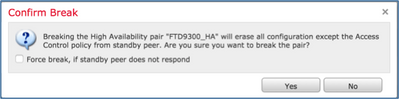
Step 2. Review the notification.
Step 3. Note the message.
Step 4. Verify the results from the FMC GUI or from the CLI.
Step 5. Show running-config on the Primary unit before and after the HA break:
Primary/Standby unit before the HA Break
Primary unit after the HA Break
> show running-config : Saved
: : Serial Number: FLM1949C5RR : Hardware: FPR4K-SM-24, 73850 MB RAM, CPU Xeon E5 series 2200 MHz, 2 CPUs (48 cores) : NGFW Version 7.2.8 ! hostname firepower enable password ***** encrypted strong-encryption-disable service-module 0 keepalive-timeout 4 service-module 0 keepalive-counter 6 names no mac-address auto
! interface Port-channel2 no nameif cts manual propagate sgt preserve-untag policy static sgt disabled trusted no security-level no ip address ! interface Port-channel2.202 vlan 202 nameif Outside cts manual propagate sgt preserve-untag policy static sgt disabled trusted security-level 0 ip address 192.168.76.10 255.255.255.0 standby 192.168.76.11 ! interface Port-channel3 description LAN/STATE Failover Interface ! interface Ethernet1/1 management-only nameif diagnostic cts manual propagate sgt preserve-untag policy static sgt disabled trusted security-level 0 no ip address ! interface Ethernet1/4 nameif Inside cts manual propagate sgt preserve-untag policy static sgt disabled trusted security-level 0 ip address 192.168.75.10 255.255.255.0 standby 192.168.75.11 ! ftp mode passive ngips conn-match vlan-id object-group-search access-control access-group CSM_FW_ACL_ global access-list CSM_FW_ACL_ remark rule-id 9998: PREFILTER POLICY: Default Tunnel and Priority Policy access-list CSM_FW_ACL_ remark rule-id 9998: RULE: DEFAULT TUNNEL ACTION RULE access-list CSM_FW_ACL_ advanced permit ipinip any any rule-id 9998 access-list CSM_FW_ACL_ advanced permit udp any eq 3544 any range 1025 65535 rule-id 9998 access-list CSM_FW_ACL_ advanced permit udp any range 1025 65535 any eq 3544 rule-id 9998 access-list CSM_FW_ACL_ advanced permit 41 any any rule-id 9998 access-list CSM_FW_ACL_ advanced permit gre any any rule-id 9998 access-list CSM_FW_ACL_ remark rule-id 268434433: ACCESS POLICY: acp_simple - Default access-list CSM_FW_ACL_ remark rule-id 268434433: L4 RULE: DEFAULT ACTION RULE access-list CSM_FW_ACL_ advanced permit ip any any rule-id 268434433 ! tcp-map UM_STATIC_TCP_MAP tcp-options range 6 7 allow tcp-options range 9 18 allow tcp-options range 20 255 allow urgent-flag allow ! no pager no logging message 106015 no logging message 313001 no logging message 313008 no logging message 106023 no logging message 710003 no logging message 106100 no logging message 302015 no logging message 302014 no logging message 302013 no logging message 302018 no logging message 302017 no logging message 302016 no logging message 302021 no logging message 302020 mtu Outside 1500 mtu diagnostic 1500 mtu Inside 1500 failover failover lan unit primary failover lan interface FOVER Port-channel3 failover replication http failover mac address Ethernet1/4 aaaa.bbbb.1111 aaaa.bbbb.2222 failover mac address Port-channel2.202 aaaa.bbbb.3333 aaaa.bbbb.4444 failover link FOVER Port-channel3 failover interface ip FOVER 172.16.51.1 255.255.255.0 standby 172.16.51.2
<output omitted>
> INFO: This unit is currently in standby state. By disabling failover, this unit will remain in standby state.
> show running-config : Saved
: : Serial Number: FLM1949C5RR : Hardware: FPR4K-SM-24, 73850 MB RAM, CPU Xeon E5 series 2200 MHz, 2 CPUs (48 cores) : NGFW Version 7.2.8 ! hostname firepower enable password ***** encrypted strong-encryption-disable service-module 0 keepalive-timeout 4 service-module 0 keepalive-counter 6 names no mac-address auto
! interface Port-channel2 shutdown no nameif no security-level no ip address ! interface Port-channel3 shutdown no nameif no security-level no ip address ! interface Ethernet1/1 management-only shutdown no nameif no security-level no ip address ! interface Ethernet1/4 shutdown no nameif no security-level no ip address ! ftp mode passive ngips conn-match vlan-id object-group-search access-control access-group CSM_FW_ACL_ global access-list CSM_FW_ACL_ remark rule-id 9998: PREFILTER POLICY: Default Tunnel and Priority Policy access-list CSM_FW_ACL_ remark rule-id 9998: RULE: DEFAULT TUNNEL ACTION RULE access-list CSM_FW_ACL_ advanced permit ipinip any any rule-id 9998 access-list CSM_FW_ACL_ advanced permit udp any eq 3544 any range 1025 65535 rule-id 9998 access-list CSM_FW_ACL_ advanced permit udp any range 1025 65535 any eq 3544 rule-id 9998 access-list CSM_FW_ACL_ advanced permit 41 any any rule-id 9998 access-list CSM_FW_ACL_ advanced permit gre any any rule-id 9998 access-list CSM_FW_ACL_ remark rule-id 268439552: ACCESS POLICY: acp_simple - Mandatory access-list CSM_FW_ACL_ remark rule-id 268439552: L7 RULE: rule1 access-list CSM_FW_ACL_ advanced permit ip any any rule-id 268439552 ! tcp-map UM_STATIC_TCP_MAP tcp-options range 6 7 allow tcp-options range 9 18 allow tcp-options range 20 255 allow urgent-flag allow ! no pager no logging message 106015 no logging message 313001 no logging message 313008 no logging message 106023 no logging message 710003 no logging message 106100 no logging message 302015 no logging message 302014 no logging message 302013 no logging message 302018 no logging message 302017 no logging message 302016 no logging message 302021 no logging message 302020 no failover <output omitted>
Secondary/Active unit before the HA Break
Secondary unit after the HA Break
> show running-config : Saved
: : Serial Number: FLM2108V9YG : Hardware: FPR4K-SM-24, 73850 MB RAM, CPU Xeon E5 series 2200 MHz, 2 CPUs (48 cores) : NGFW Version 7.2.8 ! hostname firepower enable password ***** encrypted strong-encryption-disable service-module 0 keepalive-timeout 4 service-module 0 keepalive-counter 6 names no mac-address auto
! interface Port-channel2 no nameif no security-level no ip address ! interface Port-channel2.202 vlan 202 nameif Outside cts manual propagate sgt preserve-untag policy static sgt disabled trusted security-level 0 ip address 192.168.76.10 255.255.255.0 standby 192.168.76.11 ! interface Port-channel3 description LAN/STATE Failover Interface ! interface Ethernet1/1 management-only nameif diagnostic security-level 0 no ip address ! interface Ethernet1/4 nameif Inside security-level 0 ip address 192.168.75.10 255.255.255.0 standby 192.168.75.11 ! ftp mode passive ngips conn-match vlan-id object-group-search access-control access-group CSM_FW_ACL_ global access-list CSM_FW_ACL_ remark rule-id 9998: PREFILTER POLICY: Default Tunnel and Priority Policy access-list CSM_FW_ACL_ remark rule-id 9998: RULE: DEFAULT TUNNEL ACTION RULE access-list CSM_FW_ACL_ advanced permit ipinip any any rule-id 9998 access-list CSM_FW_ACL_ advanced permit udp any eq 3544 any range 1025 65535 rule-id 9998 access-list CSM_FW_ACL_ advanced permit udp any range 1025 65535 any eq 3544 rule-id 9998 access-list CSM_FW_ACL_ advanced permit 41 any any rule-id 9998 access-list CSM_FW_ACL_ advanced permit gre any any rule-id 9998 access-list CSM_FW_ACL_ remark rule-id 268439552: ACCESS POLICY: acp_simple - Mandatory access-list CSM_FW_ACL_ remark rule-id 268439552: L7 RULE: rule1 access-list CSM_FW_ACL_ advanced permit ip any any rule-id 268439552 ! tcp-map UM_STATIC_TCP_MAP tcp-options range 6 7 allow tcp-options range 9 18 allow tcp-options range 20 255 allow urgent-flag allow ! no pager no logging message 106015 no logging message 313001 no logging message 313008 no logging message 106023 no logging message 710003 no logging message 106100 no logging message 302015 no logging message 302014 no logging message 302013 no logging message 302018 no logging message 302017 no logging message 302016 no logging message 302021 no logging message 302020 mtu Outside 1500 mtu diagnostic 1500 mtu Inside 1500 failover failover lan unit secondary failover lan interface FOVER Port-channel3 failover replication http failover link FOVER Port-channel3 failover interface ip FOVER 172.16.51.1 255.255.255.0 standby 172.16.51.2
<output omitted>
> show running-config : Saved
: : Serial Number: FLM2108V9YG : Hardware: FPR4K-SM-24, 73850 MB RAM, CPU Xeon E5 series 2200 MHz, 2 CPUs (48 cores) : NGFW Version 7.2.8 ! hostname firepower enable password ***** encrypted strong-encryption-disable service-module 0 keepalive-timeout 4 service-module 0 keepalive-counter 6 names no mac-address auto
! interface Port-channel2 no nameif no security-level no ip address ! interface Port-channel2.202 vlan 202 nameif Outside cts manual propagate sgt preserve-untag policy static sgt disabled trusted security-level 0 ip address 192.168.76.10 255.255.255.0 standby 192.168.76.11 ! interface Port-channel3 no nameif no security-level no ip address ! interface Ethernet1/1 management-only nameif diagnostic security-level 0 no ip address ! interface Ethernet1/4 nameif Inside security-level 0 ip address 192.168.75.10 255.255.255.0 standby 192.168.75.11 ! ftp mode passive ngips conn-match vlan-id object-group-search access-control access-group CSM_FW_ACL_ global access-list CSM_FW_ACL_ remark rule-id 9998: PREFILTER POLICY: Default Tunnel and Priority Policy access-list CSM_FW_ACL_ remark rule-id 9998: RULE: DEFAULT TUNNEL ACTION RULE access-list CSM_FW_ACL_ advanced permit ipinip any any rule-id 9998 access-list CSM_FW_ACL_ advanced permit udp any eq 3544 any range 1025 65535 rule-id 9998 access-list CSM_FW_ACL_ advanced permit udp any range 1025 65535 any eq 3544 rule-id 9998 access-list CSM_FW_ACL_ advanced permit 41 any any rule-id 9998 access-list CSM_FW_ACL_ advanced permit gre any any rule-id 9998 access-list CSM_FW_ACL_ remark rule-id 268439552: ACCESS POLICY: acp_simple - Mandatory access-list CSM_FW_ACL_ remark rule-id 268439552: L7 RULE: rule1 access-list CSM_FW_ACL_ advanced permit ip any any rule-id 268439552 ! tcp-map UM_STATIC_TCP_MAP tcp-options range 6 7 allow tcp-options range 9 18 allow tcp-options range 20 255 allow urgent-flag allow ! no pager no logging message 106015 no logging message 313001 no logging message 313008 no logging message 106023 no logging message 710003 no logging message 106100 no logging message 302015 no logging message 302014 no logging message 302013 no logging message 302018 no logging message 302017 no logging message 302016 no logging message 302021 no logging message 302020 mtu Outside 1500 mtu diagnostic 1500 mtu Inside 1500 no failover no monitor-interface Outside no monitor-interface service-module
<output omitted>
Main points to note for the HA break:
Primary/Standby Unit
Secondary/Active Unit
All failover configuration is removed
All IP configuration is removed
All failover configuration is removed
Standby IPs remain, but is removed in the next deployment
Step 6. Once you finish this task, recreate the HA pair.
Task 6. Delete an HA pair
This task is based on an HA setup on 41xx using 7.2.8 software. In this case, initially the devices were in these states:
Primary/Standby
Secondary/Active
Task requirement:
From the FMC, delete the failover pair.
Solution:
Step 1. Choose the icon.
Step 2. Review the notification and confirm.
Step 3. After you delete the HA, both devices are unregistered (removed) from the FMC.
Step 4. Show the running-config result from the LINA CLI:
Primary Unit (Standby)
Secondary Unit (Active)
> show running-config : Saved
: : Serial Number: FLM1949C5RR : Hardware: FPR4K-SM-24, 73853 MB RAM, CPU Xeon E5 series 2200 MHz, 2 CPUs (48 cores) : NGFW Version 7.2.8 ! hostname Firepower-module1 enable password ***** encrypted strong-encryption-disable no asp inspect-dp ack-passthrough service-module 0 keepalive-timeout 4 service-module 0 keepalive-counter 6 names no mac-address auto
! interface Port-channel2 no nameif no security-level no ip address ! interface Port-channel2.202 vlan 202 nameif NET202 cts manual propagate sgt preserve-untag policy static sgt disabled trusted security-level 0 ip address 172.16.202.1 255.255.255.0 standby 172.16.202.2 ! interface Port-channel2.203 vlan 203 nameif NET203 cts manual propagate sgt preserve-untag policy static sgt disabled trusted security-level 0 ip address 172.16.203.1 255.255.255.0 standby 172.16.203.2 ! interface Port-channel3 description LAN/STATE Failover Interface ! interface Ethernet1/1 management-only nameif diagnostic cts manual propagate sgt preserve-untag policy static sgt disabled trusted security-level 0 no ip address ! interface Ethernet1/4 nameif NET204 cts manual propagate sgt preserve-untag policy static sgt disabled trusted security-level 0 ip address 172.16.204.1 255.255.255.0 standby 172.16.204.2 ! ftp mode passive ngips conn-match vlan-id no object-group-search access-control access-group CSM_FW_ACL_ global access-list CSM_FW_ACL_ remark rule-id 9998: PREFILTER POLICY: Default Tunnel and Priority Policy access-list CSM_FW_ACL_ remark rule-id 9998: RULE: DEFAULT TUNNEL ACTION RULE access-list CSM_FW_ACL_ advanced permit ipinip any any rule-id 9998 access-list CSM_FW_ACL_ advanced permit udp any eq 3544 any range 1025 65535 rule-id 9998 access-list CSM_FW_ACL_ advanced permit udp any range 1025 65535 any eq 3544 rule-id 9998 access-list CSM_FW_ACL_ advanced permit 41 any any rule-id 9998 access-list CSM_FW_ACL_ advanced permit gre any any rule-id 9998 access-list CSM_FW_ACL_ remark rule-id 268434433: ACCESS POLICY: acp_simple - Default access-list CSM_FW_ACL_ remark rule-id 268434433: L4 RULE: DEFAULT ACTION RULE access-list CSM_FW_ACL_ advanced permit ip any any rule-id 268434433 ! tcp-map UM_STATIC_TCP_MAP tcp-options range 6 7 allow tcp-options range 9 18 allow tcp-options range 20 255 allow tcp-options md5 clear urgent-flag allow ! no pager no logging message 106015 no logging message 313001 no logging message 313008 no logging message 106023 no logging message 710003 no logging message 106100 no logging message 302015 no logging message 302014 no logging message 302013 no logging message 302018 no logging message 302017 no logging message 302016 no logging message 302021 no logging message 302020 mtu NET202 1500 mtu NET203 1500 mtu diagnostic 1500 mtu NET204 1500 failover failover lan unit primary failover lan interface FOVER Port-channel3 failover replication http failover link FOVER Port-channel3 failover interface ip FOVER 172.16.51.1 255.255.255.0 standby 172.16.51.2 monitor-interface NET202 monitor-interface NET203 icmp unreachable rate-limit 1 burst-size 1
<output omitted>
> show ip System IP Addresses: Interface Name IP address Subnet mask Method Port-channel2.202 NET202 172.16.202.1 255.255.255.0 CONFIG Port-channel2.203 NET203 172.16.203.1 255.255.255.0 CONFIG Port-channel3 FOVER 172.16.51.1 255.255.255.0 unset Ethernet1/4 NET204 172.16.204.1 255.255.255.0 CONFIG Current IP Addresses: Interface Name IP address Subnet mask Method Port-channel2.202 NET202 172.16.202.2 255.255.255.0 CONFIG Port-channel2.203 NET203 172.16.203.2 255.255.255.0 CONFIG Port-channel3 FOVER 172.16.51.1 255.255.255.0 unset Ethernet1/4 NET204 172.16.204.2 255.255.255.0 CONFIG
> show failover Failover On Failover unit Primary Failover LAN Interface: FOVER Port-channel3 (up) Reconnect timeout 0:00:00 Unit Poll frequency 1 seconds, holdtime 15 seconds Interface Poll frequency 5 seconds, holdtime 25 seconds Interface Policy 1 Monitored Interfaces 4 of 1291 maximum MAC Address Move Notification Interval not set failover replication http Version: Ours 9.18(4)210, Mate 9.18(4)210 Serial Number: Ours FLM1949C5RR, Mate FLM2108V9YG Last Failover at: 13:56:37 UTC Jul 16 2024 This host: Primary - Standby Ready Active time: 0 (sec) slot 0: UCSB-B200-M3-U hw/sw rev (0.0/9.18(4)210) status (Up Sys) Interface NET202 (172.16.202.2): Normal (Monitored) Interface NET203 (172.16.203.2): Normal (Monitored) Interface diagnostic (0.0.0.0): Normal (Waiting) Interface NET204 (172.16.204.2): Normal (Monitored) slot 1: snort rev (1.0) status (up) slot 2: diskstatus rev (1.0) status (up) Other host: Secondary - Active Active time: 70293 (sec) Interface NET202 (172.16.202.1): Normal (Monitored) Interface NET203 (172.16.203.1): Normal (Monitored) Interface diagnostic (0.0.0.0): Normal (Waiting) Interface NET204 (172.16.204.1): Normal (Monitored) slot 1: snort rev (1.0) status (up) slot 2: diskstatus rev (1.0) status (up)
<output omitted>
> show running-config : Saved
: : Serial Number: FLM2108V9YG : Hardware: FPR4K-SM-24, 73853 MB RAM, CPU Xeon E5 series 2200 MHz, 2 CPUs (48 cores) : NGFW Version 7.2.8 ! hostname Firepower-module1 enable password ***** encrypted strong-encryption-disable no asp inspect-dp ack-passthrough service-module 0 keepalive-timeout 4 service-module 0 keepalive-counter 6 names no mac-address auto
! interface Port-channel2 no nameif no security-level no ip address ! interface Port-channel2.202 vlan 202 nameif NET202 cts manual propagate sgt preserve-untag policy static sgt disabled trusted security-level 0 ip address 172.16.202.1 255.255.255.0 standby 172.16.202.2 ! interface Port-channel2.203 vlan 203 nameif NET203 cts manual propagate sgt preserve-untag policy static sgt disabled trusted security-level 0 ip address 172.16.203.1 255.255.255.0 standby 172.16.203.2 ! interface Port-channel3 description LAN/STATE Failover Interface ! interface Ethernet1/1 management-only nameif diagnostic cts manual propagate sgt preserve-untag policy static sgt disabled trusted security-level 0 no ip address ! interface Ethernet1/4 nameif NET204 cts manual propagate sgt preserve-untag policy static sgt disabled trusted security-level 0 ip address 172.16.204.1 255.255.255.0 standby 172.16.204.2 ! ftp mode passive ngips conn-match vlan-id no object-group-search access-control access-group CSM_FW_ACL_ global access-list CSM_FW_ACL_ remark rule-id 9998: PREFILTER POLICY: Default Tunnel and Priority Policy access-list CSM_FW_ACL_ remark rule-id 9998: RULE: DEFAULT TUNNEL ACTION RULE access-list CSM_FW_ACL_ advanced permit ipinip any any rule-id 9998 access-list CSM_FW_ACL_ advanced permit udp any eq 3544 any range 1025 65535 rule-id 9998 access-list CSM_FW_ACL_ advanced permit udp any range 1025 65535 any eq 3544 rule-id 9998 access-list CSM_FW_ACL_ advanced permit 41 any any rule-id 9998 access-list CSM_FW_ACL_ advanced permit gre any any rule-id 9998 access-list CSM_FW_ACL_ remark rule-id 268434433: ACCESS POLICY: acp_simple - Default access-list CSM_FW_ACL_ remark rule-id 268434433: L4 RULE: DEFAULT ACTION RULE access-list CSM_FW_ACL_ advanced permit ip any any rule-id 268434433 ! tcp-map UM_STATIC_TCP_MAP tcp-options range 6 7 allow tcp-options range 9 18 allow tcp-options range 20 255 allow tcp-options md5 clear urgent-flag allow ! no pager no logging message 106015 no logging message 313001 no logging message 313008 no logging message 106023 no logging message 710003 no logging message 106100 no logging message 302015 no logging message 302014 no logging message 302013 no logging message 302018 no logging message 302017 no logging message 302016 no logging message 302021 no logging message 302020 mtu NET202 1500 mtu NET203 1500 mtu diagnostic 1500 mtu NET204 1500 failover failover lan unit secondary failover lan interface FOVER Port-channel3 failover replication http failover link FOVER Port-channel3 failover interface ip FOVER 172.16.51.1 255.255.255.0 standby 172.16.51.2 monitor-interface NET202 monitor-interface NET203 icmp unreachable rate-limit 1 burst-size 1
<output omitted>
> show ip System IP Addresses: Interface Name IP address Subnet mask Method Port-channel2.202 NET202 172.16.202.1 255.255.255.0 CONFIG Port-channel2.203 NET203 172.16.203.1 255.255.255.0 CONFIG Port-channel3 FOVER 172.16.51.1 255.255.255.0 unset Ethernet1/4 NET204 172.16.204.1 255.255.255.0 CONFIG Current IP Addresses: Interface Name IP address Subnet mask Method Port-channel2.202 NET202 172.16.202.1 255.255.255.0 CONFIG Port-channel2.203 NET203 172.16.203.1 255.255.255.0 CONFIG Port-channel3 FOVER 172.16.51.2 255.255.255.0 unset Ethernet1/4 NET204 172.16.204.1 255.255.255.0 CONFIG
> show failover Failover On Failover unit Secondary Failover LAN Interface: FOVER Port-channel3 (up) Reconnect timeout 0:00:00 Unit Poll frequency 1 seconds, holdtime 15 seconds Interface Poll frequency 5 seconds, holdtime 25 seconds Interface Policy 1 Monitored Interfaces 4 of 1291 maximum MAC Address Move Notification Interval not set failover replication http Version: Ours 9.18(4)210, Mate 9.18(4)210 Serial Number: Ours FLM2108V9YG, Mate FLM1949C5RR Last Failover at: 13:42:35 UTC Jul 16 2024 This host: Secondary - Active Active time: 70312 (sec) slot 0: UCSB-B200-M3-U hw/sw rev (0.0/9.18(4)210) status (Up Sys) Interface NET202 (172.16.202.1): Normal (Monitored) Interface NET203 (172.16.203.1): Normal (Monitored) Interface diagnostic (0.0.0.0): Normal (Waiting) Interface NET204 (172.16.204.1): Normal (Monitored) slot 1: snort rev (1.0) status (up) slot 2: diskstatus rev (1.0) status (up) Other host: Primary - Standby Ready Active time: 0 (sec) slot 0: UCSB-B200-M3-U hw/sw rev (0.0/9.18(4)210) status (Up Sys) Interface NET202 (172.16.202.2): Normal (Monitored) Interface NET203 (172.16.203.2): Normal (Monitored) Interface diagnostic (0.0.0.0): Normal (Waiting) Interface NET204 (172.16.204.2): Normal (Monitored) slot 1: snort rev (1.0) status (up) slot 2: diskstatus rev (1.0) status (up)
<output omitted>
Step 5. Both FTD devices were unregistered from the FMC:
> show managers
No managers configured.
Main points to note for the Disable HA option in FMC:
Primary Unit
Secondary Unit
The device is removed from the FMC.
No configuration is removed from the FTD device.
The device is removed from the FMC.
No configuration is removed from the FTD device.
Scenario 1:
Run the configure high-availability disable command to remove the failover configuration from the Active FTD device:
> configure high-availability disable ?
Optional parameter to clear interfaces (clear-interfaces) optional parameter to clear interfaces (clear-interfaces) (clear-interfaces)
<cr>
> configure high-availability disable
High-availability will be disabled. Do you really want to continue?
Please enter 'YES' or 'NO': yes
Successfully disabled high-availability.
The result:
Primary Unit (ex-Standby)
Secondary Unit (ex-Active)
> INFO: This unit is currently in standby state. By disabling failover, this unit will remain in standby state.
> show failover Failover Off (pseudo-Standby) Failover unit Primary Failover LAN Interface: FOVER Port-channel3 (up) Reconnect timeout 0:00:00 Unit Poll frequency 1 seconds, holdtime 15 seconds Interface Poll frequency 5 seconds, holdtime 25 seconds Interface Policy 1 Monitored Interfaces 0 of 1291 maximum MAC Address Move Notification Interval not set failover replication http
> show ip System IP Addresses: Interface Name IP address Subnet mask Method Port-channel3 FOVER 172.16.51.1 255.255.255.0 unset Current IP Addresses: Interface Name IP address Subnet mask Method Port-channel3 FOVER 172.16.51.1 255.255.255.0 unset
> show failover Failover Off Failover unit Secondary Failover LAN Interface: not Configured Reconnect timeout 0:00:00 Unit Poll frequency 1 seconds, holdtime 15 seconds Interface Poll frequency 5 seconds, holdtime 25 seconds Interface Policy 1 Monitored Interfaces 4 of 1291 maximum MAC Address Move Notification Interval not set
> show ip System IP Addresses: Interface Name IP address Subnet mask Method Port-channel2.202 NET202 172.16.202.1 255.255.255.0 CONFIG Port-channel2.203 NET203 172.16.203.1 255.255.255.0 CONFIG Ethernet1/4 NET204 172.16.204.1 255.255.255.0 CONFIG Current IP Addresses: Interface Name IP address Subnet mask Method Port-channel2.202 NET202 172.16.202.1 255.255.255.0 CONFIG Port-channel2.203 NET203 172.16.203.1 255.255.255.0 CONFIG Ethernet1/4 NET204 172.16.204.1 255.255.255.0 CONFIG
Primary (ex-Standby)
Secondary (ex-Active)
> show running-config : Saved
: : Serial Number: FLM1949C5RR : Hardware: FPR4K-SM-24, 73853 MB RAM, CPU Xeon E5 series 2200 MHz, 2 CPUs (48 cores) : NGFW Version 7.2.8 ! hostname Firepower-module1 enable password ***** encrypted strong-encryption-disable no asp inspect-dp ack-passthrough service-module 0 keepalive-timeout 4 service-module 0 keepalive-counter 6 names no mac-address auto
! interface Port-channel2 shutdown no nameif no security-level no ip address <- IPs are removed ! interface Port-channel3 description LAN/STATE Failover Interface ! interface Ethernet1/1 management-only shutdown no nameif no security-level no ip address ! interface Ethernet1/4 shutdown no nameif no security-level no ip address ! ftp mode passive ngips conn-match vlan-id no object-group-search access-control access-group CSM_FW_ACL_ global access-list CSM_FW_ACL_ remark rule-id 9998: PREFILTER POLICY: Default Tunnel and Priority Policy access-list CSM_FW_ACL_ remark rule-id 9998: RULE: DEFAULT TUNNEL ACTION RULE access-list CSM_FW_ACL_ advanced permit ipinip any any rule-id 9998 access-list CSM_FW_ACL_ advanced permit udp any eq 3544 any range 1025 65535 rule-id 9998 access-list CSM_FW_ACL_ advanced permit udp any range 1025 65535 any eq 3544 rule-id 9998 access-list CSM_FW_ACL_ advanced permit 41 any any rule-id 9998 access-list CSM_FW_ACL_ advanced permit gre any any rule-id 9998 access-list CSM_FW_ACL_ remark rule-id 268434433: ACCESS POLICY: acp_simple - Default access-list CSM_FW_ACL_ remark rule-id 268434433: L4 RULE: DEFAULT ACTION RULE access-list CSM_FW_ACL_ advanced permit ip any any rule-id 268434433 ! tcp-map UM_STATIC_TCP_MAP tcp-options range 6 7 allow tcp-options range 9 18 allow tcp-options range 20 255 allow tcp-options md5 clear urgent-flag allow ! no pager no logging message 106015 no logging message 313001 no logging message 313008 no logging message 106023 no logging message 710003 no logging message 106100 no logging message 302015 no logging message 302014 no logging message 302013 no logging message 302018 no logging message 302017 no logging message 302016 no logging message 302021 no logging message 302020 no failover failover lan unit primary failover lan interface FOVER Port-channel3 failover replication http failover link FOVER Port-channel3 failover interface ip FOVER 172.16.51.1 255.255.255.0 standby 172.16.51.2 no monitor-interface service-module
<output omitted>
> show running-config : Saved
: : Serial Number: FLM2108V9YG : Hardware: FPR4K-SM-24, 73853 MB RAM, CPU Xeon E5 series 2200 MHz, 2 CPUs (48 cores) : NGFW Version 7.2.8 ! hostname Firepower-module1 enable password ***** encrypted strong-encryption-disable no asp inspect-dp ack-passthrough service-module 0 keepalive-timeout 4 service-module 0 keepalive-counter 6 names no mac-address auto
! interface Port-channel2 no nameif no security-level no ip address ! interface Port-channel2.202 vlan 202 nameif NET202 cts manual propagate sgt preserve-untag policy static sgt disabled trusted security-level 0 ip address 172.16.202.1 255.255.255.0 standby 172.16.202.2 ! interface Port-channel2.203 vlan 203 nameif NET203 cts manual propagate sgt preserve-untag policy static sgt disabled trusted security-level 0 ip address 172.16.203.1 255.255.255.0 standby 172.16.203.2 ! interface Port-channel3 no nameif no security-level no ip address ! interface Ethernet1/1 management-only nameif diagnostic cts manual propagate sgt preserve-untag policy static sgt disabled trusted security-level 0 no ip address ! interface Ethernet1/4 nameif NET204 cts manual propagate sgt preserve-untag policy static sgt disabled trusted security-level 0 ip address 172.16.204.1 255.255.255.0 standby 172.16.204.2 ! ftp mode passive ngips conn-match vlan-id no object-group-search access-control access-group CSM_FW_ACL_ global access-list CSM_FW_ACL_ remark rule-id 9998: PREFILTER POLICY: Default Tunnel and Priority Policy access-list CSM_FW_ACL_ remark rule-id 9998: RULE: DEFAULT TUNNEL ACTION RULE access-list CSM_FW_ACL_ advanced permit ipinip any any rule-id 9998 access-list CSM_FW_ACL_ advanced permit udp any eq 3544 any range 1025 65535 rule-id 9998 access-list CSM_FW_ACL_ advanced permit udp any range 1025 65535 any eq 3544 rule-id 9998 access-list CSM_FW_ACL_ advanced permit 41 any any rule-id 9998 access-list CSM_FW_ACL_ advanced permit gre any any rule-id 9998 access-list CSM_FW_ACL_ remark rule-id 268434433: ACCESS POLICY: acp_simple - Default access-list CSM_FW_ACL_ remark rule-id 268434433: L4 RULE: DEFAULT ACTION RULE access-list CSM_FW_ACL_ advanced permit ip any any rule-id 268434433 ! tcp-map UM_STATIC_TCP_MAP tcp-options range 6 7 allow tcp-options range 9 18 allow tcp-options range 20 255 allow tcp-options md5 clear urgent-flag allow ! no pager no logging message 106015 no logging message 313001 no logging message 313008 no logging message 106023 no logging message 710003 no logging message 106100 no logging message 302015 no logging message 302014 no logging message 302013 no logging message 302018 no logging message 302017 no logging message 302016 no logging message 302021 no logging message 302020 mtu NET202 1500 mtu NET203 1500 mtu diagnostic 1500 mtu NET204 1500 no failover monitor-interface NET202 monitor-interface NET203 no monitor-interface service-module
Main points to note to Disable HA from the Active FTD CLI:
Active Unit
Standby Unit
Failover configuration is removed
Standby IPs are not removed
Interface configurations are removed.
Failover configuration is not removed, but failover is disabled (pseudo-Standby)
At this point, you can disable the HA on the ex-Standby unit.
Scenario 2 (Not Recommended
Warning: This scenario leads to Active/Active Situation, which is why it is not recommended. It is shown only for awareness.
Run the 'configure high-availability disable' command to remove the failover configuration from the Standby FTD device:
> configure high-availability disable
High-availability will be disabled. Do you really want to continue?
Please enter 'YES' or 'NO': YES
Successfully disabled high-availability.
The result:
Primary (ex-Standby)
Secondary (Active)
> show failover Failover Off Failover unit Secondary Failover LAN Interface: not Configured Reconnect timeout 0:00:00 Unit Poll frequency 1 seconds, holdtime 15 seconds Interface Poll frequency 5 seconds, holdtime 25 seconds Interface Policy 1 Monitored Interfaces 4 of 1291 maximum MAC Address Move Notification Interval not set
> show ip System IP Addresses: Interface Name IP address Subnet mask Method Port-channel2.202 NET202 172.16.202.1 255.255.255.0 manual <- The device uses the same IPs as the ex-Active! Port-channel2.203 NET203 172.16.203.1 255.255.255.0 manual Ethernet1/4 NET204 172.16.204.1 255.255.255.0 manual Current IP Addresses: Interface Name IP address Subnet mask Method Port-channel2.202 NET202 172.16.202.1 255.255.255.0 manual Port-channel2.203 NET203 172.16.203.1 255.255.255.0 manual Ethernet1/4 NET204 172.16.204.1 255.255.255.0 manual
> show failover Failover On <- Failover is not disabled Failover unit Secondary Failover LAN Interface: FOVER Port-channel3 (up) Reconnect timeout 0:00:00 Unit Poll frequency 1 seconds, holdtime 15 seconds Interface Poll frequency 5 seconds, holdtime 25 seconds Interface Policy 1 Monitored Interfaces 4 of 1291 maximum MAC Address Move Notification Interval not set failover replication http Version: Ours 9.18(4)210, Mate 9.18(4)210 Serial Number: Ours FLM2108V9YG, Mate FLM1949C5RR Last Failover at: 12:44:06 UTC Jul 17 2024 This host: Secondary - Active Active time: 632 (sec) slot 0: UCSB-B200-M3-U hw/sw rev (0.0/9.18(4)210) status (Up Sys) Interface diagnostic (0.0.0.0): Normal (Waiting) Interface NET204 (172.16.204.1): Normal (Monitored) Interface NET203 (172.16.203.1): Normal (Monitored) Interface NET202 (172.16.202.1): Normal (Monitored) slot 1: snort rev (1.0) status (up) slot 2: diskstatus rev (1.0) status (up) Other host: Primary - Disabled Active time: 932 (sec) slot 0: UCSB-B200-M3-U hw/sw rev (0.0/9.18(4)210) status (Up Sys) Interface diagnostic (0.0.0.0): Unknown (Waiting) Interface NET204 (172.16.204.2): Unknown (Monitored) Interface NET203 (172.16.203.2): Unknown (Monitored) Interface NET202 (172.16.202.2): Unknown (Monitored) slot 1: snort rev (1.0) status (up) slot 2: diskstatus rev (1.0) status (up)
> show ip System IP Addresses: Interface Name IP address Subnet mask Method Port-channel2.202 NET202 172.16.202.1 255.255.255.0 manual <- The device uses the same IPs as the ex-Standby! Port-channel2.203 NET203 172.16.203.1 255.255.255.0 manual Port-channel3 FOVER 172.16.51.1 255.255.255.0 unset Ethernet1/4 NET204 172.16.204.1 255.255.255.0 manual Current IP Addresses: Interface Name IP address Subnet mask Method Port-channel2.202 NET202 172.16.202.1 255.255.255.0 manual Port-channel2.203 NET203 172.16.203.1 255.255.255.0 manual Port-channel3 FOVER 172.16.51.2 255.255.255.0 unset Ethernet1/4 NET204 172.16.204.1 255.255.255.0 manual
Main points to note to Disable HA from the Active FTD CLI:
Active Unit
Standby Unit
Failover configuration is not removed and remains enabled
The device uses the same IPs as the ex-Standby unit
Failover configuration is removed
The device uses the same IPs as the Active unit
Scenario 3:
Run the configure high-availability disable clear-interfaces command to remove the failover configuration from the Active FTD device:
> configure high-availability disable clear-interfaces
High-availability will be disabled. Do you really want to continue?
Please enter 'YES' or 'NO': yes
Successfully disabled high-availability.

>
The result:
Primary (ex-Standby)
Secondary (ex-Active)
> show failover Failover Off (pseudo-Standby) Failover unit Primary Failover LAN Interface: FOVER Port-channel3 (up) Reconnect timeout 0:00:00 Unit Poll frequency 1 seconds, holdtime 15 seconds Interface Poll frequency 5 seconds, holdtime 25 seconds Interface Policy 1 Monitored Interfaces 0 of 1291 maximum MAC Address Move Notification Interval not set failover replication http
> show ip System IP Addresses: Interface Name IP address Subnet mask Method Port-channel3 FOVER 172.16.51.1 255.255.255.0 unset Current IP Addresses: Interface Name IP address Subnet mask Method Port-channel3 FOVER 172.16.51.1 255.255.255.0 unset >
> show failover Failover Off Failover unit Secondary Failover LAN Interface: not Configured Reconnect timeout 0:00:00 Unit Poll frequency 1 seconds, holdtime 15 seconds Interface Poll frequency 5 seconds, holdtime 25 seconds Interface Policy 1 Monitored Interfaces 0 of 1291 maximum MAC Address Move Notification Interval not set
> show ip System IP Addresses: Interface Name IP address Subnet mask Method Current IP Addresses: Interface Name IP address Subnet mask Method >
Main points to note for the Disable HA along with clear-interfaces from Active FTD CLI:
Active Unit
Standby Unit
Failover configuration is removed
The IPs are removed
Failover configuration is not removed, but failover is disabled (pseudo-Standby)
The IPs are removed
Scenario 4
Run the 'configure high-availability disable clear-interfaces' command to remove the failover configuration from the Standby FTD device:
> configure high-availability disable clear-interfaces
High-availability will be disabled. Do you really want to continue?
Please enter 'YES' or 'NO': YES
Successfully disabled high-availability.

>
The result:
Primary (ex-Standby)
Secondary (Active)
> show failover Failover Off Failover unit Secondary Failover LAN Interface: not Configured Reconnect timeout 0:00:00 Unit Poll frequency 1 seconds, holdtime 15 seconds Interface Poll frequency 5 seconds, holdtime 25 seconds Interface Policy 1 Monitored Interfaces 0 of 1291 maximum MAC Address Move Notification Interval not set
> show ip System IP Addresses: Interface Name IP address Subnet mask Method Current IP Addresses: Interface Name IP address Subnet mask Method >
> show failover Failover On Failover unit Secondary Failover LAN Interface: FOVER Port-channel3 (up) Reconnect timeout 0:00:00 Unit Poll frequency 1 seconds, holdtime 15 seconds Interface Poll frequency 5 seconds, holdtime 25 seconds Interface Policy 1 Monitored Interfaces 4 of 1291 maximum MAC Address Move Notification Interval not set failover replication http Version: Ours 9.18(4)210, Mate 9.18(4)210 Serial Number: Ours FLM2108V9YG, Mate FLM1949C5RR Last Failover at: 07:06:56 UTC Jul 18 2024 This host: Secondary - Active Active time: 1194 (sec) slot 0: UCSB-B200-M3-U hw/sw rev (0.0/9.18(4)210) status (Up Sys) Interface diagnostic (0.0.0.0): Normal (Waiting) Interface NET204 (172.16.204.1): Normal (Monitored) Interface NET202 (172.16.202.1): Normal (Monitored) Interface NET203 (172.16.203.1): Normal (Monitored) slot 1: snort rev (1.0) status (up) slot 2: diskstatus rev (1.0) status (up) Other host: Primary - Disabled Active time: 846 (sec) slot 0: UCSB-B200-M3-U hw/sw rev (0.0/9.18(4)210) status (Up Sys) Interface diagnostic (0.0.0.0): Unknown (Waiting) Interface NET204 (172.16.204.2): Unknown (Monitored) Interface NET202 (172.16.202.2): Unknown (Monitored) Interface NET203 (172.16.203.2): Unknown (Monitored) slot 1: snort rev (1.0) status (up) slot 2: diskstatus rev (1.0) status (up)
> show ip System IP Addresses: Interface Name IP address Subnet mask Method Port-channel2.202 NET202 172.16.202.1 255.255.255.0 manual Port-channel2.203 NET203 172.16.203.1 255.255.255.0 manual Port-channel3 FOVER 172.16.51.1 255.255.255.0 unset Ethernet1/4 NET204 172.16.204.1 255.255.255.0 manual Current IP Addresses: Interface Name IP address Subnet mask Method Port-channel2.202 NET202 172.16.202.1 255.255.255.0 manual Port-channel2.203 NET203 172.16.203.1 255.255.255.0 manual Port-channel3 FOVER 172.16.51.2 255.255.255.0 unset Ethernet1/4 NET204 172.16.204.1 255.255.255.0 manual
Main points to note to Disable HA along with clear-interfaces from the Active FTD CLI:
Active Unit
Standby Unit
Failover configuration is not removed
The IPs are not removed
Failover configuration is removed
The IPs are removed
Step 6. Once you finish this task, register the devices to the FMC and enable the HA pair.
Task 7. Suspend HA
Task requirement:
Suspend the HA from the FTD CLISH CLI.
Solution:
Step 1. On the Primary FTD, run the command and confirm (type YES).
> configure high-availability suspend
Please ensure that no deployment operation is in progress before suspending high-availability.
Please enter 'YES' to continue if there is no deployment operation in progress and 'NO' if you wish to abort: YES
Successfully suspended high-availability.
Step 2. Verify the changes on Primary Unit:
> show high-availability configFailover Off
Failover unit Primary
Failover LAN Interface: fover_link Ethernet1/4 (up)
Reconnect timeout 0:00:00
Unit Poll frequency 1 seconds, holdtime 15 seconds
Interface Poll frequency 5 seconds, holdtime 25 seconds
Interface Policy 1
Monitored Interfaces 1 of 1041 maximum
MAC Address Move Notification Interval not set
failover replication http
Step 3. The result on the Secondary Unit:
> show high-availability config
Failover Off (pseudo-Standby)
Failover unit Secondary
Failover LAN Interface: fover_link Ethernet1/4 (up)
Reconnect timeout 0:00:00
Unit Poll frequency 1 seconds, holdtime 15 seconds
Interface Poll frequency 5 seconds, holdtime 25 seconds
Interface Policy 1
Monitored Interfaces 1 of 1041 maximum
MAC Address Move Notification Interval not set
failover replication http
Step 4. Resume HA on the Primary Unit:
> configure high-availability resume
Successfully resumed high-availablity.

> .

	No Active mate detected
!!!!!!!!!!!!!!!!!!!!!!!!!!!!!!!!!!!!!!!!!!!!!!!!!!!!!!!!!!!!!!!!!!!!!!!!!!!!!!!!!!!!!!!!!!!!!!!!!!!!!!!!!!!!!!!!!!!!!!!!!!!!!!!!!!!!!!!!!!!!!!!!!!!!!!!!!!
Beginning configuration replication: Sending to mate.
End Configuration Replication to mate

>
> show high-availability configFailover On
Failover unit Primary
Failover LAN Interface: fover_link Ethernet1/4 (up)
Reconnect timeout 0:00:00
Unit Poll frequency 1 seconds, holdtime 15 seconds
Interface Poll frequency 5 seconds, holdtime 25 seconds
Interface Policy 1
Monitored Interfaces 1 of 1041 maximum
MAC Address Move Notification Interval not set
failover replication http
Step 5. The results on the Secondary Unit after you resume HA:
> ..

	Detected an Active mate
Beginning configuration replication from mate.


WARNING: Failover is enabled but standby IP address is not configured for this interface.
WARNING: Failover is enabled but standby IP address is not configured for this interface.
End configuration replication from mate.

>
> show high-availability configFailover On
Failover unit Secondary
Failover LAN Interface: fover_link Ethernet1/4 (up)
Reconnect timeout 0:00:00
Unit Poll frequency 1 seconds, holdtime 15 seconds
Interface Poll frequency 5 seconds, holdtime 25 seconds
Interface Policy 1
Monitored Interfaces 1 of 1041 maximum
MAC Address Move Notification Interval not set
failover replication http
>
Frequently Asked Questions (FAQ)
Q: When the configuration is replicated, is it saved immediately (line-by-line) or at the end of the replication? A: At the end of the replication. The evidence is at the end of the debug fover sync command output which shows the config/command replication:
Q:What happens if a unit is in a pseudo-Standby state (failover disabled) and then you reload it while the other unit has failover enabled and is Active? A: You end up in an Active/Active scenario (although technically it is an Active/Failover-off). Specifically, once the unit comes UP, the failover is disabled, however, the unit uses the same IPs as the Active unit. So effectively, you have:
Unit-1: Active
Unit-2: Failover is off and the unit uses the same data IPs as Unit-1, but different MAC addresses.
Q: What happens to the failover configuration if you manually disable the failover (configure high-availability suspend), and then you reload the device? A: When you disable the failover, it is not a permanent change (not saved in the startup-config unless you decide to do this explicitly). You can reboot/reload the unit in two different ways and with the second way you must be careful:
Case 1. Reboot from CLISH
Reboot from CLISH does not ask for confirmation. Thus, the configuration change is not saved into the startup-config:
> configure high-availability suspend
Please ensure that no deployment operation is in progress before suspending high-availability.
Please enter 'YES' to continue if there is no deployment operation in progress and 'NO' if you wish to abort: YES
Successfully suspended high-availability.
The running-config has the failover disabled. In this case, the unit was on Standby and placed into the pseudo-Standby state as expected to avoid an Active/Active scenario:
firepower# show failover | include Failover
Failover Off (pseudo-Standby)
Failover unit Secondary
Failover LAN Interface: FOVER Ethernet1/1 (up)
The startup-config has the failover still enabled:
firepower# show startup | include failoverfailover
failover lan unit secondary
failover lan interface FOVER Ethernet1/1
failover replication http
failover link FOVER Ethernet1/1
failover interface ip FOVER 192.0.2.1 255.255.255.0 standby 192.0.2.2
failover ipsec pre-shared-key *****
Reboot the device from CLISH (reboot command):
> reboot
This command will reboot the system.  Continue?
Please enter 'YES' or 'NO': YES

Broadcast message from root@
Threat Defense System: CMD=-stop, CSP-ID=cisco-ftd.6.2.2.81__ftd_001_JMX2119L05CYRIBVX1, FLAG=''
Cisco FTD stopping ...
Once the unit is UP, since the failover is enabled, the device enters the failover Negotiation phase and tries to detect the remote peer:
User enable_1 logged in to firepower
Logins over the last 1 days: 1.
Failed logins since the last login: 0.
Type help or '?' for a list of available commands.
firepower> .

        Detected an Active mate
Case 2. Reboot from LINA CLI: Reboot from LINA (reload command) and it asks for confirmation. Thus, in case you select Y (Yes) and the configuration change is saved into the startup-config:
firepower# reload
System config has been modified. Save? [Y]es/[N]o: Y <-- Be careful. This disables the failover in the startup-config
Cryptochecksum: 31857237 8658f618 3234be7c 854d583a
8781 bytes copied in 0.940 secs
Proceed with reload? [confirm]
firepower# show startup | include failoverno failover
failover lan unit secondary
failover lan interface FOVER Ethernet1/1
failover replication http
failover link FOVER Ethernet1/1
failover interface ip FOVER 192.0.2.1 255.255.255.0 standby 192.0.2.2
failover ipsec pre-shared-key *****
Once the unit is UP the failover is disabled:
firepower# show failover | include FailFailover Off
Failover unit Secondary
Failover LAN Interface: FOVER Ethernet1/1 (up)
Note: To avoid this scenario, ensure that when you are prompted, you do not save the changes to the startup-config.
Related Information
Refer to all versions of the Cisco Firepower Management Center configuration guide:
Cisco Global Technical Assistance Center (TAC) strongly recommends this visual guide for in-depth practical knowledge on Cisco Firepower Next-Generation Security Technologies:










 Feedback