IP Addresses and Services Configuration Guide for Cisco 8000 Series Routers, IOS XR Releases

PDF

IP Addresses and Services Configuration Guide for Cisco 8000 Series Routers, IOS XR Releases

HSRP

Want to summarize with AI?

Log in

This topic describes the Hot Standby Router Protocol (HSRP), an IP routing redundancy protocol that provides transparent failover at the first-hop IP router by allowing a group of routers to select an active and a standby router.


The Hot Standby Router Protocol (HSRP) is an IP routing redundancy protocol that

  • provides transparent failover at the first-hop router

  • increases network availability, and

  • manages traffic routing without relying on a single device.

HSRP operates by selecting an active router to forward traffic and a standby router to assume responsibilities during a failure. This architecture ensures continuous network connectivity by maintaining a ready backup within the router group.

HSRP employs specific roles to maintain network continuity:

  • The active router serves as the primary device for forwarding IP traffic.

  • The standby router monitors the active device and takes over if a failure occurs or if specific conditions are met.

From Release 24.2.1, you can configure HSRP VIP on subinterfaces.

Table 1. Feature History Table

Feature Name

Release Information

Feature Description

Hot Standby Router Protocol

Release 26.3.1

Introduced in this release on: Modular Systems (8800 [LC ASIC: K100])(select variants only*)

*This feature is supported on Cisco 88-LC1-48Y8F-EM line cards.

Hot Standby Router Protocol

Release 25.4.1

Introduced in this release on: Fixed Systems (8010 [ASIC: A100], 8700 [ASIC: K100])(select variants only*)

*This feature is supported on:

  • 8711-48Z-M

  • 8011-32Y8L2H2FH

  • 8011-12G12X4Y-A/D

Hot Standby Router Protocol

Release 25.1.1

Introduced in this release on: Fixed Systems (8010 [ASIC: A100])

This feature is supported on Cisco 8011-4G24Y4H-I routers.

Enabling Hot Standby Router Protocol over BVI

Release 25.1.1

Introduced in this release on: Modular Systems (8800 [LC ASIC: P100]) (select variants only*)

You can now enable Hot Standby Router Protocol (HSRP) over BVI on Cisco Silicon One P100 ASIC-based systems.

This feature, enabled by default, ensures continuous network availability by automatically switching to a standby router if the active router fails. This minimizes downtime and maintains network reliability.

*The feature is supported on:

  • 88-LC1-52Y8H-EM

  • 88-LC1-12TH24FH-E

To implement HSRP on Cisco IOS XR software, you need to understand these concepts:

  • HSRP is useful for hosts that do not support a router discovery protocol (such as Internet Control Message Protocol [ICMP] Router Discovery Protocol [IRDP]) and cannot switch to a new router when their selected router reloads or loses power. Because existing TCP sessions can survive the failover, this protocol also provides a more transparent recovery for hosts that dynamically choose a next hop for routing IP traffic.

  • When HSRP is configured on a network segment, it provides a virtual MAC address and an IP address that is shared among a group of routers running HSRP. The address of this HSRP group is referred to as the virtual IP address. One of these devices is selected by the protocol to be the active router. The active router receives and routes packets destined for the MAC address of the group. For n routers running HSRP, n + 1 IP and MAC addresses are assigned.

  • HSRP detects when the designated active router fails, at which point a selected standby router assumes control of the MAC and IP addresses of the HSRP group. A new standby router is also selected at that time.

  • Devices that are running HSRP send and receive multicast User Datagram Protocol (UDP) based hello packets to detect router failure and to designate active and standby routers.

Generic restrictions for HSRP configuration

Consider these restrictions before you implement HSRP:
  • HSRP is not supported with bidirectional forwarding detection (BFD).

  • Before Release 24.2.1, the Cisco 8000 Series Routers do not support the configuration of Virtual IP (VIP) addresses for HSRP on subinterfaces. As an alternative, Bridge-Group Virtual Interfaces (BVIs) can be utilized for HSRP implementation on subinterfaces.

  • Route Processor Fail Over (RPFO) is not supported for HSRP configuration on Cisco 8608 and Cisco 8404-SYS-D routers.


HSRP overview

To implement HSRP on Cisco IOS XR software, you need to understand the following concepts.

HSRP is useful for hosts that do not support a router discovery protocol (such as Internet Control Message Protocol [ICMP] Router Discovery Protocol [IRDP]) and cannot switch to a new router when their selected router reloads or loses power. Because existing TCP sessions can survive the failover, this protocol also provides a more transparent recovery for hosts that dynamically choose a next hop for routing IP traffic.

When HSRP is configured on a network segment, it provides a virtual MAC address and an IP address that is shared among a group of routers running HSRP. The address of this HSRP group is referred to as the virtual IP address. One of these devices is selected by the protocol to be the active router. The active router receives and routes packets destined for the MAC address of the group. For n routers running HSRP, n + 1 IP and MAC addresses are assigned.

HSRP detects when the designated active router fails, at which point a selected standby router assumes control of the MAC and IP addresses of the HSRP group. A new standby router is also selected at that time.

Devices that are running HSRP send and receive multicast User Datagram Protocol (UDP) based hello packets to detect router failure and to designate active and standby routers.


HSRP groups

An HSRP group consists of two or more routers running HSRP that are configured to provide hot standby services for one another. HSRP uses a priority scheme to determine which HSRP-configured router is to be the default active router. To configure a router as the active router, you assign it a priority that is higher than the priority of all the other HSRP-configured routers. The default priority is 100, so if you configure just one router to have a higher priority, that router will be the default active router.

HSRP works by the exchange of multicast messages that advertise priority among the HSRP group. When the active router fails to send a hello message within a configurable period of time, the standby router with the highest priority becomes the active router. The transition of packet-forwarding functions between routers is completely transparent to all hosts on the network.

The following figure shows routers configured as members of a single HSRP group.

Figure 1. Routers configured as an HSRP group

All hosts on the network are configured to use the IP address of the virtual router (in this case, 1.0.0.3) as the default gateway.

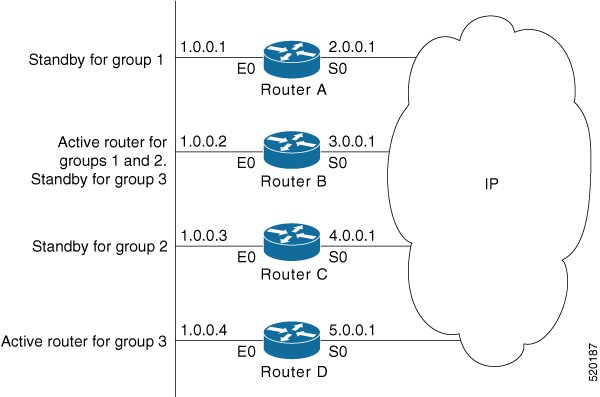
A single router interface can also be configured to belong to more than one HSRP group. The following figure shows routers configured as members of multiple HSRP groups.

Figure 2. Routers configured as members of multiple HSRP groups

In the figure above, the Ethernet interface 0 of Router A belongs to group 1. Ethernet interface 0 of Router B belongs to groups 1, 2, and 3. The Ethernet interface 0 of Router C belongs to group 2, and the Ethernet interface 0 of Router D belongs to group 3. When you establish groups, you might want to align them along departmental organizations. In this case, group 1 might support the Engineering Department, group 2 might support the Manufacturing Department, and group 3 might support the Finance Department.

Router B is configured as the active router for groups 1 and 2 and as the standby router for group 3. Router D is configured as the active router for group 3. If Router D fails for any reason, Router B assumes the packet-transfer functions of Router D and maintains the ability of users in the Finance Department to access data on other subnets.

Note

A different virtual MAC address (VMAC) is required for each sub interface. VMAC is determined from the group ID. Therefore, a unique group ID is required for each sub interface configured, unless the VMAC is configured explicitly.

Note

We recommend that you disable Spanning Tree Protocol (STP) on switch ports to which the virtual routers are connected. Enable RSTP or rapid-PVST on the switch interfaces if the switch supports these protocols.


HSRP and ARP

When a router in an HSRP group goes active, it sends a number of ARP responses containing its virtual IP address and the virtual MAC address. These ARP responses help switches and learning bridges update their port-to-MAC maps. These ARP responses also provide routers configured to use the burned-in address of the interface as its virtual MAC address (instead of the preassigned MAC address or the functional address) with a means to update the ARP entries for the virtual IP address. Unlike the gratuitous ARP responses sent to identify the interface IP address when an interface comes up, the HSRP router ARP response packet carries the virtual MAC address in the packet header. The ARP data fields for IP address and media address contain the virtual IP and virtual MAC addresses.