IP Addresses and Services Configuration Guide for Cisco 8000 Series Routers, IOS XR Releases

PDF

IP Addresses and Services Configuration Guide for Cisco 8000 Series Routers, IOS XR Releases

HSRP over BVI

Want to summarize with AI?

Log in

This topic describes how HSRP runs over Bridge-Group Virtual Interfaces (BVIs) to provide default gateway redundancy for a LAN, including supported scale, topology, and systems.


Bridge Group Virtual Interface (BVI) is a virtual interface which provides Layer 3 or routed functionality to a bridge group. Layer 2 functionality is applicable to the interfaces which are part of a bridge group and BVI is the routed interface for that bridge group.

The HSRP and BVI configuration is a redundancy mechanism that

  • provides resilient gateway services for a local area network

  • allows multiple routers to share a single virtual IP address, and

  • enables Layer 3 functionality for bridge groups.

Table 1. Feature History Table

Feature Name

Release Information

Feature Description

HSRP over BVI

Release 26.2.1

Introduced in this release on: Fixed Systems (8010 [ASIC: A100])

*This feature is supported on:

  • 8011-4G24Y4H-I

  • 8011-32Y8L2H2FH

  • 8011-12G12X4Y-A/D

HSRP over BVI

Release 26.1.1

Introduced in this release on: Centralized Systems (8400 [ASIC: K100]) (select variants only*)

*This feature is supported on Cisco 8404-SYS-D router.

HSRP over BVI

Release 25.4.1

Introduced in this release on: Fixed Systems (8700 [ASIC: K100])(select variants only*)

* This feature is supported on:

  • 8712-MOD-M

  • 8711-48Z-M

HSRP over BVI

Release 25.2.1

Introduced in this release on: Fixed Systems (8200 [ASIC: P100], 8700 [ASIC: P100])(select variants only*); Modular Systems (8800 [LC ASIC: P100])(select variants only*)

*This feature is supported on:

  • 8212-48FH-M

  • 8711-32FH-M

  • 88-LC1-36EH

HSRP over BVI

Release 25.1.1

Introduced in this release on: Fixed Systems (8700 [ASIC: P100])(select variants only*); Modular Systems (8800 [LC ASIC: P100])(select variants only*)

*This feature is supported on:

  • 8712-MOD-M

  • 88-LC1-12TH24FH-E

  • 88-LC1-52Y8H-EM

HSRP over BVI

Release 7.5.2

Hot Standby Router Protocol (HSRP) runs on top of interfaces of multiple routers in the same home network that has only Cisco routers. It allows a group of routers to behave as a single virtual default gateway router, thereby providing default gateway redundancy and minimizing traffic loss. HSRP now supports Bridge-Group Virtual Interface (BVI) on Cisco Silicon One Q100 systems, which means that HSRP sessions can run between BVI interfaces of multiple routers.

Participating routers function as a single virtual entity, which maintains network availability even if an individual device fails. These routers share a virtual IP address and a corresponding virtual MAC address, which hosts identify as the default first-hop gateway. While the active router handles packet forwarding, the standby router monitors the active device and assumes its duties if a failure occurs. The Bridge Group Virtual Interface (BVI) extends this capability by acting as a routed interface that provides Layer 3 functionality to members of a bridge group.

The following components define the operation of this redundancy configuration:

  • Participating routers share a virtual IP address and virtual MAC address to act as a single gateway for connected hosts.

  • The active router forwards all traffic while the standby router maintains readiness to take over in the event of a failure.

  • The BVI provides a routed interface that allows Layer 3 operations within a bridge group.

Topology

This topology showcases how HSRP functions over BVI.
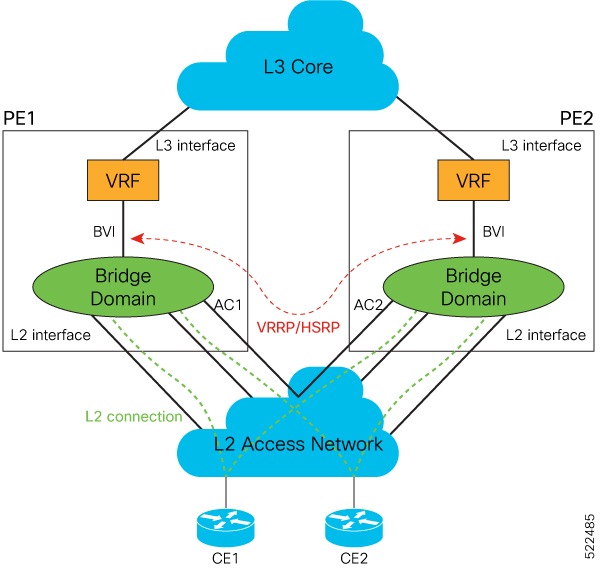
In this topology, PE1 and PE2 are paired in a redundant group. This group provides Layer 3 gateway service to CE1 and CE2. HSRP is configured over BVI interfaces on PE1 and PE2. HSRP ensures one BVI is the active gateway. The other is the standby gateway.

You can configure one of the BVIs to be active and the other BVI as standby by setting the HSRP priority value. The active BVI is programmed with the virtual MAC address chosen by HSRP. Hosts, CE1 and CE2 send the traffic to the virtual destination MAC address and the active BVI forwards the traffic.

During failover, the standby BVI becomes active and is programmed with the virtual MAC address. The traffic from the hosts is forwarded through this active BVI.

Supported scale and systems

HSRP over Bridge Virtual Interfaces (BVIs) is supported:

  • You can configure upto 512 HSRP groups (IPv4 and IPv6 combined) over BVIs on:

    • Cisco Silicon One Q100 ASIC-based systems

    • Cisco Silicon One Q200 ASIC-based systems

    • Cisco Silicon One P100 ASIC-based systems

  • Where the underlay IRB bridge domains consist of bridge members on L2 main or subinterfaces. Only physical and bundle interfaces are supported for L2 bridging in IRB.

  • For IPv4 and IPv6 configurations, in both the default and VRF tables.

  • On both the fixed and distributed systems.

  • HSRP on BVI is supported on the 88-LC1-12TH24FH-E line card from Cisco IOS XR Release 25.1.1.


Restrictions for HSRP over BVI

Consider these restrictions before you configure HSRP over BVI:
  • The minimum supported HSRP Hello timer is 100 ms. At the minimum timer, a total of 50 sessions are supported. Above 100 ms timers, the sessions scale goes up proportionately. A maximum of 1024 HSRP groups and 1024 HSRP sessions are supported.

  • HSRP on BVI is not supported on the 88-LC1-12TH24FH-E line card in Cisco IOS XR Release 24.3.1.


Configure HSRP over BVI

To configure HSRP sessions over BVI, complete the following configurations on PE1 and PE2 in the specified order:

  1. Configure a set of interfaces as Layer 2 interfaces and a set of VLAN sub-interfaces.

  2. Configure a bridge group.

  3. Configure a BVI.

  4. Configure HSRP over BVI.

Procedure

  1. Enter the global configuration mode and configure a set of interfaces as Layer 2 interfaces and a set of VLAN sub-interfaces.

    Example:

    Router# configure
    Router(config)# interface HundredGigE0/0/1/0.1 l2transport
    Router(config-subif)# encapsulation dot1q 1
    Router(config-subif)# rewrite ingress tag pop 1 symmetric
    Router(config-subif)# commit
    Router(config-subif)# exit
    Router(config)# interface HundredGigE0/0/1/1.1 l2transport
    Router(config-subif)# encapsulation dot1q 1
    Router(config-subif)# rewrite ingress tag pop 1 symmetric
    Router(config-subif)# commit
    Router(config-subif)# exit
  2. Enter the Layer 2 VPN configuration mode and configure a bridge group.

    Example:

    Router(config)# l2vpn
    Router(config-l2vpn)# bridge group 5
    Router(config-l2vpn-bg)# bridge-domain 5
    Router(config-l2vpn-bg-bd)# interface HundredGigE0/0/1/0.1
    Router(config-l2vpn-bg-bd-ac)# exit
    Router(config-l2vpn-bg-bd)# interface HundredGigE0/0/1/1.1
    Router(config-l2vpn-bg-bd-ac)# exit
    Router(config-l2vpn-bg-bd)# routed interface BVI 10
    Router(config-l2vpn-bg-bd-bvi)# commit
    Router(config-l2vpn-bg-bd-bvi)# exit
  3. Configure a BVI in the global configuration mode.

    Example:

    Router(config)# interface BVI 10
    Router(config-if)# ipv4 address 209.165.200.225 255.255.255.0
    Router(config-if)# ipv6 address 2001:DB8:A:B::1/64
    Router(config-if)# commit
  4. Configure HSRP over BVI in the global configuration mode for the IPv4 address.

    Example:

    Router(config)# router HSRP
    Router(config-hsrp)# interface BVI 10
    Router(config-hsrp-if)# address-family ipv4
    Router(config-hsrp-ipv4)# HSRP 10
    Router(config-hsrp-gp)# priority 101
    Router(config-hsrp-gp)# address 209.165.200.226
    Router(config-hsrp-gp)# commit
  5. Configure HSRP over BVI in the global configuration mode for the IPv6 address.

    Example:

    Router(config)# router HSRP
    Router(config-hsrp)# interface BVI 10
    Router(config-hsrp-if)# address-family ipv6
    Router(config-hsrp-ipv6)# HSRP 11
    Router(config-hsrp-gp)# address global 2001:DB8:A:B::2
    Router(config-hsrp-gp)# address linklocal autoconfig
    Router(config-hsrp-gp)# commit
  6. Verify the bridge domain details by using the show l2vpn bridge-domain detail command.

    Example:

    Router# show l2vpn bridge-domain detail
    
    Legend: pp = Partially Programmed.
    Bridge group: 5, bridge-domain: 5, id: 1, state: up, ShgId: 0, MSTi: 0
    Coupled state: disabled
    VINE state: BVI Resolved
    MAC learning: enabled
    MAC withdraw: enabled
    MAC withdraw for Access PW: enabled
    MAC withdraw sent on: bridge port up
    MAC withdraw relaying (access to access): disabled
    Flooding:
    Broadcast & Multicast: enabled
    Unknown unicast: enabled
    MAC aging time: 300 s, Type: inactivity
    MAC limit: 32768, Action: none, Notification: syslog
    MAC limit reached: no, threshold: 75%
    MAC port down flush: enabled
    MAC Secure: disabled, Logging: disabled
    Split Horizon Group: none
    Dynamic ARP Inspection: disabled, Logging: disabled
    IP Source Guard: disabled, Logging: disabled
    DHCPv4 Snooping: disabled
    DHCPv4 Snooping profile: none
    IGMP Snooping: disabled
    IGMP Snooping profile: none
    MLD Snooping profile: none
    Storm Control: disabled
    Bridge MTU: 1500
    MIB cvplsConfigIndex: 2
    Filter MAC addresses:
    P2MP PW: disabled
    Multicast Source: Not Set
    Create time: 26/05/2020 17:08:54 (00:11:30 ago)
    No status change since creation
    ACs: 3 (3 up), VFIs: 0, PWs: 0 (0 up), PBBs: 0 (0 up), VNIs: 0 (0 up)
    List of ACs:
    AC: BVI10, state is up
    Type Routed-Interface
    MTU 1514; XC ID 0x80000001; interworking none
    BVI MAC address:
    c472.95a6.8b90
    Virtual MAC addresses:
    0000.5e00.010a
    0000.5e00.020b
    Split Horizon Group: Access
    AC: HundredGigE0/0/1/0.1, state is up
    Type VLAN; Num Ranges: 1
    Rewrite Tags: []
    VLAN ranges: [1, 1]
    MTU 1500; XC ID 0x1; interworking none
    MAC learning: enabled
  7. Verify HSRP details for IPv4 by using the show hsrp ipv4 detail command.

    Example:

    Router# show hsrp ipv4 detail
    
    BVI10 - IPv4 vrID 10
    State is Master
    2 state changes, last state change 00:11:57
    State change history:
    May 26 17:08:59.470 UTC Init -> Backup Delay timer expired
    May 26 17:09:03.075 UTC Backup -> Master Master down timer expired
    Last resign sent: Never
    Last resign received: Never
    Virtual IP address is 209.165.200.226
    Virtual MAC address is 0000.5E00.010a, state is active
    Master router is local
    Version is 2
    Advertise time 1 secs
    Master Down Timer 3.605 (3 x 1 + (155 x 1/256))
    Minimum delay 1 sec, reload delay 5 sec
    Current priority 101
    Configured priority 101, may preempt
    minimum delay 0 secs
  8. Verify HSRP details for IPv6 by using the show hsrp ipv6 detail command.

    Example:

    Router# show hsrp ipv6 detail
    
    BVI10 - IPv6 vrID 11
    State is Master
    2 state changes, last state change 00:04:29
    State change history:
    May 26 17:16:43.476 UTC Init -> Backup Virtual IP configured
    May 26 17:16:47.085 UTC Backup -> Master Master down timer expired
    Last resign sent: Never
    Last resign received: Never
    Virtual IP address is fe80::200:5eff:fe00:20b
    Secondary Virtual IP address is 2001:db8:a:b::2
    Virtual MAC address is 0000.5E00.020b, state is active
    Master router is local
    Version is 3
    Advertise time 1 secs
    Master Down Timer 3.609 (3 x 1 + (156 x 1/256))
    Minimum delay 1 sec, reload delay 5 sec
    Current priority 100
    Configured priority 100, may preempt
    minimum delay 0 secs

    You have successfully configured and verified HSRP over BVI for IPv4 and IPv6 addresses.