Easy VPN Server
Available Languages
Table Of Contents
Restrictions for Easy VPN Server
Information About Easy VPN Server
RADIUS Support for Group Profiles
For a Cisco Secure Access Control Server
RADIUS Support for User Profiles
Functions Supported by Easy VPN Server
Mode Configuration Version 6 Support
Session Monitoring for VPN Group Access
Easy VPN Virtual Interface Support on a Server
Banner, Auto-Update, and Browser-Proxy
Configuration Management Enhancements
Per User AAA Policy Download with PKI
Network Admission Control Support for Easy VPN
How to Configure Easy VPN Server
Enabling Policy Lookup via AAA
Defining Group Policy Information for Mode Configuration Push
Enabling VPN Session Monitoring
Applying Mode Configuration and Xauth
Enabling Reverse Route Injection for the Client
Enabling IKE Dead Peer Detection
Configuring RADIUS Server Support
Configuring the Pushing of a Configuration URL Through a
Mode-Configuration ExchangeConfiguring Per User AAA Download with PKI
Configuring Per User AAA Download with PKI
Enabling Easy VPN Syslog Messages
Configuration Examples for Easy VPN Server
Configuring Cisco IOS for Easy VPN Server: Example
RADIUS Group Profile with IPsec AV Pairs: Example
RADIUS User Profile with IPsec AV Pairs: Example
Backup Gateway with Maximum Logins and Maximum Users: Example
Easy VPN with an IPsec Virtual Tunnel Interface: Example
Pushing a Configuration URL Through a
Mode-Configuration Exchange: ExamplesPer User AAA Policy Download with PKI: Example
Network Admission Control: Example
Easy VPN Server
The Easy VPN Server feature introduces server support for the Cisco VPN Client Release 3.x and later software clients and Cisco VPN hardware clients (such as the Cisco 800, Cisco 900, Cisco 1700, VPN 3002, and PIX 501 devices). This feature allows a remote end user to communicate using IP Security (IPsec) with any Cisco IOS Virtual Private Network (VPN) gateway. Centrally managed IPsec policies are "pushed" to the client device by the server, minimizing configuration by the end user.
Feature History for Easy VPN Server
Finding Support Information for Platforms and Cisco IOS Software Images
Use Cisco Feature Navigator to find information about platform support and Cisco IOS software image support. Access Cisco Feature Navigator at http://www.cisco.com/go/fn. You must have an account on Cisco.com. If you do not have an account or have forgotten your username or password, click Cancel at the login dialog box and follow the instructions that appear.
Contents
•
Restrictions for Easy VPN Server
•
•
•
Restrictions for Easy VPN Server
Nonsupported Protocols
Table 1 outlines IPsec protocol options and attributes that currently are not supported by Cisco VPN clients, so these options and attributes should not be configured on the router for these clients.
Cisco Secure VPN Client 1.x Restrictions
When used with this feature, the Cisco Secure VPN Client 1.x has the following restrictions:
•
•
This feature cannot use per-group attribute policy profiles such as IP addresses, Domain Name Service (DNS), and split tunnel access. Thus, customers must continue to use existing, globally defined parameters for IP address assignment, Windows Internet Naming Service (WINS) and DNS, and preshared keys.
Virtual IPsec Interface Restrictions
The Virtual IPsec Interface Support feature works only with a Cisco software VPN Client that is version 4.x or later, and an Easy VPN remote device that is configured to use a virtual interface.
Information About Easy VPN Server
Before using the Easy VPN Server Enhancements feature, you should understand the following concepts:
•
•
•
How It Works
When the client initiates a connection with a Cisco IOS VPN device, the "conversation" that occurs between the peers consists of device authentication via Internet Key Exchange (IKE), followed by user authentication using IKE Extended Authentication (Xauth), VPN policy push (using Mode Configuration), and IPsec security association (SA) creation. An overview of this process is as follows:
•

Note
•
•

Tip
Note
•
Note
•
Note
•
Note
•
•
RADIUS Support for Group Profiles
Group policy information is stored in a profile that can be defined locally in the router configuration or on a RADIUS server that is accessible by the Cisco IOS VPN device. If RADIUS is used, you must configure access to the server and allow the Cisco IOS VPN device to send requests to the server.
To define group policy attributes for RADIUS, you must do the following task on your RADIUS server:
•
For a Cisco Secure Access Control Server
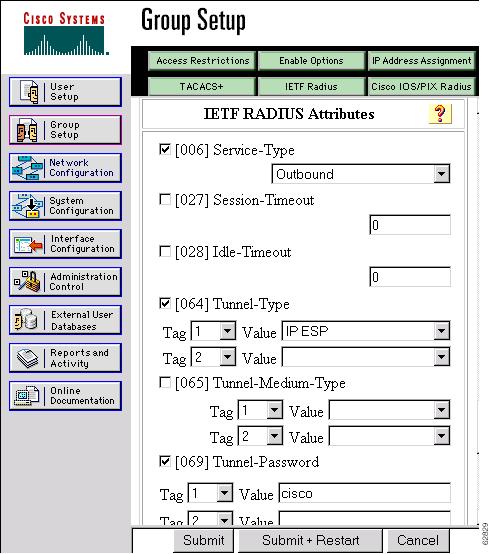
If you are using a Cisco Secure access control server (ACS), you may configure your remote access VPN group profiles on this server. To perform this task, you must ensure that Internet Engineering Task Force (IETF) RADIUS attributes are selected for group configuration as shown in Figure 1. (This figure also shows the compulsory attributes required for a remote access VPN group.) All values must be entered except the Tunnel-Password attribute, which is actually the preshared key for IKE purposes; if digital certificates are preferred, this attribute may be omitted.
Figure 1 IETF RADIUS Attributes Selection for Group Configuration
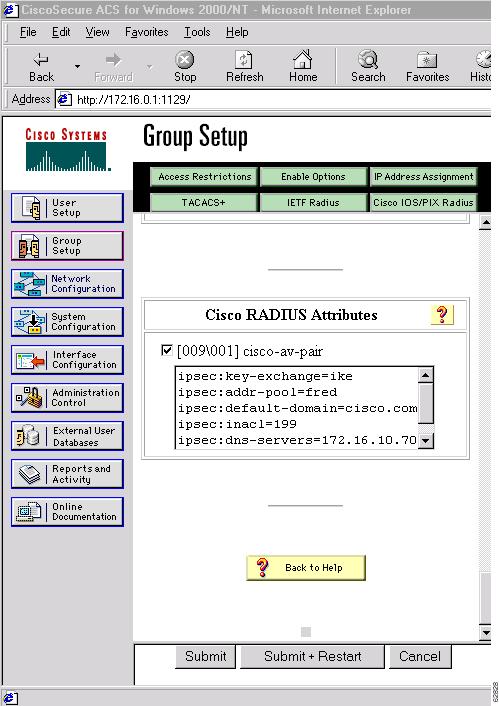
In addition to the compulsory attributes shown in Figure 1, other values can be entered that represent the group policy that is pushed to the remote client via Mode Configuration. Figure 2 shows an example of a group policy. All attributes are optional except the Addr-Pool attribute. The values of the attributes are the same as the setting that is used if the policy is defined locally on the router rather than in a RADIUS server. (These values are explained in the section "Defining Group Policy Information for Mode Configuration Push" later in this document.)
Figure 2 CiscoSecure ACS Group Policy Setup
After the group profile is created, a user who is a member of the group should be added. (Remember that the username that is defined maps to the group name as defined on the remote client, and the password defined for the username in the RADIUS database must be "cisco.") If digital certificates are the preferred method of IKE authentication, the username should reflect the OU field in the certificate presented by the remote client.
For All Other RADIUS Servers
Ensure that your RADIUS server allows you to define attribute-value (AV) pairs. (For an example, see the section "Configuring Cisco IOS for Easy VPN Server: Example" later in this document).
Note
RADIUS Support for User Profiles
Attributes may also be applied on a per-user basis. If you apply attributes on a per-user basis, you can override a group attribute value with an individual user attribute. The attributes are retrieved at the time that user authentication via Xauth occurs. The attributes are then combined with group attributes and applied during Mode Configuration.
User-based attributes are available only if RADIUS is being used for user authentication.
To define user policy attributes for RADIUS, you must do the following task on your RADIUS server:
•
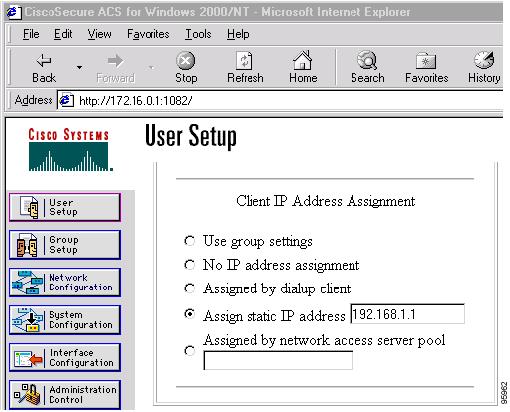
Figure 3 shows how CiscoSecure ACS may be used for user authentication and for the assignment of a Framed-IP-Address attribute that may be pushed to the client. The presence of this attribute means that the local address pool defined for the group to which that user belongs will be overridden.
Figure 3 CiscoSecure ACS User Profile Setup
For All Other RADIUS Servers
Ensure that your RADIUS server allows you to define AV pairs. (For an example, see the "Configuring Cisco IOS for Easy VPN Server: Example" section later in this document.)
Supported Protocols
Table 2 outlines supported IPsec protocol options and attributes that can be configured for this feature. (See Table 1 for nonsupported options and attributes.)
Functions Supported by Easy VPN Server
•
•
•
•
•
•
•
Mode Configuration Version 6 Support
Mode Configuration version 6 is now supported for more attributes (as described in an IETF draft submission).
Xauth Version 6 Support
Cisco IOS has been enhanced to support version 6 of Xauth. Xauth for user authentication is based on an IETF draft submission.
IKE DPD
The client implements a new keepalives scheme—IKE DPD.
DPD allows two IPsec peers to determine whether the other is still "alive" during the lifetime of a VPN connection. DPD is useful because a host may reboot, or the dialup link of a remote user may disconnect without notifying the peer that the VPN connection has gone away. When an IPsec host determines that a VPN connection no longer exists, the host can notify a user, attempt to switch to another IPsec host, or clean up valuable resources that were allocated for the peer that no longer exists.
A Cisco IOS VPN device can be configured to send and reply to DPD messages. DPD messages are sent if no other traffic is being passed through the VPN tunnel. If a configured amount of time has lapsed since the last inbound data was received, DPD will send a message ("DPD R-U-THERE") the next time it sends outbound IPsec data to the peer. DPD messages are unidirectional and are automatically sent by Cisco VPN clients. DPD must be configured on the router only if the router wishes to send DPD messages to the VPN client to determine the health of the client.
Split Tunneling Control
Remote clients can support split tunneling, which enables a client to have intranet and Internet access at the same time. If split tunneling is not configured, the client will direct all traffic through the tunnel, even traffic destined for the Internet.
Initial Contact
If a client is suddenly disconnected, the gateway may not be notified. Consequently, removal of connection information (IKE and IPsec SAs) for that client will not immediately occur. Thus, if the client attempts to reconnect to the gateway again, the gateway will refuse the connection because the previous connection information is still valid.
To avoid such a scenario, a new capability called initial contact has been introduced; it is supported by all Cisco VPN products. If a client or router is connecting to another Cisco gateway for the first time, an initial contact message is sent that tells the receiver to ignore and delete any old connection information that has been maintained for that newly connecting peer. Initial contact ensures that connection attempts are not refused because of SA synchronization problems, which are often identified via invalid security parameter index (SPI) messages and which require devices to have their connections cleared.
Group-Based Policy Control
Policy attributes such as IP addresses, DNS, and split tunnel access can be provided on a per-group or per-user basis.
User-Based Policy Control
Attributes may also be applied on a per-user basis. You can override a group attribute value with an individual user attribute. The attributes are retrieved at the time that user authentication via Xauth occurs. They are then combined with group attributes and applied during Mode Configuration.
From Cisco IOS Release 12.3(4)T forward, attributes can be applied on a per-user basis after the user has been authenticated. These attributes can override any similar group attributes. User-based attributes are available only if RADIUS is used as the database.
Framed-IP-Address
To select the Framed-IP-Address attribute for CiscoSecure for NT, do the following: Under the user profile, choose the "use this IP address" option under addressing and manually enter the address. (You should check the method of configuring a framed IP address with your own RADIUS server because this procedure will vary.)
Note
User-Save-Password
As per the group description, the User-Save-Password attribute can be received in addition to the group variant (Save-Password), but if it is received, it will override the value asserted by the group.
The following is an output example of a RADIUS AV pair for the User-Save-Password attribute:
ipsec:user-save-password=1User-Include-Local-LAN
As per the group description, the User-Include-Local-LAN attribute can be received in addition to the group variant (Include-Local-LAN), but if it is received, it will override the value asserted by the group.
The following is an output example of a RADIUS AV pair for the User-Include-Local LAN attribute:
ipsec:user-include-local-lan=1User-VPN-Group
The User-VPN-Group attribute is a replacement for the Group-Lock attribute. It allows support for both preshared key and RSA signature authentication mechanisms such as certificates.
If you need to check that the group a user is attempting to connect to is indeed the group the user belongs to, use the User-VPN-Group attribute. The administrator sets this attribute to a string, which is the group that the user belongs to. The group the user belongs to is matched against the VPN group as defined by group name (ID_KEY_ID) for preshared keys or by the OU field of a certificate. If the groups do not match, the client connection is terminated.
This feature works only with AAA RADIUS. Local Xauth authentication must still use the Group-Lock attribute.
The following is an output example of a RADIUS AV pair for the Use-VPN-Group attribute:
ipsec:user-vpn-group=cisco
Group-Lock
If you are only using pre-shared keys (no certificates or other RSA signature authentication mechanisms) with RADIUS or local AAA, you can continue to use the Group-Lock attribute. If you are only using pre-shared keys (no certificates or other RSA signature authentication mechanisms) with RADIUS, you can either continue to use the Group-Lock attribute or you can use the new User-VPN-Group attribute.

Caution
Session Monitoring for VPN Group Access
It is possible to mimic the functionality provided by some RADIUS servers for limiting the maximum number of connections to a specific server group and also for limiting the number of simultaneous logins for users in that group. After user-defined thresholds are defined in each VPN group, connections will be denied until counts drop below these thresholds.
If you use a RADIUS server, such as CiscoSecure ACS, it is recommended that you enable this session control on the RADIUS server if the functionality is provided. In this way, usage can be controlled across a number of servers by one central repository. When enabling this feature on the router itself, only connections to groups on that specific device are monitored. Load-sharing scenarios are not accurately accounted for.
To configure session monitoring using command-line interface (CLI), use the crypto isakmp client configuration group command and the max-users and max-logins subcommands.
The following is an output example of RADIUS AV pairs that have been added to the relevant group:
ipsec:max-users=1000ipsec:max-logins=1Easy VPN Virtual Interface Support on a Server
Easy VPN Virtual Interface Support on a Server allows you to selectively send traffic to different Easy VPN concentrators (servers) as well as to the Internet.
Before Cisco IOS Release 12.4(2)T, at the tunnel-up/tunnel-down transition, attributes that were pushed during the mode configuration had to be parsed and applied. When such attributes resulted in the configurations being applied on the interface, the existing configuration had to be overridden.
With the Virtual Interface Support feature, the tunnel-up configuration can be applied to separate interfaces, making it easier to support separate features at tunnel-up. Features that are applied to the traffic going into the tunnel can be separate from the features that are applied to traffic that is not going through the tunnel (for example, split-tunnel traffic and traffic leaving the device when the tunnel is not up). When the Easy VPN negotiation is successful, the line protocol state of the virtual-access interface gets changed to up. When the Easy VPN tunnel goes down because the SA expires or is deleted, the line protocol state of the virtual-access interfaces changes to down.
Note
For more information about this feature, see the document Cisco Easy VPN Remote. (This feature is configured on the Easy VPN remote device.)
For information about the IPsec Virtual Tunnel Interface feature, see the document "IPSec Virtual Tunnel Interface" (link in the "Related Documents" section of this document).
Banner, Auto-Update, and Browser-Proxy
The following features provide support for attributes that aid in the management of the Cisco Easy VPN remote device.
Banner
An Easy VPN server can be configured to push the banner to the Easy VPN remote device. A banner is needed for the web-based activation feature. The banner is displayed when the Easy VPN tunnel is up on the Easy VPN remote console or as a HTML page in the case of web-based activation.
Auto-Update
An Easy VPN server can be configured to provide an automated mechanism for software and firmware upgrades on an Easy VPN remote device.
Browser Proxy
An Easy VPN server can be configured so that an Easy VPN remote device can access resources on the corporate network. Using this feature, the user does not have to manually modify the proxy settings of his or her web browser when connecting to the corporate network using Cisco IOS VPN Client or manually revert the proxy settings upon disconnecting.
Configuration Management Enhancements
Pushing a Configuration URL Through a Mode-Configuration Exchange
When remote devices connect to a corporate gateway for creating an IPsec VPN tunnel, some policy and configuration information has to be applied to the remote device when the VPN tunnel is active to allow the remote device to become a part of the corporate VPN.
The Pushing a Configuration URL Through a Mode-Configuration Exchange feature provides for a mode-configuration attribute that "pushes" a URL from the concentrator (server) to the Cisco IOS Easy VPN remote device. The URL contains the configuration information that the remote device has to download and apply to the running configuration, and it contains the Cisco IOS CLI listing. (For more information about a Cisco IOS CLI listing, see Cisco IOS documentation for the configuration url command.) The CLI for this feature is configured on the concentrator.
The configuration that is pushed to the remote device is persistent by default. That is, the configuration is applied when the IPsec tunnel is "up," but it is not withdrawn when the IPsec tunnel goes "down." However, it is possible to write a section of configuration that is transient in nature, in which case the configuration of the section is reverted when the tunnel is disconnected.
There are no restrictions on where the configuration distribution server is physically located. However, it is recommended that a secure protocol such as HTTPS (Secure HTTP) be used to retrieve the configuration. The configuration server can be located in the corporate network, so because the transfer happens through the IPsec tunnel, insecure access protocols (HTTP) can be used.
Regarding backward compatibility: the remote device asks for the CONFIGURATION-URL and CONFIGURATION-VERSION attributes. Because the CONFIGURATION-URL and CONFIGURATION-VERSION attributes are not mandatory attributes, the server sends them only if it has them configured for the group. There is no built-in restriction to push the configuration, but bootstrap configurations (such as for the IP address) cannot be sent because those configurations are required to set up the Easy VPN tunnel, and the CONFIGURATION-URL comes into effect only after the Easy VPN tunnel comes up.
After the Configuration Has Been Acquired by the Easy VPN Remote Device
After the configuration has been acquired by the Easy VPN remote device, the remote device sends a new ISAKMP notification to the Easy VPN server. The notification contains several manageability information messages about the client (remote device). The Easy VPN server takes two actions when this information is received:
•
•
How to Configure This Feature
The commands that are used to configure this feature and the attributes CONFIGURATION-URL and CONFIGURATION-VERSION are described in the crypto isakmp client configuration group command documentation.
Per User AAA Policy Download with PKI
With the Support of Per User AAA Policy Download with PKI feature, user attributes are obtained from the AAA server and pushed to the remote device through mode configuration. The username that is used to get the attributes is retrieved from the remote device certificate.
Syslog Message Enhancements
Some new syslog messages have been added for Easy VPN in Cisco IOS Release 12.4(4)T. The syslog messages can be enabled on your server by using the command-line interface (CLI). The format of the syslog messages is as follows:
timestamp: %CRYPTO-6-VPN_TUNNEL_STATUS: (Server)  <event message>  User=<username>
Group=<groupname>  Client_public_addr=<ip_addr> Server_public_addr=<ip addr>
For an authentication-passed event, the syslog message looks like the following:
Jul 25 23:33:06.847: %CRYPTO-6-VPN_TUNNEL_STATUS: (Server) Authentication PASS
ED User=blue Group=Cisco1760group Client_public_addr=10.20.20.1
Server_public_addr=10.20.20.2
Three of the messages (Max users, Max logins, and Group does not exist) are authorization issues and are printed only with the group name in the format. The reason for only the group name being printed is that authorization check happens much before mode configuration happens. Therefore, the peer information is not yet present and cannot be printed. The following is an example of a "Group does not exit" message.
*Jun 30 18:02:58.107: %CRYPTO-6-VPN_TUNNEL_STATUS: Group: group_1 does not existEasy VPN Syslog Messages That Are Supported
Both ezvpn_connection_up and ezvpn_connection_down were already supported in a previous release of syslog messages. The enhancements in Cisco IOS Release 12.4(4)T follow the same format, but new syslogs are introduced. The added syslogs are as follows:
•
•
–
–
–
–
•
•
•
•
•
•
–
–
Network Admission Control Support for Easy VPN
Network Admission Control was introduced in Cisco IOS Release 12.3(8)T as a way to determine whether a PC client should be allowed to connect to the LAN. Network Admission Control uses Extensible Authentication Protocol over UDP (EAPoUDP) to query the Cisco trust agent on the PC and allows a PC to access the network if the client status is healthy. Different policies can be applied on the server to deny or limit access of PCs that are infected.
Effective with Cisco IOS Release 12.4(4)T, Network Admission Control can now be used to monitor the status of remote PC clients as well. After the Easy VPN tunnel comes up and the PC starts to send traffic, the traffic is intercepted at the Easy VPN server, and the posture validation process starts. The posture validation process consists of sending an EAPoUDP request over the Easy VPN tunnel and querying the Cisco trust agent. The authentication server is configured inside the trusted network, behind the IPsec aggregator.
The configuration of an Easy VPN server that has Network Admission Control enabled is shown in the output in Network Admission Control: Example.
How to Configure Easy VPN Server
This section includes the following procedures:
•
•
•
•
•
•
•
•
•
•
•
•
•
•
•
Enabling Policy Lookup via AAA
To enable policy lookup via AAA, perform the following steps.
SUMMARY STEPS
1.
2.
3.
4.
5.
6.
7.
8.
DETAILED STEPS
Defining Group Policy Information for Mode Configuration Push
Although users can belong to only one group per connection, they may belong to specific groups with different policy requirements. Thus, users may decide to connect to the client using a different group ID by changing their client profile on the VPN device. To define the policy attributes that are pushed to the client via Mode Configuration, perform the following steps.
SUMMARY STEPS
1.
2.
3.
4.
5.
6.
7.
8.
9.
10.
11.
12.
13.
14.
15.
16.
17.
DETAILED STEPS
Enabling VPN Session Monitoring
If you wish to set restrictions on the maximum number of connections to the router per VPN group and the maximum number of simultaneous logins per user, add the following attributes to the VPN group.
SUMMARY STEPS
1.
2.
3.
4.
5.
DETAILED STEPS
Verifying a VPN Session
To verify a VPN session, perform the following steps.
SUMMARY STEPS
1.
2.
3.
DETAILED STEPS
Applying Mode Configuration and Xauth
Mode Configuration and Xauth must be applied to a crypto map to be enforced. To apply Mode Configuration and Xauth to a crypto map, perform the following steps.
SUMMARY STEPS
1.
2.
3.
4.
5.
DETAILED STEPS
Enabling Reverse Route Injection for the Client
To enable RRI on the crypto map (static or dynamic) for VPN client support, perform the following steps.
SUMMARY STEPS
1.
2.
3.
or
crypto map map-name seq-num ipsec-isakmp
4.
5.
6.
7.
DETAILED STEPS
Enabling IKE Dead Peer Detection
To enable a Cisco IOS VPN gateway (instead of the client) to send IKE DPD messages, perform the following steps.
SUMMARY STEPS
1.
2.
3.
DETAILED STEPS
Configuring RADIUS Server Support
To configure access to the server and allow the Cisco IOS VPN device to send requests to the server, perform the following steps.
SUMMARY STEPS
1.
2.
3.
DETAILED STEPS
Verifying Easy VPN Server
To verify your configurations for this feature, perform the following steps.
SUMMARY STEPS
1.
2.
DETAILED STEPS
Configuring a Banner
To configure an Easy VPN server to push a banner to an Easy VPN remote device, perform the following steps.
SUMMARY STEPS
1.
2.
3.
4.
DETAILED STEPS
Configuring Auto Upgrade
To configure an Easy VPN server to provide an automated mechanism to make software and firmware upgrades automatically available to an Easy VPN remote device, perform the following steps.
SUMMARY STEPS
1.
2.
3.
4.
DETAILED STEPS
Configuring Browser Proxy
To configure an EasyVPN server so that the Easy VPN remote device can access resources on the corporate network when using Cisco IOS VPN Client software, perform the following steps. With this configuration, the user does not have to manually modify the proxy settings of his or her web browser when connecting and does not have to manually revert the proxy settings when disconnecting.
SUMMARY STEPS
1.
2.
3.
4.
DETAILED STEPS
Configuring the Pushing of a Configuration URL Through a
Mode-Configuration ExchangeTo configure an Easy VPN server to push a configuration URL through a Mode-Configuration Exchange, perform the following steps.
SUMMARY STEPS
1.
2.
3.
4.
5.
DETAILED STEPS
Configuring Per User AAA Download with PKI
To configure a AAA server to push user attributes to a remote device, perform the following steps.
Prerequisites
Before configuring a AAA server to push user attributes to a remote device, you must have configured AAA. The crypto PKI trustpoint must also be configured (see the first configuration task below). It is preferable that the trustpoint configuration contain the authorization username command.
Configuring the Crypto PKI Trustpoint
SUMMARY STEPS
1.
2.
3.
4.
5.
6.
7.
8.
DETAILED STEPS
Configuring Per User AAA Download with PKI
SUMMARY STEPS
1.
2.
3.
4.
5.
6.
7.
8.
9.
10.
11.
12.
13.
14.
DETAILED STEPS
Enabling Easy VPN Syslog Messages
To enable Easy VPN syslog messages on a server, perform the following steps.
SUMMARY STEPS
1.
2.
3.
DETAILED STEPS
Configuration Examples for Easy VPN Server
This section provides the following configuration examples:
•
•
•
•
•
•
•
•
Configuring Cisco IOS for Easy VPN Server: Example
The following example shows how to define group policy information locally for mode configuration. In this example, a group name is named "cisco" and another group name is named "default." The policy is enforced for all users who do not offer a group name that matches "cisco."
! Enable policy look-up via AAA. For authentication and authorization, send requests to! RADIUS first, then try local policy.aaa new-modelaaa authentication login userlist group radius localaaa authorization network grouplist group radius localenable password XXXX!username cisco password 0 ciscoclock timezone PST -8ip subnet-zero! Configure IKE policies, which are assessed in order so that the first policy thatmatches the proposal of the client will be used.crypto isakmp policy 1group 2!crypto isakmp policy 3hash md5authentication pre-sharegroup 2crypto isakmp identity hostname!! Define "cisco" group policy information for mode config push.crypto isakmp client configuration group ciscokey ciscodns 10.2.2.2 10.2.2.3wins 10.6.6.6domain cisco.compool greenacl 199! Define default group policy for mode config push.crypto isakmp client configuration group defaultkey ciscodns 10.2.2.2 10.3.2.3pool greenacl 199!!crypto ipsec transform-set dessha esp-des esp-sha-hmac!crypto dynamic-map mode 1set transform-set dessha!! Apply mode config and xauth to crypto map "mode." The list names that are defined here! must match the list names that are defined in the AAA section of the config.crypto map mode client authentication list userlistcrypto map mode isakmp authorization list grouplistcrypto map mode client configuration address respondcrypto map mode 1 ipsec-isakmp dynamic mode!!controller ISA 1/1!!interface FastEthernet0/0ip address 10.6.1.8 255.255.0.0ip route-cacheip mroute-cacheduplex autospeed autocrypto map mode!interface FastEthernet0/1ip address 192.168.1.28 255.255.255.0no ip route-cacheno ip mroute-cacheduplex autospeed auto! Specify IP address pools for internal IP address allocation to clients.ip local pool green 192.168.2.1 192.168.2.10ip classlessip route 0.0.0.0 0.0.0.0 10.6.0.1!! Define access lists for each subnet that should be protected.access-list 199 permit ip 192.168.1.0 0.0.0.255 anyaccess-list 199 permit ip 192.168.3.0 0.0.0.255 any!! Specify a RADIUS server host and configure access to the server.radius-server host 192.168.1.1 auth-port 1645 acct-port 1646 key XXXXXradius-server retransmit 3!!line con 0exec-timeout 0 0length 25transport input noneline aux 0line vty 5 15!RADIUS Group Profile with IPsec AV Pairs: Example
The following is an example of a standard RADIUS group profile that includes RADIUS IPsec AV pairs. To get the group authorization attributes, "cisco" must be used as the password.
client_r Password = "cisco"Service-Type = Outboundcisco-avpair = "ipsec:tunnel-type*ESP"cisco-avpair = "ipsec:key-exchange=ike"cisco-avpair = "ipsec:tunnel-password=lab"cisco-avpair = "ipsec:addr-pool=pool1"cisco-avpair = "ipsec:default-domain=cisco"cisco-avpair = "ipsec:inacl=101"cisco-avpair = "ipsec:access-restrict=fastethernet 0/0"cisco-avpair = "ipsec:group-lock=1"cisco-avpair = "ipsec:dns-servers=10.1.1.1 10.2.2.2"cisco-avpair = "ipsec:firewall=1"cisco-avpair = "ipsec:include-local-lan=1"cisco-avpair = "ipsec:save-password=1"cisco-avpair = "ipsec:wins-servers=10.3.3.3 10.4.4.4"cisco-avpair = "ipsec:split-dns=green.com"cisoc-avpair = "ipsec:ipsec-backup-gateway=10.1.1.1"cisoc-avpair = "ipsec:ipsec-backup-gateway=10.1.1.2"cisoc-avpair = "ipsec:pfs=1"RADIUS User Profile with IPsec AV Pairs: Example
The following is an example of a standard RADIUS user profile that includes RADIUS IPsec AV pairs. These user attributes will be obtained during Xauth.
ualluall Password = "uall1234"cisco-avpair = "ipsec:user-vpn-group=unity"cisco-avpair = "ipsec:user-include-local-lan=1"cisco-avpair = "ipsec:user-save-password=1"Framed-IP-Address = 10.10.10.10Backup Gateway with Maximum Logins and Maximum Users: Example
The following example shows that five backup gateways have been configured, that the maximum users have been set to 250, and that maximum logins have been set to 2:
crypto isakmp client configuration group sdmkey 6 RMZPPMRQMSdiZNJg`EBbCWTKSTi\d[pool POOL1acl 150backup-gateway 172.16.12.12backup-gateway 172.16.12.13backup-gateway 172.16.12.14backup-gateway 172.16.12.130backup-gateway 172.16.12.131max-users 250max-logins 2Easy VPN with an IPsec Virtual Tunnel Interface: Example
The following output shows that Easy VPN has been configured with an IPsec virtual tunnel interface.
!version 12.4service timestamps debug datetime msecservice timestamps log datetime msecno service password-encryption!hostname Router!boot-start-markerboot-end-marker!!aaa new-model!!aaa authentication login default localaaa authorization network default local!aaa session-id common!resource policy!clock timezone IST 0ip subnet-zeroip cefno ip domain lookupno ip dhcp use vrf connected!username lab password 0 lab!crypto isakmp policy 3authentication pre-sharegroup 2crypto isakmp xauth timeout 90!crypto isakmp client configuration group easykey ciscodomain foo.compool dpoolacl 101crypto isakmp profile vimatch identity group easyisakmp authorization list defaultclient configuration address respondclient configuration group easyvirtual-template 1!!crypto ipsec transform-set set esp-3des esp-sha-hmac!crypto ipsec profile viset transform-set setset isakmp-profile vi!!interface Loopback0ip address 10.4.0.1 255.255.255.0!interface Ethernet0/0ip address 10.3.0.2 255.255.255.0no keepaliveno cdp enableinterface Ethernet1/0no ip addressno keepaliveno cdp enable!interface Virtual-Template1 type tunnelip unnumbered Ethernet0/0tunnel mode ipsec ipv4tunnel protection ipsec profile vi!ip local pool dpool 10.5.0.1 10.5.0.10!ip classlessip route 10.2.0.0 255.255.255.0 10.3.0.1no ip http serverno ip http secure-server!!access-list 101 permit ip 10.4.0.0 0.0.0.255 anyno cdp run!!line con 0line aux 0line vty 0 4!endPushing a Configuration URL Through a
Mode-Configuration Exchange: ExamplesThe following show crypto ipsec client ezvpn command output displays the mode configuration URL location and version:
Router# show crypto ipsec client ezvpnEasy VPN Remote Phase: 5Tunnel name : branchInside interface list: Vlan1Outside interface: FastEthernet0Current State: IPSEC_ACTIVELast Event: SOCKET_UPAddress: 172.16.1.209Mask: 255.255.255.255Default Domain: cisco.comSave Password: AllowedConfiguration URL [version]: tftp://172.16.30.2/branch.cfg [11]Config status: applied, Last successfully applied version: 11Current EzVPN Peer: 192.168.10.1The following show crypto isakmp peers config command output displays all manageability information that is sent by the remote device.
Router# show crypto isakmp peers configClient-Public-Addr=192.168.10.2:500; Client-Assigned-Addr=172.16.1.209; Client-Group=branch; Client-User=branch; Client-Hostname=branch.; Client-Platform=Cisco 1711; Client-Serial=FOC080210E2 (412454448); Client-Config-Version=11; Client-Flash=33292284; Client-Available-Flash=10202680; Client-Memory=95969280; Client-Free-Memory=14992140; Client-Image=flash:c1700-advipservicesk9-mz.ef90241;Client-Public-Addr=192.168.10.3:500; Client-Assigned-Addr=172.16.1.121; Client-Group=store; Client-User=store; Client-Hostname=831-storerouter.; Client-Platform=Cisco C831; Client-Serial=FOC08472UXR (1908379618); Client-Config-Version=2; Client-Flash=24903676; Client-Available-Flash=5875028; Client-Memory=45298688; Client-Free-Memory=6295596; Client-Image=flash:c831-k9o3y6-mz.ef90241Per User AAA Policy Download with PKI: Example
The following output shows that the Per User AAA Policy Download with PKI feature has been configured on the Easy VPN server.
Router# show running-configBuilding configuration...Current configuration : 7040 bytes!! Last configuration change at 21:06:51 UTC Tue Jun 28 2005!version 12.4no service padservice timestamps debug uptimeservice timestamps log uptimeno service password-encryption!hostname GEN!boot-start-markerboot-end-marker!!aaa new-model!!aaa group server radius usrgrppkiserver 10.76.248.201 auth-port 1645 acct-port 1646!aaa authentication login xauth group usrgrppkiaaa authentication login usrgrp group usrgrppkiaaa authorization network usrgrp group usrgrppki!aaa session-id common!resource policy!ip subnet-zero!!ip cef!!ip address-pool local!!crypto pki trustpoint ca-serverenrollment url http://10.7.7.2:80revocation-check nonersakeypair rsa-pair! Specify the field within the certificate that will be used as a username to do a per-user AAA lookup into the RADIUS database. In this example, the contents of the commonname will be used to do a AAA lookup. In the absence of this statement, by default the contents of the "unstructured name" field in the certificate is used for AAA lookup.authorization username subjectname commonname!!crypto pki certificate map CERT-MAP 1subject-name co yournamename co yourname!crypto pki certificate chain ca-servercertificate 02308201EE 30820157 A0030201 02020102 300D0609 2A864886 F70D0101 0405003014311230 10060355 04031309 63612D73 65727665 72301E17 0D303530 3632383230303731 345A170D 30363036 32383230 30373134 5A301531 13301106 092A864886F70D01 09021604 47454E2E 30819F30 0D06092A 864886F7 0D010101 050003818D003081 89028181 00ABF8F0 FDFFDF8D F22098D6 A48EE0C3 F505DD96 C0022EA4EAB95EE8 1F97F450 990BB0E6 F2B7151F C5C79391 93822FE4 DEE5B00C A03412BB9B715AAD D6C31F93 D8802658 AF9A8866 63811942 913D0C02 C3E328CC 1C046E94F73B7C1A 4497F86E 74A627BC B809A3ED 293C15F2 8DCFA217 5160F9A4 09D52044350F85AF 08B357F5 D7020301 0001A34F 304D300B 0603551D 0F040403 0205A0301F060355 1D230418 30168014 F9BC4498 3DA4D51D 451EFEFD 5B1F5F73 8D7B1C9B301D0603 551D0E04 1604146B F6B2DFD1 1FE237FF 23294129 E55D9C48 CCB046300D06092A 864886F7 0D010104 05000381 81004AFF 2BE300C1 15D0B191 C20D06E0260305A6 9DF610BB 24211516 5AE73B62 78E01FE4 0785776D 3ADFA3E2 CE0644321C93E82D 93B5F2AB 9661EDD3 499C49A8 F87CA553 9132F239 1D50187D 21CC3148681F5043 2F2685BC F544F4FF 8DF535CB E55B5F36 31FFF025 8969D9F8 418C8AB7C569B022 46C3C63A 22DD6516 C503D6C8 3D81quitcertificate ca 0130820201 3082016A A0030201 02020101 300D0609 2A864886 F70D0101 0405003014311230 10060355 04031309 63612D73 65727665 72301E17 0D303530 3632383230303535 375A170D 30383036 32373230 30353537 5A301431 12301006 0355040313096361 2D736572 76657230 819F300D 06092A86 4886F70D 01010105 0003818D00308189 02818100 BA1A4413 96339C6B D36BD720 D25C9A44 E0627A29 97E06F2A69B268ED 08C7144E 7058948D BEA512D4 40588B87 322C5D79 689427CA 5C54B3BA82FAEC53 F6AC0B5C 615D032C 910CA203 AC6AB681 290D9EED D31EB185 8D98E1E7FF73613C 32290FD6 A0CBDC40 6E4D6B39 DE1D86BA DE77A55E F15299FF 97D7C185919F81C1 30027E0F 02030100 01A36330 61300F06 03551D13 0101FF04 0530030101FF300E 0603551D 0F0101FF 04040302 0186301F 0603551D 23041830 168014F9BC44983D A4D51D45 1EFEFD5B 1F5F738D 7B1C9B30 1D060355 1D0E0416 0414F9BC44983DA4 D51D451E FEFD5B1F 5F738D7B 1C9B300D 06092A86 4886F70D 0101040500038181 003EF397 F4D98BDE A4322FAF 4737800F 1671F77E BD6C45AE FB91B28CF04C98F0 135A40C6 635FDC29 63C73373 5D5BBC9A F1BBD235 F66CE1AD 6B4BFC7AAB18C8CC 1AB93AF3 7AC67436 930E9C81 F43F7570 A8FE09AE 3DEA01D1 DA6BD0CB83F9A77F 1DFAFE5E 2F1F206B F1FDD8BE 6BB57A3C 8D03115D B1F64A3F 7A7557C109B0A34A DBquit!!crypto isakmp policy 10group 2crypto isakmp keepalive 10crypto isakmp profile ISA-PROFmatch certificate CERT-MAPisakmp authorization list usrgrpclient pki authorization list usrgrpclient configuration address respondclient configuration group pkiuservirtual-template 2!!crypto ipsec transform-set trans2 esp-3des esp-sha-hmac!crypto ipsec profile IPSEC_PROFset transform-set trans2!crypto ipsec profile ISC_IPSEC_PROFILE_1set transform-set trans2!!crypto call admission limit ike sa 40!!interface Loopback0ip address 10.3.0.1 255.255.255.255no ip route-cache cefno ip route-cache!interface Loopback1ip address 10.76.0.1 255.255.255.255no ip route-cache cefno ip route-cache!interface Ethernet3/0ip address 10.76.248.209 255.255.255.255no ip route-cache cefno ip route-cacheduplex half!!interface Ethernet3/2ip address 10.2.0.1 255.255.255.0no ip route-cache cefno ip route-cacheduplex half!!interface Serial4/0no ip addressno ip route-cache cefno ip route-cacheshutdownserial restart-delay 0!interface Serial4/1no ip addressno ip route-cache cefno ip route-cacheshutdownserial restart-delay 0!interface Serial4/2no ip addressno ip route-cache cefno ip route-cacheshutdownserial restart-delay 0!interface Serial4/3no ip addressno ip route-cache cefno ip route-cacheshutdownserial restart-delay 0!interface FastEthernet5/0ip address 10.9.4.77 255.255.255.255no ip route-cache cefno ip route-cacheduplex half!interface FastEthernet6/0ip address 10.7.7.1 255.255.255.0no ip route-cache cefno ip route-cacheduplex full!interface Virtual-Template1no ip address!interface Virtual-Template2 type tunnelip unnumbered Loopback0tunnel source Ethernet3/2tunnel mode ipsec ipv4tunnel protection ipsec profile IPSEC_PROF!router eigrp 20network 172.16.0.0auto-summary!ip local pool ourpool 10.6.6.6ip default-gateway 10.9.4.1ip classlessip route 10.1.0.1 255.255.255.255 10.0.0.2ip route 10.2.3.0 255.255.0.0 10.2.4.4ip route 10.9.1.0 255.255.0.0 10.4.0.1ip route 10.76.0.0 255.255.0.0 10.76.248.129ip route 10.11.1.1 255.255.255.0 10.7.7.2!no ip http serverno ip http secure-server!!logging alarm informationalarp 10.9.4.1 0011.bcb4.d40a ARPA!!radius-server host 10.76.248.201 auth-port 1645 acct-port 1646 key cisco!control-plane!!gatekeepershutdown!!line con 0stopbits 1line aux 0stopbits 1line vty 0 4!!endNetwork Admission Control: Example
The following is output for an Easy VPN server that has been enabled with Network Admission Control.
Note
Router# show running-configBuilding configuration...Current configuration : 5091 bytes!version 12.4!hostname Router!aaa new-model!!aaa authentication login userlist local!aaa authentication eou default group radiusaaa authorization network hw-client-groupname localaaa accounting update newinfoaaa accounting network acclist start-stop broadcast group radiusaaa session-id common!!! Note 1: EAPoUDP packets will use the IP address of the loopback interface when sending the EAPoUDP hello to the Easy VPN client. Using the IP address ensures that the returning EAPoUDP packets come back encrypted and are associated with the correct virtual access interface. The ip admission (ip admission source-interface Loopback10) command is optional. Instead of using this command, you can specify the IP address of the virtual template to be an address in the inside network space as shown in the configuration of the virtual template below in Note 2.ip admission source-interface Loopback10ip admission name test eapoudp inactivity-time 60!!eou clientless username ciscoeou clientless password ciscoeou allow ip-station-ideou logging!username lab password 0 labusername lab@easy password 0 lab!!crypto isakmp policy 3encr 3desauthentication pre-sharegroup 2!!crypto isakmp key 0 cisco address 10.53.0.1crypto isakmp client configuration group easykey ciscodomain cisco.compool dynpoolacl split-aclgroup-lockconfiguration url tftp://10.13.0.9/Config-URL_TFTP.cfgconfiguration version 111!crypto isakmp profile vimatch identity group easyclient authentication list userlistisakmp authorization list hw-client-groupnameclient configuration address respondclient configuration group easyaccounting acclistvirtual-template 2!crypto ipsec security-association lifetime seconds 120crypto ipsec transform-set set esp-3des esp-sha-hmaccrypto ipsec transform-set aes-trans esp-aes esp-sha-hmaccrypto ipsec transform-set transform-1 esp-des esp-sha-hmaccrypto ipsec profile viset security-association lifetime seconds 3600set transform-set set aes-trans transform-1set isakmp-profile vi!!crypto dynamic-map dynmap 1set transform-set aes-trans transform-1reverse-route!interface Loopback10ip address 10.61.0.1 255.255.255.255!interface FastEthernet0/0ip address 10.13.11.173 255.255.255.255duplex autospeed auto!interface FastEthernet0/1ip address 10.55.0.1 255.255.255.255duplex autospeed auto!!interface Virtual-Template2 type tunnel! Note2: Use the IP address of the loopback10. This ensures that the EAPoUDP packets that are attached to virtual-access interfaces that are cloned from this virtual template carry the source address of the loopback address and that response packets from the VPN client come back encrypted.!ip unnumbered Loopback10! Enable Network Admission Control for remote VPN clients.ip admission testtunnel mode ipsec ipv4tunnel protection ipsec profile vi!!ip local pool dynpool 172.16.2.65 172.16.2.70ip classlessip access-list extended ClientExceptionpermit ip any host 10.61.0.1ip access-list extended split-aclpermit ip host 10.13.11.185 anypermit ip 10.61.0.0 255.255.255.255 anypermit ip 10.71.0.0 255.255.255.255 anypermit ip 10.71.0.0 255.255.255.255 10.52.0.0 0.255.255.255permit ip 10.55.0.0 255.255.255.255 any!ip radius source-interface FastEthernet0/0access-list 102 permit esp any anyaccess-list 102 permit ahp any anyaccess-list 102 permit udp any any eq 21862access-list 102 permit ospf any anyaccess-list 102 deny ip any anyaccess-list 195 deny ospf any anyaccess-list 195 permit ip 10.61.0.0 255.255.255.255 10.51.0.0 255.255.255.255!!radius-server attribute 6 on-for-login-authradius-server attribute 8 include-in-access-reqradius-server host 10.13.11.185 auth-port 1645 acct-port 1646 key ciscoradius-server vsa send accountingradius-server vsa send authentication!endAdditional References
The following sections provide references related to Easy VPN Server.
Related Documents
Configuring a router as a VPN client
Easy VPN Remote Enhancements, Cisco IOS Release 12.4(4)T feature module
General information on IPsec and VPN
Refer to the following information in the product literature and in IP technical tips sections on Cisco.com:
•
•
•
•
•
Release 12.2(8)T feature moduleIPsec Protocol options and attributes
"Configuring Internet Key Exchange Security Protocol" chapter in the Cisco IOS Security Configuration Guide
IPsec virtual tunnels
IPSec Virtual Tunnel Interface, Cisco IOS Release 12.3(14)T feature module
Network Admission Control
Network Admission Control, Cisco IOS Release 12.3(8)T
RRI
IPSec VPN High Availability Enhancements, Cisco IOS
Release 12.2(8)T feature module
Standards
No new or modified standards are supported by this feature, and support for existing standards has not been modified by this feature.
—
MIBs
RFCs
No new or modified RFCs are supported by this feature, and support for existing RFCs has not been modified by this feature.
—
Technical Assistance
Command Reference
The following new and modified commands are pertinent to this feature. To see the command pages for these commands and other commands used with this feature, go to the Cisco IOS Master Commands List, Release 12.4, at http://www.cisco.com/univercd/cc/td/doc/product/software/ios124/124mindx
/124htix.htm.New Commands
•
•
•
•
•
•
•
•
•
•
•
•
•
•
•
•
•
•
•
•
•
•
•
•
•
•
•
•
•
Modified Commands
•
Glossary
AAA—authentication, authorization, and accounting. Framework of security services that provides the method for identifying users (authentication), for remote access control (authorization), and for collecting and sending security server information used for billing, auditing, and reporting (accounting).
aggressive mode (AM)—Mode during Internet Key Exchange negotiation. Compared to main mode (MM), AM eliminates several steps, which makes it faster but less secure than MM. Cisco IOS software will respond in aggressive mode to an Internet Key Exchange (IKE) peer that initiates aggressive mode.
AV pair—attribute-value pair. Additional authentication and authorization information in the following format: Cisco:AVPair="protocol:attribute=value".
IKE—Internet Key Exchange. Hybrid protocol that implements Oakley key exchange and Skeme key exchange inside the ISAKMP framework. Although IKE can be used with other protocols, its initial implementation is with IPsec. IKE provides authentication of the IPsec peers, negotiates IPsec keys, and negotiates IPsec security associations.
IPsec—IP Security Protocol. Framework of open standards that provides data confidentiality, data integrity, and data authentication between participating peers. IPsec provides these security services at the IP layer. IPsec uses IKE to handle negotiation of protocols and algorithms based on local policy and to generate the encryption and authentication keys to be used by IPsec. IPsec can be used to protect one or more data flows between a pair of hosts, between a pair of security gateways, or between a security gateway and a host.
ISAKMP—Internet Security Association Key Management Protocol. Protocol framework that defines payload formats, the mechanics of implementing a key exchange protocol, and the negotiation of a security association.
MM—main mode. Mode that is slower than aggressive mode but more secure and more flexible than aggressive mode because it can offer an IKE peer more security proposals. The default action for IKE authentication (Rivest, Shamir, and Adelman signature (rsa-sig), RSA encryption (rsa-encr), or preshared) is to initiate main mode.
reverse route injection (RRI)—Simplified network design for VPNs on which there is a requirement for redundancy or load balancing. RRI works with both dynamic and static crypto maps.
In the dynamic case, as remote peers establish IPsec security associations with an RRI enabled router, a static route is created for each subnet or host protected by that remote peer. For static crypto maps, a static route is created for each destination of an extended access-list rule.
SA—security association. Description of how two or more entities will utilize security services to communicate securely. For example, an IPsec SA defines the encryption algorithm (if used), the authentication algorithm, and the shared session key to be used during the IPsec connection.
Both IPsec and IKE require and use SAs to identify the parameters of their connections. IKE can negotiate and establish its own SA. The IPsec SA is established either by IKE or by manual user configuration.
VPN—Virtual Private Network. Framework that consists of multiple peers transmitting private data securely to one another over an otherwise public infrastructure. In this framework, inbound and outbound network traffic is protected using protocols that tunnel and encrypt all data. This framework permits networks to extend beyond their local topology, while remote users are provided with the appearance and functionality of a direct network connection.
Note

Copyright © 2003-2005 Cisco Systems, Inc. All rights reserved.
 Feedback
Contact Cisco
- Open a Support Case

- (Requires a Cisco Service Contract)
This Document Applies to These Products
- Collaboration Endpoints - Retired Products
- Conferencing - Retired Products
- Contact Center - Retired Products
- Optical Networking - Retired Products
- Routers - Retired Products
- Security - Retired Products
- Servers - Unified Computing (UCS) Retired Products
- Storage Networking Retired Products
- Switches - Retired Products
- Video - Retired Products
- Wireless - Retired Products