Tunnel Authentication via RADIUS on Tunnel Terminator
Available Languages
Table Of Contents
Tunnel Authentication via RADIUS on Tunnel Terminator
Restrictions for Tunnel Authentication via RADIUS on Tunnel Terminator
Information About Tunnel Authentication via RADIUS on Tunnel Terminator
Benefits of Tunnel Authentication via a Remote RADIUS Server
Functionality Overview: Tunnel Authentication via a Remote RADIUS Server
RADIUS Vendor-Specific Attributes for Tunnel Authentication
How to Configure a Remote RADIUS Server for Tunnel Authentication
Configuring the LNS or LAC for Remote RADIUS Tunnel Authentication and Authorization
Verifying Remote RADIUS Tunnel Authentication and Authorization Configurations
Configuration Examples for Tunnel Authentication via a Remote RADIUS Server
Configuring an LNS for Remote RADIUS Tunnel Authentication: Example
RADIUS User Profile for Remote RADIUS Tunnel Authentication: Example
vpdn tunnel authorization network
vpdn tunnel authorization password
vpdn tunnel authorization virtual-template
Tunnel Authentication via RADIUS on Tunnel Terminator
The Tunnel Authentication via RADIUS on Tunnel Terminator feature allows the Layer 2 Tunneling Protocol (L2TP) network server (LNS) to perform remote authentication and authorization with RADIUS on incoming L2TP access concentrator (LAC) dial-in connection requests. This feature also allows the L2TP LAC to perform remote authentication and authorization with RADIUS on incoming L2TP LNS dial-out connection requests.
Feature History for Tunnel Authentication via RADIUS on Tunnel Terminator
Finding Support Information for Platforms and Cisco IOS Software Images
Use Cisco Feature Navigator to find information about platform support and Cisco IOS software image support. Access Cisco Feature Navigator at http://www.cisco.com/go/fn. You must have an account on Cisco.com. If you do not have an account or have forgotten your username or password, click Cancel at the login dialog box and follow the instructions that appear.
Contents
•
Restrictions for Tunnel Authentication via RADIUS on Tunnel Terminator
•
•
•
Restrictions for Tunnel Authentication via RADIUS on Tunnel Terminator
The ability to configure tunnel authentication and authorization via a remote RADIUS server is applicable only to L2TP; that is, protocols such as (Layer 2 Forwarding) L2F and Point-to-Point Tunneling Protocol (PPTP) are not supported.
Information About Tunnel Authentication via RADIUS on Tunnel Terminator
To use tunnel authentication via RADIUS on your L2TP LAC, you should understand the following concepts:
•
•
•
Benefits of Tunnel Authentication via a Remote RADIUS Server
Tunnel authentication and authorization can occur via a remote RADIUS server instead of local configuration on the tunnel terminator. Thus, users no longer have to configure LAC or LNS data in a virtual private dialup network (VPDN) group when an LNS or LAC is configured for incoming dial-in or dial-out L2TP tunnel termination; this information can now be added to a remote RADIUS server, providing a more manageable and scalable solution for L2TP tunnel authentication and authorization on the tunnel terminator.
Functionality Overview: Tunnel Authentication via a Remote RADIUS Server
Without this functionality, the LNS can only perform L2TP tunnel authentication and authorization locally. These processes can be difficult to maintain across numerous LNSs, especially if the number of VPDN groups is large, because the LAC information must be configured under the VPDN group configurations of the LNS. Remote RADIUS authentication and authorization allows users to store the LAC configurations on the RADIUS server, thereby avoiding the need to store information locally. Thus, the new LAC information can be added to the RADIUS server as necessary, and the group of LNSs can authenticate and authorize by using a common user database on RADIUS.
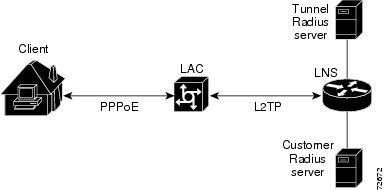
Figure 1 and the corresponding steps explain how this feature works.
Figure 1 LNS Remote RADIUS Tunnel Authentication and Authorization for L2TP Dial-in Calls Topology
•

Note
•
•
–
–
•
Note
RADIUS Vendor-Specific Attributes for Tunnel Authentication
To help implement tunnel authentication and authorization via a remote RADIUS server, the following two new Cisco-specific RADIUS attributes have been introduced:
•
•
Note
How to Configure a Remote RADIUS Server for Tunnel Authentication
This section contains the following procedures:
•
•
Configuring the LNS or LAC for Remote RADIUS Tunnel Authentication and Authorization
Use this task to configure an LNS or LAC for incoming dial-in or dial-out L2TP tunnel termination.
Prerequisites
Before configuring a LNS or LAC for remote RADIUS tunnel authentication and authorization, you should define a RADIUS server group. For information on completing this task, refer to the chapter "Configuring RADIUS" in the Cisco IOS Security Configuration Guide.
SUMMARY STEPS
1.
2.
3.
4.
5.
6.
DETAILED STEPS
Verifying Remote RADIUS Tunnel Authentication and Authorization Configurations
To verify that the L2TP tunnel is up, use the show vpdn tunnel command in EXEC mode. One tunnel and one session must be set up.
Router# show vpdn tunnelL2TP Tunnel and Session Information Total tunnels 1 sessions 1LocID RemID Remote Name State Remote Address Port Sessions VPDN Group4571 61568 csidtw13 est 10.0.195.4 1701 1 ?LocID RemID TunID Intf Username State Last Chg4 11 4571 Vi4.1 csidtw9@cisco.com est 00:02:29%No active L2F tunnels%No active PPTP tunnels%No active PPPoE tunnelsTo verify that the AAA authorization RADIUS server is configured on the LNS and that the LNS can receive attributes 90 and 69 from the RADIUS server, perform the following steps:
Step 1
Step 2
00:32:56: RADIUS: Received from id 21645/5 172.19.192.50:1645, Access-Accept, len 8100:32:56: RADIUS: authenticator 73 2B 1B C2 33 71 93 19 - 62 AC 3E BE 0D 13 14 8500:32:56: RADIUS: Service-Type [6] 6 Outbound [5]00:32:56: RADIUS: Tunnel-Type [64] 6 00:L2TP [3]00:32:56: RADIUS: Tunnel-Medium-Type [65] 6 00:IPv4 [1]00:32:56: RADIUS: Tunnel-Client-Auth-I[90] 6 00:"csidtw13"00:32:56: RADIUS: Tunnel-Password [69] 8 *00:32:56: RADIUS: Vendor, Cisco [26] 2900:32:56: RADIUS: Cisco AVpair [1] 23 "vpdn:vpdn-vtemplate=1"
To verify that the L2TP tunnel has been established and that the LNS can perform PPP negotiation and authentication with the remote client, perform the following steps:
Step 1
Step 2
00:38:50: ppp3 PPP: Received LOGIN Response from AAA = PASS00:38:50: ppp3 PPP: Phase is FORWARDING, Attempting Forward00:38:50: Vi4.1 Tnl/Sn4571/4 L2TP: Session state change from wait-for-service-selection to established00:38:50: Vi4.1 PPP: Phase is AUTHENTICATING, Authenticated User00:38:50: Vi4.1 CHAP: O SUCCESS id 1 len 4Step 3
00:38:50: Vi4.1 IPCP: State is Open00:38:50: Vi4.1 IPCP: Install route to 200.1.1.4
Configuration Examples for Tunnel Authentication via a Remote RADIUS Server
This section includes the following configuration examples:
•
•
Configuring an LNS for Remote RADIUS Tunnel Authentication: Example
The following example shows how to configure the LNS to enable remote RADIUS tunnel authentication and authorization:
! Define a RADIUS server groupRouter(config)# aaa group server radius VPDN-groupRouter(config-sg-radius)# server 64.102.48.91 auth-port 1645 acct-port 1646Router(config-sg-radius)# exit! RADIUS configurations onlyRouter(config)# aaa authorization network mymethodlist group VPDN-GroupRouter(config)# vpdn tunnel authorization network mymethodlistRouter(config)# vpdn tunnel authorization virtual-template 10RADIUS User Profile for Remote RADIUS Tunnel Authentication: Example
The following are examples of RADIUS user profiles for the LNS to terminate L2TP tunnels from a LAC. In the first user profile, the final line is optional if the vpdn tunnel authorization virtual-template command is used. Also, the first RADIUS user profile is for L2TP dial-in, and the second RADIUS user profile is for L2TP dial-out.
The service-type in the RADIUS user's profile for the tunnel initiator should always be set to "Outbound."
csidtw13 Password = "cisco"Service-Type = Outbound,Tunnel-Type = :0:L2TP,Tunnel-Medium-Type = :0:IP,Tunnel-Client-Auth-ID = :0:"csidtw13",Tunnel-Password = :0:"cisco"Cisco:Cisco-Avpair = "vpdn:vpdn-vtemplate=1"csidtw1 Password = "cisco"Service-Type = Outbound,Tunnel-Type = :0:L2TP,Tunnel-Medium-Type = :0:IP,Tunnel-Client-Auth-ID = :0:"csidtw1",Tunnel-Password = :0:"cisco"Cisco:Cisco-Avpair = "vpdn:dout-dialer=2"Additional References
The following sections provide references related to Tunnel Authentication via RADIUS on Tunnel Terminator.
Related Documents
Standards
MIBs
None
To locate and download MIBs for selected platforms, Cisco IOS releases, and feature sets, use Cisco MIB Locator found at the following URL:
RFCs
Technical Assistance
Command Reference
This section documents new commands. All other commands used with this feature are documented in the Cisco IOS Release 12.3 T command reference publications.
•
•
•
vpdn tunnel authorization network
To enable the L2TP network server (LNS) or the L2TP access concentrator (LAC) to perform remote authentication, authorization, and accounting (AAA) tunnel authentication and authorization, use the vpdn tunnel authorization network command in global configuration mode. To disable remote tunnel authentication and authorization and return to the default of local tunnel authentication and authorization, use the no form of this command.
vpdn tunnel authorization network {list-name | default}
no vpdn tunnel authorization network {list-name | default}
Syntax Description
Defaults
If this command is not enabled, the LNS or the LAC will perform authentication locally.
Command Modes
Global configuration
Command History
Usage Guidelines
Use this command to specify the authorization method list that will be used for remote tunnel hostname-based authorization. The method list (named or default) is defined using the aaa authorization network command.
If a method list for tunnel authorization is not specified via the aaa authorization network command, local authorization using the local virtual private dialup network (VPDN) group configuration will occur.
Note
Examples
The following example shows how to configure the LNS to enable remote RADIUS tunnel authentication and authorization:
! Define a RADIUS server groupRouter(config)# aaa group server radius VPDN-groupRouter(config-sg-radius)# server 10.102.48.91 auth-port 1645 acct-port 1646Router(config-sg-radius)# exitRouter(config)# aaa authorization network mymethodlist group VPDN-GroupRouter(config)# vpdn tunnel authorization network mymethodlistRouter(config)# vpdn tunnel authorization virtual-template 10Related Commands
vpdn tunnel authorization password
To configure a "dummy" password for the RADIUS authentication request to retrieve the tunnel configuration that is based on the remote tunnel host name, use the vpdn tunnel authorization password command in global configuration mode. To return to the default password, use the no form of this command.
vpdn tunnel authorization password password
no vpdn tunnel authorization password password
Syntax Description
Defaults
The password is set to "cisco."
Command Modes
Global configuration
Command History
Usage Guidelines
This command can be used on either the L2TP access concentrator (LAC) or L2TP network server (LNS) when remote RADIUS tunnel authentication is enabled.
Examples
The following example shows how to set the password to configure the LNS to enable remote RADIUS tunnel authentication and authorization and set the password to "mypassword":
Router(config)# aaa authorization network mymethodlist group VPDN-GroupRouter(config)# vpdn tunnel authorization network mymethodlistRouter(config)# vpdn tunnel authorization virtual-template 10Router(config)# vpdn tunnel authorization password mypasswordRelated Commands
vpdn tunnel authorization network
Enables the LNS or the LAC to perform remote AAA tunnel authentication and authorization.
vpdn tunnel authorization virtual-template
To select the default virtual template from which to clone virtual access interfaces, use the vpdn tunnel authorization virtual-template command in global configuration mode. To remove the default virtual template, use the no form of this command.
vpdn tunnel authorization virtual-template vtemplate-number
no vpdn tunnel authorization virtual-template vtemplate-number
Syntax Description
vtemplate-number
The default virtual template number that will be used for cloning on the local router. Valid values range from 1 to 200.
Defaults
No default behavior or values
Command Modes
Global configuration
Command History
Usage Guidelines
This command should be used if a virtual template is not specified in the local virtual private dialup network (VPDN) group (for local authentication) or in a remote RADIUS configuration (via the vpdn-vtemplate attribute).
Note
Examples
The following example shows how to configure the LNS to enable remote RADIUS tunnel authentication and authorization and how to specify a default virtual template:
! Define a RADIUS server groupRouter(config)# aaa group server radius VPDN-groupRouter(config-sg-radius)# server 10.102.48.91 auth-port 1645 acct-port 1646Router(config-sg-radius)# exit! RADIUS configurations onlyRouter(config)# aaa authorization network mymethodlist group VPDN-GroupRouter(config)# vpdn tunnel authorization network mymethodlist! Can be used for local vpdn-group tunnel authentication or remote RADIUS tunnel! authenticationRouter(config)# vpdn tunnel authorization virtual-template 10Related Commands
vpdn tunnel authorization network
Enables the LNS or the LAC to perform remote AAA tunnel authentication and authorization.

Copyright © 2002-2005 Cisco Systems, Inc. All rights reserved.
 Feedback
Contact Cisco
- Open a Support Case

- (Requires a Cisco Service Contract)
This Document Applies to These Products
- Collaboration Endpoints - Retired Products
- Conferencing - Retired Products
- Contact Center - Retired Products
- Optical Networking - Retired Products
- Routers - Retired Products
- Security - Retired Products
- Servers - Unified Computing (UCS) Retired Products
- Storage Networking Retired Products
- Switches - Retired Products
- Video - Retired Products
- Wireless - Retired Products