Cisco Service Control Mobile Solution Guide (LA), Release 3.6.x
Available Languages
Table Of Contents
Cisco Service Control Mobile Solution Guide, Release 3.6.x
Diameter Load Balancing and High Availability Schemes
Diameter Support Configuration
Diameter Forwarding Mode CLI Commands
Number of Subscriber IP Addresses Supported
Gx Subscriber Integration (None)
High Availability for the Gx Interface
Session not Shared With Stickiness.
Session Shared With Stickiness
Session Shared Without Stickiness
Load Balancing With Default High Availability
Time Based Quota (Consumption Time)
Quota Re-authorization Request
Supported Gy Messages and AVPs
Multiple Services Credit Control (MSCC) AVP
Gy Support Session and Call Flows
Configuring Subscriber Attribute Mapping
Accessing the Quota Profile Editor
Attaching the Quota Profile to a Package
Defining a Rule Using the Quota Profile
Failure Handling of an Initial CCR Message
Failure Handling of an Updated CCR Message
Detailed Flow Charts for Failover Scenarios
Subscriber Attributes and VSA Enhancements
Capturing Subscriber Attributes
Reporting Subscriber Attributes
Subscriber Attribute CLI Commands
Charging ID Mapping Table Guidelines
Charging ID Mapping Table CLI Commands
Obtaining Documentation and Submitting a Service Request
Solution guide
Cisco Service Control Mobile Solution Guide, Release 3.6.x
Revised: March 28, 2010, OL-21646-011 Introduction
This document introduces the Service Control Application-Broadband (SCA-BB) Release 3.6.x mobile solution.
As a part of this solution, SCA-BB 3.6.x supports the following reference point:
•
Gx reference point for policy provisioning as described in 3GPP TS 29.212 V7.2.0
•
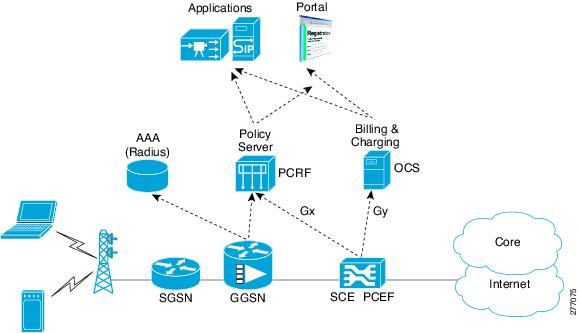
Figure 1 depicts the topology of the SCE mobile solution with respect to Gx and Ro reference points.
Figure 1 SCE Mobile Solution Topology
This section contains the following subsections:
Diameter Stack Introduction
The SCA-BB diameter stack serves the Gx and Gy interfaces. The infrastructure includes:
•
•
•
•
•
For additional information on the diameter stack, see the "Diameter Overview" section.
Gx Interface Introduction
The Gx interface is used to connect between the PCRF server and the SCE. Subscriber parameters, both SCE-specific (for example, package id), and non SCE-specific parameters, known as RADIUS VSAs, can be configured to the SCE through the Gx interface. The subscriber parameter update can be triggered both by SCE events, such as login and logout, and by PCRF external events.
Gx interface can also be used as an additional subscriber integration method. When using the Gx interface as a subscriber integration method, the PCRF provides the subscriber name in addition to the subscriber parameters.
For additional information on the Gx interface, see the "Gx Overview" section.
Gy Interface Introduction
The SCA-BB works with the Gy protocol interface in addition to working with SCE-propriety protocol for external quota management. The external quota management support is based on the current SCA-BB quota manager support.
For additional information on the Gy interface, see the "Gy Overview" section.
2 Diameter Overview
The diameter layer is responsible for maintaining connections to other diameter peers. This includes connecting to peers, sending watch dogs (keep alive), and disconnecting from peers.
The SCA-BB diameter infrastructure includes several components: the standard diameter stack, the Peer table, the Routing table, and the Forwarding Scheme table, which defines the forwarding method for each realm. The supported forwarding methods are High Availability (HA) and Load Balancing (LB).
The main entity in the diameter infrastructure is the Peer table. The Peer table includes all peers that the SCE should connect to at the transport level. Each peer is defined by an URI (usually ip:port).
Both the Routing table and the Peer table support online configuration, meaning add and remove commands are supported while diameter stack is up. Both the Peer table and the Routing table configurations are saved to the running configuration.
3 Supported Diameter Messages
The messages sent and received by the diameter infrastructure are as follows:
•
•
•
•
•
•
Figure 2 displays the typical connection flow diameter messages and responses.
Figure 2 Typical Connection Flow
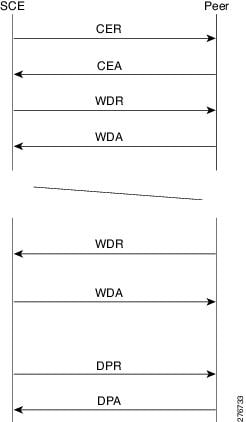
The SCE initiates the TCP connection (the only transport layer currently supported by SCE). After TCP connection is established, the SCE sends the CER message. The CER message is answered by the CEA message. At this stage the connection is up. The WDR and WDA messages are exchanged between the peers. The time gap between watch dog messages is defined by the Tx timer. If the peer is removed, the connection is gracefully closed by sending DPR the message and receiving the DPA message.
Peer State Machine
As shown in Figure 2, after the establishment of a connection and a successful exchange of CER and CEA messages, the peers begin sending watch dog messages. If three watch dog messages are not answered, the connection is disconnected and the connection is considered down. The SCE tries again to establish TCP connection once every Tx timer time interval. When TCP connection is reestablished, the peer connection is still considered down until three WDR messages and three WDA messages are exchanged.
Standard Diameter Stack
The standard diameter stack is used for sending and receiving diameter messages. The diameter stack supports both the Gx and Gy protocols. There is only one diameter stack instance.
The diameter stack includes the following general configurations:
•
•
•
•
The diameter stack holds general message statistics for non-application specific messages.
The diameter stack includes start and stop operations. To prevent state loss, the stack cannot be stopped while one of the interfaces is up
Peer Table
The Peer table holds a list of all the peers with which the SCE has a direct connection. The information for each entry includes:
•
•
•
Table 21 lists the CLI commands used to configure and monitor the Peer table.
Example for adding a peer:
SCE8000(config)#diameter peer test_peer peer-host 1.1.1.1
Note
Example for executing a show command:
SCE8000> show diameter peer-tablePeer Table:-------------------------------------------------------------| Name | Host | Port | State |-------------------------------------------------------------| SER_GX | 10.121.64.38 | 3869 | Up || SER_GY | 10.121.64.46 | 3870 | Up |-------------------------------------------------------------The Peer table lists the peers and their state. The state can be Up, Down, or N/A, which means the stack is not currently activated.
Note
Routing Table
The Routing table contains the peer application support and the forwarding scheme priority information. Each entry in the Routing table includes the peer name, supported application, realm, and priority.
When SCE sends an application message, it is sent to a realm and not to a specific server. In the Gx application there is one realm with many peers that supporting that realm. In the Gy application there can be several realms. Each peer can support both applications.
Table 2 lists the CLI commands used to configure and monitor the Routing table.
Example for adding a route:
SCE8000(config)# diameter realm test_realm.cisco.com Gy peer test_peer priority 95Example for showing the route table:
SCE8000> show diameter routing-table---------------------------------------------------------| Name | Realm | Application | Priority |---------------------------------------------------------| SER_GY | cisco.com | Gy | 0 || SER_GX | cisco.com | Gx | 0 |---------------------------------------------------------SCE8000>In the example, the peer named SER_GY supports the Gy application on the cisco.com realm.
4 Diameter Load Balancing and High Availability Schemes
The load balancing and high availability schemes are supported in diameter networks.
The diameter protocol sends messages to a realm and not to a specific server, letting other nodes in the diameter network take care of high availability (HA) and load balancing (LB) schemes. Some use cases in diameter networks require that LB and HA be handled by a network client. This is achieved by sending messages to a specific server that acts as the network client.
This section contains the following subsections:
For details of load balancing and failover troubleshooting for the Gx interface, refer to the "High Availability for the Gx Interface" section. For details of load balancing and failover troubleshooting for the Gy interface, see the "Gy Interface Failover Support" section.
Forwarding Scheme Table
The Forwarding Scheme table defines the LB and HA scheme per each realm and application (one scheme per each combination of Realm and application).
The following options are supported:
•
•
Table 3 lists the forwarding scheme examples for load balancing and high availability. For information on configuring the diameter forwarding scheme, see the "Diameter Forwarding Mode CLI Commands" section.
Load Balancing
Load balancing is completed by round robin, using the available servers. The available servers are round robin cycled per session and not per message, meaning the messages for a specific session are all sent to the same server.
When a server fails, it is removed from the round robin.
If a server is removed from the round robin and a session has already initiated, then an alternative server completes the session. It is up to the application whether to start a new session or continue with the alternate server. For information on configuring the load balancing scheme, see the"Diameter Forwarding Mode CLI Commands" section.
High Availability (Failover)
When the high availably scheme is used, there is no load balancing between servers. The high availability scheme is strictly an active/standby scheme.
Each server is assigned a priority. Only the server with the highest priority handles the session. When the active server fails, all new sessions will be started on the next server in the priority list order. This mode supports stickiness, meaning when a failed server is back up, new sessions are forwarded to it, but already existing sessions remain forwarded to the secondary server unless transferred by an application decision. For information on configuring the high availability (failover) scheme, see the "Diameter Forwarding Mode CLI Commands" section.
5 Diameter Support Configuration
This section contains the information and instructions to configure and monitor the diameter forwarding, load balancing, and high availability schemes. This section contains the following subsections:
•
Diameter Stack CLI Commands
Table 4 lists the CLI commands used to configure and monitor diameter stack support. All the commands, except origin realm and port, can be set while stack is running.
Example for showing the diameter counters:
SCE8000> show diameter countersWDR Sent : 150WDR Received : 182WDA Sent : 182WDA Received : 150CER Sent : 3CER Received : 0CEA Sent : 0CEA Received : 3DPR Sent : 0PDA Sent : 1Diameter Forwarding Mode CLI Commands
Table 5 lists the CLI commands used to configure and monitor the diameter forwarding mode.
Example for configuring load balancing:
SCE8000(config)# diameter realm test_realm.cisco.com Gx forwarding-mode load-balancingExample for configuring high availability:
SCE8000(config)# diameter realm realm test_realm.cisco.com Gy forwarding-mode high-availability
shared-session-on stickiness-off
6 Gx Overview
Generally speaking, Gx interface may be used for two purposes:
1.
Subscriber parameters may be updated either by SCE or by PCRF triggering. SCE initiated updates are mostly generated by login events, which result in sending CCR Initial/Update messages to the PCRF. PCRF can initiate an update by sending a RAR message to the SCE.
Refer to the following sections for detailed information.
2.
Gx subscriber integration is used by setting Gx as anonymous-group manager (similar to SM pull mode).
Refer to the following sections for detailed information.
Number of Subscriber IP Addresses Supported
The SCE supports a single IP per subscriber when the Gx interface is used.
7 Gx Subscriber Properties
The PCRF provides the SCE with the SCA-BB related proprieties and the RADIUS VSAs properties.
SCA-BB Related Properties
The SCA-BB related proprieties provided by the PCRF to the SCE are:
•
•
•
•
RADIUS VSAs
Note
The RADIUS VSAs provided by the PCRF to the SCE are:
•
•
•
•
•
•
8 Gx Session
The Gx session is the basic Gx entity and it is uniquely describes a subscriber and single IP mapping. The session is identified by a unique string (called session-id) and it is created both on the server and the SCE. Each Gx message must include the session-id AVP, which identifies the session that the message refers to.
Session Creation
The Gx session creation is initiated by the SCE. Session creation includes CCR (Credit Control Request) and CCA (Credit Control Answer) messages exchange. The SCE sends a CCR Initial message to the PCRF; the PCRF answers with CCA (Credit Control Answer) message.
On the Initial CCR, the SCE sends the subscriber IP and subscriber name (if no Gx integration is used). The PCRF replies with a CCA Initial message, which includes a subset of the subscriber parameters. Once the SCE receives a successful CCA Initial message (including a result AVP with success) , the session is successfully opened. If the PCRF CCA Initial message includes error codes, then the session is not created, and the SCE will attempt to reopen it later.
Session Life Time
During the life time of a Gx session the following messages can be sent:
CCR Update: Similar to CCR Initial, except that the session is already opened. The SCE asks the PCRF for updates on the parameters.
RAR: Message sent from the PCRF to the SCE to update subscriber parameters. In this case, an external event causes the PCRF to update the subscriber parameters and send the updates to the SCE.
Session Ends
A session may be ended in either of two ways:
•
•
Gx Session Life Cycle
The Gx session life cycle varies depending upon the whether or not subscriber integration is external (set as none) or internal. The following sections describe both Gx session life cycles.
Gx Subscriber Integration (None)
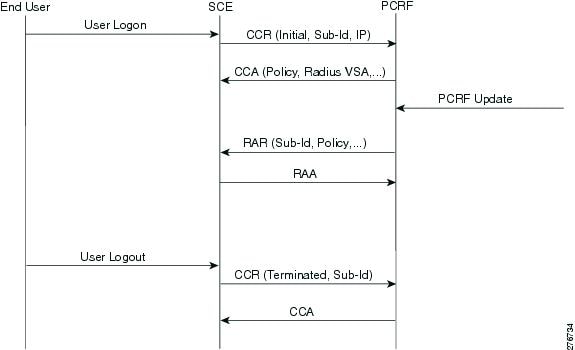
When using an external subscriber integration method such as SM, the Gx session is created upon login of the subscriber. The subscriber is logged in to the SCE by the external API (SM for example). When the login process is complete, the SCE tries to open a Gx session for the subscriber and IP tuple. Once the session is created, (the PCRF responded with a successful CCA Initial), the subscriber parameters are extracted from the CCA message and updated. As described earlier, the PCRF may send a RAR message to the SCE during the life time of the session. CCR Updates may be sent to the PCRF as a result of the external API, such as SM sync.
The Gx session is terminated when the external API in use logouts the subscriber. It is allowed to terminate the session by sending an ASR message from the PCRF, although in this case it will not trigger subscriber logout.
Figure 3 shows a typical flow of session messages. The flow starts when a subscriber is logged into the SCE, triggering a CCR and CCA message exchange. The session ends by user explicit logout, which terminates the session.
Figure 3 Gx Subscriber Integration (None) Flow
Gx Subscriber Integration
Gx session life cycle is slightly different when using the Gx as the subscriber integration method. In this setting, the SCE starts the Gx session upon identifying anonymous IP that belongs to the Gx anonymous-group (similar to SM pull, where a pull notification is created). However, in this case the SCE does not know the subscriber name, and therefore it is not sent as part of the CCR Initial message. The PCRF responds with a CCA Initial message that includes the subscriber name. The SCE logs in the subscriber and IP mapping to the SCE, together with the subscriber parameters. The Gx session may terminate in two ways, by aging, which will generate subscriber logout , or by CCR Terminate, with the PCRF ending the session by sending ASR. In this scenario, the ASR also logs out the subscriber from the SCE because the Gx is the subscriber owner.
Figure 4 Gx Anonymous-Group Flow
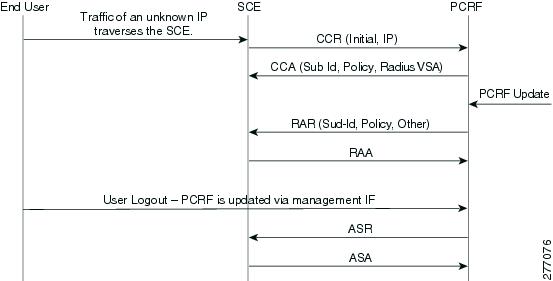
In both scenarios, the PCRF may send a RAR in order to update the subscriber parameters.
Note
9 Gx Supported Messages
The following messages are supported:
•
CCR Inititate is sent by the SCE to the PCRF (Gx Server) upon login of a subscriber (for example, using SceSubsciberAPI) or upon new flow mapped to a Gx anonymous group. Upon login, the CCR includes parameters that identify the subscriber to the PCRF, such as Framed-ip and Subscription-Id (not on anonymous-group).
CCR Terminate is sent on logout.
•
–
–
•
•
•
•
Credit Control Request (CCR)
'R' bit set
SCE to PCRF
Sent to:
•
•
Message Format:
<CC-Request> ::= < Diameter Header: 272, REQ, PXY >< Session-Id >{ Auth-Application-Id }{ Origin-Host }{ Origin-Realm }{ Destination-Realm }{ CC-Request-Type }{ CC-Request-Number }[ Destination-Host ][ Framed-IP-Address ][ Subscription-Id ]Message Response:
•
•
•
•
•
CC-Request-Number is a unique number within a session-id.Framed-IP-Address and Subscription-Id will be sent depending on the use case.
Use case 1: Login mode.
•
•
•
•
Use case 2: Pull mode.
•
•
•
Sample Message Login mode:
Version = 1Message Length = XXXCommand Flags = REQ, PXYCommand Code = Credit-Control-Request (272)Application Id = 16777238AVPsSession-Id = "gx_sce.cisco.com;0;XXXXXX;10.10.1.10"Auth-Application-Id = 16777238Origin-Host = "10.101.23.34"Origin-Realm = "sce"Destination-Realm = "att.com"Destination-Host = "PCRF host"CC-Request-Type = INITIAL_REQUEST (1)CC-Request-Number = 0Framed-IP-Address = 10.10.1.10Subscription-Id = 05412345566Sample Message Pull mode:
Version = 1Message Length = XXXCommand Flags = REQ, PXYCommand Code = Credit-Control-Request (272)Application Id = 16777238AVPsSession-Id = "gx_sce.cisco.com;0;XXXXXX;10.10.1.10"Auth-Application-Id = 16777238Origin-Host = "10.101.23.34"Origin-Realm = "sce"Destination-Realm = "att.com"Destination-Host = "PCRF host"CC-Request-Type = INITIAL_REQUEST (1)CC-Request-Number = 0Framed-IP-Address = 10.10.1.10Credit Control Answer (CCA)
'R' bit cleared
PCRF to SCE
Sent in response to the CCR command. Used to provision SCE rules and event triggers for the subscriber.
Message Format:
<CC-Answer> ::= < Diameter Header: 272, PXY >< Session-Id >{ Auth-Application-Id }{ Origin-Host }{ Origin-Realm }{ CC-Request-Type }{ CC-Request-Number }{ Subscription-Id }[ Cisco-SCA-BB-Package-Install ][ Cisco-SCA-BB-Real-time-monitor ][ Cisco-SCA-BB-Vlink-Upstream-Install ][ Cisco-SCA-BB-Vlink-Downstream-Install ][ PS-Information ][3GPP-GGSN-Address][3GPP-SGSN-Address][3GPP-Charging-Id][Called-Session-Id][3GPP-GPRS-QoS-Negotiated-Profile][3GPP-PDP-Type][3GPP-SGSN-MCC-MNC][3GPP-GGSN-MCC-MNC][3GPP-Charging-Characteristics][3GPP-RAT-Type][3GPP-Selection-Mode][3GPP-NSAPI][3GPP-MS-Timezone][3GPP-User-Location-Info][Acct-Multi-Session-ID][Acct-Session-ID][Acct-Session-Time][Calling-Station-ID][Class][CUI][Framed-IP-Address][NAS-Identifier][NAS-IP-Address][NAS-Port-Type][User-Name][3GPP-GGSN-Address-Code-7][3GPP-IMEISV][3GPP-IMSI][3GPP-CG-Address][3GPP-SGSN-Address-Code-6][WiMax-Active-Time][WiMax-BSID]Message Response:
•
•
•
•
•
•
•
•
•
•
Radius VSA attributes:
•
•
•
•
•
For Login mode, only the Cisco-SCA-BB-Package-Install is mandatory. For Pull mode, both Cisco-SCA-BB-Package-Install and Subscription-Id Avps are mandatory. Additional attributes are sorted and can be used by other interfaces such Gy.
Sample Message:
Version = 1Message Length = XXXCommand Flags = PXYCommand Code = Credit-Control-Answer (272)Application Id = 16777238AVPsSession-Id = "gx_sce.cisco.com;0;XXXXXX;10.10.1.10"Auth-Application-Id = 16777238Origin-Host = "PCRF host"Origin-Realm = "PCRF Realm"CC-Request-Type = INITIAL_REQUEST (1)CC-Request-Number = 0Subscription-Id = 05412345566Cisco-SCA-BB-Package-Install = 5Cisco-SCA-BB-Real-time-monitor = 1Re-Authorize Request (RAR)
Message Format:
<RA-Request> ::= < Diameter Header: 258, REQ, PXY >< Session-Id >{ Auth-Application-Id }{ Origin-Host }{ Origin-Realm }{ Destination-Realm }{ Destination-Host }{ Re-Auth-Request-Type }[ Framed-IP-Address ]{ Subscription-Id }[ Cisco-SCA-BB-Package-Install ][ Cisco-SCA-BB-Real-time-monitor ][ Cisco-SCA-BB-Vlink-Upstream-Install ][ Cisco-SCA-BB-Vlink-Downstream-Install ][ PS-Information ][3GPP-GGSN-Address][3GPP-SGSN-Address][3GPP-Charging-Id][Called-Session-Id][3GPP-GPRS-QoS-Negotiated-Profile][3GPP-PDP-Type][3GPP-SGSN-MCC-MNC][3GPP-GGSN-MCC-MNC][3GPP-Charging-Characteristics][3GPP-RAT-Type][3GPP-Selection-Mode][3GPP-NSAPI][3GPP-MS-Timezone][3GPP-User-Location-Info][Acct-Multi-Session-ID][Acct-Session-ID][Acct-Session-Time][Calling-Station-ID][Class][CUI][NAS-Identifier][NAS-IP-Address][NAS-Port-Type][User-Name][3GPP-GGSN-Address-Code-7][3GPP-IMEISV][3GPP-IMSI][3GPP-CG-Address][3GPP-SGSN-Address-Code-6][WiMax-Active-Time][WiMax-BSID]Same behavior as in CCA initial.
Sample Message:
Version = 1Message Length = XXXCommand Flags = REQ, PXYCommand Code = Re-Auth-Request (258)Application Id = 16777238AVPsSession-Id = "gx_sce.cisco.com;0;XXXXXX;10.10.1.10"Auth-Application-Id = 16777238Origin-Host = "PCRF Host"Origin-Realm = "PCRF Realm"Destination-Realm = "SCE Realm"Destination-Host = "SCE Host"Re-Auth-Request-Type = AUTHORIZE_ONLY (0)Framed-IP-Address = 10.1.1.1Subsscription-Id = 05412321312Cisco-SCA-BB-Package-Install = 5Re-Authorize Answer (RAA)
'R' bit cleared
SCE to PCRF
Sent in response to the RAR command.
Message Format:
<RA-Answer> ::= < Diameter Header: 258, PXY >< Session-Id >{ Origin-Host }{ Origin-Realm }[ Result-Code ][ Error-Message ]Sample Message:
Version = 1Message Length = XXXCommand Flags = REQ, PXYCommand Code = Re-Auth-Request (258)Application Id = 16777238AVPsSession-Id = "gx_sce.cisco.com;0;XXXXXX;10.10.1.10"Auth-Application-Id = 16777238Origin-Host = "PCRF Host"Origin-Realm = "PCRF Realm"Error-Code = DIAMETER_SUCCESSAbort Session Request (ASR)
Message Format:
<ASR> ::= < Diameter Header: 274, PXY >< Session-Id >{ Origin-Host }{ Origin-Realm }{ Destination-Realm }{ Destination-Host }{ Auth-Application-Id }Message Response:
•
•
•
•
Sample Message:
Version				= 1
Message Length				= XXX
Command Flags = REQ, PXYCommand Code = Re-Auth-Request (274)Application Id = 16777238AVPsSession-Id = "gx_sce.cisco.com;0;XXXXXX;10.10.1.10"Auth-Application-Id = 16777238Origin-Host = "PCRF Host"Origin-Realm = "PCRF Realm"Destination-Realm = "att.com"Destination-Host = "PCRF host"Auth=Application-id = 16777238Abort Session Answer (ASA)
•
•
•
•
Message Format:
<ASA> ::= < Diameter Header: 274, PXY >< Session-Id >{ Result-Code }{ Origin-Host }{ Origin-Realm }[ Error-Message]Result-Code see above.
Message Response:
•
•
•
Sample Message:
Version = 1Message Length = XXXCommand Flags = REQ, PXYCommand Code = Re-Auth-Request (274)Application Id = 16777238AVPsSession-Id = "gx_sce.cisco.com;0;XXXXXX;10.10.1.10"Result-Code = DIAMETER_SUCCESSOrigin-Host = "PCRF Host"Origin-Realm = "PCRF Realm"10 Gx Support Configuration
This section contains the information and instructions to configure and monitor the Gx support configuration. This section contains the following subsections:
Gx Interface CLI Commands
Table 6 lists the CLI commands used to configure and monitor the Gx interface.
Example for showing the Gx configuration:
SCE8000> show diameter gxGx Application Status : UpGx Realm : scos.comGx tx-timer : 5Gx PCRF-connection-failure-grace-time : 150Gx fatal-grace-time : 300ConnectedConfiguring Gx Support
To configure Gx support using the CLI, see the "Gx Interface CLI Commands" section.
11 High Availability for the Gx Interface
Two parameters define the High Availability (HA) behavior:
•
•
A server is defined to be in failure mode if the underlying diameter connection fails and cannot recover for the configurable grace time. Fatal mode is defined as being when all servers are in failure mode and no connections exist to at least one PCRF.
Session not Shared With Stickiness.
When the primary server fails, all the sessions managed by that server are migrated to the next server in a controlled manner (limited by the maximum rate allowed).
If the subscriber is being managed by the Gx session, the subscriber is logged out. On the next traffic generating event, the subscriber logs in on different server. If the subscriber is managed by another method, only the Gx session is closed and the session reopens on the secondary server.
Eventually all subscribers perform re-logging and migrate to the secondary server. Once the primary server is up, new sessions are forwarded to it. The migrated sessions on the secondary server continue on the secondary server until logout or failure.
In this scheme, a server failure causes a long convergence time.
In the case of fatal mode, all Gx managed subscribers are logged out and all other subscribers remain with their last configuration. When connection is resumed, the SCE reopens all non-Gx managed sessions and the Gx managed sessions are triggered by traffic.
Example:
Servers A, B, and C with priority 100, 99, and 98 respectively.
1.
2.
3.
4.
Session Shared With Stickiness
In this scheme the servers are sharing the session. When primary server is down all the existing sessions will be handled by the secondary server. No re-login is required.
When the primary server is up again, then all new sessions are handled by it, while old sessions that were moved to secondary server remain on the secondary server until logout.
Fatal mode works the same as above.
Example:
Servers A, B, and C with priority 100, 99, and 98 respectively.
1.
2.
3.
4.
Session Shared Without Stickiness
Same as the session shared with stickiness with the exception that when the primary server recovers, all sessions are re-forwarded to it.
The fatal node works the same as session shared with stickiness.
Example:
Servers A, B, and C with priority 100, 99, and 98 respectively.
1.
2.
3.
4.
Load Balancing With Default High Availability
Load balancing is always done by round robin per available servers. Round robin is done per session and not per message, meaning all messages for a specific session are sent to the same server.
When a server fails, it is removed from the round robin.
If a server is removed and a session is already initiated, the session fails, using the session shared without stickiness scheme. The session will reopen on a new server and remain with that server.
12 Gy Overview
The SCA-BB Release 3.6.x support of the Gy protocol is divided into two components. The two components reside on the control plane and the data plane, as shown in Figure 5.
Figure 5 Gy Interface Adapter
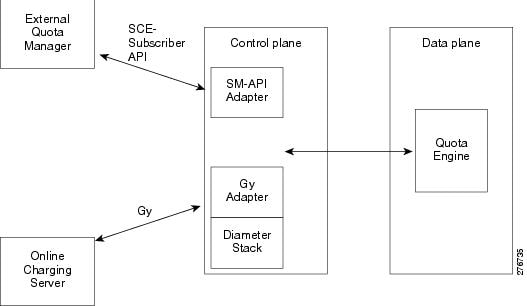
Gy Adapter (Control Plane)
The Gy adapter:
•
•
–
•
•
•
•
SM-API Adapter (Control Plane)
The SM-API Adapter:
•
•
•
Quota Engine (Data Plane)
The quota engine:
•
•
–
–
–
–
–
•
13 Gy Quota Model
The SCA-BB supports three Quota Management operational and integration models that allow gradual investment and trade-off between integration/deployment complexity and functional offering:
•
•
•
The Gy quota model enables the Gy interface adapter to be used for the external quota management. The Gy quota model is based on session charging with central unit determination. The configuration of the quota buckets is controlled by an external OCS (for example, bucket type and post-breach action). In the Gy quota model, two subscribers from the same package can use different buckets, with different sizes and post breach actions. In the Gy quota model, service association to buckets is completed using the SCE Console. For additional configuration information using the SCE Console, see the "Gy Interface Failover Support" section.
When the Gy type of quota management is used:
•
•
•
The Gy quota model supports the following quota types:
•
•
•
•
The quota time being consumed is measured as service usage duration with either no idle time or minimum idle time. The time quota being consumed is referred to as quota consuming time (QCT). When the quota is granted, a QCT can be assigned. If QCT is not assigned, a default value per service is used.
The quota usage sampling frequency is set to 30 seconds by default and the sampling is completed once every 32 packets assuming non-trivial activity. In case of trivial activity for more than the sampling time, the system charges per the sampling unit. For example, in case of trivial activity of 2 minutes, the charging is 30 seconds.
When upstream-downstream volume is in used, the debit is completed separately per upstream and downstream.
Additional Gy quota information is contained in the following sections:
•
Time Based Quota (Consumption Time)
The SCE allows the definition of time based quota buckets and accounts for subscriber usage in seconds. The up and down volume and number of sessions are not critical when using time based quota management. The subscriber usage is accumulated as long as the subscriber has at least one active session. The server can specify a QCT for each bucket. The specified Quota Consumption Time is the maximum idle time that is accounted as quota usage. As shown in Figure 6, when the idle period is less than the consumption time, it is counted as subscriber usage, but when the idle time is greater than consumption time, it is not accounted for.
Figure 6 Quota Consumption Time
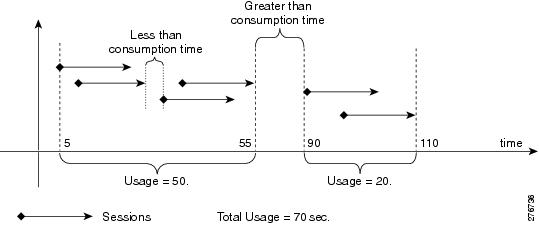
If a consumption time is not provided by the server, the SCE uses the default consumption time.
Timers
The supported quota timers are the Quota Validity Time and the Quota Holding Time.
Quota Validity Time
Quota Validity time is defined by the server for each bucket. The time is measured in seconds. Validity time indicates how long the SCE (or subscriber) can use the quota as shown in Figure 7.
Figure 7 Quota Validity Time
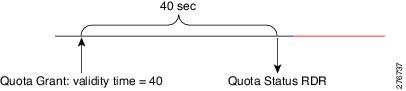
If the server does not provide a quota validity time, the default validity time is used. The default validity time is defined per bucket per package in the GUI.
After the given time expiration, the SCE sends an Quota Status RDR and invalidates bucket quota. It is a server responsibility to update the bucket quota and action again. In the case of no response from the server, the bucket state is changed to error and an error action is applied to all associated flows.
In case of validity timer expiration, the Quota Status RDR is sent even if the server has specified Final Unit Indication.
Quota Holding Time
Quota Holding time is defined by the server for each bucket. The time is measured in seconds. Holding time indicates how long the SCE is allowed to hold quota without any usage. The SCE resets the timer each time it detects subscriber activity on a flow that is associated with the bucket as shown in Figure 8.
Figure 8 Quota Holding Time
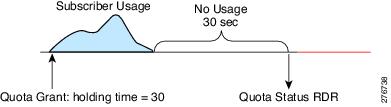
If the server does not provide a bucket holding time, the default holding time is used. The default holding time is defined per bucket per package in the GUI.
After the given time expiration, the SCE sends the Quota Status RDR and invalidates the bucket quota. It is a server responsibility to update the bucket quota and action again. In the case of no response from the server, the bucket state is changed to error and an error action is applied to all associated flows.
In the case of a quota holding timer expiration, the Quota Status RDR is sent even if the server has specified Final Unit Indication.
Quota Request
Quota requests are sent upon an attempt to use a service with no quota available, unless the service already received an indication that quota is not available (for example, a request quota was sent, and the reply was `no quota available').
Quota requests can be sent upon login, even before any attempt to use the a service was executed, if the service is marked to request quota upon login. Quota requested upon login is configured per service package. The default is not to request quota upon login.
The quota count is started before the first grant. The only exception is very short flows, which end before the quota is granted.
When a quota request occurs upon threshold, the quota keeps being counted after the quota request is sent. Once the quota is granted, the already consumed quota is treated as consumed and subtracted from the granted quota.
If the external server is used to trigger quota request, quota re-authorization request should be used.
Quota Re-authorization Request
When the quota needs to be reauthorized, a debit request for the measured consumed quota (if it exists) is sent, asking for new quota. When the response arrives, it overrides the existing quota.
A reauthorization request is sent upon the following events:
•
•
•
•
•
The validity time and QHT may be provided with the quota grant. If the validity time and QHT are not specified, a default value is used. The default value is configured per bucket or package.
Quota Threshold and Breach
The quota threshold and breach actions are defined per quota. If quota threshold and breach are not specified, default values configured per service or package are used.
The supported quota threshold and breach actions are:
•
•
•
•
In addition, the actions may include sending a predefined notification. The notification is predefined on the Quota management table.
Tariff Time Change
Pre-tariff time change and post-tariff time change is reported in the quota debit request. The tariff change time is given per quota and is measured as seconds since 1.1.1900 (32 bits).
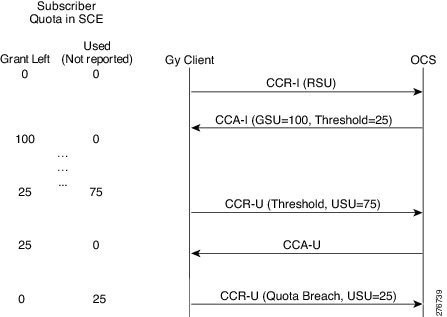
Gy Quota Threshold Call Flow
Figure 9 illustrates the Gy quota threshold call flow.
Figure 9 Gy Quota Threshold Call Flow
14 Gy Supported Messages
The following messages are supported on the Gy interface:
Credit Control Request (CCR)—Used between the SCE and the OCS to request credit authorization for a given service.
Credit Control Answer (CCA)—Used between the credit-control server and the SCE to acknowledge a Credit-Control-Request command. The SCE listens to the CCA messages and updates the SCA-BB with quota grants, failure conditions, and result codes. The CCA message is also used for failure indication and failure handling.
CCA Message Format—Sent by any server to the access device that is providing session service, to request that the user be re-authenticated or be re-authorized. In the SCE Gy implementation, RAR messages are used by the OCS to request usage information on either a specific bucket-id or all buckets. The SCE listens to RAR messages and signals SCA-BB to send usage information to the OCS. RAR messages arrive in an asynchronous manner from the server and with no correlation to any request completed by the SCE.
RAA Message Format—Sent in response to the RAR message. The Result-Code AVP must be present and indicate the disposition of the request. A successful RAA message must be followed by an application-specific authentication and/or authorization message. This message is sent by the Gy application in response to RAR right after the SCA-BB is notified that a RAR message has been received.
This section includes:
•
•
Credit Control Request (CCR)
'R' bit set
SCE to OCS
Sent to request credit authorization for a given service.
The Auth-Application-Id is set to the value 4, indicating the Diameter credit-control application.
Table 7 lists the CCR message structure.
Table 7 CCR Message Structure
(Code / Vendor-id)Session-Id
M1
263
String
Format: "<origin-host>;
<subscription-id>;
<session_start_time>Session-Id
Origin-Host
M
264
DiameterIdentifier
Box IP
Origin-Realm
M
296
DiameterIdentifier
Configured value
Destination-Realm
M
283
DiameterIdentifier
Configured value in CCR (Initial). For subsequent CCRs, the Origin-Realm received in the last CCA is used as Destination-Realm.
Destination-Host
Oc2
293
DiameterIdentifier
Not sent in the first CCR message. The Origin-Host in the CCA is used as Destination-Host in the next CCR message.
Auth-Application-Id
M
258
4
Value for DCCA
Service-Context-Identifier
M
461
—
—
CC-Request-Type
M
416
1 = INITIAL_REQUEST
2 = UPDATE_REQUEST
3 = TERMINATION_
REQUEST4 = EVENT_REQUEST
Type "EVENT_REQUEST" is not supported.
CC-Request-Number
M
415
A monotonically increasing number
A value of "0" is used for CCR (INITIAL_REQUEST)
Event-Timestamp
Oc
55
Time when quota is requested
—
Subscription-Id
Om3
443
Grouped AVP
A grouped AVP consisting of Subscription-Id-Type and Subscription-Id-Data
Subscription-Id-Type
Om
450
END_USER_E164 (0)
—
Subscription-Id-Data
Om
444
MSISDN (string)
—
Termination-Cause
Oc
295
Integer value (as per RFC 3588)
Only sent in CCR (FINAL)
Multiple-Services-Indicator
Om
455
MULTIPLE_SERVICES_SUPPORTED (1)
Present only in CCR (INITIAL)
Multiple-Services-Credit-
Control (see separate description for MSCC)Om
456
Grouped AVP
See MSCC table. Multiple of these attributes can be present. Contains the usage for each category.
Service-Information AVP
Om
—
Grouped AVP
—
PS-Information
Om
—
Grouped AVP
—
Called-Station-Id
Oc
30
APN name (string)
(in PS-Information)
SGSN-Address
Oc
1228
IPv4 Address
Subscriber attributes
3GPP-GPRS-QoS-
Negotiated-profileOc
5/10415
Negotiated QoS profile
QoS profile of the Primary PDP context will be sent. However if a primary PDP is deleted before the secondary PDPs, then subsequent CCR messages will contain the negotiated QoS of the first Secondary PDP context. (Subscriber attributes, received from Gx or SCE subscriber API), (in PS-Information)
3GPP-SGSN-MCC-MNC
Oc
18/10415
—
Subscriber attributes, received from Gx or SCE subscriber API, (in PS-Information)
3GPP-Charging-
CharacteristicsOc
13/10415
Charging Char received from SGSN
—
1 This parameter is Mandatory and must be present in the event/CDR.
2 This is a parameter that, if provisioned by the operator to be present, is included in the events/CDRs when the specified conditions are met. In other words, an Oc parameter that is configured to be present is a conditional parameter.
3 This is a parameter that, if provisioned by the operator to be present, is included in the events/CDRs. In other words, an Om parameter that is provisioned to be present is a mandatory parameter.
CCR Message Formats
CCR INITIAL MESSAGE FIELDS
<Credit-Control-Request> ::= < Session-Id >{ Origin-Host }{ Origin-Realm }{ Destination-Realm }{ Auth-Application-Id }{ Service-Context-Id }{ CC-Request-Type }{ CC-Request-Number }[ Event-Timestamp ]*[ Subscription-Id ]{ Subscription-Id-Type }{ Subscription-Id-Data }[ Multiple-Services-Indicator ]*[ Multiple-Services-Credit-Control ][ Requested-Service-Unit ]*[ Service-Identifier ][ Rating-Group ][ Service-Information ][ PS-Information ][3GPP-GGSN-Address][3GPP-SGSN-Address][3GPP-Charging-Id][Called-Session-Id][3GPP-GPRS-QoS-Negotiated-Profile][3GPP-PDP-Type][3GPP-SGSN-MCC-MNC][3GPP-GGSN-MCC-MNC][3GPP-Charging-Characteristics][3GPP-RAT-Type][3GPP-Selection-Mode][3GPP-NSAPI][3GPP-MS-Timezone][3GPP-User-Location-Info][Acct-Multi-Session-ID][Acct-Session-ID][Acct-Session-Time][Calling-Station-ID][Class][CUI][Framed-IP-Address][NAS-Identifier][NAS-IP-Address][NAS-Port-Type][User-Name][3GPP-GGSN-Address-Code-7][3GPP-IMEISV][3GPP-IMSI][3GPP-CG-Address][3GPP-SGSN-Address-Code-6][WiMax-Active-Time][WiMax-BSID]CCR UPDATE MESSAGE FIELDS
<Credit-Control-Request> ::= < Session-Id >{ Origin-Host }{ Origin-Realm }{ Destination-Realm }{ Auth-Application-Id }{ Service-Context-Id }{ CC-Request-Type }{ CC-Request-Number }[ Destination-Host ][ Event-Timestamp ]*[ Subscription-Id ]{ Subscription-Id-Type }{ Subscription-Id-Data }*[ Multiple-Services-Credit-Control ]*[ Used-Service-Unit ][ Tariff-Change-Usage ][ CC-Time ][ CC-Total-Octets ][ CC-Service-Specific-Units ][ Reporting-Reason ][ CC-Input-Octets ][ CC-Output-Octets ]*[ Service-Identifier ][ Rating-Group ][ Service-Information ][PS-Information ][3GPP-GGSN-Address][3GPP-SGSN-Address][3GPP-Charging-Id][Called-Session-Id][3GPP-GPRS-QoS-Negotiated-Profile][3GPP-PDP-Type][3GPP-SGSN-MCC-MNC][3GPP-GGSN-MCC-MNC][3GPP-Charging-Characteristics][3GPP-RAT-Type][3GPP-Selection-Mode][3GPP-NSAPI][3GPP-MS-Timezone][3GPP-User-Location-Info][Acct-Multi-Session-ID][Acct-Session-ID][Acct-Session-Time][Calling-Station-ID][Class][CUI][Framed-IP-Address][NAS-Identifier][NAS-IP-Address][NAS-Port-Type][User-Name][3GPP-GGSN-Address-Code-7][3GPP-IMEISV][3GPP-IMSI][3GPP-CG-Address][3GPP-SGSN-Address-Code-6][WiMax-Active-Time][WiMax-BSID]CCR FINAL MESSAGE FIELDS
<Credit-Control-Request> ::= < Session-Id >{ Origin-Host }{ Origin-Realm }{ Destination-Realm }{ Auth-Application-Id }{ Service-Context-Id }{ CC-Request-Type }{ CC-Request-Number }[ Destination-Host ][ Event-Timestamp ]*[ Subscription-Id ]{ Subscription-Id-Type }{ Subscription-Id-Data }[ Termination-Cause ]*[ Multiple-Services-Credit-Control ]*[ Used-Service-Unit ][ Tariff-Change-Usage ][ CC-Time ][ CC-Total-Octets ][ CC-Service-Specific-Units ][ Reporting-Reason ][ CC-Input-Octets ][ CC-Output-Octets ]*[ Service-Identifier ][ Rating-Group ]Credit Control Answer (CCA)
'R' bit cleared
credit-control server to SCE
Sent to acknowledge a Credit-Control-Request command.
The SCE listens to CCA messages and updates SCA-BB with grant quotas, failure conditions, and result codes. CCA is also used for failure indication and failure handling.
Table 8 lists the CCA message structure.
Table 8 CCA Message Structure
(Code / Vendor-Id)Session-Id
M1
263
String
Origin-Host
M
264
DiameterIdentifier
Address of DCCA server
Origin-Realm
M
296
DiameterIdentifier
Realm of DCCA server
Result-Code
M
268
Integer value (as per RFC 3588 & DCCA draft)
—
Auth-Application-Id
M
258
4
Value for DCCA
CC-Request-Type
M
416
1 = INITIAL_REQUEST
2 = UPDATE_REQUEST
3 = TERMINATION_
REQUEST4 = EVENT_REQUEST
Value 4 (Event) is not supported.
CC-Request-Number
M
415
Same as the one sent in corresponding CCR message
—
CC-Session-Failover
Oc2
—
—
—
Multiple-Services-Credit-Control
Om3
456
Grouped AVP
Contains the quota granted. There can be multiple instances of this attribute, one for each category.
Service-Context-Id
Oc
—
—
—
Subscription-Id
Oc
—
—
—
CC-Failure-Handling
Oc
—
—
—
Failed-AVP
Oc
279
Grouped AVP. Contains the list of attributes causing failure condition
Optionally present if the Result-Code is not SUCCESS, there could be multiple instances of this AVP.
1 This parameter is Mandatory and must be present in the event/CDR.
2 This is a parameter that, if provisioned by the operator to be present, is included in the events/CDRs when the specified conditions are met. In other words, an Oc parameter that is configured to be present is a conditional parameter.
3 This is a parameter that, if provisioned by the operator to be present, is included in the events/CDRs. In other words, an Om parameter that is provisioned to be present is a mandatory parameter.
CCA Message Format
<Credit-Control-Answer> ::= < Session-Id >{ Result-Code }{ Origin-Host }{ Origin-Realm }{ Auth-Application-Id }{ CC-Request-Type }{ CC-Request-Number }[ CC-Session-Failover ]*[ Multiple-Services-Credit-Control ][ Granted-Service-Unit ][ Tariff-Time-Change ][ CC-Time ][ CC-Total-Octets ][ CC-Input-Octets ][ CC-Output-Octets ][ CC-Service-Specific-Units ]*[ Service-Identifier ][ Rating-Group ][ Validity-Time ][ Result-Code ][ Final-Unit-Indication ]{ Final-Unit-Action }[ Time-Quota-Threshold ][ Volume-Quota-Threshold ][ Unit-Quota-Threshold ][ Quota-Holding-Time ][ Quota-Consuption-Time ][ Service-Context-Id ]*[ Subscription-Id ]{ Subscription-Id-Type }{ Subscription-Id-Data }[ Credit-Control-Failure-Handling ][ CC-Session-Failover ]*[ Failed-AVP ]Re-Auth Request (RAR)
In the SCE, Gy implementation RAR messages may be used by the OCS to request usage information regarding a specific bucket-id or all buckets. The SCE listens to RAR messages and signals SCA-BB to send usage information to the OCS.
RAR messages may arrive in an asynchronous manner from the server, with no correlation to any request from the SCE. The SCE behavior upon receiving an RAR message is common to other scenarios as well, such as logout or package change.
Table 9 lists the RAR message structure.
Table 9 RAR Message Structure
(Code/Vendor Id)Session-Id
M1
263
String
—
Origin-Host
M
264
Host name of Diameter server
—
Origin-Realm
M
296
Origin realm of Diameter server
—
Destination-Realm
M
283
Destination realm of diameter peer
—
Destination-Host
M
293
Host name of diameter peer
—
Auth-Application-Id
M
258
4
—
Re-Auth-Request-Type
M
285
Authorize-Only
—
Rating-Group
Oc2
432
Category Id
Presence of this AVP means that re-authorization is done for this specific category.
1 This parameter is Mandatory and must be present in the event/CDR.
2 This is a parameter that, if provisioned by the operator to be present, is included in the events/CDRs when the specified conditions are met. In other words, an Oc parameter that is configured to be present is a conditional parameter.
RAR Message Format
<Re-Auth-Request> ::= < Session-Id >{ Origin-Host }{ Origin-Realm }{ Destination-Realm }{ Destination-Host }{ Auth-Application-Id }{ Re-Auth-Request-Type }[ Rating-Group ]Re-Auth Answer (RAA)
'R' bit cleared
access device to server
Sent in response to the RAR.
The Result-Code AVP must be present, and indicates the disposition of the request.
A successful RAA message must be followed by an application-specific authentication, authorization message, or both.
This message is sent by the Gy application in response to RAR right after the SCA-BB is notified with the RAR.
Table 10 lists the RAA message structure.
Table 10 RAA Message Structure
(Code/Vendor Id)Session-Id
M1
263
String, Format: "<origin-host>;<subscription-id>;
<session_start_time>—
Result-Code
M
268
2001, 2002
2001 is sent if no CCR (Update) is sent. 2002 is sent if a subsequent CCR (Update) follows.
Origin-realm
M
296
DiameterIdentifier
Configured value.
Origin-Host
M
264
DiameterIdentifier
Configured value.
1 This parameter is Mandatory and must be present in the event/CDR.
RAA Message Format
<Re-Auth-Answer> ::= < Session-Id >{ Origin-Host }{ Origin-Realm }{ Result-Code }Supported Gy Messages and AVPs
Table 11 lists the Gy messages and the AVPs used for Gy client interface support.
Table 11 Supported Gy Messages and AVPs
INITIAL
UPDATE
TERMINATION+
+
+
+
+
+
Session-Id
M1
—
—
—
—
+
—
+
Result-Code
M
—
+
+
+
+
+
+
Origin-Host
M
—
+
+
+
+
+
+
Origin-Realm
M
—
+
+
+
—
+
—
Destination-Realm
M
—
+
+
+
+
+
—
Auth-Application-Id
M
—
—
—
—
—
+
—
Re-Auth-Request-Type
M
—
+
+
+
—
—
—
Service-Context-
IdentifierM
—
+
+
+
+
—
—
CC-Request-Type
M
—
+
+
+
+
—
—
CC-Request-Number
M
—
—
—
—
+
—
—
CC-Session-Failover
Oc2
—
—
—
—
—
+
—
Destination-Host
Oc (M for RAR)
—
—
—
—
—
(+)
—
Rating-Group
Oc
—
+
+
+
—
—
—
Event-Timestamp
Om3
—
+
+
+
—
—
—
Subscription-Id
Om
Grouped AVP
+
+
+
—
—
—
Subscription-Id-Type
Om
—
+
+
+
—
—
—
Subscription-Id-Data
Oc
—
—
—
+
—
—
—
Termination-Cause
Om
Reporting reason is used for regular logout, unsupported tariff-change. and unsupported unit type.
+
—
—
—
—
—
Multiple-Services-
IndicatorOm
—
+
+
+
+
—
—
Multiple-Services-
Credit-ControlOm
Grouped AVP
+
+
+
—
—
—
Service-Identifier
—
—
+
—
—
—
—
—
Requested-Service-Unit
Oc
Empty
—
+
+
—
—
—
Used-Service-Unit
Oc
Grouped AVP
—
+
+
—
—
—
Reporting-Reason
Oc
—
—
+
+
—
—
—
Tariff-Change-Usage
Oc
—
—
+
+
—
—
—
CC-Time
Oc
—
—
+
+
—
—
—
CC-Total-Octets
Oc
—
—
+
+
—
—
—
CC-Input-Octets
Oc
—
—
+
+
—
—
—
CC-Output-Octets
Oc
—
—
+
+
—
—
—
CC-Service-Specific-
UnitsOc
—
—
—
—
+
—
—
Granted-Service-Unit
Oc
Grouped AVP
—
—
—
+
—
—
Tariff-Time-Change
Oc
—
—
—
—
+
—
—
CC-Time
Oc
—
—
—
—
+
—
—
CC-Total-Octets
Oc
—
—
—
—
+
—
—
CC-Input-Octets
Oc
—
—
—
—
+
—
—
CC-Output-Octets
Oc
—
—
—
—
+
—
—
CC-Service-Specific-
UnitsOc
—
(+)
+
+
+
—
—
Rating-Group
Oc
—
—
—
—
+
—
—
Validity-Time
Oc
—
—
—
—
+
—
—
Result-Code
Oc
This value is considered only if the Result-Code value present at command level is SUCCESS. Value is defined
by 3GPP TS 32.299 v6.6.0 section 7.15.—
—
—
+
—
—
Final-Unit-Indication
Oc
Grouped AVP
—
—
—
+
—
—
Final-Unit-Action
Oc
TERMINATE, REDIRECT, or RESTRICT_ACCESS
—
—
—
+
—
—
Time-Quota-Threshold
Oc
—
—
—
—
+
—
—
Volume-Quota-
ThresholdOc
—
—
—
—
+
—
—
Unit-Quota-Threshold
Oc
—
—
—
—
+
—
—
Quota-Holding-Time
Oc
—
—
—
—
+
—
—
Quota-Consumption-
TimeOc
—
—
—
—
+
—
—
Credit-Control-Failure-
Handling—
—
+
—
—
—
—
—
Service-Information AVP
Om
Grouped AVP
+
—
—
—
—
—
PS-Information
Om
Grouped AVP
+
—
—
—
—
—
Called-Station-Id
Om
—
+
—
—
—
—
—
SGSN-Address
Om
—
+
—
—
—
—
—
3GPP-GPRS-
Negotiated-QOS-ProfileOm
—
+
—
—
—
—
—
3GPP-SGSN-MCC-
MNCOm
—
+
—
—
—
—
—
3GPP-Charging-
CharacteristicsOm
—
1 This parameter is Mandatory and must be present in the event/CDR.
2 This is a parameter that, if provisioned by the operator to be present, is included in the events/CDRs when the specified conditions are met. In other words, an Oc parameter that is configured to be present is a conditional parameter.
3 This is a parameter that, if provisioned by the operator to be present, is included in the events/CDRs. In other words, an Om parameter that is provisioned to be present is a mandatory parameter.
Multiple Services Credit Control (MSCC) AVP
The Multiple Services Credit Control (MSCC) AVP is used for granting and reporting quota for each bucket (rating-group). Figure 10 illustrates the structure of this attribute, and Table 12 lists the structure.
When MSCC AVP is present in CCA messages, it represents quota being granted. When it is present in CCR messages, it represents usage being reported. If quota/usage is being reported for more than one rating-group, then multiple MSCC AVP are present in the message.
There are some attributes that can be present both at command level and MSCC level.
•
If the Result-Code present at the command level is SUCCESS, then only the Result-Code present at MSCC level takes effect.
•
The Validity-Time present at the command level applies to all the categories. If Validity-Time is present at MSCC level, its value is used for that particular category.
•
This AVP must be present at the command level for CCR (initial). When quota request for a particular category is made using CCR (update), it is present at MSCC level for that category.
Figure 10 Multiple-Services-Credit-Control (MSCC) AVP Structure
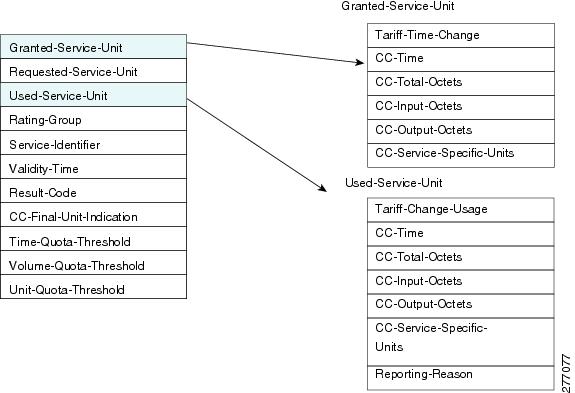
Table 12 Multiple-Services-Credit-Control (MSCC) AVP Structure
(Code / Vendor-Id)Granted-Service-Unit
Oc1
431
Grouped AVP
Present inside MSCC of a CCA (initial) and CCA (update) message.
Requested-Service-Unit
Oc
437
Empty value
Conditionally present inside MSCC of a CCR (update) message.
Used-Service-Unit
Oc
446
Grouped AVP
Present inside MSCC of a CCR (update) and CCR (final) message. There can be multiple instances of this AVP.
Rating-Group
Oc
432
—
Used to indicate service.
Validity-Time
Oc
448
Time until quota is valid
A value of "0" is considered invalid.
Present inside MSCC of CCA messages.
Result-Code
Om2
268
Value as per DCCA RFC
This value is considered only if the Result-Code value present at command level is SUCCESS.
Present inside MSCC of CCA messages.
CC-Final-Unit-Indication
Oc
—
Grouped AVP
—
Final Unit Indication
Oc
—
—
—
Time-Quota-Threshold
Oc
868/10415
Quota threshold for time quota in seconds
Present inside MSCC of CCA messages. This AVP is ignored if no time quota is granted (i.e. CC-Time AVP is not present inside Granted-Service-Unit AVP).
Volume-Quota-Threshold
Oc
869/10415
Quota threshold for volume quota in octets
Present inside MSCC of CCA messages. This AVP is ignored if no volume quota is granted (i.e. CC-Total-Octets is not present inside Granted-Service-Unit AVP).
Unit-Quota-Threshold
Oc
869/10415
Quota threshold for unit quota in octets
Present inside MSCC of CCA messages. This AVP is ignored if no unit quota is granted (i.e. CC-Unit-Quota is not present inside Granted-Service-Unit AVP).
CC-Time
Oc
420
Time quota in seconds
Present in Granted-Service-Unit AVP and Used-Service-Unit AVP.
CC-Service-Specific-Units
Oc
417
Events quota
Specific units always refer to the service identified in the Service-Identifier AVP.
CC-Total-Octets
Oc
421
Volume quota in octets
(64 bit number)
Present in Granted-Service-Unit AVP and Used-Service-Unit AVP.
Tariff-Time-Change
Oc
451
Number of seconds since 01/01/1900 UTC
Time when tariff of the service will be changed. Present in Granted-Service-Unit AVP.
Tariff-Change-Usage
Oc
452
UNIT_BEFORE_TARIFF_
CHANGE (0),UNIT_AFTER_TARIFF_
CHANGE (1),UNIT_UNDETERMINATE (2)
Present in Used-Service-Unit AVP.
CC-Input-Octets
Oc
412
Number of octets received from the end user
Present in Used-Service-Unit.
CC-Output-Octets
Oc
414
Number of octets sent to the end user
Present in Used-Service-Unit.
1 This is a parameter that, if provisioned by the operator to be present, is included in the events/CDRs when the specified conditions are met. In other words, an Oc parameter that is configured to be present is a conditional parameter.
2 This is a parameter that, if provisioned by the operator to be present, is included in the events/CDRs. In other words, an Om parameter that is provisioned to be present is a mandatory parameter.
15 Gy Support Session and Call Flows
This section provides information on Gy support session initiation, quota usage reporting, package changes, and call flows.
Initiating Session
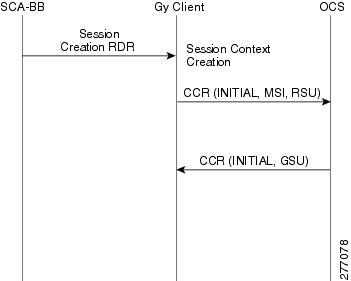
Once a login event occurs on SCA-BB, it sends a Session Creation RDR if the subscriber quota is externally provisioned. The Gy Client listens to these messages and in return sends a CCR initial message to the OCS with or without quota usage information. This process is completed in order to allow PDP context creation on the OCS as quickly as possible.
Table 13 lists required fields in CCR initial message and their sources and Figure 11 displays the session creation call flow.
Table 13 CCR Initial Message Fields and Sources
Session-Id
M1
Session ID pool
—
Origin-Host
M
Diameter Config
—
Origin-Realm
M
Diameter Config
—
Destination-Realm
M
Diameter Routing Table
—
Auth-Application-Id
M
Preconfigured
—
Service-Context-Identifier
M
Preconfigured
—
CC-Request-Type
M
—
Reporting-Reason
CC-Request-Number
M
Session context CCR counter
—
Event-Timestamp
Om2
System clock
—
Subscription-Id
Om
N/A
N/A
Subscription-Id-Type
Om
Preconfigured
—
Subscription-Id-Data
Oc3
—
Subscriber id
Multiple-Services-Indicator
Om
Always
MULTIPLE_SERVICES_SUPPORTED (1)—
Multiple-Services-Credit-Control
Om
N/A
N/A
Service-Identifier
—
—
—
Requested-Service-Unit
Oc
N/A
N/A
Rating-Group
Oc
—
Bucket-id
Service-Information AVP
Om
N/A
N/A
PS-Information
Om
N/A
N/A
Called-Station-Id
Om
Subscriber's attributes
—
SGSN-Address
Om
Subscriber's attributes
—
3GPP-GPRS-Negotiated-QOS-Profile
Om
Subscriber's attributes
—
3GPP-SGSN-MCC-MNC
Om
Subscriber's attributes
—
3GPP-Charging-Characteristics
Om
Subscriber's attributes
—
1 This parameter is Mandatory and must be present in the event/CDR.
2 This is a parameter that, if provisioned by the operator to be present, is included in the events/CDRs. In other words, an Om parameter that is provisioned to be present is a mandatory parameter.
3 This is a parameter that, if provisioned by the operator to be present, is included in the events/CDRs when the specified conditions are met. In other words, an Oc parameter that is configured to be present is a conditional parameter.
Figure 11 Session Creation
Reporting Quota Usage
The SCE reports the quota usage for each category under the circumstances listed in Table 14.
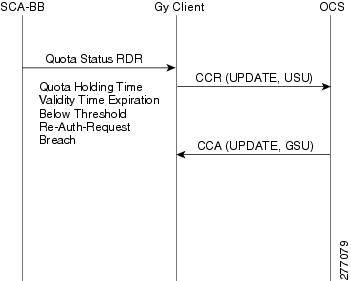
Quota usage is reported by SCA-BB using the Quota Status RDR, the Gy client listens to these messages and delivers them by a CCR update messages to the OCS.
Table 15 lists the structure of a CCR update messages and the source for each field and Figure 12 displays the quota usage update call flow.
Table 15 CCR Update Message Structure
Session-Id
M1
Session ID pool
—
Origin-Host
M
Diameter Config
—
Origin-Realm
M
Diameter Config
—
Destination-Realm
M
Diameter Routing Table
—
Auth-Application-Id
M
Preconfigured
—
Service-Context-Identifier
M
Preconfigured
—
CC-Request-Type
M
—
Reporting-Reason
CC-Request-Number
M
Session context CCR counter
—
Event-Timestamp
Om2
System clock
—
Subscription-Id
Om
N/A
N/A
Subscription-Id-Type
Om
Preconfigured
—
Subscription-Id-Data
Oc3
—
Subscriber id
Multiple-Services-Credit-
ControlOm
N/A
N/A
Service-Identifier
—
—
—
Rating-Group
Oc
—
Bucket-id
Used-Service-Unit
Oc
N/A
N/A
Reporting-Reason
Oc
—
Reporting-Reason
Tariff-Change-Usage
Oc
—
Tarrif-Change-Usage
CC-Time
Oc
—
Units-Type +Unit-Amount
CC-Total-Octets
Oc
—
Units-Type + Unit-Amount
CC-Input-Octets
Oc
—
Units-Type + Unit-Amount
CC-Output-Octets
Oc
—
Units-Type + Unit-Amount
CC-Service-Specific-Units
Oc
—
Units-Type + Unit-Amount
1 This parameter is Mandatory and must be present in the event/CDR.
2 This is a parameter that, if provisioned by the operator to be present, is included in the events/CDRs. In other words, an Om parameter that is provisioned to be present is a mandatory parameter.
3 This is a parameter that, if provisioned by the operator to be present, is included in the events/CDRs when the specified conditions are met. In other words, an Oc parameter that is configured to be present is a conditional parameter.
Figure 12 Quota Usage Update
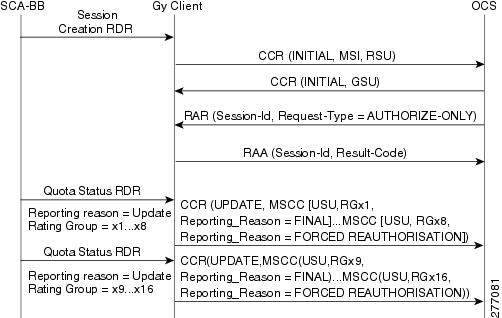
The exact structure of CCR update is also used for CCR terminate. Figure 13 displays the session termination initiated by SCA-BB call flow. Figure 14 display the re-authorization request initiated by the OCS.
Figure 13 Session Termination Initiated by SCA-BB
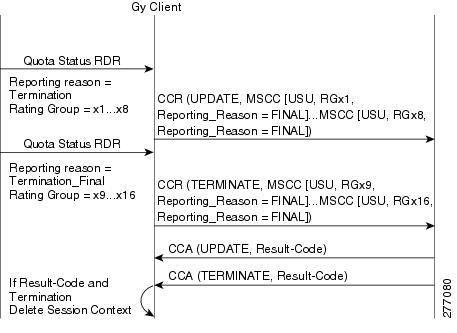
Figure 14 Re-Authorization Request Initiated by the OCS
Package Change
Upon package change, SCA-BB sends Session Termination RDR, which contains final indication and usage reporting on all buckets and reporting reason of pre-package. As a result, the Gy Client sends a CCR final message with usage information. After this, SCA-BB sends a Quota Status RDR with reporting reason of "post-package", the Gy client issues a CCR initial message with bucket IDs. Figure 15 displays the tariff change call flow and Figure 16 displays the package change call flow.
Figure 15 Tariff Change
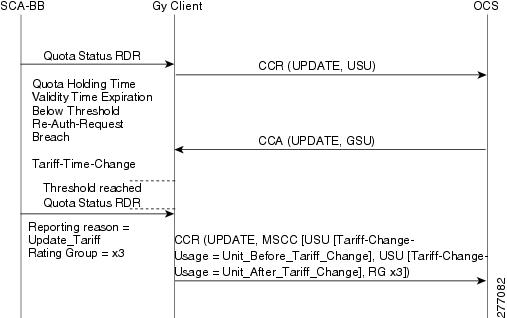
Figure 16 Package Change
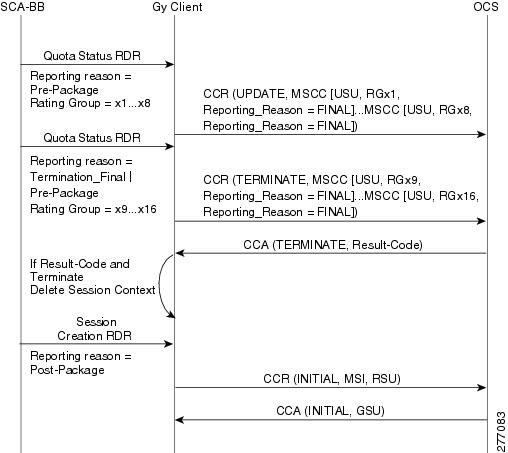
Note
16 Gy Support Configuration
This section contains the information and instructions to configure and monitor the Gy support configuration and the Gy quota configuration. This section contains the following subsections:
•
Configuring Subscriber Attribute Mapping
You can map a specified PS Information AVP (3GPP-charging-characteristics) into a specified realm. Use the following CLI command:
diameter Gy subscriber-attribute-mapping attribute-name 3GPP-charging-characteristics attribute-value <attribute-value> realm-id <realm-id>
The realm selection is completed based on the subscriber RADIUS property 3GPP-Charging-Characteristics and the global mapping of potential realm values. If there is no mapping (or a mismatch), the first realm in the realm table is selected.
Note
Gy Interface CLI Commands
Table 16 lists the CLI commands used to configure and monitor the Gy interface and Table 17 lists the CLI commands used to monitor the quota engine.
Table 16 Gy Interface CLI Commands
[no] diameter Gy1
Enable Gy application
Note
show diameter Gy
Show Gy state and connected peers.
[default] diameter Gy tx-timeout <timeout-in-seconds>
Configure the Gy tx timeout value
show diameter Gy (counters)
Show Gy information and counters
clear diameter Gy counters
Clear Gy counters
diameter Gy subscriber-attribute-mapping attribute-name 3GPP-charging-characteristics attribute-value <attribute-value> realm-id <realm-id>
Map the specified PS Information AVP (3GPP-charging-characteristics) into the specified realm.
1 Upon disabling Gy, all sessions are closed, and un-reported quota is reported. New sessions will not open. Once the Gy interface is on (again), new sessions are opened for all subscribers.
Configuring Gy Support (CLI)
To configure Gy support using the CLI, see the "Gy Interface CLI Commands" section.
Configuring Gy Support (GUI)
In the SCA BB GUI you can create quota profiles that define the limits and action of each bucket and assign specific services to that bucket. You must then attach the quota profile to a package. and define a quota rule for the package for the relevant service.
Note
To configure a Gy quota profile, complete the following steps. The steps are described in detail in the referenced sections.
Step 1
Step 2
Step 3
Step 4
Step 5
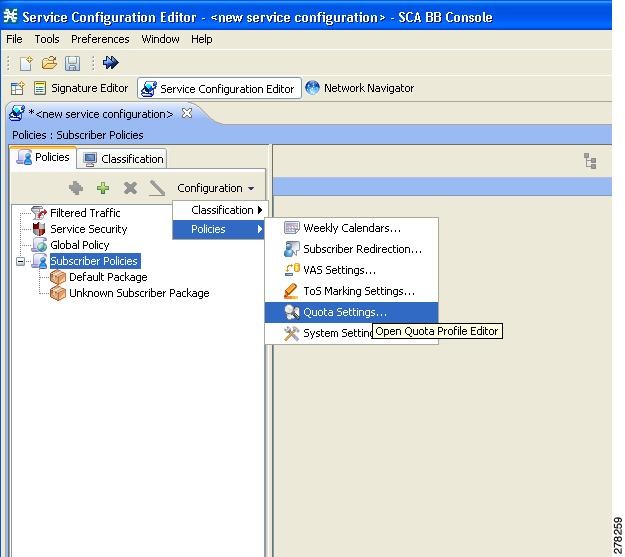
Accessing the Quota Profile Editor
You can access the Quota Profile Editor from the Configuration menu:
Service Configuration>Configuration>Policies>Quota Settings
Figure 17 Accessing the Quota Profile Editor
Global Quota Configuration
There are two aspects of global quota configuration:
•
•
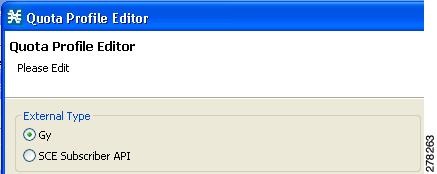
Configuring the External Quota Type
The external quota type options are displayed in the upper part of the Quota Profile Editor, as shown in Figure 18. The default quota type is Gy.
Figure 18 Quota Profile Editor Screen
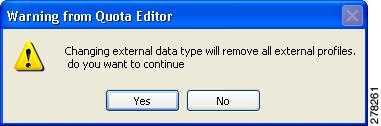
Changing the external quota type may result in the loss of the existing user-defined quota profile data. Therefore, if you change the quota type after creating any quota profiles, the system issues a warning and asks for confirmation, as shown in Figure 19.
Figure 19 Warning from Quota Editor Message
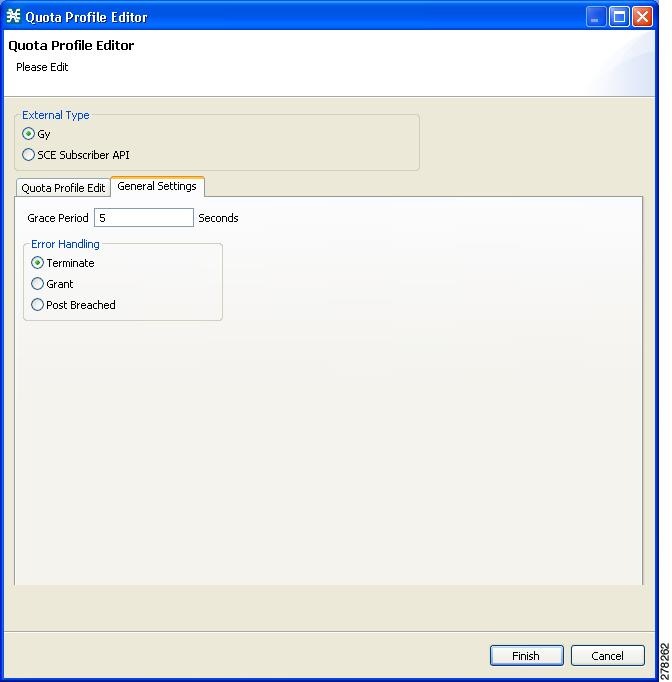
General Settings
You can configure the general quota settings from the General Settings tab of the Quota Profile Editor, as shown in Figure 20.
Figure 20 Quota Profile Editor - General Settings Tab
Adding a Quota Profile
Step 1
Step 2
Figure 21 Adding a Quota Profile
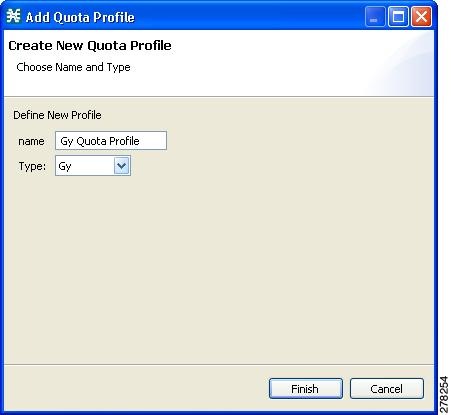
Step 3
Editing a Quota Profile
After creating a quota profile, you can configure each bucket separately. For Gy quota profiles, you can configure the following for each bucket:
•
–
–
–
•
•
Note
To configure a quota profile, complete the following steps:
Step 1
The profile name and the individual buckets appear in the right pane.
Figure 22 Quota Profile Editor - Quota Profile Edit Tab
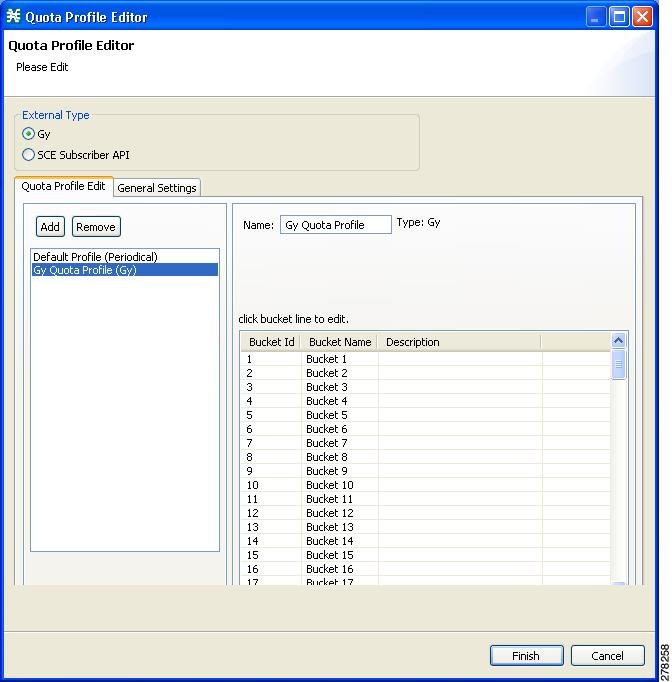
Step 2
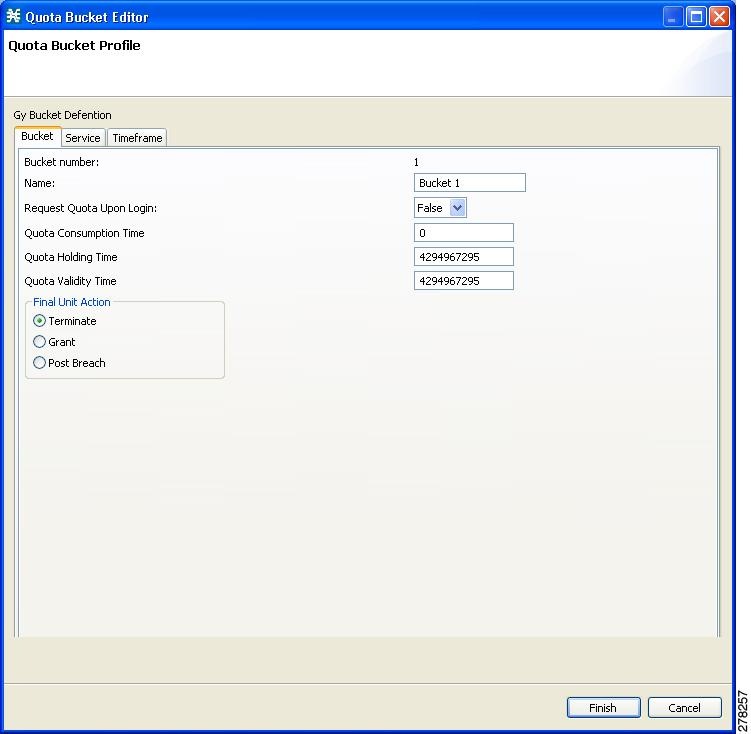
The Quota Bucket Editor opens.
Step 3
•
Figure 23 Quota Bucket Editor-Bucket Tab
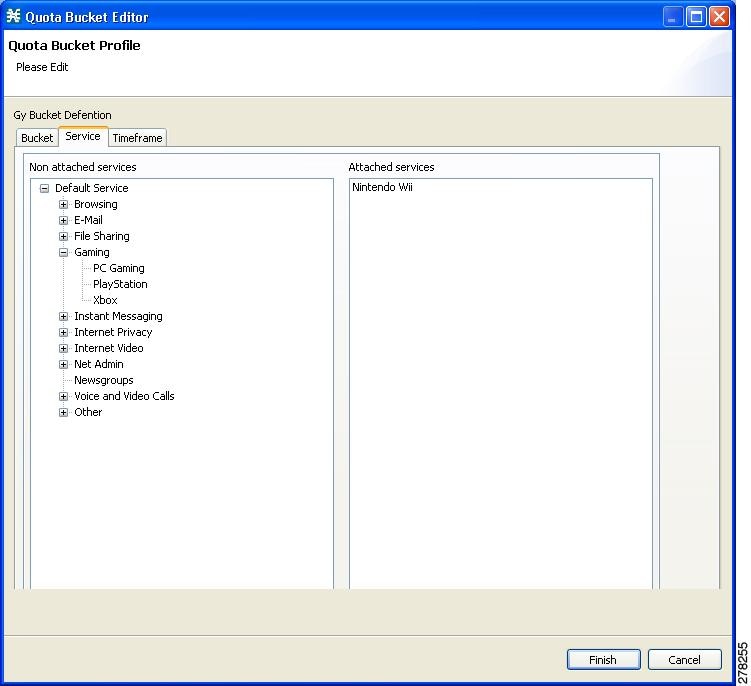
•
–
The services on the left pane are organized according to the service tree.
If you drag a service then all its sub-services in the tree are dragged as well.
Figure 24 Quota Bucket Editor-Service Tab
–
Figure 25 Quota Bucket Editor-Timeframe Tab
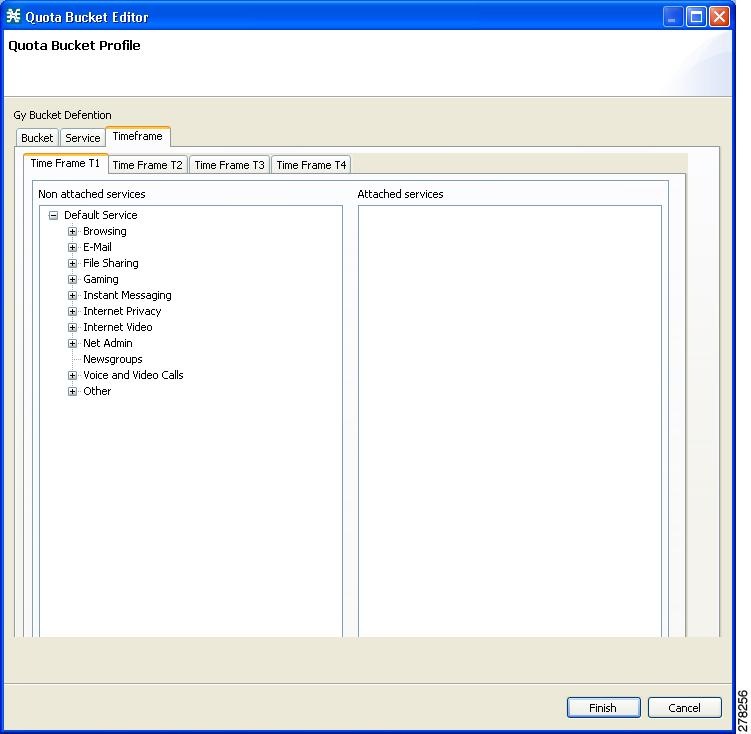
Step 4
Step 5
Attaching the Quota Profile to a Package
You must attach the quota profile to the appropriate package. You do this from the Package Settings screen.
Step 1
Step 2
Step 3
Step 4
Figure 26 Package Settings - Quota Management Tab
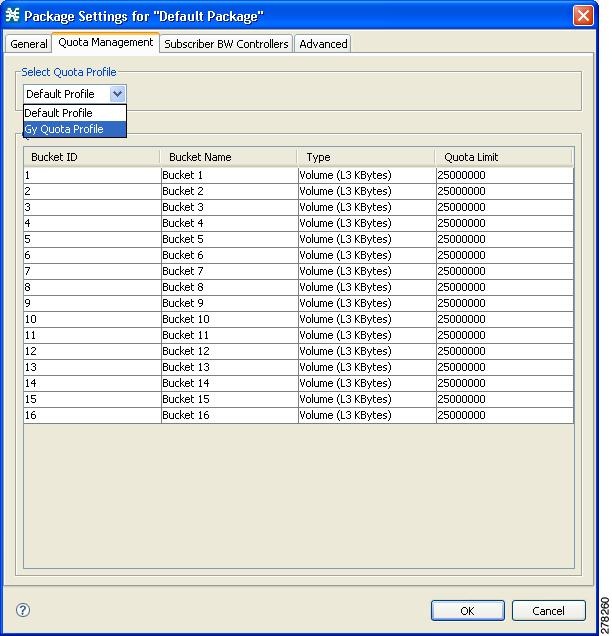
Step 5
Defining a Rule Using the Quota Profile
You must add a rule to the package that defines the action when the bucket exceeds its quota.
Step 1
in the right pane in the Policies tab of the Service Configuration window.
Step 2
Figure 27 Add New Rule - General Tab
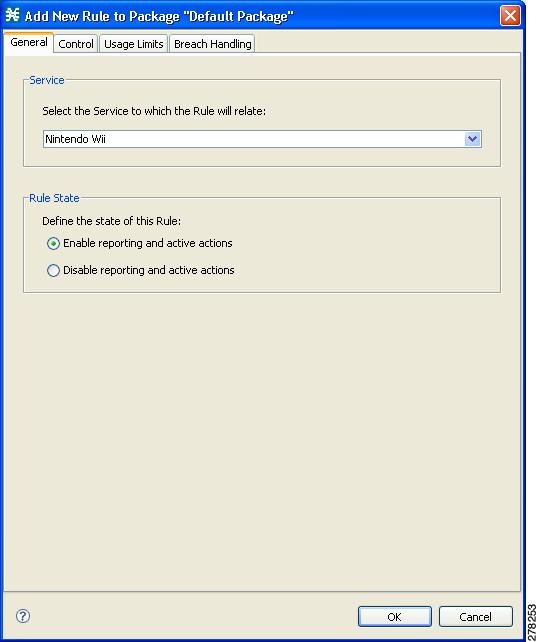
The bucket associated with this service in the quota profile is displayed in the Usage Limits tab.
Figure 28 Add New Rule - Usage Limits Tab
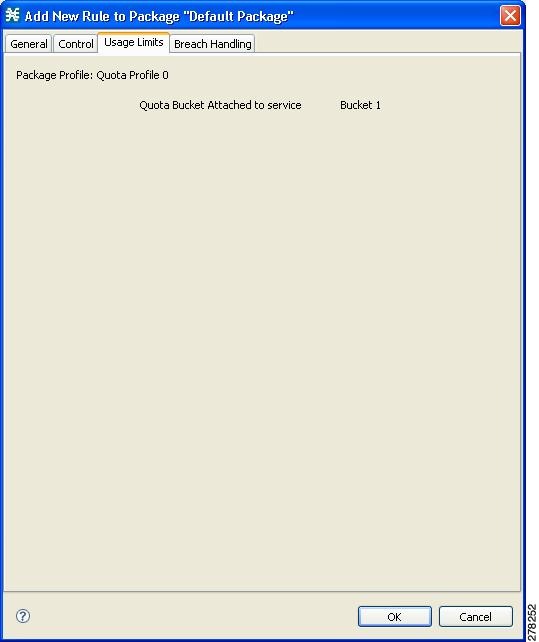
Step 3
Note
17 Gy Interface Failover Support
The behavior of the Gy client in fault situations is governed by the value of two AVPs,
•
•
The default values of these two attributes can be configured locally in the SCE. The default CCFH value of TERMINATE and the default CCSF value of "Failover not Supported" are assumed. The OCS can override the default values by sending the two AVPs in a CCA message.
When a Result-Code 4xxx is received, the Gy Client will retransmit the message to the original server.
If the CCSF and CCFH AVPs are carried by a CCA message, the AVP values are only applied to the session they are communicated on.
The Gy application implements its failover decision based on whether a failover is needed or not. The Gy application uses the peer table and failover mode to decide which destination each message should be sent to. For each Gy CCR message, the peer table and failover mode are checked for the correct destination information.
For additional details of the Gy interface failover support, see the "Diameter Load Balancing and High Availability Schemes" section and the "High Availability (Failover)" section and to the following sections:
•
•
•
•
•
Tx Timer
Usually the Diameter layer detects any transport failure within the diameter server; but for pre-paid services, the subscriber expects an answer from the network in a reasonable time. Therefore, a Tx timer is used by the DCCA client to supervise the communication with the server. When the Tx time expires, the DCCA client takes action based on the current value of CCFH for the CC-session-id.
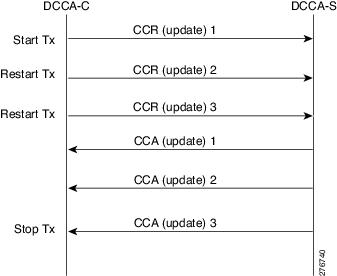
The Tx timer is restarted for each initial CCR message and for each updated CCR message. Because multiple concurrent update CCR messages are possible, if one update CCR message is pending, a subsequent update CCR message restarts the Tx timer. When answers to all pending update CCR messages are received, the Tx timer is stopped. Figure 29 illustrates the Tx timer behavior.
Figure 29 Tx Timer Behavior
CCSF
The Forwarder makes forwarding decisions according to CCSF value as passed to it from the Gy client. If the value is FAILOVER_NOT_SUPPORTED, a CC session is never moved to an alternate server. If the value is FAILOVER_SUPPORTED, then the Forwarder attempts to move the session to an alternate server if the Gy application asks for an alternate server.
The following will trigger the Forwarder to make a forwarding decision:
•
–
–
–
•
•
CCFH
Table 18 lists the action on the session for each value of Credit-Control-Failure-Handling (CCFH).
CCFH Values and the Corresponding Actions on the Session
The following are the fault conditions in which CCFH is used to determine the action on the session:
•
•
•
•
The CCFH value is used both for session level errors and bucket level errors.
Bucket level errors like DIAMETER_CREDIT_LIMIT_REACHED do not cause failover.
Gy Failover Decisions
The Gy client communicates to the Forwarder when a failover is required for a server per session. The client then expects to receive an alternate server. The alternate server may be the currently assigned server, depending on the configured Forwarder scheme.
The Gy client will communicate to the Forwarder and request an alternate server in the following situations:
•
–
DIAMETER_UNABLE_TO_DELIVER
DIAMETER_TOO_BUSY
DIAMETER_LOOP_DETECTED
–
•
–
–
–
Failure Handling of an Initial CCR Message
When the initial CCR message is sent on a CC-session, the Tx timer is started and the CC-session is pending awaiting a CCA message. When the Tx timer expires before the initial CCA message is received, the action on the session context is determined by the CCFH.
•
•
•
Failure Handling of an Updated CCR Message
When an update CCR message is sent on a CC_session, the Tx timer is started and the CC-session state is pending awaiting a CCA message. When the Tx timer expires before the initial CCA message is received, the action on the session context is determined by the CCFH.
•
•
DCCA Event Tables
The Gy client supports session-based credit-control when the first interrogation is executed after the authorization or authentication process.
In Table 19 and Table 20, the event 'Failure to send' means that the Gy client is unable to communicate with the desired destination or, if failover procedure is supported, with a defined alternative destination (for example, the request timed out and the answer message is not received). This could be due to the peer being down or due to a physical link failure in the path to or from the OCS.
The event 'Temporary error' means that the Gy client received a protocol error notification (DIAMETER_TOO_BUSY, DIAMETER_UNABLE_TO_DELIVER, or DIAMETER_LOOP_DETECTED) in the Result-Code AVP of the Credit-Control-Answer command. The protocol error notification can be received in answer to the re-transmitted request to a defined alternative destination, if failover is supported.
The event 'Failed answer' means that the Gy client received non-transient failure (permanent failure) notification in the Credit-Control-Answer command. The permanent failure notification may ultimately be received in answer to the re-transmitted request to a defined alternative destination, if failover is supported.
The Tx timer, which is used to control the waiting time in the Gy client in the Pending state, is stopped upon exit of the Pending state. The stopping of the Tx timer is omitted in the state machine when the new state is Idle, as moving to Idle state indicates the clearing of the session and all the variables associated to it.
In Table 19 and Table 20, the failover to a secondary server upon 'Temporary error' or 'Failure to send' is not described. Moving an ongoing credit-control message stream to an alternate server is, however, possible if the CC-Session-Failover AVP is set to FAILOVER_SUPPORTED.
Detailed Flow Charts for Failover Scenarios
Figure 30 depicts the Gy client behavior upon CCA error or timeout error scenarios.
Figure 30 Gy Client Behavior Upon CCA Error or Timeout Error
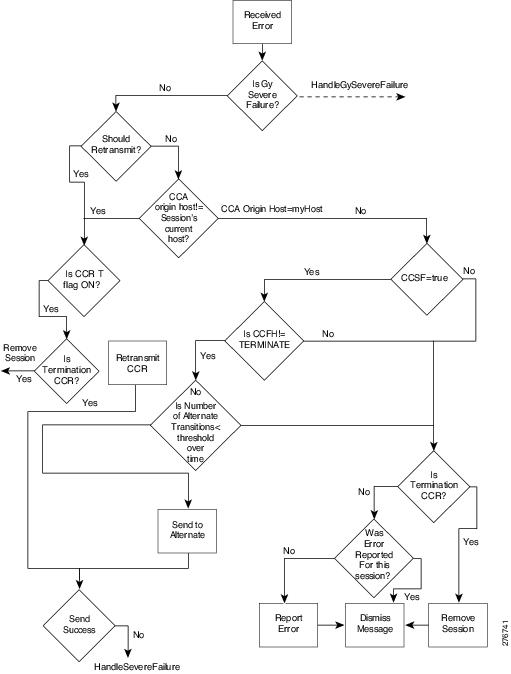
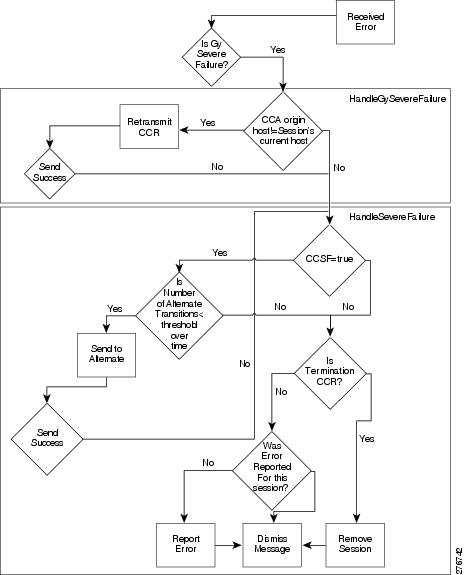
Figure 31 depicts the Gy client behavior upon severe failure situation.
Figure 31 Gy Client Behavior Upon Severe Failure
Cascade Failover
Upon cascade failover, the secondary box has no sessions in the session DB.
Each quota status update that does not have a session on the secondary box creates a new Session context and is sent an updated CCR.
Sessions that are left open on the OCS are closed by aging or by identifying a new session with the same subscription ID.
18 Subscriber Attributes and VSA Enhancements
VSA (Vendor Specific Attributes) are Radius or Diameter attributes that are sent mostly in mobile environments. These subscriber attributes can be captured by the SCE platform and then reported to the billing server. The SCE platform captures only the VSAs that you select. This gives you the flexibility to choose which attributes are relevant, and store and process only those attributes. A maximum of 20 attributes can be selected from the list of available VSAs. The list of attributes to capture can be modified while the system is running.
The following data structures are used:
•
–
–
–
–
–
–
–
The local attribute table reads the attribute details from this table.
•
The Gx, Gy and the subscriber database use this table to obtain the required information for each configured attribute.
•
Capturing Subscriber Attributes
Attributes are received from the Gx interface only. The attributes selected by CLI command are stored in the attribute table. Any time one of these attributes is input for a subscriber by Gx, it is stored in the subscriber DB for that subscriber.
When an attribute is deleted from the attribute table, all entries for that attribute are also removed from the subscriber DB.
Reporting Subscriber Attributes
Attributes are reported on the Gy interface only. Three modes of output are supported:
•
•
•
Constraints and Limitations
•
•
•
Note
Subscriber Attribute CLI Commands
Table 21 lists the CLI commands used to configure and monitor the capture and reporting of subscriber attributes.
Example for showing the VSA dictionary:
SCE8000>show sub-attribute dictionaryVSA name Vendor-ID Attr-ID Data Type Protocol Interfaces----------------------------------------------------------------------------------------Acct-Multi-Session-ID - 50 UTF8String RadiusAcct-Session-ID - 44 UTF8String RadiusAcct-Session-Time - 46 Uint32 RadiusCalled-Station-ID - 30 OCTETString RadiusCalling-Station-ID - 31 OCTETString RadiusClass - 25 OCTETString RadiusCUI - 89 UTF8String DiameterFramed-IP-Address - 8 Address RadiusNAS-Identifier - 32 OCTETString RadiusNAS-IP-Address - 4 Address RadiusNAS-Port-Type - 61 Uint32 RadiusUser-Name - 1 OCTETString Radius3GPP-Charging-Characteristics 10415 13 UTF8String Diameter3GPP-Charging-Gateway-Address 10415 4 Address Diameter3GPP-Charging-ID 10415 2 Uint32 Diameter3GPP-GGSN-Address-Code-7 10415 7 Address Diameter3GPP-GGSN-Address 10415 847 Address Diameter3GPP-GGSN-MCC-MNC 10415 9 UTF8String Diameter3GPP-GPRS-Negotiated-QoS-Profile 10415 5 UTF8String Diameter3GPP-IMEISV 10415 20 UTF8String Diameter3GPP-IMSI 10415 1 UTF8String Diameter3GPP-MS-Timezone 10415 23 OCTETString Diameter3GPP-NSAPI 10415 10 UTF8String Diameter3GPP-PDP-Type 10415 3 Uint32 Diameter3GPP-RAT-Type 10415 21 OCTETString Diameter3GPP-Selection-Mode 10415 12 UTF8String Diameter3GPP-SGSN-Address-Code-6 10415 6 Address Diameter3GPP-SGSN-Address 10415 1228 Address Diameter3GPP-SGSN-MCC-MNC 10415 18 UTF8String Diameter3GPP-User-Location-Info 10415 22 OCTETString DiameterWiMax-Active-Time 24757 39 Uint32 DiameterWiMax-BSID 24757 46 UTF8String DiameterExample for selecting a VSA to capture and then showing the attribute configuration.
SCE8000(config)#sub-attribute add-attribute 3GPP-Charging-CharacteristicsSCE8000(config)#do show sub-attribute configurationVSA name Vendor-ID Attr-ID Data Type Protocol Interfaces-----------------------------------------------------------------------------------------3GPP-Charging-Characteristics 10415 13 UTF8String Diameter GxList of Supported VSAs
Table 22 lists the supported VSAs.
19 Charging ID Mapping Table
The charging ID mapping table allows you to map the SCA BB parameters of package and bucket to the Gy interface parameters of service and rating group, so that a specified bucket from a specified package would always be output by the Gy interface as a particular service and rating group.
Charging ID Mapping Table Guidelines
•
–
–
•
•
•
Charging ID Mapping Table CLI Commands
Table 23 lists the CLI commands used to configure and monitor the charging ID mapping table.
Example for mapping the first three buckets in package-id 5 to service-id 1 rating-groups 10-12.
SCE8000(config)#diameter Gy charging-id-mapping package-id 5 bucket-id 1 service-id 1 rating-group 10SCE8000(config)#diameter Gy charging-id-mapping package-id 5 bucket-id 2 service-id 1 rating-group 11SCE8000(config)#diameter Gy charging-id-mapping package-id 5 bucket-id 3 service-id 1 rating-group 1220 Obtaining Documentation and Submitting a Service Request
For information on obtaining documentation, submitting a service request, and gathering additional information, see the monthly What's New in Cisco Product Documentation, which also lists all new and revised Cisco technical documentation, at:
http://www.cisco.com/en/US/docs/general/whatsnew/whatsnew.html
Subscribe to the What's New in Cisco Product Documentation as a Really Simple Syndication (RSS) feed and set content to be delivered directly to your desktop using a reader application. The RSS feeds are a free service and Cisco currently supports RSS Version 2.0.
CCDE, CCENT, CCSI, Cisco Eos, Cisco Explorer, Cisco HealthPresence, Cisco IronPort, the Cisco logo, Cisco Nurse Connect, Cisco Pulse, Cisco SensorBase, Cisco StackPower, Cisco StadiumVision, Cisco TelePresence, Cisco TrustSec, Cisco Unified Computing System, Cisco WebEx, DCE, Flip Channels, Flip for Good, Flip Mino, Flipshare (Design), Flip Ultra, Flip Video, Flip Video (Design), Instant Broadband, and Welcome to the Human Network are trademarks; Changing the Way We Work, Live, Play, and Learn, Cisco Capital, Cisco Capital (Design), Cisco:Financed (Stylized), Cisco Store, Flip Gift Card, and One Million Acts of Green are service marks; and Access Registrar, Aironet, AllTouch, AsyncOS, Bringing the Meeting To You, Catalyst, CCDA, CCDP, CCIE, CCIP, CCNA, CCNP, CCSP, CCVP, Cisco, the Cisco Certified Internetwork Expert logo, Cisco IOS, Cisco Lumin, Cisco Nexus, Cisco Press, Cisco Systems, Cisco Systems Capital, the Cisco Systems logo, Cisco Unity, Collaboration Without Limitation, Continuum, EtherFast, EtherSwitch, Event Center, Explorer, Follow Me Browsing, GainMaker, iLYNX, IOS, iPhone, IronPort, the IronPort logo, Laser Link, LightStream, Linksys, MeetingPlace, MeetingPlace Chime Sound, MGX, Networkers, Networking Academy, PCNow, PIX, PowerKEY, PowerPanels, PowerTV, PowerTV (Design), PowerVu, Prisma, ProConnect, ROSA, SenderBase, SMARTnet, Spectrum Expert, StackWise, WebEx, and the WebEx logo are registered trademarks of Cisco and/or its affiliates in the United States and certain other countries.
All other trademarks mentioned in this document or website are the property of their respective owners. The use of the word partner does not imply a partnership relationship between Cisco and any other company. (1002R)
Any Internet Protocol (IP) addresses used in this document are not intended to be actual addresses. Any examples, command display output, and figures included in the document are shown for illustrative purposes only. Any use of actual IP addresses in illustrative content is unintentional and coincidental.
© 2010 Cisco Systems, Inc. All rights reserved.
 Feedback
Contact Cisco
- Open a Support Case

- (Requires a Cisco Service Contract)
This Document Applies to These Products
- Collaboration Endpoints - Retired Products
- Conferencing - Retired Products
- Contact Center - Retired Products
- Optical Networking - Retired Products
- Routers - Retired Products
- Security - Retired Products
- Servers - Unified Computing (UCS) Retired Products
- Storage Networking Retired Products
- Switches - Retired Products
- Video - Retired Products
- Wireless - Retired Products