Configuring IP-in-IP on the Cisco Service Control Engine Platform
Available Languages
Table Of Contents
Configuring IPinIP on the SCE Platform
ip-tunnel IPinIP DSCP-marking-skip
show interface linecard ip-tunnel IPinIP
Configuring IPinIP on the SCE Platform
OL-15415-01
This note describes the IP in IP tunneling protocol option. This option is supported beginning with SCOS release 3.1.5.
Introduction
IPinIP is an IP-based tunneling protocol; therefore the system must be specifically configured to recognize the flows inside the tunnel. The SCE platform will then skip the external IP header, reaching the internal IP, which is the actual subscriber traffic.
When IPinIP skip is disabled, the system treats the external IP header as the subscriber traffic, resulting in all IPinIP traffic being reported as generic IP.
The commands described in this document can be used to configure IPinIP tunneling.
Fragmentation
Fragmentation should be avoided whenever possible. If it is not possible to avoid fragmentation, it is recommended to opt for internal fragmentation. If that is also not possible, the SCE platform can be operated under conditions of external fragmentation.
ip-tunnel IPinIP skip
Enables the recognition of IPinIP tunnels and skipping into the internal IP packet. Use the no form of this command to disable IPinIP skip.
ip-tunnel IPinIP skip
no ip-tunnel IPinIP skip
Syntax Description
This command has no arguments or keywords.
Defaults
By default, IPinIP skip is disabled.
Command Modes
Interface Linecard Configuration
Usage Guidelines
•
IPinIP and other tunnels: IPinIP is supported simultaneously with plain IP traffic and any other tunneling protocol supported by the SCE platform.
•
•
See the ip-tunnel IPinIP DSCP-marking-skip command.
Authorization: admin
Examples
The following example shows how to use this command.
SCE>enable 10
Password:<cisco>
SCE# configure
SCE(config)#interface linecard 0
SCE(config if)#>ip-tunnel IPinIP skip
Related Commands
ip-tunnel IPinIP DSCP-marking-skip
Configures the SCE platform to perform DSCP marking on the internal IP header of IPinIP traffic. Use the no form of the command, to perform DSCP marking on the external IP header.
ip-tunnel IPinIP DSCP-marking-skip
no ip-tunnel IPinIP DSCP-marking-skip
Syntax Description
This command has no arguments or keywords.
Defaults
By default, DSCP marking of IPinIP traffic is done on the external IP header ( no form of the command).
Command Modes
Interface Linecard Configuration
Usage Guidelines
DSCP marking modifies the DSCP bits of the IPv4 header. In IPinIP tunnels there are at least two IP headers. By default, DSCP marking is performed only on the external IP header. Use this command to mark the DSCP bits of the internal IP header.
Figure 1 IPinIP DSCP Marking
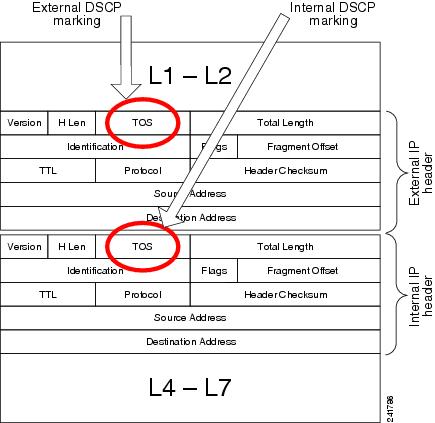
This command takes effect only when IPinIP skip is enabled (see the ip-tunnel IPinIP skip command, above).

Note
Authorization: admin
Examples
The following example shows how to configure the SCE platform to perform DSCP marking on the internal IP header of an IPinIP flows.
SCE>enable 10
Password:<cisco>
SCE# configure
SCE(config)#interface linecard 0
SCE(config if)#>ip-tunnel IPinIP DSCP-marking-skip
Related Commands
show interface linecard ip-tunnel IPinIP
Displays the current IPinIP configuration.
show interface linecard slot-number IP-tunnel IPinIP
Syntax Description
Defaults
This command has no default settings.
Command Modes
User Exec
Usage Guidelines
Authorization: viewer
Examples
The following example shows how to use this command.
SCE>enable 5
Password:<cisco>
SCE>show interface linecard 0 ip-tunnel IPinIP
IPinIP skip mode is enabled
IPinIP DSCP skip mode is disabled
SCE>
Related Commands
 Feedback
Contact Cisco
- Open a Support Case

- (Requires a Cisco Service Contract)
This Document Applies to These Products
- Collaboration Endpoints - Retired Products
- Conferencing - Retired Products
- Contact Center - Retired Products
- Optical Networking - Retired Products
- Routers - Retired Products
- Security - Retired Products
- Servers - Unified Computing (UCS) Retired Products
- Storage Networking Retired Products
- Switches - Retired Products
- Video - Retired Products
- Wireless - Retired Products