Get started with health monitoring
Learn how health policies, modules, metrics, events, and alerts work together to monitor Cloud-Delivered Firewall Management Center and its managed appliances.
Health monitoring in Cloud-Delivered Firewall Management Center
Health monitoring tracks hardware, software, and critical system functions in Cloud-Delivered Firewall Management Center and its managed appliances. Cloud-Delivered Firewall Management Center runs health modules at configured intervals, evaluates the results, and presents health information for your deployment.
Health monitoring provides two related functions: collecting time series data for metric analysis, and monitoring system health and generating alerts. Use health monitoring to analyze health and performance trends, review health events, identify conditions that require attention, and send selected health notifications to external destinations.
Configure health monitoring
These categories explain various elements of the Cloud-Delivered Firewall Management Center health monitoring model and how they work together.
-
Health policy—Defines what Cloud-Delivered Firewall Management Center monitors for an assigned appliance. A health policy contains enabled health modules and the settings that control how each module operates, such as module-specific criteria, thresholds, and run or collection intervals where applicable. Select modules according to the system conditions and operational outcomes that you need to monitor, and review module applicability before applying the policy. For more information, refer to Health policies.
-
Health module—Tests a specific system function or collects information about it. Alert modules report health status. Metrics modules collect time-series data, and some metrics modules also generate alerts when values cross configured thresholds. For more information, refer to Health modules.
-
Health metrics—Time series data collected over time for a monitored system function. Cloud-Delivered Firewall Management Center displays metrics in health monitor dashboards so that you can analyze changes, trends, and relationships between system conditions.
-
Health status—Indicates the result of a health module test or the compiled condition of a monitored appliance. Health monitor status categories include Error, Critical, Warning, Normal, Recovered, and Disabled as applicable.
-
Health event—A record that Cloud-Delivered Firewall Management Center logs when a health module result meets the configured event conditions. The event contains information about the health module, monitored appliance, reported status, and condition. For more information, refer to Health event views.
-
Health monitor dashboards—Displays the compiled health status for Cloud-Delivered Firewall Management Center and its managed appliances. It also provides an option to create custom dashboards to view specific health information. For more information, refer to About the health monitor.
-
Alert response—Defines how Cloud-Delivered Firewall Management Center sends information to an external destination. For health-event alerting, use email or webhook alert responses. SNMP and syslog are not supported as the primary methods for sending health alerts to external systems.
-
Health monitor alert—Associates a severity level, one or more health modules, and an alert response. When the selected severity occurs for a selected module, the health monitor alert triggers its associated alert response. For more information, refer to Health monitor alerts.
Health monitoring scope and behavior
-
Cloud-Delivered Firewall Management Center automatically reports its own status using the modules configured in the default health policy. All appliances automatically report hardware status through the Hardware Alarms health module.
Some health modules, such as the Appliance Heartbeat module, run on Cloud-Delivered Firewall Management Center and report the status of managed devices. To provide managed-device status, health policies must be deployed to the devices.
-
If a health policy enables a module that does not apply to the selected appliance, the health monitor reports that module as Disabled. Review module applicability before applying a policy.
How health monitoring works
Summary
Health monitoring in Cloud-Delivered Firewall Management Center enables you to track appliance health using policies, modules, metrics, events, and notifications, providing visibility and automated alerting for network conditions.
Workflow
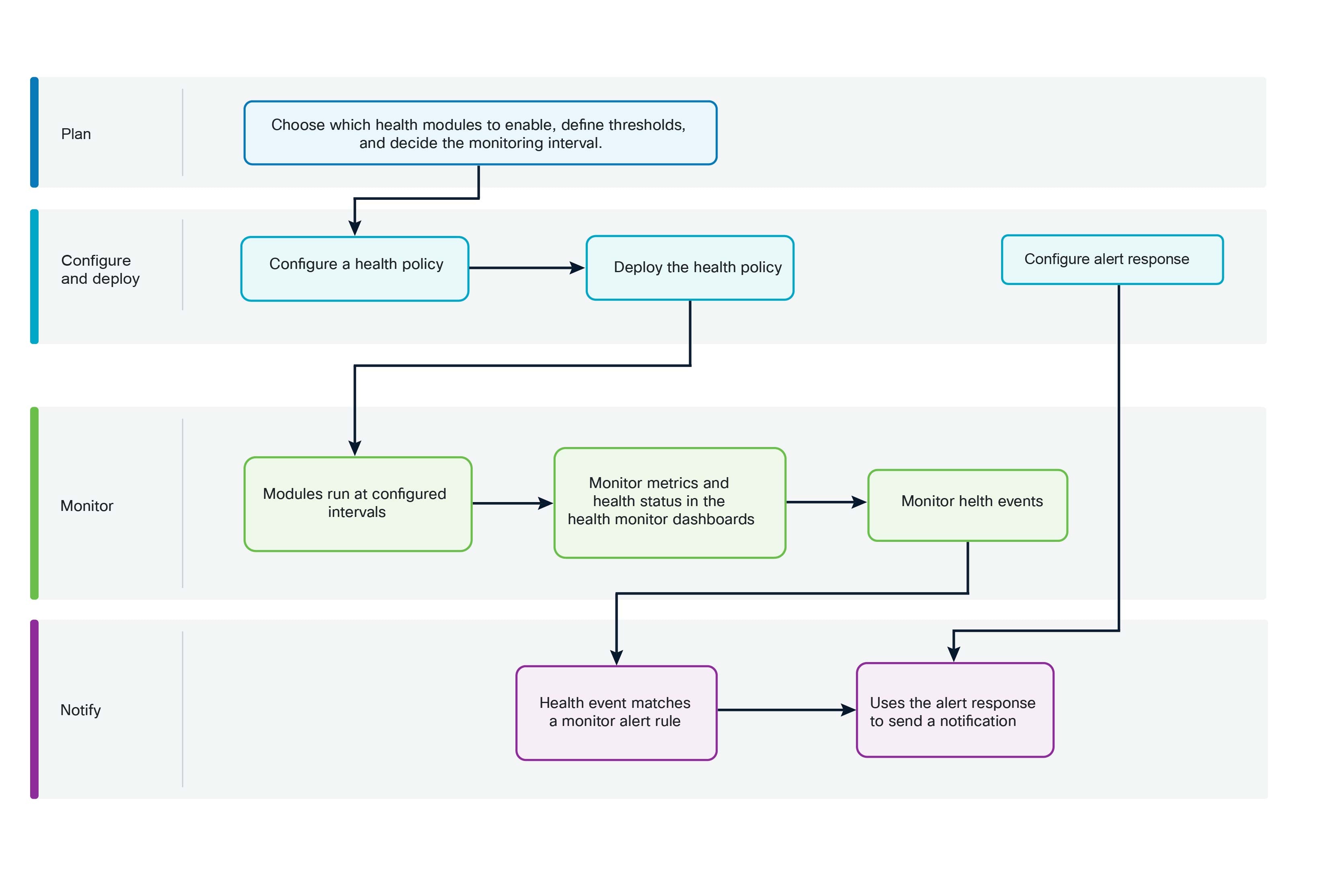
These stages describe how health monitoring information flows from policy configuration to monitoring and notification.
- Choose the health modules that provide the health metrics and alerts required for your monitoring goal. Check that each module supports your appliance type and review its configuration requirements, dependencies, and available thresholds. For more information, refer to Health modules.
- Create or modify a health policy. Enable the selected health modules and configure their settings, run intervals, and thresholds where needed. For more information, refer to Health policies.
- Deploy the health policy to the appropriate managed appliances. Monitoring begins after you successfully deploy the health policy.
- The enabled health modules run at the intervals configured in the health policy. A module can collect metric data, report a health alert, or perform both functions, depending on the module.
- Cloud-Delivered Firewall Management Center displays health statuses and metrics in the health monitor dashboards. Metric data supports analysis over time; it does not necessarily produce a health event for every collected value. For more information, refer to About the health monitor.
- When a module result meets the conditions configured for event generation, Cloud-Delivered Firewall Management Center logs a health event. Note that the health event logs the condition in Cloud-Delivered Firewall Management Center and does not, by itself, send an external notification.
- Cloud-Delivered Firewall Management Center evaluates the health event against configured health monitor alerts. When the event's module and severity match a health monitor alert, Cloud-Delivered Firewall Management Center invokes the alert response associated with that alert.
- The alert response delivers the notification to its configured destination, such as an email server or webhook endpoint.
Result
During operation, you can run all health modules, or a specific module, on demand to investigate a condition. You can also exclude appliances or health modules if you do not want them to generate health information.
Your health policy determines what Cloud-Delivered Firewall Management Center monitors and how often it evaluates the condition. The health monitor displays the results. The health event records a qualifying condition. The health monitor alert determines which conditions require notification, and the alert response determines how and where the notification is delivered.
Health event external notifications
Firewall Management Center uses separate configurations to detect a health condition and notify an external system about it.
A health policy defines what Cloud-Delivered Firewall Management Center monitors and which conditions produce a health event. An alert response configuration defines how Cloud-Delivered Firewall Management Center communicates with an external destination, such as an email server. The monitor alert rule configuration connects the health policy and alert response by specifying which health events should trigger a particular alert response.
How the configurations work together
These steps describe how you configure external notifications for health events and how Cloud-Delivered Firewall Management Center processes the health event.
-
Configure and apply the health policy: A health policy enables health modules and defines the criteria used to assess appliance health.
For example, a health policy can enable the Memory Usage module and define Critical thresholds.
Apply the health policy to the appliance, including the Cloud-Delivered Firewall Management Center when you want to monitor Cloud-Delivered Firewall Management Center resources.
-
Configure the alert response: An alert response defines how and where Cloud-Delivered Firewall Management Center sends the external notification. Depending on the response type, the alert response contains the destination address, server or endpoint information, and other communication settings.
For example, an email alert response identifies the recipients, sender, and mail relay host that Cloud-Delivered Firewall Management Center uses to send the message.
For more information about alert responses, refer to Configuring external alerts with alert responses.
-
Configure the monitor alert rule: A monitor alert rule associates a health-event severity and one or more health modules with an alert response.
For example, a health monitor alert rule can specify:
-
Severity: Critical
-
Health module: Memory Usage
-
Alert response: Critical memory email
This means that when Cloud-Delivered Firewall Management Center generates a Critical event for the Memory Usage module, it invokes the associated alert response.
For more information about health monitor alerts, refer toHealth monitor alerts.
-
-
Cloud-Delivered Firewall Management Center generates a health event: Cloud-Delivered Firewall Management Center evaluates the enabled health modules according to the health policy and its configured run interval. When a health module evaluates an appliance and the result meets a configured condition, Cloud-Delivered Firewall Management Center generates a health event.
Note that a health event is an event log within Cloud-Delivered Firewall Management Center; it does not send an external notification by itself.
-
Cloud-Delivered Firewall Management Center matches the event and sends the notification: Cloud-Delivered Firewall Management Center evaluates the generated event against the configured health monitor alerts. If the event's module and severity match a monitor alert rule, Cloud-Delivered Firewall Management Center invokes the alert response associated with that rule and sends the notification to the configured external system.
 Note |
Health alerts can take approximately 5–6 minutes to be generated after the corresponding health event occurs. |
Health policies
A health policy is a configuration framework that
-
enables you to define test criteria for monitoring the health of appliances,
-
allows selective enabling of health modules and critical alert settings, and
-
provides flexibility to apply, customize, or use default policies for each appliance.
Health policy configuration options
When you configure a health policy, you decide whether to enable each health module for that policy. You also select the criteria that control which health status each enabled module reports each time it assesses the health of a process.
You can enable or disable health alerts for individual attributes within a health module. By adjusting the settings for health alerts at the attribute level, you can reduce the number of health alerts and streamline your focus on the most critical health alerts without interrupting data collection. You can continue to monitor the attribute from your Health Monitor dashboard. When you enable a health module in the health policy, the health alert configuration for all the attributes within that health module gets enabled by default.
You can create one health policy that can be applied to every appliance in your system, customize each health policy to the specific appliance where you plan to apply it, or use the default health policy provided for you.
Note |
When you register an appliance, the Cloud-Delivered Firewall Management Center automatically assigns it the default health policy. To disassociate a health policy from an appliance, you must first associate a different health policy with it. An appliance must have at least one health policy assigned. |
Default health policy
The Cloud-Delivered Firewall Management Center setup process creates and applies an initial health policy, in which most—but not all—available health modules are enabled. The system also applies this initial policy to devices added to the Cloud-Delivered Firewall Management Center.
This initial health policy is based on a default health policy. You cannot view or edit the default health policy, but you can copy it when creating a custom health policy.
You can create a custom health policy and set it as your default health policy. The Cloud-Delivered Firewall Management Center applies the default health policy to any managed device when you add the device to the Cloud-Delivered Firewall Management Center. Note that you cannot delete the health policy that you have set as the default. For detailed instructions for setting a default health policy, refer to Set a default health policy.
Upgrades and the default health policy
When you upgrade the Cloud-Delivered Firewall Management Center, any new health modules are added to all health policies, including the initial health policy, default health policy, and any other custom health policies. Usually, new health modules are added in an enabled state.
Note |
For a new health module to begin monitoring and alerting, reapply health policies after upgrade. |
Requirements and prerequisites for health monitoring
This reference provides the requirements and prerequisites needed to implement health monitoring functionality.
Model support
Any
Supported domains
Any


 )
)


 )
)


 )
)


 Feedback