Ultra Packet Core CUPS User Plane Administration Guide, Release 21.26
Bias-Free Language
The documentation set for this product strives to use bias-free language. For the purposes of this documentation set, bias-free is defined as language that does not imply discrimination based on age, disability, gender, racial identity, ethnic identity, sexual orientation, socioeconomic status, and intersectionality. Exceptions may be present in the documentation due to language that is hardcoded in the user interfaces of the product software, language used based on RFP documentation, or language that is used by a referenced third-party product. Learn more about how Cisco is using Inclusive Language.
Revision history details are not provided for features introduced before release 21.24.
Revision Details
Release
Support of UP selection based on the availability of IP pool chunks.
21.26
With this release, the VPN limitation of 100
UPs per context has been removed.
21.25
First introduced
Pre 21.24
Feature Description
When the IP Pool is unused for a large part, it is not an efficient way of utilizing the resources. The User Plane (UP), which
are short of IP resources, can benefit if the unused resources are available to them in a dynamic way.
In the CUPS architecture, there is a centralized Control Plane (CP), large number of UPs, and an automatic and efficient way
of managing IP Pool across UPs for the following deployments:
Co-Located CUPS
Remote CUPS
How It Works
In CUPS architecture, the PDN/IP context at CP distributes the IP chunk resources among multiple registered UPs in a dynamic
way. Following sections describes the overall solution.
Handling UP De-Registration
UP de-registration is triggered in the following scenarios:
Graceful de-registration from UP—In this scenario, Control-Plane-Group association is removed with User-Plane-Service CLI.
The IP addresses are released at sessmgr level on CP.
UP connection failure from CP—This scenario occurs either because of miss of
heartbeat from UP to CP, or because UP restarts and CP is communicated about
it. When UP restarts, it implies that the reception of a new Restart-Counter
at CP of the specified UP.
After the UP de-registration is triggered, the VPNMGR task on CP validates the
identity and address of UP with the information available in the VPNMGR database. In
case of mismatch, VPNMGR shows the failure message. In case of match, the validation
is successful. On successful validation, VPNMGR takes all the assigned and
unassigned chunks from both IPv4 and IPv6 pools from the specified UP.
Whether the UP has some used or all unused IPs, VPNMGR starts a 2-minutes timer
before carrying out forceful de-registration of the UP. During forceful
de-registration, all IP addresses are deleted from VPNMGR database locally, session
entries are removed, and all the chunks are placed to the main address pools at
CP.
Hold Timer
Table 1. Feature History
Feature Name
Release Information
Description
IPv6 Session Affinity
2026.02.0
Anchors IPv6 session to the same User Plane (UP) as the HOLD IPv4 session during reassociation, overriding standard UP selection
algorithms to ensure dual-stack connections are successful.
Hold Timer is configured per pool for IPv4 dynamic pools. Static pools and IPv6 pools are not considered. If Hold Timer is
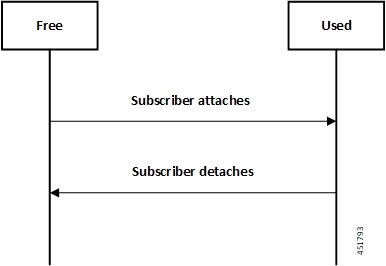
not configured, the IP address moves from Free to Used state when allocated, and returns to Free state upon session release.
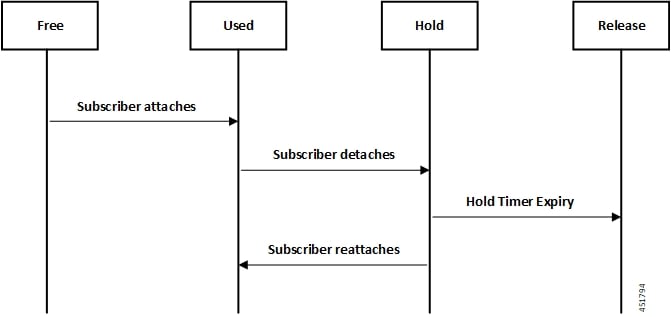
When Hold Timer is configured in the pool, a released IP address is moved to the Hold state. For the Hold Timer duration,
the IP address remains in the Hold state and can be reused if the same subscriber attaches again. While in Hold state, the
IP address is not assigned to any other subscriber. After Hold Timer expiry, the IP address moves to Release state and is
reused only when all free IP addresses in the pool are exhausted.
For dual-stack PDN connections using the IPv4 address-hold-timer, the IPv6 session affinity anchors the IPv6 component to
the same UP that previously hosted the IPv4 session, overriding the standard UP selection algorithm during reassociation.
This ensures successful allocation of both IPv4 and IPv6 addresses.
Note
IPv6 session affinity ensures the allocation of IPv6 address provided there are free IPv6 addresses with the userplane however,
it does not guarantee allocation of same IPv6 address on reassociations.
Address hold timer on IPv4 pools is supported only for one PDN connection (single or dual stack) per subscriber. When a subscriber
has multiple PDN connections, address hold timer cannot be used for more than one PDN. In other words, in case of a multi-PDN
call, only one of the allocated IP addresses will get into Hold state when the call is disconnected.
When UP deregistration occurs, all IP addresses in Hold state move to Free state. This happens because the UP details (UP
ID and related memory) are not preserved at the CP. This change might result in the IP address being reused by a different
subscriber. VPNMgr recovery and ICSR are also supported for Hold addresses.
Address State Change
Following call flow describes the address state change with Hold Timer
configured.
Figure 1. Address State Change with Hold Timer
Following call flow describes the address state change without Hold Timer
configuration.
Figure 2. Address State Change without Hold Timer
Configuring Hold Timer
Use the following configuration to enable Hold Timer feature in CUPS.
configurecontext context_nameip pool pool_name address-hold-timer secondsend
NOTES:
pool_name: Specifies the logical name of the IP
address pool. pool_name must be an alphanumeric
string of 1 through 31 characters.
When the feature is enabled, and an active subscriber is disconnected, the IP
address is held or considered still in use, and isn't returned to the free
state until the address-hold-timer expires. This enables subscribers who
reconnect within the length of time specified (in seconds) to obtain the
same IP address from the IP pool. seconds is the
time in seconds and must be an integer from 0 through 31556926.
Use the show ip pool address pool-name pool_name
CLI command to check the status of all IP addresses in a pool. It also shows the
remaining hold time for the held addresses.
IP Pools per Context
You can configure 600 IP pools per UP group in a single context at CP. Also, 2000
IPv4 and 256 IPv6 pools can be configured per context in CP which can be distributed
among various UP groups with upper limit of 600 pools per UP. The functionality
includes:
UP group can have a maximum of 600 IP pools for all possible combinations of
pool type.
Pools can be either static, dynamic, or combination of both.
Pools can be all IPv4, IPv6, or combination of both.
Out of 600, a UP group can have a maximum of 256 IPv6 pool (context level
limitation that is same as ASR5500). All 600 pools can be IPv4.
If more than 600 IP pools are configured in a UP group, then it can't be
determined as to which 600 pool/pool chunks will be allocated to a UP.
The CP maintains count of routes that are installed at UP. If it exceeds 6000
pool routes (context level limitation that is same as ASR5500), then no new
chunk is allocated to UP even if it reaches the threshold for overuse.
Similarly, if new IP pool is dynamically allocated and 6000 pool routes are
already installed, then no new chunk is allocated from that pool even if
pool count is less than 600 for that UP.
As part of this feature, the dynamic IPv4 and IPv6 pool count is replaced with total
IPv4 and IPv6 pool count in the show ip user-plane verbose
CLI command. Also, the output of the CLI command is enhanced to display Total Pool
Kernel Routes and Max Pool Kernel Routes fields.
IP Resource Management
In CUPS architecture, the CP has all the IP Pool configurations in PDN/IP context. In compliance with 3GPP standards, the
UP registers with CP by Sx Association Request/Response procedure.
During the registration process, the CP finds out all the APNs which are being served by the particular UP, and the associated
Pool configuration in each APN. The CP allocates some of the IP chunk resources to a particular UP and sends over the Sx Association
Update Request/Response procedure. This information is sent to PDN/IP context instance at UP.
After UP registration is successful, the PDN/IP instance initiates sending of IP chunk resource information to the UP from
the Pool. This IP chunk resource information is sent to the UP on Proprietary/Custom IE on Sx Association Update Request/Response
message. The PDN/IP instance at UP announces the BGP routes, on per chunk basis, which is received from the CP.
Each UP, which is registered with the CP, is identified using "Peer Id" and the Node ID.
IP Resource Replenishment/Withdrawal Procedure
For efficient utilization of IP resources, the CP allocates IP resources to UP on need basis. And so, it supports replenishment
and withdrawal procedures for IP chunk resources.
Based on the threshold logic in CP, it monitors the usage of IP resources in each UP on pool-level basis. If the overall IP
chunk usage of the UP crosses certain threshold, the CP sends additional IP chunk resources to the UP.
If certain IP chunks in the UP are not utilised, and idle for certain duration, the
CP withdraws those IP chunk resources from respective UPs. For details, see
Configuring Percentage of Chunks Per Pool section.
No-chunk-pool for One UP per UP Group
Feature Description
For static IP address allocation, the SessMgr requests for specific IP address. The
VPNMgr searches for that specific IP address. If the chunk is already allocated to a
particular UP, then the VPNMgr allocates that address and responds to the UP which
serves the call. For static IPv4v6 call, the requested IPv4 and IPv6 address might
belong to different UPs and therefore, success of IPv4v6 can't be guaranteed unless
there's only one UP per UP Group. So, for successful static IPv4v6 call, only one UP
per UP group can be configured. For one UP per UP Group use case, pool chunking
isn't recommended as only one UP uses that pool, and the entire pool can be
allocated to the UP rather than in chunks. Also, there are certain use cases to
contain one APN to one UP. To support both these use cases, an option to not chunk
the pool in CUPS architecture is introduced.
Without the no-chunk-pool functionality, if number of usable addresses are less than
the chunk size, then minimum of two chunks were configured.
With no-chunk-pool functionality, a pool can be configured without being chunked. The
entire pool is allocated to the UP that is first to request for the pool.
Note
The no-chunk-pool functionality is recommended only for a setup with one UP per
UP Group. It's not recommended for multi-UP per UP Group.
How it Works
The no-chunk-pool functionality includes:
When a pool is configured as no-chunk-pool, then pool itself is considered as
a chunk and the entire pool is allocated to the UP that is first to request
for the pool.
No-chunk-pool can be public, private, or static.
No-chunk-pool can be configured within VRF.
For multi-UP per UP Group, the entire dynamic no-chunk-pool is allocated to
the UP that is first to do Sx-association.
For multi-UP per UP Group, the static no-chunk-pool is allocated in
round-robin algorithm among currently servicing UP.
For multi-UP per UP Group, the dynamically added new pool can get allocated
to any UP in UP Group and can’t be deterministically known.
Configuring No-chunk-pool
Use the following configuration to enable no-chunk-pool functionality.
configurecontext context_namecups enableip pool pool_name ip_address/subnet_mask no-chunk-poolipv6 pool pool_name prefix ip_address/length no-chunk-poolexit
The no-chunk-pool can be identified from the output of the following CLI commands if
the "total-chunks" field displays 1 (one) for that particular pool.
show ip pool-chunks pool-all
show ipv6 pool-chunks pool-all
Static IP Pool Management
In CUPS architecture, the strategy to manage static IP pools differs from dynamic pool managemnent. Static IP pools are broken
down into "static-chunks" similar to how dynamic pools are chunked. However, these static chunks are not distributed to the
UPs and remain at the CP until a UE requests for the first static address in a certain Static-IP-Chunk during session creation.
The CP selects the UP using the round-robin algorithm and the entire Static-IP-Chunk, to which the requested static address
belongs, is assigned to the selected UP. Therefore, whenever any UE requests static addresses (IPv4 or IPv6) from that chunk,
the UE is assigned that UP.
Note
Within dynamic pools, "allow static" is not supported.
IPv4v6 static PDP is not supported with multiple UPs in a UP Group.
For the static IPv4v6 PDNs to be successful, both IPv4 and IPv6 addresses
must be on the same UP. Only way to ensure this is to have a single UP
in the UP group.
For the multi-PDNs on same APN to be successful, with one PDN as static
and the other as dynamic, both addresses must be on same UP. Only way to
ensure this is to have a single UP in the UP group.
In case of static IP pool, address is already decided by UE and so, the
benefit of UP selection does not remain.
UP Selection
In CUPS architecture, during the establishment of sessions, UP selection happens among the registered UP. There are various
ways to select UP. In earlier releases, Round-Robin Algorithm based UP selection was supported. Currently, least connection
User Plane selection algorithm is supported.
UP Selection based on IP Pool Chunk Availability
Prior to release 21.26, the CP selects a UP based on least session usage or a round-robin algorithm. If chunks are exhausted
in a selected UP, the CP rejects the session establishment request until new IP pools are added for the impacted APNs. This
result in wastage of IP resources in an UP, which still has some chunks with free IP addresses.
In 21.26 and later releases, this feature is enhanced to allow UP selection based on the availability of IP pool chunks. When
chunks are exhausted in some UPs, and if the CP receives an attach request, the CP selects randomly any UP that has IP addresses
available. Also, it ignores any other UP selection algorithm that is configured.
Note
For dual-stack IPv4 and IPv6 PDNs, when address-hold-timer is configured, this will overwrite the UP for the IPv6 session.
Limitations
UP selection for Pure-S calls isn’t supported.
Only non-DNS based UP selection is considered for IP address-based validation.
UP selection is overridden if the selected UP has no IP address to allocate for the session.
During Sx association, if one of the contexts don’t have sufficient chunks for all UPs, then only UPs which get chunks are
maintained in VPN.
As the VPN overrides UP selection when chunks aren’t available in certain UPs, you must follow proper IP pool planning guidelines
to minimize uneven load distribution across UPs.
The following functionalities are supported as part of the IP Pool Management feature.
IPv4, IPv6 Public, and private pool-based IP address allocation.
IPv4 static type address allocation.
Session Manager recovery and VPN Manager recovery for active calls types.
CP to CP Interchassis Session Recovery (ICSR) support.
Hold-timer for IPv4 pools.
Busy-out (basic functionality) for IPv4 and IPv6 pools.
Limitations
Following are the known limitations and restrictions of this feature for this release:
The “allow-static” type pool configuration isn't supported.
Configure the cups enabled CLI before you add a pool in IP context to enable IP Pool Management functionality in CUPS mode.
IPv4v6 static PDP isn't supported with multiple UPs in a UP Group.
The output of the following CLI commands displays all pools with maximum of
2048 chunks per pool:
show ipv6 pool-chunks up-id up_id
show ipv6 pool-chunks pool-name ipv6_pool_name
show ip pool-chunks up-id up_id
show ip pool-chunks pool-name ipv4_pool_name
Upon UE reattach, CP needs to select the same UP session (as IP address is already advertised by that UP in the earlier session).
Hence there is no UP load based selection or location based UP Selection possible.
Hold timer value of 0 is not supported.
Recovery of Hold timer is supported for up to 1000 address per session manager.
Reload chassis results in the standby chassis losing the hold timer information.
Any change to the Hold timer value also requires a Sx re-establishment like it happens for any other pool configuration.
Configuring IP Pool Management
This section provides information about the CLI commands available in support of this feature.
Important
In an earlier release, User Plane profile configuration was required for S-GW and P-GW. With this release, User Plane profile
configuration is no longer required in S-GW and P-GW for UP selection. Also, it is not required to be associated with IP pool
configuration.
Same PDN context should be present at both CP and UP.
IP context name, which is specified in APN configuration, should be same for both CP and UP.
For guidelines around planning IP Pool and User Plane grouping in your network,
contact your Cisco Account representative.
At Control Plane
Enabling IP Context for IP Pool Management
Use the following CLI commands to enable IP context for IP Pool management.
configurecontext context_namecups enableend
Configuring Custom Threshold Timer
Important
In 21.9 (mid-July) and later releases, the cups chunk-allocate-timer allocate_timer_seconds chunk-release-timer release_timer_seconds CLI command is deprecated, and replaced by cups chunk-threshold-timer threshold_timer_seconds and cups min-chunks-threshold-per-pool threshold_percent CLI commands.
There is a threshold timer for chunk redistribution among UPs. By default, for sending chunk into an over utilized UP, check
is carried out every 60 seconds, and for removing chunk from an underutilized UP, check is carried out every 300 seconds.
For custom threshold timer, use the following CLI commands:
This is an optional configuration. If not configured, then by default the allocate threshold is 60 seconds and the release
threshold is 300 seconds.
Use the default cups chunk-allocate-timer chunk-release-timer CLI command to revert back the chunk-allocation and chunk-release timer to 60 and 300 respectively.
If the release timer is configured to be less than the allocate timer, then it is overwritten with the value that equals to
the allocate timer.
Configuring Chunk Threshold Timer
Use the following CLI commands to configure CUPS IP pool chunk threshold timer for a context.
threshold_timer_seconds: Specifies the chunk threshold timer value in seconds, integer 30 to 300. Default = 60 seconds.
Use the default cups chunk-threshold-timer CLI command to set the default value of 60 seconds.
In releases prior to 21.9 (mid-July), allocation of new chunks to UP and release of chunks from underutilized UP use to occur
based on allocation and release timers, respectively. With 21.9 (mid-July) and later releases, only single threshold timer
exists, based on which the allocation and release of chunks occur periodically.
Configuring Percentage of Chunks Per Pool
Use the following CLI commands to configure minimum percentage of chunks per pool in a context.
threshold_percent: Specifies the minimum chunks in percentage of 0 to 50. Default = 10.
Use the default cups min-chunks-threshold-per-pool CLI command to set the default value of 10 percent.
Chunks are released periodically only when free chunks with particular pools, at CP, are less than the percentage configured
with this CLI command.
When minimum chunks equals to, or falls below, the configured percentage, a check is done to ascertain if there is any UP
that has less than 50% utilization and has more than 2 free chunks. If there is, then one is taken back from each underutilized
UP from that particular pool.
Warning log is generated for: periodicity = chunk-threshold-timer; till minimum chunks in CP VPNmgr are restored.
UP lockdown period on registration: For first five (5) minutes of a UP registration, no chunks are taken back from that UP
and sent to another UP even if other UPs are in need of chunks.
Configuring Chunk-size Value
Use this CLI command to specify the size of the chunk for the particular IP pool during pool creation.
cups max-user-planes value: The default value is 10.
The maximum number of user-planes supported in a context and UP Group is 1000.
In 21.25 and later
releases:
cups max-user-planes value: The value is in the range of 1-1000. The default value is 10.
The maximum number of user-planes supported in a context is increased to 1000.
Use this CLI command to tune the chunks that were
initially allocated on Sx-association. It can't be
used to restrict the addition of new UPs into a
system.
Use the default cups
max-user-planes CLI command to
revert back the maximum user-planes value to 10.
Monitoring and Troubleshooting
This section provides information regarding monitoring and troubleshooting the feature.
Show Command(s) and/or Outputs
This section provides information regarding show commands and/or their outputs in support of this feature at CP.
show ip pool-chunks pool-name <pool-name>
The output of this command displays all the chunks in the specified IPv4 pool.
chunk-id
pool-id
up-id
total-addr
free-addr
used-addr
hold-addr
release-addr
busyout-free
busyout-used
show ip pool-chunks pool all
The output of this command displays the IPv4 pool chunks that are allocated to all the User Planes.
chunk-id
pool-id
up-id
total-addr
free-addr
used-addr
hold-addr
release-addr
busyout-free
busyout-used
Note
The above fields are also displayed for the show ipv6 pool-chunks pool all CLI command except for the "hold-addr" and "release-addr" fields.
show ip pool-chunks up-id <up_id> user-plane-group name <grp-name>
The output of this command displays all the IPv4 chunks that are allocated to a specific User Plane.
chunk-id
pool-id
up-id
total-addr
free-addr
used-addr
hold-addr
release-addr
busyout-free
busyout-used
show ip user-plane chunks
The output of this command displays IPv4 chunks allocated to each User Plane.
up-id
total-chunks
free-chunks
used-chunks
full-chunks
Note
The above fields are also displayed for the show ipv6 user-plane chunks CLI command.
show ip user-plane prefixes
The output of this command displays IPv4 prefixes allocated to each User Plane.
up-id
Total
Free
Used
Hold
Release
Busyout-Free
Busyout-Used
Note
The above fields are also displayed for the show ipv6 user-plane prefixes CLI command.
show ip user-plane verbose
The output of this command displays all the details related to a User Plane.
User-plane Group Name
User-plane ID
User-plane address
Sxmgr-id
IPv4 Chunks
Total
Free
Used
Full
IPv4 address
Total
Free
Used
Hold
Release
Busyout-Free
Busyout-Used
IPv6 Chunks
Total
Free
Used
Full
IPv6 prefixes
Total
Free
Used
Busyout-Free
Busyout-Used
Total Pool count
IPv4
IPv6
Total Pool Kernel Routes
Max Pool Kernel Routes
Total VRFs
apn-without-pool-name-v4
apn-without-pool-name-v6
Pool-groups
show ip user-plane
The output of this command displays the details of all the User Planes that are registered with the VPN Manager.
up-id
user-plane-address
user-plane-group-name
sxmgr-id
NOTES:
Use the show ip user-plane up-idup_iduser-plane-group name grp-name to view the details of a specific User Plane belonging to a specific User Plane group.
show ipv6 pool-chunks pool-name <pool-name>
The output of this CLI command displays all the chunks in the IPv6 pool.
chunk-id
pool-id
up-id
total-addr
used-addr
busyout-free
busyout-used
show ipv6 pool-chunks up-id <up_id> user-plane-group name <grp-name>
The output of this command displays all the IPv6 chunks that are allocated to a specific User Plane.

 Feedback