CPC pods and services overview
Depending on your deployment environment, CPC deploys the pods on the virtual machines that you have configured. Pods operate through the services that are responsible for the intrapod communications. If the machine hosting the pods fail or experiences network disruption, the pods are terminated or deleted. However, this situation is transient and CPC spins new pods to replace the invalid pods.
This workflow provides a high-level visibility into the host machines, and the associated pods and services. It also represents how the pods interact with each other. The representation might defer based on your deployment infrastructure.
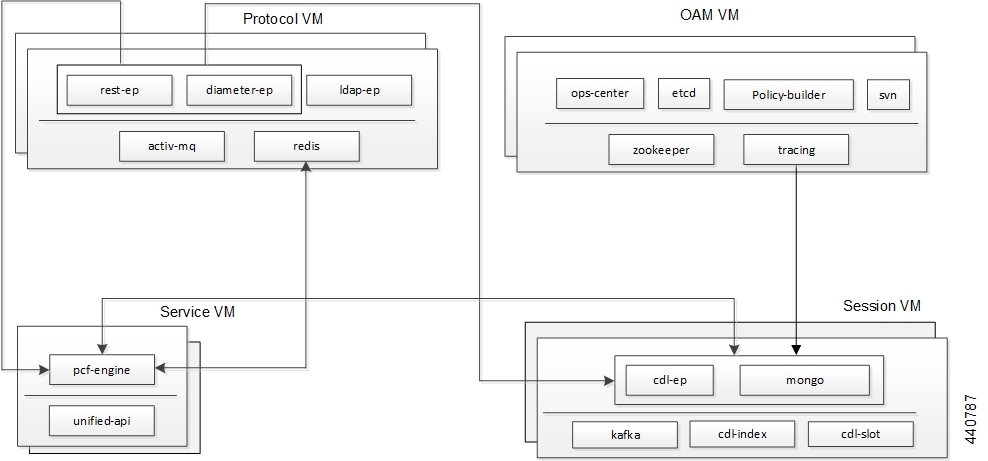
The Protocol VM hosts the rest-ep, diameter-ep, and ldap-ep pod that governs the ingress (incoming) and egress (outgoing) traffic on the interfaces. The pods responsible for the operations and management processes reside in the OAM VM and, the Service VM hosts the pcf-engine. The session VMs hosts the pods that operate as the databases to store the data accessed by the pods. The illustration also depicts the services which the pods use to channel the interactions. The pods communicate over the gRPC interface.
 Note |
Typically, multiple instances of the Protocol and OAM VMs are created to ensure resiliency. |
Kubernetes deployment includes the kubectl command-line tool to manage the resources in the cluster. You can manage the pods, nodes, and services using the CLI.
For performing the maintenance activities, you can use the kubectl drain command to withdraw a node voluntarily. This command prepares the node by evicting or assigning the associated pods to another node with sufficient resources. You can run the kubectl drain on individual or multiple nodes concurrently.
Pods
Kubernetes deploys one or multiple pods on a single node which can be a physical or virtual machine. Each pod has a discrete identity with an internal IP address and port space. However, the containers within a pod can share the storage and network resources.
This table lists the pod names and the hosts on which they are deployed depending on the labels that you assign.
|
Pod Name |
Description |
Host Name |
||
|---|---|---|---|---|
|
admin-db |
Acts as the MongoDB router pod for the Admin database. |
Session |
||
|
api-pcf-ops-center |
Functions as the confD API pod for the CPC Ops Center. |
OAM |
||
|
cdl-ep-session-c1 |
Provides an interface to the CDL.
|
Session |
||
|
cdl-index-session |
Preserves mapping information of the keys to the session pods. |
Session |
||
|
cdl-slot-session-c1 |
Operates as the CDL Session pod to store the session data. |
Session |
||
|
cps-license-manager |
Acts as the CPC License Manager. |
OAM |
||
|
crd-api-pcf-pcf-engine- app-pcf-<n >-mjgxp |
Hosts the CRD APIs. |
Protocol |
||
|
db-admin |
Acts as the replica set pod for the Admin database. |
Session |
||
|
db-admin-config |
Acts as the replica set pod that stores the Admin database configuration. |
Session |
||
|
db-spr-config |
Operates as the replica set pod that stores the SPR database configuration. |
Session |
||
|
db-spr1 |
Functions as the replica set pod that preserves the SPR database. |
Session |
||
|
diameter-ep-rx-rx |
Contains the Diameter stack details and acts as the endpoint.
|
Protocol |
||
|
documentation |
Contains the documentation. |
OAM |
||
|
etcd-pcf-etcd-cluster |
Hosts the etc-d for the CPC application. |
OAM |
||
|
grafana-dashboard-cdl |
Contains the Grafana metrics for CDL. |
OAM |
||
|
grafana-dashboard-pcf |
Contains the Grafana metrics for CPC. |
OAM |
||
|
kafka |
Hosts the Kafka details for the CDL replication. |
Protocol |
||
|
ldap-ep |
Operates as an LDAP client to establish communication with an external LDAP server.
|
Protocol |
||
|
network-query |
Operates as the utility pod to determine the route IP for the Diameter outbound messages. |
OAM |
||
|
ops-center-pcf-ops-center |
Acts as the CPC Ops Center. |
OAM |
||
|
patch-server-pcf-cnat-cps- infrastructure |
Operates as the utility pod for patching the CPC JAR files. |
OAM |
||
|
pcf-day0-config-pcf-pcf -engine-<n>-rchg2 |
Dedicated for performing the Day-0 configuration for CPC. |
OAM |
||
|
pcf-engine-pcf-pcf-engine- app-pcf |
Operates as the CPC Engine.
|
Service |
||
|
pcf-rest-ep |
Operates as a REST endpoint for CPC.
|
Protocol |
||
|
policy-builder-pcf-pcf-engine-app |
Operates as the Policy Builder for CPC. |
OAM |
||
|
redis-keystore |
Operates as the REDIS Index. |
Protocol |
||
|
redis-queue |
Operates as the REDIS IPC. |
Protocol |
||
|
rs-controller-admin |
Responsible for the replication controller for Admin database. |
Session |
||
|
rs-controller-admin-config |
Operates as a replication controller for the Admin database configuration. |
Session |
||
| rs-controller-spr-config |
Operates as a replication controller for SPR database configuration. |
Session |
||
|
rs-controller-spr1 |
Operates as a replication controller for the SPR database. |
Session |
||
|
smart-agent-pcf-ops-center |
Operates as the utility pod for the CPC Ops Center. |
OAM |
||
|
svn |
Stores all the CPC XMI configuration files. |
OAM |
||
|
svn-ldap |
Stores the LDAP endpoint configuration which is configured through the ops-center. |
Protocol |
||
|
swift-pcf-ops-center |
Operates as the utility pod for the CPC Ops Center. |
OAM |
||
|
traceid-pcf-pcf-engine |
Stores the subscriber tracing details. |
OAM |
||
|
zookeeper |
Assigned for the Zookeeper. |
OAM |
Services
This table describes the CPC services and the pod on which they run.
|
Service Name |
Pod Name |
Description |
|---|---|---|
|
admin-db |
admin-db-0 |
Serves to process the MongoDB-specific router messages. |
|
cps-diameter-inbound-rx-rx-rx |
cps-diameter-ep |
Transmits the Rx messages to the Diameter endpoint. You can set an external IP address for the service. |
|
crd-api-pcf-pcf-engine-app-pcf |
crd-api |
Processes the CRD API calls. |
|
datastore-ep |
datastore-ep |
Processes the CDL endpoint calls. |
|
datastore-ep-session |
ngn-datastore-ep |
Responsible for the CDL session. |
|
datastore-notification-ep |
pcf-engine |
Responsible for sending the notifications from the CDL to the engine. |
|
diameter-engine |
pcf-engine |
Acts as the Diameter endpoint to pcf-engine. |
|
documentation |
documentation |
Processes the documentation API calls. |
|
etcd |
pcf-etcd-cluster |
Processes the etc-d API. |
|
etcd-pcf-etcd-cluster-<n> |
pcf-etcd-cluster |
Processes the etc-d stateful sets. |
|
grafana-dashboard-cdl |
grafana-dashboard-cdl |
Responsible for managing the Grafana dashboard for inputs from the CDL. |
|
grafana-dashboard-pcf |
grafana-dashboard-pcf |
Manages the Grafana dashboard for CPC. |
|
helm-api-pcf-ops-center |
helm-api |
Manages the Ops Center API. |
|
kafka |
kafka |
Processes the Kafka messages. |
|
mongo-admin-<n> |
db-admin-0 |
Responsible for the Admin database stateful sets. |
|
mongo-admin-config-<n> |
db-admin-config-0 |
Responsible for the Admin database configuration stateful sets. |
|
mongo-spr-config-<n> |
db-spr-config-0 |
Responsible for the SPR database configuration stateful sets. |
|
mongo-spr1-<n> |
db-spr1-0 |
Responsible for the SPR database stateful sets |
|
ops-center-pcf-ops-center |
ops-center |
Manages the CPC Ops Center. |
|
patch-server-pcf-cnat- cps-infrastructure |
patch-server |
Maintains the patch repository. |
|
pcf-day0-config-pcf-pcf- engine-app-pcf |
pcf-day0-config |
Manages the Day-0 configuration. |
|
pcf-engine |
pcf-engine |
Processes the API calls to pcf-engine. |
|
pcf-rest-ep |
pcf-rest-ep |
Acts as the http2 request/response to the REST endpoint. You can set an external IP address for the service. |
|
policy-builder-pcf-pcf- engine-app-pcf |
policy-builder |
Manages the Policy Builder's request/response messages. |
|
redis-keystore-<n> |
redis-keystore-0 |
Manages the REDIS keystore stateful set. |
|
redis-queue-<n> |
redis-queue-0 |
Processes the REDIS queue stateful set. |
|
rs-admin |
replica-set admin |
Manages the replica set for Admin database. |
|
rs-admin-config |
replica-set admin-config |
Manages the replica set for the Admin database configuration. |
|
rs-spr-config |
replica-set spr-conifg |
Manages the replica set for the SPR configuration. |
|
rs-spr1 |
replica-set sp1 |
Manages the replica set for the SPR database. |
|
smart-agent-pcf-ops-center |
smart-agent-pcf-ops-center |
Responsible for the Ops Center API. |
|
svn |
cps-subversion |
Responsible for the SVN API calls. |
|
swift-pcf-ops-center |
swift-pcf-ops-center |
Responsible for the Ops Center API. |
Limitations
When removing a node using the kubectl drain command, the pods managing the inbound traffic such as pcf-rest-ep, pcf-ldapserver-ep, and diameter-ep-rx-protocol cannot be assigned to another node. The workload of these pods cannot be scheduled to another node since the traffic is routed
through persistent connections that do not support load balance. As a result, the Grafana dashboard does not display the Transaction
Per Second (TPS) for these pods.
 Feedback