Cisco Common Data Layer

Geographic redundancy support

The CPC extends support to the Geographic Redundancy (GR) version of the Cisco Common Data Layer (CDL). When the highest rated CDL endpoint fails, CPC attempts the same operation on the next highly rated CDL endpoint thus providing a nondisrupted message handling. If the next rated endpoint is unavailable, then CPC reattempts the operation on the subsequent endpoint that has the highest rating and so on.

For more information on the CDL concepts, see the Ultra Cloud Core Common Data Layer Configuration Guide.

Limitations for GR support feature

The GR support feature has these limitations:

  • The CPC attempts to reroute the calls only when it encounters gRPC errors such as UNAVAILABLE. It does not acknowledge errors that the datastore returns and actual gRPC timeouts such as DEADLINE_EXCEEDED gRPC status code.

  • The CPC Engine does not resolve failures occurring with the datastore such as indexing and slot failures. The CDL layer must resolve these failures and if necessary, send an API call on the remote.
How it Works

When you configure the CDL in CPC through the CPC Ops Center, CPC gets enabled to support multiple CDL datastore endpoints. You can configure the endpoints by specifying the IP addresses, port numbers, and assigning ratings to each endpoint. By default, CPC considers the local endpoint as the primary endpoint, which has the highest rating. CPC performs CDL API operations on the primary endpoint. If this endpoint is unavailable, then CPC routes the operations to the next highest rated endpoint. CPC keeps failing over to the accessible secondary endpoint or until all the configured secondaries are exhausted. It does not reattempt a query on the next rated endpoint if the endpoint is reachable but responds with error or timeout.

If CPC is unable to access any of the endpoints in the cluster, then CDL operation fails with the "Datastore Unavailable" error.

Architecture

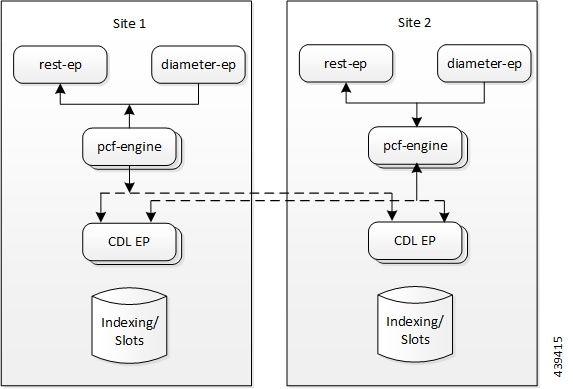
You can configure CDL through CPC Ops Center. CDL in the GR mode replicates the session data across the configured sites. When CPC connects to the CDL, it always treats the local CDL endpoints as the primary endpoint and the remote endpoints as secondaries (with the appropriate rating). CPC uses the secondary endpoints when the connection to the primary endpoint fails.

This illustration depicts the failover that happens when the CPC/ PCF Engine is unable to access the primary CDL datastore endpoint.

Figure 1. CDL Datastore Architecture

Call Flows

This section describes the key call flows for this feature.

CDL endpoint failure

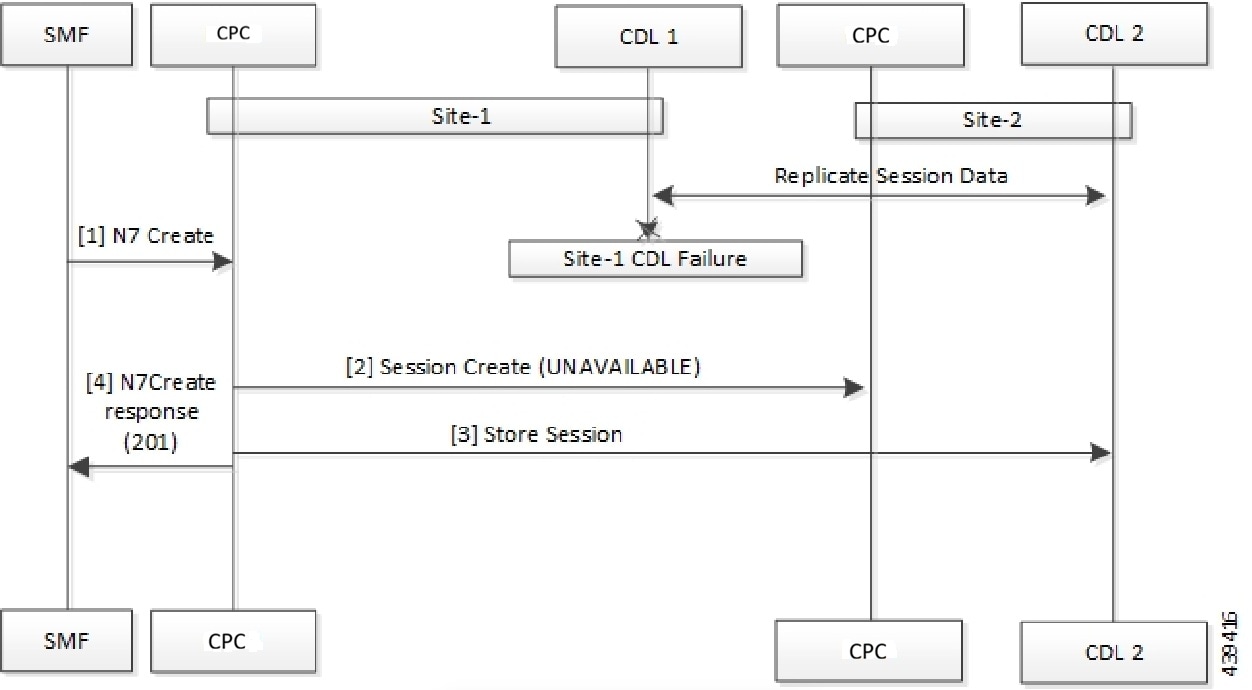
This section describes the CDL Endpoint Failure call flow.

Figure 2. CDL Endpoint Failure Call Flow
Table 1. CDL Endpoint Failure Call Flow Description
Step Description

1

In the Site 1 environment, the SMF sends a N7 Create Request to the CPC 1 over the N7 interface.

2

The CPC 1 sends Session Create Request to the CPC 2.

3

The CPC 1 sends a Session Store Request to the CDL2.

4

The CPC 1 sends N7 Create Response to the SMF.

GR Call Flows

This section describes the possible CDL GR mode scenarios that could initiate a failover to another site.

Indexing shard failure

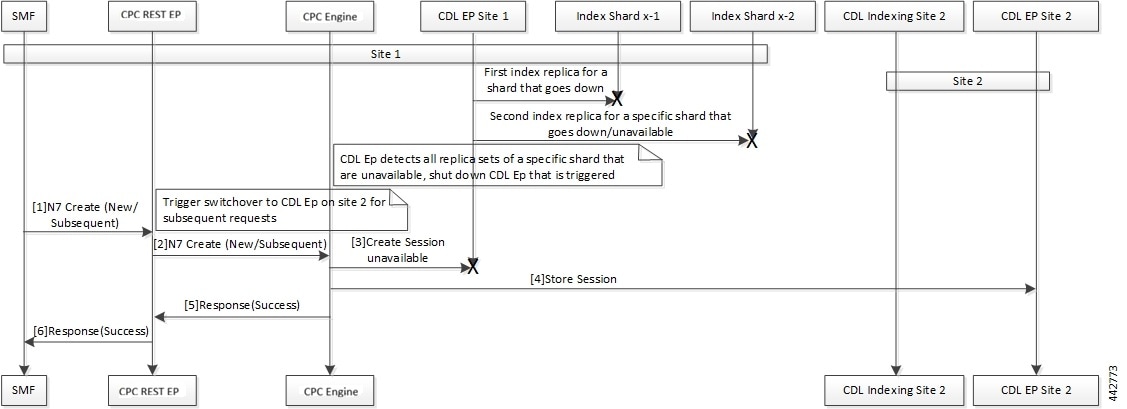
This section describes how the failover happens when two index replicas that belong to the same shard are down or unavailable.

The indexing shard failure is an example of two points-of-failure scenario where the two replicas reside on different virtual machines or hosts.

The CPC REST endpoint and CPC Engine redirect the traffic to the secondary CDL endpoint site (Site 2) based on the highest rating when the primary CDL site (Site 1) is unavailable.
Figure 3. Indexing Shard Failure Call Flow
Table 2. Indexing Shard Failure Call Flow Description

Step

Description

1

In the Site 1 environment, index replica 1 and replica 2 for a configured shard has failed or unavailable. Since both the replicas for the shard are unavailable, the CDL endpoint in Site 1 is shut down and all the subsequent requests are directed to the CDL endpoint on Site 2.

In the Site 1 environment, the SMF sends a Create Request to CPC REST endpoint over the N7 interface.

2

After receiving the request, the CPC REST endpoint forwards the Create Request to the CPC Engine.

3

The CPC Engine attempts to reach the CDL endpoint to send the Session Create Request. However, the CDL endpoint is unreachable.

The CPC Engine sorts the CDL points across Site 1 and Site 2 to recognize the endpoint with the highest rating or priority.

4

The Create Request is evaluated in the stored session and the CPC Engine forwards the request to the CDL endpoint residing in Site 2.

5

After the call request is successful, the CPC Engine notifies the Success Message to the CPC REST endpoint.

6

The CPC REST endpoint forwards the Success Message to the SMF.

Slot replica set failure

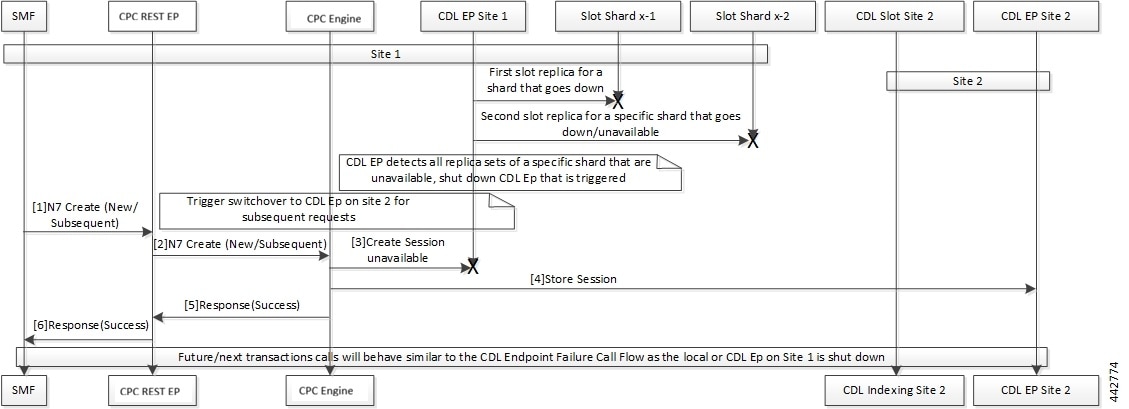
This section describes how the failover happens when two slot replicas that belong to the same replica set are down or unavailable.

The slot failure is an example of two points-of-failure scenario where the two slot replicas reside on different virtual machines or hosts.

Figure 4. Slot Replica Set Failure Call Flow
Table 3. Slot Replica Set Failure Call Flow Description

Step

Description

1

In the Site 1 environment, slot replica 1 and replica 2 for a configured shard is down or unavailable. Since both the replicas for the shard are unavailable, the CDL endpoint in Site 1 is shut down and all the subsequent requests are directed to the CDL endpoint on Site 2.

In the Site 1 environment, the SMF sends a N7 Create request to CPC REST endpoint over the N7 interface.

2

The CPC REST endpoint receives the request and forwards it to the CPC Engine.

3

The CPC Engine attempts to connect the CDL endpoint to send the Session Create request. If the CDL endpoint is unreachable, the CPC Engine sorts the CDL points across Site 1 and Site 2 to recognize the endpoint with the highest rating or priority.

4

The Create Request is evaluated in the stored session and the CPC Engine forwards the request to the CDL endpoint residing in Site 2.

5

After the call request is successful, the CPC Engine notifies the Success message to the CPC REST endpoint.

6

The CPC REST endpoint forwards the Success message to the SMF.

CDL configuration through Ops Center

This section describes how to configure the CDL endpoints.

Configure the CDL using CPC Ops Center involves these steps:

  • Configure the CDL Session Database and Defining the Base Configuration

  • Configure Kafka in CDL

  • Configure Zookeeper in CDL

Configure the CDL session database and defining the base configuration

This section describes how to configure the CDL session database and define the base configuration in CPC.

To configure the CDL session database and define the base configuration in CDL, use the following configuration in the Policy Ops Center console:

config 
  cdl 
    system-id system_id 
    node-type node_type 
    enable-geo-replication [ true | false ]  
    zookeeper replica zookeeper_replica_id 
    remote-site remote_system_id 
      db-endpoint host host_name 
      db-endpoint port port_number 
      kafka-server remote_kafka_host1 remote_port1 
      kafka-server remote_kafka_host2 remote_port2 
      kafka-server remote_kafka_host3 remote_port3 
      exit  
   cdl logging default-log-level debug_level 
      cdl datastore session  
      cluster-id cluster_id 
      geo-remote-site remote_site_value 
      endpoint replica replica_number 
      endpoint external-ip ip_address 
      endpoint external-port port_number 
         index map map_value 
         slot replica replica_slot 
         slot map map/shards 
         slot write-factor write_factor 
         slot notification host host_name 
         slot notification port port_number 
         slot notification limit tps 

         index replica index_replica 
         index map map/shards 
         index write-factor write_factor 
         end  

NOTES:

  • system-id system_id —(Optional) Specify the system or Kubernetes cluster identity. The default value is 1.

  • node-type node_type —(Optional) Specify the Kubernetes node label to configure the node affinity. The default value is “session.” node_type must be an alphabetic string of 0-64 characters.

  • enable-geo-replication [ true | false ] —(Optional) Specify the geo replication status as enable or disable. The default value is false.

  • zookeeper replica zookeeper_replica_id —Specify the Zooker replica server ID.

  • remote-site remote_system_id —Specify the endpoint IP address for the remote site endpoint. Configure this command only when you have set the cdl enable-geo-replication to true.

  • db-endpoint host host_name —Specify the endpoint IP address for the remote site. Configure this command only when you have set the cdl enable-geo-replication to true.

  • db-endpoint port port_number —Specify the endpoint port number for the remote site endpoint. The default port number is 8882. Configure this command only when you have set the cdl enable-geo-replication to true.

  • kafka-server remote_kafka_host1 remote_port1 —Specify the Kafka server’s external IP address and port number of the remote site that the remote-system-id identifies. You can configure multiple host address and port numbers per Kafka instance at the remote site. Configure this command only when you have set the cdl enable-geo-replication to true.

  • endpoint replica replica_number —(Optional) Specify the number of replicas to be created. The default value is 1. replica_number must be an integer in the range of 1 – 16.

  • endpoint external-ip ip_address —(Optional) Specify the external IP address to expose the database endpoint. Configure this command only when you have set the cdl enable-geo-replication to true.

  • endpoint external-port port_number —(Optional) Specify the external port number to expose the database endpoint. Configure this command only when you have set the cdl enable-geo-replication to true. The default value is 8882.

  • slot replica replica_slot —(Optional) Specify the number of replicas to be created. The default value is 1. replica_slot must be an integer in the range of 1 – 16.

  • slot map map/shards —(Optional) Specify the number of partitions in a slot. The default value is 1. map/shards must be an integer in the range of 1 – 1024.

  • slot write-factor write_factor —(Optional) Specify the number of copies to be written before successful response. The default value is 1. write_factor must be an integer in the range of 0 – 16. Make sure that the value is lower than or equal to the number of replicas.

  • slot notification host host_name —(Optional) Specify the notification server hostname or IP address. The default value is datastore-notification-ep.

  • slot notification port port_number —(Optional) Specify the notification server port number. The default value is 8890.

  • slot notification limit tps —(Optional) Specify the notification limit per second. The default value is 2000.

  • index replica index_replica —(Optional) Specify the number of replicas to be created. The default value is 2. index_replica must be an integer in the range of 1 – 16.

  • index map map/shards —(Optional) Specify the number of partitions in a slot. The default value is 1. map/shards must be an integer in the range of 1 – 1024. Avoid modifying this value after deploying the CDL.

  • index write-factor write_factor —(Optional) Specify the number of copies to be written before successful response. The default value is 1. write_factor must be an integer in the range of 0 – 16.

Configure Kafka in CDL

This section describes how to configure Kafka in CDL.

To configure the Kafka in CDL, use these configuration:

  1. Open the Policy Ops Center console and navigate to the datastore CLI.

  2. To configure Kafka, use these configuration:

    config 
       cdl kafka replica number_of_replicas 
          enable-JMX-metrics [ true | false ] 
          external-ip ip_address  port_number 
          enable-persistence [ true | false ]  
          storage storage_size 
          retention-time retention_period 
          retention-size retention_size 
          end 
    

    NOTES:

    All the following parameters are optional.

    • cdl kafka replica number_of_replicas —Specify the number of replicas to be created. The default value is 3. number_of_replicas must be an integer in the range of 1 – 16.

    • enable-JMX-metrics [ true | false ] —Specify the status of the JMX metrics. The default value is true.

    • external-ip ip_address port_number —Specify the external IPs to expose to the Kafka service. Configure this command when you have set the enable-geo-replication parameter to true. You are required to define an external IP address and port number for each instance of the Kafka replica. For example, if the cdl kafka replica parameter is set to 3, then specify three external IP addresses and port numbers.

    • enable-persistence [ true | false ] —Specify whether to enable or disable persistent storage for Kafka data. The default value is false.

    • storage storage_size —Specify the Kafka data storage size in gigabyte. The default value is 20 GB. storage_size must be an integer in the range of 1-64.

    • retention-time retention_period —Specify the duration (in hours) for which the data must be retained. The default value is 3. retention_period must be an integer in the range of 1 – 168.

    • retention-size retention_size —Specify the data retention size in megabyte. The default value is 5120 MB.

Configure Zookeeper in CDL

This section describes how to configure Zookeeper in CDL.

To configure Zookeeper in CDL, use this configuration:

  1. Open the Policy Ops Center console and navigate to the datastore CLI.

  2. To configure the parameters, use this configuration:

    
    config 
       cdl zookeeper data-storage-size data_storage 
          log-storage-size log_storage 
          replica number_of_replicas 
          enable-JMX-metrics [ true | false ] 
          enable-persistence [ true | false ]  
          end 
    

    NOTES:

    All these parameters are optional.

    • cdl zookeeper data-storage-size data_storage —Specify the size of the Zookeeper data storage in gigabyte. The default value is 20 GB. data_storage must be an integer in the range of 1-64.

    • log-storage-size log_storage —Specify the size of the Zookeeper data log's storage in gigabyte. The default value is 20 GB. log_storage must be an integer in the range of 1-64.

    • replica number_replicas —Specify the number of replicas that must be created. The default value is 3. number_replicas must be an integer in the range of 1-16.

    • enable-JMX-metrics [ true | false ] —Specify the status of the JMX metrics. The default value is true.

    • enable-persistence [ true | false ] —Specify the status of the persistent storage for Zookeeper data. The default value is false.

Sample Configuration

The following is a sample configuration of CDL in the HA environment.

cdl system-id   system_i
cdl enable-geo-replication true
cdl zookeeper replica num_zk_replica
cdl datastore session
 endpoint replica ep_replica
index map index_shard_count
 slot replica slot_replica
 slot map slot_shard_count
exit
cdl kafka replica kafka_replica

Sample Configuration

These is a sample configuration of CDL in the HA environment.

cdl system-id   system_i
cdl enable-geo-replication true
cdl zookeeper replica num_zk_replica
cdl datastore session
 endpoint replica ep_replica
index map index_shard_count
 slot replica slot_replica
 slot map slot_shard_count
exit
cdl kafka replica kafka_replica

CDL endpoint configuration

CDL endpoint configuration is a process that involves configuring external services and associating the datastore with the CDL endpoint service.

Configuration steps

Configure the CDL endpoints involves these steps:

  1. Configure the External Services

  2. Associating the Datastore with the CDL Endpoint Service

Configure the external services

Configure the CDL endpoints that are available in the Datastore CLI node of the CPC Ops Center. By default, these endpoints are deployed but require configuration with specific IP addresses and port numbers for each CDL site and instance.

CDL gets deployed in the GR environment as part of the SMI deployment procedure. While the CDL endpoints are available by default, you must configure them with the appropriate parameters for your specific deployment.

Procedure


Step 1

Open the Policy Ops Center console and navigate to the datastore CLI.

Step 2

Configure the external service parameters using the following configuration:

Example:


config 
    external-services site_name 
    ips ip_address 
    ports port_number 
    end 

NOTES:

  • external-services site_name —Specify the CDL site or instance name.

  • ips ip_address —Specify the IP address on which the CDL endpoint is exposed.

  • ports port_number —Specify the port number on which the CDL endpoint is exposed.


The external services are configured with the specified CDL endpoints, IP addresses, and port numbers for each site and instance.

Associate the datastore with the CDL endpoint service

Configure the external service for each CDL endpoint service that you plan to use.

This configuration allows you to associate the datastore with CDL endpoint services by specifying the service name, port number, and rating priority.

Procedure


Step 1

Open the Policy Ops Center console and navigate to the datastore CLI.

Step 2

To associate the datastore with CDL endpoint service, use the following configuration:

Example:

config 
   datastore external-endpoints service_name 
   port port_number 
   rating rating_priority 
   end 

NOTES:

  • datastore external-endpoints service_name —Specify the service name that belongs to the external services.

  • port port_number —Specify the port number where the external service resides.

  • rating rating_priority —Specify the rating or priority of the external service. CPC gives preference to the endpoints with the higher ratings.


The datastore is now associated with the CDL endpoint service with the specified configuration parameters.

Feature description

The Cisco Data Layer (CDL) stale session cleanup identifies and removes duplicate sessions that share identical International Mobile Subscriber Identity (IMSI) and Access Point Name (APN) identifiers. In high-traffic environments, duplicate sessions breach session capacity limits, which causes the CDL datastore service to reject new session requests. This enhancement uses the CDL index-overwrite-detection mechanism to enforce a delete-record action, which ensures that only the most recent session record remains active.

Configure stale session cleanup

Before you begin

Ensure that you meet these requirements:

  • Verify that the CDL datastore service is deployed and operational.

  • Confirm that the specific key families (FramedIpv6PrefixKey and SupiDnnKey) are identified for conflict detection.

Enable index overwrite detection and configure the delete-record action for stale sessions.

Procedure


Step 1

Log in to the CPC Ops-Center CLI and enter config mode.

Step 2

Access the CDL datastore session configuration.

cdl datastore session

Step 3

Enable index overwrite detection for FramedIpv6PrefixKey.

features index-overwrite-detection unique-keys-prefix FramedIpv6PrefixKey
  action delete-record
exit

Step 4

Enable index overwrite detection for SupiDnnKey.

features index-overwrite-detection unique-keys-prefix SupiDnnKey
  action delete-record
exit

Step 5

commit the configuration changes.

Example:

cdl datastore session
 cluster-id 1
 label-config session
 features index-overwrite-detection unique-keys-prefix FramedIpv6PrefixKey
  action delete-record
 exit
 features index-overwrite-detection unique-keys-prefix SupiDnnKey
  action delete-record
 exit
exit

Step 6

Verify the configuration show running-config cdl datastore session. Confirm that the output displays action delete-record under the index-overwrite-detection configuration for both FramedIpv6PrefixKey and SupiDnnKey.

The CDL datastore service automatically monitors incoming session requests for duplicate IMSI and APN combinations. When a collision occurs, the service removes the older record and retains the latest session, which prevents the CDL from breaching session capacity limits.