Cisco Security Cloud Control: On-Premises Firewall Management Center Integration

PDF

Cisco Security Cloud Control: On-Premises Firewall Management Center Integration

Network Address Translation policy analysis

Want to summarize with AI?

Log in

Learn how to analyze NAT policies in Policy Analyzer and Optimizer, identify shadowed or redundant rules, review conflict ownership, and download NAT analysis reports.


Use the Network Address Translation (NAT) tab when you want to analyze NAT policies and find rules that are shadowed or redundant. NAT Policy Analyzer and Optimizer helps you identify rules that are not contributing to effective NAT behavior, understand which rule owns the conflict, and download a NAT analysis report for review.

NAT Policy Analyzer and Optimizer requirements

  • NAT Policy Analyzer and Optimizer is available only when AIOps is enabled for the tenant and for the selected data source.

  • For On-Premises Firewall Management Center, NAT Policy Analyzer and Optimizer requires Version 7.6 or later.

  • If NAT Policy Analyzer and Optimizer is disabled in AIOps settings, NAT Policy Analyzer and Optimizer operations are blocked for all data sources.

  • When AIOps is enabled for a data source, Policy Analyzer and Optimizer initiates the initial NAT synchronization and analysis for onboarded data sources.

  • NAT Policy Analyzer and Optimizer performs analysis at the management center level, not on a per-device basis.

Note

Disabled NAT rules are excluded from being analyzed by the Policy Analyzer and Optimizer.

Analyze NAT policies

Network Address Translation (NAT) Policy Analyzer and Optimizer analyzes Cloud-Delivered Firewall Management Center and On-Premises Firewall Management Center NAT policies and categorizes NAT findings into shadowed rules and redundant rules.

NAT Policy Analyzer and Optimizer reports these NAT finding types.

Table 1.

NAT finding

Meaning

How to interpret it

Shadowed NAT rule

A rule that will never evaluate network traffic because another rule that precedes it over shadows this rule.

Review the shadowing rule and the shadowed rules together. A rule is marked shadowed only when the overlap is complete for the compared dimensions.

Redundant NAT rule

A rule can be removed without changing the final NAT behavior because another rule can handle the traffic with the same effective NAT action.

Policy Analyzer and Optimizer checks the translated action for redundancy. Matching traffic criteria alone is not enough when translated source, destination, service, or PAT behavior differs.


NAT rule sections and comparison behavior

NAT Policy Analyzer and Optimizer follows the high-level NAT evaluation model used by Cisco Secure Firewall NAT policies. NAT rules are evaluated in section order: Manual NAT before Auto NAT, Auto NAT, and Manual NAT after Auto NAT.

The NAT section determines the rule comparisons that can be reported by NAT Policy Analyzer and Optimizer.

NAT section

What it contains

NAT Policy Analyzer and Optimizer comparison behavior

Manual NAT before Auto NAT

Manual or twice NAT rules evaluated before Auto NAT.

Rules in this section can be compared with rules in the same section, Auto NAT, and Manual NAT after Auto NAT.

Auto NAT

Object NAT rules whose device order is determined internally.

Auto NAT rules can participate in comparisons with Manual NAT before or after sections. NAT Policy Analyzer and Optimizer does not report shadowed or redundant rules within the same Auto NAT section.

Manual NAT after Auto NAT

Manual or twice NAT rules evaluated after Auto NAT.

Rules in this section can be compared with rules in the same section and with rules from earlier comparable sections.


Supported NAT address families for Policy Analyzer and Optimizer

NAT Policy Analyzer and Optimizer supports these address-family flows.

Flow

Traffic family

Notes

NAT44

IPv4 to IPv4

Supported for standard IPv4 NAT and PAT behavior.

NAT66

IPv6 to IPv6

Supported for IPv6 NAT behavior.

NAT64

IPv6 to IPv4

Supported when cross-family behavior is explicitly configured.

NAT46

IPv4 to IPv6

Supported when cross-family behavior is explicitly configured.


NAT policy analysis summary

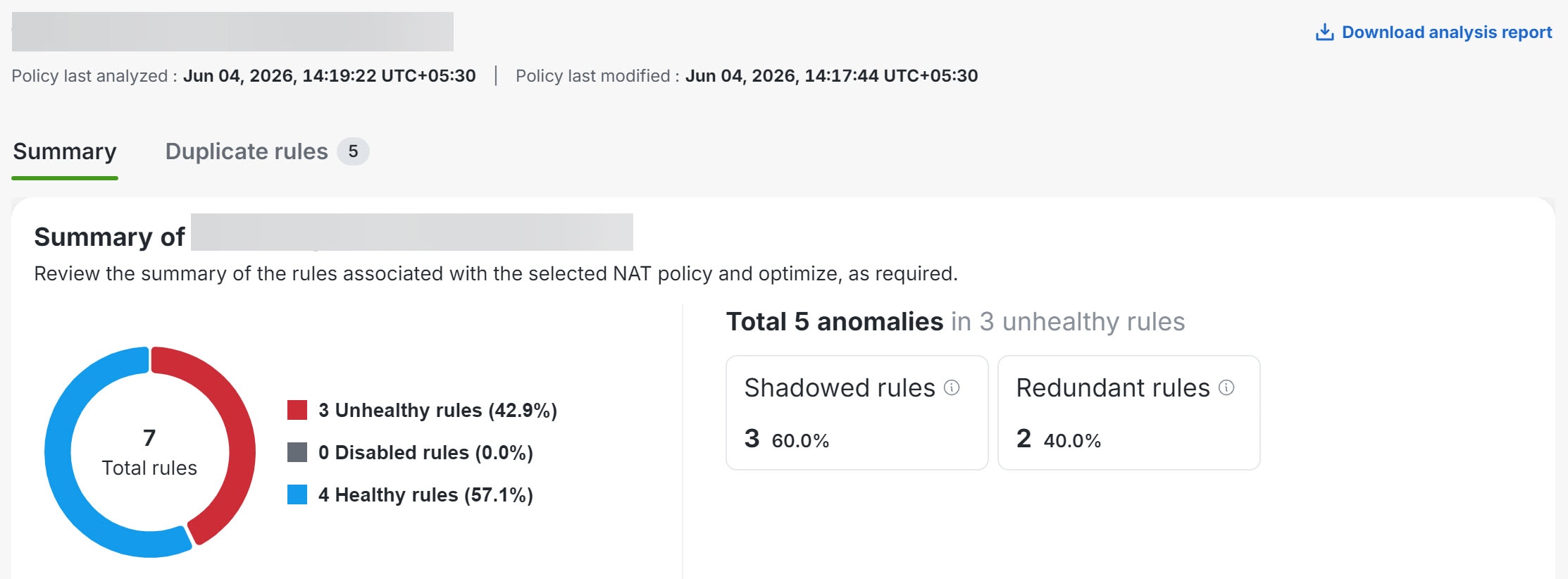
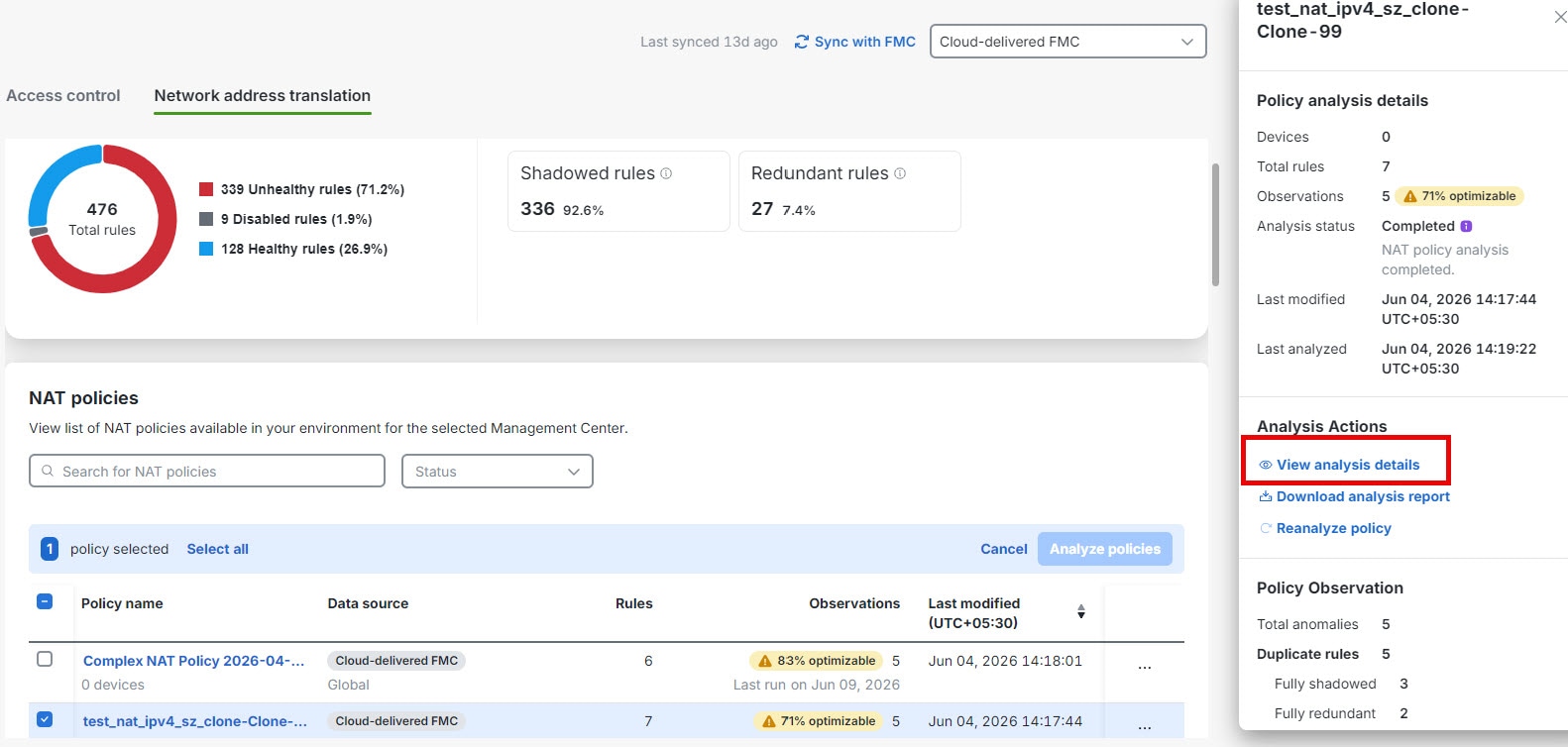
When analysis completes, select a NAT policy to review the right-pane summary and click View analysis details.

The policy-specific page displaying the anomaly details is shown.

  • Overall summary—provides insights on how many rules are unhealthy, disabled, healthy, using a pie chart for the selected NAT policy. You can also hover over the part of the pie to view the percentage of rules.

  • Total anomalies—shows the number of rule anomalies detected in the selected NAT policy. Also indicates how many unhealthy rules contain those anomalies.


Download NAT analysis report

The NAT analysis report is available after NAT policy analysis is complete and can be downloaded as a PDF. The PDF report includes policy metadata, analysis timestamps, summary charts, counts for healthy, disabled, shadowed, and redundant rules, and tabular observation details.

  1. In the Policy Analyzer and Optimizer page, click Network address translation.

  2. Select a NAT policy, and in the right pane, click Download analysis report.

The detailed rule information can include NAT section, rule type, direction, source and destination interface objects, original source, original destination, original service, translated source, translated destination, and translated service. Use these details to evaluate whether changes are needed in the management center. NAT Policy Analyzer and Optimizer does not apply NAT remediations in this release.


NAT Policy Analyzer and Optimizer and AgenticOps insights

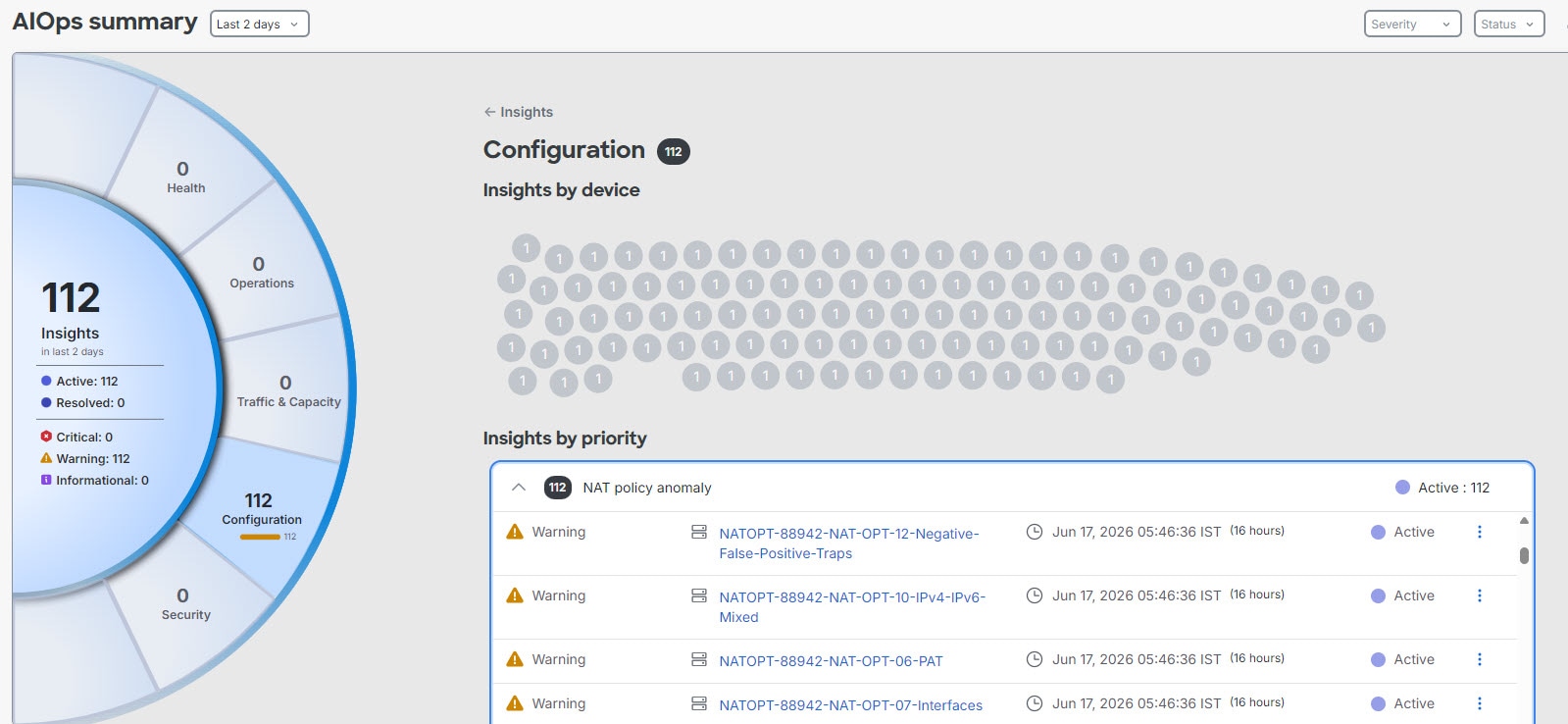
When NAT Policy Analyzer and Optimizer analysis detects NAT policy anomalies, AgenticOpscan raise a NAT policy anomaly insight. From AIOps Insights, you can review NAT anomaly counts by data source, open the affected data source or policy, and navigate back to the NAT Policy Analyzer and Optimizer analysis details.

Navigation: Insights & Reports > Summary.

If you dismiss a NAT anomaly insight, it is dismissed for the current insight occurrence. A later scheduled analysis can raise the insight again if NAT anomalies are detected again.