Introduction to AIOps Insights

AIOps brings AI-driven intelligence to firewall management, helping you proactively identify issues, optimize configurations, plan software upgrades, analyze policy health, track feature adoption, and assess capacity requirements. Use AIOps capabilities to gain operational visibility, prioritize remediation efforts, and improve the performance, security, and reliability of your firewall deployment.

About AIOps insights

Firewalls are a critical component of any organization's network security architecture. As organizations expand and the threat landscape evolves, managing these firewalls becomes complex. Organizations must continuously update rules and configurations to adapt to new threats, network changes, and compliance requirements, which presents significant challenges. Improper management can lead to security gaps and vulnerabilities. These issues pose risks to an organization's network security.

To effectively address these challenges, a new approach to firewall management is required. This is where AIOps becomes essential. AIOps leverages artificial intelligence (AI) and machine learning (ML) to streamline and enhance firewall management and network security.


Note


Currently, the AIOps features are available only for Firewall Threat Defense devices that are managed by Cloud-Delivered Firewall Management Center. For on-premises FMC-managed Firewall Threat Defense devices, selective AIOps capabilities like Policy Analyzer and Optimizer are accessible via cloud-assist.


Key functionalities

  • Traffic and capacity monitoring: Monitors network traffic and system capacity in real-time, and detects anomalies such as elephant flows. This ensures resources are optimized for peak performance.

  • Policy anomaly detection: Analyzes firewall policies and detects misconfigurations or anomalies before they impact performance or security.

  • Feature adoption insights and best practice recommendations: Provides insights into the level of feature adoption and suggests best practices to optimize security configurations.

  • Predictive forecasting for network issues: Predicts potential future network issues, allowing you to address them proactively and minimize downtime.

  • Operational insights: Evaluates device readiness for software upgrades, suggests compatible versions, and helps plan upgrades to maintain consistency, stability, and compliance across deployments.

  • Critical alerts: Filters and prioritizes the most urgent security events, helping you focus on critical issues.

Key features

  • Policy Analyzer and Optimizer: Analyzes security policies, detects anomalies, and provides recommendations on remediations that can be performed to optimize the policies, thereby improving the firewall performance.

  • Best Practices and Recommendations: Generates detailed assessment reports that highlight failed checks against Cisco Secure Firewall best practices and provides actionable recommendations to resolve issues, ensuring optimal firewall performance.

  • Feature Adoption: Provides insights into the features that are adopted and the percentage of adoption to modify the usage pattern and achieve optimal security. Analyze the adoption rate of different features to improve usage patterns and enhance security measures.

  • Software Upgrade Planner: Provides upgrade suggestions for your devices through a centralized dashboard. The dashboard displays the current and suggested versions and details about security vulnerabilities and bug fixes.

  • Application Insights: Detects application outages that may impact users, sites, and business-critical services. The feature correlates outage telemetry, operational insights, and affected resources to help you reduce troubleshooting time.

  • Capacity and Trend Analyzer: Analyzes firewall capacity utilization and traffic trends to identify abnormal spikes, sustained resource consumption, and emerging performance risks. The feature provides operational visibility into throughput, connection behavior, and traffic patterns to optimize firewall performance.

  • Compliance Posture: Assess firewall compliance posture against supported security standards. The feature evaluates firewall configurations, identifies compliance gaps, and provides actionable remediation insights to improve security posture

  • Configuration Settings: Provides the ability to configure thresholds for AIOps features and enable or disable insight preferences. You can customize these settings to suit your specific needs.

AIOps licensing requirements

If you have licenses for the Secure Firewall Management Center, you can access AIOps by enabling AIOps Insights in your organization. The initial version of AIOps is included as part of your firewall license and is granted on a per-device basis.

Prerequisites to use AIOps

  • Ensure that AIOps Insights is enabled for your Security Cloud Control organization and that Cloud-Delivered Firewall Management Center is provisioned.

  • Configure the required thresholds and preferences for supported AIOps features.

  • You must have Super Admin or Admin user roles to opt in and opt out of AIOps Insights for your organization.

View summary dashboard

AIOps summary dashboard

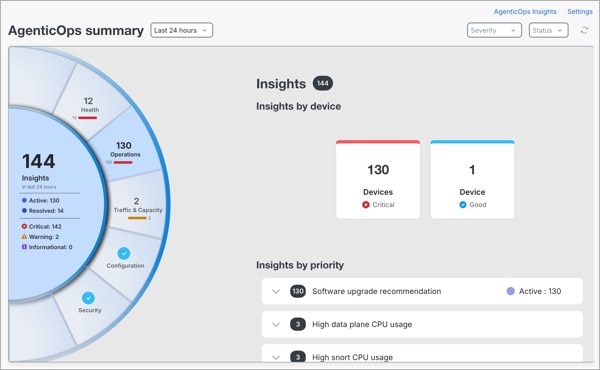
The Summary dashboard provides a consolidated view of all insights across your environment. It enables identification of areas that require attention and gives you the ability to drill down for operational, configuration, and security analysis. You can filter insights by time range, severity, and status.

  • Insights visualization panel: Visual representation of your insights, helping you quickly understand overall system posture and where to prioritize action.

    • The inner ring summarizes insights by status and severity.

    • The outer ring represents insight categories. Selecting a category displays related details.

      The insight categories include:

      • Operations: Focuses on insights that help maintain the operational health and software lifecycle readiness of your devices. This includes upgrade recommendations for your Firewall Threat Defense devices and End-of-Life notifications.

      • Configuration: Focuses on insights that evaluate your network policies, configurations, and adherence to Cisco Firewall best practices. This includes identifying misconfigurations, policy anomalies, and deviations that may impact performance, security, or compliance.

      • Security: Focuses on insights that detect suspicious, risky, or anomalous activities within your environment. These insights highlight behaviors that may indicate compromised accounts and malicious intent.

    Select any insight category to view the insights associated with it.

  • Insights by device: Click on a device to view insights.

  • Insights by priority: Expand the section to view all devices with related insights.

  • Use the icons at the top right of the page for additional actions:
    • AIOps Insights: Navigate to the view of all AIOps insights.

    • Settings: Navigate to configure preferences and thresholds for insights.

Confidence levels in AIOps

A confidence level represents the reliability of a forecast-based insight generated by AIOps. It indicates how accurately AIOps can predict future behavior for a given condition, helping you decide when immediate action is required versus when monitoring is sufficient.

Applicable forecast-based insight types

Confidence levels are displayed for the following forecast-based AIOps insights:

  • Remote Access VPN – Maximum Sessions Nearing Limit

  • CPU (LINA) Utilization Forecast Breach

  • CPU (Snort) Utilization Forecast Breach

  • Memory (LINA) Utilization Forecast Breach

  • Memory (Snort) Utilization Forecast Breach

How AIOps determines confidence levels ?

For forecast-based insights, such as High Snort Memory Usage, High Snort CPU Usage, and RA VPN Forecast, AIOps evaluates how accurately its machine learning models can predict future behavior using historical patterns and current trends.

Based on this forecast accuracy, each insight is automatically assigned a confidence level. Insights that do not meet a minimum reliability threshold are not generated.

  • High

    • The forecast is highly reliable and strongly supported by historical data.

    • Recommended action: Prioritize the investigation and take proactive corrective measures.

  • Medium

    • The forecast is reliable but may show moderate variability.

    • Indicates a strong trend that is likely to continue.

    • Recommended action: Review the insight and plan mitigation.

  • Low

    • The forecast indicates a possible emerging condition.

    • Limited data or higher variability reduces certainty.

    • Recommended action: Monitor closely and validate with additional operational context.

  • Very low

    • The forecast signal is weak or in an early stage.

    • Higher uncertainty due to insufficient or inconsistent data.

    • Recommended action: Observe trends. No immediate action is required.

Insight statuses and transitions

This table outlines the possible insight statuses, their descriptions, transitions, and examples.

Status

Description

Transition

Triggered by

Example

Active

  • An issue is detected and ongoing.

  • This is the initial state when an issue is identified.

–

System

Upgrade options suggested for Firewall Threat Defense devices.

Resolved

  • AIOps automatically marks an active insight as resolved when the issue no longer exists.

  • Historical details are available for reference.

Active to Resolved: After you fix the issue and the system confirms it in the next check.

  • Automatically by the system for performance issues.

  • By the user (with system confirmation) for configuration issues.

Overlapping firewall rules corrected by the user.

Not Applicable (N/A)

  • The issue existed earlier but it is no longer present.

  • No historical data is available for reference.

Active to Not Applicable

System

  • When an Access Control policy is deleted, the corresponding insight is marked as NA.

  • When a device is deleted from FMC inventory, all insights for that device are marked as NA.

  • When earlier Policy Analyzer and Optimizer results showed issues but a recheck finds zero issues and no details to display, the insight is marked as NA.

View AIOps insights

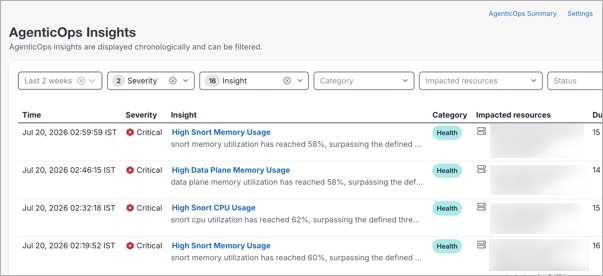
The AIOps Insights page provides AI-driven alerts that help you detect, prioritize, and resolve issues across your environment.

Procedure


Step 1

In the left pane, click Insights & Reports > AIOps Insights > Summary.

Step 2

On the Summary page, click AIOps Insights at the top right.

Insights are displayed in chronological order and can be filtered by the following:

  • Time: Select a time range to view insights generated within that window

  • Severity: Select a severity level, such as Critical, Warning, or Informational.

  • Insight: Select a type of insight to view.

  • Category: Select a category such as Configuration, Health, Operations, and so on.

  • Impacted Resources: Select a device or service affected by the insight.

  • Status: Select a status, such as Active, Not applicable, or Resolved stauses.

Clicking Reset all clears all applied filters and returns to the default view.

Step 3

In the insights table, click an Insight or Impacted Resource to view additional details.

The details include a summary of the issue, the probable cause, related metrics, and recommended remediation or upgrade actions to ensure optimal performance.

Step 4

Use the icons at the top right of the page for additional actions:

  • AIOps Summary: Navigate to the view the high-level summary of all insights.

  • Settings: Navigate to configure preferences for AIOps features.


About capacity and traffic insights

Capacity issues often develop gradually and only become visible when they begin to impact performance. The Capacity and Trend Analyzer provides visibility into resource utilization across your devices, highlights emerging risks, and predicts when those risks may lead to performance issues. By combining historical trends with predictive insights, it enables you to anticipate problems and take action before they affect users. This feature enables proactive capacity planning by identifying future risks before they impact system performance.

How AIOps generates capacity insights

Forecasted insights predict future resource utilization based on historical trends and patterns. AIOps continuously analyzes historical data and runs periodic forecasts to identify when resources are likely to reach configured thresholds.

AIOps uses multiple analytical approaches to identify and predict issues. AIOps runs forecasts on a recurring weekly basis to identify potential capacity risks in advance, including:

  • Detect threshold breaches: Identifies when CPU or memory usage exceeds configured limits in real time.

  • Detect anomalies: Identifies unusual deviations from expected behavior based on historical patterns.

  • Detect elephant flows: Detects large traffic flows that can impact system performance and resource utilization.

  • Detect Remote Access VPN session limits: Detects or predicts when VPN session capacity limits are reached.

  • Forecast capacity risks: Predicts future threshold breaches using historical trends, enabling proactive planning.


Note


  • The accuracy of insights depends on the availability and quality of historical data. Limited or inconsistent data may delay or reduce insight accuracy.

  • In environments with limited activity or newly onboarded devices, insights and forecasts may take time to appear.


Key features

Table 1. Key features of Capacity and Trend Analyzer

Feature

Description

Capacity insights dashboard

Provides a fleet-level view of device capacity status, displaying past, current, and predicted capacity insights across all monitored devices.

Capacity insights

Generates insights based on CPU, memory, connection, throughput, and VPN session activity to highlight potential resource constraints.

Device capacity analysis

Displays detailed capacity insights for an individual device, including resource metrics, AI-generated summaries, and forecast information.

Predictive capacity forecasting

Uses historical resource utilization data to predict future usage trends and identify potential capacity risks before thresholds are reached.

Timeline-based analysis

Allows you to analyze capacity insights across different time windows, including past events, current conditions, and predicted future risks.

Device health indicators

Displays device health status based on active and predicted capacity insights, helping you quickly identify devices that require attention.

Supported devices

The Capacity and Trend Analyzer supports:

  • Secure Firewall Threat Defense devices

  • Secure Firewall Threat Defense High Availability (HA) deployments

  • Secure Firewall Threat Defense Cluster deployments


Note


For High Availability (HA) and cluster deployments:

  • Capacity analysis runs at the system level.

  • Individual member devices are not displayed separately.


Analyze capacity trends and forecast resource usage

Before you begin

Ensure that Capacity and Trend Analyzer is enabled under Settings. For more information, see enable Capacity and Trend Analyzer.

Procedure


Step 1

In the left pane, click Insights & Reports > Capacity and Trend Analyzer.

This opens the dashboard where you can view capacity insights across your environment.

Step 2

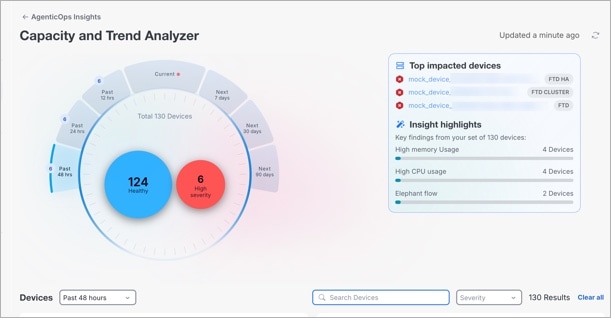
Use the circular timeline to select a timeframe, such as Current, Past (12 hours, 24 hours, or 48 hours), Next (7 days, 30 days, or 90 days).

  • Current shows active capacity insights.

  • Past 12, 24, or 48 hours show insights from the selected past period.

  • Next 7, 30, or 90 days show predicted capacity risks.

The timeline also displays the total number of devices and their health status, such as Healthy, Needs attention, and High severity.

Step 3

Review the summary panel.

  • Use the Top impacted devices section to identify devices with the most critical capacity issues.

  • Use the Insight highlights section to understand the most common capacity risks across your organization.

Step 4

Review device insights in the Devices section.

  • Search for a device or use filters such as timeframe and severity to locate devices that require attention.

  • Each device displays a summary of detected or predicted issues, along with associated insight tags.

Step 5

Select a device to view detailed insights.

This view provides summaries and detailed insights for the selected device.

Step 6

On the device details page, review the AI summary, Resolved insights, Active insights, and Future insights.

Step 7

In the Device metrics section, select a metric to view historical trends and forecast data.

Step 8

Use the insights and forecasts to determine appropriate actions, such as redistributing traffic, scaling resources, or planning capacity upgrades. After taking action, use the Current view to monitor whether the issue has been resolved.

The Capacity and Trend Analyzer helps you move from reactive troubleshooting to proactive capacity management by enabling you to identify risks early and take informed action.


About application insights

Application Insights identifies outages for monitored cloud applications by consuming outage intelligence provided by ThousandEyes Internet Insights.

ThousandEyes Internet Insights collects telemetry from globally distributed vantage points that continuously measure application and network availability. When an outage affecting a SaaS or cloud service is detected, an outage event is generated. Application Insights uses this intelligence to display outage details such as affected applications, outage duration, impacted regions, and affected domains for the applications you monitor.

For more information about ThousandEyes Internet Insights, see Internet Insights.

How application insights work

  • Once Application Insights is enabled, AIOps periodically evaluates Cloud-Delivered Firewall Management Center policies to determine which applications are eligible for monitoring.

  • The Cloud-Delivered Firewall Management Center policy is scanned every 24 hours. Applications that are enabled in the policy are automatically monitored, and any detected outages are reported on the Application Insights page using outage intelligence from ThousandEyes Internet Insights.

  • On the Settings page, applications that are allowed in the Cloud-Delivered Firewall Management Center policy are preselected by default. You can optionally select additional applications from the list to include them in outage monitoring.

Detect application outages

Before you begin

Ensure that the Application outage insights toggle is enabled under Insights & Reports > Settings > Application Insights.

Procedure


Step 1

In the left pane, click Insights & Reports > Application Insights.

The Application Insights page displays a summary of detected outages, including the total number of outages, active outages, resolved outages, and the number of applications being monitored for the selected time range.

Step 2

Review the list of affected applications. For each application outage, the following information is displayed:

  • Application name

  • Affected domains

  • Outage duration

  • Start and end timestamps

  • Affected regions

Step 3

Click an application to view detailed outage information in the right pane.


About compliance insights

Organizations spend significant time and effort validating firewall configurations against industry security standards. This process is often manual, inconsistent, and dependent on specialized expertise. As compliance requirements evolve, teams must repeatedly revisit configurations, which slows down deployments and increases operational overhead.

Even small misconfigurations such as, overly permissive access rules or missing segmentation controls, can lead to compliance violations that are difficult to detect through manual review.

Compliance Posture in AIOps addresses this problem by automating the evaluation of firewall policies against industry-standard requirements. The feature analyzes configurations, identifies compliance gaps, and presents actionable insights through a centralized dashboard.

The system translates high-level compliance guidelines into programmatic checks that can be applied consistently across environments. This allows organizations to move from periodic, audit-driven validation to continuous compliance monitoring.

The current implementation evaluates firewall configurations against the Payment Card Industry Data Security Standard (PCI DSS) v4.0.1 framework.

Note: Currently, Compliance Posture is available only for deployments in the AMER and EU regions.

Benefits

  • Automate compliance validation by evaluating firewall policies against predefined rules, eliminating manual review and reducing the risk of human error.

  • Generate compliance reports that provide detailed findings and recommendations to help you assess and improve your security posture.

  • Review actionable recommendations that guide remediation, such as restricting overly broad access, validating business intent, or removing redundant rules.

  • Apply zone-aware analysis to evaluate segmentation controls based on relationships between trusted, untrusted, and intermediary network zones.

Prepare your environment for compliance evaluation

  • Ensure that Cloud-Delivered Firewall Management Center is provisioned in your organization.

  • Ensure that AIOps is activated in your organization.

  • Ensure your Firewall Threat Defense devices are onboarded and managed through Security Cloud Control Firewall Management.

Generate compliance reports

Procedure


Step 1

In the left pane, click Insights & Reports > Compliance Posture.

The Compliance Posture page displays previously generated reports and allows you to create new compliance evaluations.

Step 2

Click Generate Report to begin defining the report.

Step 3

Enter a name and choose the device to evaluate.

  • Currently, PCI DSS 4.0.1 Compliance Template is the only supported template. This template evaluates firewall configurations against requirements for network security, access control, secure configuration, and logging.

  • Only devices that are currently online are available for selection.

Step 4

Review zone mappings.

Zone mappings are pre-assigned based on the existing configuration. Review these assignments and update them as needed. Assign each interface to one of the following zone categories:

  • Trusted: Internal networks that handle sensitive or business-critical data, such as the Cardholder Data Environment (CDE) or corporate networks.

  • Untrusted: External networks, typically the internet or any network outside organizational control.

  • DMZ: Intermediate networks that expose services to untrusted networks while isolating them from trusted environments.

  • N/A: Interfaces that are not relevant to compliance evaluation or are not part of the analyzed traffic flow.

Note


Zone mappings are used to evaluate segmentation-related compliance rules. Incorrect mappings can lead to inaccurate findings, especially for rules that validate traffic between trusted and untrusted networks.

Step 5

Click Generate Report to begin the compliance evaluation process.

Note

 
  • Compliance reports are generated manually and are not evaluated automatically.

  • The system analyzes firewall policies and validates them against the selected compliance template. Report generation can fail due to device connectivity issues. Verify that the device is online and reachable.

Step 6

Monitor report status.

View the report status from the Compliance Posture dashboard. The Compliance Status column indicates the current state of the report and its findings.

Step 7

Select a completed report from the Compliance Posture dashboard to view detailed compliance results for the selected device.

Step 8

Review compliance checks and findings.

The report displays a list of compliance checks, each representing a specific requirement being evaluated (for example, restricting inbound traffic to the CDE or validating VPN security). Select a compliance check to view its details, which may include:

  • A description

  • References to relevant compliance standards

  • Identified findings associated with the check

  • Recommendations for remediation

The number next to each compliance check indicates how many findings were identified for that check.

Step 9

Click Download Report to export the report in JSON format for audit and offline review.


You can re-run reports on devices after making policy changes that address findings from previous reports. You can view compliance findings from the Summary page. Navigate to Insights & Reports > Summary and click Operations to view compliance-related insights for the selected time range.

About Best Practices and Recommendations

Enhance your organization’s security posture with AIOps by identifying deviations from Cisco Secure Firewall best practices. Run assessments on your devices, generate reports, and receive insights that guide you toward optimal performance.

  • Assessment: Evaluates your firewall configuration across multiple categories. Each check determines alignment with Cisco Secure Firewall best practices. The report summarizes the total number of checks performed. It categorizes the results as Passed or Requires review.

    Checks that require review indicate deviations that could impact firewall efficiency and security. Each failed check presents an opportunity for improvement. Addressing these checks contributes directly to optimizing firewall performance.

  • Recommendation: Provides specific recommendations to address identified issues, ensuring optimal firewall performance. These include detailed information such as the nature of the problem, symptoms, impact, and required actions.

The best practices and recommendations checks are developed with input from Cisco's Technical Assistance Center (TAC) and Customer Experience (CX) teams. This input helps address trending issues, incorporate industry best practices, and enhance the reliability of recommendations. Implement these recommendations to resolve issues, align with best practices, and optimize firewall performance.

Table 2. Key Features

Feature

Description

Automated assessments

Runs periodic evaluations of firewall devices against Cisco best practices.

Checks summary

Displays how many checks passed and highlights those requiring review.

Trend visualization

Shows the number of checks over time, helping you compare passed and failed checks across assessment cycles.

Device reports

Provides device-specific results and percentage of improvement potential.

Review category and check control

Enable or disable review categories or individual checks for future assessments.

Implement Best Practices and Recommendations

Before you begin

Ensure that Best Practices is enabled under Settings. For more information, see Enable Best Practices.

Procedure


Step 1

In the left pane, click Monitor > Insights & Reports > AIOps Insights > Best Practices and Recommendations.

The Assessment Summary provides a high-level overview of assessment results. It includes two tiles:

  • Checks summary: Displays the total number of checks and highlights those requiring review.

  • Best practices assessment trend: Helps you track assessment outcomes over time. The Y-axis represents the number of checks, and the X-axis shows assessment dates. You can hover over data points to view summary statistics.

  • Feedback: A mechanism for you to provide feedback on the assessments. You can enter optional comments and grant consent for follow-up contact regarding your feedback.

Step 2

In the Device reports section, you can view the list of all available device reports. Filter devices by Device status, Review categories, or Assessment status to narrow down results.

Assessment Statuses: Each device report has an Assessment Status, which indicates the current state of the assessment.

  • In progress: An assessment is actively running. After completion, a report will be generated.

  • In queue: The previous assessment is outdated, and a new one has been scheduled.

  • Updated: The assessment is complete, and the latest report is available for review.

  • Error: The assessment could not be completed due to an error. The report will be automatically generated after 24 hours. If the issue persists, contact Cisco TAC for assistance.

Step 3

From the three-dot menu icon next to each device:

  1. Click Run assessment to initiate a new assessment.

  2. Click Download report to export the Best Practices assessment summary report in PDF format.

Schedule Device Assessment

Periodic assessments run automatically, but you can also run assessments manually at any time. In environments with more than 50 devices, only 50 devices can be analyzed per day. Use the Select devices option on the Best Practices and Recommendations page to choose which devices are included in automated assessments.

  • Select devices for automated assessments:

    1. Click Select devices in the notification banner to open the Schedule devices for assessment dialog. This dialog allows you to choose which devices run automated assessments.

    2. Devices in the Scheduled devices panel are included in automated assessments. Click Save.

  • Mange scheduled devices: You can update the list of scheduled devices at any time. Devices removed from the Scheduled devices panel are no longer included in automated assessments. Devices added to this panel are included in future automated assessments.

  • Device scheduling limits: You can schedule a maximum of 50 devices for automated assessments. The Scheduled devices panel displays the number of currently scheduled devices, for example 48 / 50 devices. When 50 devices are selected, further selection is disabled and a tooltip indicates that the maximum number of scheduled devices has been reached.

Step 4

Click on a Device name to view a detailed report for that specific device.

  • Check the Show passed checks checkbox to view successful checks in the detailed view. This provides full visibility into all checks.

  • In the Best practices assessment section, view the Total checks, how many Passed and Require review.

  • Expand each check to view the remediations and corrective actions.

Step 5

Enable or disable an entire category from future assessments. You can also disable individual checks within a category.

  • Disable the toggle to exclude a review category or check from future assessments.

  • Enable the toggle to include it in future assessments.

Note


Disabling a category or check does not affect the actual feature or its operation. The feature continues to function normally, but it is excluded from Best Practices assessments.


About Feature Adoption Insights

The Feature Adoption dashboard provides a comprehensive view of how effectively different features are being utilized across your environment. Each feature has an adoption rate. This rate is calculated based on the total number of eligible devices and the number of those devices configured with the feature. This insight helps you identify underutilized capabilities and take steps to improve overall adoption.

The dashboard groups features into license categories such as Essentials, IPS, Remote Access VPN, Features not requiring license, and Subscription-Based Features to help you understand adoption patterns.


Note


If a license is not available for a given category, the adoption rate for that category will always be 0%.


By tracking the adoption rate at both the feature and license category levels, you can prioritize improvements and maximize the usage of available features. Feature Adoption helps you use available capabilities to achieve your intended outcomes

Assess and Improve Feature Adoption

Before you begin

Ensure that you have selected the list of features under Insights & Reports > Settings > Feature Adoption.

Procedure


Step 1

In the left pane, click Insights & Reports > Feature Adoption.

  • The Summary tile provides a quick overview of overall adoption status:

    • Adoption rate: Percentage of features currently adopted across their applicable scope.

    • Total features: Total number of features available for adoption.

    • Not adopted: Number of features that have not been enabled or configured.

    • Partially adopted: Number of features that are enabled or in use but not fully across all applicable scope.

    • Adopted: Number of features that are fully enabled and in use.

  • In the Feature Recommendation tile, you can watch short videos about recommended features that will help enhance your organization’s security.

Note

 
  • The data updates every 24 hours, but you can click Refresh to update it manually.

  • We recommend that you increase the usage of these features to improve overall performance.

Step 2

Click a feature name to view the following details:

  • A short description of the feature.

  • The feature adoption rate can range from 0% to 100%, based on how much the feature is used. Enable the toggle to include the feature in adoption calculations or disable it to exclude it.

    Note


    Enabling or disabling a feature affects only the adoption score and does not impact the functionality of the feature.

  • Steps to improve your feature adoption rate.


About Software Upgrade Insights

The Software Upgrade Planner helps simplify firewall software upgrade planning and management. It analyzes your deployed Firewall Threat Defense devices and provides upgrade recommendations based on compatibility, stability, security vulnerabilities, and b ug fixes. This helps you make informed upgrade decisions and maintain a consistent software version across the environment.

The feature provides a centralized view of the current software version running on each device along with the suggested version. It also highlights important details such as bug fixes, vulnerabilities fixes, and upgrade readiness insights. By identifying potential risks and compatibility concerns before the upgrade process begins, the planner helps reduce operational issues and minimizes downtime.

Need a visual guide? Explore the Software Upgrade Planner feature walkthrough to see it in action.

Manage Software Upgrades

Before you begin

Ensure that the Software Upgrade Planner toggle is enabled under Insights & Reports Settings > Operations.

Procedure


Step 1

In the left pane, click Insights & Reports > Software Upgrade Planner.

The Device summary tile displays the number of Firewall Threat Defense devices in your network having upgrade recommendations. The displayed data is automatically updated every hour.

Step 2

Click Go to product upgrade to navigate to the Product Upgrades page for upgrade actions on the Cloud-Delivered Firewall Management Center. This page allows you to:

Step 3

Click Download report to export the Software Upgrade Planner report in PDF format.

Step 4

The Security vulnerability and bug fixes section displays the total number of available fixes, categorized into Security vulnerability fixes and Bug fixes. Click View all.

The page displays a table listing all the available fixes for your devices, including security vulnerabilities and bug fixes in separate tabs.

The security vulnerability fixes tab

Use the Search text box to find specific security vulnerabilities and filter the results by Severity.

  • CVE ID: Displays the unique identifier for the security vulnerability.

    • Click on a CVE ID to view detailed information in the panel on the right-hand side, including CVE details, Description and Impacted devices.

    • Expand CVE details and click Open Security Advisory to navigate to the official Cisco security advisory page.

      The advisories provide details such as affected products, workarounds, fixed software, revision history, and other public announcements. You can view all published security advisories at Cisco Security Advisories.

  • Title: Name of the vulnerability.

  • Impact: Severity level of the vulnerability.

  • Description: A brief explanation of the vulnerability.

  • Impacted devices: List of devices affected by the vulnerability.

  • CVSS score: The Common Vulnerability Scoring System (CVSS) score, a standardized method for rating vulnerability severity.

  • Available fixes: List of the software versions or patches that address the vulnerability.

The bug fixes tab

Use the Search text box to find specific bugs and filter the results by Severity.

  • Bug ID: Displays the unique identifier for each bug.

    • Click on a Bug ID to view detailed information in the panel on the right-hand side, including Bug details, Description and Impacted devices.

    • Expand Bug details and click Open in bug Search Tool to navigate to the details on the Bug Search Tool.

  • Title: Name of the bug.

  • Severity: Severity level of the bug.

  • Description: A brief explanation of the bug.

  • Impacted devices: List of devices affected by the bug.

  • Available fixes: List of the software versions or patches that address the bug.

Step 5

In the Software Upgrade Planner page, click on a device name to view more details about the upgrade options.

Multiple upgrade options are available based on vulnerabilities, bugs, and new features. The Cisco-suggested version is indicated by a gold star. Choose the version that suits your requirements. The Recommended upgrades section displays:

  • Recommended version 1

  • Recommended version 2

  • Golden version

You can access release highlights by clicking on the Release Notes link associated with each recommended version. Additionally, this page provides details on Security vulnerability fixes and Bug fixes relevant to the current version of the device.


Manage Insight Preferences

You can enable or disable insight preferences for your tenant for the following AIOps features:

Enable AIOps Insights

To take advantage of AIOps' benefits, you must enable AIOps insights. You must have Super Admin or Admin user roles to enable AIOps Insights in your tenant.

Procedure


Step 1

In the left pane, click Insights & Reports > AIOps Insights > Settings.

Step 2

Click Start Onboarding.

Step 3

In the AIOps Insights for Cisco Firewall window, click Setup.

Step 4

In the Setup AIOps page, check the Confirm AIOps activation check box.

Step 5

Click Get Started.

The onboarding process begins, and it takes a few minutes to fetch the data that is required to provide the insights. When completed, the AIOps > Summary page is displayed.


Disable AIOps Insights

You can choose to opt out of AIOps if you no longer want to use the capabilities. When you opt out, AIOps stops collecting data from your devices and deactivates all data processing and alerts. You must have Super Admin or Admin user roles to disable AIOps insights in your tenant.

Data Cleanup Options

When opting out, you can decide how existing data is handled:

  • Keep existing data: Stops the AIOps service but retains your historical data. If you choose to opt in again later, this data can be reused for improved insights.

  • Remove all data: Stops the AIOps service and permanently deletes all existing AIOps data. Deleted data cannot be recovered.

Procedure


Step 1

In the left pane, click Insights & Reports > AIOps Insights > Settings.

Step 2

Click Miscellaneous.

Step 3

Under Opt out of AIOps, choose your preferred data cleanup option.

Step 4

Click Opt out of AIOps.


Best Practices and Recommendations Insights

You can modify the preferences for Best Practices & Recommendations-related insights.


Note


The setting for Best Practices & Recommendations is enabled by default.


Procedure


Step 1

In the left pane, click Insights & Reports > AIOps Insights > Settings.

Step 2

Click Best Practices.

Step 3

Enable the Best Practices & Recommendations Analysis toggle button to view the assessment categories, checks performed under each category, and the number of failed checks for each device.

Step 4

Enable the Automatic assessment toggle to activate automated report generation.

Step 5

Click Submit.


After you enable the feature for your tenant, you can view the detected anomalies in the Summary page, and the respective widget is displayed on the dashboard.

Feature Adoption Insights

You can modify the preferences for Feature Adoption-related insights.


Note


The setting for Feature Adoption is enabled by default.


Procedure


Step 1

In the left pane, click Insights & Reports > AIOps Insights > Settings.

Step 2

Click Feature Adoption.

Step 3

License categories such as Essentials, IPS, Features not requiring license, Remote Access VPN, and Subscription-Based Features are listed. Expand a category to view the individual features.

Step 4

For each feature:

  • Check the checkbox to include it in adoption rate calculations.

  • Clear the checkbox to exclude it from adoption rate calculations.

Step 5

You can select a category to bulk include all features in that category.

Disabled features continue to function normally but are excluded from the adoption rate calculation.

Step 6

Click Submit.


Application Insights

You can modify the preferences for application outages- related insights.


Note


The setting for Application Insights is enabled by default.


Procedure


Step 1

In the left pane, click Insights & Reports > AIOps Insights > Settings.

Step 2

Click Application insights.

Step 3

Enable the Application outage insights toggle button to receive insights and notifications when application outages occur.

Step 4

In the Selected applications list, search for an application and check the checkbox to include it for monitoring. Clear the checkbox to remove an application from monitoring.

Step 5

Click Submit.


After you enable the feature for your organization, you can view detected application outages on the Application Insights page, and corresponding insights are displayed on the AIOps Summary dashboard under the Operations category.

Capacity and Traffic Insights

You can modify the preferences for Capacity and Traffic-related insights. These insights help monitor firewall performance, detect anomalies, and identify potential capacity risks.

Procedure


Step 1

In the left pane, click Insights & Reports > Settings.

Step 2

Click Capacity & Traffic Analysis.

Step 3

Enable the toggle buttons for the insights you want to monitor:

  1. Traffic-related insights

    • High traffic caused by elephant flow

    • RAVPN capacity assessment

  2. System health-related insights

    • High data plane CPU usage

    • High snort CPU usage

    • High data plane memory usage

    • High snort memory usage

  3. Anomaly detection-related insights

    • Connections rate (CPS) anomaly

    • Network throughput anomaly

Step 4

For each insight, expand the section and configure the available settings. Depending on the insight, you can select severity levels, configure thresholds, or specify forecast parameters.

Step 5

Click Submit.


After you enable the feature for the organization, you can view the detected anomalies in the Summary page, and the respective widgets are also displayed in the dashboard.

Operational Insights

You can modify the preferences for operations-related insights.


Note


The setting for Software Update Planner is enabled by default.


Procedure


Step 1

In the left pane, click Insights & Reports > AIOps Insights > Settings.

Step 2

Click Operations.

Step 3

Enable the Software Update Planner toggle. You can view the software versions running on your devices and our upgrade recommendations.

Step 4

Click Submit.

After you enable this feature for your tenant, detected insights are listed in the Summary page.


Frequently Asked Questions About AIOps

What is AIOps?

AIOps for firewalls leverages artificial intelligence (AI) and machine learning (ML) to streamline and enhance firewall management. By continuously analyzing the data, AIOps provides insights that help you:

  • Optimize firewall policies and configurations.

  • Detect misconfigurations before they impact performance.

  • Improve feature adoption and adherence to best practices.

  • Receive upgrade suggestions for Secure Firewall Threat Defense devices, including bugs fixes and security vulnerabilities fixes.

Are AIOps features available for all types of FMC-managed Firewall Threat Defense devices?

AIOps capabilities for FMC-managed Firewall Threat Defense devices are accessible via cloud-assist, enabling features such as Policy Analyzer and Optimizer.

Can onboarding AIOps fail?

If an onboarding failure occurs, open a support ticket with Cisco Technical Assistance Center (TAC).

Can AIOps Insights be disabled?

Opting out of AIOps stops data collection and disables insights. You can choose whether to retain or permanently delete historical data. For more information, see Disable AIOps Insights.

Can I disable specific AIOps modules?

Yes. From AIOps Settings, you can enable or disable modules such as Feature Adoption, Best Practices & Recommendations, and Operations. Disabled modules stop generating insights but do not affect device functionality.

Can I manually run Best Practices and Recommendations assessments?

Periodic assessments run automatically, but you can also run assessments manually at any time. For large-scale deployments with more than 50 devices, you must run assessments manually due to processing limits.

Does AIOps automatically make changes to my firewall configuration?

No. AIOps provides recommendations and guidance based on analysis of your environment. Configuration changes are not automatically applied unless you explicitly review and implement them.