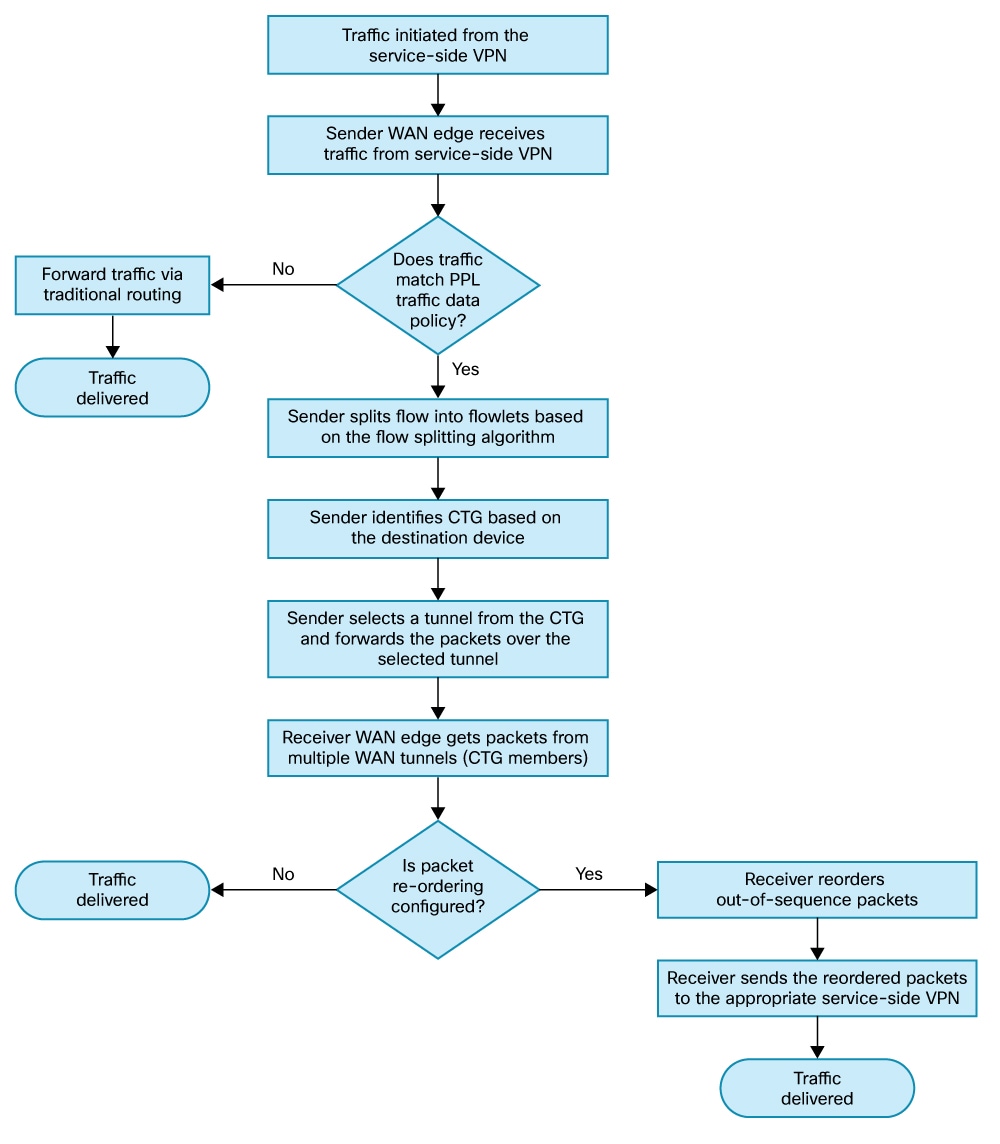
Describes how PPL improves network bandwidth and performance by distributing and reordering packets across multiple WAN links, unlike traditional load balancing methods.
Per-packet load balancing (PPL) or adaptive single flow distribution is a bandwidth aggregation feature that
-
distributes packets from a single flow across multiple WAN links,
-
maximizes the use of all available paths, and
-
maintains data integrity by reordering packets at the destination.
Traditional load balancing vs PPL
Traditional load balancing uses one network link for each data stream, which can limit overall bandwidth use. PPL shares traffic across multiple available links, allowing you to get the most out of your network and improve performance.
Reorder packets
When a device distributes packets over multiple links, packets may arrive at the destination out of order. The PPL feature automatically reorders these packets on a best-effort basis and releases any buffered packets based on either a time threshold or a memory threshold.