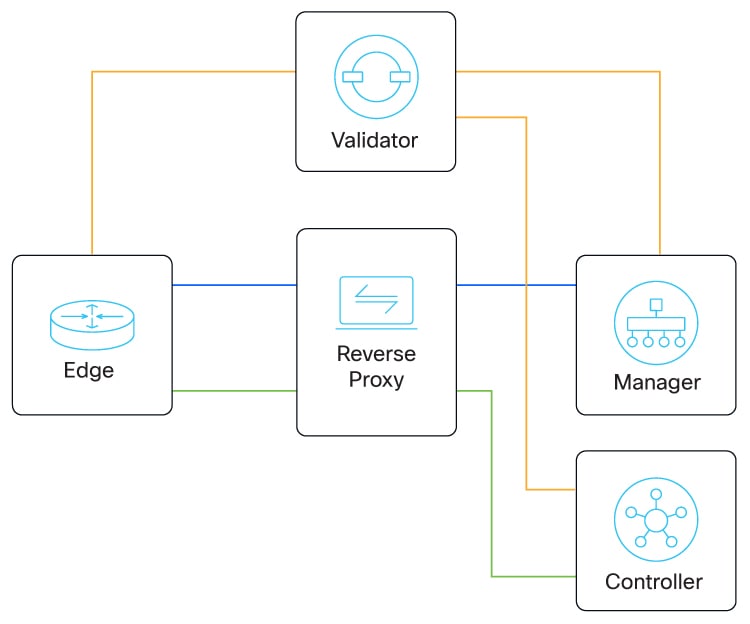
Describes reverse proxy, an intermediary between WAN edge devices and controllers, relaying control traffic and enhancing security by preventing direct internet connections to SD-WAN Control Components.
A reverse proxy in Cisco Catalyst SD-WAN is an intermediary network component that
-
relays control traffic between WAN edge devices and SD-WAN Control Components,
-
enhances security by preventing direct internet connections to SD-WAN Control Components, and
-
enables flexible deployment in single-tenant and multitenant setup.
Reverse proxy deployment and communication
In a standard overlay network, Cisco Catalyst SD-WAN edge devices initiate direct connections to the SD-WAN Control Components (SD-WAN Manager and SD-WAN Controllers) and exchange control plane information over these connections. The WAN edge devices are typically located in branch sites and connect to the SD-WAN Controllers over the internet. As a result, SD-WAN Manager and SD-WAN Controllers are also connected directly to the internet.
For security or other reasons, you may not want the SD-WAN Controllers to have direct internet connections. In such scenarios, the reverse proxy acts as an intermediary to pass control traffic between the SD-WAN Controllers and the WAN edge devices. WAN edge devices communicate with the reverse proxy, which relays traffic to and from SD-WAN Manager and SD-WAN Controllers.
You can deploy a reverse proxy in both single tenant and multitenant Cisco Catalyst SD-WAN deployments. The TLOC communicates with the reverse proxy on its public IP address and port, regardless of public or private TLOC.