Explains how AppNav-XE management and policy configuration work in SD-WAN environments.
Summary
The AppNav-XE feature was already supported on IOS XE platforms. However, starting from Cisco IOS XE Release 17.2, the feature is extended to Cisco IOS XE Catalyst SD-WAN platforms. Note that for this feature to work, Cisco SD-WAN Manager should be running release 20.1.1 or later.
Workflow
How AppNav-XE is configured in SD-WAN is different from how it’s configured in non-SD-WAN environments. The major difference is the involvement of Cisco SD-WAN Manager, which acts as an intermediary between WCM and AppNav-XE controllers, to push the AppNav policy configuration to Cisco IOS XE Catalyst SD-WAN devices. Cisco IOS XE Catalyst SD-WAN devices act as AppNav-XE controllers.
AppNav-XE in SD-WAN versus non-SD-WAN environments
The following image shows the differences in the deployment of AppNav-XE in SD-WAN and non-SD-WAN environments.
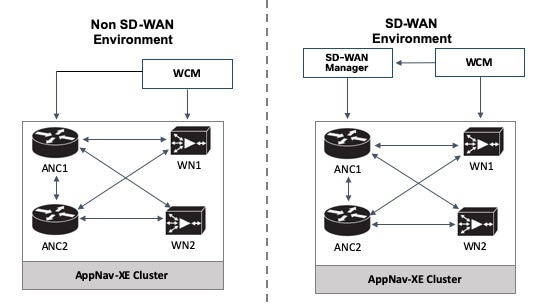
AppNav-XE in IOS XE: The WCM GUI directly communicates with the AppNav Controller (ANC) and the WAAS Nodes (WN) in the AppNav cluster to push the configuration.
AppNav-XE in IOS XE SD-WAN: The major difference is in terms of how the AppNav policy configuration is pushed to the AppNav Controllers (ANC). Here, the feature is configured through both WCM GUI and Cisco SD-WAN Manager. You continue to configure the AppNav-XE feature in WCM. WCM then sends the configuration to Cisco SD-WAN Manager, which in turn pushes the configuration to AppNav controllers. The communication between WCM and Cisco SD-WAN Manager is achieved through registering WCM as a third-party controller with Cisco SD-WAN Manager. WCM still directly sends the configuration to the WAAS nodes.