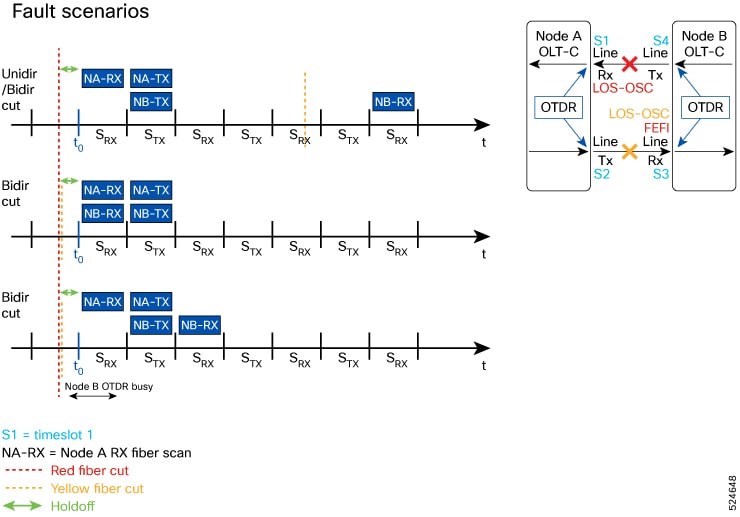
This topic explains how automatic OTDR scans function as a fiber diagnostics feature, automatically triggering OTDR tests in response to events such as span faults and restorations. It also describes bidirectional scanning capabilities for comprehensive fault detection and rapid fault localization through alarm monitoring.
An automatic OTDR scan is a fiber diagnostics feature that
-
automatically triggers OTDR tests in response to specific events such as span fault, span restoration, device power cycling, and line card cold reload that affect the optical span,
-
enables RX directionscanning for comprehensive fault detection and prevents scan collisions, and
-
provides rapid fault localization by monitoring and raising relevant alarms during scan execution.
| Feature Name | Release Information | Feature Description |
|---|---|---|
| Automatic OTDR Scan |
Cisco IOS XR Release 7.11.1 |
An OTDR scan is automatically triggered on Rx direction, whenever events such as span fault, span restore, device power cycle, and line card cold reload occur. The automatic scan lets you quickly identify fiber failure type and fault location. Commands added to enable and view OTDR results:
|
Autoscan direction and duration
In Release 7.11.1, autoscan is performed only in the Rx direction, regardless of whether the span fault is unidirectional or bidirectional.
In both span up and span down events, the bidirectional OTDR scan process terminates after both Rx and Tx scans have been completed successfully. You can stop the scan sequence by disabling the autoscan feature.
The OTDR autoscan takes less than three minutes to complete. During the autoscan, the OTDR-SCAN-IN-PROGRESS-RX alarm is raised and gets cleared once the scan is finished.