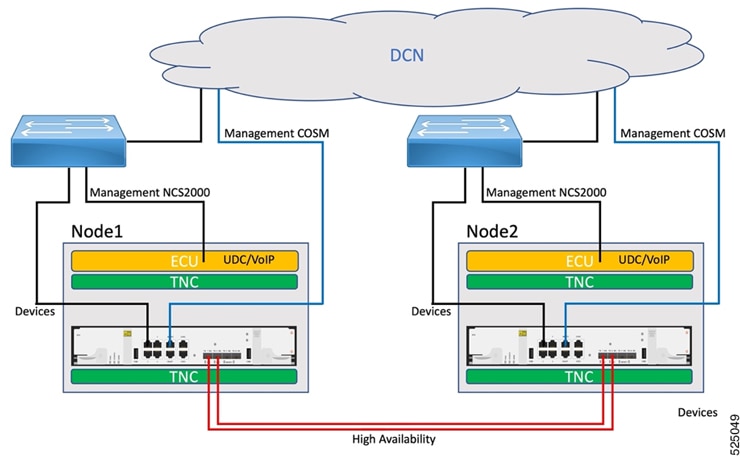
This topic explains available HA deployment modes for NCS 2000, including Local HA and Geo HA options using UDC or nearby-node links. It clarifies connectivity requirements, failover behavior, and practical design considerations for resilient service operation.
HA deployment modes for NCS 2000 define how two SVO-LCs are connected to provide service continuity during failures.
-
Local HA uses two SVO-LCs in the same node.
-
Geo HA uses two SVO-LCs in separate nodes and exchanges HA traffic through UDC or optical links.
-
The selected mode determines cabling, management reachability, and failover behavior.
Supported HA deployment modes
You can deploy HA in these modes:
-
Local HA
-
Geo HA between adjacent nodes by using the UDC channel
-
Geo HA between nearby NCS 2000 nodes
Local HA mode and connectivity requirements
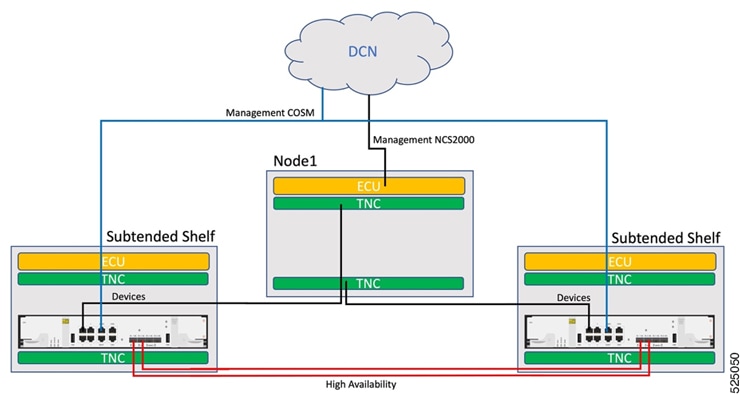
Local HA mode provides high availability by installing two SVO-LCs in the same NCS 2000 node. This mode enables failover to the standby SVO-LC if the primary SVO-LC fails.
This image shows the Local HA connection for NCS 2000 multishelf node.
The connection requirements for each SVO-LC are:
-
Connect MGMT1 port to the customer Data Communication Network (DCN).
-
Connect two optical fibers by inserting two pluggables in HA1 and HA2 ports.
-
Connect port 1 to one TNC, and connect peer SVO-LC port 1 to the other TNC.
-
(Optional) Connect NCS 2000 ECU EMS to the customer DCN. For multishelf setups, use the ECU of the master chassis when direct accessibility to the NCS 2000 device is required.
Geo HA overview and benefits
In Geo HA mode, two SVO-LCs are installed in separate NCS 2000 nodes. Each SVO-LC runs a Cisco Optical Site Manager Admin Plane and communicates with its peer to maintain active and standby roles for the virtual network element (vNE).
Geo HA provides these benefits:
-
Uses two SVO-LCs in separate nodes to provide robust redundancy.
-
Uses UDC or optical pluggables to transport HA traffic between nodes.
-
Supports failover to the standby SVO-LC if the primary SVO-LC fails.
Geo HA using the UDC channel
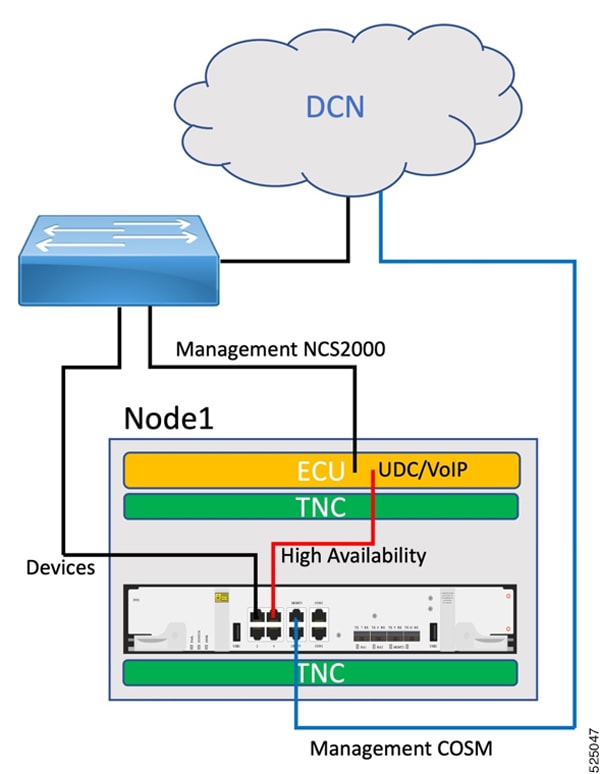
Geo HA by using the UDC channel places two SVO-LCs in two adjacent NCS 2000 nodes. The UDC channel transports high-availability traffic and supports continuous service during failures.
This image shows the Geo HA connection using the UDC channel.
The Geo HA link uses the available NCS 2000 UDC channel and supports packet processing at hardware level without affecting the NCS 2000 controller CPU. It supports a single-path UDC HA link with a theoretical bandwidth of 80 Mbps.
Connecting an optical HA port to the local ECU UDC port by using the electrical ONS-SE-ZE-EL-C pluggable is unsupported. This limitation occurs because a connected re-timer supports 1G, while the NCS 2000 UDC port operates at FE rate. To address this limitation, reconfigure port 3 as an electrical HA port to negotiate FE speed.
Configure UDC through CTC because Cisco Optical Site Manager does not support UDC configuration. Configure UDC on the Transponder Node Controller (TNC) pluggable associated with the Optical Supervisory Channel (OSC) connected toward the adjacent node. Apply the same configuration to the corresponding TNC pluggable on the adjacent NCS 2000 node.
Each SVO-LC must be connected as follows:
-
Connect MGMT1 port to the customer Data Communication Network (DCN).
-
Connect port 3 to the NCS 2000 ECU UDC/VoIP.
-
Connect port 1 to the NCS 2000 ECU EMS, or to the same switch and VLAN where NCS 2000 ECU EMS is connected.
-
(Optional) NCS 2000 ECU EMS can connect directly to the customer DCN for multishelf setups when direct accessibility to the NCS 2000 device is required.
Geo HA between nearby NCS 2000 nodes
In this mode, two SVO-LCs are installed in separate nearby NCS 2000 nodes, typically in the same building. The two SVO-LCs are directly interconnected through HA optical pluggables.
This image shows Geo HA between nearby NCS 2000 nodes.