Route Filtering and Policy Enforcement

You will learn how to apply these BGP policy and filtering methods to enhance network security and control.

Routing policy enforcement

Routing policy enforcement is a feature that

  • requires configuring inbound and outbound policies for external BGP (eBGP) neighbors

  • prevents accidental route acceptance or advertisement, and

  • provides an added security measure against configuration omission errors.

Routing policy enforcement behavior

If you do not configure a policy, BGP does not accept any routes from the neighbor, nor does it advertise any routes to it. This enforcement affects only eBGP neighbors, which are neighbors in a different autonomous system than this router. For internal BGP (iBGP) neighbors, which are neighbors in the same autonomous system, BGP accepts or advertises all routes if there is no policy.

Configure routing policy enforcement

Configure BGP routing filtering by applying a route policy.

This task outlines the steps to create and apply a route policy to filter BGP routes, ensuring that only desired routes are accepted or advertised.

Procedure


Step 1

Create a route policy and define its filtering logic.

Example:

Router# config
Router(config)# route-policy drop-as-1234
Router(config-rpl)# if as-path passes-through '1234' then
Router(config-rpl-if)# apply check-communities
Router(config-rpl-if)# else
Router(config-rpl-else)# pass
Router(config-rpl-else)# endif
Router(config-rpl)# end-policy

Step 2

Configures a neighbor IP address as a BGP peer and apply the route policy to inbound or outbound routes for the neighbor.

Example:

Router(config)# router bgp 120
Router(config-bgp)# neighbor 172.168.40.24
Router(config-bgp-nbr)# address-family ipv4 unicast
Router(config-bgp-nbr-af)# route-policy drop-as-1234 in
Router(config-bgp-nbr-af)# commit

BGP routes are filtered according to the defined route policy.
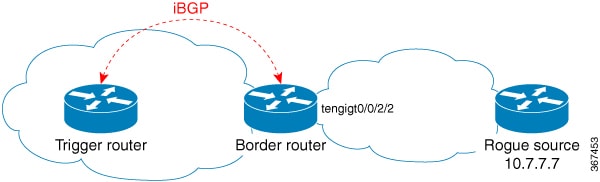
Table policy

Table policy is a feature that

  • configures traffic index values on routes as BGP installs them in the global routing table

  • supports the BGP policy accounting feature, and

  • provides the ability to drop routes from the Routing Information Base (RIB) based on match criteria.

Table policy operational details

You enable this feature using the table-policy command. BGP policy accounting uses traffic indices set on BGP routes to track various counters. The ability to drop routes from the RIB is useful in applications such as Remotely Triggered Blackhole (RTBH) filtering to mitigate denial-of-service attacks, or to enforce specific security policies by preventing routes to unwanted destinations from being installed in the local forwarding table.

However, use this feature with caution. It can easily lead to a scenario where BGP advertises routes to neighbors but does not install them in its global routing table and forwarding table. This results in traffic destined for those routes being silently dropped.

Apply policy when updating routing table

Apply a routing policy to routes being installed into the routing table and configure a route policy for BGP neighbors.

This task outlines the steps to configure a policy that influences which routes BGP installs into the global routing table using the table-policy command. It also includes an example of how to define a general route policy and apply it to BGP neighbors for inbound and outbound routes.

Procedure


Step 1

Configure the BGP routing process, specifying the autonomous system number and the address family.

Example:

Router# configure
Router(config)# router bgp 120.6
Router(config-bgp)# address-family ipv4 unicast

Step 2

Apply the routing policy to routes being installed into the routing table.

Example:

Router(config-bgp-af)# table-policy tbl-plcy-A
Router(config-bgp)# exit
Router(config)# commit

Step 3

Configure a pass-all route policy that accepts and advertises all routes without modifications.

Example:

Router(config)# route-policy pass-all
Router(config-rpl)# pass
Router(config-rpl)# end-policy
Router(config)# commit

Step 4

Apply the pass-all policy to a BGP neighbor.

Example:

Router(config)# router bgp 1
Router(config-bgp)# neighbor 192.168.40.24
Router(config-bgp-nbr)# remote-as 21
Router(config-bgp-nbr)# address-family ipv4 unicast
Router(config-bgp-nbr-af)# route-policy pass-all in
Router(config-bgp-nbr-af)# route-policy pass-all out
Router(config-bgp-nbr-af)# commit

Step 5

Verify the BGP neighbor summary.

Example:

Router# show bgp all all summary

Address Family: IPv4 Unicast
============================

BGP router identifier 10.0.0.1, local AS number 1 BGP generic scan interval 60 secs
BGP main routing table version 41 BGP scan interval 60 secs
BGP is operating in STANDALONE mode.

Process	RecvTblVer	bRIB/RIB SendTblVer
Speaker	41	41	41

Neighbor	Spk	AS MsgRcvd MsgSent	TblVer InQ OutQ Up/Down St/PfxRcd
10.0.101.1	0	1	919	925	41	0	0 15:15:08	10
10.0.101.2	0	2	0	0	0	0	0 00:00:00 Idle	

This command displays eBGP neighbors that do not have both an inbound and outbound policy for every active address family.


The specified policies are applied to routes being installed into the routing table, and to BGP neighbors for inbound and outbound route advertisements.

Policy-based aggregate route management

Policy-based aggregate route management is a feature that

  • allows you to configure aggregate routes in the routing table

  • marks specific routes as aggregate contributors for a specific destination route via route policy, and

  • enables you to set and modify aggregate contributors to a route aggregate address.

Aggregate contributor behavior in BGP

Table 1. Feature History Table

Feature Name

Release

Description

Configuring an Aggregate Contributor

Release 7.5.4

You can now configure aggregate routes in the routing table and mark specific routes as aggregate contributors for a specific destination route via route policy. This allows you to set the aggregate contributors to a route aggregate address and modify these routes. You can then use the BGP route policy to tag BGP prefixes before announcing them to the rest of the global network.

Earlier, there was no mechanism to identify a more specific route contributing to an aggregate and mark them as aggregate contributors.

This feature introduces these changes:

Route aggregation in BGP combines several specific routes into one route. You can configure the aggregate routes in the BGP routing table and mark specific routes as aggregate contributors for a specific destination route via route policy.

For example, if you have three prefixes 1.1.1.2/32, 1.1.1.3/32, and 1.1.1.4/32 in the routing table, BGP aggregates them by an aggregate route 1.1.1.0/24 and advertises that route to a peer. Before Cisco IOS XR Release 7.5.4, you could advertise to a peer the more specific route addresses along with the aggregate route (the 1.1.1.X’s) or the aggregate route, 1.1.1.0/24.

You can now mark specific routes (the 1.1.1.X’s) as aggregate contributors for a specific destination route. This allows you to set the aggregate contributors to a route aggregate address and modify these routes. After setting an aggregate contributor, you also have the option to set BGP attributes (for example, cost community, next-hop, BGP multiple exit discriminator) to the aggregate contributor. This checks the integrity of BGP updates in BGP update messages and optimizes reaction when detecting invalid attributes. You can then apply the inbound policy and the outbound policy to the neighbors.

Restrictions of policy-based aggregate route management

This feature is applicable only for the following Address Family Indicators (AFIs):

  • IPv4 unicast

  • IPv6 unicast

Configure BGP aggregate contributors

Define a route policy to mark routes as aggregate contributors and associate it with a specific aggregate address route in BGP.

This task guides you through creating a route policy that identifies routes as aggregate contributors and then applying this policy within BGP to an aggregate address. This allows for fine-grained control over how BGP aggregates and advertises routes.

Procedure


Step 1

Define the aggregate contributor route policy.

Example:

Router# configure
Router(config)# route-policy aggregate-policy1
Router(config-rpl)# set aggregate-contributor
Router(config-rpl)# end
Router(config-rpl)# commit

Step 2

Associate the route policy with an aggregate address in BGP.

Example:

Router# configure
Router(config)# router bgp 100
Router(config-bgp)# address-family ipv4 unicast
Router(config-bgp-af)# aggregate-address 250.2.2.0/24 route-policy aggregate-policy1
Router(config-bgp-af)# commit

Step 3

Verify the running configuration.

Example:

Router# show running-config
route-policy aggregate-policy1
   set aggregate-contributor
end-policy
!

router bgp 100
  address-family ipv4 unicast
    aggregate-address 250.2.2.0/24 route-policy aggregate-policy1
  !
 !
!

Step 4

Verify the BGP routing table entry for a specific prefix to confirm it is an aggregate contributor.

Example:


Router#show bgp 250.2.2.1/32

BGP routing table entry for 250.2.2.1/32
Versions:
  Process           bRIB/RIB  SendTblVer
  Speaker                 247          247
Last Modified: Dec  1 09:00:20.000 for 01:11:55
Paths: (1 available, best #1)
Net is an aggregate-contributor
  Advertised IPv4 Unicast paths to update-groups (with more than one peer):
    0.2 
  Advertised IPv4 Unicast paths to peers (in unique update groups):
    192.168.0.5     10.10.10.1      
  Path #1: Received by speaker 0
  Advertised IPv4 Unicast paths to update-groups (with more than one peer):
    0.2 
  Advertised IPv4 Unicast paths to peers (in unique update groups):
    192.168.0.5     10.10.10.1      
  105
    13.0.1.1 from 13.0.1.1 (13.0.1.1)
      Origin IGP, localpref 100, valid, external, best, group-best
      Received Path ID 0, Local Path ID 1, version 247
      Community: 20:20
      Origin-AS validity: (disabled)

Step 5

Display all aggregate contributors of a specific BGP address.

Example:


Router#show bgp 250.2.2.0/24 aggregate-contributors 

BGP router identifier 192.168.0.2, local AS number 100
BGP generic scan interval 60 secs
Non-stop routing is enabled
BGP table state: Active
Table ID: 0xe0000000   RD version: 247
BGP main routing table version 247
BGP NSR Initial initsync version 22 (Reached)
BGP NSR/ISSU Sync-Group versions 247/0
BGP scan interval 60 secs

Status codes: s suppressed, d damped, h history, * valid, > best
              i - internal, r RIB-failure, S stale, N Nexthop-discard
Origin codes: i - IGP, e - EGP, ? - incomplete
   Network            Next Hop            Metric LocPrf Weight Path
*> 250.2.2.1/32       13.0.1.1                               0 105 i
*> 250.2.2.2/32       13.0.2.1                               0 105 i
*> 250.2.2.3/32       13.0.3.1                               0 101 i
*> 250.2.2.4/32       13.0.4.1                               0 101 i
*> 250.2.2.5/32       13.0.5.1                               0 102 i
*> 250.2.2.6/32       13.0.6.1                               0 102 i
*> 250.2.2.7/32       13.0.7.1                               0 103 i
*> 250.2.2.8/32       13.0.8.1                               0 103 i
*> 250.2.2.9/32       13.0.9.1                               0 104 i
*> 250.2.2.10/32      13.0.10.1                              0 104 i
*> 250.2.2.11/32      0.0.0.0                  0         32768 ?
*> 250.2.2.12/32      0.0.0.0                  0         32768 ?
*> 250.2.2.13/32      0.0.0.0                  0         32768 ?

Processed 13 prefixes, 13 paths

Set BGP attributes to the aggregate contributor

Setting BGP attributes to the aggregate contributor is an optional step that

  • allows you to set or modify BGP attributes, or example, cost community, next-hop, BGP multiple exit discriminator, to the aggregate contributor

  • checks the integrity of BGP updates in BGP update messages, and

  • optimizes reaction when detecting invalid attributes.

Setting the aggregate contributor to a specific aggregate address route (aggregate-address address/mask-length route-policy aggregate-route-policy-name ) on a router (Router1) sets the aggregate contributor to the more specific routes on that router (Router1) only. The aggregate contributor then can be used in neighbor In and Out policy to match the BGP prefix with the aggregate contributor on the same router. However, you cannot match the BGP prefix with the aggregate contributor on a remote BGP node (Router2) because the aggregate contributor is not set in the remote node by default.

You can use this optional step to configure BGP attributes for an aggregate contributor via an inbound policy or an outbound policy.

Procedure


Step 1

Configure BGP attributes for an aggregate contributor via an inbound policy in Router1.

Example:

Router1# config
Router1(config)# route-policy set_comm_in
Router1(config-rpl)# if aggregate-contributor then
Router1(config-rpl-if)# set community (20:20) additive
Router1(config-rpl-if)# pass
Router1(config-rpl-if)# else
Router1(config-rpl-else)# drop
Router1(config-rpl-else)# endif
Router1(config-rpl)# end-policy
Router1(config)#
Router1(config)# router bgp 100
Router1(config-bgp)# neighbor 13.0.1.1
Router1(config-bgp-nbr)# remote-as 105
Router1(config-bgp-nbr)# address-family ipv4 unicast
Router1(config-bgp-nbr-af)# route-policy set_comm_in in
Router1(config-bgp-nbr-af)# commit

Step 2

Configure BGP attributes for an aggregate contributor via an outbound policy in Router1.

Example:

Router1# config
Router1(config)# route-policy set_comm_out
Router1(config-rpl)#  if aggregate-contributor then
Router1(config-rpl-if)# set extcommunity rt(200:200) additive
Router1(config-rpl-if)# pass
Router1(config-rpl-if)# else
Router1(config-rpl-if)# set extcommunity rt(500:500) additive
Router1(config-rpl-else)# pass
Router1(config-rpl-else)# endif
Router1(config-rpl)#end-policy
Router1(config)#
Router1(config)# router bgp 100
Router1(config-bgp)# neighbor 192.168.0.5
Router1(config-bgp-nbr)# remote-as 100
Router1(config-bgp-nbr)# address-family ipv4 unicast
Router1(config-bgp-nbr-af)# route-policy set_extcomm_out out
Router1(config-bgp-nbr-af)# commit

Step 3

Verify the running configuration.

  • For inbound policy:
    
    route-policy set_comm_in
      if aggregate-contributor then
         set community (20:20) additive
         pass
       else
          drop
       endif
     end-policy
     !
    router bgp 100
       neighbor 13.0.1.1
       remote-as 105
         address-family ipv4 unicast
            route-policy set_comm_in in
    
  • For outbound policy:
    
    route-policy set_extcomm_out
      if aggregate-contributor then
         set extcommunity rt (200:200) additive
         pass
      else
        set extcommunity rt (500:500) additive
        pass
      endif
    end-policy
    !
    
    router bgp 100
      neighbor 192.168.0.5
      remote-as 100
        address-family ipv4 unicast
          route-policy set_extcomm_out out
        !
    !
    

Step 4

Verify the BGP routing table entry on Router1 for prefix 250.2.2.1/32 to confirm it is an aggregate contributor and has the expected community attribute.

Example:

Router1#show bgp 250.2.2.1/32
Thu Dec  1 10:12:15.374 EST
BGP routing table entry for 250.2.2.1/32
Versions:
  Process           bRIB/RIB  SendTblVer
  Speaker                 247          247
Last Modified: Dec  1 09:00:20.000 for 01:11:55
Paths: (1 available, best #1)
Net is an aggregate-contributor
  Advertised IPv4 Unicast paths to update-groups (with more than one peer):
    0.2 
  Advertised IPv4 Unicast paths to peers (in unique update groups):
    192.168.0.5     10.10.10.1      
  Path #1: Received by speaker 0
  Advertised IPv4 Unicast paths to update-groups (with more than one peer):
    0.2 
  Advertised IPv4 Unicast paths to peers (in unique update groups):
    192.168.0.5     10.10.10.1      
  105
    13.0.1.1 from 13.0.1.1 (13.0.1.1)
      Origin IGP, localpref 100, valid, external, best, group-best
      Received Path ID 0, Local Path ID 1, version 247
      Community: 20:20
      Origin-AS validity: (disabled)

This example shows the BGP attribute (community) being set to aggregate contributor 250.2.2.1/32 via inbound policy. The neighbor inbound policy matches with an aggregate contributor. If it matches, then the route is added with the Community 20:20.

Step 5

Verify the BGP routing table entry on Router2 for prefix 250.2.2.4/32 to confirm it has the expected extended community attribute.

Example:

Router2#show bgp ipv4 u 250.2.2.4/32
Thu Dec  8 15:08:40.672 EST
BGP routing table entry for 250.2.2.4/32
Versions:
  Process           bRIB/RIB  SendTblVer
  Speaker                 174          174
Last Modified: Dec  8 15:06:53.000 for 00:01:47
Paths: (1 available, best #1)
  Advertised IPv4 Unicast paths to update-groups (with more than one peer):
    0.1 
  Advertised IPv4 Unicast paths to peers (in unique update groups):
    12.12.12.4      
  Path #1: Received by speaker 0
  Advertised IPv4 Unicast paths to update-groups (with more than one peer):
    0.1 
  Advertised IPv4 Unicast paths to peers (in unique update groups):
    12.12.12.4      
  101, (Received from a RR-client)
    13.0.4.1 (metric 2) from 192.168.0.2 (192.168.0.2)
      OC-RIB Attribute-Index 0
      Origin IGP, localpref 100, valid, internal, best, group-best
      Received Path ID 1, Local Path ID 1, version 174
      Extended community: RT:200:200  
  

This example shows the BGP attribute (extended-community) being set to aggregate contributor 250.2.2.4/32 via outbound policy. The neighbor outbound policy matches with an aggregate contributor. If it matches, then the route is added with the Extended community: RT:200:200. This attribute is set before the router (Router2) receives the route.


Remotely triggered blackhole filtering

Remotely triggered blackhole (RTBH) filtering is a technique that

  • drops undesirable traffic before it enters a protected network

  • quickly drops traffic at the edge of the network, and

  • operates based on either source or destination addresses by forwarding traffic to a null0 interface.

These are the types of RTBH filtering:

  • Destination-based RTBH filtering: RTBH filtering based on a destination address

  • Source-based RTBH filtering: RTBH filtering based on a source address

Benefits of remotely triggered blackhole filtering

This technique enhances network security by

  • effectively mitigating Distributed Denial of Service (DDoS) and worm attacks

  • quarantining all traffic destined for a target under attack, and

  • enforcing blocklist filtering.

How remotely triggered blackhole filtering works

Summary

The key components involved in the process are:

  • Remotely Triggered Blackhole (RTBH) filtering: A technique to drop undesirable traffic.

  • Route Policy Language (RPL): Defines the rules for discarding traffic.

  • set next-hop discard command: Configures the next-hop of the target prefix to a null interface.

  • Routing Information Base (RIB): Stores routing information, updated by the next-hop discard configuration.

  • Triggering device: A separate device, typically in a Network Operations Center (NOC), that sends iBGP updates.

  • Edge routers: Access and aggregation points that receive iBGP updates from the trigger device.

  • Null0 interface: A virtual interface where discarded traffic is sent.

RTBH filtering drops undesirable traffic by rerouting it to a null0 interface, based on route policies and BGP updates from a trigger device.

Workflow

Figure 1. Topology to implement RTBH filtering

Consider this topology, where a rogue router is sending traffic to a border router.

These stages describe how RTBH filtering works.

  1. Policy definition: You implement RTBH by defining a route policy (RPL) that uses the set next-hop discard command to discard undesirable traffic at the next-hop.
  2. Next-hop configuration: RTBH filtering sets the next-hop of the target prefix to the null interface. Traffic destined for the target is then dropped at the ingress.
  3. Inbound policy application: You use the set next-hop discard configuration in the neighbor inbound policy. When applied to a path, the RIB updates with the next-hop set to Null0, even if the primary next-hop is unreachable.
  4. Best path selection: The RTBH path is considered reachable and becomes a candidate in the best path selection process.
  5. Readvertisement: The system readvertises the RTBH path to other peers with either the received next-hop or nexthop-self, based on normal BGP advertisement rules.
  6. Deployment scenario: In a typical deployment, an internal Border Gateway Protocol (iBGP) runs at the access and aggregation points. A separate device in the Network Operations Center (NOC) acts as a trigger.
  7. Traffic dropping: The triggering device sends iBGP updates to the edge routers, which cause undesirable traffic to be forwarded to a null0 interface and dropped.

Result

The network effectively drops undesirable traffic at the edge, preventing it from entering the protected network.

Configure remotely triggered blackhole filtering

Follow these steps to configure destination-based RTBH filtering:

  • Configure the trigger router to initiate RTBH filtering.

    The trigger router defines a static route redistribution policy that sets a community on static routes marked with a special tag. It also configures a static route with this tag for the source prefix to be discarded.

  • Configure the border router to apply RTBH filtering based on community matches.

    The border router defines a route policy that matches the community set on the trigger router and configures the next-hop to discard. This policy is then applied to iBGP peers.

Procedure


Step 1

Configure the trigger router with a static route redistribution policy that sets a community on static routes marked with a special tag, and apply it in BGP.

Example:

Router(config)# route-policy RTBH-trigger
Router(config-rpl)# if tag is 777 then
Router(config-rpl-if)# set community (1234:4321, no-export) additive
Router(config-rpl-if)# pass
Router(config-rpl-if)# else
Router(config-rpl-else)# pass
Router(config-rpl-else)# endif
Router(config-rpl)# end-policy

Router(config)# router bgp 65001
Router(config-bgp)# address-family ipv4 unicast
Router(config-bgp-af)# redistribute static route-policy RTBH-trigger
Router(config-bgp-af)# exit

Router(config-bgp)# neighbor 192.168.102.1
Router(config-bgp-nbr)# remote-as 65001
Router(config-bgp-nbr)# address-family ipv4 unicast
Router(config-bgp-nbr-af)# route-policy bgp_all in
Router(config-bgp-nbr-af)# route-policy bgp_all out
Router(config-bgp-nbr-af)# exit
Router(config-bgp-nbr)# exit
Router(config-bgp)# exit
Router(config)# commit

Step 2

Configure a static route on the trigger router, tagging the source prefix that must be discarded.

Example:

Router(config)# router static
Router(config-static)# address-family ipv4 unicast
Router(config-static-afi)# 10.7.7.7/32 Null0 tag 777
Router(config-static-afi)# exit
Router(config-static)# exit
Router(config)# commit

Step 3

Configure a route policy in the border router that matches the community set on the trigger router and set the next-hop to discard.

Example:

Router(config)# route-policy RTBH
Router(config-rpl)# if community matches-any (1234:4321) then
Router(config-rpl-if)# set next-hop discard
Router(config-rpl-if)# else
Router(config-rpl-else)# pass
Router(config-rpl-else)# endif
Router(config-rpl)# end-policy
Router(config)# commit

Step 4

Apply the route policy on the iBGP peers.

Example:

Router(config)# router bgp 65001
Router(config-bgp)# address-family ipv4 unicast
Router(config-bgp-af)# exit

Router(config-bgp)# neighbor 192.168.102.2
Router(config-bgp-nbr)# remote-as 65001
Router(config-bgp-nbr)# address-family ipv4 unicast
Router(config-bgp-nbr-af)# route-policy RTBH in
Router(config-bgp-nbr-af)# route-policy bgp_all out
Router(config-bgp-nbr-af)# exit
Router(config-bgp-nbr)# exit
Router(config-bgp)# exit
Router(config)# commit

The border router is configured to discard undesirable traffic based on RTBH communities


BGP community and extended-community advertisements

BGP community and extended-community advertisements are mechanisms that

  • specify that community or extended-community attributes should be sent to an eBGP neighbor

  • are not sent to an eBGP neighbor by default, and

  • are always sent to iBGP neighbors by default.

Guidelines for BGP community and extended-community advertisements

  • If you configure the send-community-ebgp command for a neighbor group or address family group, all neighbors using that group inherit the configuration.

  • Configuring the command specifically for a neighbor overrides the inherited values.

  • You cannot configure BGP community and extended-community filtering for iBGP neighbors.

  • BGP always sends communities and extended-communities to internal BGP (iBGP) neighbors under VPNv4, MDT, IPv4, and IPv6 address families.

Configure BGP community and extended-community advertisements

Enable the router to send community or extended-community attributes to an eBGP neighbor.

By default, BGP does not send community or extended-community attributes to an eBGP neighbor. This task provides the procedure to enable this advertisement.

Procedure


Step 1

Configure the BGP neighbor, specifying its IP address and remote autonomous system number.

Example:

Router# configure
Router(config)# router bgp 120
Router(config-bgp)# neighbor 172.168.40.24
Router(config-bgp-nbr)# remote-as 2002
Router(config-bgp-nbr)# address-family ipv6 unicast

Step 2

Configure the router to send community attributes or extended community attributes to the specified eBGP neighbor.

  • Router(config-bgp-nbr-af)# send-community-ebgp
    Router(config-bgp-nbr-af)# commit
  • Router(config-bgp-nbr-af)# send-extended-community-ebgp
    Router(config-bgp-nbr-af)# commit

BGP attribute filters

BGP attribute filter is a feature that

  • checks the integrity of BGP updates in BGP update messages

  • optimizes reactions when detecting invalid attributes, and

  • filters attributes received in the incoming update message.

Purpose and operation of the attribute filter

The BGP attribute filter feature checks the integrity of BGP updates in BGP update messages. It also optimizes reactions when it detects invalid attributes. BGP update messages contain a list of mandatory and optional attributes. These attributes include MED, LOCAL_PREF, and COMMUNITY, and so on. In some cases, if attributes are malformed, filtering them at the receiving router is necessary. The BGP attribute filter regulates which attributes are accepted in incoming update messages. The attribute filter can also filter any attributes that may potentially cause undesirable behavior on the receiving router.

Some BGP updates are malformed due to incorrect formatting of attributes, such as the Network Layer Reachability Information (NLRI) or other fields in the update message. These malformed updates, when received, cause undesirable behavior on the receiving routers. Such undesirable behavior may occur during update message parsing or during re-advertisement of received NLRIs. In such scenarios, it's better to filter these corrupted attributes at the receiving end.

Configure BGP attribute filtering

To filter malformed BGP attributes received in incoming update messages.

You perform this task to prevent undesirable behavior on receiving routers caused by malformed BGP attributes.

Procedure


Step 1

Enter global configuration mode and specify the autonomous system number to enter BGP configuration mode.

Example:

Router# configure
Router(config)# router bgp 100

Step 2

Run the attribute-filter command with the attribute-filter group name to enter the attribute-filter group configuration mode.

Example:

Router(config-bgp)# attribute-filter group ag_discard_med

Step 3

Specify a single or a range of attribute codes and an associated action.

Example:

Router(config-bgp-attrfg)# attribute 24 discard

The allowed actions are:

  • Treat-as-withdraw: The system considers the update message for withdrawal. The associated IPv4-unicast or MP_REACH NLRIs, if present, are withdrawn from the neighbor's Adj-RIB-In.

  • Discard attribute: The system discards this attribute. The matching attributes alone are discarded, and the rest of the update message is processed normally.


Syslog messages for BGP attribute filtering

A BGP syslog message is a notification that

  • indicates an event related to BGP error handling or attribute filtering

  • is generated when a router receives a malformed update packet or filters attributes, and

  • is rate-limited to prevent excessive logging.

BGP error syslog message

%ROUTING-BGP-3-MALFORM_UPDATE : Malformed UPDATE message received from neighbor 192.0.2.1
- message length 90 bytes,
error flags 0x00000840, action taken "TreatAsWithdraw".
Error details: "Error 0x00000800, Field "Attr-missing", Attribute 1 (Flags 0x00, Length 0), Data []"

BGP attribute filtering syslog message for the discard attribute action

4843.46]RP/0/0/CPU0:Aug 21 17:06:17.919 : bgp[1037]: %ROUTING-BGP-5-UPDATE_FILTERED :
One or more attributes were filtered from UPDATE message received from neighbor 192.0.2.1
- message length 173 bytes, action taken "DiscardAttr".
Filtering details: "Attribute 16 (Flags 0xc0): Action "DiscardAttr"". NLRIs: [IPv4 Unicast] 88.2.0.0/17

BGP attribute filtering syslog message for the treat-as-withdraw action

[391.01]RP/0/0/CPU0:Aug 20 19:41:29.243 : bgp[1037]: %ROUTING-BGP-5-UPDATE_FILTERED :
One or more attributes were filtered from UPDATE message received from neighbor 192.0.2.1
- message length 166 bytes, action taken "TreatAsWdr".
Filtering details: "Attribute 4 (Flags 0xc0): Action "TreatAsWdr"". NLRIs: [IPv4 Unicast]

How malformed BGP updates generate syslog messages

Summary

The key components involved in the process are:

  • Router: Receives malformed BGP update packets.

  • System: Prints ios_msg to the console and applies rate-limiting.

  • ios_msg (ROUTING-BGP-3-MALFORM_UPDATE): The specific syslog message generated for malformed update packets.

  • Neighbors: BGP peers from which malformed updates are received.

  • Discard Attribute (A5) / Local Repair (A6) actions: Specific responses to certain malformed packets.

The system handles malformed BGP update packets by generating specific syslog messages (ios_msg) that are rate-limited to prevent excessive logging, with different logging behaviors for general malformations versus those leading to specific attribute filtering actions.

Workflow

These stages describe how malformed BGP updates generate syslog messages.

  1. A router receives a malformed update packet.
  2. The system prints an ios_msg of type ROUTING-BGP-3-MALFORM_UPDATE on the console.
  3. The system rate-limits this message to one per minute across all neighbors.
  4. If malformed packets trigger Discard Attribute (A5) or Local Repair (A6) actions:
    • The system prints the ios_msg only once per neighbor per action.
    • This printing behavior is independent of the number of malformed updates received since the neighbor last reached an Established state.

Result

The system provides controlled and informative logging of BGP malformation events, ensuring you are aware of issues without overwhelming the console with duplicate messages.

BGP update message error management

BGP update message error management is a feature that

  • handles error update messages to avoid session reset

  • classifies BGP update errors into categories based on factors such as severity, likelihood of update errors, or attribute type, and

  • handles errors in each category according to the Internet Engineering Task Force (IETF) Inter-Domain Routing (IDR) draft, I-D:draft-ietf-idr-error-handling.

The base BGP specification requires a BGP speaker that receives an update message containing a malformed attribute to reset the session. This action affects both the routes with the malformed attribute and other valid routes exchanged over the session, which is undesirable.

The update message error handling implementation classifies BGP update errors into categories based on factors such as severity, likelihood of update errors, or attribute type.

Errors in each category are handled according to the draft.

The system avoids session reset as much as possible during error handling.

Error handling for some categories is controlled by configuration commands that enable or disable the default behavior.

User-defined Martian address check

Martian addresses are IP addresses that

  • are typically dropped by routers to prevent access to certain sites

  • include specific IPv4 and IPv6 prefixes, and

  • can be configured to be accessible using BGP.

When you configure BGP, you can prevent routers from accessing certain sites with certain specific IP address prefixes. The routers drop packets from such IP addresses, known as Martian addresses.

These IPv4 address prefixes are part of Martian addresses:

  • 0.0.0.0/8

  • 127.0.0.0/8

  • 224.0.0.0/4

These IPv6 address prefixes are part of Martian addresses:

  • ::

  • ::0002 to ::ffff

  • ::ffff:a.b.c.d

  • fe80:xxxx

  • ffxx:xxxx

By default, routers prevent access to sites with Martian addresses. However, you can enable routers with BGP IPv4 address-family or BGP IPv6 address-family configuration to access these sites by configuring the default-martian-check disable command.


Restriction


Routers with OSPF or IS-IS protocols cannot access these sites even by having the default-martian-check disable command configured.


Disable Martian address check

To allow routers with BGP IPv4 address-family or BGP IPv6 address-family configuration to access sites with Martian addresses.

By default, routers prevent access to sites with Martian addresses. This task configures the router to disable this check.

Before you begin

Follow these steps to allow routes from Martian addresses.

Procedure


Step 1

Enter BGP IPv4 or BGP IPv6 address-family configuration mode.

Example:

Router# configure
Router(config)# router bgp 100

Step 2

Configure the address-family modifier as unicast.

Example:

Router(config-bgp)# address-family ipv4 unicast

Step 3

Disable the Martian address check.

Example:

Router(config-bgp-af)# default-martian-check disable
Router(config-bgp-af)# commit

Step 4

Use the show bgp ipv4 unicast command or show bgp ipv6 unicast command to verify Martian address check status.

Example:

Router# show bgp ipv6 unicast
BGP router identifier 2.2.2.1, local AS number 1 BGP generic scan interval 60 secs
Non-stop routing is enabled BGP table state: Active
Table ID: 0xe0800000 RD version: 29 BGP main routing table version 29
BGP NSR Initial initsync version 4 (Reached) BGP NSR/ISSU Sync-Group versions 0/0 Dampening enabled
BGP scan interval 60 secs

Status codes: s suppressed, d damped, h history, * valid, > best i - internal, r RIB-failure, S stale, N Nexthop-discard
Origin codes: i - IGP, e - EGP, ? - incomplete
Network	Next Hop	Metric	LocPrf	Weight Path
*>i::/0	1:1:1:1:1:1:1:1	100	0	i
* i192:1::/112	1.1.1.1	0	100	0 ?
*>i	1:1:1:1:1:1:1:1	0	100	0 ?
* iff11:1123::/64	1.1.1.1	2	100	0 ?
*>i	1:1:1:1:1:1:1:1	2	100	0 ?

BGP private AS number management

BGP private AS number management is a feature that

  • allows routers belonging to a private Autonomous System (AS) to access the global Internet

  • removes private Autonomous System Numbers (ASNs) from the AS path in outgoing update messages, and

  • optionally replaces those numbers with the local router's ASN to maintain AS path length.

Private AS numbers are ASNs that

  • are used by Internet Service Providers (ISPs) and customer networks to conserve globally unique ASNs

  • cannot access the global Internet because they are not unique, and

  • range from 64,512 to 65,535.

Private AS number removal and replacement in BGP

Public ASNs are assigned by InterNIC, range from 1 to 64,511, and are globally unique. Private ASNs range from 64,512 to 65,535, are not unique, and cannot appear in the global BGP routing table.

Because BGP best path calculations require unique ASNs, private ASNs must be removed from the AS path before propagating routes to external peers. With this featurem you can configure routers to strip private ASNs from outgoing updates in external BGP (eBGP) sessions. Optionally, the router can replace them with its own ASN to preserve the AS path length.

Verify private AS number removal or replacement

To confirm that private AS numbers are successfully removed or replaced from the AS path.

After configuring the removal or replacement of private AS numbers, you should verify the changes to ensure proper BGP operation.

Before you begin

Ensure the remove-private-as or replace-as command has been configured

Procedure


Run these commands to verify that the private AS numbers are removed or replaced.

  • Run show bgp neighbors command.
  • Run show bgp update-group command.

The command outputs display information that indicates whether private AS numbers were removed or replaced as intended.

Private AS number removal in iBGP advertisements

The removing private AS numbers when advertising to iBGP neighbors is a routing feature that:

  • provides a safe method to remove private AS numbers when advertising to iBGP neighbors without causing routing loops,

  • enables safe AS_PATH modification for iBGP neighbors by removing private AS numbers only if all AS numbers in the path are private, and

  • addresses specific network scenarios where traditional inbound removal at the eBGP boundary is insufficient.

The remove-private-as internal command allows you to configure this behavior under the neighbor address-family.

This feature ensures that private AS numbers are stripped from iBGP advertisements only when it is safe to do so, preventing routing loops that can occur if AS_PATH modifications are done improperly.

Unlike general AS_PATH modifications, which are disallowed for iBGP neighbors, this targeted removal provides a controlled exception to meet operational needs.

Use this feature when you need to advertise routes to internal BGP neighbors without private AS numbers in the AS_PATH, especially in complex network topologies where eBGP boundary removal is not enough.

Limitations and usage guidelines for removing private AS numbers when advertising to iBGP neighbors

To ensure safe and effective use of the remove-private-AS internal feature when advertising routes to iBGP neighbors, follow these principles:

  • Configure the remove-private-as internal command only when you need to strip private AS numbers in iBGP advertisements.

  • Do not configure this command under BGP Route Policy Language (RPL), as no changes have been made to support stripping private AS numbers via policies.

  • Avoid using this feature with attribute sets (attrset), as it is not supported.

  • Do not use this feature with BGP confederations, especially confederation iBGP, as it is not supported.

  • Do not combine this feature with the ibgp-local-as feature.

  • Avoid using this feature with graceful shutdown prepends, as it is not supported.

Adhering to these guidelines helps prevent routing issues and ensures network stability when modifying AS_PATH attributes for iBGP neighbors.

Configure private AS number removal when advertising to iBGP neighbors

To safely remove private Autonomous System Numbers (ASNs) from the AS_PATH attribute when advertising routes to internal BGP (iBGP) neighbors.

Procedure


Step 1

Create an address-family group and enable private AS number removal.

Example:

Router(config)# router bgp 140
Router(config-bgp)# af-group group1 address-family ipv4 unicast
Router(config-bgp-afgrp)# remove-private-as
Router(config-bgp-afgrp)# exit

Step 2

Configure the iBGP nieghbor.

Example:

Router(config)# router bgp 140
Router(config-bgp)# neighbor 172.20.1.1
Router(config-bgp-nbr)# remote-as 140
Router(config-bgp-nbr)# address-family ipv4 unicast
Router(config-bgp-nbr-af)# use af-group group1
Router(config-bgp-nbr-af)# remove-private-as internal

Conditional matching on transitive and non-transitive bandwidth extended communities in BGP RPL

Conditional matching on transitive and non-transitive bandwidth extended communities in RPL is a BGP feature that allows route policies to evaluate and act on specific extended community bandwidth values.

Table 2. Feature History Table

Feature Name

Release Information

Feature Description

Conditional matching on transitive and non-transitive bandwidth extended communities in BGP RPL

Release 25.1.1

Introduced in this release on: Fixed Systems (8200 [ASIC: Q200, P100], 8700 [ASIC: P100, K100], 8010 [ASIC: A100]); Centralized Systems (8600 [ASIC: Q200]); Modular Systems (8800 [LC ASIC: Q100, Q200, P100])

The feature introduces support for conditional matching on transitive and non-transitive bandwidth extended communities in RPL. You can use this capability to create precise BGP routing policies that evaluate and act on specific bandwidth values, enabling effective and intelligent traffic engineering.

The feature introduces these changes:

CLI:

Conditional matching support on extended communities is introduced in RPL.

YANG Data Models:

  • Cisco-IOS-XR-um-route-policy-cfg

  • Cisco-IOS-XR-policy-repository-cfg

(see GitHub, YANG Data Models Navigator)

RPL now supports conditional matching on extended communities, including transitive and non-transitive bandwidth types, enabling more granular BGP route control. With this capability, you can define precise BGP routing policies that respond to bandwidth attributes, ensuring effective and intelligent traffic engineering. The feature is useful in multipath, multivendor, and large-scale environments.

For information about transitive-bandwidth support and topology for BGP path selection using UCMP, see BGP DMZ transitive-bandwidth extended community support and Topology for BGP path selection using UCMP.

Configure conditional matching on transitive and non-transitive bandwidths

To configure BGP route policies that conditionally match and act on specific bandwidth extended community values for intelligent traffic engineering.

This task enables granular BGP route control by defining policies that respond to bandwidth attributes. It is useful in environments requiring precise traffic engineering based on network bandwidth, particularly in multipath, multivendor, and large-scale deployments.

Procedure


Step 1

Run the extcommunity-set command to configure the transitive-bandwidth extended community definition.

Example:

Router#config
Router(config)#extcommunity-set transitive-bandwidth LB10G
Router(config-ext)#65000:1250000000
Router(config-ext)#end-set

Step 2

Run the route-policy command to create a policy that conditionally matches BGP routes based on the transitive-bandwidth extended community, for use in either inbound or outbound direction.

Example:

The policy checks if a route includes a transitive-bandwidth extended community that matches any entry in the predefined set LB10G . If it matches, the policy sets the standard BGP community 65000:10 on the route. You can use this community for route filtering, and policy-based forwarding decisions.

Router(config)#route-policy MATCH_LB_10G
Router(config-rpl)#if extcommunity transitive-bandwidth matches-any LB10G then
Router(config-rpl-if)#set community (65000:10)
Router(config-rpl-if)#endif 
Router(config-rpl)#done 
Router(config-rpl)#end-policy

Step 3

Run the show running-config command to verify the running configuration.

Example:

extcommunity-set transitive-bandwidth LB10G
  65000:1250000000
end-set
!
route-policy MATCH_LB_10G
  if extcommunity transitive-bandwidth matches-any LB10G then
    set community (65000:10)
  endif
  done
end-policy
!

Step 4

Run the router bgp command to enable BGP for the ASN, and apply the configured route policy to inbound IPv4 unicast updates from the specified neighbor.

Example:

In the example configuration, BGP is set up for ASN 65000. A route policy MATCH_LB_10G is applied to inbound BGP updates received from neighbors 10.0.0.0/24.

Router(config)#router bgp 65000
Router(config-bgp)#address-family ipv4 unicast 
Router(config-bgp-af)#maximum-paths ibgp8
Router(config-bgp)#neighbor 10.0.0.0/24
Router(config-bgp-nbr)#remote-as 65000
Router(config-bgp-nbr)#address-family ipv4 unicast 
Router(config-bgp-nbr-af)#route-policy MATCH_LB_10G in

Step 5

Run the show running-config command to verify the running configuration.

Example:

router bgp 65000
 address-family ipv4 unicast
  maximum-paths ibgp 8
 !
 neighbor 10.0.0.0/24
  remote-as 65000
  address-family ipv4 unicast
   route-policy MATCH_LB_10G in
  !
 !
!

Step 6

Run the show bgp ipv4 unicast command to verify the multiple paths and extended community attributes for load-balancing bandwidth advertisement.

Example:

In the sample output, Path 1 includes community value 65000:10 , which indicates that the route-policy matched and applied the configured BGP community. Path 2 does not include this community, indicating that the route-policy did not match the condition.

Router#show bgp ipv4 unicast 192.168.1.0/24
Fri Apr  4 08:49:24.609 UTC
BGP routing table entry for 192.168.1.0/24
Versions:
  Process           bRIB/RIB   SendTblVer
  Speaker                 11           11
Last Modified: Apr  4 08:49:13.608 for 00:00:11
Paths: (2 available, best #1)
  Not advertised to any peer
  Path #1: Received by speaker 0
  Not advertised to any peer
  Local
    10.0.0.1 (metric 10) from 10.0.0.1 (10.0.0.1)
      Origin incomplete, metric 0, localpref 100, valid, internal, best, group-best, multipath
      Received Path ID 0, Local Path ID 1, version 11
      Community: 65000:10
      Extended community: LB_TRANS:65000:10000000 
                          (LB transitive     AS:bytes/sec:65000:1250000000.0)
  Path #2: Received by speaker 0
  Not advertised to any peer
  Local
    10.0.0.2 (metric 10) from 10.0.0.2 (10.0.0.2)
      Origin incomplete, metric 0, localpref 100, valid, internal, multipath
      Received Path ID 0, Local Path ID 0, version 0
      Extended community: LB_TRANS:65000:20000000 
                          (LB transitive     AS:bytes/sec:65000:2500000000.0) 

VPN route limit on route reflectors

The VPN route limit is a feature that

  • allows you to configure Route Reflectors (RRs) to retain only a certain number of unique network entries for each VPN

  • defines this limit by a set of Route Targets (RTs) associated with the VPN, and

  • ensures the resources of the RR are used efficiently.

Per-VPN configuration

You can set the maximum number of routes an RR accepts from a particular VPN. This ensures the resources of the RR are used efficiently. This limit can be configured for each VPN. Each VPN can have a unique limit based on its individual requirements.

Selective route dropping

When the number of routes configured for a VPN reaches the limit, the RR drops all later routes learned from that VPN. This drop action is specific to the VPN that has exceeded its limit, and it does not affect other VPNs or active BGP sessions.

How the route count mechanism works

Summary

The key components involved in the process are:

  • BGP: Maintains a route count for each unique set of RTs.

  • Route Reflector (RR): Accepts or drops paths based on the route count and limit.

  • Route Target (RT)-set: A unique set of RTs associated with a VPN.

  • Prefixes: Network entries with at least one path tagged with a corresponding RT-set.

  • Inbound Route Policy Language (RPL) policy: Evaluates incoming paths and sets the RT-set limit.

BGP maintains a route count for each unique set of Route Targets (RTs) to determine route acceptance or dropping based on a configured VPN route limit.

Workflow

These stages describe how the route count mechanism works.

  1. BGP maintains a route count for each unique set of RTs. This count reflects the number of prefixes that have at least one path tagged with the corresponding RT-set.
  2. The count increments by one for each prefix. This occurs regardless of the number of paths sharing the same RT-set.
  3. When BGP receives a path from a neighbor, it evaluates the path against the inbound RPL policy.
  4. The inbound RPL sets an RT-set limit for the path.
  5. BGP checks the current count for the RT-set.
  6. If the count is below the limit, or if the prefix already has a path with the same RT-set, BGP accepts the path.
  7. Otherwise, BGP drops the path.
  8. If the number of routes configured for a VPN reaches the limit, the RR drops all subsequent routes learned from that VPN. This drop action is specific to the VPN that exceeded its limit. It does not affect other VPNs or active BGP sessions.
  9. In scenarios with multiple RRs, a path accepted by one RR results in identical paths from other RRs also being accepted. This promotes network consistency.

Result

BGP consistently manages VPN routes on RRs, ensuring efficient resource use and adherence to configured limits.

Guidelines and limitations of VPN route limit

Guidelines for VPN route limit configuration

Recommendation: Configure the VPN route limit to be twenty percent higher than the expected scale, for example, 1000 routes instead of 833. This protects the Route Reflector (RR) and Provider Edge (PE) devices.


Note


When the VPN route limit is reached, the routes from a neighbor may vary if the neighbor experiences a flap. This happens because route dropping depends entirely on the order in which routes are received.


Limitations of VPN route limit

  • When the VPN route limit feature is enabled, active and standby RRs may have different prefixes and paths. This happens because active and standby RRs receive updates independently. The RRs do not guarantee the sequence of prefixes. Therefore, Non-Stop Routing (NSR) is not supported with the VPN Route Limit feature.

  • If you modify the policy to reduce the VPN route limit, for example, from 200 to 50 routes, the system enforces the updated limit exclusively on single path networks. Networks with multiple paths are not subject to this new route limit. All existing paths are maintained regardless of the reduced threshold.

  • For the same RT-set, if the route limit is not the same due to differing route policies for different neighbors, the routing behavior is nondeterministic.

Configure VPN route limit

To configure a VPN route limit on RRs to control the number of unique network entries for each VPN.

This task helps manage RR resources efficiently by preventing an excessive number of routes from a particular VPN.

Procedure


Step 1

Enable BGP routing.

Example:

Router(config)# router bgp 100

Step 2

Configure a route policy.

Example:

Router(config-bgp)# neighbor 10.1.1.1
Router(config-bgp-nbr)# use neighbor-group RRC
Router(config-bgp-nbr)# address-family vpnv4 unicast
Router(config-bgp-nbr-af)# route-policy vpn-route-limit-policy
Router(config-bgp-nbr-af)# exit
Router(config-bgp-nbr)# address-family vpnv6 unicast
Router(config-bgp-nbr-af)# route-policy vpn-route-limit-policy

Step 3

Run the set rt-set route-limit limit-value command in route-policy configuration mode to configure the VPN route limit.

Example:

Router# config  
Router(config)# route-policy vpn-route-limit-policy  
Router(config-rpl)# if extcommunity rt matches-any (111:1) then  
Router(config-rpl-if)# set rt-set route-limit 5  
Router(config-rpl-if)# else  
Router(config-rpl-else)# set rt-set route-limit 6  
Router(config-rpl-else)# endif  
Router(config-rpl)# end-policy

Step 4

Run the show bgp vpnv4 unicast rt-set or show bgp vpnv4 unicast path rt-set command to verify the configuration.

  • Router# show bgp vpnv4 unicast rt-set 
    BGP router identifier 10.3.3.3, local AS number 100
    BGP generic scan interval 300 secs
    Non-stop routing is enabled
    BGP table state: Active
    Table ID: 0xe0000000   RD version: 4
    BGP main routing table version 4
    BGP NSR Initial initsync version 3 (Reached)
    BGP scan interval 60 secs
    
    Identifier   Route Count   RT-Set
     1           10            111:1 
    
  • Router# show bgp vpnv4 unicast path-rt-set 
    BGP router identifier 10.3.3.3, local AS number 100
    BGP generic scan interval 300 secs
    Non-stop routing is enabled
    BGP table state: Active
    Table ID: 0x0   RD version: 1269777764
    BGP main routing table version 124757
    BGP NSR Initial initsync version 3 (Reached)
    BGP scan interval 60 secs
    
    Status codes: s suppressed, d damped, h history, * valid, > best
                  i - internal, r RIB-failure, S stale, N Nexthop-discard
    Origin codes: i - IGP, e - EGP, ? - incomplete
       Network            Next Hop        RT-set ID       Route Count
    Route Distinguisher: 100:1
    *>i51.0.90.0/24       1.1.1.1         1               10              
    *>i51.0.91.0/24       1.1.1.1         1               10