
Table Of Contents
Simple Network-Enabled Auto-Provision for Cisco IAD2420 Series IADs
Options for Saving the Configuration File
Supported Standards, MIBs, and RFCs
Configuring the CNS Configuration Agent (optional)
Configuring the CNS Event Agent (optional)
Full Configuration of Cisco IAD2420 Series IAD (Optional)
Configuring the Serial Interface
C onfiguring the ATM Interface
Full Configuration of Cisco IAD2420 Series IAD Example
Incremental Configuration of Cisco IAD2420 Series IAD (Optional)
Configuring a Serial Interface
Incremental Configuration of Cisco IAD2420 Series IAD Example
Configuration Express File Using T1 over HDLC Protocol Example
T1 Configuration Template Example
Voice Configuration Template Example
ip address slarp retry (IAD2420)
Simple Network-Enabled Auto-Provision for Cisco IAD2420 Series IADs
Feature History
This document describes the Simple Network-Enabled Auto-Provision (SNAP) feature for Cisco IAD2420 series integrated access devices (IADs) in Cisco IOS Release 12.2(2)XB. The Simple Network-Enabled Auto-Provision feature is an auto-installation system supporting the Cisco IAD2420 series of IADs. This system allows service providers to rapidly deploy and configure services to IADs with little or no onsite technician intervention.
•
Supported Standards, MIBs, and RFCs
Feature Overview
The SNAP feature on the Cisco IAD2420 series IAD allows service providers to rapidly deploy the CiscoIAD platforms at customer premises without requiring configuration of the IADs at the customer site. SNAP is part of the Cisco Networking Services (CNS) technology, which allows network products to be installed and automates many of the configuration tasks. SNAP consists of two basic functions: learning and setting the IP address and downloading the configuration for the IAD.
Each Cisco IAD2420 series IAD using SNAP includes a CNS Configuration Agent and CNS Event Agent that communicates with the CNS Configuration Registrar to enable the configuration of the IAD.
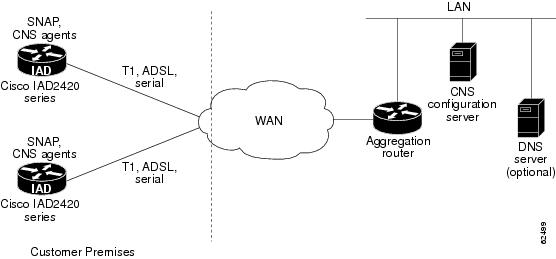
Using SNAP in conjunction with a Cisco aggregation router, a CNS Configuration Registrar, and an optional Domain Name System (DNS) server, SNAP performs the IAD configuration on the CNS Configuration Registrar and downloads the configuration to the IAD at the customer premises.
Figure 1 shows the topology of the SNAP architecture.
Figure 1 SNAP Architecture
How SNAP Works
An initial configuration is installed on the Cisco IAD2420 series IAD using Config Express either by the manufacturer or by the service provider. The IAD is installed at the customer premises site following installation procedures included with the IAD. When the IAD is switched on, the IAD connects with the aggregation router at the central office (CO), where SNAP assigns a unique IP address and an optional hostname to the IAD. After resolving the IP address through either Serial Line Address Resolution Protocol (SLARP), ATM InARP, or PPP/IPCP protocols, the system uses the DNS reverse lookup feature to assign the hostname to the IAD.
The CNS Configuration Agent on the IAD then communicates with the CNS Configuration Registrar where the CNS Configuration Registrar determines the configuration of the IAD. The CNS Configuration Registrar searches its database to determine the correct configuration template and downloads that Cisco IOS configuration file in XML format to the IAD.
Once the IOS configuration file is downloaded, the IAD is now functioning. No further configuration on the IAD is required.
The initial configuration is a full configuration of the IAD that runs automatically upon switching on the IAD on the network. This configuration provides all information needed to operate. Incremental or partial configurations are performed to update the configuration information without the network having to shut down. The incremental configuration can be delivered in an event payload in a push operation or upon request in a pull operation.
Updates can be downloaded from the CNS Configuration Registrar in a push operation initiated by the service provider. For more information on the CNS Configuration Registrar, refer to Cisco Intelligent Engine 2100 Configuration Registrar, Cisco Release 1.0.
Options for Saving the Configuration File
If the CNS configuration is set to not save the configuration file in the NVRAM of the IAD, the SNAP download procedure repeats each time the IAD turns on. By turning the IAD off and then on, this procedure repeats and permits the IAD to save the current Cisco IOS configuration file so that updates can occur without intervention by a technician.
If the CNS configuration is set to be saved in NVRAM, the original default configuration that was installed during the manufacturing process is overwritten.
For more information about changing the SNAP configuration, see the "Configuration Tasks" section.
Benefits
SNAP simplifies the installation by moving the configuration requirements from the customer to the CNS Configuration Registrar and allowing the Cisco IOS configuration to run automatically.
Provides Configuration Through the CNS Configuration Registrar
The CNS Configuration Registrar uses popular industry standards and technologies such as XML, ADSI/Active Directory, HTTP/Web Server, ASP, and Publish-Subscribe Event Bus to enable a mechanism for provisioning the configuration of Cisco IOS devices. The CNS Configuration Agent provides a facility for the CNS Configuration Registrar to configure the IADs in a plug-and-play manner.
The CNS Configuration Agent is a Cisco IOS subsystem that establishes a TCP/IP connection with the CNS Configuration Registrar to retrieve and apply the initial and incremental configurations. The CNS Configuration Registrar can be running on Windows 2000, Solaris, and Linux platforms, such as the Cisco Intelligence Engine 2100 series.
Assigns Unique IP Addresses and Hostname
SNAP applies the DNS reverse lookup feature (optional) to retrieve the hostname by passing the IP address. Then SNAP assigns the IP address and hostname to the IAD. Assigning the hostname is an optional feature.
Reduces Technical Personnel Requirements
SNAP permits Cisco IAD2420 series IADs to be installed by a person with limited or no technical experience. SNAP does not require a network engineer or technician for installation.
Speeds Deployment
Upon receiving the Cisco IAD2420 series IAD at the customer premises, the unit can be immediately installed by following simple installation instructions, without any knowledge or use of Cisco IOS software.
Permits Direct Shipping
SNAP permits the Cisco IAD2420 series IADs to be shipped directly to the end-user site to eliminate warehousing of inventory and manual handling. Configuration occurs automatically upon connection to the network.
Permits Remote Updates
Remote configuration updates, service additions, and deletions are handled through SNAP. The CNS Configuration Registrar performs a push operation to send the information to the Cisco IAD2420 series IAD.
Restrictions
•
•
•
•
•
•
•
Related Documents
•
•
•
The following configuration guides describe the configuration of IP and ATM:
•
•
The following online feature documentation and installation guides describe the configuration and installation of hardware components:
•
http://www.cisco.com/univercd/cc/td/doc/product/access/iad/iad2420/index.htmSupported Platforms
•
Supported Standards, MIBs, and RFCs
Standards
•
MIBs
•
To obtain lists of supported MIBs by platform and Cisco IOS release, and to download MIB modules, go to the Cisco MIB website on Cisco.com at the following URL:
http://www.cisco.com/public/sw-center/netmgmt/cmtk/mibs.shtml
RFCs
•
Prerequisites
•
•
CNS Configuration Agent, Cisco IOS Release 12.2(2)T
CNS Event Agent, Cisco IOS Release 12.2(2)T•
•
Table 1 IAD Interface and Transport Protocols Required by SNAP
T1
SLARP, ATM InARP, PPP (IPCP)
ADSL
ATM InARP, PPP (IPCP)
Serial
SLARP, PPP (IPCP)
Configuration Tasks
The Simple Network-Enabled Auto-Provision feature allows the Cisco IAD2420 IAD to be connected and configured automatically. Configuration Express loads a minimal set of Cisco IOS configuration commands for the IAD in the startup-configuration file in the NVRAM, either at the manufacturer or at the service provider premises. The IAD is ready to be installed at the customer premises with no further configuration.
If the service provider desires to change the configuration or install a custom configuration, these tasks allow a new configuration to be loaded. Each task in the list is optional and is not required for the initial installation of the Cisco IAD2420 series IAD.
•
•
•
•
Configuring the CNS Configuration Agent (optional)
The CNS Configuration Registrar uses templates to build the configuration file. Refer to Configuration Registrar Administration, Cisco Release 1.0, for additional information on using the CNS Configuration Registrar.
Each parameter in the template must have a directory-customized schema attribute associated. Create the template in the CNS Configuration Registrar through the Edit Template graphical user interface (GUI). Each Cisco IAD2420 series IAD object in the CNS Configuration Registrar must be associated with one specific template, although one template may be applied to multiple IAD objects. The template does not have interactive ability. You must enter the value in the Edit Parameter GUI of the CNS Configuration Registrar. If there is no value assigned for the attribute, the attribute value in the configuration file is empty.
Configuring the CNS Event Agent (optional)
To initiate an event between the IAD and the CNS Configuration Registrar, the connection must be configured by the CNS Event Agent. To configure the CNS Event Agent, use the following commands beginning in global configuration mode:
Full Configuration of Cisco IAD2420 Series IAD (Optional)
The full or initial configuration of the Cisco IAD2420 series IAD occurs when the IAD is initialized on the network. This configuration occurs automatically at the customer premises. If desired, this configuration can be performed manually.
After connecting the IAD to the network where the aggregation router resides and switching it on, the IAD boots up and the commands are executed.
SNAP assigns the IAD with the unique IP address or hostname. After resolving the IP address through SLARP, ATM InARP, or PPP protocols, the system uses the DNS reverse look up feature (optional) to assign the hostname to the IAD (optional) and invokes the CNS agents to download the initial configuration from the CNS Configuration Registrar.
To manually perform the initial configuration, use the CNS Configuration Registrar and follow these steps:
Step 1
Step 2
Step 3
Configuring the Serial Interface
The detailed steps are for the T1 connection by using enhanced SLARP protocol.
C onfiguring the ATM Interface
Use this table to configure an ATM interface.
Full Configuration of Cisco IAD2420 Series IAD Example
Router(config)# cns config ?initial Initial Configurationpartial Partial ConfigurationRouter(config)# cns config initial ?WORD Host name or address of configuration serverRouter(config)# cns config initial 172.28.129.22 ?<0-65535> the port number of the config service, default is 80event Use event agent to report errorsno-persist Do not write configuration to NVRAMpage The web page from where to get the configuration, default is/cns/config.asp.syntax-check Turn on syntax checking<cr>Router(config)# cns config initial 172.28.129.22 event ?no-persist Do not write configuration to NVRAMsyntax-check Turn on syntax checking<cr>Router(config)# cns config initial 172.28.129.22 no-persistIncremental Configuration of Cisco IAD2420 Series IAD (Optional)
The incremental or partial configuration allows the IAD to be incrementally configured after being initially configured. The configuration changes are done manually through the CNS Configuration Registrar. The CNS Configuration Registrar allows the operator to change the configuration templates, edit the parameters, and submit the new configuration to the IAD without requiring a software or hardware restart.
To manually perform the initial configuration, use the CNS Configuration Registrar and follow these steps:
Step 1
Step 2
Step 3
Configuring a Serial Interface
The detailed steps are for the T1 connection, using enhanced SLARP protocol.
Configuring an ATM Interface
Use this table to configure an ATM interface.
To do the partial configuration, the IAD must be configured with CNS agent commands as shown in the following example. In the example, the CNS Configuration Registrar IP address is 172.28.129.22.
Incremental Configuration of Cisco IAD2420 Series IAD Example
Router(config)# cns config partial 172.28.129.22 80Router(config)# cns event 172.28.129.22Configuration Examples
This section provides the following configuration examples:
•
•
•
Configuration Express File Using T1 over HDLC Protocol Example
The Configuration Express file can be used to configure the Cisco IAD2420 series before delivery to a customer. The 172.28.129.22 address is the IP address of the CNS Configuration Registrar.
!cns configure and event agentscns config initial 172.28.129.22 no-persistcns event 172.28.129.22!T1 configurationcontroller t1 0framing esflinecode b8zschannel-group 0 timeslots 1-24 speed 64cns id s0:0 ipaddress!Assign IP addr to s0:0interface s0:0ip address slarp retry 2!IP static routeip route 0.0.0.0 0.0.0.0 s0:0endT1 Configuration Template Example
The T1 Configuration template is used to build the configuration for use on T1. The 172.28.129.22 address is the IP address of the CNS Configuration Registrar.
hostname
${LDAP://172.28.129.22/cn=${DeviceID},CN=IOSConfigs,DC=wwwin,DC=cisco,DC=com:attrName=IOSh
ostname}
enable password ${LDAP://172.28.129.22/cn=${DeviceID},CN=IOSConfigs,DC=wwwin,DC=cisco,DC=com:attrName=IOSp assword}controller T1 0clock source ${LDAP://172.28.129.22/cn=${DeviceID},CN=IOSConfigs,DC=wwwin,DC=cisco,DC=com:attrName=IOST 1-clocksource}linecode ${LDAP://172.28.129.22/cn=${DeviceID},CN=IOSConfigs,DC=wwwin,DC=cisco,DC=com:attrName=IOST 1-line}framing ${LDAP://172.28.129.22/cn=${DeviceID},CN=IOSConfigs,DC=wwwin,DC=cisco,DC=com:attrName=IOST 1-framing}channel-group ${LDAP://172.28.129.22/cn=${DeviceID},CN=IOSConfigs,DC=wwwin,DC=cisco,DC=com:attrName=IOST 1-channel-group} timeslots ${LDAP://172.28.129.22/cn=${DeviceID},CN=IOSConfigs,DC=wwwin,DC=cisco,DC=com:attrName=IOST 1-timeslots} speed ${LDAP://172.28.129.22/cn=${DeviceID},CN=IOSConfigs,DC=wwwin,DC=cisco,DC=com:attrName=IOST 1-speed}Voice Configuration Template Example
The Voice Configuration template is used to build the configuration for using voice. The 172.28.129.22 address is the IP address of the CNS Configuration Registrar.
voice-port 1/1codec ${LDAP://172.28.129.22/cn=${DeviceID},CN=IOSConfigs,DC=wwwin,DC=cisco,DC=com:attrName=IOSv oice-port1}dial-peer voice 1 potsapplication ${LDAP://172.28.129.22/cn=${DeviceID},CN=IOSConfigs,DC=wwwin,DC=cisco,DC=com:attrName=IOSd ial-peer1}port 1/1Command Reference
This section documents new and modified commands used with the Simple Network-Enabled Auto-Provision feature. All other commands used with this feature are documented in the Cisco IOS Release 12.2 command reference publications.
Modified
New
•
cns config initial
To start the Cisco Networking Services (CNS) Configuration Agent and initiate an initial configuration, use the cns config initial command in global configuration mode. To remove the existing cns config initial command from the running configuration of the routing device, use the no form of this command.
cns config initial { ipaddress | hostname } [port-number] [event] [no-persist ] [page] [syntax-check]
no cns config initial { ipaddress | hostname } [port-number] [event] [no-persist ] [page] [syntax-check]
Syntax Description
Defaults
The port number defaults to 80.
The web page defaults to /cns/config.asp.Command Modes
Global configuration
Command History
12.2(2)T
This command was first supported on the T train.
12.2(2)XB
This command was integrated on Cisco IAD2420 series IADs.
Usage Guidelines
Use this command to monitor the IP address of an interface and pass it as the unique CNS ID to the CNS Configuration Agent, which then pulls the initial configuration template to the Cisco IAD2420 series integrated access device (IAD) during bootup.
Examples
The following example shows how to use the CNS Configuration Registrar at 172.28.129.22 to set the initial CNS configuration and to not write the configuration to NVRAM:
Router# cns config initial 172.28.129.22 no-persistRelated Commands
cns config partial
To start the Cisco Networking Services (CNS) Configuration Agent and initiate a partial configuration, use the cns config partial command in global configuration mode. To shut down the partial Configuration Agent, use the no form of this command.
cns config partial { ipaddress | hostname } port-number
no cns config partial { ipaddress | hostname } port-number
Syntax Description
ipaddress
The IP address of the CNS Configuration Registrar.
hostname
The name of the host.
port-number
The port number of the configuration service. The value is from 0 to 65535. The default is 80.
Defaults
The port number defaults to 80.
The web page defaults to /cns/config.asp.Command Modes
Global configuration
Command History
12.2(2)T
This command was first supported on the T train.
12.2(2)XB
This command was introduced on Cisco IAD2420 series IADs.
Usage Guidelines
Use this command to monitor the IP address of an interface and pass it as the unique CNS ID to the CNS Configuration Agent, which then pulls the initial configuration template to the Cisco IAD2420 series integrated access device (IAD) during bootup.
Examples
The following example uses the CNS Configuration Registrar at 172.28.129.22 and port number 80 to set the partial CNS configuration:
Router()# cns config partial 172.28.129.22 80Related Commands
cns event
To configure the Cisco Networking Services (CNS) Event Gateway, use the cns event command in global configuration mode. To remove the specified Event Gateway from the gateway list, use the no form of this command.
cns event {ipaddress | hostname} [ port-number | backup ]
no cns event {ipaddress | hostname} [ port-number | backup ]
Syntax Description
Defaults
The event gateway port number default is 11011.
Command Modes
Global configuration
Command History
12.2(2)T
This command was introduced.
12.2(2)XB
This command was integrated on Cisco IAD2420 series IADs.
Usage Guidelines
Use this command to select the IP address of an event and pass it as the unique CNS ID to the CNS Configuration Agent, which then pulls the initial configuration template to the Cisco IAD2420 series integrated access device (IAD) during bootup.
Examples
The following example shows how to select the event IP address of 172.28.129.22 and set it to the backup gateway:
Router(config)# cns event 172.28.129.22 backupRouter(config)# cns event ?Hostname or A.B.C.D hostname or ip address of event gatewayRouter(config)# cns event 172.28.129.22 ?<0-65535> Event Gateway port number, default is 11011backup Event Agent backup gateway<cr>Router(config)# cns event 172.28.129.22 backup ?<cr>Router(config)# cns event 172.28.129.22 backupRelated Commands
cns id
To retrieve the configuration and to specify the unique ID for the integrated access device (IAD) , use the cns id command in global configuration mode. To disablethe Cisco Networking Services (CNS) ID settings, use the no form of this command.
cns id interface {ipaddress | hostname | dns-reverse | mac-address | string word}
no cns id interface {ipaddress | hostname | dns-reverse | mac-address | string word}
Syntax Description
Defaults
No default behavior or values
Command Modes
Global configuration
Command History
Usage Guidelines
Use this command to monitor the IP address of an interface and pass it as the unique CNS ID to the CNS Configuration Agent, which then pulls the initial configuration template to the Cisco IAD2420 series IAD during bootup.
Examples
The following example shows the IP address of the s0:0 interface being passed:
Router(config)# cns id s0:0 ipaddressThe following example shows the unique ID of 2.2.2.2 being passed for the atm0 interface:
Router(config)# cns id atm0 string 2.2.2.2The following example shows the hostname of the IAD being passed using the Virtual-Template interface:
Router(config)# cns id Virtual-Template1 hostnameThe following example shows the MAC address of the IAD being passed using the s0:0 interface:
Router(config)# cns id s0:0 mac-addressThe following example shows the hostname of the IAD that has been retrieved being passed from the DNS server using the s0:0 interface:
Router(config)# cns id s0:0 dns-reverseRelated Commands
ip addr inarp (IAD2420)
To retrieve the aggregation router ATM interface IP address or to assign a new IP address, use the ip addr inarp command in global configuration mode. To disable the retrieval of the aggregation router ATM interface IP address or the assignment of a new IP address, use the no form of this command.
ip addr inarp
no ip addr inarp
Syntax Description
This command has no arguments or keywords.
Defaults
None
Command Modes
Global configuration
Command History
Usage Guidelines
Use this command to run enhanced ATM InARP over T1 connections and assign a new IP address on the ATM interface. If the last digit of the retrieved IP address is greater than 2, then the new IP address results from incrementing the old IP address by 1. If the last digit of the resulting IP address is 255 or larger, the last digit is decreased by 1. The inarp 1 command is required for the ip addr inarp command to function.
Examples
The following example shows how to assign a new IP address:
Router# Controller t1 0mode atmframing esfclock source internallinecode b8zs!interface atm 0pvc 10/10inarp 1ip addr inarpRelated Commands
ip address slarp retry (IAD2420)
To assign the integrated access device (IAD) serial interface IP address through Serial Line Address Resolution Protocol (SLARP), use the ip address slarp retry command in global configuration mode. To return to default value, use the no form of this command.
ip address slarp retry interval
no ip address slarp retry
Syntax Description
Defaults
The default value is one second.
Command Modes
Global configuration
Command History
Usage Guidelines
This command is used only for the Simple Network-Enabled Auto Provision (SNAP) feature on the Cisco IAD2420 series IAD in this release. Use this command to run SLARP over T1 or serial connections on any serial interface and assign a new IP address on the interface. Use this command to retrieve the aggregation router serial interface IP address and then assign the new IP address to the Cisco IAD2420 series IAD. If the last digit of the retrieved IP address is greater than 2, then the new IP address results from incrementing the old IP address by 1. If the last digit of the resulting IP address is 255 or larger, the last digit is decreased by 1. Use the retry interval to set the time interval between the time the command attempts to set the new IP address and the time it is successful. This command supports only serial interfaces, such as, s0, s1, and s0:x.
Examples
The following example shows the SLARP retry interval being set to 30 seconds:
Router# ip address slarp retry 30Related Commands
Glossary
ADSI—Microsoft's Active Directory Services Interface.
ADSL—asymmetric digital subscriber line. Available through several telecommunications carriers to accommodate the need for increased bandwidth for Internet access and telecommuting applications.
ARP—Address Resolution Protocol.
ASP—Microsoft's Active Server Pages technology.
ATM InARP—ATM Inverse Address Resolution Protocol.
CLEC—competitive local exchange carrier. A company that builds and operates communication networks in metropolitan, urban, and remote areas and provides its customers with an alternative to the local telephone company.
CLI—command-line interface.
CNS—Cisco Networking Services.
CSU—channel service unit.
codec—code/decoder. An algorithm that transforms analog signals into digital signals and digital signals into analog signals.
CPE—customer premises equipment. Devices such as channel service units (CSUs) and data service units (DSUs), modems, and ISDN terminal adapters, required to provide an electromagnetic termination for wide-area network circuits before connecting to the router or access server. This equipment was historically provided by the telephone company, but is now typically provided by the customer in North American markets.
DNS—Domain Name System.
DSU—data service unit.
HDLC—High-Level Data Link Control.
HTTP—Hypertext Transport Protocol.
IAD—integrated access device. A CPE device used to combine services from various sources onto a common platform for transmission on a common transport span. Typically, an IAD combines various voice and data services such as circuit-based services such as traditional plain old telephone service (POTS) and packet-switched services such as Frame Relay or ATM.
PPP/IPCP—Point-to-Point Protocol / IP Control Protocol.
POTS—plain old telephone service.
PVC—permanent virtual circuit.
SLARP—Serial Line ARP.
XML—eXtensible Markup Language.
